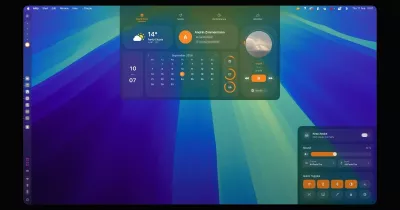
A calm, clean, iPhone-style desktop for Hyprland on Arch Linux: light and dark themes, glass panels, thin 11px corners, its own mouse cursor, icons and wallpapers, and its own apps (Settings, Files, Notes, Tools, Welcome, Terminal, Lock screen).
Install (Arch + Hyprland)
git clone https://github.com/madhav-sharma-co/XLIN.git
cd XLIN
./install.sh          # asks for your password to install packages
hyprctl reload        # or log out and back in
xlin doctor           # shows anything missing
Run it as your normal user, not root. The installer backs up the Waybar and swaync configs it replaces.
Update later: open Settings → About → Update XLIN, or run xlin update
(it works when XLIN was installed from a git clone, as above). By hand:
cd XLIN && git pull && ./update.sh
Remove everything (your old Waybar, swaync and Kitty configs are put back):
xlin uninstall
What you get
| Piece | How |
|---|---|
| Lock screen | hyprlock with your blurred wallpaper, time, date, battery, name and password (Super+L); auto-lock when idle |
| Top bar | X launcher, the current app, settings, tools, Wi-Fi, Bluetooth, sound, battery, date and time, power, control panel; every button can be hidden |
| Launcher | A Start menu (tap Super): search, pinned apps, recent apps, Settings / Power, and All apps. Right-click an app to pin it |
| App drawer | Every app in a narrow, tall panel (Super+Space), in the Launcher's style. Right-click: Open, pin to the Run Bar, pin to the Launcher |
| Run Bar | The bar at the bottom: pinned and running apps, the app drawer; auto-hides |
| Control panel | Wi-Fi, Bluetooth, airplane, theme, night light, volume, brightness, power mode and notifications (Super+C) |
| Desktop | Right-click: Apps and widgets gallery (clock, calendar, system, battery, media, notes, to-do, timer), new folder, wallpaper, icon size. Files in ~/Desktop show up too |
| Settings | General, Connectivity, Desktop, Status Bar and Run Bar, Launcher and App Drawer, Personalization (theme, fonts, sizes), About (update, reset) |
| Tools | Clock, Calendar, Calculator, Notes and Screenshot as small floating windows (Super+U) |
| Apps | Terminal (tabs, Super+Return), Files (Super+E), System Monitor (Super+M), Media player, Store (pacman and AUR), SysDebug (checks, logs, repairs) |
| Windows | Every app has hide, fullscreen and close buttons; Super+H brings back hidden windows; Super+Shift+D shows the desktop |
| Fast | Settings, Files, the Store, the Launcher and the drawer wait out of sight, so they open instantly (xlin warm off to disable) |
| Look and feel | light / dark, accent colours, system font and size, XLIN cursor, app icons, eight built-in wallpapers (Super+W) |
| Daily basics | screenshots, clipboard history, night light, quick notes, volume/brightness popup |
Keys
Press Super+/ or run xlin keys. Every key is the first letter of what it does:
Super+S Settings, Super+C Control panel, Super+L Lock, Super+D Dark/light, Super+E Explorer,
Super+Q Quit window, Super+F Fullscreen, Super+Shift+F Float, Print screenshot.
Command line
xlin help                      everything, with help for each command
xlin status                    one-screen overview
xlin wifi | bluetooth | sound | brightness | battery
xlin theme light|dark|toggle   xlin accent teal   xlin opacity 0.85
xlin bar show|hide settings|tools|wifi|...   xlin runbar autohide on|off
xlin wallpaper next|<image>    xlin cursor 24|32|48|64   xlin update [check]
xlin screenshot | clipboard | idle | nightlight | lock | session
xlin font <name> | size small|normal|large|huge   xlin store | media | debug
xlin showdesktop | unhide | warm on|off | reset
xlin doctor | uninstall
Tab completion works in the XLIN terminal.
Notes
- Hyprland 0.53+ window and layer rule syntax is used.
- Dock flags can differ between nwg-dock-hyprland versions; see
dock_startinbin/xlin. - Logs are in
~/.cache/xlin/.
Contributing and licence
See CONTRIBUTING.md. XLIN is released under the MIT licence (LICENSE).