
YAVCHN - Yet Another Vibe-Coded Hacker News (Wrapper)
A desktop-style web reader for Hacker News and Lobsters:
- Left: The list of stories from the active source
- Right: An article-reader window holding the linked article (reader-mode extracted) above its discussion thread
Why?
Because I could!
No, Really... Why?
It seems that everybody has their own personalized Hacker-News reader these days. After all, why not? It's so easy to whip one up in an evening when you have agentic coding at your disposal.
Whenever I browse HN, I find myself opening the discussion in a new tab, then clicking through in that tab to view the article, then popping back to the discussion. It's all very annoying, when what I really want to do is get a quick overview of the article and see if there is any interesting discussion going on before I dive into either the article or the discussion.
YAVCHN lets me quickly browse an article in scaled-down reader mode with the discussion right below it, in the same window. If I find either one compelling, I can click "Open original" to see the original article or "Open on HN" / "Open on Lobsters" to join the discussion on the source's own site. Clicking another story in the list loads it into the most recently active reader for that site that is not docked, preferring a visible reader and otherwise restoring a minimized one. HN and Lobsters use separate readers by default, and an empty reader takes its site from the first article loaded into it. If none is available, it opens a new reader. Window > New reader window opens an empty floating reader, and each story row has an Open in new reader window action. Docked readers keep their articles while you browse the list. Returning to the list on mobile reuses the same reader for each site. "Next story" (or the ] key) reads on down the list through that same instance. When a comment links to another HN or Lobsters thread, that thread opens in a window too, and a link to a single HN comment opens the comment with its replies.
The same treatment works on Lobsters (a smaller, computing-focused link aggregator) thanks to a tiny Source abstraction in the Go backend; pick the source from the segmented control at the right of the top bar. Switching sources or lists only swaps the list, so open windows stay put.
The menu bar also has an Applets menu with three tools, each in a window of its own:
- Replies to me watches the replies to your Hacker News comments and stories, which HN itself never tells you about. Give it your user name and it checks every three minutes while it's open, marking what's new.
- Look up a user opens a Hacker News or Lobsters profile with the user's submissions and recent comments (Lobsters doesn't publish its users' comments, so only submissions there). Clicking a commenter's name in any discussion does the same, and the bar at the top of a profile looks up someone else in the same window.
- Who is hiring? filters the posts of HN's monthly hiring threads as you type:
remote rust -crypto "new york".
None of them needs a login. They read only what each site publishes for anyone to read.
The UI is built with PUDL, my design language, and it borrows the window view of parkscomputing.com.
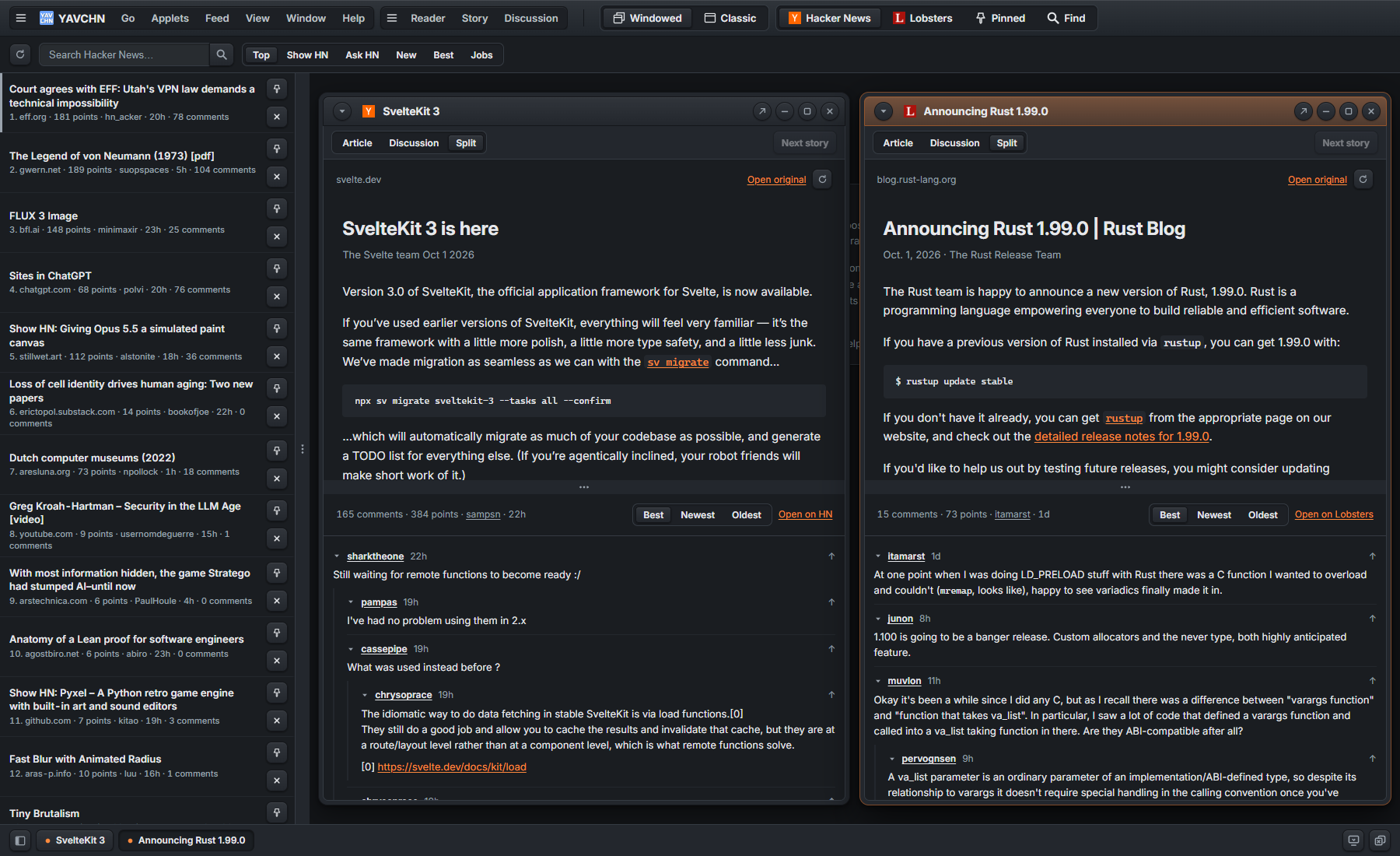
Choose View > Windowed for the desktop or View > Classic for page-based browsing. The choice saves your default in this browser. Direct article and applet links still open as pages, and Open as a page / Open in a window do not change that default. Both views work at desktop and mobile widths.
YAVCHN > Settings collects the default view, theme, comment order, and blocked domains. Changes apply immediately and stay in this browser. Settings opens in a window on the desktop or as a page at /settings in Classic view.
Live Site
The site is live at https://yavchn.com/ if you'd like to try it out. Visitors to https://yavchn.parkscomputing.com/ can choose Start migration, save their browser data to a file, and import it into yavchn.com through YAVCHN > Settings > Move your browser data. Backups stay on your device. Import replaces matching storage entries and preserves other entries; browsing view and new-window placement preferences must be set again.
Running Locally
go run ./src
Serves on http://localhost:8080.
Stack
- Go 1.25, standard
net/http+html/template. golang.org/x/sync/singleflight: coalesce concurrent upstream fetches.github.com/hashicorp/golang-lru/v2/expirable: bounded LRU + TTL for the item, thread, user and submission caches.github.com/go-shiori/go-readability: server-side article extraction.github.com/microcosm-cc/bluemonday: HTML sanitisation for extracted articles and comment bodies.golang.org/x/net/html: rewriting links to other threads so they open as windows, and the text excerpts in profiles and the replies watcher.modernc.org/sqlite: pure-Go SQLite for the article-extraction cache.- PUDL v0.89.5 for the stylesheet, floating windows, menu bar, applet runtime, regions and splitters, copied unchanged from its release into
src/static/pudl/. Pages load the minified copies inmin/, which have the same names as the readable files and source maps pointing at them. Update it by copying a newer release'sdist/over that folder. - Vanilla JS for YAVCHN's own behaviour. No SPA framework.
Design notes
-
The URL is king. Every page in YAVCHN has its own URL. You can bookmark
/hn/show/,/lobsters/,/pinned/, or a list with stories open, like/hn/?open=hn-12345678,lobsters-abc123&top=hn-12345678, and reopening that URL takes you straight back to what you were reading. The source, the tab, the page number, and every open window (which ones, which is in front, which are minimized, and where each one sits) all live in the URL, in PUDL's window grammar. Each reader has a stable window key, such asreader-1, and its article is recorded separately, as in/hn/?open=reader-1,reader-2&r.reader-1=hn-12345678&r.reader-2=lobsters-abc123. Back returns to the previous article without changing the reader's identity. Each story also has a page of its own at/story/hn/12345678, which is where its link goes without JavaScript. The older/hn/s/12345678addresses redirect to the story's window. Pinned's filters live in the URL too:/pinned/?q=rust&source=lobsters&show=unread&sort=pointsis Lobsters stories mentioning Rust that you haven't opened, by points. The browser applies the pinned-list filters. Pins stay in this browser anonymously, or synchronize with your YAVCHN account when signed in. -
Source-site accounts remain separate. YAVCHN never sees your HN or Lobsters credentials. Comments are fetched from each site's public JSON API and rendered into the discussion pane. When you want to vote, reply, save, or hide a comment, click the upward arrow next to it (or the "Open on HN" / "Open on Lobsters" link at the top of the pane). That opens the item on the source's own site in a new tab, where your existing session does the work.
-
Multi-source by design. YAVCHN is built around a small Go interface called
Source(seesrc/source.go). HN and Lobsters each have their own implementation that knows how to talk to their respective JSON APIs. Adding a third site means writing one more implementation. The rest of YAVCHN doesn't care which site a story came from. -
Caching. Story lists, individual items, comment threads, user profiles and their submissions are cached in memory with a short time-to-live (a minute or two), so the front page doesn't hammer HN or Lobsters when many people are reading. Article extraction is much more expensive (fetch the source page, run readability, sanitize the HTML), so extracted articles are cached durably in SQLite and only re-fetched after 30 days.
-
Progressive enhancement. The page renders fully server-side, so it works without JavaScript, and the server renders the windows the URL names along with the list. A window that opens later is fetched from
GET /window/{key}, which returns that one window's markup. The article reader-mode pane and the comment thread are fetched separately after a window appears, viaGET /api/articleandGET /api/discussion. That keeps the first paint fast, and it lets the heavier requests fail without breaking the page. Visitors with JavaScript disabled see plainly-labeled "Open original" and "Open on HN" / "Open on Lobsters" fallback links instead. -
The reader is a PUDL applet. PUDL's applet runtime starts the reader script when its window opens and stops it when the window closes. A list click asks the running instance to load another story, then the applet replaces its story markup and restarts only the article and discussion requests. While the reader window is in front, the applet puts a Story menu and a Discussion menu in the menu bar. It reports its scroll positions and the comment you'd reached as its state, which YAVCHN keeps for each reader and article, so two readers can show the same article at different scroll positions.
-
The applets are windows and pages both. Each one in the Applets menu opens as a window like a story's, and has a page of its own that works without JavaScript:
/applets/replies?u=pg,/applets/hiring?q=remote+rust, and/user/hn/pgfor a profile. The server renders all of them from the sites' public APIs (HN's Firebase and Algolia APIs, and Lobsters' JSON). The replies watcher and the hiring filter are PUDL applets, which add the live checking and filtering; PUDL loads their scripts the first time one opens. Profiles are plain server-rendered windows, since there's nothing in them to run. The applets' state (the user you watch, the replies you've read, the hiring thread and words) is kept in your browser bysrc/static/continuity.js, the same host script that keeps each story's place. -
Browser-local state. The list width, the article's share of a window, theme choice, the hidden-list mode, pinned stories, dismissed stories, visited stories, collapsed comment threads, the comment-sort preference, the domain block-list, your place in each story (its scroll positions and the comment you'd reached), and the applets' state all live in your browser's
localStorage. Without a YAVCHN account, this state stays in the browser. When signed in, pins, blocked domains, and retained applet state synchronize with the account; other preferences remain device-specific. Anonymous and account data use separate storage keys. Small inline scripts apply your theme, the list width, the article split, and the hidden-list mode before the first paint, so reloading doesn't flash the default layout for a moment. -
Search. Search runs against HN only, at
/hn/search. Lobsters has a search page, but it returns HTML rather than JSON, so instead of scraping that HTML and watching it break every time Lobsters tweaks its markup, YAVCHN returns 404 for/lobsters/search.
Docker
docker build -t yavchn .
docker run --rm -p 8080:8080 yavchn
YAVCHN is a single-binary distroless image. The SQLite article cache is in /home/nonroot/yavchn.db inside the container and rebuilds from scratch after a container replace.
When a publisher asks for an article's readable copy to be removed, exclude it from the reader with the same binary. Give one article's address, or a host to exclude a whole site and its subdomains:
docker exec yavchn /yavchn takedown add https://example.com/post
docker exec yavchn /yavchn takedown add example.com
docker exec yavchn /yavchn takedown list
docker exec yavchn /yavchn takedown remove example.com
Contributor and individual-item requests use source-scoped exclusions. See Content removal requests for commands, verification and backup-restore safeguards.
License
MIT. Feel free to use it, fork it, embed it, learn from it, whatever. Just keep the copyright notice intact.
Reader-window behavior and URL assignments are described in DESIGN.md.
To run the optional browser regression test, install Playwright, set YAVCHN_BROWSER_TEST=1, and run go test ./src -run TestReaderBrowser -v. YAVCHN_PLAYWRIGHT can name an installed Playwright module; YAVCHN_BROWSER_CHANNEL selects the browser channel (the default is msedge).
The looped-arrow button before the feed search box refreshes the current feed without reloading its readers. On Lobsters it appears before the list tabs. It preserves the current URL and open windows, and keeps the previous feed visible if refreshing fails.
Install the app
Use your browser's Install app command to add YAVCHN to your desktop or home screen. On iPhone or iPad, open the site in Safari and choose Share, then Add to Home Screen. The installed app opens in its own window and uses your saved browsing preference. Reading feeds and articles requires a network connection.
Optional YAVCHN accounts
YAVCHN supports optional GitHub sign-in at /account. Accounts synchronize pinned stories, blocked domains, and retained applet reading state. Existing anonymous browser data is imported only through an explicit action on the account page. Users can export their data, revoke other sign-in sessions, sign out, and delete their account after a recent sign-in. YAVCHN does not collect HN or Lobsters credentials. GitHub access tokens are used to verify identity and are not persisted.
GitHub sign-in requires YAVCHN_PUBLIC_ORIGIN, YAVCHN_GITHUB_CLIENT_ID, and either YAVCHN_GITHUB_CLIENT_SECRET or YAVCHN_GITHUB_CLIENT_SECRET_FILE. The public origin must be HTTPS, and the registered OAuth callback must be <origin>/auth/github/callback. If GitHub credentials are absent, anonymous reading and the account information page remain available, but no login button is offered.
Run ./build.ps1 -Target Beta to deploy beta on port 8087 with its separate database. To configure authentication, supply -AuthEnvFile with a local environment file containing the GitHub client ID and client secret, and optionally YAVCHN_RESEND_API_KEY and YAVCHN_EMAIL_FROM for email sign-in links (see config/auth-beta.env.example). Passkeys need no configuration beyond the public origin. The script sets the beta public origin to https://beta.yavchn.com. Environment files must remain outside Git and Docker build context. A production deployment requires main and uses a separate OAuth registration with origin https://yavchn.com.
The account design and migration constraints are recorded in docs/USER-ACCOUNTS.md.