
Zaelar
A personal AI agent you talk to — self-hosted, with memory, a real browser and hands.
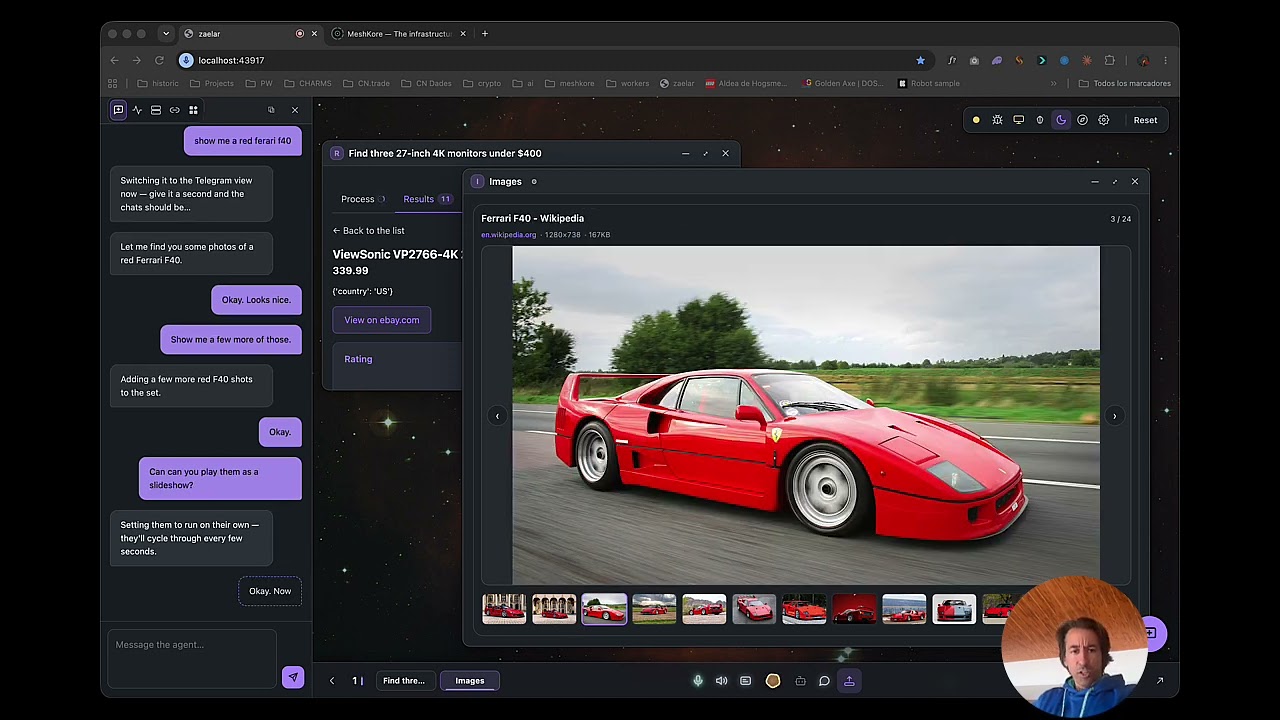
You speak, it answers in under a second, remembers what matters, and goes off to do the slow work (browse, book, search, write to your contacts) while you keep talking.
Website · Technology · Architecture · Guide · Developers


▶ Watch the demo · more on YouTube
What it is
Zaelar is not a chatbot. It is the place where your agent lives: a voice-first desktop on
localhost where the conversation drives everything on screen — widgets, a real browser, your agenda,
your messages, your files.
- Voice first. Streaming speech in and out over a local LiveKit server; the voice turn is answered by a fast, non-reasoning model so it feels like a conversation, not a form.
- Two brains. FlashBrain owns the sub-second turn. When a task needs time it hands it to a Brain Worker — a headless coding-agent CLI that browses, reads and acts — and keeps talking while it works.
- Memory that behaves like memory. One local SQLite file (vectors + FTS5 + graph + forgetting), distilled after every turn and consolidated at night.
- Widgets, not walls of text. Agenda, maps, music, video, photos, documents, messaging — opened, filled and closed by voice.
- Connectors. Google (Calendar, Contacts, Drive), email (IMAP), Telegram, WhatsApp, Spotify, photos and more — credentials stay on your machine.
- Your files, on your terms. A tiny read-only daemon serves only the folders you allow.
- Speaks your language. English and Spanish ship built in; any of forty others is generated on first run.
- Reaches the outside world. For bookings, travel, events and thousands of other services, Zaelar works with the agents available on the MeshKore network, external MCP servers and third-party APIs — and falls back to its own browser for everything else.
What's in this repo, and what's external
| In this repository | External services Zaelar uses |
|---|---|
| the voice engine, the two brains, the memory, the canvas and its apps, the connectors, the local daemon | agents on the MeshKore network — independent specialists Zaelar discovers and calls for an errand; the network grows on its own, no update needed here |
| external MCP servers — third-party tools the Brain Worker's agent CLI can call during a task | |
| third-party APIs — language and speech models, search, and the accounts you connect (Google, Spotify, messaging…) |
Zaelar orchestrates those services; it doesn't reimplement them. What they offer is defined by each provider.
Architecture at a glance
flowchart LR
    U(("🎙 You")) <-->|audio| LK["LiveKit<br/>(local)"]
    LK <--> V["voice/<br/>STT · turn-taking · TTS"]
    V <--> FB["FlashBrain<br/>nucleo/flash"]
    FB -->|silent tags · SSE| UI["Canvas & widgets<br/>frontend/ · widgets/"]
    FB -->|escalate| BW["Brain Worker<br/>Claude Code CLI"]
    BW --> BR["Real browser"]
    BW --> CN["Connectors<br/>connectors/"]
    FB <--> M[("Memory<br/>memory/ · SQLite")]
    BW --> M
    D["Local daemon<br/>daemon/ · read-only"] --> FB
Three decoupled layers — voice + canvas (the only user surface), the brain (nucleo/, decides and
acts) and compute (short-lived agents that build widgets and exit). The full model, with every seam, is in
zaelar-architecture.md and on
zaelar.com/technology.
Quick start
You need Python 3.11+ and about 3 GB of free disk. Zaelar installs everything else into its own folder — nothing system-wide, no Docker.
macOS / Linux
git clone https://github.com/meshkore/zaelar
cd zaelar
./zaelar          # checks your system, sets up, and starts
Windows (PowerShell)
git clone https://github.com/meshkore/zaelar
cd zaelar
.\zaelar.ps1      # checks your system, sets up, and starts
Then open http://localhost:43917 and follow the on-screen setup. You pick a language, add your AI keys
in the app — no .env editing, no config files — and it greets you.
No HTTPS, on purpose. A local install is plain HTTP on
localhost: browsers treat it as a secure context (the microphone works) and nothing leaves your machine, so there is no certificate to issue, install or renew.
For the Brain Worker: one extra CLI
The voice works with keys alone. The agent that browses and acts is driven through a coding-agent CLI, so
install Claude Code once (claude on your PATH). Zaelar
points it at the model in the table below — it does not need an Anthropic subscription.
Models and keys
Zaelar brings no model of its own and holds no key of yours in the repo. Every piece has a titular and one
stand-in, and you can change any of them from the settings panel. These are the defaults
(config/models.default.json):
| Piece | What it does | Default | Stand-in | Key |
|---|---|---|---|---|
| FlashBrain | the voice and chat turn | DeepSeek deepseek-flash |
OpenAI gpt-4.1-mini |
DEEPSEEK_API_KEY |
| Brain Worker | browses and executes, via Claude Code | Z.AI glm-5.3 |
DeepSeek | Z_AI_API_KEY |
| Memory | distils every turn; nightly consolidation | DeepSeek | OpenAI | DEEPSEEK_API_KEY |
| Embeddings | the semantic space of the memory | OpenAI text-embedding-3-small |
— | OPENAI_API_KEY |
| Speech-to-text | streaming transcription | Deepgram | Mistral Voxtral | DEEPGRAM_API_KEY |
| Text-to-speech | the voice you hear | Inworld | ElevenLabs | INWORLD_API_KEY |
The short list for full voice: DeepSeek, OpenAI, Deepgram and Inworld (or ElevenLabs). Add Z.AI for the Brain Worker's default model; without it the worker uses its DeepSeek stand-in. Web search can use Gemini, OpenAI, Perplexity, Tavily or Brave — whichever keys you have.
Prefer to keep audio on your machine? Free local speech is one script away:
| macOS (Apple Silicon) | Windows | |
|---|---|---|
| Speech-to-text — Whisper (MLX / faster-whisper) | scripts/install-stt-mac.sh |
scripts/install-stt-win.ps1 |
| Text-to-speech — Kokoro | scripts/install-tts-mac.sh |
scripts/install-tts-win.ps1 |
Then choose them in ⚙ settings. Every key and how to check it: ./zaelar doctor.
Commands
Identical on macOS, Linux and Windows (use .\zaelar.ps1 instead of ./zaelar on Windows):
| Command | What it does |
|---|---|
./zaelar |
First run: check → setup → start. After that: just starts. |
./zaelar up |
Start it in the background and give you your prompt back. |
./zaelar stop |
Stop it, and unload any local models so they stop draining the battery. |
./zaelar restart |
Stop + start. This is how you pick up code you just changed. |
./zaelar status |
Is it running? On which ports? Which build? |
./zaelar start |
Run it in the foreground with the logs on screen (Ctrl-C quits). |
./zaelar doctor |
Check that your system meets the requirements and which keys are present. |
./zaelar setup |
Create the local environment and install dependencies. |
./zaelar update |
Pull the latest version and re-setup. |
Working on the code? make start / make stop / make restart / make status do the same thing.
Always the same ports
Zaelar starts on the same fixed ports every time, and the app and its helpers answer only on your own
machine (127.0.0.1). Bookmark http://localhost:43917 — it will not move.
| Port | What |
|---|---|
| 43917 | the app — the only address you open |
| 44917 | the voice worker's health check (app port + 1000) |
| 7880 · 7881 | the local LiveKit server (voice signalling · media over TCP) |
| 45817 | the local daemon (the folders you allow it to read) |
| 3111 | the WhatsApp bridge, when connected |
./zaelar start on a running instance says so instead of starting a second one, and ./zaelar stop frees
every port in this list. Another port for the app? PORT=…; the worker follows it (+1000). The list lives in
scripts/zaelar.py (PORTS).
Your own files
Zaelar can read the folders you choose on your own computer through a small companion service, the
local daemon — and if you are running Zaelar from this repository there is nothing to install: it is a
Python package in daemon/, it has no dependencies at all (standard library only), and ./zaelar starts
it beside the engine on macOS, Linux and Windows alike.
Open Zaelar, click the 🖥 icon at the top right, and choose which folders it may read. It can read nothing until you do.
| Command | What it does |
|---|---|
make daemon |
Run just the daemon in the foreground (equivalently python -m daemon). |
python -m daemon status |
Is it up? Which folders are allowed? |
python -m daemon allow ~/Documents |
Allow a folder from the terminal instead of the screen. |
python -m daemon deny ~/Documents |
Stop reading it. |
It is read-only, it listens on 127.0.0.1 only, and keys, credential files, browser cookie stores and
.git internals are never served even inside a folder you allowed. Every operation, allowed or refused,
is written to an audit log you own. The threat model:
zaelar-daemon-security.md.
Your data is yours
Everything Zaelar knows lives inside this folder, on your machine: the memory is one SQLite file, credentials are owner-only files, and nothing is synced anywhere. No account, no telemetry to us, no lock-in — and because the source is public, you can read exactly what runs on your data. Delete the folder and it is gone.
Requirements
- macOS, Windows or Linux.
- Python 3.11+ — the only thing you install yourself (plus the Claude Code CLI for the Brain Worker).
- ~3 GB free disk, 8 GB RAM recommended.
- An internet connection for the first setup.
- Your own AI provider keys — added later, in the app.
Everything else (voice server, models, dependencies) is fetched into .venv/ and bin/ inside this folder.
How the repository is organised
| Folder | What lives there |
|---|---|
server/ |
FastAPI app — transport and composition root; runs the voice engine in-process |
voice/ |
the voice trunk: STT, turn-taking, audio filtering, TTS, LiveKit plumbing |
nucleo/ |
the brain — FlashBrain, the Brain Workers, the loop, proactivity, homeostasis |
memory/ |
the central memory: one SQLite file with vectors, FTS5, a graph and forgetting |
widgets/ |
everything you see on the canvas, each widget self-contained |
connectors/ |
Google, email, Telegram, WhatsApp, Spotify, photos, the MeshKore network… |
search/ |
the search service — one door in, one result shape out |
frontend/ |
a thin ES-module shell, no build step, no business logic |
daemon/ |
the read-only local file daemon (standard library only) |
i18n/ |
the multilingual layer — shipped bundles plus on-demand generation |
library/ · files/ |
the agent's own filesystem and the file APIs |
bus/ · observability/ |
in-process event bus; who, when and in which flow |
config/ |
settings, profiles, the model table, doctor |
update/ |
the update channel — one build number you can compare |
scripts/ · tools/ |
the zaelar launcher, installers, maintenance |
tests/ |
~13,000 tests, organised by area, with a hang-aware runner |
.meshkore/ |
the engineering docs: architecture, modules, conventions, security, ops |
Documentation
| Product & concepts | zaelar.com/guide |
| Technology | FlashBrain · Brain Workers · Memory · Architecture · Developers |
| Architecture (source) | zaelar-architecture.md · zaelar-memory.md · zaelar-i18n.md · the MeshKore network |
| Modules | module map · first run · search · update channel |
| Security | zaelar-security.md · daemon threat model |
| Contributing & testing | tests/README.md · conventions |
Testing
make tier0                            # < 60 s — lint, syntax, and every test your diff can reach
./.venv/bin/python tests/watchdog.py  # the whole deterministic suite, chunked, hang-aware
Read tests/README.md before changing anything — it is the contract for humans and
agents alike.
Zaelar Cloud
Don't want to run it yourself? Zaelar Cloud runs the same engine for you — ready in minutes, automatic updates, managed backups, no maintenance. → zaelar.com
License
Zaelar is fair-code, distributed under the Sustainable Use License 1.0 (the license n8n pioneered):
- Free to use for yourself — self-host it for personal use or for your own internal business purposes, modify it, read every line.
- Not free to commercialize — you may not sell it, offer it as a hosted service, or build a commercial product on top of it. Commercial hosting is what Zaelar Cloud is.
- Third-party components keep their own licenses — notably
connectors/whatsapp/bridge/is MIT-licensed code vendored from Hermes Agent (Nous Research); see the LICENSE file in that directory.
This is a source-available license, not an OSI-approved open-source license: the source is public and yours to run, but the commercial rights stay with Zaelar.