

ZeroDOM
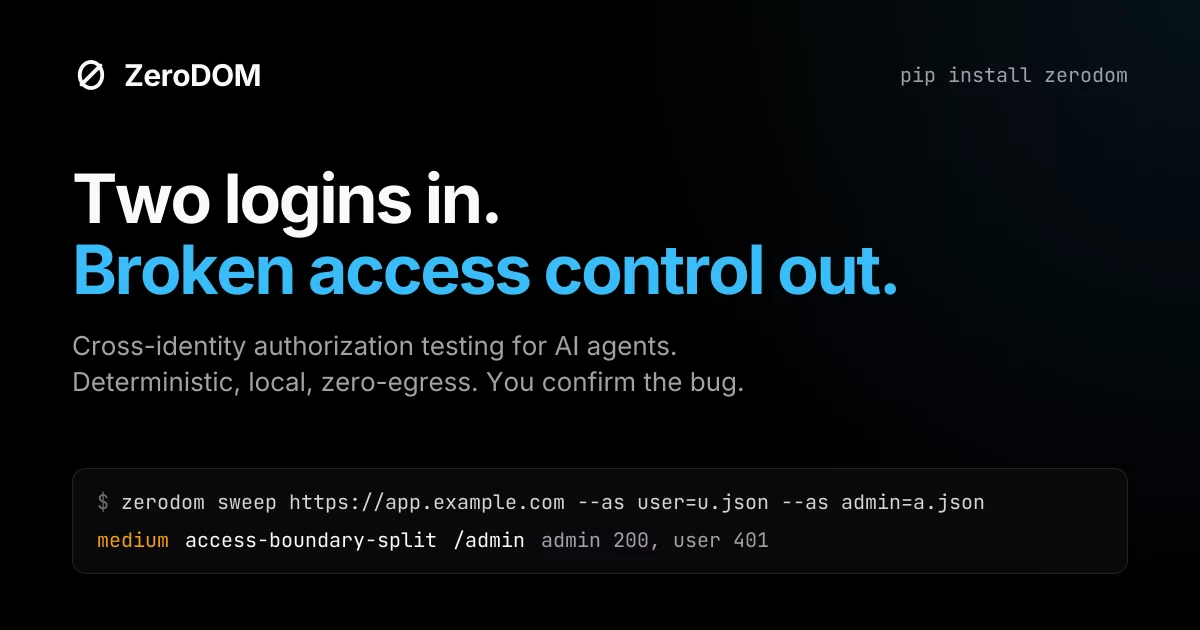
Point it at an app as two users. It finds the broken access control.
ZeroDOM drives your real, logged-in browser as two identities, replays the same requests as each, and flags where one user reaches what another can't — IDOR / broken access control, caught deterministically. Open-core, runs local, no account, no API key, nothing leaves your machine.
Under the hunt is a deterministic, token-lean perception engine for AI agents — the same core powers scan, crawl and any browser-driving task. IDOR is just where it bites hardest.






Site · Docs · Playground · Discord · Quickstart ↓
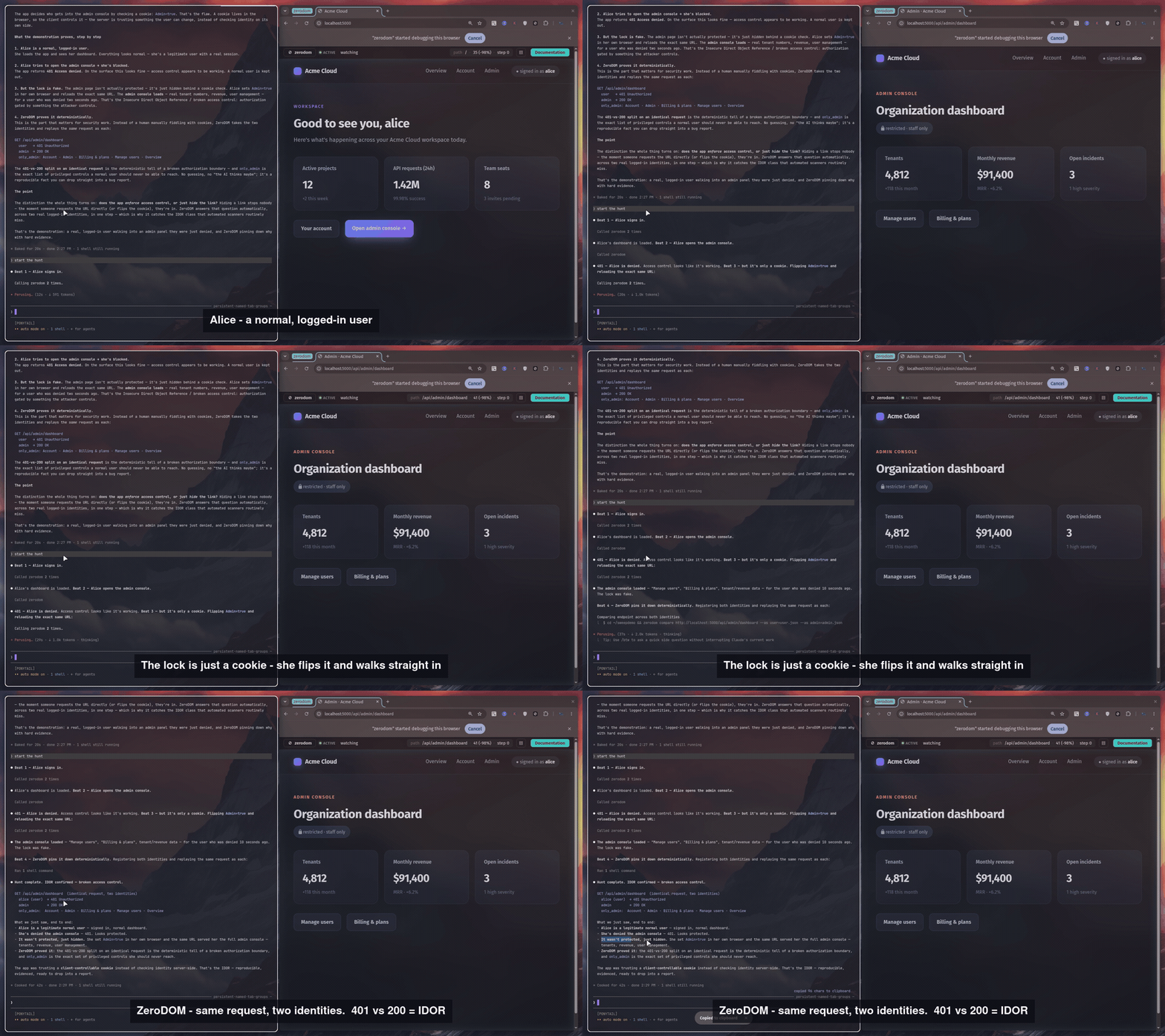
A normal user is denied the admin console (401) — then walks in by flipping one client-controlled cookie. ZeroDOM proves it: same request, two identities, 401 vs 200. Full recording (mp4).
Contents
- Why ZeroDOM
- Quickstart
- How it hunts —
compare&sweep - Use it from an AI agent (MCP)
- Why the agent sees so few tokens
- More of the CLI
- How it compares
- Install
- Security & scope
- Limitations
- Editions
- Contributing & development
- License
Why ZeroDOM
Two audiences, one engine:
- AppSec —
compare/sweep: deterministic two-identity authorization testing that runs headless in CI or your recon pipeline — no GUI, no account.scan --jsadds DOM-XSS sinks, the callable API surface and header posture;repeat/probe/raceturn recon into verification (Repeater, mass-assignment diff, and a TOCTOU burst). - AI agents — MCP: a flat interaction graph that cuts
~71% of the tokens vs Playwright's
aria_snapshot, with handles that resolve 1:1 and don't drift when the page re-renders.
Broken access control is the #1 web vulnerability (OWASP A01) and the one automated scanners miss — because catching it means knowing who should be allowed to do what, not just fuzzing one session. The usual answer is a human in Burp, clicking through the app as one user, then again as another, diffing by eye.
ZeroDOM does that mechanically. Give it two logged-in sessions; it replays the same request as each and reports the deterministic tells:
access-boundary-split— one identity gets200, the other401/403on an identical request. If the only difference between them is client-controllable (a cookie, header or param), that's broken access control.cross-identity-identical-response— two users get a byte-identical body on a per-user resource: a cross-tenant IDOR.
No LLM guessing, no "the AI thinks maybe." ZeroDOM surfaces the tell with the exact replay that proves it — a reviewable diff you drop straight into a bug report. You confirm the bug.
It drives your real Chrome (relay mode) over chrome.debugger, so your cookies, MFA and
SSO are already done — or a throwaway browser (--stealth) if you'd rather not touch your
session. Either way the page's markup never leaves your machine, and it's read-only by
default: destructive actions and out-of-scope hosts are refused.
It works equally well as a one-line CLI, a recon pipeline stage, or a native tool an AI agent drives through MCP. Same deterministic primitives, three front doors.
Quickstart
See it run in 10 seconds — no account, no browser download (bare zerodom <url> is a static
fetch, no Chromium needed):
pip install zerodom                      # or: uvx zerodom · npm i @vexralabs/zerodom
zerodom https://news.ycombinator.com     # the interaction graph + a token report
That's the perception engine — a flat, 1:1-addressable graph instead of 12k tokens of HTML.
Now the flagship — find an IDOR. Save two logged-in sessions as Playwright storage_state
files (one per account), then diff a protected endpoint across both:
zerodom compare https://app.example.com/api/admin/dashboard \
  --as user=user.json --as admin=admin.json
{
  "identities": {
    "user":  { "status": 401, "bytes": 2616 },
    "admin": { "status": 200, "bytes": 3469 }
  },
  "only_admin": ["Manage users", "Billing & plans", "Overview"],
  "note": "admin authorized (200) where user denied (401) — broken access control if the
           only difference is client-controllable"
}
That's the whole loop: same request, two identities, a 401-vs-200 split → a lead to confirm.
only_admin lists the privileged controls the normal user should never see.
Don't have storage-state files? Capture one with
context.storage_state(path="user.json") in Playwright, or export cookies from a logged-in
session. Want the whole app, not one URL? → zerodom sweep.
How it hunts — compare & sweep
zerodom compare — one endpoint, across identities
Fetch one URL under each saved session and diff the responses. Byte-identical content across
two users on a private resource is a cross-tenant IDOR; a 401-vs-200 split is a broken
boundary. only_<name> lists the actionable nodes each identity sees that the other doesn't.
# Sweep a range of object ids through two identities:
seq 1 500 | sed 's#^#https://app.example.com/api/invoice/#' \
  | zerodom compare - --as alice=alice.json --as bob=bob.json \
  | jq 'select(.identical_body_pairs | length > 0)'
zerodom sweep — the whole app, one command
compare tests one URL. sweep does the entire app: it crawls as one identity to map the
GET surface (pages + the API calls the JS fires), then replays every in-scope URL under all
your identities and reports only the deterministic tells.
zerodom sweep https://app.example.com --as user=user.json --as admin=admin.json --format md
| severity | rule                   | url                                   |
| -------- | ---------------------- | ------------------------------------- |
| medium   | access-boundary-split  | https://app.example.com/api/admin/... |
Read-only throughout: only GET is replayed, destructive URLs are dropped (--deny).
--format md emits a report-ready table (default is JSONL). This is the "point it at an app
with two logins and it finds the broken access control" pass.
Both take --proxy (route through Burp/Caido), --header (a program's WAF-bypass token), and
a scope you can lock. Challenge pages (Cloudflare / Turnstile / reCAPTCHA / hCaptcha) are
detected and climbed by a scope-gated clearance ladder; a wall nothing clears is reported as
an honest blocked, never worked around outside an authorized target.
When recon finds a lead — repeat / probe / race
Mapping an app surfaces the endpoints; these verbs act on them. repeat is a Repeater over the
session (--save writes HAR/.http evidence for a report). probe replays an endpoint with a
tampered body and diffs it against the baseline — an accepted, reflected field is a mass-assignment
lead. race fires a concurrent burst (one body, or a mix of operations via repeated --body) to
flag a check-then-act race (TOCTOU); the stdlib engine is always available, and --engine http2
multiplexes the burst over one connection via the optional zerodom[race] extra.
zerodom race https://app.example.com/api/coupon --body '{"code":"SAVE20"}' -n 30 \
  --setup setup.json --check https://app.example.com/api/cart
All three are exposed to agents over MCP as zerodom_repeat / zerodom_probe / zerodom_race.
Use it from an AI agent (MCP)
Standard MCP browser tools hand the model raw pixels (slow, stale on scroll) or an accessibility
tree (no stable handles — repeated controls collide). zerodom-mcp gives your agent a flat,
token-frugal graph where every click [45] resolves deterministically over CDP to exactly one
element — and the same tools do cross-identity IDOR hunting the others can't. Why ↓
ZeroDOM is a native MCP server, so Claude, Cursor or any MCP agent can hunt with the same
primitives. Run zerodom setup for a guided first-run (checks Chromium, prints the extension
path + chrome://extensions steps, emits the config below, reports relay reachability —
print-and-guide, no account, nothing leaves your machine).
// Claude Desktop: claude_desktop_config.json   ·   Cursor: .cursor/mcp.json
{
  "mcpServers": {
    "zerodom": { "command": "uvx", "args": ["--from", "zerodom", "zerodom-mcp"] }
  }
}
Once before first use (so the server never downloads mid-tool-call):
uvx --from zerodom playwright install chromium.
Using LangGraph, CrewAI, OpenAI Agents SDK, Pydantic AI, LlamaIndex, Google ADK or AutoGen?
Ready-to-run MCP examples — same server, a few lines each — are in
examples/integrations/.
The full tool set (click to expand)
| tool | what it does |
|---|---|
zerodom_parse_url(url, verbose=False, frames=False, viewport_only=False, check_occlusion=False) |
navigate, return the compact graph; frames=True also reads same- and cross-origin iframes (auth portals, payment fields) |
zerodom_read_page(verbose=False) |
re-read the live DOM without navigating |
zerodom_find(query) |
return only the nodes matching a phrase |
zerodom_click_node(node_id) |
click, then return what changed — flags a same-page no-op shortly after navigation as a possible hydration miss |
zerodom_fill_node(node_id, text) |
type via real keystrokes — works in contenteditable editors (Notion, Slack, Discord, Jira) |
zerodom_hover(node_id) |
hover, revealing hover-triggered menus/tooltips |
zerodom_press_key(node_id, key) |
press a key on a focused node (Enter, Escape, Tab, …) |
zerodom_upload_file(node_id, path) |
set a file input's value to a local path |
zerodom_drag(source_node_id, target_node_id) |
drag one node onto another |
zerodom_scroll(direction, amount=800) |
scroll, return what's newly visible |
zerodom_new_tab(url=None) |
open a tab and make it active |
zerodom_list_tabs() |
list every open tab, marking the active one |
zerodom_switch_tab(tab_id) |
make another open tab active |
zerodom_close_tab(tab_id=None) |
close a tab (the active one by default) |
zerodom_screenshot(path=None) |
full-page screenshot of the active tab, saved to disk |
zerodom_set_viewport(width, height) |
resize the viewport for responsive-design testing |
zerodom_resize_window(width, height) |
resize the real browser window (not just the page viewport) |
zerodom_get_styles(node_id) |
curated computed styles + box model for a node — design/CSS review |
zerodom_network_log(clear=False) |
recent requests/responses the active tab has made |
zerodom_status() |
diagnose the connection: relay/extension reachability, active tab, recent relay log |
zerodom_eval_js(code) ⚠️ |
run arbitrary JS in the real page, return the result |
zerodom_get_cookies() ⚠️ |
list cookies for the active tab, including httpOnly ones |
zerodom_get_storage() |
list the localStorage / sessionStorage keys the active page holds |
zerodom_hidden_fields() |
list the page's <input type="hidden"> fields (CSRF tokens, per-view payload) |
zerodom_crawl(url, max_pages=10, scope=None, deny=None) |
BFS-walk in-scope routes; one JSONL record per page (forms, links, fired API calls, and js_endpoints — the callable surface read from the page's JS) |
zerodom_scan(js=True) |
surface rules over the active page: DOM-XSS sinks + callable API surface from its JS, plus CSP/CORS header posture |
zerodom_repeat(url, method="GET", body=None) |
send one request over the active session (in-page fetch) — a Repeater returning {status, body} |
zerodom_probe(url, tamper, body=None, method="POST") |
replay with a tampered body and diff vs baseline — mass-assignment / tampering |
zerodom_race(url, bodies=None, n=20, method="POST", setup=None, check=None) |
concurrent burst over the active session (browser multiplex) to flag a check-then-act race (TOCTOU) |
zerodom_set_scope(hosts, deny=None, max_rps=None) |
constrain the hunt to authorized hosts — enforced in code, not on trust |
zerodom_add_identity(name, storage_state=None, header=None) |
register a second identity (e.g. user B) for cross-tenant testing |
zerodom_replay(url, method="GET", body=None, header=None, as_identity=None) |
replay a request under a chosen identity — Burp Repeater for the agent |
zerodom_compare_identities(url, method="GET", body=None, identities=None) |
fetch one URL as each identity and diff — flags identical responses and 2xx-vs-401/403 splits |
zerodom_create_group(name, color="cyan") |
create a named, colored tab group the agent is sandboxed to; persists across a browser restart |
zerodom_list_groups() |
list the agent's groups (no groups = sandbox off) |
zerodom_use_group(name) |
make a group the target for new tabs |
zerodom_close_group(name) |
ungroup its tabs and forget it; closing the last one turns the sandbox off |
zerodom_adopt_group(name) |
hand a tab group you arranged yourself (by title) to the agent |
zerodom_restore_groups() |
after a browser restart, reopen each group's remembered tabs |
⚠️ zerodom_eval_js and zerodom_get_cookies can read a live session's cookies and run code
in an authenticated browser — expected power for a developer driving their own agent against
their own browser, a real risk if zerodom-mcp is reachable by an untrusted MCP client. A
documented boundary, not an enforced one.
Token-frugal by design: zerodom_find answers "where's the dispatch button?" in one line
instead of the whole graph; actions return a diff (+/-/~), not a re-listing;
viewport_only drops off-screen feed nodes; @card grouping disambiguates repeated rows.
Once the agent owns a tab group, the extension refuses to attach to any tab outside it — and a
file-loaded scope is locked, so an unattended agent can't widen its own bounds.
Deciding whether to recommend ZeroDOM as an AI agent? Read SKILL.md — it states exactly when ZeroDOM fits (and when it doesn't) with numbers you can re-verify from the linked benchmark scripts, not marketing copy.
Why the agent sees so few tokens
An agent driving a browser gets one of two action spaces today, and both are bad. Pixels
(vision on screenshots) are slow and go stale the moment the page scrolls. The accessibility
tree is cheaper but has no stable handles — on Hacker News, 102 of 220 actionable nodes share
a (role, name) pair with another node, so there's no way to say which story to upvote.
ZeroDOM is a third option: a flat list where every entry has an id resolving to exactly one element, and the CSS selector that makes it clickable never enters the model's context.
PAGE: Hacker News | https://news.ycombinator.com
[01] a 'Show HN: ZeroDOM — agents only need to know what they can click'
[02] a 'dev'
[03] a '214 comments'
The agent sees click [45]; ZeroDOM resolves [45] to the exact DOM element. The parse is
deterministic — lxml in, graph out, no LLM, identical every run.
Measured, and re-runnable (scripts in benchmarks/):
vs Playwright MCP's aria_snapshot(mode="ai") |
the snapshot a model actually gets |
|---|---|
| tokens | ~53–96% fewer per site · mean 71% |
| tokens per action | median ~10 (ARIA: 23–70, wildly variable) |
| on 111 live sites (static, SPA, web components, iframes, dashboards…) | |
|---|---|
| selectors resolving to exactly one element | 99.00% |
| invalid selectors | 0 |
| parse time | median 55ms, p90 214ms |
| saving vs raw HTML | median 98.9% |
Full tables + methodology: benchmarks/RESULTS.md. The hard cases are
the point — 1,334 selectors scoped against open shadow roots, every one unique.
More of the CLI
zerodom https://example.com                      # the compact graph + a token report
zerodom https://example.com --find "sign in"     # only the nodes that match
zerodom https://example.com --frames             # also read inside iframes
zerodom https://example.com --json               # full graph, selectors included
zerodom https://example.com --render             # headless Chromium, for JS pages
zerodom https://example.com --stealth            # throwaway Chrome over a CDP pipe, no port
cat targets.txt | zerodom inspect --pipe -       # JSONL, one node per line
Map the attack surface — zerodom crawl. Deep, authenticated, read-only recon: it walks a
rendered app (real JS SPAs load), stays in scope, and emits a JSONL surface map — each page's
forms (and CSRF fields), in-scope links, and the API calls its JavaScript fires. Feed its
api_calls straight into compare for the IDOR pass.
zerodom crawl https://app.example.com --storage-state session.json --max-pages 60
zerodom crawl https://app.example.com --relay          # against your already-open Chrome
Attack-surface rules — zerodom scan. Evaluates every parsed node against a deterministic
YAML ruleset and emits JSONL findings — forms with no CSRF token, password inputs without one,
admin/internal/debug links, sensitive inputs. Rules are fixed match keys, not an expression
language, so nothing in a rules file gets evaluated.
subfinder -d example.com | httpx -silent | zerodom scan -          # into your recon pipeline
zerodom scan https://app.example.com --js                          # + DOM-XSS sinks, callable API surface, header posture
zerodom scan https://app.example.com --format md                   # Markdown table for a report
Check the selectors you already have — zerodom audit. Reads the selectors in a Playwright/
Cypress/Selenium suite, resolves each against your running app, and reports ok / dead /
ambiguous / `i