
agent-kanban exists because browser-first project tools are a bad control
plane for agents, shell scripts, and CI jobs. If automation has to click
through a web app, scrape HTML, or learn a different integration for every
tracker, the setup gets brittle fast.
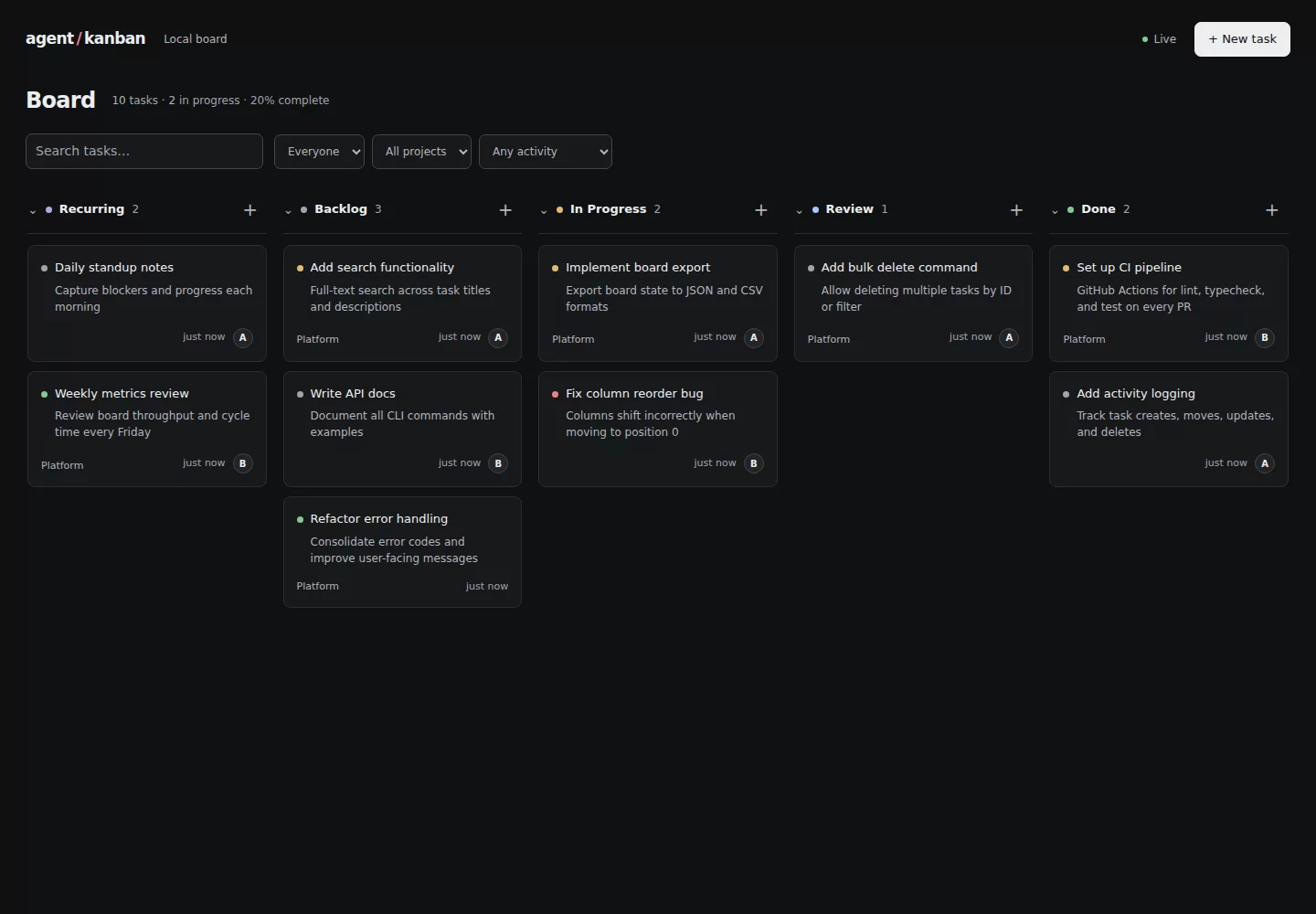
This repo gives you one small contract across three modes: a local SQLite board, Linear, and Jira Cloud. The CLI stays the same. The JSON envelope stays the same. Humans still get an optional dashboard when they want a visual pass.
That buys you a few things that are easy to miss at first:
- You can prototype an agent against a local board, then point the same workflow at Linear or Jira later.
- Remote modes use webhooks plus polling fallback, so missed events are less painful than with one-shot scripts or browser automation.
- Local mode needs no external database or service, which makes scratch boards, demos, and CI setups much easier to spin up.
- The repo also includes a reusable MCP layer, so sibling tools can reuse the same tracker semantics instead of growing their own tracker adapter.
Documentation
docs/INDEX.mdfor the documentation indexdocs/SPEC_CONTRACT.mdfor the repo proof menu and spec contractdocs/workflow.mdfor a common day-to-day workflowdocs/mcp.mdfor the reusable tracker MCP moduledocs/providers/linear.mdfor Linear provider detailsdocs/providers/jira.mdfor Jira provider detailsSKILL.mdfor agent-specific repo usage instructions
Install
bun install -g @andypai/agent-kanban
agent-kanban requires Bun 1.4.2 or newer. CI and the Docker image use Bun 1.4.2. Install or upgrade Bun before installing the CLI.
Local development
git clone https://github.com/abpai/agent-kanban.git
cd agent-kanban
bun install
cd ui && bun install && cd ..
bun link
bun link makes kanban available globally while you work on the source checkout.
Getting started
kanban board init
kanban task add "Set up CI pipeline" -p high -a alice
kanban task add "Write integration tests" -c backlog
kanban board view --pretty
Running kanban with no arguments is equivalent to kanban board view.
Providers
All operations route through a provider backend. Set KANBAN_PROVIDER to choose one.
| Variable | Default | Description |
|---|---|---|
KANBAN_PROVIDER |
local |
local, linear, or jira |
KANBAN_STORAGE |
sqlite |
sqlite or postgres |
KANBAN_DATABASE_URL |
— | Required when KANBAN_STORAGE=postgres |
KANBAN_DB_PATH |
auto-resolved | SQLite database path |
KANBAN_DEFAULT_COLUMNS |
— | Optional bootstrap column names for local/Postgres caches |
KANBAN_DEFAULT_TASK_COLUMN |
— | Optional created-task column override for local/Postgres caches |
KANBAN_SYNC_INTERVAL_MS |
30000 |
Polling sync interval for remote providers; integer milliseconds >= 1000 |
KANBAN_API_TOKEN |
— | When set, kanban serve requires Authorization: Bearer <token> (required for --tunnel) |
KANBAN_ALLOWED_ORIGIN |
— | Allowed CORS origin for kanban serve; unset means same-origin only |
KANBAN_WEBHOOK_FORWARD_URL |
— | Optional HTTP target for each accepted provider webhook |
KANBAN_WEBHOOK_FORWARD_TOKEN |
— | Bearer token for the webhook forward target |
LINEAR_API_KEY |
— | Required when KANBAN_PROVIDER=linear |
LINEAR_TEAM_ID |
— | Required when KANBAN_PROVIDER=linear |
JIRA_BASE_URL |
— | Required when KANBAN_PROVIDER=jira (e.g. https://acme.atlassian.net) |
JIRA_EMAIL |
— | Required when KANBAN_PROVIDER=jira (Atlassian account email) |
JIRA_API_TOKEN |
— | Required when KANBAN_PROVIDER=jira (Atlassian API token) |
JIRA_PROJECT_KEY |
— | Required when KANBAN_PROVIDER=jira (e.g. ENG) |
JIRA_BOARD_ID |
— | Optional when KANBAN_PROVIDER=jira (Agile board id for column order) |
JIRA_ISSUE_TYPE |
Task |
Optional when KANBAN_PROVIDER=jira (default issue type for new tasks) |
When KANBAN_STORAGE=sqlite and KANBAN_DB_PATH is unset, the local provider
resolves the database in this order:
./.kanban/board.dbif it exists in the current working directory~/.kanban/board.dbif it exists./.kanban/board.dbas the path to create
Linear quick start
export KANBAN_PROVIDER=linear
export LINEAR_API_KEY=lin_api_...
export LINEAR_TEAM_ID=<team-id>
kanban board view
Jira quick start
export KANBAN_PROVIDER=jira
export JIRA_BASE_URL=https://your-domain.atlassian.net
export JIRA_EMAIL=you@example.com
export JIRA_API_TOKEN=...
export JIRA_PROJECT_KEY=ENG
export JIRA_BOARD_ID=123  # optional
kanban board view
Capability matrix
| Capability | Local | Linear | Jira |
|---|---|---|---|
| task create/update/move | yes | yes | yes |
| task delete | yes | no | no |
| comment read/create/update | yes | yes | yes |
| activity log | yes | no | no |
| metrics | yes | no | no |
| column CRUD | yes | no | no |
| bulk operations | yes | no | no |
| config edit | yes | no | no |
| attachment list/read | no | no | yes |
| webhooks | no | yes | yes |
Linear tasks carry an externalRef (e.g. TEAM-123) and a url. Commands accept either the internal ID or the external ref.
Jira tasks can also be addressed by issue key (for example ENG-123).
Local mode is still the only mode with built-in metrics, config mutation, bulk cleanup, and the dashboard/bootstrap activity feed. Linear and Jira do keep remote issue history and comment counts in their cache tables for sync and provider-backed flows, but those modes do not expose the same local analytics surface.
Unsupported operations return error code UNSUPPORTED_OPERATION with exit code 1.
Task comments are exposed through the CLI, REST API, and MCP. Dashboard task details show the comment count.
Task attachments are exposed through the CLI and MCP. Only Jira stores
readable task files; in local and Linear modes the attachment commands return
UNSUPPORTED_OPERATION instead of an empty list.
In Linear and Jira modes, webhooks update the cache immediately when configured, and the normal poll loop still runs as a fallback so missed deliveries and remote deletions are eventually reconciled.
The Postgres runtime defaults statement_timeout to 60 seconds for every
connection. An explicit statement_timeout in KANBAN_DATABASE_URL takes
precedence; other startup parameters such as search_path remain unchanged.
Commands
board
| Command | Description |
|---|---|
kanban board init |
Initialize a new board with default columns |
kanban board view |
View the full board (default command) |
kanban board reset |
Reset board — drops all data and restores defaults |
Default columns: recurring, backlog, in-progress, review, done.
task
| Command | Description |
|---|---|
kanban task add <title> |
Add a task |
kanban task list |
List tasks |
kanban task view <id> |
View task details |
kanban task update <id> |
Update task fields |
kanban task delete <id> |
Delete a task |
kanban task move <id> <column> |
Move task to a column |
kanban task assign <id> <user> |
Assign task to a user |
kanban task prioritize <id> <level> |
Set priority (low, medium, high, urgent) |
kanban task attachments <id> |
List task attachments (metadata only) |
kanban task attachment get <id> <name-or-attachment-id> |
Download one attachment to a file |
Flags for task add:
| Flag | Description |
|---|---|
-d <text> |
Description |
-c <column> |
Target column (default: backlog) |
-p <level> |
Priority: low, medium, high, urgent (default: medium) |
-a <user> |
Assignee |
--project <name> |
Project tag |
--label <name> |
Label; repeatable and comma-separated values are accepted |
--labels <names> |
Label alias; repeatable and comma-separated values are accepted |
-m <json> |
Arbitrary metadata (must be valid JSON) |
Flags for task list:
| Flag | Description |
|---|---|
-c <column> |
Filter by column |
-p <level> |
Filter by priority |
-a <user> |
Filter by assignee |
--project <name> |
Filter by project |
-l <n> |
Limit results |
--sort <field> |
Sort by: priority, created, updated, position, title |
Flags for task attachment get:
| Flag | Description |
|---|---|
-o <path> |
Write to this path, replacing any file there (default: the attachment's filename in the current directory) |
-o - |
Write the bytes to stdout; the JSON envelope then goes to stderr |
--max-bytes <n> |
Refuse attachments larger than n bytes (default: 100 MiB) |
The second argument is an attachment id or an exact filename. A filename shared
by several attachments is refused with the matching ids. The default path uses
only the last segment of the provider's filename, refuses dotfile names, and
never replaces an existing file (CONFLICT); pass -o to choose the path.
Success prints { "attachment": { ... }, "path": "/abs/path" }.
Flags for task update:
| Flag | Description |
|---|---|
--title <text> |
New title |
-d <text> |
New description |
-p <level> |
New priority |
-a <user> |
New assignee |
--project <name> |
New project |
-m <json> |
New metadata |
comment
| Command | Description |
|---|---|
kanban comment list <task-id> |
List task comments |
kanban comment add <task-id> <body> |
Create a task comment |
kanban comment update <task-id> <comment-id> <body> |
Update a task comment |
column
| Command | Description |
|---|---|
kanban column add <name> |
Add a column |
kanban column list |
List all columns |
kanban column rename <id|name> <new-name> |
Rename a column |
kanban column reorder <id|name> <position> |
Move column to position |
kanban column delete <id|name> |
Delete an empty column |
Flags for column add:
| Flag | Description |
|---|---|
--position <n> |
Insert at position (0-indexed) |
--color <hex> |
Column color |
bulk
| Command | Description |
|---|---|
kanban bulk move-all <from> <to> |
Move all tasks from one column to another |
kanban bulk clear-done |
Delete all tasks in the done column |
config
| Command | Description |
|---|---|
kanban config show |
Show board config (default) |
kanban config set-member <name> |
Add or update a team member |
kanban config remove-member <name> |
Remove a team member |
kanban config add-project <name> |
Register a project |
kanban config remove-project <name> |
Remove a project |
Flags for config set-member:
| Flag | Description |
|---|---|
--role <human|agent> |
Member role (default: human) |
serve
kanban serve            # default port 3000
kanban serve --port 8080
kanban serve --sync-interval-ms 300000
kanban serve --token "$(openssl rand -hex 32)"   # require an API token
kanban serve --tunnel --token "$SECRET"           # public URL (token required)
Authentication & CORS
By default serve binds locally and leaves the API open for backward
compatibility. To require authentication, set a token via --token or the
KANBAN_API_TOKEN env var. When a token is set:
- All
/api/*routes (reads and mutations) and the/wsupgrade requireAuthorization: Bearer <token>. The WebSocket, which can't send headers, accepts?token=<token>instead. /api/healthstays public (liveness probe)./api/webhooks/*are not covered by this token — they authenticate with the provider webhook secret when one is configured. Without that secret, Linear/Jira webhooks run in local open dev mode and accept unsigned payloads.- The bundled UI picks the token up once from
?token=/#token=and stores it inlocalStorage, so you can openhttps://<host>/?token=<token>.
--tunnel exposes the dashboard publicly, so it refuses to start without a
token. In Linear or Jira mode it also refuses to start unless the matching
webhook secret is set, so auth-exempt webhook routes cannot accept unsigned
public writes. CORS is off by default (same-origin); set
KANBAN_ALLOWED_ORIGIN (or --allowed-origin) to allow a specific cross-origin
browser client. CORS is origin hygiene, not an auth control — the token is the
security boundary.
mcp
kanban mcp
kanban mcp --db /path/to/board.db
Runs the bundled MCP server over stdio for local MCP clients such as Claude
Desktop. See docs/mcp.md
for the tool surface and caveats.
Global flags
| Flag | Description |
|---|---|
--pretty |
Human-readable output instead of JSON |
--db <path> |
Database path (default: local first, then ~/.kanban, else create local; env: KANBAN_DB_PATH) |
--project <name> |
Filter or set project context |
-h, --help |
Show help text |
Output format
Every command returns a JSON envelope on stdout:
{ "ok": true, "data": { ... } }
{ "ok": false, "error": { "code": "TASK_NOT_FOUND", "message": "No task with id 't_abc123'" } }
Exit codes: 0 success, 1 known error, 2 internal error.
Pass --pretty for human-readable output — board view, task lists, and details are formatted for the terminal.
Web dashboard
kanban serve
In Linear mode the dashboard hides unsupported actions and shows Linear issue identifiers and links on task cards.
Starts a Bun HTTP server with:
- REST API at
/api/*— board, tasks, task comments, bootstrap/provider metadata, activity, metrics, config, and webhook endpoints - WebSocket at
/ws— push notifications on board mutations (clients receivetask:upsertwith{ task, columnId },task:deletewith{ id }, or a fallbackrefreshevent) - Static UI served from
ui/dist/(build withbun run build:uiorbun run ui:build) - Health check at
/api/health— cheap process liveness only - Readiness check at
/api/ready— reports whether the cache has warmed at least once - Sync status at
/api/sync-status— reports background sync state plus provider sync metadata
In serve mode, remote providers warm once on startup and continue syncing in
the background on the runtime's configured polling cadence. Use
KANBAN_SYNC_INTERVAL_MS or kanban serve --sync-interval-ms to tune it. Full
reconciliation is still handled by the provider-specific logic on top of that
steady cadence.
Comment routes:
GET /api/tasks/:id/comments- `POST /api/tasks/: