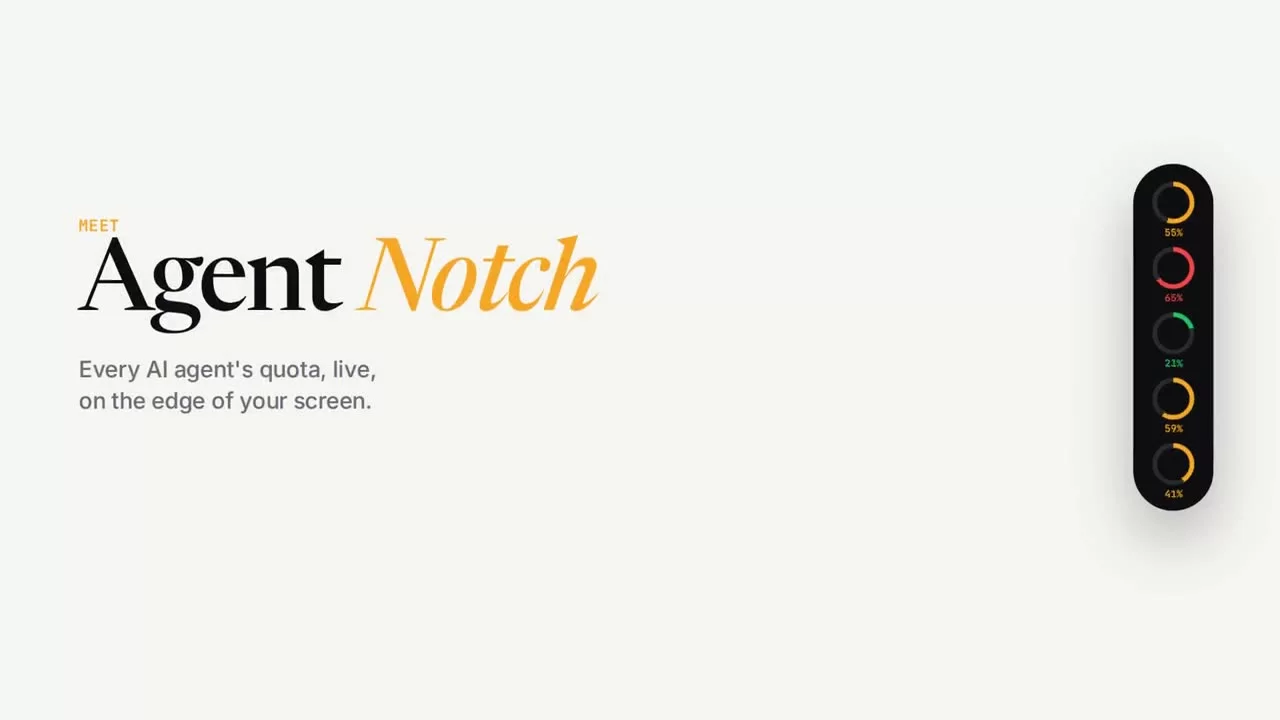

Ambient right-edge desktop HUD for live AI coding-agent quotas and session limits.
Windows-first • Electron + React 19 + Tailwind CSS v4 • 100% Standalone • Zero telemetry

Codex runs out. The job moves to Antigravity, and the toast says why — in the colour of wherever it landed.
The dispatch behind it is MindSync — Notch shows the orchestration, MindSync does it.
Hover a ring for that account's windows and resets. Red means spent.
Every CLI can be toggled, and you can add your own.
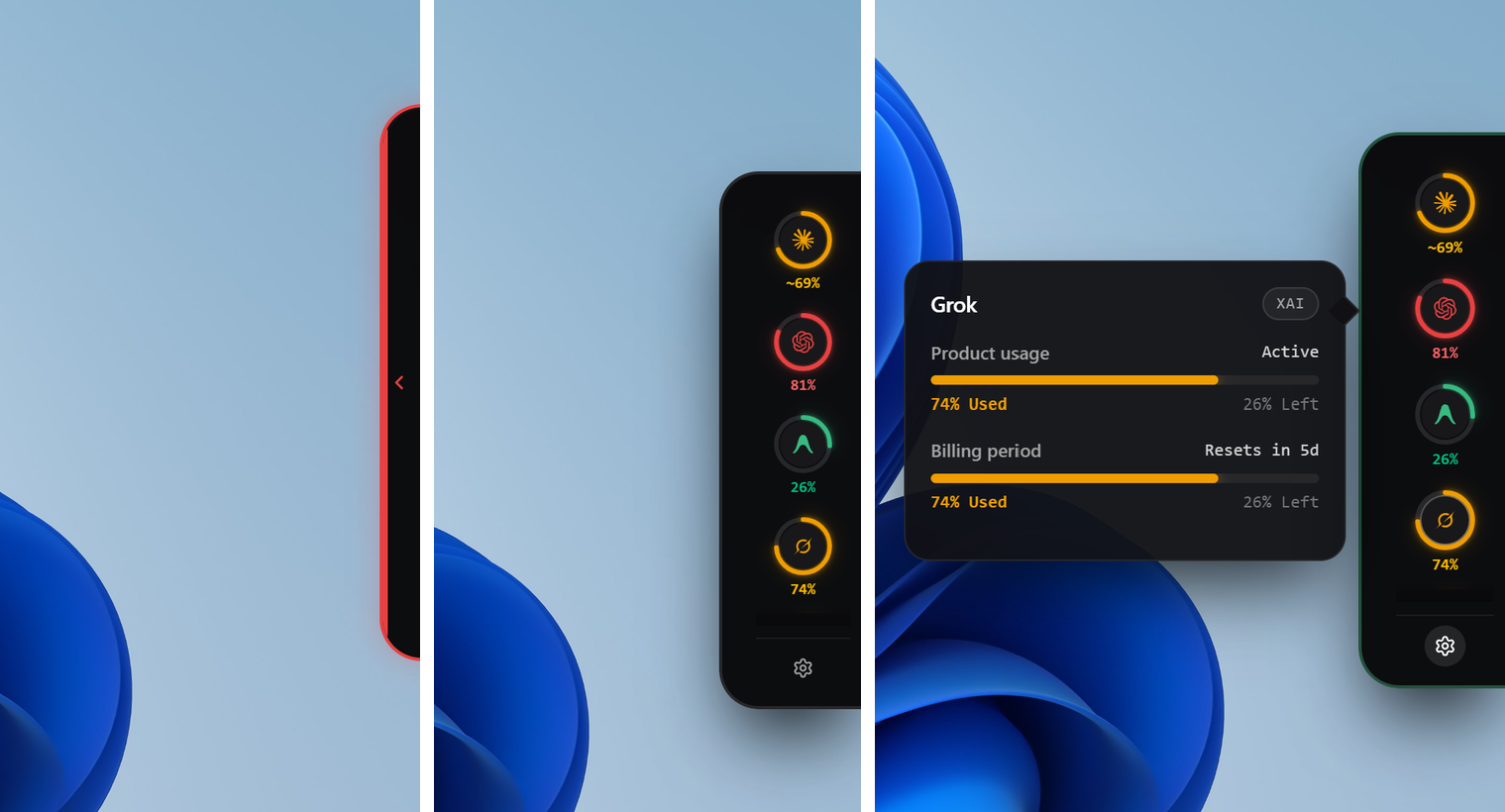
Three states, left to right: tucked against the edge, open with every ring, and one account's detail on hover.
🎯 Overview
Agent Notch is an ultra-lightweight, always-on-top ambient desktop HUD snapped to the right edge of your screen. It gives you instant, zero-friction visibility into live token quotas, session rate-limits, and weekly usage windows across all your AI coding tools — without opening browser dashboards or checking multiple terminals.
- Account-Level Quota Rings: Periodically refreshed session and plan-window usage percentages at a single glance.
- Strictly Grounded Quotas: Never estimates or shows fake percentages. Unknown or unauthenticated accounts display as
—orlogin. - Honest Failure State: Recent successful readings survive restarts for up to 24 hours and stay clearly marked with
~and a stale notice until live data returns. Expired authentication is never masked by cached quota. - Zero-Lag Click-Through: Transparent overlay pixels automatically forward all mouse clicks, drags, and scrolls to background windows.
- 100% Standalone & Local-First: Works immediately out of the box using your local CLI credentials. Zero telemetry, zero external tracking servers.
- Custom Extensible: Monitor custom CLI agents through stdout JSON commands or manual snapshots, and optionally map an exact native executable for automatic activity glow.
📊 Supported Providers & Quota Adapters
Agent Notch detects and tracks live usage for major coding agent ecosystems directly from local session vaults. Live percentages only exist where a grounded reader exists. Suggested apps get an icon and activity glow on opt-in; they do not get invented quota.
| Provider / Ring | Monitored Windows | Data Source & Detection |
|---|---|---|
| OpenAI Codex | Provider-reported session + plan windows | ChatGPT WHAM usage endpoint (~/.codex/auth.json); windows are labeled by duration |
| Claude Code | 5h Session + Weekly | Official Anthropic OAuth usage API (~/.claude/.credentials.json) |
| Gemini / Antigravity | Quota Summary / Limits | Official Antigravity CLI token vault & Cloud Code usage API |
| Cursor | Monthly Period Usage | Cursor IDE local state (state.vscdb / session token) |
| Grok CLI | Included quota when exposed | Grok CLI local configuration & billing endpoint; signed-in unavailable usage stays explicit |
| OpenCode Go | Go Subscription Usage | OpenCode Go plan quota (excludes BYOK local engines) |
| Custom / catalog CLIs | Glow now; quota only if you attach it | Settings suggestion or notch provider add. Icon + native process come from the catalog. Quota stays — until a JSON command or manual snapshot is set. |
Catalog suggestions (detection-only, never silent-add): Aider, GitHub Copilot, Amp, Goose, Crush, Qwen, Cline, Continue, Roo Code, Factory Droid, Hermes, Windsurf, Trae, Zed, Kiro, ZCode. On add: catalog icon (Windsurf/ZCode → Cursor mark, Cline → Claude mark, else Spark) and process glow. No fake usage bar.
🖥️ Visual HUD Features
          [ Screen Edge ]
  ┌─────────────────────────┐
  │  (⚙️ Settings Drawer)   │
  │                         │   ┌──────┐
  │  Claude Code            │───│ (92%)│ 🔴 Critical (≥80%)
  │  Session: [████████--]  │   ├──────┤
  │  Weekly:  [████------]  │───│ (45%)│ 🟢 Normal (<50%)
  │  Resets in 1h 24m       │   ├──────┤
  │                         │───│ (65%)│ 🟡 Warning (50-80%)
  │  ● Active Session       │   ├──────┤
  │  5h window expiring     │───│ ( — )│ ⚪ Unknown / Unconfigured
  └─────────────────────────┘   └──────┘
- Color-Coded Status Rings (default 80% critical threshold; configurable in Settings):
- 🟢 Normal (< 50%): Healthy quota headroom.
- 🟡 Warning (50% – 80%): Approaching session threshold.
- 🔴 Critical (80%+): Imminent rate-limit window.
- Hover Popover Cards: Detailed dual-meter breakdown (Session vs. Weekly/Monthly) with exact humanized reset countdowns (e.g. “Resets in 2h 15m”).
- Compact Viewport: 70px half-pill on the right edge. Four rings stay in view; extra rings scroll. Drag a ring to put your most-used agents on top.
- Settings Drawer: Toggle which CLIs appear, set the alert threshold, add custom CLIs, turn tuck notifications on/off, and turn handoff animation off.
- Edge Collapse: Hover the rail for a chevron to tuck it; the same remnant pulls it back. Collapse and reveal share one spring. The remnant keeps a quota-colored jewel edge. Notch remembers the last chosen state.
- Tuck Notifications: If a quota crosses the critical threshold while the rail is tucked, a glass toast sits beside the remnant. Click it to reveal the HUD. If the window is fully hidden, Windows still shows a desktop toast. Expanded rings already show red, so those stay silent.

🔄 Optional: MindSync Multi-Agent Integration
Tip
Agent Notch works 100% standalone. You do not need MindSync to monitor quotas.
If you also use MindSync for multi-agent task dispatch and automated failover across local and VPS agents, Notch automatically surfaces live orchestration status:
- Dispatch-Aware Glow: A running MindSync job keeps its assigned agent ring active alongside any directly observed local CLI sessions.
- One-Shot Handoff Flash: When MindSync transitions a task between agents (e.g.
codex → grok (quota exhausted)), a non-intrusive 2–3s banner plays once and quietly settles. - Pure Spectator: Notch never touches job execution, task transfers, or dispatch — it purely reflects live state from
~/.mindsync/dispatch/jobs/.
🚀 Quick Start & Installation
Option 1: One-Click Windows Install (Recommended)
Run via PowerShell (User-level, no admin required):
irm https://raw.githubusercontent.com/adityarya24/agent-notch/main/install.ps1 | iex
Or clone the repository and double-click install.bat.
Option 2: Global NPM Install
npm i -g agent-notch
notch
notch autostart
Option 3: Run Once via NPX
npx agent-notch
Option 4: Local Development Clone
git clone https://github.com/adityarya24/agent-notch.git
cd agent-notch
npm install
npm run build
npm link
notch
⌨️ CLI Reference
Manage Agent Notch from any terminal via the notch command:
| Command | Description |
|---|---|
notch / notch start |
Start the HUD, or bring it to the foreground if already running |
notch stop / notch kill |
Safely terminate the HUD process |
notch restart |
Perform a clean stop and restart |
notch status |
Check process status and background PID |
notch quota / notch --json |
Print the last quota snapshot as JSON (no HUD, no live scrape) |
notch autostart |
Register Agent Notch in Windows Startup (logon launch) |
notch disable-startup |
Remove Agent Notch from Windows Startup |
notch provider ... |
Register, list, remove, or discover custom providers |
notch help |
Display available CLI commands |
Quota dump for local orchestrators
notch quota (alias notch --json) prints the HUD's last quota snapshot to stdout. It does not start Electron, scrape providers, or open a localhost port — orchestrators can poll it without burning quota.
notch quota
# or: notch --json
{
  "ok": true,
  "source": "cache",
  "savedAt": "2026-09-18T04:00:00.000Z",
  "models": [
    {
      "id": "claude",
      "name": "Claude Code",
      "quotaState": "known",
      "ringPercent": 89,
      "sessionUsedPercent": 36,
      "weeklyUsedPercent": 89,
      "stale": true
    }
  ]
}
Launch Notch once so the cache exists. Missing or empty cache exits 1 with "ok": false. Secrets never appear in the dump. A localhost endpoint is not in this release — same dump, extra process.
Note
Hotkey: Press Ctrl + Shift + U to toggle HUD visibility while running. (Note: Hotkey toggles visibility of the active instance; if the process is stopped via
notch stop, launch it again usingnotch).
Provider registration from an agent
An agent can opt itself into Notch without editing JSON. The command is non-interactive and writes the existing per-user config atomically:
notch provider add zcode --name "ZCode" --process ZCode.exe --quota none --icon auto
register is an alias for add. The exact native executable name is required
for the activity glow; generic runtimes (node, python, PowerShell) and shell
wrappers are rejected. Quota can be none, manual, or command (the latter
uses a trusted local command that prints the JSON shape documented below).
notch provider list
notch provider remove custom_zcode
notch provider discover
notch provider discover --json
discover and the Settings suggestions are detection-only: they never add a
provider silently. The catalog currently recognizes Aider, GitHub Copilot,
Amp, Goose, Crush, Qwen, Cline, Continue, Roo Code, Factory Droid, Hermes,
Windsurf, Trae, Zed, Kiro, and ZCode. CLI tools are detected from PATH;
desktop apps (Windsurf, Trae, Zed, Kiro, ZCode) can also be suggested from a
cataloged Windows install path or native process when they are not on PATH.
Click the suggestion in Settings or run provider add to opt in. Unknown tools
must be registered once by the agent/user with the command above. --icon auto
selects a deliberate bundled icon for known providers (ZCode and Windsurf use
the Cursor icon; Cline uses Claude) and falls back to the generic Spark icon
for unknown providers; Notch does not extract arbitrary executable icons.
⚙️ Configuration & Environment
Antigravity / Gemini Token Refresh (Optional)
Quota scraping works out-of-the-box using local credentials. If automatic OAuth token refresh for Google Antigravity is required:
- Copy
.env.exampleto.env(gitignored):cp .env.example .env - Configure your Google OAuth credentials:
(AliasesMINDSYNC_ANTIGRAVITY_CLIENT_ID="your-client-id.apps.googleusercontent.com" MINDSYNC_ANTIGRAVITY_CLIENT_SECRET="your-client-secret"NOTCH_ANTIGRAVITY_CLIENT_IDandNOTCH_ANTIGRAVITY_CLIENT_SECRETare also supported).
Motion Settings
To reduce animations (disables the edge-tuck transition and sliding handoff animations, while keeping glow effects static):
- Toggle Reduce Motion in the in-app Settings Drawer (⚙️ gear icon).
- Or export the environment variable:
NOTCH_REDUCE_MOTION=1.
Local Settings File
Notch stores its own settings in %APPDATA%\Agent Notch\config.json. Existing installs are migrated from the legacy repository-level notch_config.json on first read; the legacy file is left untouched.
🛠️ Adding Custom CLI Agents
You can add any custom coding assistant or local LLM CLI to the dock via the Settings Drawer (⚙️):
- Click the Settings Gear at the bottom of the dock.
- Under Custom Agents, click Add Custom CLI.
- Supply a Display Name and, for automatic live glow, the CLI's native process/executable name (for example
aider). - Choose a Quota Source:
- Command Stdout: Point to a command/script that outputs JSON:
{ "sessionUsedPercent": 25, "weeklyUsedPercent": 60 } - Manual Snapshot: Set fixed percentage values for manual tracking.
- Unmanaged: Displays as an unmetered ring; it can still glow while its configured native CLI process is doing CPU work.
- Command Stdout: Point to a command/script that outputs JSON:
Custom quota commands run locally on each refresh. Only configure commands you trust.
Activity Process and JSON Quota Command are separate: the first is used only for local process activity, while the second supplies percentages. Notch intentionally does not infer activity from generic wrapper runtimes such as node, python, PowerShell, or .cmd/.ps1 scripts because that could light the wrong provider ring.
🏛️ Architecture & Design Philosophy
- Zero Interruption: Frameless, transparent Electron overlay configured with OS-level click forwarding so your IDE, terminal, and browser interactions remain completely uninterrupted.
- Local-First Security: Notch has no telemetry or tracking backend. Provider credentials are read locally and sent only to that provider's official usage, billing, or OAuth endpoint when needed to retrieve quota data.
- Credential Spectator Boundary: Notch does not rewrite or refresh provider credential files. An expired Claude session asks you to sign in through Claude Code. Google token refresh, when explicitly configured, is held in memory.
- Activity Spectator Boundary: Notch detects recent local CLI work from session-artifact timestamps plus dedicated-process name and CPU metadata. It never reads transcript contents for the glow, and none of this activity metadata is transmitted. MindSync metadata remains the source for dispatch glow and handoff flash.
🗺️ Upcoming (demand-driven)
Windows is the supported host. No dates — these land if people actually ask:
- macOS — overlay + Login Item + Keychain / Cursor
Librarypaths. Electron can show a window today; CLI, autostart, and several quota readers are still Windows-only. - Multi-monitor — pick which display’s right edge.
- Packaged Windows installer — NSIS / winget after the
npm i -gpath. - Vertical slide on the right edge so the dock can sit above or below other overlays.
Not on the list: free-floating drag, fake desktop glass, or job transfer (that stays MindSync).
Product media capture
From a development checkout with dependencies installed, run npm run media:make.
The command builds the current UI, opens an isolated Electron fixture, captures
the quota hover, settings, and handoff states, then renders a silent 22.6-second
horizontal (1920×1080) and vertical (1080×1920) MP4 plus three 1920×1080 PNGs.
Outputs go to a timestamped directory under output/product-media/; the command
prints the exact location. Pass an empty output directory after -- to choose one:
npm run media:make -- C:\path\to\empty-directory.
The capture reads no local provider credentials or dispatch history and makes no
provider requests. Percentages and handoffs are marked as demo data in every
frame. Python 3 with Pillow and FFmpeg/FFprobe on PATH are required.
📜 License
MIT License © 2026 Aditya Arya