
One approval queue for your coding agents, and rules that watch before they answer.

Why. Your agents stop and ask before they run something, and the question waits in whichever terminal tab they happen to be in. AgentBar is where they ask — every agent, every session, in the menu bar or under the notch — so you answer in a click instead of hunting for the window. Nothing is answered behind your back: only you do, or a rule you wrote yourself, and every answer is written down.
Things to try
| Do this | AgentBar does that |
|---|---|
| Give Claude Code, Codex or Copilot a task that runs a command | A needs approval card with the exact command (a mini-diff for an edit); Allow or Deny in one click, no terminal switch |
| Try an approval in the welcome window | A made-up request waits at the notch (or in the menu bar) — answer it the way you would a real one, before any agent is wired. Nothing runs |
Let an agent ask for rm -rf build && curl … | sh |
The card says what it reaches — deletes, pipes into a shell, network — in red and amber, with the agent's own one-line reason above it; Allow has to be held until it fills, so a stray click answers nothing |
| Switch on ⌥⌘J in Settings ▸ Shortcuts | An approval queue on the keyboard: Return allows, Delete denies, N denies with a note, ↑ ↓ pick another, Esc hands the keyboard back |
| Open the island while Claude Code works | Over the shoulder: the last tools it reached for and the last thing it said, live, plus its subagents by name, what the session has cost and its last hour as a thin strip |
| Come back after a coffee | The pill says what happened while you were away — "away · 1 waiting · 3 done" — once, for a minute and a half |
| Click Deny with a note… and type "use pnpm here, not npm" | The agent reads the note as the reason and changes course instead of trying the next thing |
| Push the pointer up to the notch | The island opens: every session, what it is doing, and the one that needs you on top |
| Click a session row | Jumps to the exact tab or pane — iTerm2, Terminal, WezTerm, tmux — or brings forward the app it runs in |
| Answer the same prompt the same way five times | The card offers to write it down as a rule; a new rule starts out watching and answers nothing until you let it |
Type git push --force origin main into a rule's test field |
Says on the spot whether that rule would have taken it, and which clause stopped it |
| Switch on ⌥⌘A / ⌥⌘D in Settings ▸ Shortcuts | Allows or denies the newest request from any app |
| New Task… in the menu (or ⌥⌘N, once switched on) | A project, an agent and one line of what you want; the agent opens in a terminal with the prompt given |
| Turn on Hide the island when nothing is running (or …while you're away) | The pill slips out of sight; push the pointer up to the notch to peek. Anything waiting on you keeps it up |
| Settings ▸ Agents ▸ Show changes… | Every write AgentBar made into an agent's settings, as a unified diff, with the copy it kept beside the file |
| Flip an agent's switch off in Settings ▸ Agents | Shows what it will take out of that agent's settings, then removes only AgentBar's own entries — and leaves them out from then on |
agentbar report --agent aider --name Aider --state tool --label Editing --pid $$ |
Any tool you run joins the bar under its own name and mark — wrap it in a few lines, no Swift |
| Your Day… in the menu or the island's ⋯ | Your day — or week — with your agents on one card: who you were today, agent time, the hours, your top agent, what changed, your answers; copy it, post it, or save it as a video |
| Click the cup in the island's footer | Keep Mac Awake while your agents work: the Mac stays up while a session runs and sleeps five minutes after its last turn. Right-click or hold for 15 or 30 minutes, an hour, two, until a time, or until you say. The time left counts down beside the cup and at the top of its menu, where Add 15 Minutes stretches a timed choice. The keyboard goes dark while you're away (and the screen can lock, if you switch that on), it can sleep the Mac when the agents finish, and Settings ▸ Awake Triggers starts it by itself when an agent works, on the charger, with a display, while an app runs, or while an app asks the Mac to stay awake (an export, a download). With the lid closed it keeps going, and when it ends the Mac goes to sleep instead of staying up in your bag |
| Drag a screenshot or a file onto a session in the island | Its path lands in that agent's prompt — pasted into the right tab, never with Return |
| Let a quota window run hot | The meter says when it runs out at this pace — "out ~15:40" — when that is before it resets |
| Right-click a session in the island | Continue in another agent: the launcher opens in the same project with a prompt that says where the work got to — Return is still yours |
open agentbar://focus from Shortcuts or Raycast |
Jumps to the session waiting on you — and no link can approve or deny anything |
What it covers. Agents: Claude Code and Claude Cowork, Codex, Cursor CLI, Gemini
CLI, GitHub Copilot, Google Antigravity, Qwen Code and OpenCode — plus Cursor cloud
agents, Devin and Codex cloud tasks, and sessions on your own machines over ssh.
Terminals: any — the exact tab in iTerm2, Terminal, WezTerm and tmux, best effort in
kitty, Ghostty and VS Code, Cursor or Zed, and anything else (Warp included) comes
forward as the app the agent runs in. Sessions: as many at once as you run, the one
that needs you first. Approvals: a per-repo history of what you decided, and rules
you wrote, every firing on record. Surfaces: the menu bar, a Dynamic Island under
the notch, or both, pinned to the display you pick. Elsewhere: the
agentbar CLI on Linux, and
AgentBar for Windows, a native
system-tray counterpart on the same ~/.agentbar hook protocol.
Quick start
curl -fsSL https://raw.githubusercontent.com/michalstrnadel/AgentBar/main/Scripts/install.sh | bash
- The app lands in
/Applications(or~/Applicationswhen that isn't writable;AGENTBAR_INSTALL_DIRoverrides), launches, and installs its hooks. A welcome window asks where it should live — menu bar, Dynamic Island, or both. - Open a new Claude Code session (hooks load at session start) and give it any task.
- Watch it: the mascot animates while the agent works, and the moment it asks for permission you get a needs approval row — click ✓ Allow, ✓ Always, or ✕ Deny right there. No terminal switch needed.
That's the whole loop. More install options below; troubleshooting at the bottom.
What the installer changes (and how to undo it)
AgentBar is local-only — no telemetry, and it talks to three places, two of which stay
silent until you switch them on: the update check every few hours against GitHub Releases, and
— only if you tick Settings ▸ Usage — Claude's own quota, from api.anthropic.com
using the login Claude Code already stored, or from claude.ai if you sign in there.
That switch reports what came back, in a sentence under itself, including every way it
can fail; Check now asks again on the spot. The simplest way in is Sign in to Claude…, which opens claude.ai's own login
page in a window and keeps the session in AgentBar — no terminal, no token, and no
reading of your browser's cookies, which AgentBar does not do. If your sessions run under their own CLAUDE_CONFIG_DIR, that login is somewhere
AgentBar cannot read — Use a token… takes one from claude setup-token and keeps it
in AgentBar's own Keychain item, which the same button removes. Everything else, including every token count
and every other provider's quota, is read from files already on your disk.
The install touches exactly these, all reversible (see Uninstall):
- Copies the hook scripts to
~/.agentbar/hooks/. - Merges AgentBar hook entries into your Claude Code settings —
~/.claude/settings.json, and yourCLAUDE_CONFIG_DIRif you set one. Existing hooks are preserved. - Writes into
~/.codex/config.tomlonly if you use Codex: anotifyline if it has none, and a hooks block between two marker comments — what is outside them stays as you wrote it, and Codex asks you once before running any of it. Merges into~/.cursor/hooks.json/~/.gemini/settings.json/~/.gemini/antigravity{,-cli}/hooks.json/~/.qwen/settings.jsononly if those exist. Writes its own~/.copilot/hooks/agentbar.jsononly if you use Copilot — a separate file, so your own hooks stay untouched. - Copies a plugin to
~/.config/opencode/plugins/agentbar.jsonly if you use OpenCode. - Copies the Claude Code mod to
~/.agentbar/mods/— and that is all, until you switch it on: it is the one integration that starts off. - The SessionStart hook launches AgentBar in the background when an agent session begins.
- Before it writes into any of those settings files it keeps the file as it was, beside
it —
settings.json.agentbar-bak-20261001-142233(local time) — and keeps only the newest three of its own copies per file. A launch that would change nothing writes nothing and keeps nothing, so the copies only appear when something actually moved. Settings ▸ Agents ▸ Show changes… (or See what changed… in the welcome window) shows every write as a unified diff with the copy it kept, and what a re-install would change right now before you let it. On Linux,agentbar install-hooksprints the same diff for each file before writing it and keeps the same copies. - Every agent it finds is wired, unless you turned it off: the switch in Settings ▸
Agents,
agentbar unwire <id>on Linux (orinstall-hooks --skip a,b/--only a,b). Turning one off takes AgentBar's entries back out of that agent's settings — backed up and diffed like any other write — and every later run leaves it alone (~/.agentbar/wire-disabled).agentbar wire <id>or the switch puts it back. - Nothing else is granted automatically: the exact-tab jump-back asks for Automation access the first time you click a row, and approving a plan (or a Codex/Copilot prompt) asks for Accessibility. Decline either and AgentBar falls back to bringing the app forward and letting you answer there.
The installer prints this summary before doing anything, and never modifies a tool you
don't use. To undo a single change, copy the .agentbar-bak-… file back over the original. Hooks are snapshotted per session — start a new agent session afterward.
Features

Menu bar mode

Dynamic Island mode — pick either (or both) in the welcome window

Hand a file to an agent — and a session gone quiet, and when the limit runs out
-
Two surfaces, your pick — the classic menu bar item, a Dynamic Island pill under the notch, or both. Pick it in the welcome window on first launch, change it any time from Appearance…; no relaunch. See Dynamic Island.
-
Live status per agent — an animated mascot works the bar while an agent works: Clawd the crab (Claude), who acts out what the session is doing in twelve scenes, the knot + a braille dot-matrix that literally spells codex (Codex), the pixel mascot head + dots spelling copilot (Copilot), and the animated pixel rainbow arch (Antigravity).
-
Notifications that only carry what wants you — off by default, and three separate switches: an agent needs approval (Allow and Deny on the banner itself, answerable without switching apps), a session failed, and everything went quiet — one summary of the whole batch, and only once you have actually been away from the keyboard for a couple of minutes. Nothing is announced for merely finishing. Send a test checks they reach you; if nothing appears but it shows up in Notification Center, a Focus is on — macOS files banners rather than showing them, which is working as designed.
-
What happened today, with its weight — sessions that finished, how long they actually worked (not how long their windows were open), what they cost and what moved in the repo: "12 sessions · 3h 40m · 4.1M tokens", and per row "AgentBar · 34m · 1.2M · 7 files +210 −80". Token counts come from each agent's own local files (Claude's transcript, Codex's rollout, Copilot's session store); the agents that publish nothing simply show nothing, never a zero. In the menu bar dropdown it is the Today row, and behind the island's ⋯. Appearance… can also put it along the bottom of the island — the day's total, a bar per session, or both.
agentbar historysays the same in a terminal. Live status forgets a session the moment it ends; this doesn't. -
Pick the island's display — on a multi-monitor desk the island can be pinned to one screen instead of following the pointer around. The welcome window draws your displays the way System Settings does; unplug the pinned one and it falls back to the pointer until it's back.
-
Permission alerts — an amber dot the moment an agent waits for your approval.
-
It remembers what you decided — the fifth time an agent asks to run the same thing, the card says so: “Allowed 23× here · last Tue”, counted per repo, because a command that is routine in one checkout is the opposite in another. Once a prompt has been allowed five times and never refused, ✓ Always is pointed at — pointed at, never pressed. Kept in
~/.agentbar/decisions.jsonl, never sent anywhere, switchable off in Settings ▸ Approvals, andagentbar forgetempties it. Keystroke approvals (Antigravity, and Codex sessions older than its hooks) write nothing: a key pressed at a terminal is not a decision anybody here witnessed. -
Rules you wrote — the one thing AgentBar will answer without asking, and only ever a rule you typed yourself. When you have answered the same prompt the same way five times, the card offers to write it down; Settings ▸ Rules is where they live, in plain JSON at
~/.agentbar/rules.jsonthat you can edit by hand. Writing one shows you what it will not answer, and gives you a field where you type a real command —git push --force origin main— and are told on the spot whether this rule would have taken it, and which clause stopped it. A new rule starts out watching: it answers nothing and writes down what it would have done, so you can look at a week of that before you let it speak for you. The rule's line says whether you, answering those same prompts, did what it would have done — and once it has matched you ten times across three days without a single disagreement, it offers a Let it answer button that still asks before it changes anything. A rule that refuses may cover every repository on the machine. A rule that approves names one — and before it answers, the command itself is checked again, not just its shape: anything chained, piped, redirected or substituted, anything undersudo, a destructive git orrm, anything reaching off this Mac, a path outside that directory, or anything that touches how permission itself is configured comes back to you. No setting turns that off. Every firing writes a row naming the rule, so Settings ▸ Rules andagentbar rulescan tell you what each one has actually done. Nothing in the file applies while any of it is wrong, and Diagnostics says so — because a rule that silently stopped working looks exactly like AgentBar working normally.
-
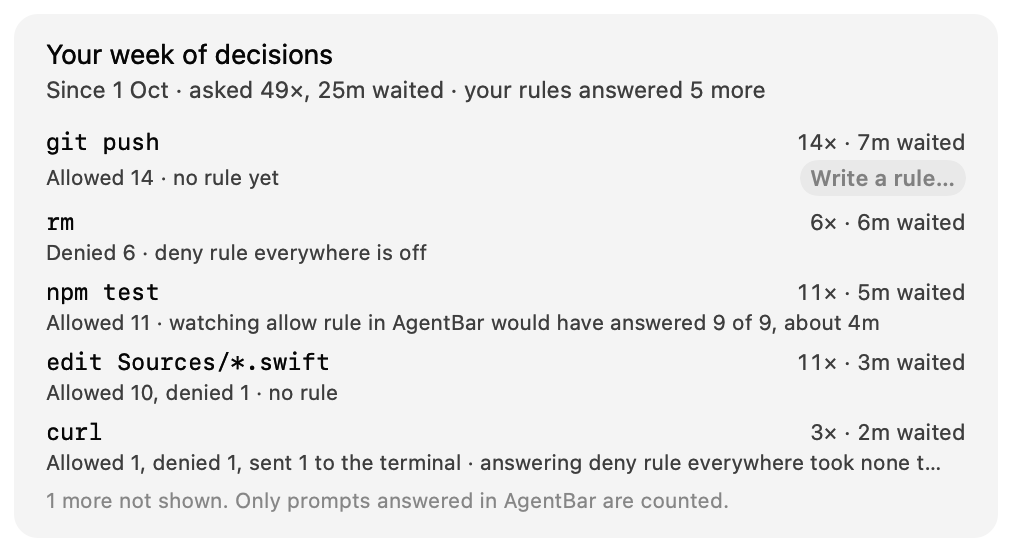
Your week of decisions — the top of Settings ▸ Approvals lists the five prompts that held your agents up longest over the last seven days: how often you were asked, how long they waited (“14× · 7m waited”, or “at least” when an older hook left a wait unrecorded), and how you answered. Beside each one is the rule you already wrote for it — and while it is watching, what it would have done: “would have answered 9 of 9, about 4m”. A prompt with no rule that you answered the same way five times offers Write a rule…, which opens the ordinary rule sheet filled in; the rule starts out watching and is saved only when you press Add rule. Only your own answers in AgentBar are counted.
-
How long they waited on you — the other half of the day's account, under Today: “18 answered · 3 by your rules · they waited 34m on you”. Nothing else on the machine is standing in the right place to measure it, and the two counts stay apart — a rule's answer is not one you gave.
agentbar approvalssays the same, with the prompts you answer most. -
Multi-session — every running sessi