
AKB — Agent Knowledge Base
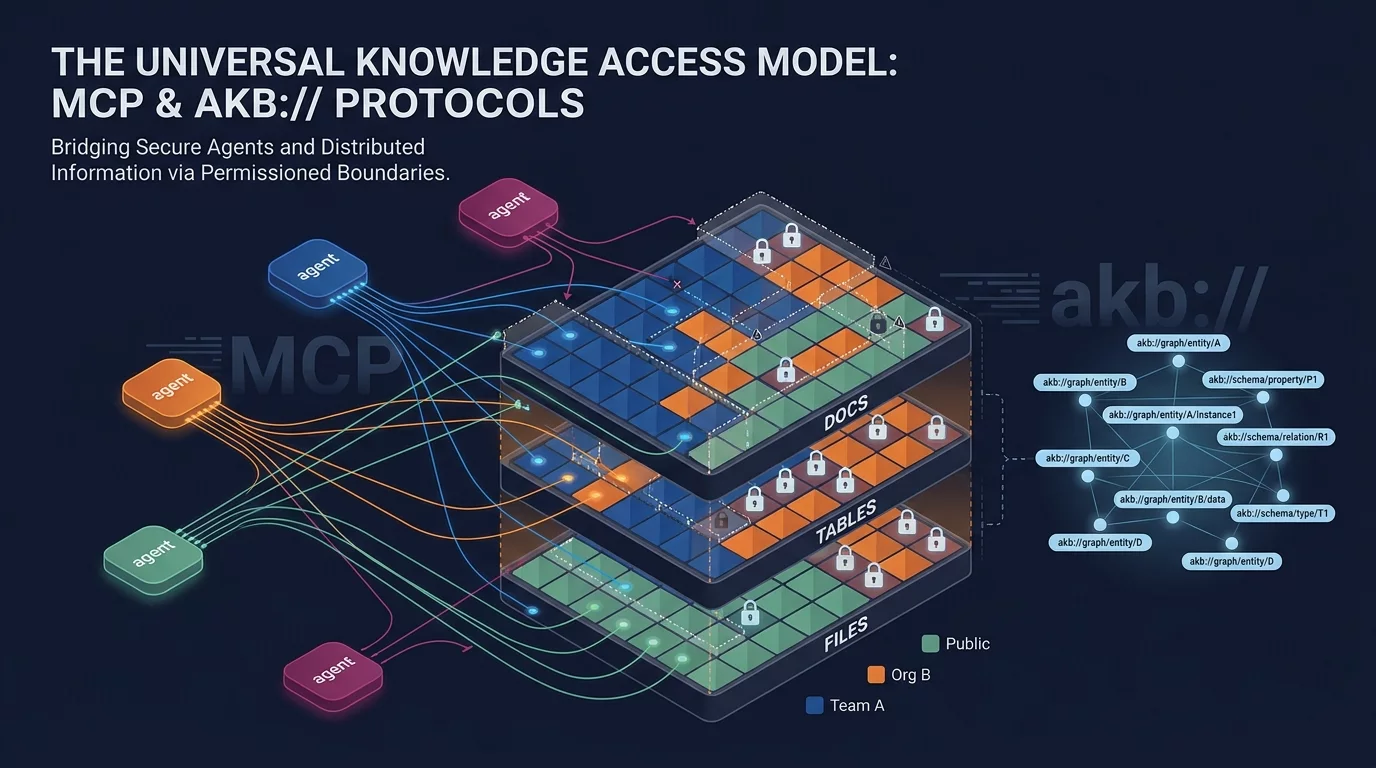
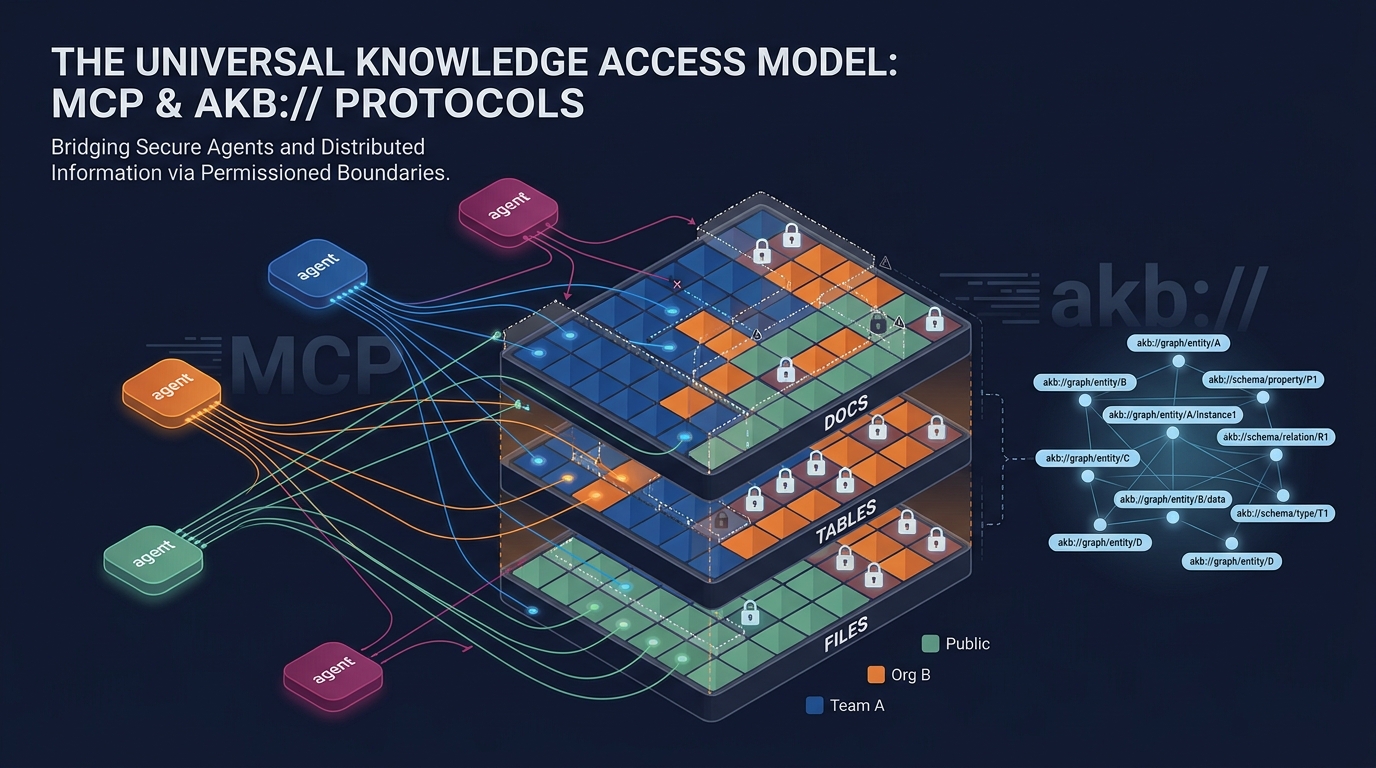
Organizational memory for AI agents. PostgreSQL-native knowledge base served over the Model Context Protocol (MCP) — agents read and write directly with hybrid semantic + keyword search, structured tables, files, and a URI graph. Drop-in alternative to Confluence / Notion for Claude Code, Cursor, Windsurf, and any MCP-aware agent.
Works with
Any agent client that speaks MCP (Streamable HTTP or stdio):
- Claude Code — CLI / VS Code / JetBrains
- Claude Desktop — macOS / Windows
- Cursor, Windsurf, Cline, Continue — via the
akb-mcpstdio proxy - Custom agents — direct HTTP
POST /mcp/with a Bearer token
The default flow uses a Personal Access Token. Deployments with the
optional MCP OAuth Resource Server path turned on (via Keycloak as
the AS — see docs/mcp-clients/web-connectors.md)
also accept Claude Code's mcp add --transport http + mcp login flow
end-to-end, without a PAT.
MCP protocol compatibility
AKB keeps one tool and authorization core behind two protocol adapters:
| Surface | Modern | Legacy |
|---|---|---|
Direct HTTP /mcp/ |
2026-07-28 stateless server/discover and per-request _meta with Mcp-Protocol-Version / Mcp-Method (and Mcp-Name for named calls) |
2024-11-05, 2025-03-26, 2025-06-18, 2025-11-25 initialize, stateless requests (no Mcp-Session-Id lifecycle) |
akb-mcp stdio proxy |
2026-07-28 discovery and per-request metadata |
2025-06-18 initialize |
The proxy answers either handshake locally and normalizes backend calls to the modern stateless contract when available. For older backends without modern discovery, the proxy can fall back to legacy initialization and retain a session ID if that older server returns one. The current backend runs both adapters statelessly. A process cannot mix generations, and unsupported revisions or conflicting protocol evidence fail closed before a tool or local-file operation runs.
Plugins
Beyond raw MCP access, AKB ships ready-made agent plugins for Claude Code and Codex that wrap common vault workflows:
- akb-wiki — ingest a source (local file, web URL, GitHub PR / release / commit, Confluence page, or Jira issue) into the vault as a structured document, and answer questions from the vault with grounded, cited synthesis (read-only).
- akb-sessions — capture a coding session as structured notes: a session report plus follow-up tasks, learnings, ideas, and decisions.
- akb-claude-code — a Claude Code lifecycle bridge: hooks anchor each session to your AKB memory vault, injecting preferences and recent learnings at the start and writing a recap at the end.
/plugin marketplace add dnotitia/akb        # Claude Code
codex plugin marketplace add dnotitia/akb   # Codex
Install details and credentials: plugins/.
Try it live
A public demo runs at akb-demo.agent.seahorse.dnotitia.ai.
Browse and search a small fictional-organization knowledge base — product docs,
a company handbook, agent session notes, and an engineering wiki, cross-linked
by the URI graph — right in your browser, no signup. To wire it into your own
agent, sign up with any email (a throwaway address is fine) and point the
akb-mcp proxy at
https://akb-demo.agent.seahorse.dnotitia.ai/mcp/.
⚠️ Throwaway demo. It is public, wiped and re-seeded weekly, and runs on minimal resources with no uptime, privacy, or data guarantees. Don't put anything real or sensitive in it — treat every write as public and ephemeral. For real use, self-host with Docker Compose or Kubernetes.
Why AKB
Most knowledge tools are built for humans clicking through a UI. Agents need a
different shape: structured documents, semantic + keyword search in one call,
explicit relations, and full version history. AKB gives agents a single set of
tools (akb_put, akb_search, akb_browse, akb_relations, …) over a
PostgreSQL-native revision store and hybrid index. Explicit Bare Git installations
remain supported for existing deployments.
Retrieval quality
Memory is only useful if the right note comes back. AKB's hybrid retrieval (dense + BM25, source-level dedup) was benchmarked on LongMemEval-S — 500 long-context questions, ~50 chat sessions per question. Recall@5 = 98.4%, with no reranker in the loop.
| System | R@5 | n | Reranker | Source |
|---|---|---|---|---|
| AKB hybrid | 98.4% | 500 | no | this repo |
| MemPalace hybrid + rerank | 98.4% | 450 | yes | MemPalace |
| gbrain hybrid | 97.6% | 500 | no | gbrain-evals |
| gbrain vector | 97.4% | 500 | no | gbrain-evals |
Methodology, per-category breakdown, and a one-command reproducible harness
live in eval/longmemeval/. The embedding model differs
across systems (AKB: bge-m3@1024), so read this as a stack-level comparison.
Design philosophy
Core stays small; flexibility comes from extension, not built-in
automation. AKB does not ship its own consolidator, summariser, or
"knowledge gardener" — instead every write records a structured event in the
PostgreSQL outbox. When redis_url is configured, the publisher fans those
events out to a Redis Stream (akb:events). Operators wire any external
consumer (periodic synthesis bot, doc-rot reaper, weekly-digest agent, audit
trail, …) on top, with no patches to the core. The base contract is a
read/write store; opinions about what to do with the knowledge live outside.
Architecture
┌──────────────────────────────────────────────────────────┐
│                  Access Layer                            │
│   MCP Server  │  REST API  │  Web UI                     │
├──────────────────────────────────────────────────────────┤
│                  Core Services                           │
│   Document (Put/Get)  │  Search (Hybrid: dense+BM25)     │
│   Relations (graph)   │  Session  │  Publications        │
├──────────────────────────────────────────────────────────┤
│                  Storage Layer                           │
│   Native revisions     │  PostgreSQL 16 (text + meta SoT)│
│                        │  Vector store (driver):         │
│                        │    pgvector        (default, PG)│
│                        │    qdrant          (optional)   │
│                        │    seahorse-cloud  (managed)    │
│                        │    seahorse-db     (self-hosted)│
│                        │    seahorse-db-grpc(experimental)│
└──────────────────────────────────────────────────────────┘
PostgreSQL is the source of truth — chunk text + metadata + BM25 vocab.
The vector store is a driver-pluggable derived index holding dense
embeddings and corpus-side sparse vectors. Full vector-store loss is
recoverable from PG by setting chunks.vector_indexed_at = NULL and
letting the indexing worker re-populate.
Key Concepts
- Vault — The unit of access control and knowledge organization. Native revisions live in PostgreSQL; the legacy backend uses one bare Git repo per vault.
- Collection — A directory inside a vault. Topical grouping of documents.
- Document — Markdown + YAML frontmatter, optimised for agent read/write.
- Hybrid Search — Dense (semantic) + BM25 (lexical) fused via RRF in one call.
- Relations —
depends_on,related_to,implementsin frontmatter form an explicit knowledge graph. - Vault isolation in
akb_sql— Enforced by PostgreSQL ACL. Each AKB user has a corresponding PG role (akb_user_<uid>) and each vault has three group roles (akb_vault_<vid>_{reader,writer,admin}).akb_sqlruns the user's SQL inside a transaction withSET LOCAL ROLE; cross-vault references return PG42501directly. No application-side regex inspects user SQL for forbidden identifiers. Seedocs/designs/pg-native-rbac/.
MCP Tools (selection)
| Tool | Description |
|---|---|
akb_list_vaults / akb_create_vault |
Vault management |
akb_put / akb_get / akb_update / akb_delete |
Document CRUD (revision + indexing) |
akb_put_file / akb_get_file / akb_update_file / akb_delete_file |
File attachments — proxy-side (requires local filesystem) |
akb_put_image / akb_discard_image |
Validated inline Markdown images — proxy-side in akb-mcp 2.2+ |
akb_create_table / akb_alter_table / akb_drop_table / akb_sql |
Tabular content — per-doc tables + SQL |
akb_browse |
Tree traversal (collection → docs) |
akb_search / akb_grep |
Hybrid search (dense + BM25) / literal grep |
akb_drill_down |
Section-level retrieval |
akb_relations / akb_link / akb_unlink / akb_graph |
Knowledge graph |
akb_edit / akb_diff / akb_history |
In-place edit, diff, revision history |
akb_grant / akb_revoke / akb_set_public |
Permission boundaries — per-user, per-org, public |
akb_publish / akb_unpublish |
Public publication |
Agent memory and session lifecycle are not MCP tools — they live on
the dedicated /api/v1/agent-sessions REST surface, driven by AKB
lifecycle plugins (akb-claude-code, akb-cursor, …) that hook into
the agent's own SessionStart / PreCompact / SessionEnd events. As an
agent, your own memory vault (agent-memory-{username}) is browsable
through the standard akb_search / akb_browse / akb_get tools
exactly like any other vault.
The full tool catalogue is exposed via akb_help() from any MCP client.
Inline document images from MCP
Inline images are hidden document attachments, not browsable Files. Upload a local PNG, JPEG, GIF, or WebP (maximum 10 MiB), then insert the returned Markdown without reconstructing its asset URL:
image = akb_put_image(
  parent="akb://eng/coll/specs",
  file_path="/workspace/architecture.png",
  alt_text="Request processing architecture")

akb_put(
  parent="akb://eng/coll/specs",
  title="Request Processing",
  content="# Architecture\n\n" + image.markdown)
For an existing document, use akb_get followed by a targeted
akb_edit(base_commit=...). Do not pass only the image fragment to
akb_update(content=...), which replaces the complete body. Image bytes are
immutable: replacing an image means uploading a new one and editing the
Markdown reference. Remove an image by deleting its Markdown expression; use
akb_discard_image only for an upload that never reached a successful document
commit. Run akb_help(topic="images") for retention and publication behavior.
The image tools require both the matching backend release and akb-mcp 2.2 or
newer. For upgrades, deploy the backend first, then publish/install the proxy
and restart existing MCP processes so they load the updated tool list.
Document Format
Every vault resource has a location-aware AKB URI — the canonical handle used by every tool and stored in relations. As of 0.3.0:
akb://{vault}                                          vault root (browse target)
akb://{vault}/coll/{coll_path}                         collection (browse target)
akb://{vault}[/coll/{coll_path}]/doc/{filename}        document
akb://{vault}[/coll/{coll_path}]/table/{name}          table
akb://{vault}[/coll/{coll_path}]/file/{uuid}           file
The /coll/{coll_path} segment is omitted for resources at the vault
root. Walking up a URI to its parent collection is a pure string
operation — paste the parent into akb_browse(uri=...) to list
siblings without an extra lookup.
For large Vaults, start with akb_browse(uri=..., depth=0, page_size=100)
and follow next_cursor until complete=true, or drill into a Collection.
See bounded navigation and literal-search scope limits
for paging, partial results and protective grep errors.
---
title: "Payment API v2 migration plan"
type: plan              # note | report | decision | spec | plan | session | task | reference
status: active          # draft | active | archived | superseded
tags: [payments, api]
domain: engineering
summary: "REST → gRPC transition plan."
depends_on: ["akb://eng/coll/specs/doc/payment-api-v2.md"]
related_to: ["akb://eng/coll/meetings/doc/2026-05-01-payments.md"]
---

# Payment API v2 migration plan
...
Open Knowledge Format (OKF) compatible
With the explicit Bare Git backend, a vault is stored as a git tree of
.md + YAML-frontmatter files whose
identity is the path — the same model as Google Cloud's
Open Knowledge Format
(OKF v0.1), which AKB independently arrived at before the spec existed.
AKB-authored bundles satisfy all three OKF MUST rules. Server-side
akb_export({"vault": "<vault>", "format": "okf"}) and authenticated
GET /api/v1/vaults/{vault}/export?format=okf support both PostgreSQL Native
and Bare Git through the document service. Bundles contain documents plus
tables/files represented as concept documents.
The offline CLI below reads an existing Bare Git worktree; it does not read
Native storage. Run it from backend/:
cd backend
uv run python -m app.cli okf-export --from-git /data/vaults/_worktrees/<vault> \
    --vault <vault> --out ./okf-out/
uv run python -m app.cli okf-validate ./okf-out/
OKF and AKB are complementary — OKF standardizes how knowledge is written
down; AKB stores, versions, searches, governs, and serves it to agents. See
okf/ for the mapping and a sample bundle.
Guides
Task-oriented guides for teams evaluating or adopting an agent knowledge layer:
- Sharing one agent memory across Claude Code, Cursor, and other MCP clients
- Evaluating retrieval claims for an agent knowledge layer
- Keeping document structure in retrieval: heading-aware chunks and section reads
- Self-hosting AKB: license terms, seat counting, and checks before you commit
- Applying permissions at query time when agents search shared knowledge
- Keeping a record of what coding agents decided
- Keeping search current when documents and embedding models change
Quick Start
New installations use PostgreSQL Native with a persisted installation identity and an explicit database bootstrap. Use a new Compose project and never-used database. Existing installations must follow the pre-upgrade preservation procedure before using this version; changing a default does not migrate their data.
The recommended stack runs PostgreSQL with pgvector, MinIO, API, a separate worker, and frontend. One-shot services prepare the File bucket and Native authority before the application starts. Docker Compose 2.24.4+ is required. Configure an OpenAI-compatible embedding endpoint for dense search; pgvector and Qdrant degrade to BM25-only lexical search when embedding is unavailable.
MinIO uses a mirror with the original upstream server digest pinned after
the Quay image removal.
Local, evaluation, CI, and all-in-one builds use the same artifact; bucket
bootstrap and all-in-one builds use the mc bundled in that server image.
# 1. Build this checkout's images. For a registry installation, use a backend
# image pinned as registry.example.com/akb-backend@sha256:... instead.
docker build -t akb-backend:native-local ./backend
docker compose -p my-native-install build frontend postgres
export AKB_NATIVE_IMAGE="$(docker image inspect akb-backend:native-local --format '{{.Id}}')"
export AKB_NATIVE_CONFIG_DIR="$PWD/config/native"

# 2. Prepare installation assets ONCE. Keep them and the original template.
mkdir -p "$AKB_NATIVE_CONFIG_DIR"
cp config/app.yaml.example "$AKB_NATIVE_CONFIG_DIR/template.yaml"
cp config/secret.yaml.example "$AKB_NATIVE_CONFIG_DIR/secret.yaml"
$EDITOR "$AKB_NATIVE_CONFIG_DIR/template.yaml" # provider and public URL settings
$EDITOR "$AKB_NATIVE_CONFIG_DIR/secret.yaml"   # credentials and independent secrets

docker run --rm -v "$AKB_NATIVE_CONFIG_DIR:/installation" \
  "$AKB_NATIVE_IMAGE" python -m app.cli generate-local-session-keyset \
  --output-dir /installation/local-session
docker run --rm -v "$AKB_NATIVE_CONFIG_DIR:/installation" \
  "$AKB_NATIVE_IMAGE" python -m app.cli prepare-native-config \
  --source /installation/template.yaml --secret /installation/secret.yaml \
  --output /installation/app.yaml --tenant-id my-installation --namespace akb \
  --image-digest "${AKB_NATIVE_IMAGE##*@}"

# 3. Use the same project, files and environment on every subsequent operation.
docker compose -p my-native-install \
  -f docker-compose.yaml -f docker-compose.native.yaml up -d --no-build

# 4. Provision the local recovery administrator with an operator-owned password.
docker compose -p my-native-install \
  -f docker-compose.yaml -f docker-compose.native.yaml \
  exec -T backend python -m app.cli provision-recovery-admin local \
  --username recovery-admin --email recovery-admin@example.com \
  --password-file - < /secure/operator/recovery-admin.password

open http://localhost:3000
To upgrade, update the checkout and repeat step 1 before step 3. up --no-build
never builds, so it cannot pick up what the new checkout builds (frontend,
postgres): a missing image makes it fail, and an old one keeps running. On the
upgrade that turned PostgreSQL into a built image, skipping step 1 stops the API
(backend) and then fails with No such image: my-native-install-postgres:latest,
which leaves the API down.
The local image ID pins the locally built bytes; it is not a registry digest.
For distributed installs, build/push first and use the registry digest for
AKB_NATIVE_IMAGE. Keep the generated initializing image receipt unchanged
when upgrading the workload image. Never regenerate identity or local-session
keys on restart. On Linux, ensure the operator can read and back up assets
created by the container (or run the preparer with the operator's UID/GID).
The generated app.yaml and companion secret.yaml are the single source of
application configuration and are mounted read-only at /etc/akb.
AKB_PROCESS_ROLE=all|api|worker only selects process composition;
AKB_TOKENIZER_PROCESSES=1..4 can reduce tokenizer concurrency. Revision
selection is not an environment-variable switch.
See the Native installation guide for image upgrades, bootstrap recovery and Kubernetes. The [Compose guide](https://github.com/dnoti