


Alchemist
OLBRAIN · AGENT BUILDER
Build, test and publish Olbrain AI agents from Claude Code, Codex or claude.ai.
You describe the agent. Claude plans it with Alchemist's guidance; Alchemist builds it, tests it, checks every step — and asks you before anything goes live, unless you let Claude decide.


Install · How a build works · Capabilities · Tools · Privacy · Docs
What it is
Alchemist is Olbrain's agent builder, available as an MCP server and a Claude Code plugin. You tell Claude what the agent should do, in plain words. Claude (or Codex) plans and designs the agent from your words and your project, with Alchemist's step-by-step guidance. Alchemist builds it in your Olbrain organisation, tests it on real inputs, checks each step in order, refusing one that is skipped, and publishes it.
Every agent it builds runs on Olbrain and stays visible in Noesis, Olbrain's console, where your team can open, review and change it.
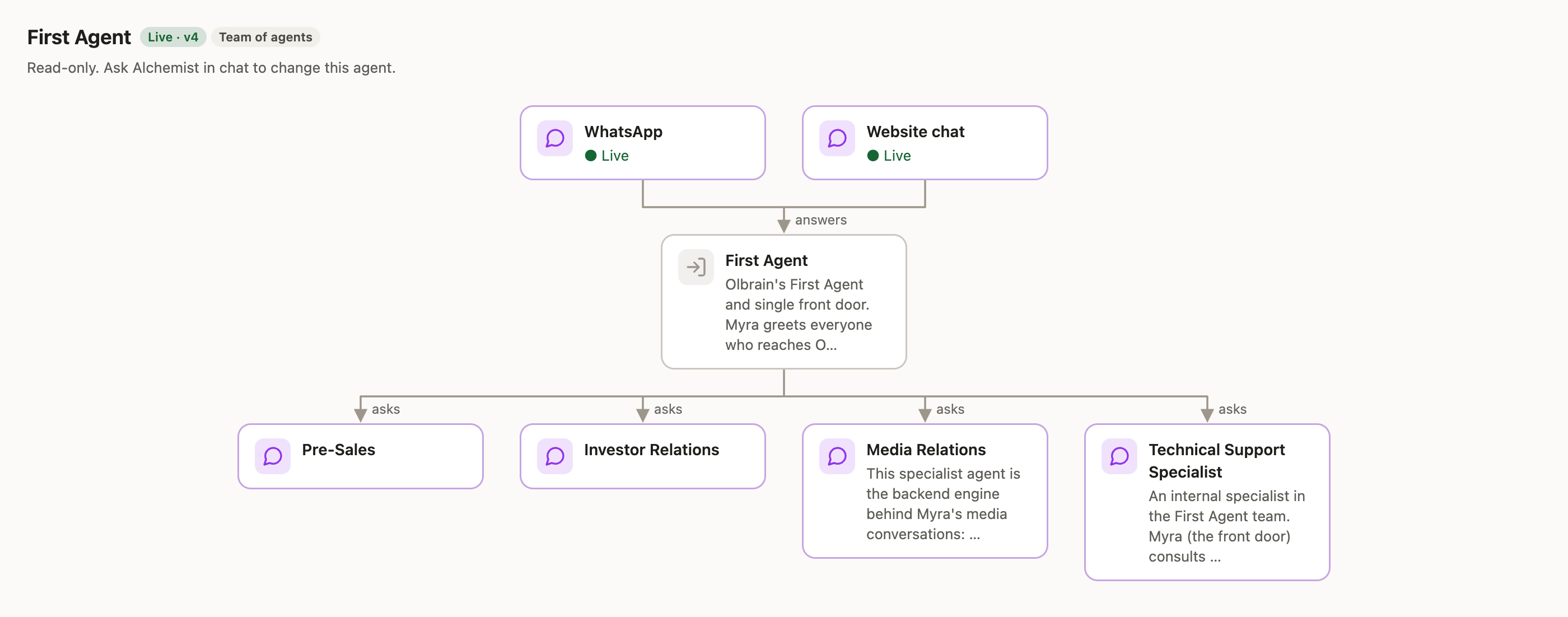
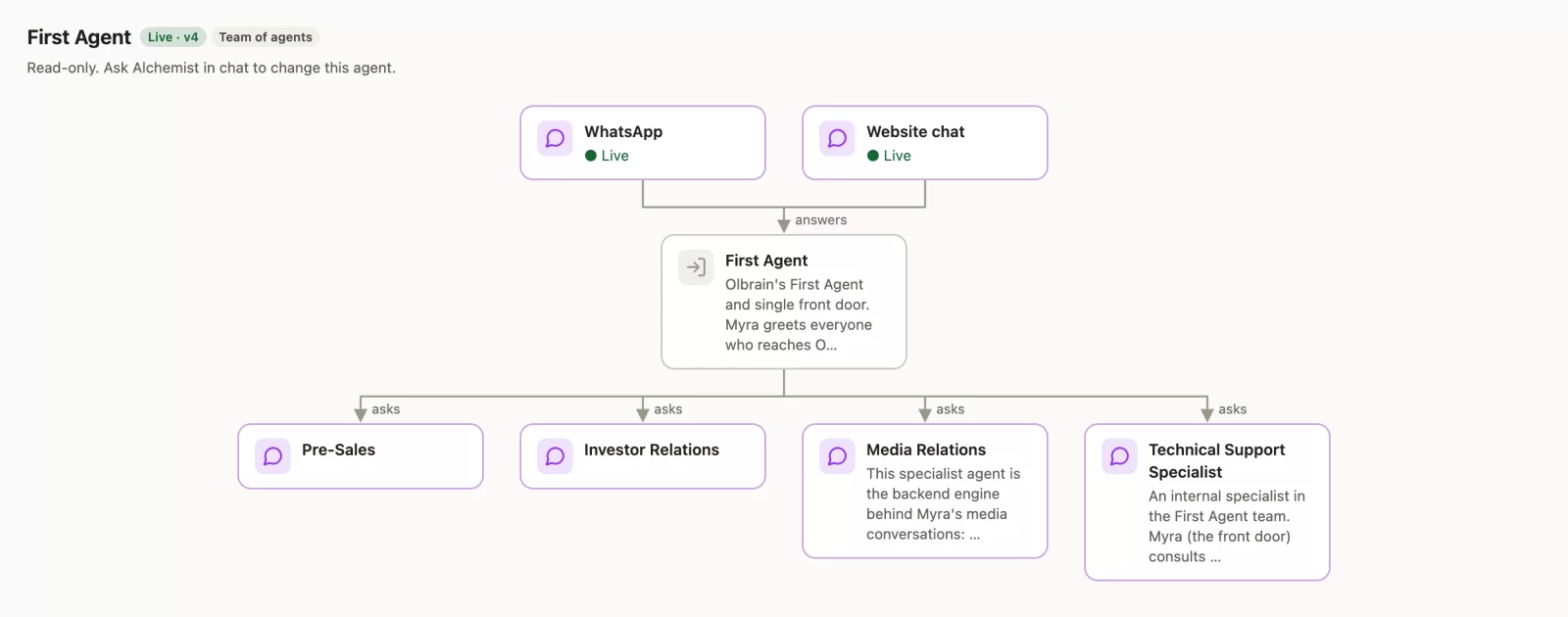
Olbrain's own front door, built with Alchemist: one team of agents on WhatsApp and website chat.
Install
Claude Code
/plugin marketplace add Olbrain/alchemist-plugin
/plugin install alchemist@alchemist
Then run /mcp, pick alchemist and sign in with your Olbrain account. New to Olbrain?
Choose Create account on the sign-in page.
Claude Code asks before every tool call. To stop it asking each time Claude checks on a
build, allow these five tools once under /permissions (they read; alchemist_state also
marks the build's news as seen, and Claude shows it to you):
mcp__plugin_alchemist_alchemist__whoami, mcp__plugin_alchemist_alchemist__alchemist_builds,
mcp__plugin_alchemist_alchemist__alchemist_build,
mcp__plugin_alchemist_alchemist__alchemist_capabilities and
mcp__plugin_alchemist_alchemist__alchemist_state. Leave the rest asking, including
alchemist_do and alchemist_answer: they take build steps, answer cards or change your
organisation.
To see an agent drawn in a pane beside the chat, also install the canvas:
/plugin install alchemist-canvas@alchemist
It draws the agent whenever Claude shows it, and redraws it when a publish or make-live
card arrives, with new, changed and removed parts marked. /agent-canvas opens the pane
when the terminal is too narrow for it to open by itself. It needs a Claude Code build
with plugin panes; older builds and Codex skip it.
Codex
codex mcp add alchemist --url https://alchemist.olbrain.com/mcp/
codex mcp login alchemist
Optional: copy plugins/alchemist/skills/alchemist to ~/.agents/skills/alchemist so Codex
follows the same workflow as Claude, including when to continue a build and when to start a
new one. Without it, the server's own instructions carry the same rule. A copied skill does
not update itself: copy it again after each release (0.9.0 changes how builds run).
claude.ai and Claude Code on the web
Add a custom connector with the URL https://alchemist.olbrain.com/mcp/
(Customize → Connectors → Add custom connector; on Team and Enterprise plans an owner adds it
under Organization settings → Connectors). Then click Connect and sign in.
How a build works
| Stage | What happens | Your call |
|---|---|---|
01 Brief |
Your coding agent drafts what you asked for (who the agent serves, what it does, what it must not do) from your words and your project; Alchemist checks it. | Approve or change it |
02 Plan |
Your coding agent drafts the agents, steps, channels and tools; Alchemist checks it. | Approve or change it |
03 Build |
Alchemist builds the agent, connects its tools and knowledge, and reviews the setup for gaps and contradictions. | Sign in to tools or add keys when a card asks |
04 Test |
Your coding agent writes the tests; Alchemist checks them, runs them on the draft and grades them. A job gets a live run on a real input first. | Run the live test, or not yet |
05 Publish |
The tested version is published, with a 30-day free trial for a new agent. | Publish, or not yet |
06 Go live |
Embed code, API and SDK steps, or the channel it answers on. | You run the commands |
Alchemist gives one stage at a time and refuses a step taken out of order. Builds started in
Noesis, and plugin builds while Olbrain moves accounts over, are still planned by Alchemist's
own model through the alchemist tool; the skill switches by itself.
On a build Claude plans, each agent has a budget: six passes per fix round, a stop after three passes in a row without a gain, four failed compiles and 120 draft test runs. When a build reaches one, Claude shows the best result so far and asks whether to continue (two more passes). A stronger model usually gets a build through its tests first time.
Before Alchemist publishes an agent, makes it live, merges agents or changes how one behaves,
it stops with an approval card. You decide how many of these Claude answers for you:
tell it in the chat, or put it in your CLAUDE.md or AGENTS.md, for example "Approve
plans and tests yourself; ask me before publishing." If you haven't said, Claude answers
every card itself in auto mode (Codex: running without approvals) and asks you otherwise.
It still asks for what only you can do, like sharing a Drive folder or a browser step.
On a build Claude plans, removing an agent, forgetting a customer, renaming or moving an
agent, changing a job's email address, and publishing despite failing tests are always
answered in the browser, from the link Claude gives you.
If Claude Code blocks an answer, answer the card on its build page, or allow the tool with
/permissions: mcp__plugin_alchemist_alchemist__alchemist_answer when installed as the plugin,
mcp__claude_ai_Alchemist__alchemist_answer when added as a claude.ai connector.
Use it
- Ask in plain words: "Use Alchemist to build an agent that answers questions about our pricing and hands refunds to a person."
/alchemist:build <what the agent should do>starts a build./alchemist:statusshows your account, organisation, builds and any cards waiting on you.- "Pick up my support agent build": Claude finds your build by name and carries on. Builds are private to you; a teammate changes your published agent in a new build of their own. Anything waiting on you comes first, and Claude doesn't start a duplicate.
- "Put my support agent on my website" or "call my intake job when our signup form is sent": Claude adds the chat snippet, or a server route that calls the agent, to your project. It never puts your API key in browser code.
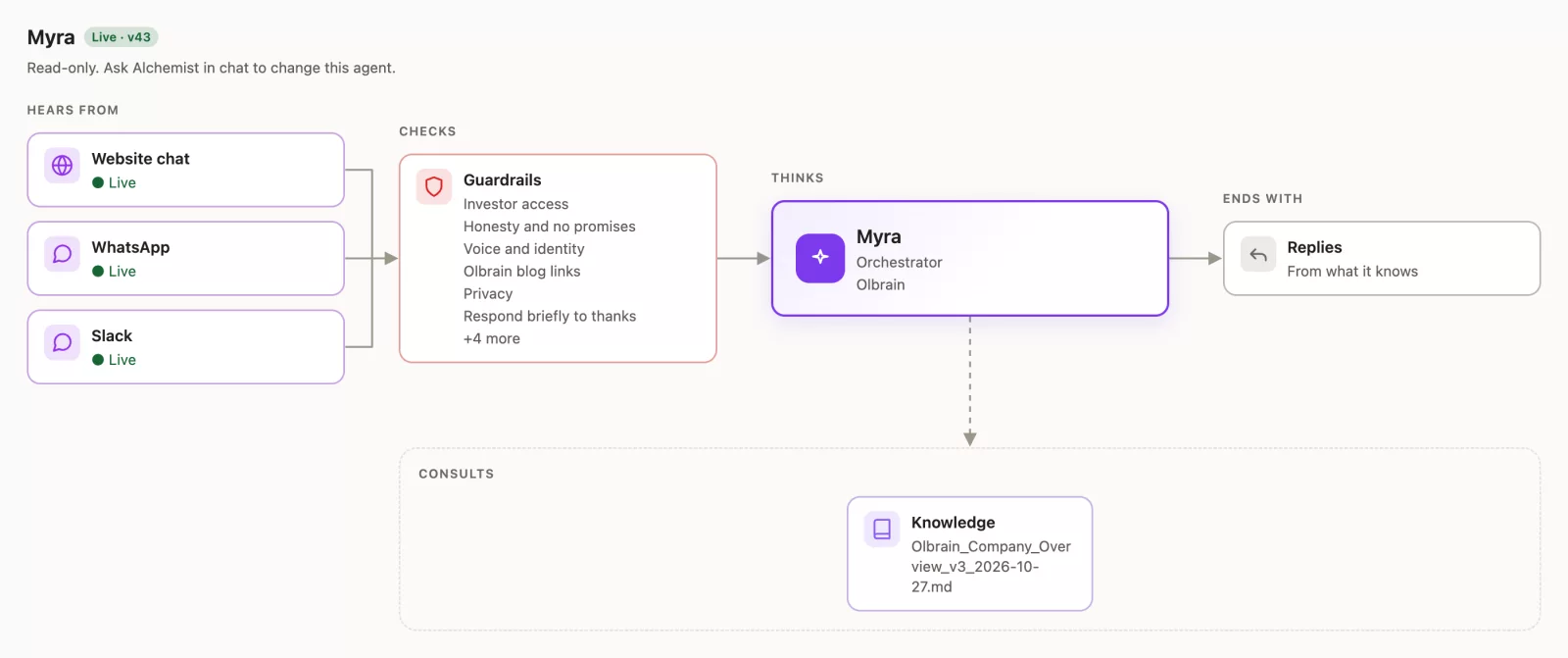
- "Show me my support agent": Claude draws it as a read-only diagram (example below).
- "What can Alchemist do?" or "Can it answer calls on our phone number?": Claude checks the live capability list before saying yes or no.
- "Where is my ticket TKT-…?" or "Raise a ticket: our webhook job didn't run": Alchemist handles your Olbrain support tickets in the same session.
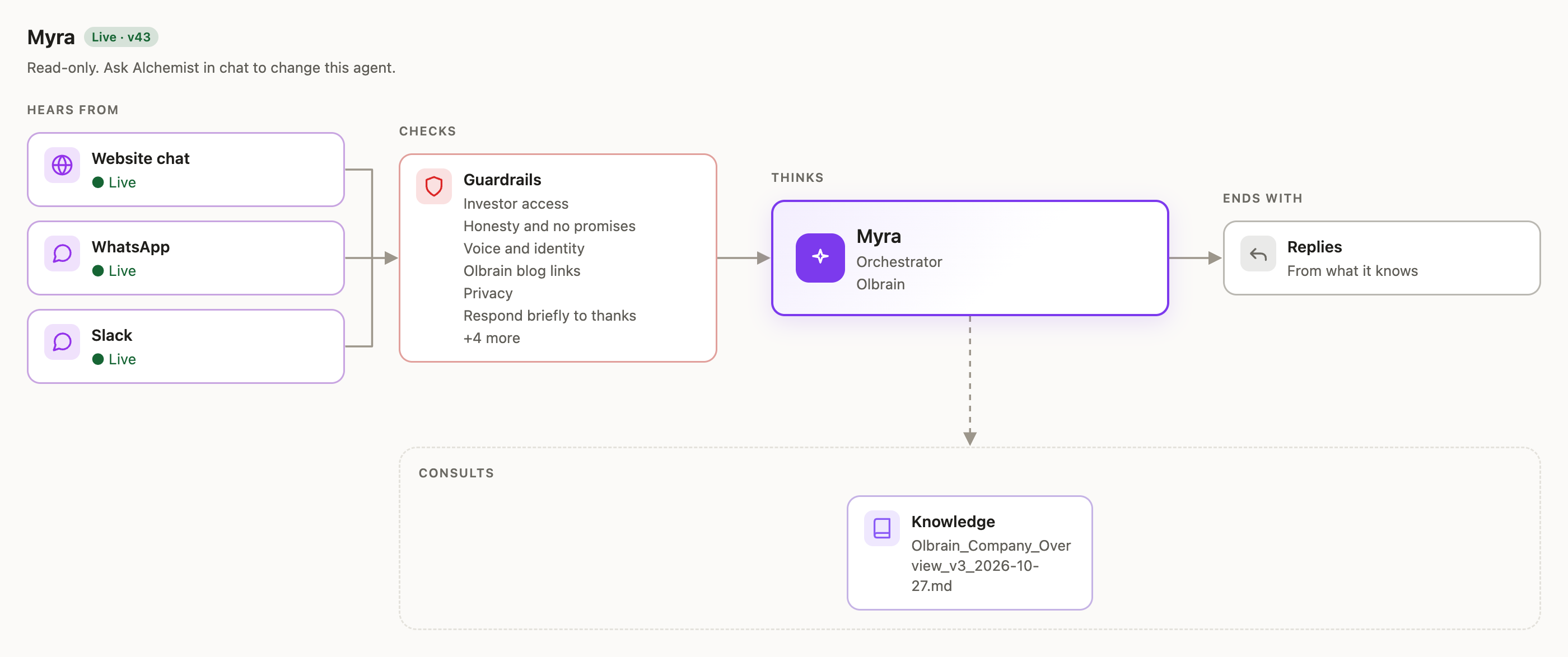
A chat agent's diagram: where it hears from, what it checks, what it consults and how it ends.
Capabilities
Ask Claude "What can Alchemist do?" for the full, current list: it reads
alchemist_capabilities live, so it is never out of date.
You don't pick a type of agent. Describe the work; Alchemist decides.
| Agent | What it is |
|---|---|
| Chat agent | One person talks to it, turn by turn, in chat or by voice. |
| Automatic job | Runs by itself with nobody talking to it. Steps can wait hours or days, stop for a named person's approval (with reminders), call APIs and tools, and notify people. |
| Team of agents | One front door hands each question to the specialist that owns it, and can start automatic jobs. Customers reach it on website chat or WhatsApp. |
| Research agent | A person asks for a report in Noesis; it researches the sources and emails the report. A scheduled job can run it too. |
A job starts on a schedule, a webhook (Stripe, Shopify, GitHub and other signed senders), an email, a team's front door, or a new file in a Google Drive, cloud storage bucket, Dropbox or OneDrive folder. Agents answer on website chat, WhatsApp, Shopify storefront chat, your phone number and Microsoft Teams. They use tools from Olbrain's connector catalog, any REST API or your own MCP server, and answer from their knowledge files. Every agent gets a setup review and tests before it publishes. Anything Alchemist can't build yet goes to the Olbrain team as a request, with an id you can follow up on.
Commands and tools
| Command | What it does |
|---|---|
/alchemist:build <description> |
Start a build |
/alchemist:status |
Your account, organisation, builds and waiting cards |
| Tool | What it does |
|---|---|
whoami |
Who you are signed in as, and your organisations |
create_org |
Create an organisation and make it active |
select_org |
Switch your active organisation (everywhere you are signed in) |
list_members |
Who is in your organisation |
alchemist |
Start a build or add your words to one; on builds Alchemist's own model runs, one builder turn |
alchemist_state |
Where a build stands: its stage, the steps allowed next, waiting cards, budget and news. Marks the news it returns as seen |
alchemist_do |
Take one allowed build step (write the brief, build, write tests, run them, raise a card) |
alchemist_answer |
Send your choice on an approval card |
alchemist_builds |
List your builds, each with a state (running, needs you, stale, in progress, inactive, completed, published, archived, idle) and a readable label |
alchemist_build |
One build: its plan, agents, waiting cards and next step; with wait, follows a running turn and says what Alchemist, Cortex and Synapse did |
alchemist_edit_build |
Rename a build, or archive it (and bring it back), with an optional reason |
alchemist_rate_build |
Rate how a build session went (up or down, with an optional comment) |
alchemist_stop |
Stop the turn a build is running |
alchemist_connect |
Put a live agent on your website or call it from your code |
alchemist_capabilities |
What Alchemist can build and do, read live |
alchemist_show_agent |
One agent, or one of its published versions, as a read-only diagram |
Inviting people and joining an organisation happen in Noesis. Every build can also be opened there.
Privacy and security
- Every tool call goes to
https://alchemist.olbrain.com, which acts as you in Olbrain. It keeps your Olbrain sign-in encrypted so you stay signed in; remove the connection to end it. - Keys and passwords for tools never pass through the chat. Approval cards collect them into your organisation's vault.
- Nothing goes live, merges or changes behaviour without an approval card you answered. Claude Code also asks your permission before sending each answer.
- Draft test runs, probes and compiles are counted per developer per day, to keep builds within their budget. Pricing does not change.
- Once an agent is live, its go-live steps call Olbrain's agent API at
https://webhook.olbrain.comwith your organisation's API key — to test it, upload a file for a job, start a job, or from the server route Claude adds to your app. You run those commands yourself, and the key stays in your own environment.
Olbrain's privacy policy and terms.
Links
olbrain.com · Noesis · Docs · Developers · Support
Licence
Copyright Olbrain. All rights reserved.
