
AndonCord
Claude Code sessions on your Mac's notch. Approve tool calls, answer questions, and review plans — without leaving your editor.
⬇ Download AndonCord.dmg — universal (Apple Silicon + Intel), macOS 14+
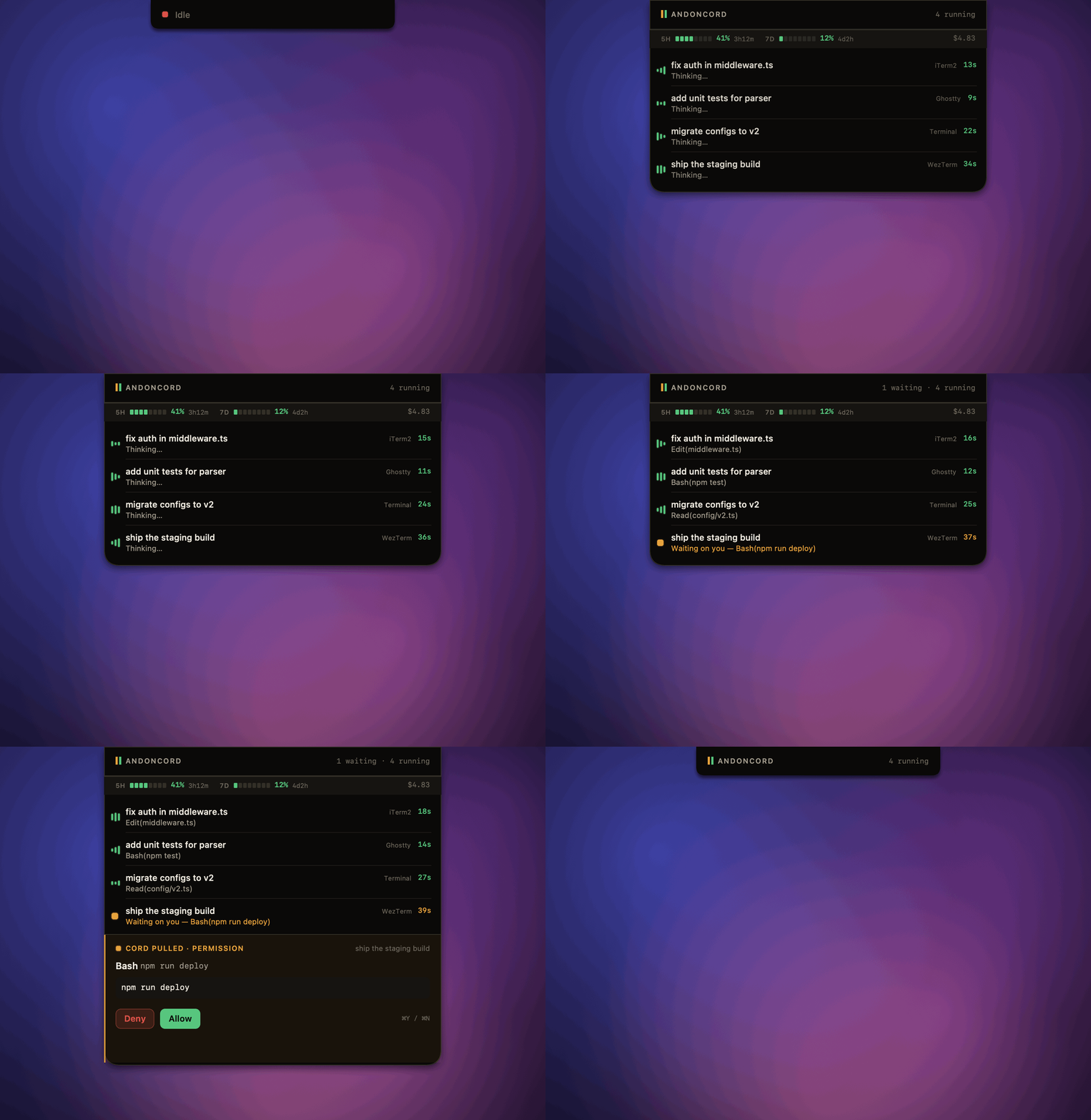
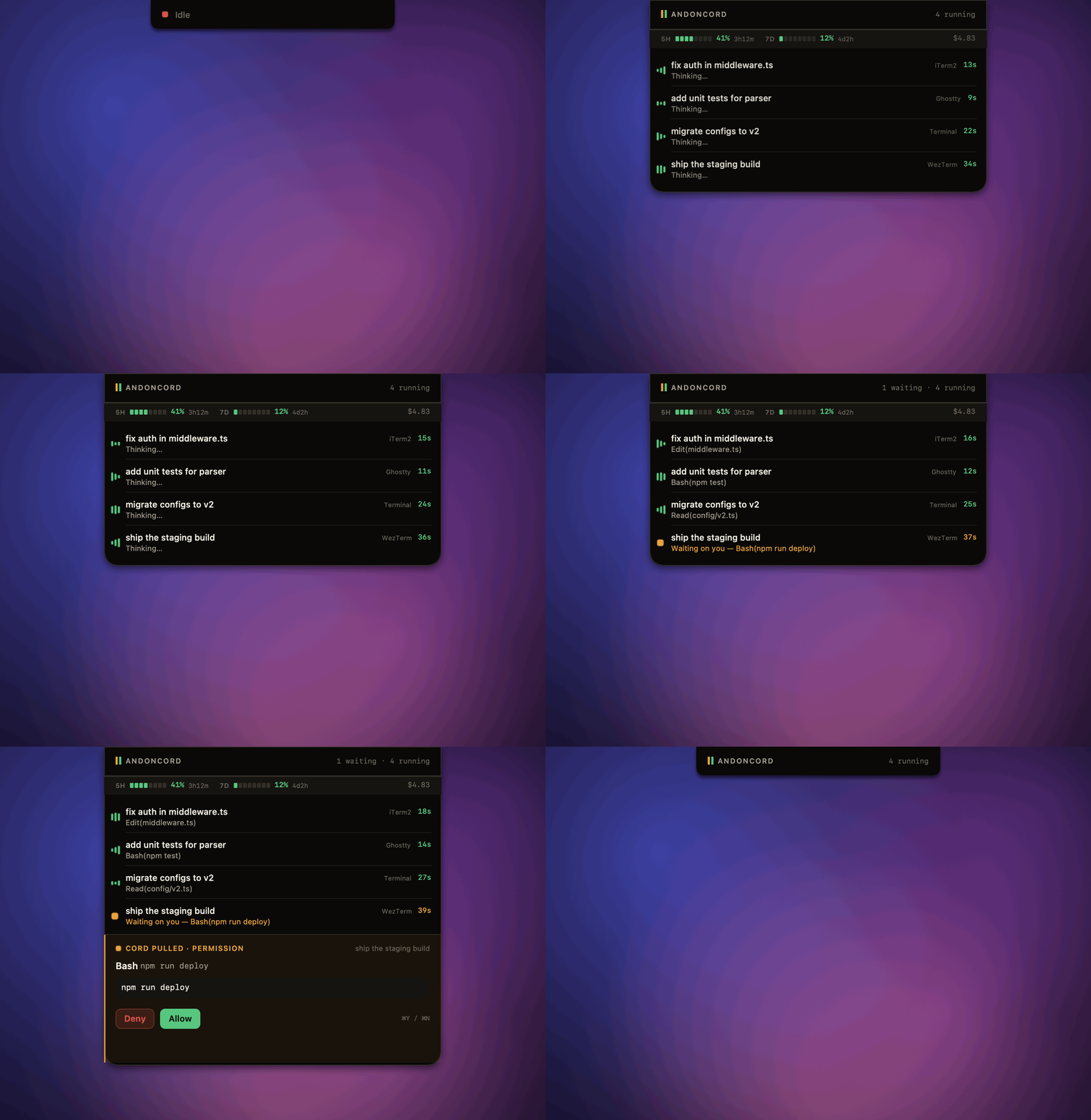
Four sessions on one board with live quota — then one pulls the cord, and the command it wants to run waits in the notch for Deny or Allow.
On a Toyota production line, any worker can pull the andon cord to stop the line and call for help — and a board above the floor shows every station's status at a glance. That is exactly what this app is: Claude Code pulls the cord when it needs you, the board in your notch lights up, you answer, the line resumes.
Claude-Code-only, on purpose. One agent supported deeply beats twenty supported shallowly — it is what lets the permission card show a real diff, the plan reviewer render real Markdown, and questions get answered from the notch instead of just being announced.
What it does
| 🖥️ Watch | Every session's live state — a bouncing equalizer while working, amber blink when it needs you, red when stopped. Elapsed time ticks in real time. |
| ✅ Answer | Approve or deny tool calls (with the actual diff or command in front of you), answer every question of an AskUserQuestion — multi-select and typed answers included — and approve plans or send them back, all from the notch. "Always allow" offers Claude Code's own don't ask again rules, so npm test:* means what it means in the terminal. The terminal's dialog stays live the whole time: answer wherever you are, and the other one clears. |
| 🎯 Jump | Click a session to land in its exact terminal tab, split, or tmux pane — Ghostty 1.3 included. |
| ⌨️ Reach | ⌃⌥Y allow · ⌃⌥N deny · ⌃⌥A always allow · ⌃⌥B show the board — from any app, no Accessibility permission. With the card out of sight, the first press shows it and only the next one acts. |
| 💬 Reply | A finished session in tmux, iTerm2 or Ghostty takes its next prompt straight from its row. |
| 📊 Budget | 5-hour and weekly rate-limit windows, read from Claude Code itself — and a straight answer to the question a percentage can't give you on its own: will it last? |
| 🧾 Account | Where the tokens actually went — by project, by session, by prompt, by file. Read from Claude Code's own transcripts, which record every request and add up none of it. |
| 🔊 Hear | Synthesized 8-bit cues, one per event, distinct enough to learn by ear. Replace any of them by dropping a .wav into ~/.andoncord/sounds. |
| 📺 Place | The board lives on the display you choose — the notched built-in screen or any external monitor (Settings → Display). It steps aside for a fullscreen app, and stays quiet for a session whose own window is already in front. |
Everything is local. No account, no server, no telemetry, no network calls — unless you turn on Exact usage from Anthropic (below), which sends Claude Code's own sign-in token to Anthropic's usage endpoint and nothing else.
Will it last?
A quota percentage on its own is unreadable. 60% used is comfortable four hours into a five-hour window and a wall you hit before lunch twenty minutes in. These windows are fixed-length, so their reset time gives away when they opened — and from that, AndonCord projects where the current pace lands:
5H · 47% used, resets in 2h38m — session runs out 16:12 at this pace
Getting a current percentage is the harder half. Claude Code publishes
rate_limits on exactly one surface — the statusline — and a statusline only
renders while a session is drawing one. Work through the desktop app, an SDK
session, or a headless run and that reading never updates at all; close every
terminal and it stops the moment you do.
So AndonCord reads whichever source is actually alive, in this order:
- Anthropic itself, when Exact usage from Anthropic is on in Settings.
Claude Code reads its quota from
api.anthropic.com/api/oauth/usage, signed in with the token it keeps in the login Keychain; AndonCord asks the same question with the same token every five minutes. That is the figure Claude's own usage panel shows, reset times included, plus model-scoped weekly limits. Off by default, because it is the only thing AndonCord sends off the Mac. The token is read through/usr/bin/security, which Claude Code writes it with, so there is no Keychain prompt. AndonCord never refreshes it itself — refresh tokens rotate, and a refresh Claude Code did not perform would sign it out — so when it has lapsed, AndonCord startsclaudeon a hidden terminal, asks for/status, and lets Claude Code renew its own sign-in (at most every half hour). ~/Library/Application Support/Claude/plan-usage-history.json— the Claude desktop app's own record, sampled every fifteen minutes with the same percentages its Usage panel shows, and carrying a month of history. Recent versions only keep it current while the app's usage tray has been opened in the last day. Read-only; nothing is written back.- Claude Code's statusline, for machines without the desktop app.
- The transcripts, when the rest have gone quiet — one real reading fixes
the scale between measured spend and a percentage, and the ledger carries
it from there. Subagents and workflow agents write their own transcripts
under each session's
subagents/folder, and those are counted too; on a day of workflows they are most of the spend.
Anthropic states each window's reset time outright. The desktop record does not, and that is what the forecast needs. Its history does, implicitly: a reset is the percentage falling, and consecutive samples bracket the moment it happened.
13:29   5h  30%     ← still the old window
13:44   5h   1%     ← new one, so it turned over in between
The weekly window resets on a fixed cadence, so every reset ever recorded constrains the same phase. Not every drop is the cadence — a limit can be reset off-cycle — so resets vote: the brackets that agree with each other modulo a week are intersected, and across a month that pins it to within a few minutes.
And a figure is never presented as current when it isn't:
- a window whose reset time has passed is not drawn at all — that reading is about a window which no longer exists
- a reading Claude Code gave is shown plainly; anything AndonCord worked out
itself is marked
~and says so on hover - between readings, the gap is filled from the transcripts. One honest reading — "you are 40% through this window" — next to the spend that produced it fixes the scale, and after that the ledger carries it forward on its own
Where the tokens went
Menu bar → Token Usage, click the quota strip on the board, or
open -a AndonCord --args --usage if you would rather put it on a shortcut.
Claude Code writes every request it makes to
~/.claude/projects/<cwd>/<session>.jsonl, usage block attached, and adds up
none of it. AndonCord indexes those files and answers the four questions that
follow from a quota running low:
| Projects | which repo is eating the week |
| Sessions | which conversation inside it, largest first |
| Prompts | what one thing you typed set in motion — its replies, its tool calls, its retries |
| Context | which files and commands are actually carrying the cost |
That last one is the least obvious and usually the answer. A 40k-token file read on turn 3 of a 60-turn session is re-sent as a cache read on all 57 requests that follow, so it is charged nearly sixty times over. The Context list separates direct (the result itself) from re-sent (the same result travelling again on every later request), and the second column is normally the larger one.
Two details decide whether these numbers are true, and both are easy to get
wrong: Claude Code writes one line per content block and repeats the identical
usage object on every one of them — counting per line inflates every total by
roughly 3× — and dollar figures are a cost-equivalent, what the same traffic
would cost at API list prices, since a subscription is not billed per token at
all.
The index is built once, cached in ~/.andoncord/usage-index.json, and only
re-reads files that changed — and of a live session's transcript, only the
lines appended since the last pass, so a 200 MB conversation costs kilobytes
per refresh rather than the whole file. The first index runs on half the
cores, not all of them. Nothing leaves the machine; the transcripts are opened
read-only and never modified.
The lamp language
The board reads like an andon board — colour and motion first, text second:
| Lamp | Meaning |
|---|---|
| 🟢 bouncing equalizer + ticking timer | the line is moving — Claude is working |
🟠 hard blink + CORD badge |
cord pulled — a decision is waiting on you |
| 🔴 steady dot | stopped — idle, finished, or failed |
If it's green and moving, it's working. If it's red and still, it isn't. There is no state where a dead session can impersonate a live one: sessions whose process disappears leave the board the moment it exits (a kernel exit watch on Claude Code's own process, with a liveness sweep behind it), and a turn stopped with Esc — which no hook reports — is read from the transcript, where Claude Code records it.
Install
With Homebrew:
brew install --cask muratkaragozgil/tap/andoncord
brew upgrade --cask andoncord picks up new releases.
Or ⬇ download AndonCord.dmg, open it, drag AndonCord into Applications, launch. Releases are Developer ID signed and notarised by Apple, so it opens with a plain double-click.
Or build from source:
git clone https://github.com/MuratKaragozgil/andoncord.git
cd andoncord
./build.sh release
cp -R "build/AndonCord.app" /Applications/
open /Applications/AndonCord.app
First launch walks you through setup. With your consent AndonCord will:
- add hook entries to
~/.claude/settings.json— alongside anything already there; other tools' hooks keep running - point
statusLineat a wrapper that chains to your existing statusline, so its output keeps rendering - create
~/.andoncord/for the local socket, the hook launcher, and a timestamped backup ofsettings.jsontaken before every change
Settings → Remove puts everything back exactly as it was; only entries carrying our marker are touched. Claude Code picks up hook changes in running sessions on its own.
Upgrading from 0.2.x: the first launch rewrites AndonCord's own hook entries to the 0.3 set — the blocking
PreToolUsegroup goes,PermissionDeniedarrives — after the usual backup. Nothing else insettings.jsonis touched, and a file with comments is left for Repair rather than rewritten behind your back.
Upgrading from 0.1.x: earlier releases could also add hooks to Codex, Gemini CLI, and Cursor. Those hooks are now inert — the shim sees they are not Claude Code's and exits without a word, so the other tool carries on as if they were not there — but each still costs a process spawn per event. To remove them, delete the entries that reference
~/.andoncord/bin/andon-hookfrom~/.codex/hooks.json,~/.gemini/settings.json, and~/.cursor/hooks.json.
How it works
Claude Code ──spawns──▶ andon-hook ──unix socket──▶ AndonCord.app
   (hooks)              (the shim)                   (the board)
      ▲                                                   │
      └──────────── decision JSON on stdout ◀─────────────┘
The shim is a real process, not an HTTP callback — deliberately. Claude Code spawns it as a child of your shell, so it inherits the controlling TTY and the terminal's environment variables. That is the only reliable way to learn which tab a session lives in; the hook payload itself carries no terminal information at all.
Approval works by blocking — next to Claude Code's own dialog, not instead
of it. PermissionRequest hooks are registered with a 24-hour timeout. The
shim writes the request to the socket and blocks on read(). Claude Code shows
its usual dialog at the same moment, in the terminal or the desktop app, and
whichever answer comes first wins. When you click Allow, the decision
travels back down the same connection, the shim prints it to stdout, and the
other dialog closes.
Questions and plans are permission requests too. AskUserQuestion and
ExitPlanMode are tools that ask a person, so they arrive as an ordinary
PermissionRequest. A question is answered by allowing the call with its own
input plus an answers map (updatedInput), which is exactly what the
terminal's question dialog does: the tool runs, and Claude reads the answers as
its result. A plan is approved the same way, optionally with Claude Code's
setMode update to start accepting edits; sending it back is a deny whose
message is your feedback. No keystrokes injected into a terminal, no dependence
on the TUI's internals — and since nothing waits in PreToolUse any more,
nothing holds the terminal's own dialog back.
A card never outlives its question. If you answer in the terminal, the
tool call's result arrives with the same tool_use_id the request was matched
to, and the card goes. If Claude Code kills the hook (Esc, an interrupt, the
session dying), the parked connection hangs up and the card goes. A new prompt
or the end of the turn settles whatever the session's own thread was still
asking; a background subagent's request stays until it is answered.
Quota comes from the statusline. rate_limits is exposed on Claude Code's
statusline payload and nowhere else. Since only one statusline can be
configured, AndonCord takes it over and chains to whatever was there before,
passing the identical stdin. Uninstall restores the original entry verbatim.
Failing open
The shim sits on your critical path, so every failure path exits 0 with no
output — which Claude Code reads as "the hook had no opinion":
- app not running → exit 0, Claude Code carries on
- app dies mid-decision → hook released, Claude Code's own prompt carries on
- session closed while a request is parked → hook released immediately
- request answered in the terminal → hook released with no opinion, card withdrawn
- run by anything other than Claude Code — a hook 0.1.x left in another
agent's config, or Cursor running the ones in
~/.claude/settings.json→ exit 0 before the socket is ever touched
The worst case is that AndonCord becomes invisible. It never breaks Claude Code.
The notch panel
The panel window never moves or resizes — only its contents animate. An earlier
version resized the window on hover, which oscillates: the resize moves the
boundary that decides whether the pointer is inside, which flips hover, which
resizes again. With a fixed window and an interactiveRect-based hit test,
clicks outside the drawn region fall through to whatever is behind, and the
feedback loop is structurally impossible.
Project layout
Sources/
  AndonKit/            # models, socket, installer, store — no AppKit
    Server/            # HookServer, SocketTransport, PendingDecision
    Integration/       # ClaudeSettingsInstaller, LauncherWriter, JSONC
    Store/             # BoardStore — the state machine + session reaper
    Audio/             # ChiptuneEngine — synthesized 8-bit cues
  andon-hook/          # the shim: tiny, fail-open, terminal-aware
  AndonCordApp/        # SwiftUI + AppKit
    Notch/             # fixed-size panel, pill, board, request cards
    Terminal/          # precise jump (AppleScript / CLI / tmux)
Tools/make-icon.swift      # the app icon, generated from the theme palette
Tools/make-demo-gif.swift  # the README demo, rendered from the same palette + geometry
The demo above is rendered offscreen from the app's own palette, geometry, and equalizer math — not a live screen capture — so it shows exactly what the app draws. Regenerate it with
swift Tools/make-demo-gif.swift docs/demo.gif.
AndonKit deliberately avoids AppKit so the shim stays light — it is spawned
on every tool call (~10 ms). The icon is code, not an asset, so it can never
drift from the palette the board uses.
Development
swift build --product andon-hook   # RoundTripTests spawn the real shim
swift test                         # 180 tests; two run only against real data (ANDON_SCAN_REAL, ANDON_REAL_SETTINGS)
./build.sh dmg                     # the release artifact: a universal drag-to-install image
The tests that matter most:
- RoundTripTests — run the actual
andon-hookbinary as a subprocess over a real Unix socket and assert on what it prints to stdout, which is the only thing Claude Code ever reads. Covers the approval round trip, release-on-session-end, fail-open, hot-path latency, and hooks 0.1.x left in other agents never reaching the app at all. - InstallerTests — coexistence with other tools' hooks, byte-exact statusline restoration, idempotent reinstall, drift detection, JSONC comments.
- BoardStoreTests / ReapingTests — every code path releases its parked hook (a leak here is someone's hung session), and dead sessions are reaped by pid liveness while parked requests are never swept.
Debugging: launch with ANDON_DEBUG=1 and tail ~/.andoncord/debug.log —
hover and presentation transitions are logged, so a misbehaving panel shows up
as text instead of guesswork.
Known limits
- Precise jump works for iTerm2, Terminal.app, WezTerm, kitty (remote control on), tmux, and Ghostty 1.3+ (found by working directory — two Ghostty terminals in the same directory are indistinguishable). Warp, Alacritty, Hyper, Zed, and editor terminals only get app activation — they expose no public tab-addressing API, and the UI says "Click to raise" instead of pretending.
- MCP forms are shown, not answered. Claude Code waits for
Elicitationhooks before it shows its own form, so a hook that held one would hide the form until the notch answered. The board says which server is asking and links its sign-in page; the answer is given in Claude. - Sessions hosted by the Claude desktop app have no terminal at all; they are identified by the launching bundle and a click raises Claude.
- Quota is exact only from Anthropic — with Exact usage from Anthropic
off, the figure is as current as the desktop app's record (open its usage
tray once a day) or the last statusline, and between readings it is an
estimate, marked
~.claude -pnever renders a statusline at all. - First precise jump or reply prompts for Automation permission (iTerm2, Terminal.app, Ghostty). Denying it degrades to app activation.
- No SSH-remote sessions, no auto-update.
Credits
Inspired by Vibe Island, which supports 26 agents. AndonCord is the opposite bet: one agent, integrated as deeply as the hooks allow.
0.3 learned from the open-source notch apps that took the same road —
ideas, not code: CodeIsland (system-wide
card shortcuts, hiding over fullscreen apps, quiet when the session is in
front, exit watches, tool_use_id withdrawal, the idle-compaction filter),
ping-island (