anyfmt
Drag a file. Tap a key. Drop it on what you want.
A free, open-source file converter that lives in your Mac's menu bar.
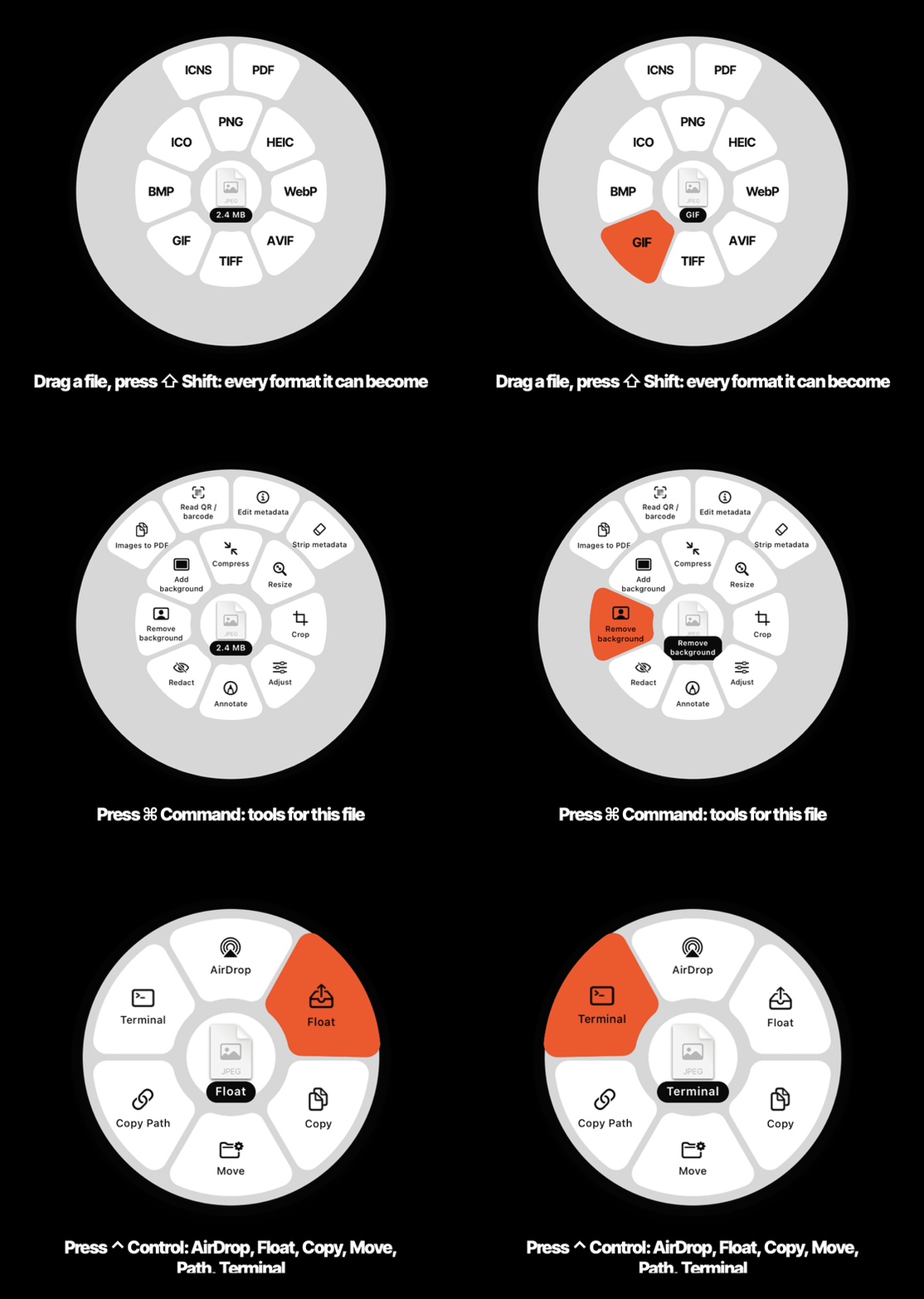
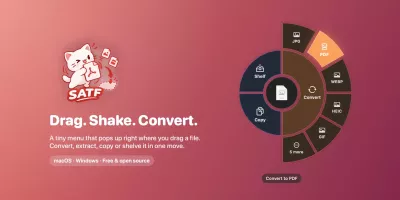
Start dragging any file in Finder and press ⇧ Shift (tap it or hold it): a wheel of every format that file can become opens around your pointer. Drop on a segment and a converted copy appears beside the original. Press ⌘ Command for tools (compress, crop, trim, remove background…) and ⌃ Control for actions (AirDrop, Float, Copy, Move, Copy Path, Terminal).
- Everything runs on your Mac. No uploads, no account, no analytics. The bundled ffmpeg is built without network support.
- Free, including commercial use. Every conversion, tool and action is free forever. You can read every line (AGPL-3.0).
- Nothing to install. ffmpeg, x264/x265, VP9, AV1, Opus, WebP and the SVG renderer ship inside the app. You never need Homebrew.
- Never overwrites. Results are always new files:
photo.jpg, thenphoto 2.jpg.
Inspired by drag-to-convert tools.
Install
Requirements: a Mac with Apple silicon, macOS 13 Ventura or later.
- Download the latest
anyfmt-x.y.z.dmgfrom Releases and drag anyfmt to Applications, or brew install --cask aatmanaj/tap/anyfmt
anyfmt appears in the menu bar. There's no Dock icon and no main window.
Using it
| Do this mid-drag | You get |
|---|---|
| Tap ⇧ Shift | Convert: only the formats this file (or every file in a multi-file drag) can become |
| Tap ⌘ Command | Tools: compress, resize, crop, adjust, annotate, redact, remove/add background, collage, images → PDF, read QR codes, trim, crop video, change speed, split, join, snapshot, compress video, trim audio, normalize, bleep, channels, metadata, merge/split PDF, compress PDF |
| Tap ⌃ Control | Actions: AirDrop, Float shelf, Copy, Move, Copy Path, open in Terminal. Works on folders and mixed selections too |
- Let go of the key and keep dragging: the wheel stays open until you drop or move back to the centre to cancel.
- Press another key to switch wheels without letting go of the file.
- Hover over a format for a moment mid-drag (or right-click it in keyboard mode) to set options: quality, target size, DPI, codec and more.
- No dragging? Select files in Finder and use Finder › Services › Open in anyfmt Wheel (bind it to any shortcut), or press ⌃⌥Space to open an empty ring you can drop files onto.
- Keys are remappable in Settings › Keys.
Permissions, honestly
The wheel needs no permissions at all. anyfmt watches the mouse button and modifier keys (the same public state any app can read) and the system drag pasteboard, which every app can read. It never logs keystrokes, and it can't: it doesn't see ordinary keys.
Two optional extras ask for more, and both are off until you turn them on:
| Feature | Permission | Why |
|---|---|---|
| Press Return on a Finder selection to open the wheel | Accessibility | To catch Return before Finder starts renaming the file |
| Automation → Finder | To ask Finder which files are selected | |
Export to .pages / open .key .numbers |
Automation → Pages / Keynote / Numbers | anyfmt asks your installed iWork apps to do the conversion |
Update checks are also opt-in. When they're on, anyfmt fetches an appcast once a day and sends nothing else.
Formats
| Category | From | On the wheel | Also available (opt-in, CLI) |
|---|---|---|---|
| Image | JPG | PNG, HEIC, WebP, AVIF, TIFF, GIF, BMP, ICO, ICNS, PDF | HEIF, JP2, PSD, TGA, EXR, DOCX, MD, TXT, HTML, RTF, RTFD, ODT, PPTX, XLSX, EPUB |
| Image | PNG | JPG, HEIC, WebP, AVIF, TIFF, GIF, BMP, ICO, ICNS, PDF | HEIF, JP2, PSD, TGA, EXR, DOCX, MD, TXT, HTML, RTF, RTFD, ODT, PPTX, XLSX, EPUB |
| Image | HEIC | JPG, PNG, WebP, AVIF, TIFF, GIF, BMP, ICO, ICNS, PDF | HEIF, JP2, PSD, TGA, EXR, DOCX, MD, TXT, HTML, RTF, RTFD, ODT, PPTX, XLSX, EPUB |
| Image | WebP | JPG, PNG, HEIC, AVIF, TIFF, GIF, BMP, ICO, ICNS, PDF | HEIF, JP2, PSD, TGA, EXR, DOCX, MD, TXT, HTML, RTF, RTFD, ODT, PPTX, XLSX, EPUB |
| Image | AVIF | JPG, PNG, HEIC, WebP, TIFF, GIF, BMP, ICO, ICNS, PDF | HEIF, JP2, PSD, TGA, EXR, DOCX, MD, TXT, HTML, RTF, RTFD, ODT, PPTX, XLSX, EPUB |
| Image | TIFF | JPG, PNG, HEIC, WebP, AVIF, GIF, BMP, ICO, ICNS, PDF | HEIF, JP2, PSD, TGA, EXR, DOCX, MD, TXT, HTML, RTF, RTFD, ODT, PPTX, XLSX, EPUB |
| Image | GIF | JPG, PNG, HEIC, WebP, AVIF, TIFF, BMP, ICO, ICNS, MP4, MOV, WebM, MKV, PDF | HEIF, JP2, PSD, TGA, EXR, DOCX, MD, TXT, HTML, RTF, RTFD, ODT, PPTX, XLSX, EPUB |
| Image | BMP | JPG, PNG, HEIC, WebP, AVIF, TIFF, GIF, ICO, ICNS, PDF | HEIF, JP2, PSD, TGA, EXR, DOCX, MD, TXT, HTML, RTF, RTFD, ODT, PPTX, XLSX, EPUB |
| Image | HEIF | JPG, PNG, HEIC, WebP, AVIF, TIFF, GIF, BMP, ICO, ICNS, PDF | JP2, PSD, TGA, EXR, DOCX, MD, TXT, HTML, RTF, RTFD, ODT, PPTX, XLSX, EPUB |
| Image | JP2 | JPG, PNG, HEIC, WebP, AVIF, TIFF, GIF, BMP, ICO, ICNS, PDF | HEIF, PSD, TGA, EXR, DOCX, MD, TXT, HTML, RTF, RTFD, ODT, PPTX, XLSX, EPUB |
| Image | PSD | JPG, PNG, HEIC, WebP, AVIF, TIFF, GIF, BMP, ICO, ICNS, PDF | HEIF, JP2, TGA, EXR, DOCX, MD, TXT, HTML, RTF, RTFD, ODT, PPTX, XLSX, EPUB |
| Image | ICO | JPG, PNG, HEIC, WebP, AVIF, TIFF, GIF, BMP, ICNS, PDF | HEIF, JP2, PSD, TGA, EXR, DOCX, MD, TXT, HTML, RTF, RTFD, ODT, PPTX, XLSX, EPUB |
| Image | ICNS | JPG, PNG, HEIC, WebP, AVIF, TIFF, GIF, BMP, ICO, PDF | HEIF, JP2, PSD, TGA, EXR, DOCX, MD, TXT, HTML, RTF, RTFD, ODT, PPTX, XLSX, EPUB |
| Image | TGA | JPG, PNG, HEIC, WebP, AVIF, TIFF, GIF, BMP, ICO, ICNS, PDF | HEIF, JP2, PSD, EXR, DOCX, MD, TXT, HTML, RTF, RTFD, ODT, PPTX, XLSX, EPUB |
| Image | EXR | JPG, PNG, HEIC, WebP, AVIF, TIFF, GIF, BMP, ICO, ICNS, PDF | HEIF, JP2, PSD, TGA, DOCX, MD, TXT, HTML, RTF, RTFD, ODT, PPTX, XLSX, EPUB |
| Vector | SVG | JPG, PNG, HEIC, WebP, AVIF, TIFF, GIF, BMP, ICO, ICNS, PDF | HEIF, JP2, PSD, TGA, EXR, DOCX, MD, TXT, HTML, RTF, RTFD, ODT, PPTX, XLSX, EPUB |
| Audio | MP3 | M4A, WAV, FLAC, AIFF, OGG, Opus, CAF | – |
| Audio | M4A | MP3, WAV, FLAC, AIFF, OGG, Opus, CAF | – |
| Audio | WAV | MP3, M4A, FLAC, AIFF, OGG, Opus, CAF | – |
| Audio | FLAC | MP3, M4A, WAV, AIFF, OGG, Opus, CAF | – |
| Audio | AIFF | MP3, M4A, WAV, FLAC, OGG, Opus, CAF | – |
| Audio | OGG | MP3, M4A, WAV, FLAC, AIFF, Opus, CAF | – |
| Audio | Opus | MP3, M4A, WAV, FLAC, AIFF, OGG, CAF | – |
| Audio | CAF | MP3, M4A, WAV, FLAC, AIFF, OGG, Opus | – |
| Audio | WMA | MP3, M4A, WAV, FLAC, AIFF, OGG, Opus, CAF | – |
| Video | MP4 | GIF, MP3, M4A, WAV, FLAC, AIFF, OGG, Opus, CAF, MOV, WebM, MKV, AVI, WMV, M4V | – |
| Video | MOV | GIF, MP3, M4A, WAV, FLAC, AIFF, OGG, Opus, CAF, MP4, WebM, MKV, AVI, WMV, M4V | – |
| Video | WebM | GIF, MP3, M4A, WAV, FLAC, AIFF, OGG, Opus, CAF, MP4, MOV, MKV, AVI, WMV, M4V | – |
| Video | MKV | GIF, MP3, M4A, WAV, FLAC, AIFF, OGG, Opus, CAF, MP4, MOV, WebM, AVI, WMV, M4V | – |
| Video | AVI | GIF, MP3, M4A, WAV, FLAC, AIFF, OGG, Opus, CAF, MP4, MOV, WebM, MKV, WMV, M4V | – |
| Video | WMV | GIF, MP3, M4A, WAV, FLAC, AIFF, OGG, Opus, CAF, MP4, MOV, WebM, MKV, AVI, M4V | – |
| Video | M4V | GIF, MP3, M4A, WAV, FLAC, AIFF, OGG, Opus, CAF, MP4, MOV, WebM, MKV, AVI, WMV | – |
| JPG, PNG, HEIC, WebP, AVIF, TIFF, BMP, DOCX, MD, TXT, HTML, RTF, RTFD, ODT, PPTX, XLSX, EPUB | – | ||
| Document | DOCX | PDF, MD, TXT, HTML, RTF, RTFD, ODT, EPUB | – |
| Document | MD | PDF, DOCX, TXT, HTML, RTF, RTFD, ODT, EPUB | – |
| Document | TXT | PDF, DOCX, MD, HTML, RTF, RTFD, ODT, EPUB | – |
| Document | HTML | PDF, DOCX, MD, TXT, RTF, RTFD, ODT, EPUB | – |
| Document | RTF | PDF, DOCX, MD, TXT, HTML, RTFD, ODT, EPUB | – |
| Document | RTFD | PDF, DOCX, MD, TXT, HTML, RTF, ODT, EPUB | – |
| Document | ODT | PDF, DOCX, MD, TXT, HTML, RTF, RTFD, EPUB | – |
| Document | DOC, Web Archive, Clipping | PDF, DOCX, MD, TXT, HTML, RTF, RTFD, ODT, EPUB | – |
| Slides | PPTX | JPG, PNG, PDF | – |
| Spreadsheet | XLSX | PDF, HTML, CSV, TSV, ODS, JSON | DOCX, MD, TXT, RTF, RTFD, ODT, EPUB |
| Spreadsheet | CSV | PDF, HTML, XLSX, TSV, ODS, JSON | DOCX, MD, TXT, RTF, RTFD, ODT, EPUB |
| Spreadsheet | TSV | PDF, HTML, XLSX, CSV, ODS, JSON | DOCX, MD, TXT, RTF, RTFD, ODT, EPUB |
| Spreadsheet | ODS | PDF, HTML, XLSX, CSV, TSV, JSON | DOCX, MD, TXT, RTF, RTFD, ODT, EPUB |
| Spreadsheet | XLS | PDF, HTML, XLSX, CSV, TSV, ODS, JSON | DOCX, MD, TXT, RTF, RTFD, ODT, EPUB |
| Spreadsheet | JSON | PDF, HTML, XLSX, CSV, TSV, ODS | DOCX, MD, TXT, RTF, RTFD, ODT, EPUB |
| Ebook | EPUB | PDF, DOCX, MD, TXT, HTML, RTF, RTFD, ODT | – |
| Subtitles | SRT | TXT, VTT | – |
| Subtitles | VTT | TXT, SRT | – |
| Archive | ZIP | TAR, GZIP, 7z, Folder | – |
| Archive | TAR | ZIP, GZIP, 7z, Folder | – |
| Archive | GZIP | ZIP, TAR, 7z, Folder | – |
| Archive | RAR | ZIP, TAR, GZIP, 7z, Folder | – |
| Archive | 7z | ZIP, TAR, GZIP, Folder | – |
| Folder | Folder | ZIP, TAR, GZIP, 7z | – |
793 conversion options (each input × output pair, direct or routed through up to 3 steps), 516 of them on the wheel by default. Every one is run on a real file and validated by make matrix (MATRIX.md).
The table is generated from the same capability table the wheel uses. Every route is tested on a real file in docs/MATRIX.md. Opt-in routes show on the wheel once you switch the format on in Settings › Formats, and they're always available from the CLI. What's not covered yet, and why, is in docs/PARITY.md.
Pro (optional, needs our servers)
anyfmt makes money the way Cap does: the app is free, and things
that cost us servers are paid. Nothing that runs on your Mac is ever behind
a paywall. Pro adds share links, cloud conversions for heavy video, sync
across Macs, an inbox from your phone, and GPU features (transcription,
upscaling, HQ background removal). Pro segments carry a small cloud glyph, and
the first upload always tells you which server it's going to. You can point
anyfmt at your own server (Settings › Account › Server URL). The API contract is
in Server/openapi.yaml.
Build from source
git clone https://github.com/AatmanAJ/anyfmt && cd anyfmt
make bootstrap   # build-machine tools (xcodegen, meson, ninja, nasm)
make engines     # ffmpeg/ffprobe/resvg from pinned, checksummed sources
make build
make test
make matrix      # every conversion on a generated fixture → docs/MATRIX.md
make dmg         # styled DMG (signed + notarized when credentials are present)
You need Xcode 16+ (Swift 6) and Rust (for resvg). The anyfmt command-line tool
ships inside the app (anyfmt.app/Contents/Helpers/anyfmt):
anyfmt convert IMG_0042.heic --to jpg --opt quality=85
anyfmt tool image.compress *.png --opt sizeMode=size --opt targetSize=500000
anyfmt formats
Architecture: docs/ARCHITECTURE.md · Decisions: docs/DECISIONS.md · Contributing (including "add a format in one row"): CONTRIBUTING.md
Licence
anyfmt is AGPL-3.0 (LICENSE). The two reusable pieces other Mac developers may want are MIT:
Packages/DragSense: global file-drag + modifier-tap detection, no permissionsPackages/RadialMenu: the wheel component
Contributions are welcome under the same licences. Sign off your commits
(git commit -s) to accept the Developer Certificate of Origin;
see CONTRIBUTING.md.
Credits
anyfmt stands on these projects, which are bundled unmodified (apart from one
build-flag fix) with their licences in LICENSES/,
including a written source offer:
FFmpeg · x264 ·
x265 · libvpx ·
libaom · dav1d ·
Opus · Ogg/Vorbis ·
LAME · libwebp ·
resvg · Sparkle