

Assay
Tap, collect and annotate passages in ChatGPT and Claude answers, then send them back as one deep-dive prompt.
A browser extension and userscript for reading AI chats critically, built for the phone first.
100% local: no account, no server, no API keys, no tracking.
Website · Install on a phone · Install · How it works · Privacy · FAQ · Development





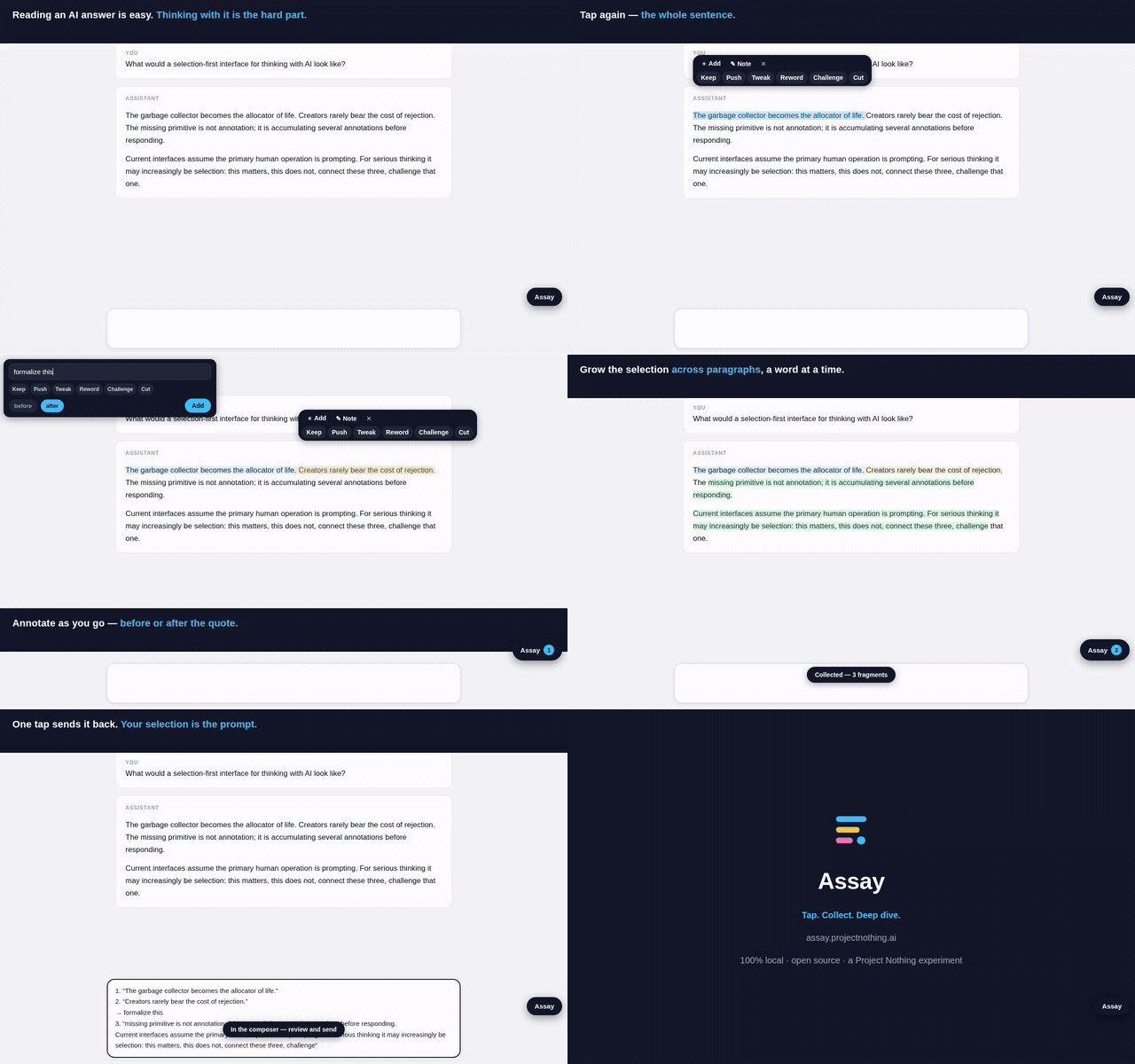
Tap a word → widen to the sentence → add a note → send the set back as one prompt.
MP4 · phone-sized MP4
What it does
Reading an AI answer is easy. Thinking with it is the hard part. Every chat interface is built around one verb, prompt, but most of the real work is editorial: reading a long reply and deciding which three sentences deserve a second look. That step has no interface. It is copy, paste, retype, and on a phone it is barely possible at all.
Assay gives that step an interface. While you read a reply on chatgpt.com or claude.ai:
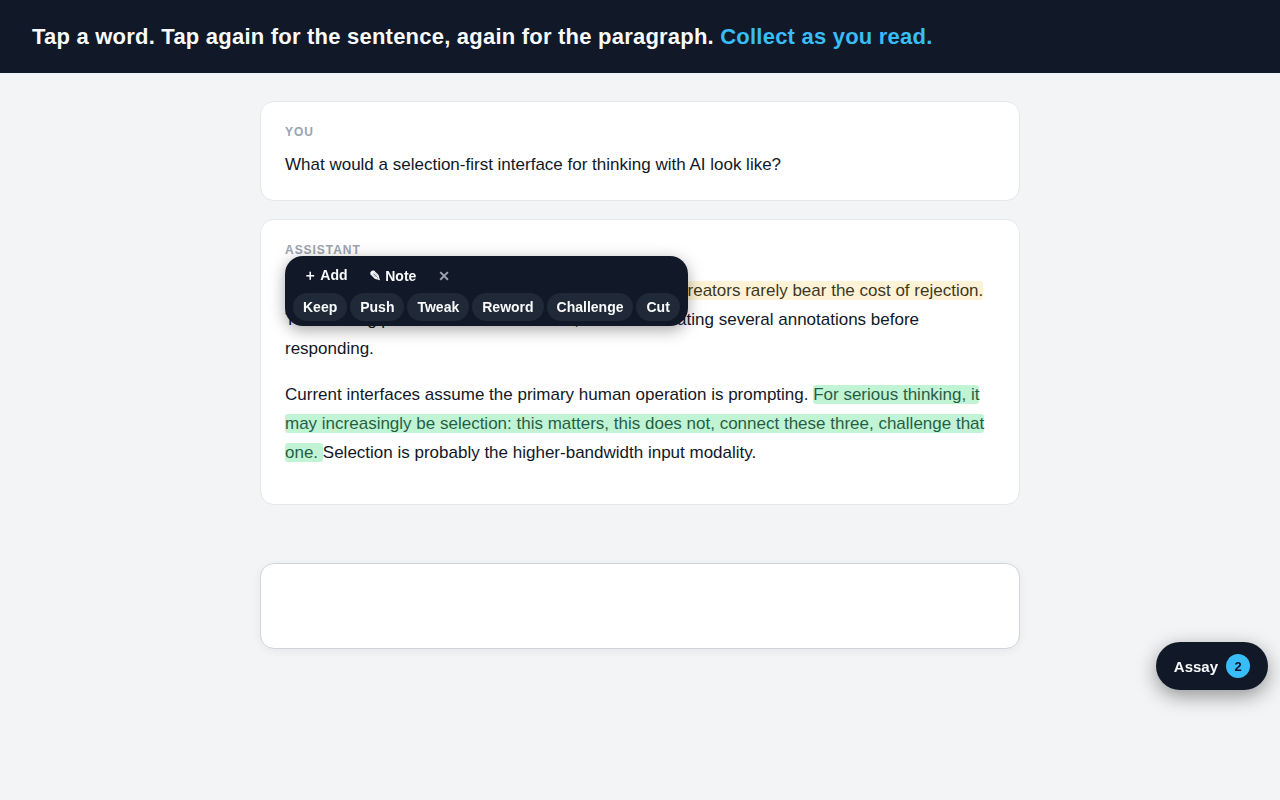
- Tap a word in a reply and it highlights, with a small action bar.
- Tap the highlight to widen it: word → sentence → paragraph → back to the word.
- Tap nearby words to grow the selection toward them, across a paragraph break; tap further away and you start a new selection there.
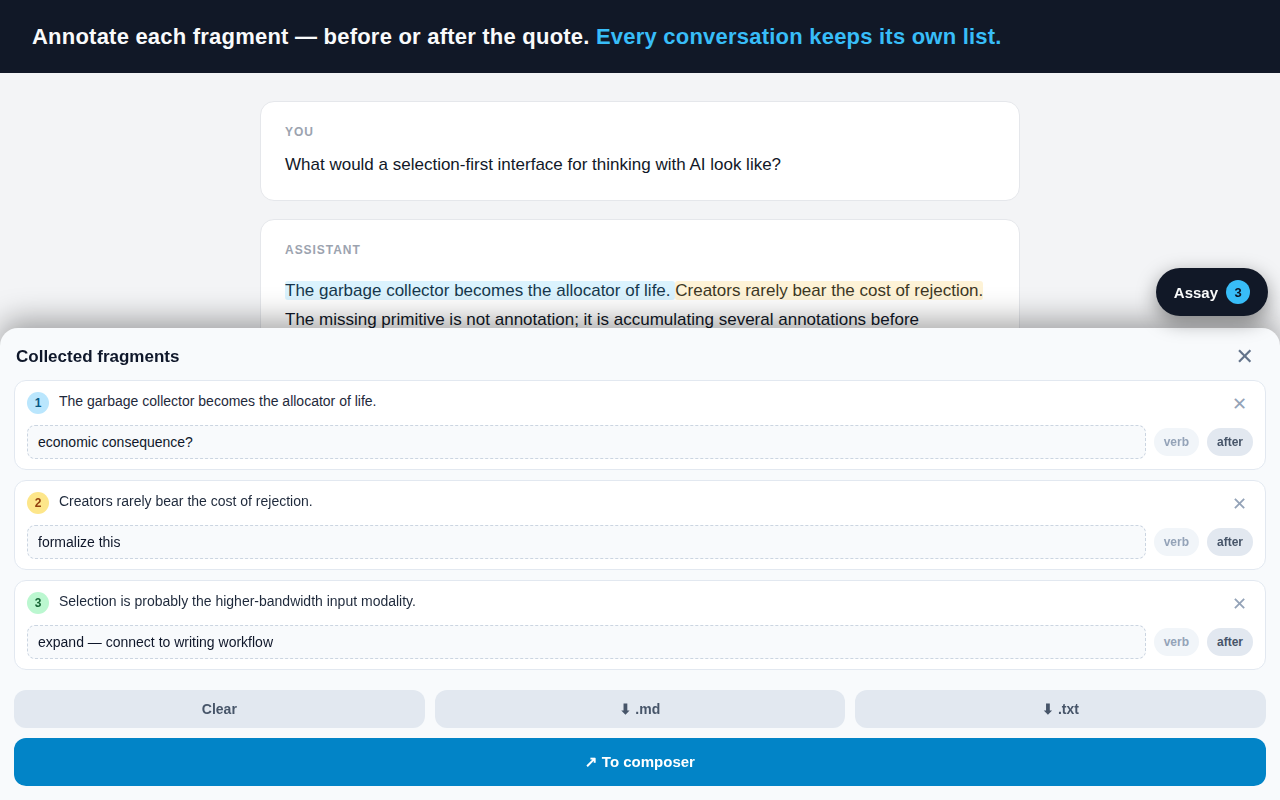
- + Add collects the passage; ✎ Note annotates it, before or after the quote, now or later.
- A verb palette for when typing is expensive: Keep · Push · Tweak · Reword · Challenge · Cut. One tap collects the passage classified; the verb becomes a plain-English clause in the prompt.
- Six rotating highlight colours so you can see what you already took, and they survive a page refresh.
- A tray holds everything you kept while the chat stays scrollable; a pill toggles it. Tap a collected passage on the page to change or remove it in place.
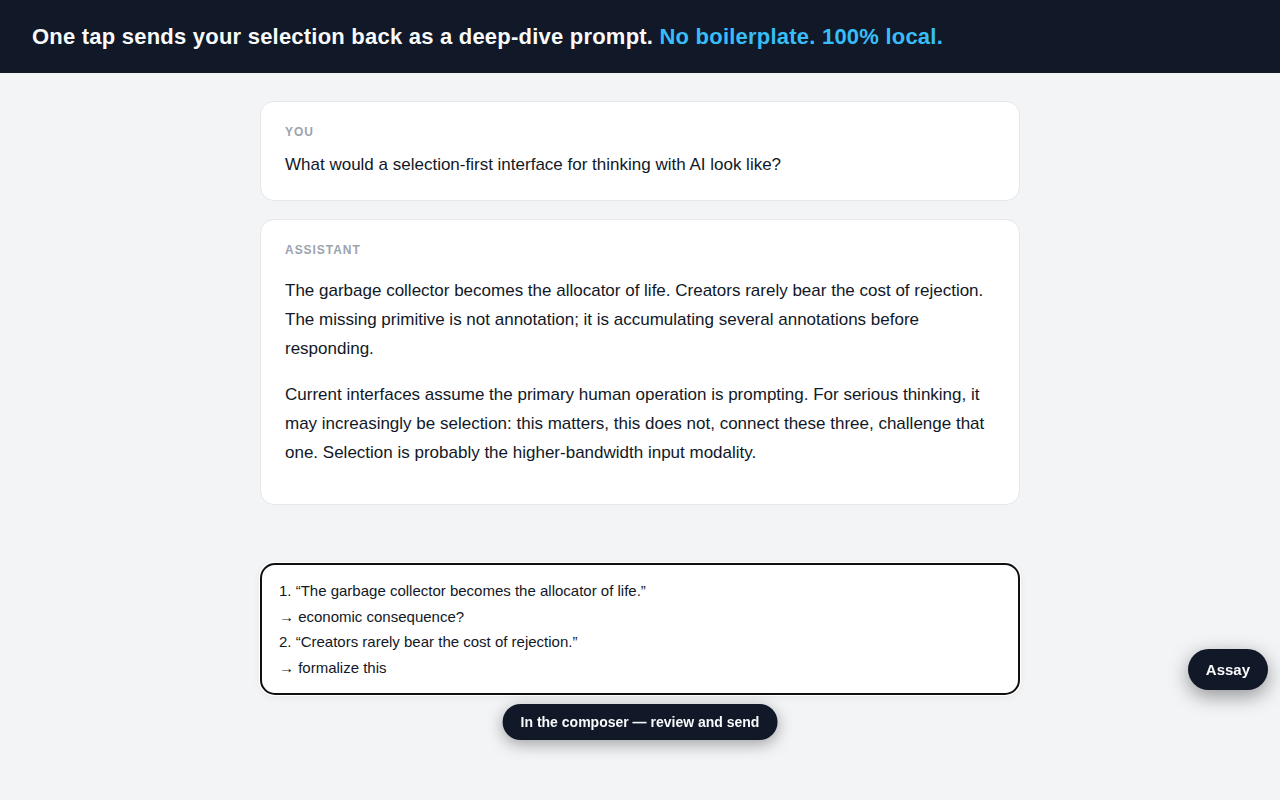
- ↗ To composer writes your fragments and notes into the site's own message box. Nothing is auto-sent; you review, then send.
- On GitHub, where there is no message box, the same tray offers ⧉ Copy notes instead: the set goes to the clipboard and stays in the tray.
- ⭳ .md / ⭳ .txt export the conversation as Markdown or plain text with your fragments appended, named after the chat:
assay-<chat title>-<date>-<time>.md. A picker lets you choose which messages go in — each row shows who spoke and enough of the message to recognise it, and ↓ takes one message and everything after it, which is usually what you want. - Export is what the page is showing. Both sites render only a window of a long conversation, so ⭳ reads the thread at the moment you press it: scroll back and open what's collapsed first and the file has more of it. Messages are found by several markup strategies, so identical messages stay distinct and a site redesign doesn't empty the export.
- Nothing of Assay runs while you use the chat. No observers, no polling, nothing on scroll, nothing remembered between exports. Scrolling, typing and a reply streaming in cost exactly zero — measured as zero frames requested, not as a fast number — and highlights are painted by the browser into the text itself rather than as boxes held over it, so they move with the words instead of chasing them. On a phone that is the difference between a highlight that stays under your finger and one that doesn't.
- Every conversation keeps its own list, so a batch started in one thread never bleeds into another.
No wrapper prompt is added to what you send. Your selection is the signal and your notes carry the intent, which is why replies to an Assay prompt tend to be sharper than replies to "tell me more about the second point".
Install
Assay is one file delivered three ways. All three share the same code and the same local storage, so you can switch between them without losing anything.
| You are on | Do this |
|---|---|
| Chrome, Edge, Brave (desktop) | Add to Chrome — the Chrome Web Store listing. Edge installs from it too, until the Edge Add-ons listing lands. |
| Firefox desktop | Firefox Add-ons once the first version clears review; until then, the userscript route below works today. |
| Firefox for Android (recommended on phones) | The store listing covers Android once approved. Today: install the userscript in Tampermonkey or Violentmonkey by opening https://assay.projectnothing.ai/assay.user.js and accepting. It auto-updates. Step by step at assay.projectnothing.ai/install. |
| Chrome on Android, Safari, anything else | The bookmarklet: open assay.projectnothing.ai/install, add the bookmark it gives you, and tap it once per visit. Zero install, nothing to update. |
Works on chatgpt.com, chat.openai.com, claude.ai, github.com and
gist.github.com. Firefox 121+ and any current Chromium browser.
How it works
The interaction is a small grammar you can learn in a minute:
- Tap a word in an assistant reply. It highlights; an action bar appears next to it.
- Tap the highlight to cycle its scope: word → sentence → paragraph → word.
- Tap another word in the same reply to grow the selection to include it, in either direction, and into the paragraph next to it. A tap further off than that is a different passage, so it starts a new selection there instead — reaching a distant paragraph is a tap at a time.
- Tap a different reply, empty space, or ✕ to start over. Long-press selection still works for arbitrary spans.
The same taps work inside the cards ChatGPT renders in the conversation — a canvas draft, a message swapped into an edit box. On a phone the caret is handed straight back, so the keyboard never opens over what you are reading. The only text Assay leaves alone is the composer: that is your draft, not a passage. 5. + Add collects it. ✎ Note attaches a few words, placed before the quote (a lead-in) or after it (an instruction). Or tap a verb (Keep, Push, Tweak, Reword, Challenge, Cut) to collect it classified in one tap, no keyboard. 6. Tap a passage you already collected and the same bar opens on it, showing which fragment it is and how it is filed: change the verb, rewrite the note, or Remove it — its highlight goes with it. 7. Open the tray to do the same to the whole set, in a list. 7. ↗ To composer writes the set into the message box. ⭳ .md or ⭳ .txt saves the whole conversation locally instead.
What lands in the composer is plain text with no boilerplate, numbered only when there is more than one fragment:
1. push this further:
“The garbage collector becomes the allocator of life.”

2. “Creators rarely bear the cost of rejection.”
→ formalize this
A verb or a pre note renders as a leading clause (keep as is, push this further, tweak this, keep the idea, reword this, challenge this, drop this); a post
note renders as a → line after the quote. No legend is sent: the clauses
are ordinary English.
Under the hood, taps resolve to text with caretPositionFromPoint and
Intl.Segmenter (regex fallback), inside a virtual text axis per message so
selections can span blocks. Highlights are overlay rectangles from
Range.getClientRects(); the site's DOM is never mutated, so React
re-renders cannot break them. All UI lives in a shadow root and is
re-attached on in-app navigation. Note controls and the tray track
visualViewport, so the on-screen keyboard never covers them.
Screenshots
Privacy
- No account, no server, no analytics, no API keys. Your existing ChatGPT or Claude subscription does all the inference.
- Nothing leaves your device except the message you choose to send, through the site's own composer.
- Fragments and notes live in the site's
localStorage, on your device, keyed per conversation. Highlights are re-found in the page after a refresh; nothing is written to the conversation itself. - The extension makes no network requests and loads no remote code. It runs only on the three chat hosts above.
- The full policy is
PRIVACY.md, published at https://www.projectnothing.ai/assay/privacy.
The Firefox manifest declares data_collection_permissions: none, and the
code is small enough to read in one sitting: src/assay.core.js.
Why Assay and not…
- …copy and paste? On a phone, selecting three separate sentences from a long reply and quoting them back with notes is a five-minute job. With Assay it is a few taps, and the result is structured.
- …the chat app's own "quote" reply? That quotes one span, once. Assay collects many passages, across paragraphs, annotates each, keeps them per conversation, and exports the whole thread.
- …a general web highlighter? Those annotate pages for later reading. Assay's output is the next prompt: it closes the loop back into the conversation.
- …a wrapper app with its own API key? Assay adds nothing to the model and sends nothing anywhere. It is an editorial layer on the interface you already pay for.
FAQ
Does Assay work on a phone? Yes, that is what it was built for. Firefox for Android with Tampermonkey or Violentmonkey gives the full auto-loading experience; every other mobile browser can use the bookmarklet.
Does it cost money or need an API key? No. It is free, open source, and uses your existing ChatGPT or Claude session. There is nothing to sign up for.
Does it send my conversations anywhere? No. It has no backend and makes no network requests. The only thing that leaves your device is the message you review and send yourself.
Which sites does it support?
ChatGPT (chatgpt.com, chat.openai.com), Claude (claude.ai), and GitHub
(github.com and gist.github.com).
What does it do on GitHub? The same thing, over a file instead of a reply: tap to collect passages from a file's rendered markdown or from its code lines, where each line is a paragraph and keeps its indentation. Every file keeps its own list, ⭳ .md exports the file with your fragments appended, and since there is no message box the primary action is ⧉ Copy notes. A multi-file gist exports each file as its own section, named by its filename, and the picker lets you choose which files go in.
Where are my fragments stored?
In the site's localStorage on that device, one list per conversation — or per file, on GitHub. Switching from the userscript to the store extension keeps them, since the storage belongs to the site, not the extension.
Can I export a whole ChatGPT or Claude conversation to Markdown?
Yes. ⭳ .md saves the conversation, roles, text and code blocks, with your fragments appended, as assay-<chat title>-<date>-<time>.md. ⭳ .txt does the same in plain text. Scroll to the top of very long threads first so everything is loaded.
Can I export only part of a conversation? Yes. ⭳ .md and ⭳ .txt open a picker listing every message with its author and a preview. Take all of them, use All / None / Last 2 / Last 6, tap rows individually, or tap ↓ on a message to take it and everything after it. The file records what it holds — "messages 19–30 of 30" — so a partial export is never mistaken for the whole thread.
How do I export a whole long conversation? Press ⭳ .md or ⭳ .txt, then ⤓ Walk the whole thread in the picker — the quiet amber button, deliberately not the big blue one, since it takes over the page for a while and asks before it starts. It walks the thread to the top, unfolds anything behind a "show more", reads each screenful on the way back down and stitches them together — then puts the page back where you were reading. It blocks while it runs, shows a count as it climbs, and has a Stop. Everything you'd already ticked or unticked survives it.
Without it the picker shows only what the page has built, which for a long thread is the last handful of messages — both sites load older ones only as you scroll to them.
Why isn't that automatic? It was, once, in a different form: 0.14–0.17 kept a running copy of the thread by watching the page. That cost the thing the product is for — watching the page made selection lag on a phone — so it came out in 0.18.0. This is the honest version of the same idea: the work happens once, when you ask for it, in front of you, and when it ends nothing is left running and nothing is left stored.
Does it slow the page down? It isn't attached to the page. No observers, no polling, no scroll handlers, nothing stored between exports. Scrolling past collected highlights, typing a follow-up and a reply streaming in each ask Assay for zero frames of work. Highlights are painted by the browser into the text (CSS custom highlights) rather than drawn as boxes positioned over it, so scrolling never involves Assay at all; browsers without that API get the boxes, and those do have to be repositioned.
ChatGPT put a document inside the reply and I can't select in it. You can now. Those canvas cards are rendered as editors, and an editor fights a tap: the caret lands, the keyboard comes up, the browser runs its own word selection. Assay marks a card inside the conversation as not-editable, so it reads as ordinary conversation text and selects like the prose around it — no words are changed, and its text now lands in exports too. If you'd rather edit the card in place, ⚙ → Cards: editable in the tray hands it straight back to the site. The message box is never touched by this.
Something isn't working and I'm on a phone with no console. Open the tray, press ⚙, then ⓘ Copy diagnosis. It copies what Assay can see on that page — which message-finder matched, how many turns it found, and what it thinks each editable on the page is — which is what a bug report needs.
Can I dictate instead of typing? Bring your own. The tray has a 🎤 Voice scratchpad: a near-fullscreen text field you can talk or type into. On a phone that means your keyboard's own microphone, which works everywhere and needs nothing from Assay. Where the browser has on-device recognition of its own — Chrome and Edge do — the mic buttons in the scratchpad and the note box use it directly.
Nothing is ever downloaded or installed for this. If the browser can't recognise speech on the device, Assay says so and points you at the keyboard rather than offering to fetch something.
Everything else the scratchpad does needs no recogniser at all: tap a word to select it, tap again for the sentence, again for the paragraph — then Say it again to re-dictate just that part, Delete it, + Collect it as a fragment, or ↗ To composer to put the scratchpad (or only the selected part) into the chat's message box.
Where does the recognition happen? On your device or not at all. Browsers do speech recognition by sending your microphone to a server unless told otherwise, so Assay uses only recognition it can pin to the device, and declines rather than falling back to the other kind.
Assay tried shipping an offline recogniser, and then fetching one. Neither survived contact with a chat page: the page decides whether a script inside it may reach another origin, and whether it may start the background worker such a recogniser runs in, and both answers are no. Packaging it also meant six megabytes in the extension and a slower review in every store — for a feature that then did not work. So it is gone, in both forms, and the scratchpad is a text field your own keyboard can dictate into instead.
Does it auto-send anything? Never. ↗ To composer only fills the message box.
Is it open source? Can I fork it? MIT licensed, so yes. A fork distributed to the public needs its own name and icon; see License and trademark.
Why "Assay"? To assay is to test ore and say what in it is worth keeping. That is the whole job: read the reply, keep what deserves a second look.
Development
Everything is generated from one source file; there is no bundler and no runtime dependency.
| File | Purpose |
|---|---|
src/assay.core.js |
The single source of truth: all logic and UI. |
assay.user.js |
Generated: userscript header + core (Tampermonkey/Violentmonkey) |