Bespoke Nimble
Data, Model, Recipe for an open Jev
#4 repository of the day on Trendshift.
Model · Timeline · Updates · Capabilities · Quickstart · Methodology · Documentation and development · Citation
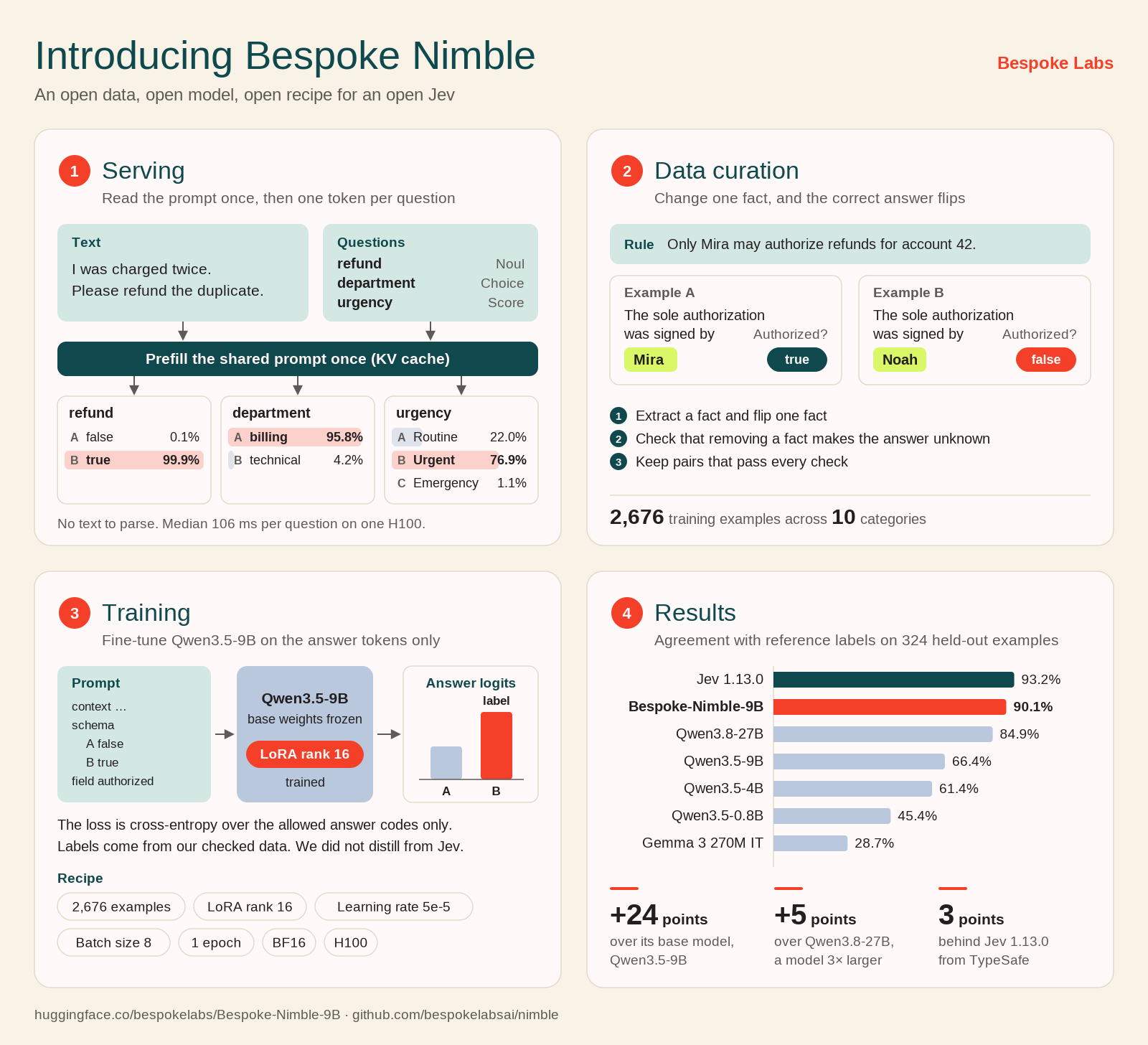
Nimble takes some text and a schema, and makes typed decisions about the text. The schema is the list of questions to answer. Each question is either a choice from a list that you give or a true or false question. For each question, Nimble returns the answer it picked and the probability of each allowed answer.
Nimble makes each decision in one step and does not write out any reasoning first, so it is fast (blazing fast!). Nimble is inspired by the System One approach of TypeSafe's Jev. In this repository, we share our recipe for training such a model.
Note that we did not distill from Jev. The point of the repository is to show how to curate data, how to train, and to serve such a model, and encourage more research!
You can run Bespoke-Nimble-9B on a Mac with Apple Silicon or on a machine with an NVIDIA GPU.
Timeline
These are the main steps from the release of Jev to the launch of Nimble-v4.
-
On September 14, 2026, TypeSafe released Jev, a decision model.
-
On September 18, 2026, we released Nimble-v1 as Bespoke-Nimble-9B, together with its data and its training recipe.
-
On September 29, 2026, Ollama added Nimble-v2 (Bespoke-Nimble-9B-v2), so you can run it on your own computer with
ollama pull nimble. -
On October 6, 2026, Nimble-v3 was the #1 open model under 25B on the Decision Index. Jev is the only model with a higher score in this view, and Jev is not open.

-
On October 13, 2026, we launched Nimble-v4 (9B) and Nimble-v4-max (27B) on the API at console.bespokelabs.ai. On the public suite of the Decision Index, Nimble-v4-max is #1 with 68.46, and Nimble-v4 is #1 of 104 models under 25B with 63.70. Jev 1.13 scores 57.96, and Perplexity Decider v1.1 scores 62.25. We measured the scores for Nimble-v4 and Nimble-v4-max in our own run on October 12, 2026. They are not yet on the Decision Index dashboard.
Updates
-
September 24, 2026: Bespoke-Nimble-9B now contains the latest checkpoint, with an 8,192-token context and up to 255 choices per field. Its default is T=1.0; the original release is preserved under the
original-2676tag, and the separate v2 repository is unchanged. Update this checkout before loading the new release. -
On September 22, 2026, we fitted a temperature for Bespoke-Nimble-9B. With this temperature, the probabilities better match how often the answers are right. The model picks the same answers as before. Noul probabilities and Score values do change, so if you compare them with a threshold, test the threshold again. See Probability temperature and PR #7.
-
On September 20, 2026, we published the 2,676 training examples and the 324 held-out examples for Bespoke-Nimble-9B. We had left them out of the first release by mistake. See the dataset guide and PR #5.
-
On September 19, 2026, we raised the prompt limit of the hosted API to 8,192 tokens for each question. The model was trained on prompts of up to 2,048 tokens, so shorter prompts are better tested. See the SGLang deployment guide and PR #4.
-
On September 18, 2026, Edgar Dyck added a public benchmark suite. With it, you can run Bespoke-Nimble-9B and Jev on the same records from 13 public subsets with human labels. The public benchmarks guide has the steps and the results. See PR #2.
Capabilities
We built Nimble in one day, so expect some rough edges. What Nimble can do comes from two sources: the first is the base model, Qwen3.5-9B, the second is our training data, which we curated for a few specific domains.
What you can build
| Task | You define | You get back |
|---|---|---|
| Route a request | The destinations and when each one applies | The chosen destination and the probability of each destination |
| Check a condition | A yes or no question and the evidence | True or false, and the probability of each |
| Apply a policy | The rules and the allowed outcomes | A typed decision based on the text you supply |
| Rate an outcome | Ordered levels, each with clear criteria | The chosen level and the probability of each level |
You supply a context, which is the text to judge, and a schema. The schema must be flat, which means that it has no nested fields. Each field is an enum or a boolean. An enum field has a fixed list of string choices, and a boolean field is true or false.
Each allowed answer has a code that is one token long. The scorer reads the model's logits for these codes. Logits are the raw scores that the model gives to each token. The scorer turns the logits into probabilities with the softmax function. Our Python code then builds the output from these probabilities, so there is no generated JSON to parse. If a field is an ordered rating scale, your application can use the probabilities to calculate an expected level.
On a Mac, ParallelScorer processes the shared context once and then scores all
the fields in parallel. The CUDA scorer scores each field on its own, with the
full prompt each time. Both scorers return the typed output. They also return
the logits and the probabilities of the candidate answers. Each field is scored
separately, so one field cannot see the answer to another field.
What you cannot build with the current release
- Nimble accepts only text. You cannot use it to judge other kinds of input, e.g., images. This is true even though the base model includes a vision part.
- Nimble only picks from the answers you supply. It cannot write text of its own, e.g., an explanation. It also cannot return nested JSON or a piece of text taken from the context. An enum field can have 1 to 255 string choices in the latest release, and a boolean field has two.
- The probabilities are not a guarantee that an answer is correct. Nimble scales them so that they add up to 1 across the answers you supplied. The latest checkpoint uses T=1.0 and has not had a separate temperature fit. Earlier releases have their own temperature settings. See Probability temperature. A probability of 0.9 still does not mean that the answer is right 90% of the time on your data. If it is possible that none of your answers fit, add an answer that means "no match". Test any probability threshold on your own data before you rely on it.
- Each prompt can have at most 8,192 tokens in the latest release. This limit includes the schema and the part of the prompt that names the field to score. Nimble rejects longer prompts. Fields cannot depend on each other, so your code must check that the answers to different fields are consistent.
Nimble’s performance depends on the curated data and domains represented in its training; test it on your own tasks. But we do see that Nimble is overall better than its base model Qwen3.5-9B in new domains.
Quickstart
Clone the repository and move into its folder. Run all the commands below from this folder.
git clone https://github.com/bespokelabsai/nimble.git nimble
cd nimble
Use Python 3.12. To run the model on a Mac, you need Apple Silicon. Python must also run directly on macOS so that it can use Metal, which is Apple's interface to the GPU. To run the model on Linux, you need an NVIDIA GPU that supports BF16, a 16-bit number format.
Without quantization, the 9B weights alone take about 18 GB. Quantization means storing the weights with fewer bits to save memory. The model needs more memory than this while it runs. The merge step below runs on the CPU. It needs extra RAM, and it needs disk space for both the base weights and the merged weights. A Mac with 64 GB of memory has more free memory for this than a machine with 24 GB.
Download the model
Create a Python environment for preparing the model. On Linux, you can also use this environment to run the model on the GPU. If you do, install a build of PyTorch with CUDA support that works with your GPU driver.
python3.12 -m venv .cache/venvs/nimble
source .cache/venvs/nimble/bin/activate
python -m pip install torch==2.8.0 -r requirements/training.txt
The following accepts either a full checkpoint or a PEFT LoRA adapter. For an adapter, it downloads the pinned base and merges the trained weights once. It records the resolved revision and local model path for both platform examples. No TypeSafe or generation API key is needed for local inference.
python - <<'PYTHON'
import hashlib
import json
from pathlib import Path

from huggingface_hub import snapshot_download

repo = "bespokelabs/Bespoke-Nimble-9B"  # Or "bespokelabs/Bespoke-Nimble-9B-v2"
snapshot = Path(snapshot_download(repo, cache_dir=".cache/huggingface/hub"))
contract_file = snapshot / "schema_config.json"
contract = json.loads(contract_file.read_text()) if contract_file.exists() else {}
if contract:
    from transformers import AutoTokenizer
    from nimble.training.candidate_schema import validate_contract
    validate_contract(contract, AutoTokenizer.from_pretrained(snapshot))

model_path = snapshot
if (snapshot / "adapter_config.json").exists():
    import torch
    from peft import PeftModel
    from transformers import AutoTokenizer, Qwen3_5ForConditionalGeneration

    # The adapter release must include its pinned base and prompt contract.
    base = Qwen3_5ForConditionalGeneration.from_pretrained(
        contract["model"], revision=contract["revision"],
        dtype=torch.bfloat16, device_map="cpu",
    )
    adapter = PeftModel.from_pretrained(base, snapshot)
    merged = adapter.merge_and_unload(safe_merge=True)
    model_path = Path(".cache/models") / ("nimble-9b-" + snapshot.name)
    merged.save_pretrained(model_path)
    (model_path / "schema_config.json").write_text(json.dumps(contract, indent=2))
    AutoTokenizer.from_pretrained(snapshot).save_pretrained(model_path)
    # Preserve adapter identity for automatic temperature selection after merging.
    (model_path / "READY.json").write_text(json.dumps({
        "model": repo, "revision": snapshot.name,
        "adapter_sha256": hashlib.sha256(
            (snapshot / "adapter_model.safetensors").read_bytes()
        ).hexdigest(),
    }, indent=2))

config = {
    "model_path": str(model_path.resolve()),
    "model_id": repo,
    "revision": snapshot.name,
    "max_input_tokens": contract.get("max_length", 2048),
}
Path(".cache/nimble-model.json").write_text(json.dumps(config, indent=2))
print("Ready:", model_path)
PYTHON
Mac with Apple Silicon (MLX)
Use a separate MLX environment after the model preparation step:
deactivate
python3.12 -m venv .venv-mlx
source .venv-mlx/bin/activate
python -m pip install -r requirements/mlx.txt
In Python, pass the saved model settings to ParallelScorer so that it loads
the prepared 9B weights.
import json
from pathlib import Path
from nimble.scoring.parallel_scorer import ParallelScorer

config = json.loads(Path(".cache/nimble-model.json").read_text())
scorer = ParallelScorer(**config)
Note
If you call
ParallelScorer()with no arguments, it loads the Qwen3.5-4B model that we used as a baseline, not Nimble. The MLX runner cannot load a LoRA adapter folder directly, so use the merged folder that you prepared above. The MLX runner also does not support quantized weights.
Linux with an NVIDIA GPU (CUDA)
Activate the environment that you used to prepare the model. Then check that PyTorch can use the GPU and that the GPU supports BF16.
source .cache/venvs/nimble/bin/activate
python -c 'import torch; assert torch.cuda.is_available() and torch.cuda.is_bf16_supported()'
In Python, load the same prepared weights.
import json
from pathlib import Path
from nimble.scoring.cuda_scorer import CudaCandidateScorer

config = json.loads(Path(".cache/nimble-model.json").read_text())
scorer = CudaCandidateScorer(**config)
You can also run the adapter without merging it, in the same way as our training evaluation. See the training guide for how to do this. The CUDA runner scores each field with the full prompt. So it processes the shared context again for each field, while the MLX runner processes it only once.
Make a typed decision
After you load either scorer, continue in the same Python session.
schema = {
    "priority": {
        "type": "enum",
        "choices": ["HIGH", "LOW"],
        "description": "Urgency based on current business impact.",
        "choice_descriptions": {
            "HIGH": "A critical business operation is currently blocked.",
            "LOW": "An optional enhancement with no current business impact.",
        },
    },
    "requires_review": {
        "type": "boolean",
        "description": "Whether customers are unable to complete a purchase.",
    },
}
result = scorer.score("The payment service is down for all customers.", schema)
print(result["output"])
print(result["fields"]["priority"]["scores"])  # Candidate probabilities.
print(result["fields"]["priority"]["logits"])
The output has this shape. The values depend on the model:
{"priority": "HIGH", "requires_review": true}
Load the scorer once and reuse it for each new context. The latest checkpoint
uses T=1.0; the following fitted temperature applies only to the original release. For revision
93ec5d6ff1a9cd31d6cc0e0c58d312465d36de7c of Bespoke-Nimble-9B, both scorers
use a temperature of 2.179 by default. The scorers need this full revision hash,
and a short hash such as 93ec5d6 does not match. The download step above saves
the full hash in .cache/nimble-model.json. We fitted this temperature so that
the probabilities better match how often the answers are right. See
Probability temperature. For other models, the
default temperature is 1.0, except for
Bespoke-Nimble-9B-v2:
v2 automatically uses 2.179078721266035 in both scorers, including local merges
whose READY.json identifies its adapter. This is a transferred release default,
not a temperature fitted independently for v2. Documentation-only Hub revisions
retain this default. Deliberately using raw v2 probabilities requires both
temperature=1.0 and allow_uncalibrated=True; passing only temperature=1.0
raises an error. Other positive temperatures remain explicit overrides. See the
scoring guide for the schema rules and the ways you
can run the scorer.
Methodology
This section documents the original release’s data and recipe. The latest checkpoint is identified in Updates.
The serving methodology and training data curation are heavily inspired by Bespoke-MiniCheck.
Serving
We follow the approach laid out by Niels Rogge: see this post on how Jev does decoding.
In a nutshell:
- Process the context and schema once (prefill the KV-cache)
- We obtain the scores for the tokens we care about.
We used this approach (we didn't have to do kv-cache prefill) in Bespoke-MiniCheck, since it always returned a single json tuple: {"is_claim_supported_by_context": p}.
Contrastive data curation
The challenge here is that we don't have access to probabilities from a teacher model (or humans). But as you saw above, we just need to somehow get the logits and ensure the logits are as calibrated to estimate the probabilities as possible.
We push the model to be calibrated to be a better decision maker by creating negative examples, which forces the model to become a better discriminator.
So we made the training data with a new method that we call contrastive data curation. In this method, we write two examples that are almost the same. They differ in one relevant fact, and this difference changes the correct answer. Everything else stays the same, including the question and the policy. From these pairs, the model learns which evidence should change its decision.

Watch the 34-second explanation (silent).
In this example, the rule is that a refund is authorized only when its sole authorization was signed by someone who can approve refunds for that account. The example has two evidence sentences, and you need both of them to answer.
| Evidence | First example | Changed example |
|---|---|---|
| Who can approve refunds | Only Mira may authorize refunds for account 42. | Unchanged |
| Authorization record | The sole authorization for this refund on account 42 was signed by Mira. | The sole authorization for this refund on account 42 was signed by Noah. |
| Is the refund authorized? | true |
false |
Our curation pipeline uses this idea for Choice, Noul and Score tasks. It has four steps:
- Check the decision rules. We start from the schema and the policy of a training source. We write down the basic facts that the rules depend on. Then we check that the rules can lead to different answers.
- Build the pair. We write two evidence sentences, and you need both of them to find the answer. Then we change at most eight words in one of the sentences. We make this edit to change one fact, which we call the focus fact, and so the label changes too. The rest of the context and the other facts stay t