


Cinderpaw has received an ElevenLabs Startup Grant and is a member of Anthropic's Claude Startups program.


Website · Download · Report an issue · Discussions · What we promise · Discord
Cinderpaw is a helper that lives on your computer, does real work with your files and apps, remembers what matters to you, and tests ways to get better at it. You talk to it like you would talk to a person.
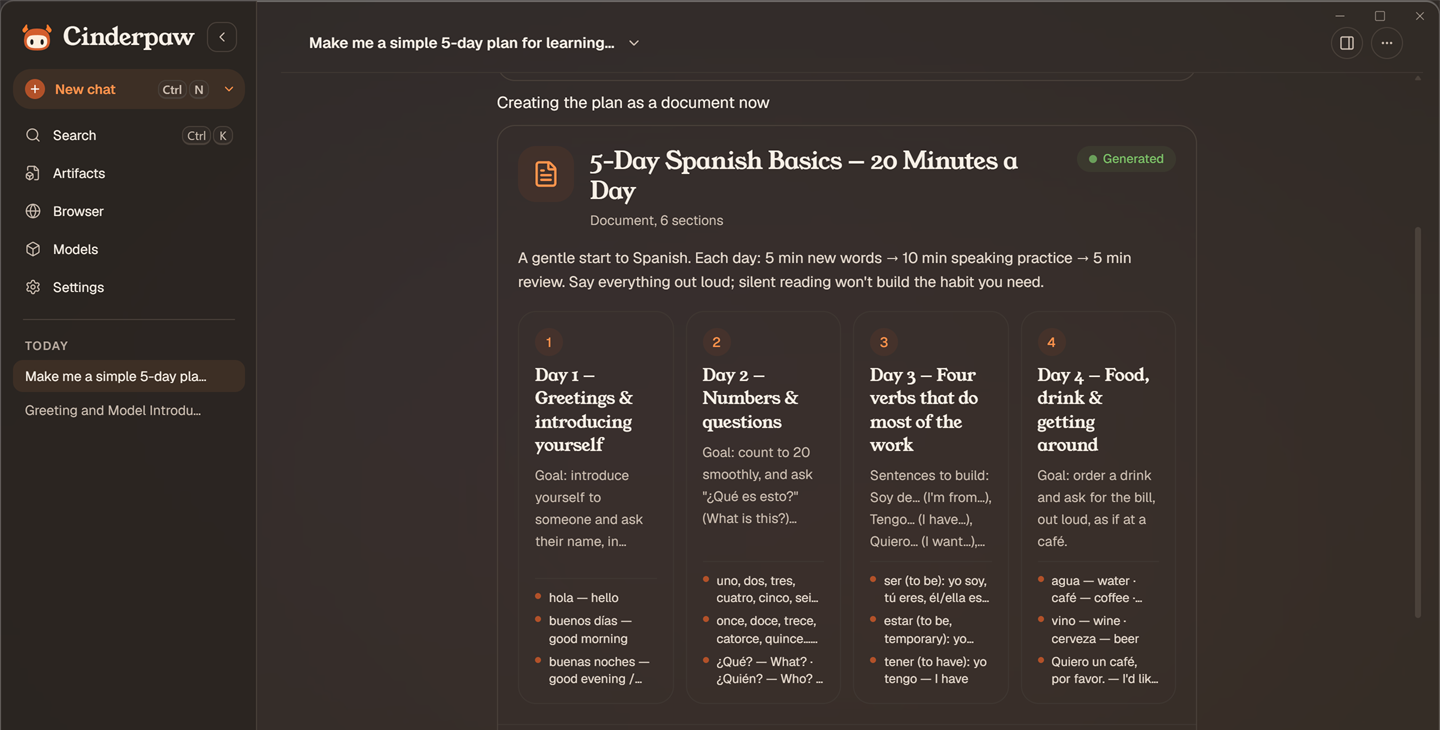
It opens your files, browses the web in a browser you can watch, answers messages on Telegram, Discord, Slack or WhatsApp, makes the document, the PDF, the spreadsheet or the small app you asked for, and then actually sends it. You can call it and just say the thing out loud; while you talk it can open apps, play music, copy, paste and take screenshots.
Here is the part that is different. Turn on Dreams, and when you stop working, Cinderpaw goes back over what happened and tries to find a better way to do it next time. It keeps what worked and throws away what did not. So the Cinderpaw you have in March is not the one you installed in January. It has been practising.
It also remembers you. Tell it once how you like your emails written, and you do not have to say it again in six weeks. Every fact it keeps is listed in plain sentences, each with a Forget button.
The little orange creature on the screen is Cubby, the face of your helper. Cubby shows you what is going on without a log to read: thinking, working, waiting for you, done. Playful on the outside, real work underneath.
Where it stands, 28 October 2026
v2026.10.28 is the newest release, and it is the one marked Latest on GitHub. Every download link and install command below gets it. What changed is in the changelog.
Cinderpaw used to be called Feral. The Feral desktop app offers this update by
itself, and your things come with you: what was in ~/.feral is brought over
to ~/.cinderpaw, and your saved API keys move over too.
Two honest things before you download
It needs a good brain. Cinderpaw is the body: the hands, the memory, the habits. The thinking comes from a model, and a small one will fumble. Sign in with OpenRouter in one click, or bring a key from OpenAI, Anthropic, Google or any of dozens of other providers, and it flies. Run a big model on your own machine and it flies without the internet. Run a tiny local model and it will stumble, and that is us being honest rather than you doing something wrong.
Practising is off until you say yes. Thinking about its own work is still thinking: on a paid model that is your money, and on your own machine it is your computer working while you are away. So it waits for your yes, on a cloud model and on a local one. Flip it on in Settings → Learning, where you can also cap what it may spend.
New here? Install it · How to use it · What we promise · Help build it
What Cinderpaw sends about itself, and only with your yes: at the end of setup it offers to count the install once (its version, your operating system and, if you press one, where you heard about Cinderpaw), and you can untick that box right there. It can also send a daily usage summary, which is off until you turn it on. Neither one holds your messages, file names, links or keys. See PROMISES.md.
Quick install
Cinderpaw comes two ways. Pick one.
The desktop app is a normal program with its own window. It is the one
that can run models on your own computer. Download it from the
Releases page: .exe
for Windows, .dmg for macOS, .deb or .rpm for Linux. First-launch notes
for each system are in Install below.
SmartScreen may warn on first run (the installer isn't code-signed yet). Click More info → Run anyway.
The Browser App is one command. It puts Cinderpaw in one folder,
~/.cinderpaw, and opens it in your web browser. It has no engine for running
models on your computer, so it uses a cloud model with your key.
Linux or macOS:
curl -fsSL https://raw.githubusercontent.com/bloom500/cinderpaw/main/scripts/install.sh | bash
Windows 10/11, in PowerShell:
irm https://raw.githubusercontent.com/bloom500/cinderpaw/main/scripts/install.ps1 | iex
The command downloads Cinderpaw into ~/.cinderpaw/bin and checks that the
download is not damaged (SHA-256). Then it makes Cinderpaw start when you log
in, adds cinderpaw to your PATH, adds a Cinderpaw shortcut, and opens your
browser. It needs no admin rights. Run the same command again to update. To
open the page later, run cinderpaw open or use the shortcut.
It works on 64-bit Windows 10 or newer, macOS 12 or newer, and 64-bit (x86_64) Linux with glibc 2.35 or newer (Ubuntu 22.04, Debian 12 or newer). On anything else, like ARM Linux or Alpine, it says so and stops.
The Linux/macOS script has two other modes (add them after | bash -s --):
--desktopinstalls the desktop app:.deb/.rpmon Linux, or the right.dmgfor your Mac's chip, copied to /Applications with the quarantine flag cleared.--from-source(or--headless) builds the CLI from source on Linux. See the recipe below.
Just the CLI (npm)
Want the terminal agent without the desktop app? One command, any OS:
npm install -g cinderpaw-agent
cinderpaw        # the command is `cinderpaw`; the package is `cinderpaw-agent`
Had the old feral-agent package? Run npm uninstall -g feral-agent first, or
npm stops with an EEXIST error. The new package brings the feral command
along, so old scripts keep working.
npm pulls only the binary for your platform (Windows, macOS Intel/Apple Silicon,
or Linux x64). Then cinderpaw setup to configure, cinderpaw chat for the terminal
UI, cinderpaw gateway start to run it as a service.
cinderpaw update pulls the latest release and restarts the gateway, so a running
connector (Discord, Slack, …) picks up the new build instead of staying on the
old one until you notice. It knows how Cinderpaw got onto the machine (npm, the
one-command install, or install.sh --from-source) and does the right one.
cinderpaw uninstall removes the programs. In an npm install it cannot remove
itself, so it prints the command to run yourself: npm uninstall -g cinderpaw-agent. Your ~/.cinderpaw
stays: settings, memory and downloaded models, so reinstalling resumes instead
of starting over. Saved API keys are usually in your system's keychain, not in that
folder, and they stay too. cinderpaw uninstall --purge also deletes
~/.cinderpaw (permanently). It clears the saved keys from the keychain only
for the one-command install. After any other install, the keys stay in the
keychain until you remove them yourself.
Note: the npm build is a cloud/gateway CLI. It does not bundle the local llama.cpp inference engine. Point it at a cloud provider (BYOK via
CINDERPAW_BASE_URL/CINDERPAW_API_KEY/CINDERPAW_MODEL) or at a running desktop Cinderpaw. The one-command Browser App is built the same way, without the engine. For local GGUF models on your own machine, install the desktop app above: that's the build with the inference engine.
Headless server / CLI from source (no npm, build it yourself)
Build the cinderpaw CLI + gateway from source, with no GPU or llama.cpp compile needed.
Requires Rust, Bun and Go
1.26 or newer (for the terminal chat). install.sh --from-source does all of
this for you on Linux.
# Build deps (Debian/Ubuntu). libdbus-1-dev is needed by the keyring crate:
sudo apt install -y build-essential pkg-config libssl-dev libdbus-1-dev cmake git curl unzip ca-certificates

git clone --depth 1 https://github.com/bloom500/cinderpaw && cd cinderpaw
( cd CinderpawAgent && bun install --frozen-lockfile && bun run build )
# --no-default-features skips the local llama.cpp engine (the CLI's default
# `inference` feature). On a server you point the gateway at a cloud
# provider via CINDERPAW_BASE_URL/CINDERPAW_API_KEY/CINDERPAW_MODEL instead:
cargo build --release -p cinderpaw-cli --no-default-features
# The terminal chat (`cinderpaw chat` needs it):
( cd tui && go build -o cinderpaw-tui . )
# The sidecar and the TUI must sit NEXT TO the CLI:
mkdir -p ~/.local/bin
install target/release/cinderpaw-cli        ~/.local/bin/cinderpaw
install CinderpawAgent/dist/cinderpaw-agent ~/.local/bin/cinderpaw-agent
install tui/cinderpaw-tui                   ~/.local/bin/cinderpaw-tui
cinderpaw doctor && cinderpaw gateway start
cinderpaw update and cinderpaw uninstall do not recognise a build made by
hand like this one. To update it, git pull and run the build steps again. To
remove it, delete the three files from ~/.local/bin.
See docs/HEADLESS.md for running the gateway as a systemd service, cloud keys via env (CINDERPAW_BASE_URL / CINDERPAW_API_KEY / CINDERPAW_MODEL), and the HTTP API. Full install notes (hardware requirements, first-launch warnings per OS) are in Install below.
What's new
The newest changes are in the changelog. Below is what came in v2026.10.16 (16 October 2026), the first full Cinderpaw release. We're looking for testers and contributors. Start here if you want to help.
- 🧡 A new look, and a face. Warm light and dark themes, Geist and Young Serif, and Cubby, a small mascot that shows what the agent is doing. Press Listen on any setup step to hear Cubby read it. Background can be Glass (your desktop shows through) or Solid.
- 🧳 Bring over OpenClaw or Hermes from the first screen: your persona and your skills come with you.
- 📦 Install with one command into one folder,
~/.cinderpaw, thencinderpaw open. See Quick install. - 📁 Projects keep their own instructions and files for every chat inside them.
- 🟢 One Google button sends a file to Drive, Docs, Sheets or Gmail.
- ✋ Posting waits for you. On a social network, the agent writes the post and opens the page in its browser. You read it and press Post.
- 👍 A thumbs-up teaches the agent a way of working (beta). The next similar request gets the steps that worked.
- 🖱️ Desktop control on macOS and Linux too, by voice and by the agent.
- 📊 A daily usage summary, only if you turn it on, and a new Leaderboard tab with everyone's totals. What it sends is in PROMISES.md, promise 4.
- 🔑 Sign in with OpenRouter instead of pasting a key: one button, your browser opens, and the key goes straight to the system keychain. On a computer with no model at all, that button is the home screen. 24 more providers in the cloud list, and a small machine is told to start with a cloud model, and why.
- 🌐 A browser beside the chat, with tabs, an ad blocker (Brave's engine), downloads and a wide mode. The agent uses it by itself, you watch it work, and a click of yours pauses it.
- 📄 Artifacts. Documents, PDFs, Word and Excel files, charts and small interactive apps the agent makes, shown as a card in the chat and kept in a panel after the conversation ends. Edit, rename, export, send to Google Docs; fill in and sign PDFs yourself.
- 📞 Call it. Speech-to-speech with Gemini Live, OpenAI Realtime, or Jev, which acts on your computer while you are still talking: open apps and folders, play Spotify, copy, paste, screenshot. Park a call in a small pill instead of hanging up.
- 🤝 Cowork teammates. Named helpers the agent creates, each with only its own tools, talking in a group chat you can read, and asking you before a gated step.
- 💬 21 chat platforms. Telegram, Discord, Slack, WhatsApp and more; files travel both ways where the platform allows.
- 🧠 Memory you can read. Facts listed as sentences, each with Forget. A new chat already knows you and what you did recently. Procedures it learned show up in the skills menu with the evidence behind them.
- 🛡️ A prompt-injection gate checks tool calls before they run.
- ⌨️ Small things that add up. Generated chat titles, Undo instead of "Are you sure?", the app reopens where you left, drop a file anywhere, Send to > Cinderpaw from Windows Explorer, Alt+Space from anywhere.
- 🔥 A campfire mini-game. While a long task runs, a small fire appears on the edge of the composer; click it and play until the work is done.
- 🌙 Self-improvement, honest about cost. On a paid cloud model it stays off until you say yes, and the screen says so, with the switch and your spend cap.
The interface is English-only in this release; talking to Cinderpaw in your own language, by text or voice, works as before. Full details in the CHANGELOG. Upgrading from 0.1.7 or older? Read the updater key migration notes first.
Install
Grab the latest installer from Releases. On Windows it needs no admin rights. The built-in updater keeps you current after that.
| Platform | Installer | Status |
|---|---|---|
| Windows 10/11 (x64) | .exe |
🟢 Stable, primary target |
| macOS (Apple Silicon, Intel) | .dmg |
🟡 Beta — CI-built, lightly tested on real hardware. Report issues. |
| Linux (Ubuntu/Debian, Fedora/RHEL) | .deb / .rpm |
🟡 Beta: CI-built, lightly tested. Report issues. |
Windows first launch: the installer isn't code-signed yet (the free open-source signing programme at SignPath has not been applied to yet), so SmartScreen may show "Windows protected your PC". Click More info → Run anyway. The installer is built by public GitHub Actions CI from this repository — you can audit exactly what went into it.
macOS first launch: Cinderpaw isn't notarized by Apple (yet), so macOS will warn you on first open. If you see "Cinderpaw.app is damaged" or "can't be opened", run this once in Terminal and you're set:
xattr -cr /Applications/Cinderpaw.appThen open Cinderpaw normally. This removes the quarantine flag macOS puts on downloaded apps — nothing is actually damaged.
macOS after an update: if you saved cloud API keys before updating, macOS may ask for your Mac login password to let the new version access an item stored in
ai.bloom.cinderpaw.byok. That's your saved API keys in the macOS Keychain. Keys saved by Feral sit under the old name,ai.bloom.feral.byok; Cinderpaw moves each one to the new name the first time it reads it, so after updating from Feral macOS may ask once about the old item. Enter your Mac login password and click Always Allow (or just re-enter the key in Models → Cloud). This happens because Cinderpaw isn't Apple-notarized yet, so each update looks like a new app to the Keychain. It will go away once Cinderpaw ships with an Apple Developer certificate.
Hardware requirements
Cinderpaw itself is lightweight — the models are what need muscle. You can skip local models entirely and run on cloud keys (BYOK) on any machine.
| Minimum | Recommended | |
|---|---|---|
| RAM | 8 GB (3–4B models at Q4) | 16 GB+ (7–8B models comfortably) |
| GPU | None — CPU inference works | Any Vulkan-capable GPU; 6 GB+ VRAM keeps 7–8B models fully on-GPU |
| Disk | ~500 MB app + 2–5 GB per model | SSD, 20 GB+ free if you like collecting models |
Before you download, every model in Models → Hugging Face says whether it fits your hardware: it fits, it may be slow, or it won't fit. Models already on your computer also get a 0–100 fitness score under Show details on their card. Cinderpaw tells you up front if a model will make your machine cry.
Quick start
- Install and open Cinderpaw. A short welcome wizard introduces the app — pick a name for yourself and your agent.
- Get a model (either path works):
- Local: open Models → Hugging Face, pick a model, and click download — Cinderpaw pre-selects the quantization that best fits your hardware. Already have GGUF files? Drop them in via Models → Local.
- Cloud (BYOK): press Sign in with OpenRouter, or open Models → Cloud and paste an API key — OpenAI, Anthropic, Google Gemini, DeepSeek, Groq, Mistral, OpenRouter, Kimi, GLM, MiniMax and two dozen more, or any custom OpenAI-compatible endpoint. Keys are s