

Claude Code Infinite
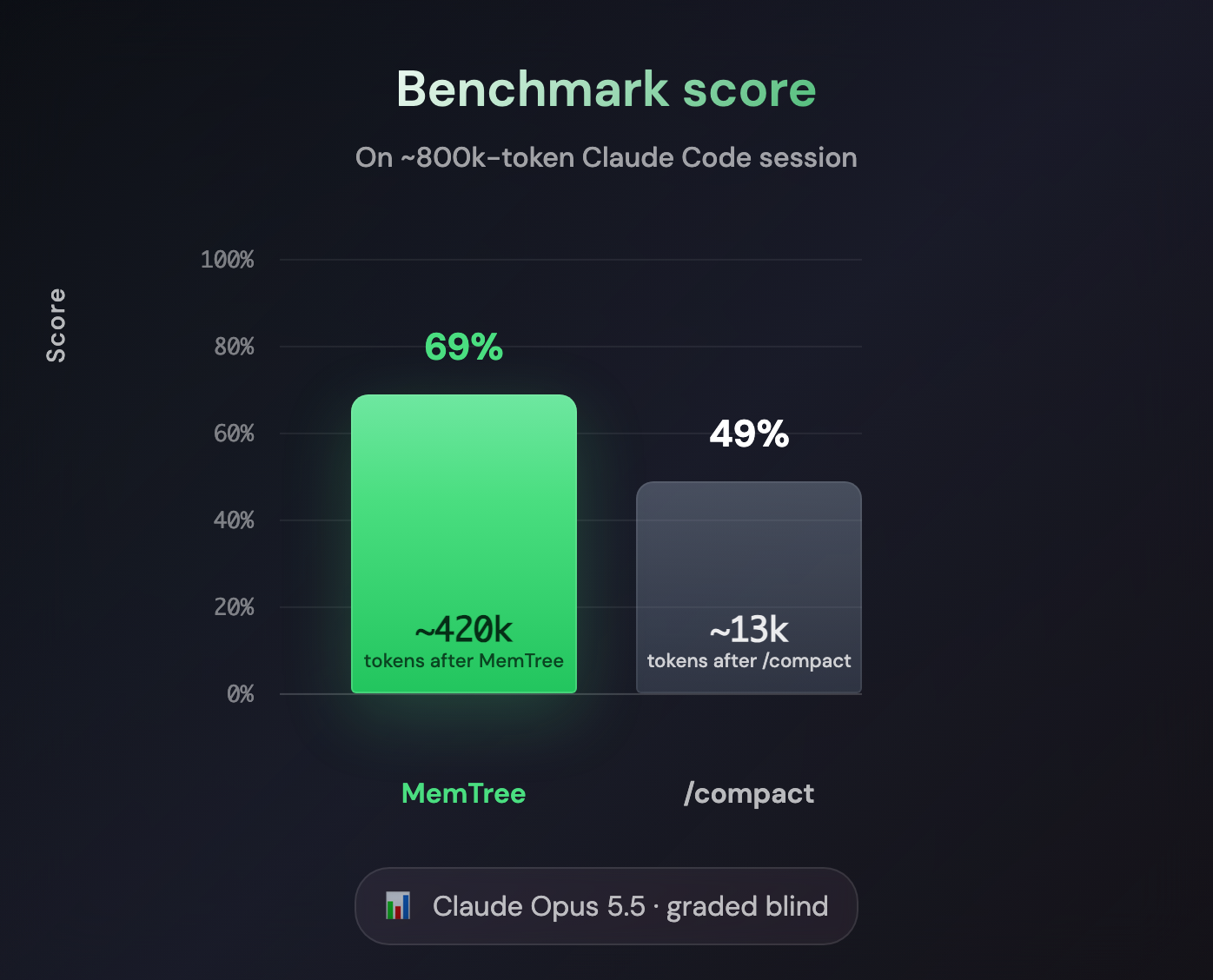
Long-session benchmark (Claude Opus 5.5, graded blind): MemTree beat /compact by 20 points,
on a ~800k-token Claude Code session. It also matched full context on this test (69 vs 69).
Full results
Infinite context for Claude Code: memory for long-running agents. Claude Code Infinite indexes your Claude Code sessions with MemTree so their history can be easily searched, navigated, and understood, by you and by Claude, within a session and across all of them.
While Claude works, MemTree summarizes each new batch of messages in the background and files it under a topic. Each topic gets its own summary, and the whole session gets one at the top. When a session outgrows the context window, Claude works from these summaries plus your most recent messages, so the session can keep going indefinitely. When it needs a detail, it opens a branch and follows it down to the original messages.
- Search across every session. Claude can find what was decided, tried or ruled out in any of your past sessions, by exact words or by meaning, filtered by project and date
- Browse each session's MemTree in your browser, from the link
cccprints in the terminal - Never loses anything vs Claude Code. On Opus 5 and up, you get the vast majority of the
1M-token window word for word, exactly as Claude Code sends it. Only near the limit does MemTree
compress, to about half the window to minimize the number of compressions: recent messages stay word for word
and older ones become a searchable memory, the originals one tool call away. MemTree matched full context (69 vs 69) and beat
/compactby 20 (benchmark) - Unlimited-length sessions, with relevant past information recalled automatically
- A local proxy, so no slowdown. Requests go straight from your machine to Anthropic and MemTree indexes in the background; only the occasional compression step, when a session outgrows the context budget, waits on MemTree
The magic starts past the context limit. Keep one session going for days and it learns how you
work: your priorities, the nuances of your projects, your company and your environment. Where
/compact would wipe that detail, MemTree keeps it, so the thread becomes an expert in you. Let it
orchestrate dozens of subagents on your behalf.
Important
Needs Claude Code in your terminal, signed in with Claude Pro or Max.
Search across sessions
Every ccc session is indexed as it runs, and Claude gets read-only memtree tools over all of
your indexed sessions, so you can just ask:
- "What did we decide about the retry limit last week?"
- "Find the session where we fixed the token-count bug, and show me the fix."
- "We tried this before. What went wrong last time?"
| Tool | What it does |
|---|---|
search |
Searches this session's tree or all of your sessions. Text mode (default, free) matches exact words, ids, paths and errors; vector mode matches meaning. Filter by project, since and until. |
list |
Lists your sessions, most recently active first, with title, first message, project (directory, repo, branch), models and times. Filter by time, project or words. |
read_node |
Opens a node: its summary, its path from the root, and its children. |
read_lines |
Reads the exact original transcript lines under a leaf. |
Hits name their node, so Claude goes from a search hit to the summary around it and then to the
exact lines. Type /memtree-view for the link to this session's tree. Details are under
Memory tools.
Long-session benchmark
In a blind-graded benchmark on a 775k-token Claude Code session, MemTree matched full-context
Claude Code and beat Claude Code's built-in /compact by 20 points, finishing in about half the
time. That is the same score as full context with a third of the tokens.
| Setup | Score | Input tokens / run | Wall time | How it handles the history |
|---|---|---|---|---|
| Claude Code Infinite | 69 | 39M | 11–22 min | Sent whole until the 800k budget, then compressed once to ~420k; never compacted |
| Full context | 69 | 113M | 24–54 min | Grew to ~970k and hit Claude Code's auto-compaction mid-task every round |
/compact |
49 | 17M | 29–40 min | Claude Code's /compact before the task, 789k → 13k |
Every setup resumes the same ~775k-token history and is given one task: fix the security issues
found earlier in the session, which are listed only in the conversation. Claude Opus 5.5, 3
rounds, graded blind against a fixed answer key by an independent grader. Scores are 0–100 means
(68.7 / 69.3 / 48.7 in table order); the noise floor is 10 points, so MemTree vs full context is parity, not a
win, while MemTree was ahead of /compact in every round. Average wall time was 16 min
for MemTree and 38 min for full context. Input tokens count uncached, cache-read and cache-write
tokens; /compact's exclude the one-time /compact step. This is one task family, one model and
3 rounds, not a general benchmark.
MemTree compresses as late as possible: the whole ~775k-token history went out word for word, exactly as Claude Code would send it, and MemTree compressed only once, near the limit, keeping the most recent messages word for word.
A rerun on Oct 20, with MemTree's lookup tools loaded and the same outputs graded again at a
higher reasoning effort, gave the same shape: MemTree 65, full context 66, /compact 45.
MemTree's figure there is the mean of its 2 clean rounds (a harness bug let the third round read
another round's work); full context still fixed more of the issues (21 vs 17 on average).
Past the context window: MemTree keeps the work, /compact loses it

The benchmark above fits inside Claude Opus 5.5's 1M-token window. This one does not. Each setup resumes the same 1M+-token history, built in time order from real Claude Code sessions of our own engineering work: the design and implementation of a backend feature, four rounds of code review in which an outside reviewer's findings were confirmed and, for several, re-scoped by the session, then about 550k tokens of later, unrelated work. The task comes at the end: the commits that fixed review rounds 2–4 were lost, so re-implement every fix as the session approved it, each with a regression test, in one commit. The findings and decisions exist only in the conversation, and the task forbids re-reviewing the code to find them again. Since the history is already past the window, MemTree compressed it on the first turn: the most recent messages stayed word for word, and the older ones became a memory tree whose original messages Claude can read back with one tool call. An independent grader scored each result blind (0–100) against the real fixes, their regression tests and the session's decisions.
| Setup | Score | Findings addressed (of 8) | How it handles the history |
|---|---|---|---|
| Claude Code Infinite | 69.9 | 8: 3 fully, 5 partly | Compressed to ~200–290k on the first turn; looked up the review rounds with its MemTree tools |
/compact |
23.0 | 0 | Claude Code's /compact before the task; made no changes and asked for the findings |
| Full context | n/a | n/a | Not possible: the history is larger than the 1M-token window |
/compact failed because its summary dropped the findings: it recorded the reviews only as
confirmed reviewer findings, with no finding or decision in it, so there was nothing to fix. Its
23 points are for reporting that honestly (regrading the same empty diffs gave 23 every time). MemTree recovered all 8 findings from the
session's memory in every round, fixed 3 fully and 5 partly every round, and implemented the
session's decisions rather than the reviewer's original proposals. Before writing any code, it searched its tree for the review rounds and read about 400 lines of the original exchange word for word with read_lines. MemTree's round scores were
74.6, 67.6, 67.1, 69.4, 68.1 and 72.6, with 5 regressions charged across the 6 rounds.
Caveats: 6 rounds, one task, one model, one grader; no significance claims. Blinding is weak: /compact made no changes and its report says it worked from a summary,
so a grader can tell the setups apart. The same task prompt went to both setups and mentions
MemTree's lookup tools, which plain Claude Code doesn't have. There is no full-context arm, since
the history doesn't fit. Grading used a fixed rubric (coverage 30, fix quality 30, fidelity to the
session's decisions 15, report accuracy 20, process 5); the harness and the answer key stay
private because they come from a private codebase.
Requirements
- Claude Code in your terminal, signed in with Claude Pro or Max (don't have it yet?)
- node.js 20.3 or newer
Also works with an Anthropic API key that has credit, but that's far costlier than Pro or Max.
Setup
- Install Claude Code Infinite (Node ≥ 20.3; no git needed)
npm install -g claude-code-infinite
- Run it from your project folder
ccc
This will guide you through setting up your PolyChat key which you can also get here.
Needs Claude Code in your terminal, signed in with Claude Pro or Max.
Don't have Claude Code yet?
# Windows PowerShell
irm https://claude.ai/install.ps1 | iex
# macOS / Linux
curl -fsSL https://claude.ai/install.sh | bash
Or just run ccc: when Claude Code isn't installed it offers to install it for you (with the
same official command) and starts it, and Claude Code asks you to sign in. The Claude desktop
app isn't enough: ccc needs the claude command in your terminal
(help).
Environments
The tool supports multiple environments (this selects the MemTree compression API only — Anthropic traffic always goes directly from your machine to api.anthropic.com):
- Production (default):
ccc- Uses https://api.polychat.co - Local:
ccc local- Uses http://localhost:8080 for local development
Each environment maintains its own separate API key.
Commands
Type these inside a ccc session (the ccc: prefix is optional). ccc answers them
locally, so they cost no model turn.
| Command | What it does |
|---|---|
/ccc:memtree |
Lists the MemTree commands and links your usage dashboard. |
/ccc:memtree-view |
Shows the link to this session's MemTree page. |
/ccc:memtree-compact [tokens] |
Compacts the session on your next message (to half the budget, or a target such as 400k) and keeps the compressed history. |
/ccc:memtree-compact off |
Goes back to sending the conversation whole. |
From a shell or script (no session needed):
| Command | What it does |
|---|---|
ccc link <session-id> |
Prints the session's newest MemTree page URL on stdout, one line and nothing else. --json prints {session_id, url, tree, updated_at} instead (updated_at is the session's last activity). Exit status 0 printed, 1 no saved key or the server could not be reached (5 s timeout), 2 bad invocation, 3 the session has no MemTree yet (or no session with that id on your key; stderr says which). Only your own sessions (those of your saved key) are found. ccc staging link / ccc local link use that environment's key. |
ccc fetch <memtree-url> |
Prints one of your MemTree pages as JSON, using your saved key. |
Environment variables, set when launching ccc:
| Variable | What it does |
|---|---|
CCC_COMPACT_TARGET=500k |
Compaction target for every session (useful for headless -p runs); off starts every session with compaction off. |
CCC_MEMTREE_MCP=0 |
Turns off the memtree MCP tools (details), in interactive and headless (-p) runs. |
CCC_PROJECT_TREES=0 |
Interactive sessions in a git repository with an origin remote start with a short list of your earlier MemTree sessions in that repository (model context only); this turns it off. |
CCC_MEMTREE_LINK |
Where the MemTree link appears: turn (default, end of a turn with a new page), message (under every reply), stop (end of every turn), success (only after an optimized turn), or off. |
CCC_AUTO_COMPACT=1 |
Restores Claude Code's own auto-compaction and idle compaction settings (details). |
CCC_NO_UPDATE_CHECK=1 |
Turns off the update check, and with it automatic updates (details). |
CCC_DISABLE_AUTOUPDATE=1 |
Keeps the update notice but never installs (details). |
CCC_NO_DIAGNOSTICS=1 |
Turns off diagnostics (details). So do DO_NOT_TRACK=1, Claude Code's DISABLE_TELEMETRY=1 or CLAUDE_CODE_DISABLE_NONESSENTIAL_TRAFFIC=1, and "diagnostics": false in ~/.claude-code-infinite/config.json. |
Links are clickable in terminals that support OSC 8 hyperlinks (iTerm2, Ghostty, WezTerm, kitty, VS Code, JetBrains, Windows Terminal); elsewhere you get the plain URL.
Claude Code auto-compaction
ccc disables Claude Code's automatic conversation compaction for the Claude process it launches. MemTree manages the context sent to the model, so letting Claude Code independently summarize the full local transcript can compact a conversation MemTree already reduced. Manual /compact remains available.
Manual /compact also asks once: while MemTree is compressing, the first /compact answers
"MemTree already keeps this session within its budget; /compact would discard detail…" and
suggests /ccc:memtree-compact; typing /compact again within two minutes runs Claude Code's
own. While MemTree is paused or its key is refused, /compact runs at once, and under
CCC_AUTO_COMPACT=1 it is never intercepted. Claude itself is told the same: context is
MemTree's job, so it won't suggest /compact, /clear or a fresh session to free context,
and if MemTree is paused it is told why (MemTree's usage limit, not Claude's) and how to fix it.
That includes idle compaction (Claude Code 2.1.286 and later), which summarizes a
long conversation while you're away, just before the prompt cache expires
("Compacted while idle, before the prompt cache expired"). The
DISABLE_AUTO_COMPACT=1 that ccc sets turns it off too, so you don't need
"idleCompaction": false in your settings.
Claude Code 2.1.219 also recommends “Resume from summary” for any old session
above a fixed 100k-token threshold, even when the active model has a 1M window
and auto-compaction is disabled. ccc suppresses that resume-time
recommendation as well; it does not disable the manual /compact command.
With auto-compaction off, Claude Code still refuses a request itself, without
sending it, once its own estimate reaches the window minus 23k (977k on a 1M
window). MemTree compresses at 960k, so a single large tool round could reach that
refusal before ccc ever saw the request. ccc sets
CLAUDE_CODE_BLOCKING_LIMIT_OVERRIDE (unless you exported your own) so such a
request reaches the proxy, which compresses it mid-turn.
A session whose last response reached the verified local refusal threshold
(for example one sent whole while MemTree was unavailable) would otherwise be
refused locally with "Context limit reached" on every prompt after a resume.
On ccc --resume <id>, ccc backs the transcript up to
~/.claude-code-infinite/transcript-backups/ and lowers that last response's
recorded usage to half the window, so the next message is sent and MemTree
compresses it.
To restore Claude Code's native auto-compaction and idle compaction settings for one invocation, use:
CCC_AUTO_COMPACT=1 ccc
Claude Code normally treats any custom ANTHROPIC_BASE_URL as an unverifiable
gateway and can therefore account for a resumed native-1M model as if it had a
200k window. ccc identifies its transparent localhost relay as trusted, so
current native-1M models retain the same context window they have when Claude
Code connects directly to Anthropic. The official
CLAUDE_CODE_DISABLE_1M_CONTEXT=1 switch still forces the legacy 200k behavior.
Privacy & architecture: your Anthropic credentials never leave your machine
ccc runs a small proxy on 127.0.0.1 and launches Claude Code with ANTHROPIC_BASE_URL pointed at it and automatic compaction disabled. Claude Code keeps its native login — token refresh, plan-default model selection, and rate-limit handling behave exactly like vanilla Claude Code, and your OAuth token is sent only to api.anthropic.com from your own machine.
Claude Code ──▶ localhost proxy (ccc)
                  ├──(messages only, MemTree API key)──▶ api.polychat.co /v1/context_memory
                  │◀──(compressed messages)─────────────┘
                  └──(compressed request + your local OAuth)──▶ api.anthropic.com
- Only message content is sent to MemTree for indexing/compression — never credentials.
- Anthropic requests go directly from the local proxy to api.anthropic.com using the authentication Claude Code supplied. PolyChat never sees that credential or Anthropic traffic.
- If MemTree is unreachable, slow, or your MemTree plan needs payment,
cccdegrades to a transparent passthrough so your session is never interrupted. While MemTree is paused (usage limit reached), a request that still fits the model's context window (by Anthropic's token count, or ccc's conservative estimate when counting is unavailable) goes out unchanged, as plain Claude Code would send it, and once the session reaches the compression budget the paused notice suggests Claude Code's own/compactwhile it still fits. A request that no longer fits is refused at once with "MemTree is paused (usage limit reached), so this long conversation can't be compressed…", your subscribe link, and/clearto start fresh (/memtree-compactneeds MemTree, so it is not offered then). After you subscribe, the next request compresses again with no restart.
Diagnostics
ccc sends a few diagnostics to MemTree so we can see why a session fails to start or stalls:
- versions (ccc, Claude Code, Node), how ccc was installed (npm, npx, linked), OS and CPU architecture, terminal type and locale;
- how Claude Code is signed in, as a type only (Claude.ai subscription, API key, Bedrock, Vertex, Foundry), the plan's tier name when Claude Code records one (Pro, Max, Team), the main model's context window ccc uses (200k or 1M), and where Claude Code was found (on PATH, its installer's folder, npm, winget);
- when npm installs or reinstalls ccc: one anonymous
installedevent (ccc and Node versions, OS, CPU architecture, install method, the install id below; not in CI or under sudo, not under any opt-out below); - lifecycle events (first run, sig