
🧠⚡ Claude Code Local
Claude Code, running on your own Mac. No cloud. No API key. No waiting.
Your Mac's chip runs the AI · Claude Code works exactly like it always does · nothing leaves your computer
Now on Linux and Windows too, same Claude Code, same privacy, your own machine doing the work. Phones are next.


In one sentence: a small Python server (proxy/server.py) runs open AI models on your Mac's chip with Apple's MLX and answers Claude Code in Anthropic's own API format, so Claude Code works with no cloud model and no API key.
Other things I built that go with it are in the local-first family.
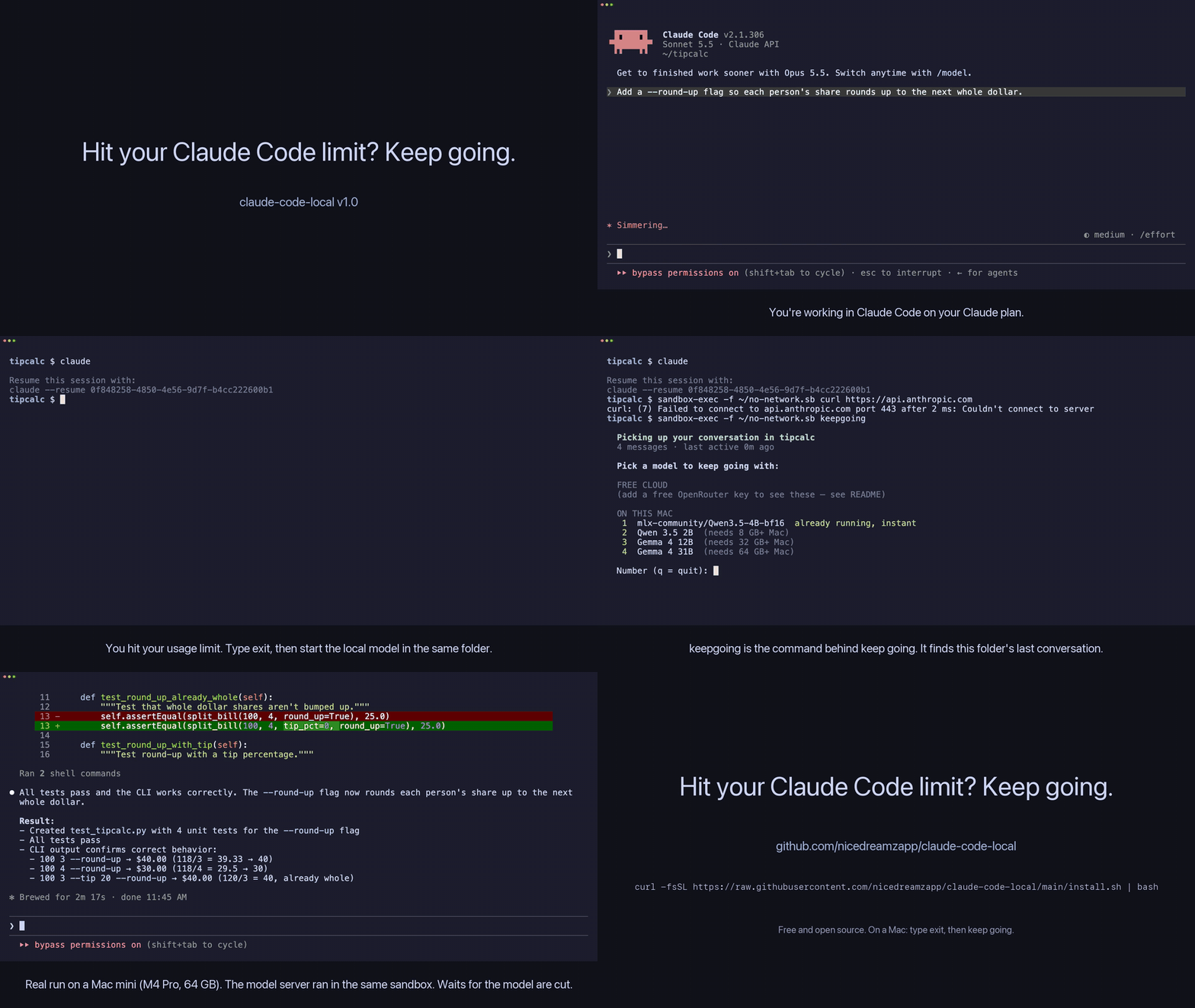
A real session, unedited. Claude Code reads and edits the file, and the AI answering is running on the laptop.


Matt Macosko wrote the glue that makes local models usable inside Claude Code. The pieces in this repo:
- ⚡
proxy/server.py: the MLX server. Speaks the Anthropic Messages API with streaming, turns each model's own tool-call format (Gemma 4, Qwen, Llama JSON) into Claude Code tool calls, repairs garbled tool JSON, and reuses the prompt cache between turns so long sessions don't re-read everything. - 🧪
scripts/test_parse_tool_calls.pyandscripts/test_mlx_server.py: tests for the tool-call parser (no model needed) and for multi-step tool calls against a running server. - 🏎️
agent/agent.py: the Native Engine, a one-file terminal coding agent with a short fixed system prompt so the cache survives every turn.bench/agent_bench.pyreproduces its cache numbers. - 🔋
bin/keepgoing+bin/keepgoing.py: finds your last Claude Code conversation in this folder and resumes it on a free cloud or local model. - 🚀
install.sh,setup.shandscripts/doctor.sh: check the Mac, pick a model that fits its memory, install everything and make a Desktop launcher. - 🎮
launchers/with the sharedlaunchers/lib/claude-local-common.sh: the double-click modes below.
Upstream, not mine: Claude Code (Anthropic), MLX and mlx-lm (Apple), and the models themselves (Google, Qwen, Nous Research and the others credited below). Contributors who fixed things are named at the bottom.


🛑 Hit your Claude usage limit?
Claude Code just said "you've reached your usage limit" and the reset is hours away? Keep working: same Claude Code, same project, but the AI answering runs on your own Mac.
curl -fsSL https://raw.githubusercontent.com/nicedreamzapp/claude-code-local/main/install.sh | bash
That's it. It even works on a 16 GB MacBook, and gets better the more memory your Mac has.
Once it's running, the local-first family takes it off the keyboard: your browser, your voice, your phone, all on the same machine.
🔋 Out of Claude credits? Keep going.
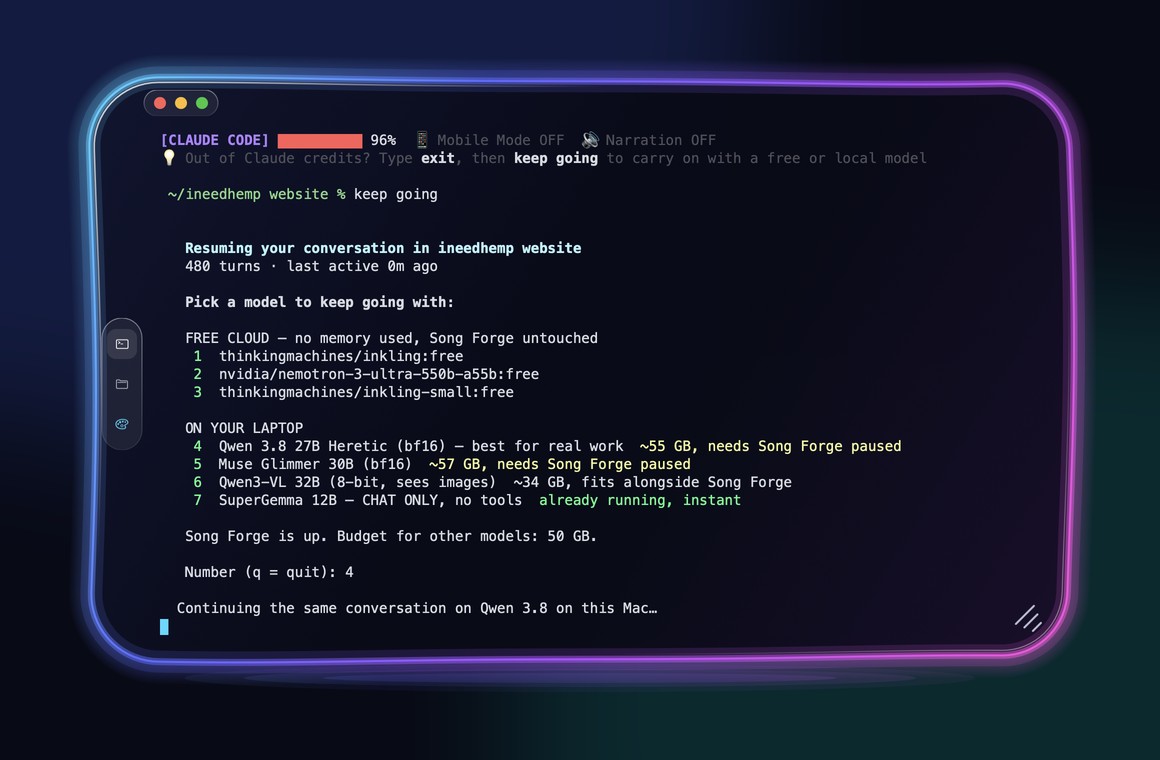
When Claude runs out, type exit in Claude Code, then keep going. You get a short menu,
and the same conversation carries on with whichever model you pick:
- ☁️ Free cloud models from OpenRouter (add a free key, see below)
- 💻 Models on your Mac from the lineup below, sized to fit your memory
setup.sh installs it for you. To add it by hand, or to turn on the free cloud models:
echo 'source "$HOME/claude-code-local/scripts/keepgoing-shell.sh"' >> ~/.zshrc   # the "keep going" command
mkdir -p ~/.config/claude-code-local
echo 'OPENROUTER_API_KEY=your-free-key' >> ~/.config/claude-code-local/keepgoing.env   # optional
Want a reminder at the bottom of every Claude window? Point your status line at
scripts/statusline-keepgoing.sh. It says "💡 Out of Claude credits? Type exit, then keep going to
carry on with a free or local model."
It can also happen automatically. Add one hook to Claude Code and, the moment you hit your usage limit, a new window opens in the same folder and carries on without a menu, free cloud model first, then one on your Mac. Setup and limits are in Automatic keep going.
💡 Free cloud models can get busy later in the day. The models on your Mac are always there.


🤔 What is this, really?
Your Mac has a powerful graphics chip built in. This project uses it to run big AI models right on your computer and plugs them into Claude Code, so the whole coding experience works offline: editing files, managing projects, even driving your browser or talking out loud.
The trick: Claude Code speaks one language (Anthropic's), and local AI servers usually speak another (OpenAI's). Most setups put a slow translator in between. This project's server speaks Claude Code's language directly, so there's nothing in the middle, and that's what makes it fast.
📝 You ──▶ 🤖 Claude Code ──▶ ⚡ this server (on your Mac) ──▶ 🧠 local model ──▶ 🖥️ your Mac's chip
💻 What you need
- 🍎 A Mac with Apple Silicon (M1 or newer)
- 🐍 Python 3.12 (setup installs it for you)
- 🤖 Claude Code:
npm install -g @anthropic-ai/claude-code
Setup looks at your Mac's memory and picks a model that fits:
| Your Mac's memory | The model you get |
|---|---|
| Under 16 GB (8 GB) | Gemma 4 E4B. It loads and chats, but in our Claude Code test it claimed to run a file it never wrote, so expect tool trouble |
| 16 GB (MacBook Air, base models) | 🟡 Hermes 4 14B, confirmed on a 16 GB Mac by a user (#54) |
| 32–63 GB (Pro) | 🟢 Gemma 4 12B |
| 64–95 GB (Max) | 🟢 Gemma 4 31B |
| 96 GB and up (Max, Ultra) | 🟣 Qwen 3.8 27B, 8-bit. Passed our Claude Code test (write a file, run it, report) in 38 s |
🚀 Get started
One command:
curl -fsSL https://raw.githubusercontent.com/nicedreamzapp/claude-code-local/main/install.sh | bash
Or read the script first:
git clone https://github.com/nicedreamzapp/claude-code-local
cd claude-code-local
bash setup.sh
Setup picks your model, downloads it, installs the server, and puts Claude Local.command on
your Desktop. Double-click it and you're coding locally. 🎉
🧰 The full kit
The local model is the brain. The add-ons give it ears, a voice, hands and reach, and one command installs all of it:
curl -fsSL https://raw.githubusercontent.com/nicedreamzapp/claude-code-local/main/install.sh | bash -s -- --with all
| Add-on | What it gives you | Mac | Windows |
|---|---|---|---|
voice |
NarrateClaude: talk to Claude Code and hear it answer | ✅ | ✅ |
moonstone |
Moonstone: every session on every machine in one window, push to talk | ✅ | ✅ |
browser |
browser-agent: agents use your real, logged in browser, each in its own tab | ✅ | ✅ |
phone |
claude-screen-to-phone: drive Claude Code from your iPhone over iMessage | ✅ | |
remote |
FiaOS: your screen and a real terminal from any browser | ✅ | ✅ |
failover |
claude-failover: background agents keep working on the local model when you hit your Claude limit | ✅ | |
terminal |
Trinidad Head: a glowing terminal with a color per window | ✅ |
Every piece is its own repo with its own one-line installer and uninstaller, so you can take one and leave the rest.
Add-ons (macOS). After the model is set up, setup offers a menu of add-ons. Each is its own repo,
installed by that repo's own one-line installer: voice (NarrateClaude),
browser (browser-agent), phone (claude-screen-to-phone),
remote (FiaOS), moonstone (Moonstone)
and failover (claude-failover). Skip the menu:
curl -fsSL https://raw.githubusercontent.com/nicedreamzapp/claude-code-local/main/install.sh | bash -s -- --with voice,browser,phone
curl -fsSL https://raw.githubusercontent.com/nicedreamzapp/claude-code-local/main/install.sh | bash -s -- --with all
bash ~/claude-code-local/scripts/addons.sh menu      # add more later
With no terminal to ask on and no --with, no add-ons are installed.
Uninstall: bash ~/claude-code-local/uninstall.sh (add --with phone,remote or --all to remove add-ons too, --purge to delete their data).
🐛 Asked to sign in to a Claude account? Your
claudeis too old. Update it:npm install -g @anthropic-ai/claude-code
🛠️ Prefer to do it by hand?
# 1. Set up the MLX environment
python3.12 -m venv ~/.local/mlx-server
~/.local/mlx-server/bin/pip install mlx-lm

# 2. Pick a model and download it (one time)
bash scripts/download-and-import.sh gemma   # or 'qwen', 'gemma12', 'hermes'

# 3. Start the server (MLX_SERVER points at the repo copy, since setup.sh didn't install one)
MLX_MODEL=divinetribe/gemma-4-31b-it-abliterated-4bit-mlx \
MLX_SERVER="$PWD/proxy/server.py" \
  bash scripts/start-mlx-server.sh

# 4. Launch Claude Code against it
ANTHROPIC_BASE_URL=http://localhost:4000 \
ANTHROPIC_API_KEY=sk-local \
claude --model claude-sonnet-4-6
setup.sh installs the server as a symlink back to proxy/server.py in this repo, so if you edit
it, just restart the server.

🐧🪟 On Linux or a Windows PC
MLX on Apple Silicon is still the heart of this project and always will be, it's what we run every day. We extended it to everything else so nobody gets left out: the same Claude Code, running on your own machine, now works on Linux and Windows too. Off a Mac there is no MLX, so the AI runs on llama.cpp instead, and the installer does the whole "download and go" for you: it looks at your hardware (NVIDIA, AMD, or just your CPU), grabs the right pinned llama.cpp build, picks the best model that fits your memory at the highest precision it can, downloads it, and launches Claude Code pointed at it. Phones are the next frontier, we're working on it.
Every model it can pick can see images, so screenshots you paste into Claude Code work the same as they do on the cloud.
Linux (one command):
curl -fsSL https://raw.githubusercontent.com/nicedreamzapp/claude-code-local/main/install.sh | bash
Windows (PowerShell):
irm https://raw.githubusercontent.com/nicedreamzapp/claude-code-local/main/install.ps1 | iex
You need git, Python 3, and Claude Code installed. When it finishes, run claude-local
(Linux) or double-click Claude Local on your Desktop (Windows).
On Windows the installer then offers the add-ons that run there, each installed by its own repo's
installer: moonstone (Moonstone), browser
(browser-broker), remote
(FiaOS), terminal
(Trinidad Head) and voice
(NarrateClaude). To skip the menu, set
$env:CCL_WITH = "all" (or "moonstone,terminal", or "none") before the one-liner. Uninstall
(set $env:CCL_WITH = "all" first to remove the add-ons too; models and user data are kept unless
$env:CCL_PURGE = "1"):
irm https://raw.githubusercontent.com/nicedreamzapp/claude-code-local/main/uninstall.ps1 | iex
It picks the strongest vision model that fits and tells you why, for example:
| Your hardware | What you get |
|---|---|
| 24 GB NVIDIA card | Qwen 3.5 9B at full BF16 |
| 12 GB NVIDIA card | Qwen 3.5 4B at full BF16 |
| AMD or Vulkan GPU | the largest that fits in VRAM |
| No GPU (CPU only) | a 4B or 9B vision model, sized to your RAM |
Want a specific one? CCL_MODEL_ID=gemma-4-12b claude-local. The catalog lives in
portable/catalog.json.
What it depends on (and how we'd replace it)
We stay independent on purpose. The portable path leans on exactly two outside things:
- llama.cpp (MIT licensed) runs the model. We pin an exact release by