usage-limits
Most usage tools for Claude Code show you the numbers. This one shows them to Claude, before every prompt, and changes what it does about them.
Claude Code already knows how much of your 5-hour and weekly limit is gone. It caches those numbers locally and will show them if you ask. What it does not do is notice that the job in front of it is larger than the budget behind it. So it starts anyway, and stops halfway through an edit.
This puts the budget in front of Claude before your prompt lands, so the reply opens with the answer instead:
The weekly window has about 22 turns left. That covers the parser change and its tests, but not the migration or the docs pass, so I will do the first two and leave the rest for after the reset at 09:00.
Nobody read a chart to get that. The numbers reached the model, not you.
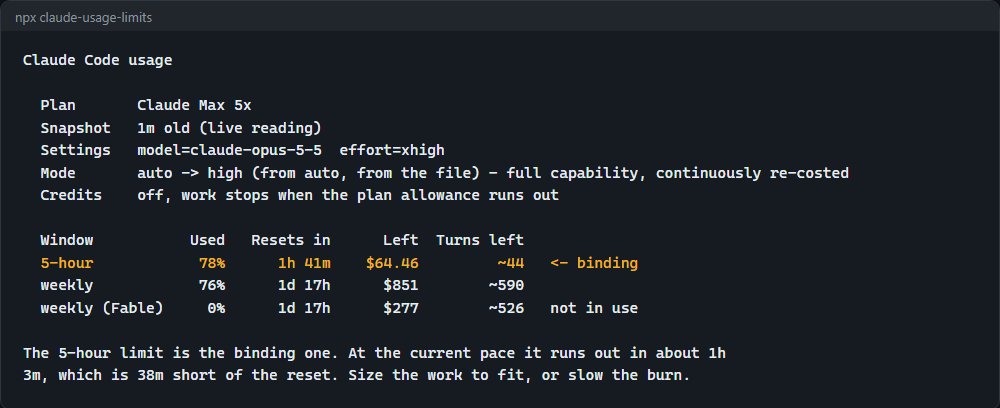
Real output of npx claude-usage-limits on the author's machine, 2026-09-26: the Claude Code windows and the closing verdict, with the Codex and per-model sections left out. The plugin puts the same reading into Claude's context, as the budget line, before every prompt.
Install it as a Claude Code plugin:
/plugin marketplace add ridelink0/claude-code-usage-limits
/plugin install usage-limits@usage-limits
Or see the report without installing anything: npx claude-usage-limits.
Codex, the plain-skill route and keeping it updated are under
Install.
What it runs on your machine, and what it never does
Installing this plugin registers six Claude Code hooks, which means Node runs on
your machine at six moments: UserPromptSubmit (the budget line), PreToolUse
(the fan-out line, and the refusal when a cap is set), PostToolUse and
SubagentStop (keeping the reading fresh), and Stop and SessionEnd (the
session tally). Nothing runs on a timer except a relay wake you armed yourself.
What it reads: your Claude Code transcripts under the config directory, to price
what has been spent; the account snapshot the host already fetched; and your
settings files. What it writes: its own files beside those, every one prefixed
usage-limits-, plus the launcher and scheduled task a relay needs while one
is armed.
It does read your login. The live reading is the same call Claude Code
makes for /usage, and making it needs the same OAuth token, so this plugin
reads it from .credentials.json (or, on macOS, the Claude Code-credentials
keychain item) and sends it as a bearer token to
https://api.anthropic.com/api/oauth/usage. That token is never written to a
file, never logged, and never sent anywhere else: the destination is checked
against an allowlist first - Anthropic over https, or loopback for the tests -
because a project settings file can put anything in a hook's environment and
the override that points at a different endpoint must not become a way to walk
off with your login. Without a live reading the plugin still works, from the
snapshot and your transcripts.
Apart from that one call to Anthropic, nothing leaves the machine: no
telemetry, no upload, no record of your usage kept anywhere else. Everything it
knows sits in files you can open, and node bin/cli.js mode off stops it
injecting anything at all.
Do not want any of this?
node bin/cli.js mode off              nothing injected, ever - including at the wall
node bin/cli.js mode off --guard 95   silent, except one short line at 95% used
node bin/cli.js statusline off        take the bars out from under the prompt
off means off: no budget line, no end-of-reply cost, no panel animation. Most
people who want quiet actually want the second form - silence until it matters.
Both apply to new prompts immediately and survive restarts. mode standard
turns it back on.
How this differs from a usage dashboard
There are a lot of good tools that read the same local files this does and draw you a picture: status lines, menu bar apps, terminal dashboards. They are worth having, and this is not trying to replace them. The difference is who the output is for.
| A usage dashboard | This |
|---|---|
| Renders numbers for a person to read | Puts numbers in the model's context |
| You notice, then you interrupt | Claude notices, and adjusts on its own |
| Tells you 78 percent is gone | Tells you 22 turns are left, and whether what you asked for fits in them |
| Runs beside Claude Code | Runs inside it, as a skill and a hook |
| Shows what already happened | Says what to do now, and what to drop |
A percentage is a fact about the past. The useful question is whether the thing you just asked for is going to finish, and answering that needs the request and the budget in the same place. That place is the model's context, which is where this puts them.
So: if you want to watch your usage, install a status line. This ships one too, and a live panel that sits beside the chat, both drawn in Claude Code's own colours from Claude Code's own numbers. If you want the thing spending the budget to know it is spending the budget, that is what this is for.
What it prints
Claude Code usage

  Plan       Claude Pro
  Snapshot   3m old
  Settings   model=opus  effort=xhigh
  Overage    off, work stops at the limit

  Window           Used   Resets in      Left  Turns left
  5-hour            62%      1h 40m    $46.00         ~88   <- binding
  weekly            75%       2d 4h      $124        ~240

  Recent pace   15 turns in the last hour, $0.164 per turn, effort xhigh
  Measured      1,284 turns of local transcript

The 5-hour limit is the binding one. At the current pace it runs out in about
1h 12m, which is 28m short of the reset. Size the work to fit, or slow the burn.
Turns left is the column that matters. It divides the remaining headroom by
what a turn has actually been costing over the last hour, on your account, at
your effort level, so it moves when your working style does. Fifteen turns of
headroom means something you can plan against; 75 percent does not.
It also breaks the window down by model, with the token split behind it:
  Models in the 5-hour window
    Model                   Turns    Tokens   Output   Share
    claude-opus-5             159     27.0M     212k    100%
    Tokens  input 318, cache write 631k, cache read 26.2M, output 212k
When more than one project has run inside the window it breaks that down too, so you can see which working directory actually spent the week:
  Projects in the weekly window
    Project                 Turns    Tokens   Share
    ...ideLink-Stuff-app      930     45.2M     78%
    C--Users-OWNER            240     12.1M     22%
That split is usually the surprise. Almost all of it is cache reads, billed at a tenth of the input rate but paid again on every turn, which is why context length matters more than any single expensive message.
The percentages and reset times come from Claude Code's own cache. The pace comes from your local session transcripts. Neither requires a network call.
Install
Nothing to install, if you just want the numbers:
npx claude-usage-limits
npx claude-usage-limits --status
npx claude-usage-limits lowpower on
That runs the same code as the plugin, from claude-usage-limits on npm. Node 18 or newer.
To have Claude read the numbers and plan against them, install it properly.
As a plugin:
/plugin marketplace add ridelink0/claude-code-usage-limits
/plugin install usage-limits@usage-limits
As a plain skill, if you would rather not use the plugin system:
git clone https://github.com/ridelink0/claude-code-usage-limits
cp -r claude-code-usage-limits/skills/usage-limits ~/.claude/skills/usage-limits
On Windows, in PowerShell:
git clone https://github.com/ridelink0/claude-code-usage-limits
Copy-Item -Recurse claude-code-usage-limits\skills\usage-limits "$env:USERPROFILE\.claude\skills\usage-limits"
One difference between the two: the hook that puts the budget line in front of
every prompt is declared in the plugin manifest, so it only runs on a plugin
install. If you took the plain skill and want that behaviour, add it yourself
in ~/.claude/settings.json, pointing at wherever you put the skill:
{
  "hooks": {
    "UserPromptSubmit": [
      {
        "hooks": [
          {
            "type": "command",
            "command": "node \"$HOME/.claude/skills/usage-limits/scripts/brief.js\"",
            "timeout": 10
          }
        ]
      }
    ]
  }
}
Either way, ask something like "how much usage do I have left" or "can we
finish this before the limit hits" and Claude will load it. Installed as a
plugin it also gives you /usage-limits:check, which prints the report and
sizes whatever you just asked for against it.
The scripts also run on their own, with or without any of the above:
node skills/usage-limits/scripts/usage.js
node skills/usage-limits/scripts/usage.js --json
Keeping it up to date
Claude Code can update this for you, but it will not by default. Auto-update is a per-marketplace switch, and it defaults to on only for claude.ai-hosted marketplaces and a hard-coded list of official Anthropic ones. Every third-party GitHub marketplace, this one included, defaults to off.
Turn it on once, either through /plugin → Marketplaces → usage-limits, or by
adding one key to ~/.claude/settings.json:
{
  "extraKnownMarketplaces": {
    "usage-limits": {
      "source": { "source": "github", "repo": "ridelink0/claude-code-usage-limits" },
      "autoUpdate": true
    }
  }
}
Claude Code then refreshes the marketplace and updates the plugin in the
background shortly after a session starts (with a random delay of up to ten
minutes, so a running session keeps the version it launched with), and offers
/reload-plugins when something changed. To update on the spot instead:
claude plugin update usage-limits
Note that the whole pass is skipped when Claude Code's own auto-updater is
disabled, unless FORCE_AUTOUPDATE_PLUGINS is set.
Cloud and web sessions never see ~/.claude, so nothing installed on a
laptop reaches them. Commit the same block to a repository's
.claude/settings.json, alongside enabledPlugins, and any session opened on
that repository installs the plugin at session start — always at the newest
commit. This repository carries exactly that file if you want one to copy.
The other two channels update themselves the ordinary way: the VS Code
extension through the Marketplace, and the npm package on the next npx claude-usage-limits (a global install pins, so npm i -g claude-usage-limits@latest
to move it).
When another Claude is working too
Two Claude Code windows share one limit, so headroom measured in turns is optimistic while another session is also spending. It watches for that:
  Sharing       2 sessions have spent in the last 15m, splitting this budget 75% / 25%
                The turns above are the whole window, not your slice of it.
and the before-prompt line says how many of those turns are actually yours:
about 38 turns of headroom (2 sessions active, roughly 10 of them yours)
The split comes from measured spend rather than an assumption that everyone is working equally hard, because they usually are not. A session that has gone quiet for a quarter of an hour is not counted as competing.
Every session's spend also feeds the reading itself, not just the split. The percentage is corrected using all spend recorded since the snapshot was taken, whichever window produced it, so another Claude burning budget in the next terminal moves your number too.
Which limit it watches
Two windows run at once and the 5-hour one is usually what actually stops you, so it gets picked whenever it is tighter, and it wins a tie against the weekly window because the shorter window is the one hit first in practice.
It is not forced, though. When the weekly window is genuinely the wall, at 99 percent with minutes left, that is what gets reported. Forcing the 5-hour there would hide the limit about to stop the work, which is the same failure as ignoring it.
A window with no recent spend to measure is ranked by how full it is rather than being skipped, so a 5-hour window sitting at 95 percent is never passed over just because nothing has gone through it in the last few minutes.
Binding is about what stops you soonest, though, not what stopping costs, and those are different: a 5-hour window returns in hours, the weekly one in days. So a window above 85 percent gets called out even when something shorter binds, with its own reset time, because spending the weekly window to save a few turns of the 5-hour one is a bad trade.
When you keep typing
Every message sent while work is already running starts another turn, and each turn re-sends the whole conversation. Three follow-ups during one task can cost more than the task did.
So when several additions arrive mid-task and the binding window is tight, Claude says so once and keeps working:
I have got all three. While the weekly window is this tight, sending them together costs a good deal less than one at a time, so I will fold these in and carry on.
It asks once, never repeatedly, and only when the budget is actually tight. Asking someone to hold their thoughts when there is room to spare is rude for no gain.
The important exclusion: it never discourages a correction, a stop, or a bug report. Those are the messages that save the most work, and a rule that trains people out of interrupting to say "that is wrong" costs far more than the turns it saves. Only additive scope is worth batching.
Credits, and what happens at the wall
The report says which of two things happens when the plan allowance runs out, because they need opposite handling.
If paid credits are off, work stops dead and there is no buying through it, so the report says so and plans around it. If they are on, the limit is a cost boundary instead of a wall. It deliberately does not warn you about that crossover, because Claude Code already announces it and asks before drawing on credits, and a second warning saying the same thing is just noise.
When the binding window will run out before it resets, the report stops describing and starts instructing:
The 5-hour limit is the binding one. At the current pace it runs out in about
20m, which is 3h 40m short of the reset. Size the work to fit, or slow the burn.
  Work stops when it does. Nothing carries on into paid credits.
  Land what exists, write the handoff, and resume after 03:00.
The clock time matters more than the countdown. "Resume after 03:00" is a plan; "4h 12m" is a number you still have to do arithmetic on.
The cloud-session credit is a third case. Claude Code can offer a dollar
credit for cloud sessions (claude.ai/code), on top of the plan, and names it at
the wall itself: "While you wait, start a new cloud session with a $250
credit". It is not usage credits - the account this was built on has those off
at the org level and has this - and a cloud session on it was seen still
working with its 5-hour window "rejected". When the account carries the offer
the report says so on a Cloud credit line, with the amount read from the
offer, and at the wall adds the way on:
  Work stops when it does. Nothing carries on into paid credits.
  To carry on now instead of waiting, start a cloud session on the $250
  cloud-session credit: relay cloud hands it this work as claude --cloud.
  Land what exists, write the handoff, and resume after 03:00.
relay cloud builds the hand-off the wake would deliver and prints the
claude --cloud command with it inline; the cloud session clones from GitHub,
so it warns about anything not pushed. On Windows it also warns when the
claude on PATH is a .cmd shim, because cmd.exe cuts the hand-off at its
first line break even when the command is pasted into PowerShell. Inside a cloud session the report does
not ask for /usage - the container keeps no snapshot - and says what the
session has cost so far at list prices instead. What is left of the credit is
not readable anywhere, so it is never claimed.
The skill also requires Claude to say up front when a job will not fit in what is left, name what it is doing now, what it is leaving, and when the rest can happen, rather than starting and stopping halfway through an edit.
/low-priority, and Claude Code's own features at the wall
Claude Code has grown its own machinery for the moment the 5-hour limit is hit. Some of it a hook can read and some of it cannot, and the whole of this section is about keeping that line straight — a plugin that guesses at the half it cannot see is worse at this than one that says nothing.
/low-priority is a hidden toggle the CLI offers when the session (5-hour)
limit is reached. It keeps the session working at reduced priority and spends
your weekly limit, plus a separate weekly lower-priority allowance. Replies
can pause while it waits for spare capacity. It appears in no changelog and in
no documentation — there are zero mentions across all 405 versions of the
bundled changelog back to 0.2.21 — and it is declared isHidden: true, so the
only way anyone learns of it is the offer line at the wall.
What the plugin can read is whether your account is provisioned for it, from
one field in the same ~/.claude.json it already parses for the meter:
cachedGrowthBookFeatures.tengu_toasty_breeze. That costs no extra I/O, and it
is re-read on every prompt rather than remembered, because the grant can be
withdrawn mid-week.
What the plugin cannot read is whether it is on right now. That state lives
in the CLI's process memory and is written to no file — not ~/.claude.json,
not ~/.claude/state, and no hook payload or status-line field carries it. So
there are three states and never a fourth:
| state | how it is known |
|---|---|
| absent | the account is not provisioned, and the plugin never mentions the command |
| offered | provisioned, so the brief says it exists at the wall — as a possibility |
| acknowledged | you said you switched it on: mode --low-priority on |
Two further gates sit in front of the offer that nothing here will ever see: the
experiment arm arrives in a response header, and the CLI withholds the offer
during a cooloff and once the weekly allowance is spent. So the brief says "if
the wall offers it", never "you can run it". And it never says the plugin or the
model can switch it on: Claude cannot type a slash command, and the command is
declared supportsNonInteractive: false, so it is unusable in a headless or
relayed run either.
At the wall with weekly headroom, the line looks like this:
If the wall offers it, /low-priority can carry this session past the 5-hour
limit at lower priority instead of stopping: it spends the weekly limit, which
is at 45% and so has room, and replies may pause while it waits for spare
capacity - the wait and its ceiling are set by the server per request. It is a
toggle only the user can type, and type again to stop: you cannot run a slash
command, and nothing here can switch it on.
The recommendation has a number behind it. It is offered only while the weekly is at or below 80 per cent and the 5-hour window is the binding wall. Above that the brief actively says not to, and cites the figure: low-priority spends the weekly and draws on a weekly allowance whose size is exposed to no hook and no file, and one user has reported it burning through almost a week of usage in a couple of hours (anthropics/claude-cod