
How much of your Claude limit is left, when it resets, and what you have been spending — on your own machine, from your own data.
ไทย: QUICKSTART.th.md · Support · Contributing · Changelog · Roadmap · Security
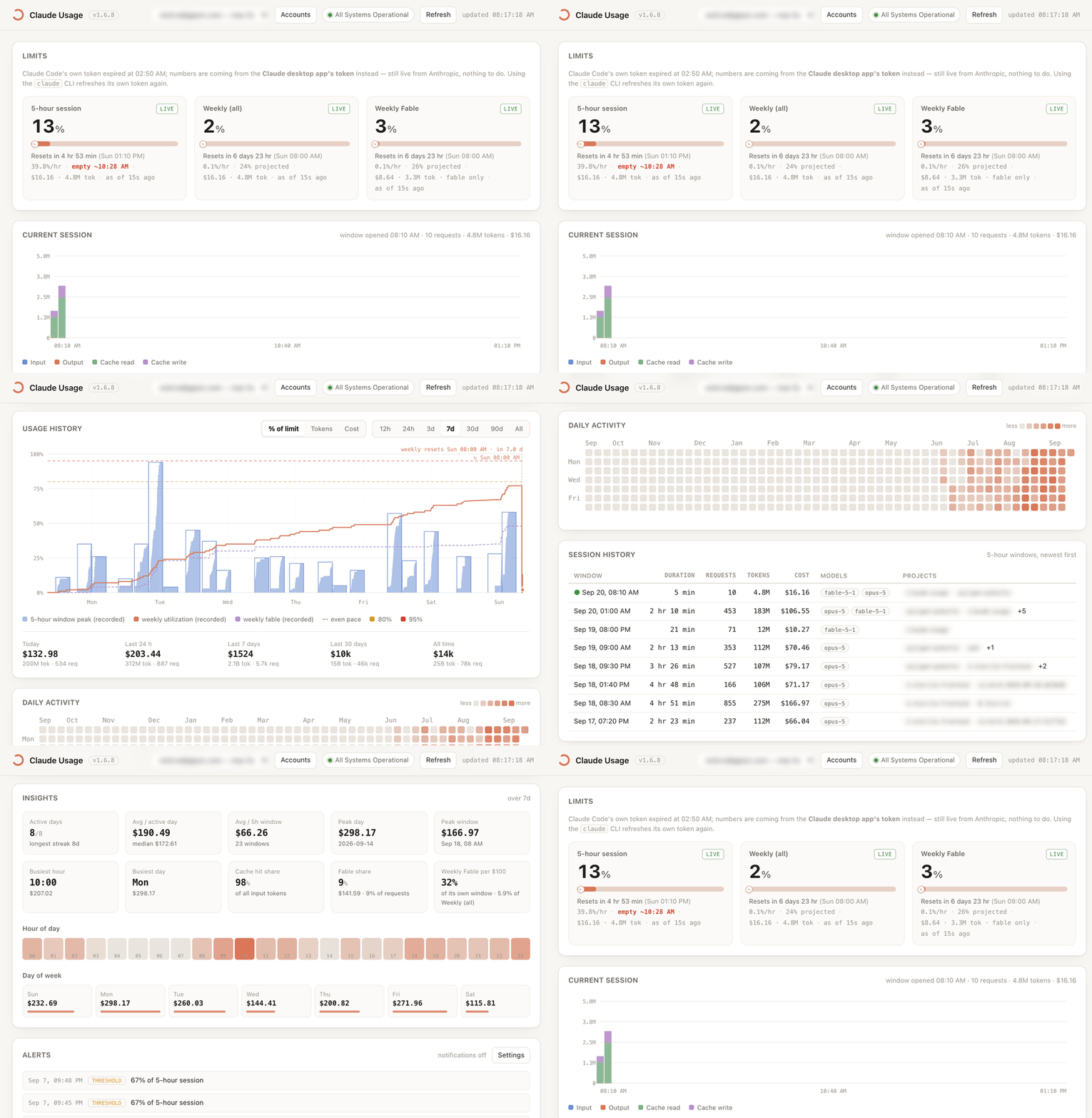
Claude Code tells you a percentage. This tells you which windows are close, when each one really resets, whether your current burn rate gets you there first, and what the whole month has cost — and it keeps the history the apps throw away.
- Real numbers, not guesses. Percentages come from the same Anthropic
endpoint Claude Code's own
/usagecalls, using the login you already have. Anything inferred is labelledestimated; nothing is dressed up as live. - Everything stays local. Transcripts → SQLite on your disk → a dashboard on
127.0.0.1. Zero npm dependencies, no telemetry, no account, no server. - It keeps running. A launchd agent, systemd user service or scheduled task records the windows so you have months of history, not just today.
Install
brew tap gipsic/tap && brew install claude-usage # macOS
or, on macOS and Linux, the installer that also sets up the background service:
curl -fsSL https://raw.githubusercontent.com/gipsic/claude-usage/main/install.sh | sh
Requires Node.js 22+ (brew install node). On macOS the installer puts the
tool in ~/Applications/claude-usage, adds claude-usage to your PATH, starts a
launchd agent at login, builds Claude Usage.app, and opens the dashboard at
http://127.0.0.1:4778. On Linux it installs to
~/.local/share/claude-usage and starts a systemd --user service instead
(no menu-bar app). Re-run it to upgrade. Nothing needs sudo.
On Windows there is no shell installer — use npm:
npm install -g @gipsic/claude-usage
claude-usage install-daemon        # a scheduled task that starts at logon
claude-usage serve --open
Or with npm (Node users), which also puts claude-usage on your PATH:
npm install -g @gipsic/claude-usage && claude-usage install-daemon
Prefer
install -governpxfor the background service:npxunpacks into a cache that gets pruned, and the launchd agent would point at a vanished path.
Every release is also pushed to GitHub Packages, but that copy is private to the GIPSIC organisation — GitHub Packages authenticates every install, even for public packages, and this organisation does not permit public ones. It is an internal mirror, not a second way in. npmjs.org and Homebrew above are the ways to install this.
From a clone instead:
git clone https://github.com/gipsic/claude-usage ~/Applications/claude-usage
~/Applications/claude-usage/install.sh
The first time, macOS may ask whether node may access "Claude Code-credentials". Choose Always Allow — that's the tool reading your own Claude Code login from the keychain to ask Anthropic for your limit percentages. It is never copied or sent anywhere else.
Then, for exact percentages and reset times: dashboard → Accounts → Sign in
with browser (or claude-usage login --web). Everything works without that
too, from the desktop app's cache — reset times are then inferred and labelled
as such.
claude-usage now          # terminal snapshot
claude-usage watch        # live
claude-usage doctor       # check every data source
More of it
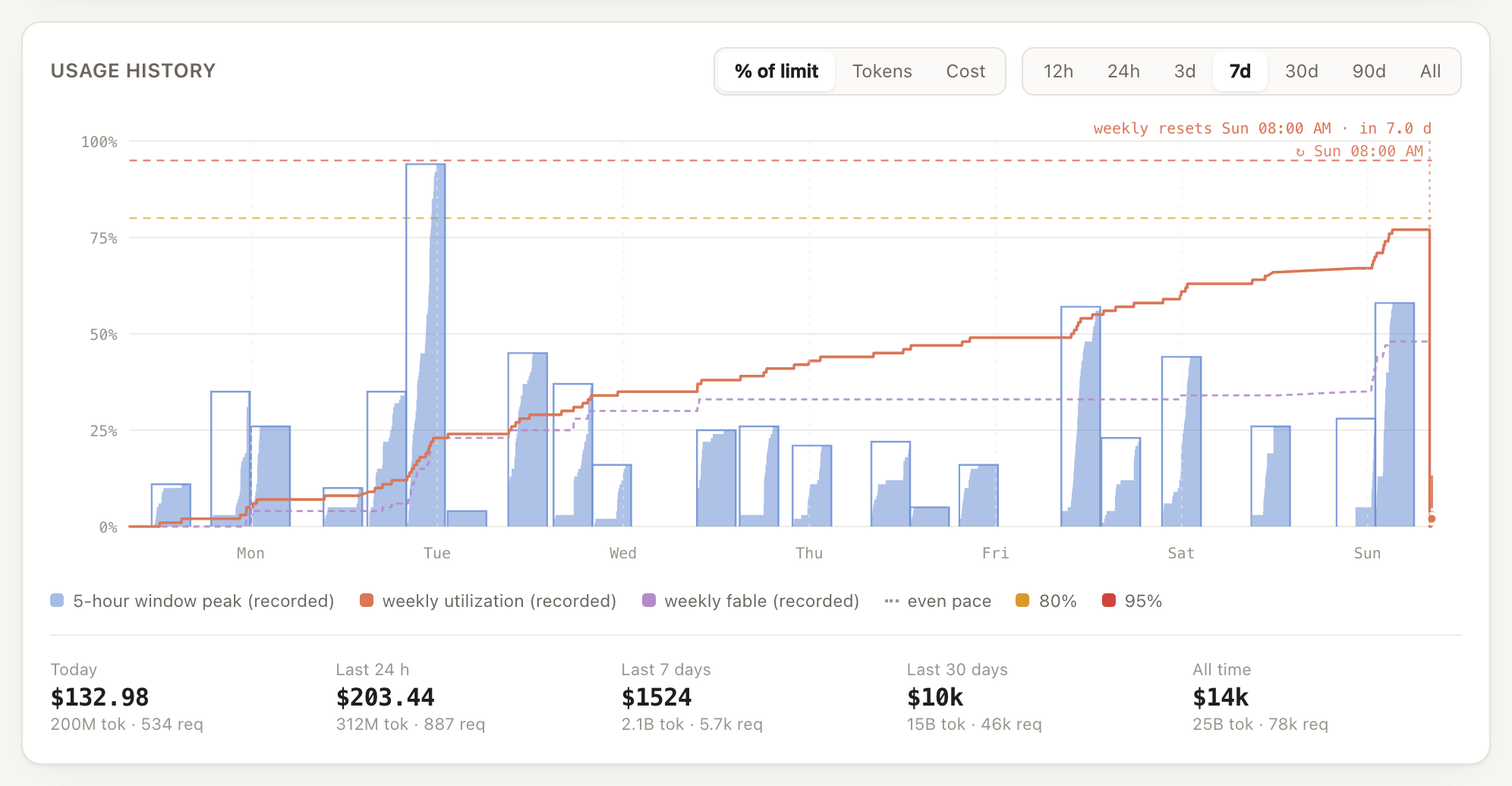
Usage history — every 5-hour window against the limit, with weekly utilization drawn from real recorded snapshots (not interpolated). The per-model weekly window (Fable) gets its own dashed line, each weekly reset is marked where it happened, the corner names the next one, and hovering reads out every line's value at that time.
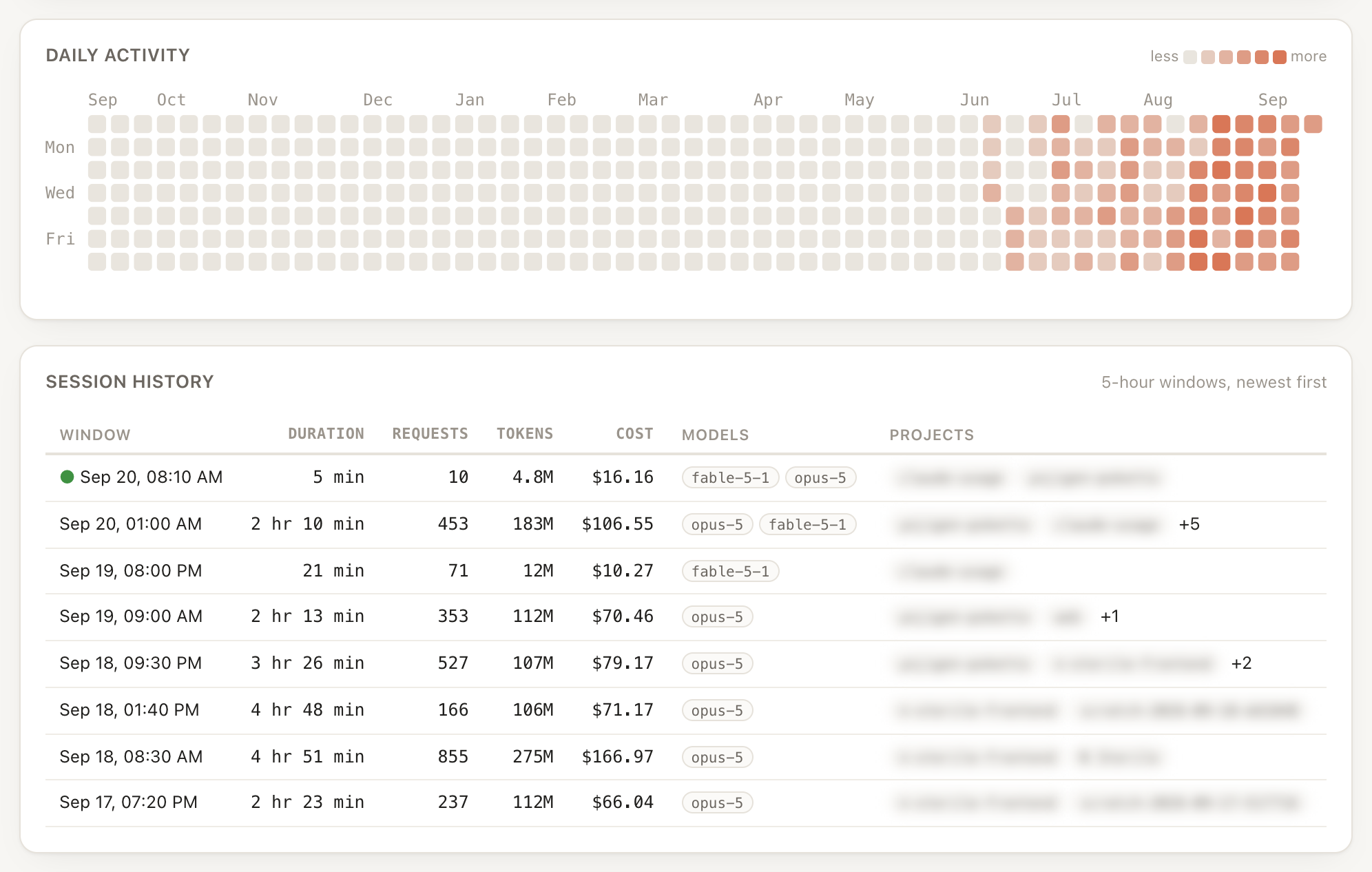
Daily activity and session history — a year at a glance, then every 5-hour window with duration, requests, tokens, cost, the models used and the projects it went to.
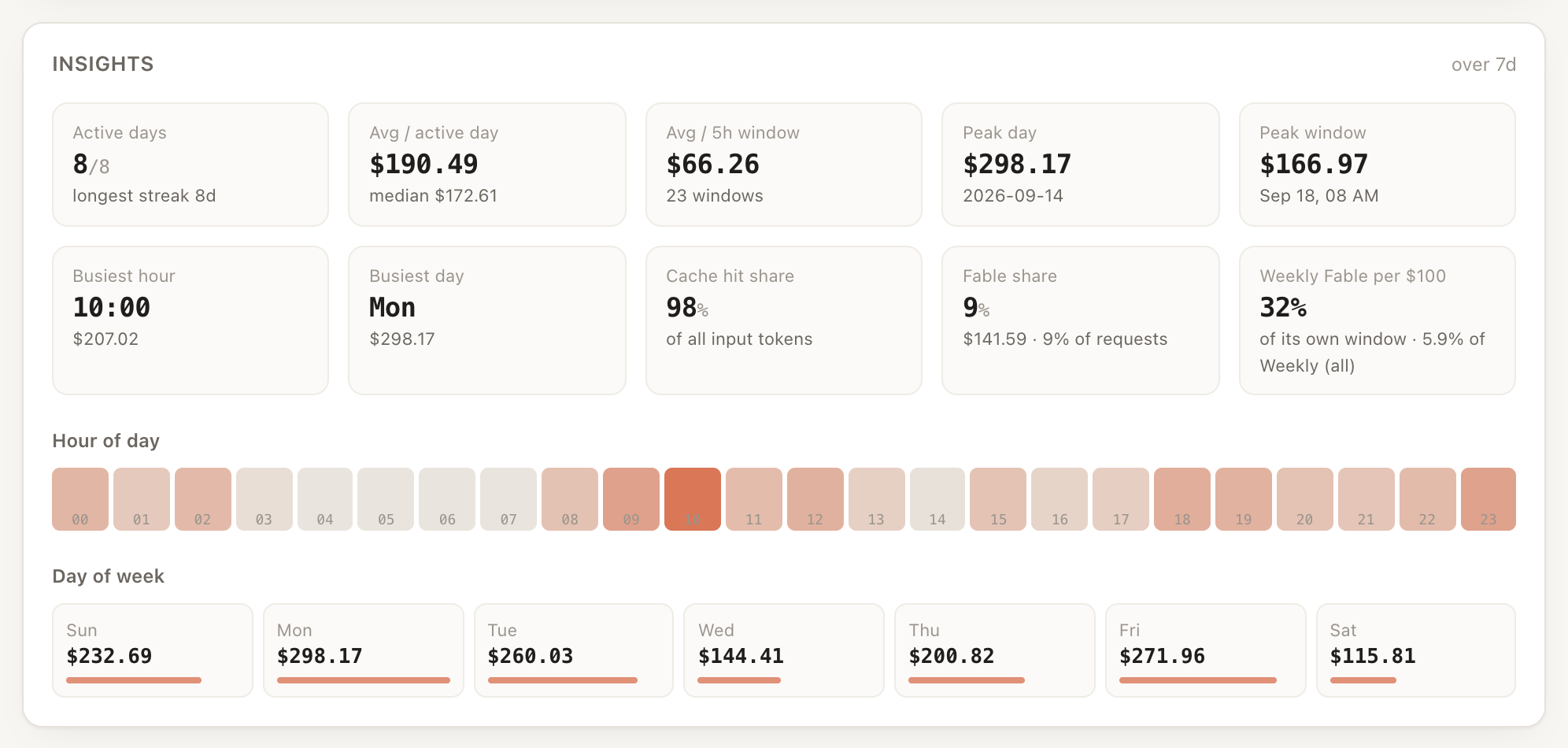
Insights — averages, peaks, cache hit share, what $100 on a per-model window (Fable) costs in limit, the hours and days you actually work.
In the terminal — claude-usage now for a one-shot snapshot, watch for a
live view, menubar for a status line:
  Claude usage — default

  5-hour session  ████████░░░░░░░░░░░░░░░░░░░░   30%  live+
                 resets 12:09 AM (5m)  ·  $148.74 · 238.4M tok  ·  burn 7.9%/h  ·  proj 31% at reset
  Weekly (all)    █████████░░░░░░░░░░░░░░░░░░░   33%  live+
                 resets Sun 07:59 AM (103h 55m)  ·  $723.45 · 1.01B tok  ·  burn 0.4%/h  ·  proj 75% at reset
  Weekly Fable    ███████████░░░░░░░░░░░░░░░░░   38%  live
                 resets Sun 07:59 AM (103h 55m)

  Spend (API-equivalent)
  Today                $5.95   2.6M tok  14 reqs
  Last 7 days       $2473.41  3.73B tok  13219 reqs
  Last 30 days      $9136.79  13.98B tok  44205 reqs
Help make it better
This started as one person's itch and is now open for everyone. If you use Claude and a Mac, you can help — and you don't need to write code:
- Run it and tell us when a number is wrong. A screenshot of Claude app →
Settings → Usage next to
claude-usage nowis the single most valuable thing you can send. Open an issue. - Share it with the people you know who are always wondering how much of their 5-hour window is left.
- Test the Linux and Windows builds. Both are new. Linux runs in CI and has been exercised by hand; the Windows port has only ever run in CI — nobody has installed the scheduled task, seen a toast or completed a browser sign-in on a real Windows machine. If you have one, that report is worth a lot.
- Build the native menu-bar app we don't have yet, on top of the local API.
- Help pin down how limits are weighted. We fit it from data; more accounts make the fit better.
Start with CONTRIBUTING.md. npm test runs 50 isolated tests
in about three seconds. Pull requests of every size are welcome.
Project status & maintenance
Actively maintained by GIPSIC. Every push and pull request runs the full test suite on Node 22 and 24 (see the CI badge above).
- Issues are triaged within a week. Reports of a number that disagrees with the Claude app get priority — use the Wrong number template.
- Pull requests get a first review within two weeks; small, focused PRs land fastest. Reviews are requested automatically via CODEOWNERS.
- Releases follow semver and are tagged on GitHub with notes from
CHANGELOG.md. Only
mainis supported. - Security problems go through private vulnerability reporting, never a public issue — see SECURITY.md.
- Questions and show-and-tell belong in Discussions.
Anthropic changes its usage API from time to time (the limits array appeared
without notice); when a report shows the shape changed, that fix is treated as
urgent.
What it tracks
Limit windows — the 5-hour session window, the weekly window, and any per-model weekly window your plan reports (Fable on Max), each with utilization %, exact reset time and countdown, burn rate in %/hour, a projection of where you land at reset, and an estimated time-of-exhaustion when you're on pace to run out early.
History — every request since your first Claude Code session, broken down by model, project, git branch, effort level, and session. Charts over 12h / 24h / 3d / 7d / 30d / 90d / all, a daily activity grid, a session-window history, and insights (averages, peaks, hour-of-day and day-of-week patterns, cache hit share).
Cost — API-equivalent dollar cost per request, using the published per-model rates including the separate 5-minute/1-hour cache-write and cache-read prices. On a subscription you aren't billed this; it's the yardstick for relative spend and the unit the limit calibration is expressed in.
Alerts — macOS notifications at usage thresholds you choose, reset reminders, a warning when your burn rate will exhaust a window before it resets, and Anthropic service incidents.
Change any of it from the dashboard (Alerts → Settings) or the terminal:
claude-usage alerts                      # what is set right now
claude-usage alerts mute 2h              # silence banners, keep recording
claude-usage alerts quiet 22:00-08:00    # nightly silence
claude-usage alerts set five_hour 80,95  # thresholds for one window
claude-usage alerts test                 # does a notification reach me at all?
A muted or quiet-hours alert is still recorded, so unmuting never dumps a backlog of banners at you.
Is this the right tool for you?
There is a good, popular tool in this space already:
ccusage (MIT). Its README says it reads
local usage data from sixteen coding-agent CLIs — Claude Code, Codex, Gemini,
Copilot, Qwen, Goose and more — and turns them into daily, weekly, monthly and
session reports in the terminal, with npx ccusage@latest and nothing to
install. If that is your question, use it; it answers it better than this does.
claude-usage answers a narrower question about one tool:
| What you want | Reach for |
|---|---|
| Spend across several agent CLIs, one report | ccusage |
| A one-off number in the terminal, nothing installed | ccusage (npx) |
| How close am I to my Claude plan limit, and when exactly does it reset? | claude-usage |
| Per-model weekly windows (e.g. Fable) as Anthropic reports them | claude-usage |
| Burn rate, projection to 100%, notifications before you hit it | claude-usage |
| Months of limit history — the desktop app keeps ~30 days and drops the rest | claude-usage |
| A dashboard that keeps running and recording in the background | claude-usage |
The dividing line is where the percentages come from. claude-usage asks
Anthropic's own usage endpoint with the login Claude Code already has, so the
numbers and reset times are the account's real ones — including usage from
claude.ai, mobile and your other machines — and it records them so you have a
history later. That is also why it needs a credential and a background service,
which is a real cost: a tool you run with npx needs neither.
Both are MIT, both read-only, both keep your data on your machine, and nothing stops you from running both. If something above is wrong or out of date, please open an issue — this table is meant to help you choose, not to win an argument.
Feature parity with Usage for Claude
| Session / weekly / per-model (Fable) limits, % and burn rate | yes |
| 5h · 24h · 7d · 30d · 90d charts | yes, plus 12h · 3d · all |
| GitHub-style activity grid | yes |
| Current-session chart, session-history chart | yes |
| Insights: averages, peaks, recurring patterns | yes |
| Threshold + reset-time notifications | yes, macOS Notification Center |
| Service status alerts | yes, status.anthropic.com |
| Menu bar display | yes, via SwiftBar/xbar plugin |
| Multi-account with quick switch | yes |
| Works with no CLI login (desktop app cache) | yes |
| Measures how much usage came from other devices | yes |
| CSV export | yes |
| Local HTTP API | yes — it is the API |
| Desktop / lock-screen widgets, watchOS, iCloud sync | no — outside what a local web app can do |
Extra here: per-project / per-branch / per-effort breakdowns, dollar-cost estimation, limit history retained past the desktop app's rolling 30-day cache, and the whole database on disk in SQLite for your own queries.
How limit tracking works
A longer write-up of the file formats, the credential handling and the fitting: Where Claude Code keeps your usage numbers.
Anthropic doesn't publish plan limits as token numbers, and the transcripts don't record them. Three sources are combined:
-
The desktop app's cache. The Claude desktop app records plan utilization every ~15 minutes into
~/Library/Application Support/Claude/plan-usage-history.json:{ t, org, u: { fh, sd } }— the 5-hour and 7-day windows as real percentages. These are Anthropic's own numbers, needing no credential and no network call, and they backfill about a month of history on first import. That file is a rolling cache; once imported here the samples are kept permanently. -
The OAuth endpoint.
GET /api/oauth/usage— what Claude Code's own/usagecalls — adds exact reset times and any per-model weekly window. It is polled every 3 minutes with an honestUser-Agent: claude-usage/<version>. Anthropic throttles unrecognised clients harder than Claude Code itself, so a poll may occasionally come back 429; the desktop-app cache fills the gap. It needs a CLI login; without one the desktop cache carries the whole feature.Its current shape returns a
limitsarray (session,weekly_all, andweekly_scopedentries carrying a model scope) alongside the older top-level keys. The array is preferred, so a scoped window like Weekly Fable appears automatically without being hardcoded — and a plan that has no scoped limit shows no empty card for one. A scoped window named after a model family is calibrated on that family's transcripts alone (fable onlyon the card), so it gets the samelive + localandestimatedtreatment as the others. -
Local interpolation. Between snapshots the last real percentage is advanced by whatever you've used since.
Reset times are recovered even without the OAuth endpoint, from the shape of the series itself:
- 5-hour windows begin whenever you send the first message, so they are not hour-aligned. The window's start is read from the last time utilization went from zero to non-zero, and the reset is that plus five hours.
- Weekly windows reset on a fixed weekly schedule, but not every drop in the series is a real rollover — the desktop cache also writes 0 when it cannot fetch. Clustering the observed drops on a 7-day period separates them: the real schedule is the phase most observations agree on. The phase is then taken from the tightly-located members of that cluster (a rollover seen inside a 30-minute gap pins the hour; one seen across an 8-hour gap does not) and snapped to the hour, where real resets land.
On a real account that recovers the exact reset time — 10 observed drops over six
weeks, 7 of which agree on a Sunday-morning schedule. The other 3 were real
resets (94% → 0% inside a 15-minute gap, then climbing again), not cache noise,
but the following Sunday reset still landed on the same phase, so they are
correctly kept out of the schedule. Inferred times are still labelled
inferred in the UI, and signing in replaces them with the exact resets_at
Anthropic reports.
Each window reports its source, shown in the UI as live (straight from
Anthropic), live + local, or estimated. Before any real sample exists the
dashboard shows your local spend rather than inventing a percentage.
Fitting the weighting
Interpolation needs to know how much one request moves the needle, and how Anthropic weights cached input, output and model tier against a plan limit is not documented. Rather than assume a formula, several candidates are scored against the real samples — dollar cost, raw tokens, uncached tokens, cost with cache priced at full rate, output-only, and model tier. For each, cumulative local weight is fitted against the cumulative rise in utilization with a single slope; the candidate with the lowest residual is the plan's real rule, and the slope gives the capacity. (Fitting cumulative curves rather than per-segment ratios matters: the API reports integer percentages, and on a regular cadence a scheme that merely counts requests would otherwise look spuriously consistent.)
Capacity is fitted over the last 14 days only, and the 14 days before that
are fitted separately to detect a step. Plans get temporary boosts — one real
account's weekly capacity jumped ~2.5× on a single day — and a fit pooled across
that describes neither regime. When a step is detected the dashboard says so.
On a real Max 5x account, output fits dramatically better than dollar cost.
claude-usage doctor and the dashboard show which weighting was chosen.
Multiple devices and claude.ai
The percentages are account-wide. They come from Anthropic, so they already include claude.ai in a browser, the mobile app and any other machine — the same numbers you'd see in the app itself.
The token and cost breakdowns are local. Per-project, per-model and per-branch history only covers Claude Code on this machine.
The usage-history chart plots recorded percentages, not derived ones. Each 5-hour bracket takes its height and its ramp from the real samples inside it, and the weekly line is the recorded series verbatim. Only stretches with no snapshot coverage fall back to a calibrated estimate, and the legend says which.
The gap between the two is measured and reported as coverage: the share of observed plan usage that local transcripts account for. The dashboard says so directly — e.g. "About 95% traces to Claude Code on this Mac; the remaining ~5% was used elsewhere." To capture another machine's breakdowns too, run claude-usage there as well; both will agree on the percentages.
Accounts, login and switching
Each account is a separate Claude Code config directory, so two logins never
overwrite each other. The Accounts panel in the dashboard (and
claude-usage accounts) lists them with their email, plan tier, sign-in state,
record count and calibration status.
Signing in
Press Sign in with browser in the Accounts panel, or run:
claude-usage login --web
That runs Claude Code's own claude auth login, which opens claude.ai in your
browser. You approve there; nothing is typed into this tool and it never sees
your password.
About token lifetime. The access token this yields lasts one hour, and only
Claude Code renews it — whenever you use the CLI. When it has lapsed, macOS falls
back to the Claude desktop app's own token, which the app keeps fresh for as
long as it runs: it is read from the app's encrypted store
(~/Library/Application Support/Claude/config.json, unlocked with the
Claude Safe Storage keychain item — macOS asks for permission t