

A CLI tool written in Go that generates git commit messages or provides code review summaries using ChatGPT AI (gpt-5, gpt-4o, gpt-4 model). It also automatically installs a git prepare-commit-msg hook.

Table of Contents
- CodeGPT
- Table of Contents
- Features
- Installation
- Configuration
- Using API Key Helper for Dynamic Credentials
- How to Customize the Default Prompt Folder
- How to Change to Azure OpenAI Service
- Support for Gemini API Service
- Support for Anthropic API Service
- How to Change to Groq API Service
- How to Change to Ollama API Service
- How to Change to OpenRouter API Service
- Support for LiteLLM Proxy
- Usage
- Change Commit Message Template
- Testing
- Star History
- Reference

Features
- Supports Azure OpenAI Service, OpenAI API, [Gemini][60], [Anthropic][100], [Ollama][41], [Groq][30], [OpenRouter][50], and LiteLLM proxy.
- Adheres to the conventional commits specification.
- Integrates with Git prepare-commit-msg Hook, see the Git Hooks documentation.
- Allows customization of generated diffs by specifying the number of context lines (default: 3).
- Enables file exclusion patterns for git diff operations.
- Translates commit messages into other languages (supports
en,zh-tw, orzh-cn). - Supports SOCKS proxy or custom network HTTP proxy.
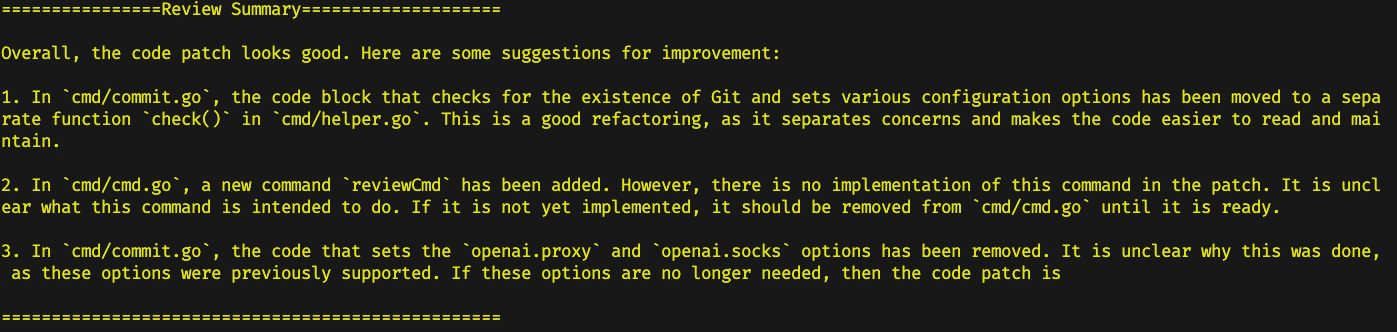
- Generates brief code reviews.
- Supports streaming output for real-time token display.
- Allows customization of prompt templates and variables.
Installation
macOS
Install via Homebrew:
brew tap appleboy/tap
brew install codegpt
Windows
Install via Chocolatey:
choco install codegpt
Install via Script or Binary
For most systems, you can use an install script or manually download a pre-compiled binary.
A. Automated Install (Recommended)
Run the install script to automatically download and set up the latest release:
bash < <(curl -sSL https://raw.githubusercontent.com/appleboy/CodeGPT/main/install.sh)
Or download and run manually:
curl -LO https://raw.githubusercontent.com/appleboy/CodeGPT/main/install.sh
chmod +x install.sh
./install.sh
B. Manual Install (Advanced)
-
Download the latest pre-compiled binary from the release page.
-
Change permissions:
chmod 755 codegpt -
Move the binary to your system bin directory:
mv codegpt /usr/local/bin/ -
Confirm installation:
codegpt version
Configurable Environment Variables
| Variable Name | Default Value | Description |
|---|---|---|
| VERSION | latest | The CodeGPT version to install (defaults to latest release) |
| INSTALL_DIR | $HOME/.codegpt/bin | Installation directory |
| INSECURE | unset (disabled) | If set to any value, skips SSL verification. Enabled when variable is present |
Example usage:
# Install with insecure mode enabled (ignoring curl SSL verification):
INSECURE=1 ./install.sh

# Install a specific version to a custom directory:
VERSION=1.1.0 INSTALL_DIR=/opt/codegpt ./install.sh
The script will:
- Detect your OS and architecture
- Download the latest binary
- Add the binary to your PATH
From Source
Install from source code:
go install github.com/appleboy/CodeGPT/cmd/codegpt@latest
Using VSCode Devcontainer
Add the feature to your devcontainer.json:
"features": {
    "ghcr.io/kvokka/features/codegpt:1": {}
}
Configuration
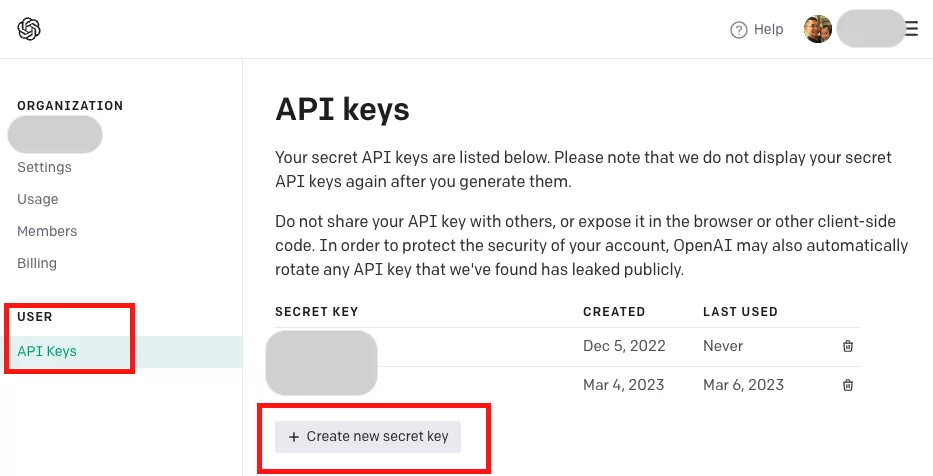
For the default OpenAI provider, first create your OpenAI API key. The OpenAI Platform allows you to generate a new API Key.
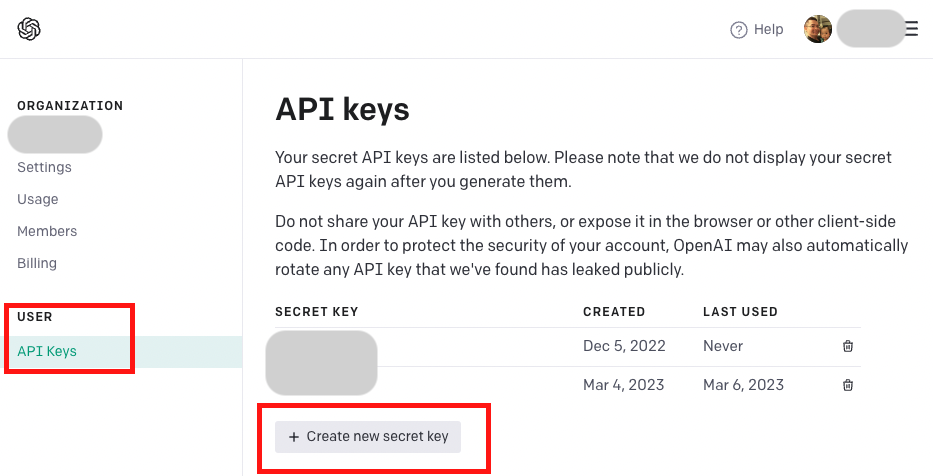
Set the environment variable OPENAI_API_KEY:
export OPENAI_API_KEY=sk-xxxxxxx
Alternatively, save your API key in the credential store:
codegpt config set openai.api_key sk-xxxxxxx
General settings are stored in $HOME/.config/codegpt/.codegpt.yaml. API keys saved with codegpt config set use the OS keyring, with a file-based fallback at $HOME/.config/codegpt/.cache/credentials.json. The following options are available:
| Option | Description |
|---|---|
| openai.base_url | Replace the default base URL (https://api.openai.com/v1). |
| openai.api_key | Generate API key from openai platform page. |
| openai.api_key_helper | Shell command to dynamically generate API key (e.g., from password manager or secret service). |
| openai.api_key_helper_refresh_interval | Interval in seconds to refresh credentials from api_key_helper (default: 900 seconds / 15 minutes). Set to 0 to disable caching. |
| openai.org_id | Identifier for this organization sometimes used in API requests. See organization settings. Only for openai service. |
| openai.model | Default model is gpt-4o, you can change to another model, including a model name configured on your LiteLLM proxy. |
| openai.proxy | HTTP/HTTPS client proxy. |
| openai.socks | SOCKS client proxy. |
| openai.timeout | Default HTTP timeout is 10s (ten seconds). |
| openai.skip_verify | Default skip_verify is false, You can change it to true to ignore SSL verification. |
| openai.max_tokens | Default max tokens is 300. See reference max_tokens. |
| openai.temperature | Default temperature is 1. See reference temperature. |
| git.diff_unified | Generate diffs with <n> lines of context, default is 3. |
| git.exclude_list | Exclude file from git diff command. |
| openai.provider | Default provider is openai; also accepts azure, gemini, anthropic, and litellm. |
| output.lang | Default language is en and available languages zh-tw, zh-cn, ja. |
| openai.top_p | Default top_p is 1.0. See reference top_p. |
| openai.frequency_penalty | Default frequency_penalty is 0.0. See reference frequency_penalty. |
| openai.presence_penalty | Default presence_penalty is 0.0. See reference presence_penalty. |
| openai.stream | Enable streaming output for real-time token display, default is false. |
| litellm.base_url | LiteLLM proxy API base URL (default: http://localhost:4000/v1). Used instead of openai.base_url for LiteLLM. |
| litellm.api_key | LiteLLM proxy API key (master key or virtual key); also available through LITELLM_API_KEY. |
| litellm.api_key_helper | Shell command to retrieve a LiteLLM proxy API key dynamically. |
| litellm.api_key_helper_refresh_interval | LiteLLM helper cache interval in seconds (default: 900). Set to 0 to fetch a key every time. |
| prompt.folder | Default prompt folder is $HOME/.config/codegpt/prompt. |
Using API Key Helper for Dynamic Credentials
Instead of storing your API key directly in the config file, you can use a shell command to dynamically retrieve it from a password manager or secret service. This is especially useful for:
- Fetching keys from password managers (1Password, Bitwarden, etc.)
- Using cloud secret services (AWS Secrets Manager, Google Secret Manager, etc.)
- Implementing token rotation and short-lived credentials
- Enhancing security by not storing keys in plain text
Setup API Key Helper
Configure a shell command to retrieve your API key:
# Using 1Password CLI
codegpt config set openai.api_key_helper "op read op://vault/openai/api_key"

# Using AWS Secrets Manager
codegpt config set openai.api_key_helper "aws secretsmanager get-secret-value --secret-id openai-key --query SecretString --output text"

# Using Google Cloud Secret Manager
codegpt config set openai.api_key_helper "gcloud secrets versions access latest --secret=openai-api-key"

# Using environment variable
codegpt config set openai.api_key_helper "echo \$MY_OPENAI_KEY"

# Custom script
codegpt config set openai.api_key_helper "/path/to/get-api-key.sh"
Configure Refresh Interval
By default, the API key is cached for 15 minutes (900 seconds) to avoid excessive calls to your secret service:
# Set refresh interval to 5 minutes
codegpt config set openai.api_key_helper_refresh_interval 300

# Set refresh interval to 30 minutes
codegpt config set openai.api_key_helper_refresh_interval 1800

# Disable caching (fetch key every time)
codegpt config set openai.api_key_helper_refresh_interval 0
Gemini-Specific API Key Helper
For Gemini provider, you can set a separate helper:
codegpt config set gemini.api_key_helper "gcloud secrets versions access latest --secret=gemini-key"
codegpt config set gemini.api_key_helper_refresh_interval 600
How It Works
- First execution: CodeGPT runs your helper command and caches the API key in the credential store (OS keyring with a file-based fallback)
- Subsequent executions: Within the refresh interval, CodeGPT uses the cached key
- After expiration: CodeGPT automatically re-runs the helper command and updates the cache
- File fallback: Credentials and helper cache entries use
~/.config/codegpt/.cache/credentials.jsonwith owner-only read/write permissions (0600)
Priority Order
For the shared OpenAI credentials, CodeGPT uses this priority:
openai.api_key_helper(if configured)openai.api_keyin the credential storeOPENAI_API_KEYenvironment variableopenai.api_keyin the configuration file
Gemini and LiteLLM check their provider-specific credentials before falling back to shared credentials. See LiteLLM proxy configuration for its full lookup order.
How to Customize the Default Prompt Folder
The default prompt folder is located at $HOME/.config/codegpt/prompt. You can change this to another directory by executing:
codegpt config set prompt.folder /path/to/your/prompt
To load the prompt files from the custom folder, run:
codegpt prompt --load
Upon execution, you will see messages similar to the following:
save code_review_file_diff.tmpl to /Users/xxxxx/.config/codegpt/prompt/code_review_file_diff.tmpl
save summarize_file_diff.tmpl to /Users/xxxxx/.config/codegpt/prompt/summarize_file_diff.tmpl
save summarize_title.tmpl to /Users/xxxxx/.config/codegpt/prompt/summarize_title.tmpl
save conventional_commit.tmpl to /Users/xxxxx/.config/codegpt/prompt/conventional_commit.tmpl
How to Change to Azure OpenAI Service
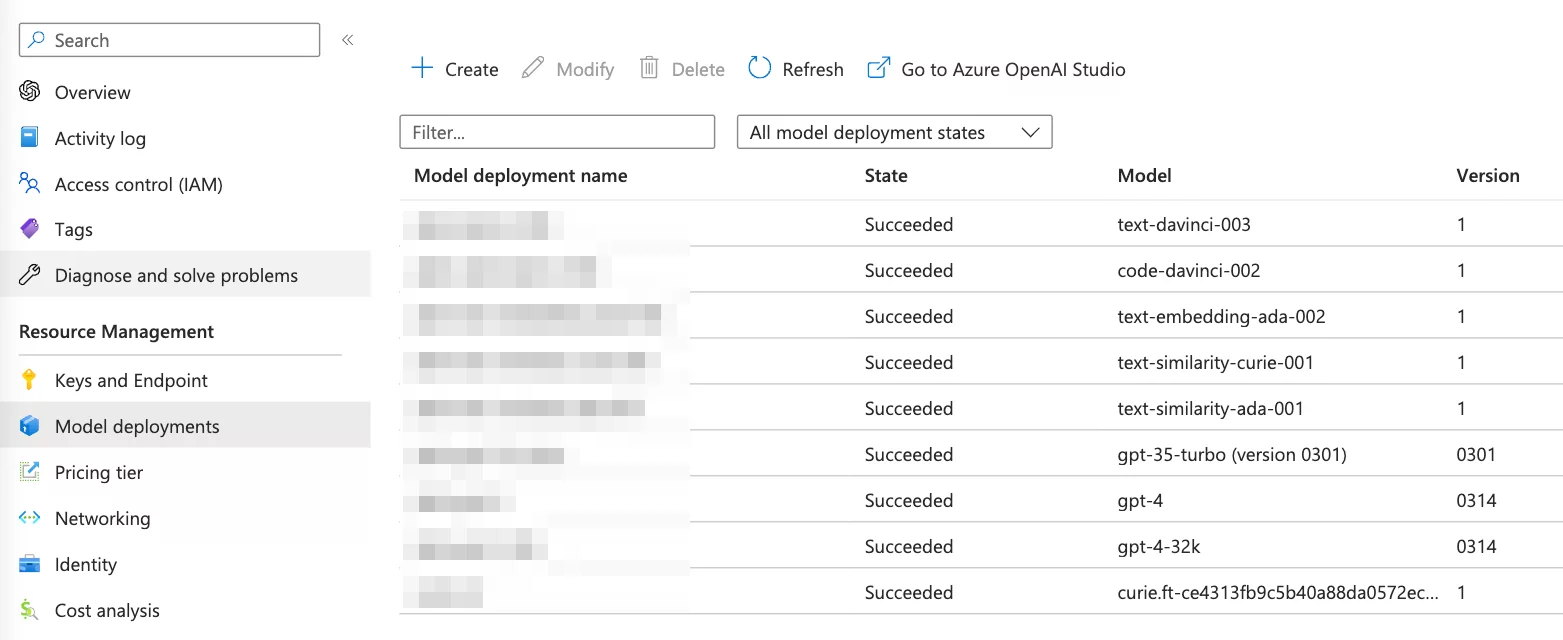
Get the API key, Endpoint, and Model deployments list from the Azure Resource Management Portal on the left menu.
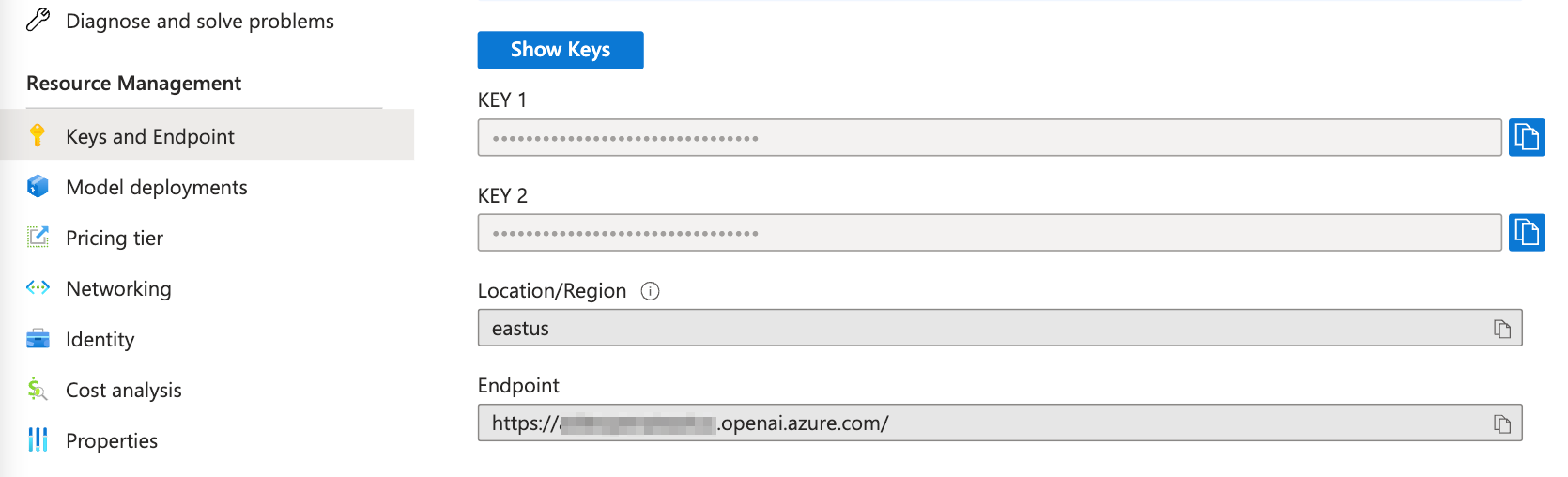
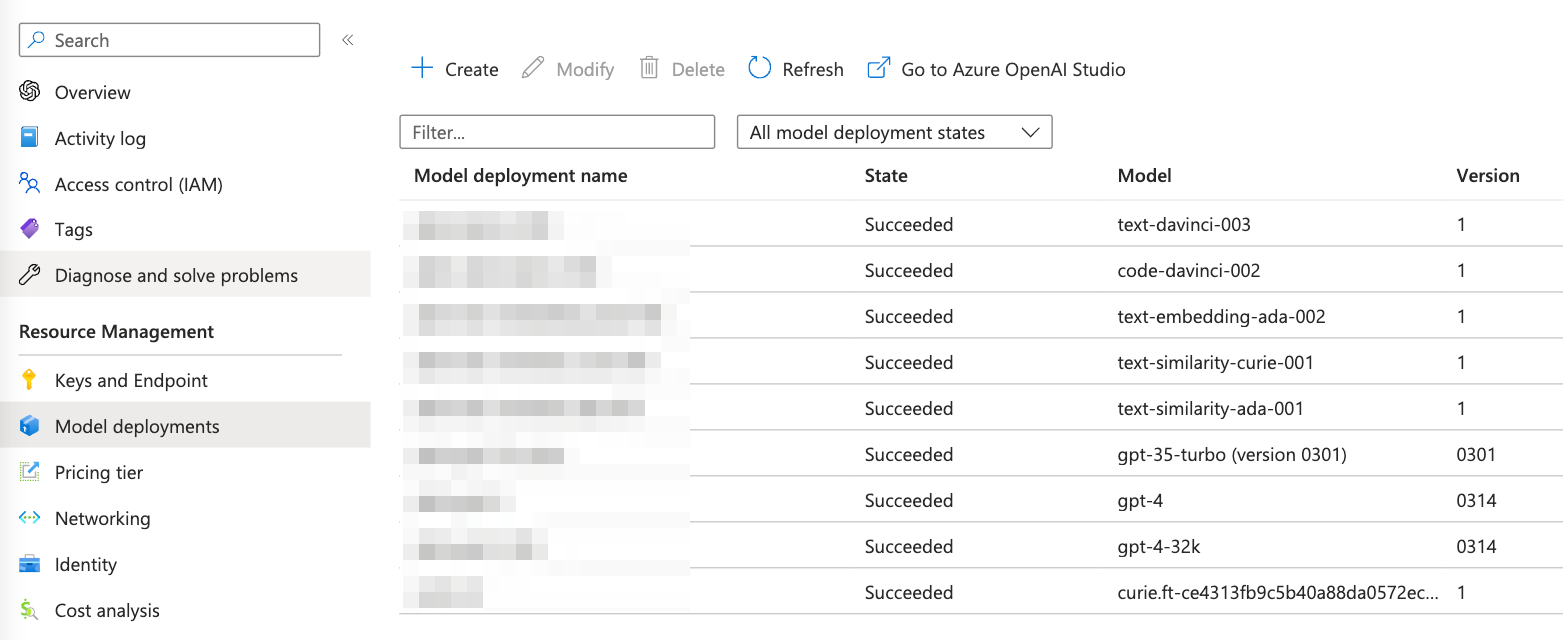
Update your config file:
codegpt config set openai.provider azure
codegpt config set openai.base_url https://xxxxxxxxx.openai.azure.com/
codegpt config set openai.api_key xxxxxxxxxxxxxxxx
codegpt config set openai.model xxxxx-gpt-4o
Support for [Gemini][60] API Service
You can use the Gemini API or VertexAI Gemini service. See the [Gemini API documentation][61] and [VertexAI documentation][63].
Update the following parameters in your config file.
- Please create an API key from the [Gemini API][62] page (for BackendGeminiAPI) or from [VertexAI API Key][64] (for BackendVertexAI).
Configuration Options
| Option | Description | Example Value | Required | Default |
|---|---|---|---|---|
| openai.provider | Set to gemini to use Gemini provider |
gemini |
Yes | |
| gemini.api_key | API key for Gemini or VertexAI | xxxxxxx |
Yes | |
| gemini.model | Model name (see [Gemini models][61]) | gemini-2.0-flash |
Yes | |
| gemini.backend | Gemini backend: BackendGeminiAPI (default, for Gemini API) or BackendVertexAI (for VertexAI) |
BackendGeminiAPI |
No | BackendGeminiAPI |
| gemini.project_id | VertexAI project ID (required if using BackendVertexAI) |
my-gcp-project |
Cond. | |
| gemini.location | VertexAI location (required if using BackendVertexAI) |
us-central1 |
Cond. |
Example: Gemini API (default backend)
codegpt config set openai.provider gemini
codegpt config set openai.model gemini-2.0-flash
codegpt config set gemini.api_key xxxxxxx
# gemini.backend defaults to BackendGeminiAPI, so you can omit it