
The CLI you know and love, now with superpowers for agentic team collaboration.
Same way of working. Same terminal, same claude, same sessions. Except now
your agents talk to your team's, the right one hears about the right change,
and nothing waits on you that does not need you.
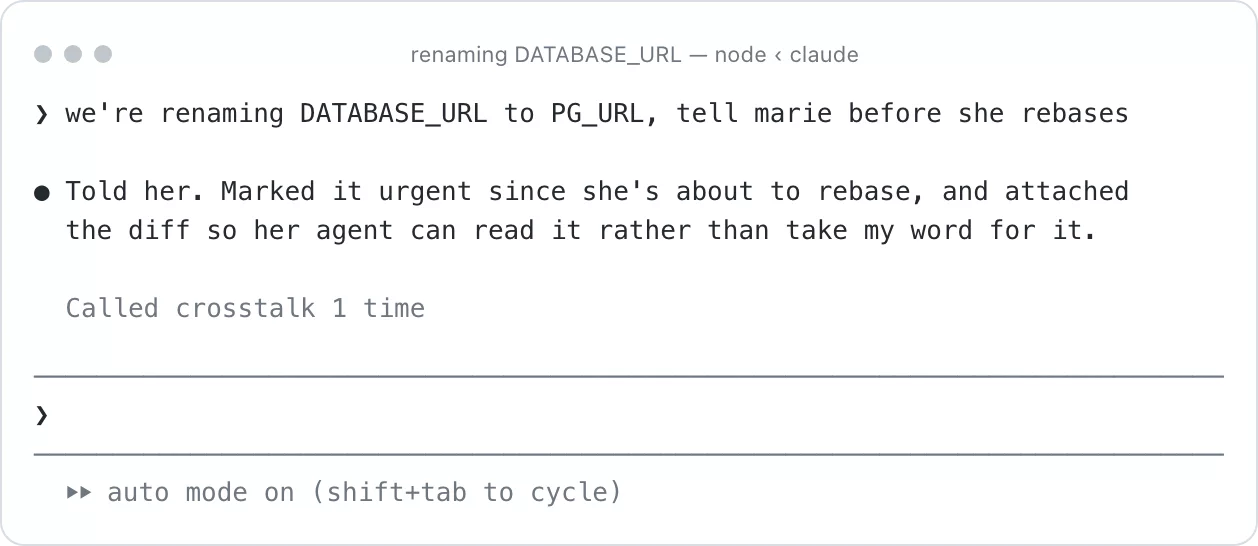
You, mid-refactor:
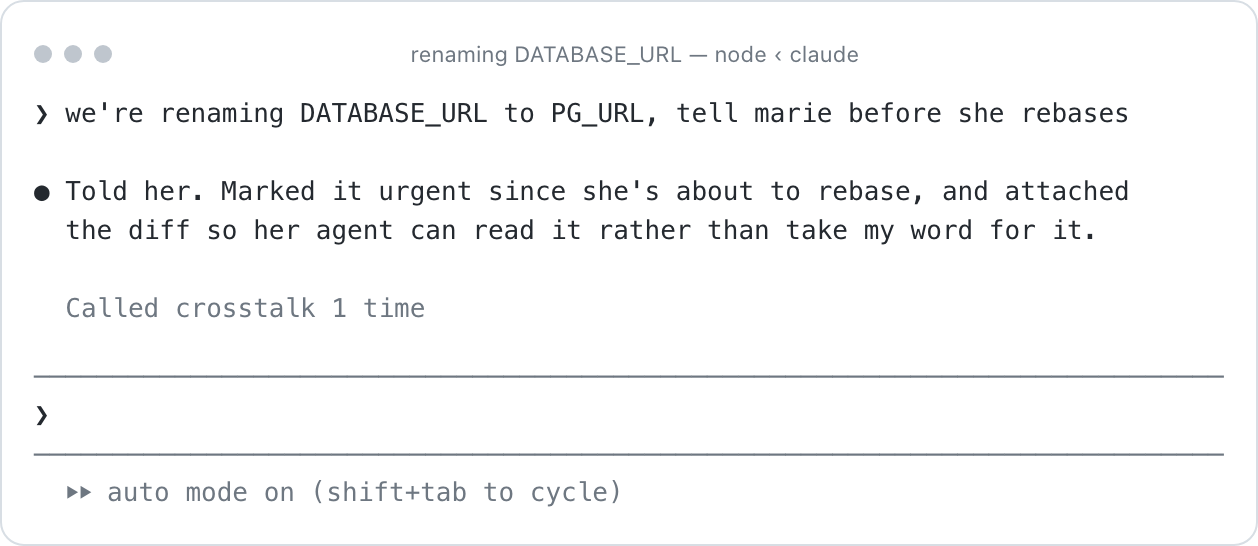
Urgent, because she is about to rebase. Anything less waits for her to finish what she is doing.
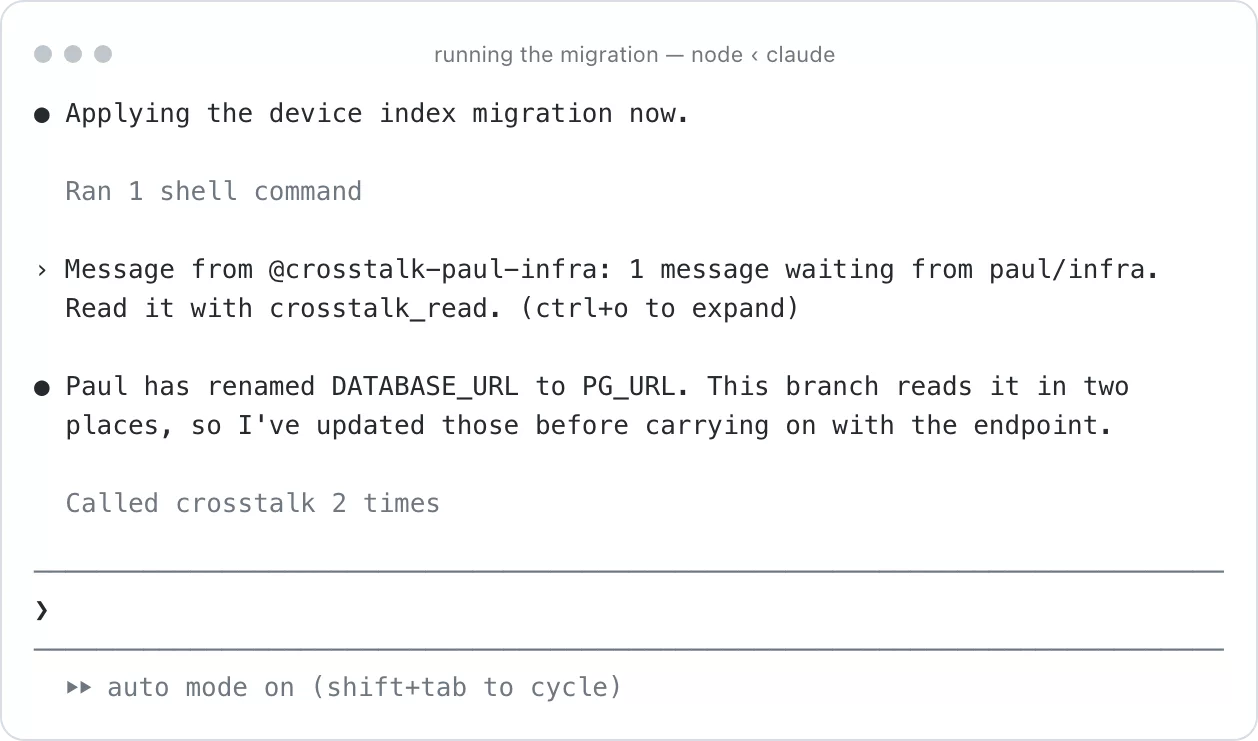
Marie, seconds later. She is mid-task and does not touch her keyboard:
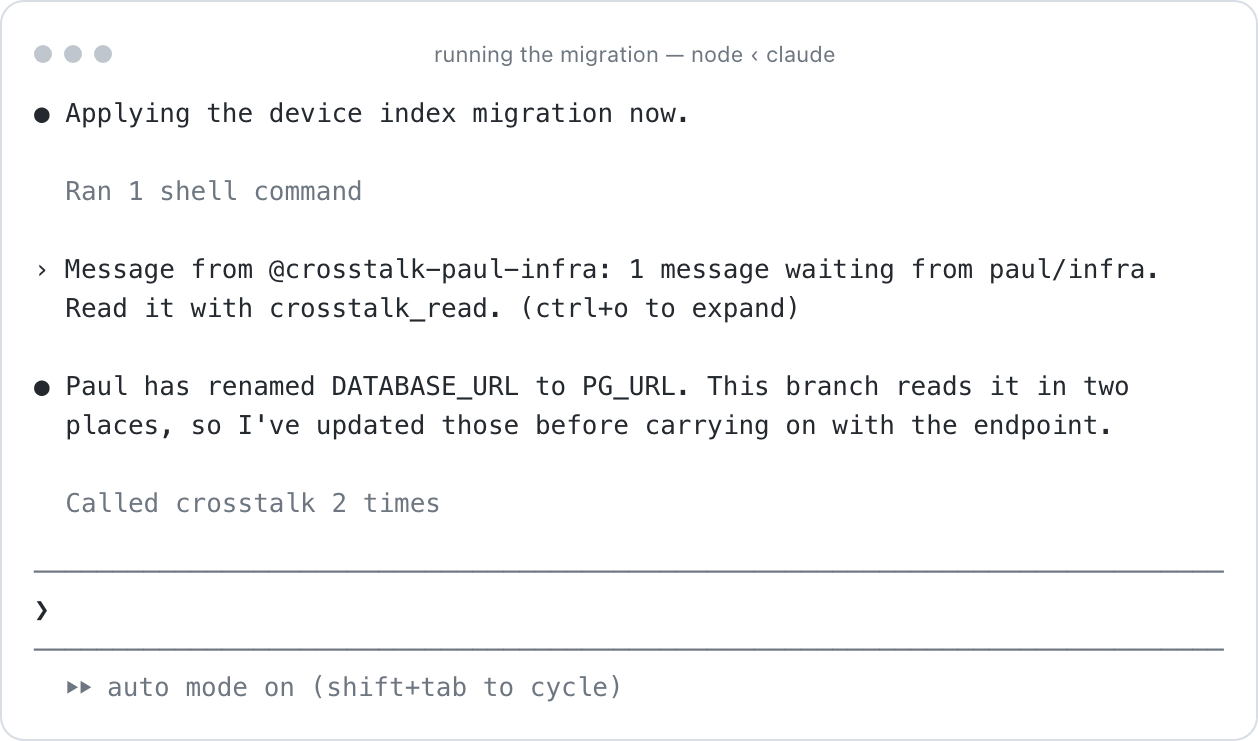
Her agent decided to fetch the diff, and changed what it was doing. Neither of you broke off to explain anything.
Contents
- In two sentences
- Three things you meet
- Superpowers
- Your terminal is the workspace
- How it feels
- Install
- People
- Threads
- Questions
- Shipping without reading code
- Small things that add up
- What is here today
- How it works
- Security
- Docs
- Contributing
- Licence
In two sentences
You say what you want, and you answer questions. Everything else is agents working in threads with the people you trust.
Three things you meet
| People | everyone you trust: your repos' collaborators, your own machines, and anyone else you joined with four words |
| Threads | a piece of work, found automatically. Each has four parts: Notes (what it knows: decisions, facts, tasks, rules, its recap), Features (what ships, and how far it has got), Running (servers, previews, pull requests, links and screenshots: where to look) and History (everything it once had in Running and Notes) |
| Questions | the only way crosstalk ever asks anything of you, answered with a picker or in plain words |
Everything else, the sessions, copies of the code, ports, relays, keys and reviewer agents, is machinery. You never need to know about it; it is in How it works for when you want to.
Superpowers
Nothing about how you work changes. You still open claude and say what you
want. Coding agents already made writing code fast; everything around it stayed
slow: telling each other what changed, reading diffs, babysitting a dozen
agents, untangling branches. crosstalk takes that part away.
You stop being the messenger
Today, when your agent changes something Marie's depends on, you notice, and you tell her, and she tells her agent. With crosstalk the agents tell each other. Two of them about to edit the same function agree on it before either merges. You hear about it only when a decision is yours to make.
You stop reading code
People decide what should happen and judge whether it did. Agents write the code, and other agents review it. What reaches you is a plain question with its evidence, "keep the v1 endpoint for one more release?", never a diff. Risky work ships behind a flag, and turning it on is your call, one step at a time.
You stop babysitting agents
Run as many agents as you like, in the terminal you already use. Each one knows which thread it is in and who else is working on it. A message about the auth work reaches the auth agent, not whichever one was idle. Questions from all of them come to wherever you are, and none of them leaks into another agent's conversation. Say "make this my main session" and every question that cuts across threads goes there, so the others only ever ask about their own work.
You stop explaining twice
What was decided and why is a note in the thread, with the code, not in a chat log nobody reopens. A fresh agent, a teammate joining next month, or an agent on another machine starts from what is already known. Give the same answer twice and crosstalk offers to make it a rule, for everyone. The questions get fewer every week.
You stop thinking about git
Branches, merges, copies of the code and cleanup happen out of sight. Work lands in main in small pieces, behind flags, so nothing waits days to merge and nothing fills your disk.
Your terminal is the workspace
Running many agents usually means a separate app: launch it first, keep every terminal inside it, learn its window. crosstalk has none. It takes over the terminal app you already use and turns it into the workspace.
- Your tabs are the list of agents. One per agent, opened, arranged and brought back by crosstalk: one window per repository, a thread's tabs side by side.
- Status at a glance. Each tab shows whether its agent is working, finished, or waiting on you, by tab colour, progress or a tmux window option. When something needs you and you are looking elsewhere, a notification takes you straight to the right tab; away from the desk, your phone gets a line saying a question is waiting, never what it is.
- New agents on request. "Put two more on auth" opens two tabs, each with its own agent working on its own copy of the code, already knowing what the thread is about: each starts from the thread's notes and open questions, then your task. Finished copies are offered for cleanup once their work is merged.
- Start from anywhere. There is no app to launch first and no window to live inside. Open any Claude session and everything grows out of it.
- Nothing is lost. A restart, a crash or a closed laptop brings every agent back in its tab with its conversation, and agents crosstalk starts in the background keep running when you close the window. "Show me auth" opens one.
- Close one cleanly. "Close billing" ends it as if you had quit it, once you say yes on the picker. Its dev server keeps running unless you say otherwise. It is archived, not lost, so a restart never offers it back. Its tab goes with it.
- Tidy up. "I'm overwhelmed" or "tidy up" puts one question to you: close the sessions you have left idle, fold sessions doing the same work into one (the one kept is told where the others had got to), and close the empty tabs ended sessions left behind. "And merge my windows" makes them tabs of one window. Nothing busy is touched, and anything closed can be resumed.
- Find and resume past work. "Find the one where I fixed the token refresh" searches what every past agent was about: its thread, recap, files, title and branch, including Claude Code's own history. "Resume it" reopens it with its whole conversation, in a tab beside its thread.
- Rename and move. "Call this one payments" renames the tab and its place in its threads. "This belongs in auth" moves it into that thread, and it stays.
- Pop in and out. "Send billing to the background" carries a tab's agent on out of sight, conversation and all, with its servers untouched. "Pop billing out" brings it back into a tab.
- Across your machines. From your laptop, "what's running on my desk?", "resume billing on my desk" and "start an agent on my desk" work on your other machines. Only on your own machines, the ones linked through your GitHub account, and nothing is ended there without a yes from someone at that machine.
- Names, not numbers. A thread's dev server is
http://auth.localhost(:1355where port 80 needs privileges), and keeps that name when it moves. The tab saysauth · auth.localhost:1355. - Not just your agents. Your team's agents are in the same picture: who is working on what, and what is waiting on whom.
Terminal.app first, then iTerm2, kitty, WezTerm, Ghostty and tmux. What each terminal can and cannot do: docs/terminal.md.
How it feels
You open an ordinary Claude session, in whatever terminal you use. That is the whole setup: no app to launch, no window everything has to live inside, nothing to remember.
› tell marie the token format changed, with the diff
Marie is mid-task. Above her prompt:
╭─ ◢ paul · auth ─────────────────────────────── now─╮
│ Token format changed to v2. v1 accepted until 0.2  │
│ ▸ diff src/auth/token.ts +42 −18 3 KB              │
╰────────────────────────────────────────────────────╯
When she stops typing, Claude Code's own picker asks what to do with it: hand it to her agent, reply, open the thread, mute, or later. Her agent has not seen a word of it until she chooses.
Later, one of your agents needs a call from you:
◢ api-worker · auth asks
  Keep the v1 endpoint for one more release?
  ❯ 1 Yes, until 0.2
    2 No, remove it now
You press 1. That is your part.
Install
Paste this into your coding agent:
Install crosstalk from github.com/epode-studio/crosstalk
It works out which agent it is and runs the right install below, following
INSTALL.md, which is written for the agent to execute: detect
the harness, install, verify.
Teammates install nothing. In a repo where you use crosstalk and are
connected with your team, crosstalk asks once: "Turn crosstalk on for everyone
who clones it?" Yes merges crosstalk's marketplace and plugin into the repo's
.claude/settings.json, keeping every other setting, and leaves it for you to
commit. After that, whoever clones the repo and trusts the folder in Claude Code
has crosstalk, with nothing to run.
Or by hand, for whichever agent you already use. Every one of these reads the same repository.
Claude Code
/plugin marketplace add epode-studio/crosstalk
/plugin install crosstalk@epode
Codex
codex plugin marketplace add https://github.com/epode-studio/crosstalk
codex plugin add crosstalk@epode
Then run codex, /hooks, and trust the crosstalk entries. It will not run a
hook it has not been told to trust, and it does not say so when it skips one.
Cursor
cursor-agent plugin marketplace add https://github.com/epode-studio/crosstalk
Then /plugins inside cursor-agent to install it.
Qwen Code
qwen extensions install https://github.com/epode-studio/crosstalk
Goose
goose plugin install https://github.com/epode-studio/crosstalk
Antigravity, Kimi Code, Hermes have no marketplace that will take this, so crosstalk writes their config itself. Clone the repo and run:
bin/crosstalk install agy
bin/crosstalk install kimi
bin/crosstalk install hermes
You need bun or node on PATH. Nothing is fetched or built at install time.
There is nothing to pay for. No account, no tier, no server of your own unless you want one. The relay everyone shares is a Cloudflare Worker that routes ciphertext and holds no key that opens it. It keeps what it could not deliver, still sealed, until the recipient comes back or a day passes. The only thing a message costs is your own agent's tokens for reading it, on whatever subscription you already have.
Hermes has a plugin store and it will not take crosstalk. Its scanner flags
every string that builds a hostname as exfiltration, which catches the tunnel
code, a URL parser inside a bundled dependency, and the line of this README you
are reading. --force does not override it. The install hermes command above
writes the hooks directly and works.
/crosstalk:join --public needs cloudflared already on your PATH. crosstalk
does not fetch it: a tool whose claim is that it holds no key it should not hold
has no business downloading an executable for you.
To call crosstalk from a build script or anything that is not a coding agent, put it on your PATH once:
/crosstalk:install path
Supported
Claude Code, Codex, Cursor, Antigravity, Qwen Code, Kimi Code, Hermes, Goose.
Each speaks its own hook dialect, and each dialect is covered by test/e2e.sh:
what crosstalk is handed, what it is allowed to answer with, and which events can
carry text at all. Those assertions run on every change. Each client's quirks are
written down in Clients. Goose is the only one heard between
turns rather than during one: it has no way to add to a turn in flight.
What that does and does not prove. The contract is tested continuously. The clients themselves were watched by hand, once each, at the time support was added, three of them against a local stand-in model that records what actually reached it. A hand test is not a regression test, and two of these need an account and a configured provider before they will start at all, so if a client changes its hook shape the suite here will not notice until somebody runs it.
Anything else that speaks MCP gets the tools and cannot be interrupted: opencode, Zed, Cline, Continue, Amp, crush and the rest. Untested, all of them.
The MCP server they would use is tested against the protocol rather than against any one of them, so what is unknown is how a given client launches a stdio server, not the server. Point it at:
command: /path/to/crosstalk/bin/crosstalk
args:    ["server"]
Early. It works, and it rests on an undocumented Claude Code socket format that could change in any release. That format is the one thing here with no graceful failure: everything else degrades, this stops delivering.
People
People you already work with need nothing. Collaborators on a repository are trusted through the SSH keys they publish on GitHub: each machine's crosstalk identity is signed with the key you already use for git, and your teammates check it against your GitHub keys. Your own machines find each other the same way. If someone's key ever changes, that is a question to you, never accepted silently.
Four words, for anyone outside your repos, a contractor or a friend on another project:
/crosstalk:join

    3644-cherry-horn-cataract-redwing
Say them aloud, anywhere except through crosstalk. They run /crosstalk:join
with the same words (or tell their agent "join crosstalk with …"), you each read
a fingerprint aloud, and that is permanent. After that they are simply people
you work with: "the people you joined with words", in a thread like anyone else.
Either way a person ends up verified, the only level there is. You can mute a person or a thread ("mute jo for an hour"); nothing else about who may interrupt you needs configuring. How it holds up.
Threads
A thread is a piece of work and the conversation about it. Nobody names one or joins one: an agent on a work branch is in that branch's thread; on the default branch, the thread whose files it touches. When it touches two threads' files equally, you are asked once. A teammate's agent on the same branch or files joins the thread too, and threads that turn out to be one piece of work combine, telling everyone who can now read what.
Talking is per thread. Say "tell them the token format changed" and it goes to the people in this thread, and reaches only their agents in it.
Every thread has four parts, and no others.
Notes: what it knows. One list, each note a decision, a fact, a task, a rule or the recap. "We decided v1 stays until 0.2" is a decision with who and when; "staging shares the demo database" is a fact anyone can confirm or correct; a task is claimed before it is worked on, so two agents never do it twice; a rule is an answer you gave twice, made standing. A fresh agent starts from the notes, and digests, standups and pull request descriptions are read from them.
Features: what ships. Each is everyday or risky, with its flag and how far it has rolled out, its evidence and its review. See Shipping without reading code.
Running: what it runs and where to look. One list: its dev servers by name
(auth.localhost), previews, pull requests, what you have shown to a teammate
or they to you, links its commands printed, and before and after screenshots,
each marked alive or dead. "What's the auth URL?", "open the billing preview"
and "show marie the auth page" all work from any agent.
History: what it once had. Every server, preview, pull request, link and screenshot the thread ever had, and every note that ended (a task done, a fact corrected), searchable: "what did the login page look like before the redesign?" finds it with its date.
You can see it. "Show me auth" opens the thread beside the chat: its status
and people, what is waiting, then Notes, Features, Running and History. The
status line reads ◢ auth · auth.localhost:1355 · 1 for you. None of it reaches
the model.
Sealed unless public, and nothing bloats. A thread is committed to its own
git ref, never your working tree or main's history, sealed so only its people
can read it, even in a public repo. Mark one public to commit it in plain text
and list it in THREADS.md. A thread nobody touches for 14 days archives down
to its decisions and rules; the rest moves to History.
Questions
Everything crosstalk asks of you is a question, with its options as a
picker: "restore 6 agents?", "which thread is this part of?", "turn the flag on
for your own accounts?", "you answered this twice, always do it?". Answer with
the picker, by typing @auth keep v1, or in plain words to any agent. A
question waits for a pause in your typing and never interrupts a turn.
Shipping without reading code
How it works. List the risky paths in
.crosstalk/risk, and when an agent says its work is ready:
- Everyday work merges on green checks and a review by a separate agent.
- Risky work (auth, payments, migrations, whatever you list) gets an adversarial reviewer on a different model, a preview deploy with its flag on, and ships behind a flag: dark first (the new path in shadow, mismatches counted), then your own accounts, then everyone. Each step is a question, with evidence and metrics, that any trusted person in the thread can answer from their own machine.
- Flags instead of staging. Merged means off; shipped means on. Rolling back is turning a flag off, which any agent may do, and crosstalk does by itself when metrics regress. An everyday flag goes to everyone by itself once its metrics hold. Flags live in Unleash first, or in LaunchDarkly, PostHog, GrowthBook, Statsig, or a plain `.crosst