
Discord Rich Presence for Cursor that knows what your agents are doing.
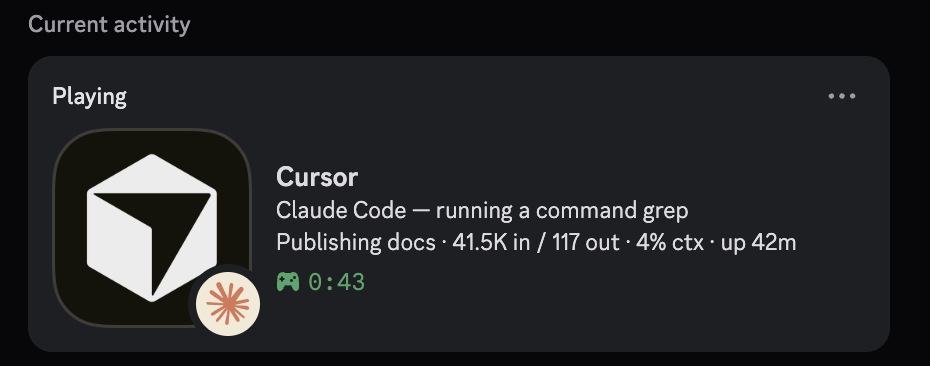
An actual profile, mid-session. This is the full setup — the extension alone shows editing and a plain Claude Code state; the tool, session title and token counts need the companion plugin.
Other presence extensions work in Cursor, but report it as "VS Code" and are blind to the two things a Cursor user actually spends the day doing: driving Cursor's AI, and running Claude Code.
Install
Search cursor2discord in Cursor's extensions panel — Cursor uses Open VSX, where this is published.
Or from the command line:
cursor --install-extension emd5953.cursor2discord
If your build can't reach Open VSX, download the .vsix from
Releases and use
cursor --install-extension cursor2discord-*.vsix, or the extensions panel's
… → Install from VSIX.
Then reload the window. That's it — nothing to register in Discord's developer portal, no configuration.
The one requirement is the Discord desktop app, running. Presence travels over a local IPC socket that only the desktop client opens, so the browser client can never show it — which is the usual answer to "I installed it and nothing happened". The status bar item tells you which side is at fault: it reports the connection state, and clicking it is also the kill switch.
What it shows
| State | Line 1 | When |
|---|---|---|
claudeCode |
Claude Code — editing client.ts |
a Claude Code session is running |
cursorAi |
Vibing with Cursor AI |
Composer / Chat / inline edits |
editing |
Editing client.ts |
otherwise |
idle |
Idle |
no input for 5 minutes |
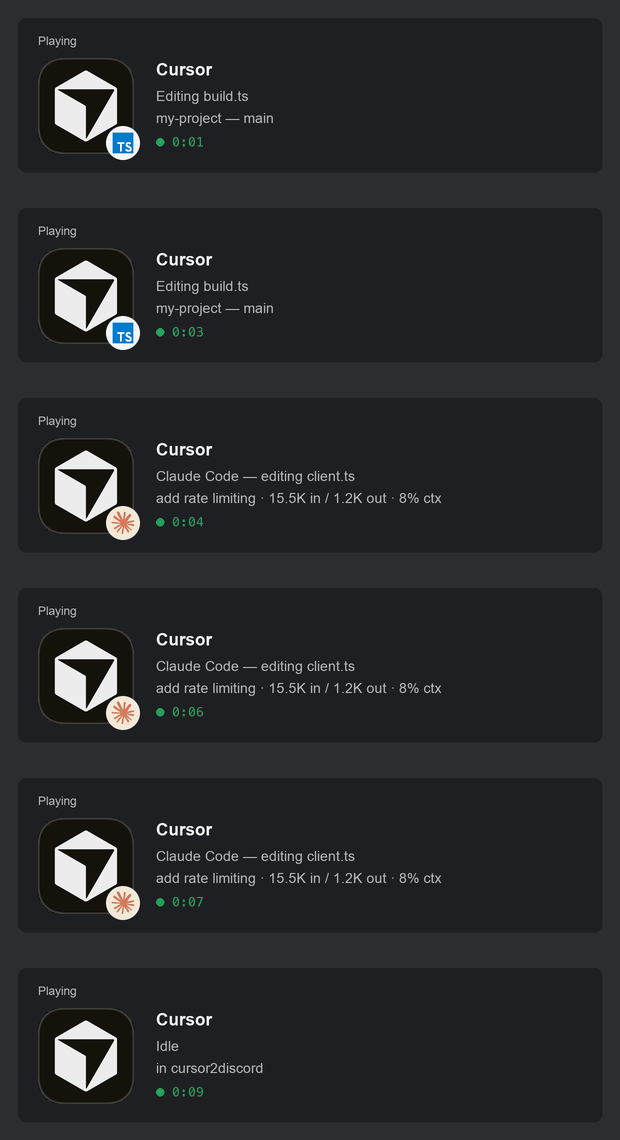
Drawn from the strings the golden payload tests assert, not a screen capture — it cannot drift from what the extension sends without a test failing first.
Which one wins is configurable via cursor2discord.priority.
The large image is always the Cursor mark, so the card reads as Cursor at a glance. The badge under it says what is driving: Claude Code, Cursor AI, or — when neither is — the language you have open. Hovering the large image during a session shows the model and token counts.
Live Claude Code detail
Out of the box, a Claude Code session shows as a plain state — the extension can see that
claude is running, not what it's doing. To get the current tool, the file it's touching,
the session title and token usage, install the companion Claude Code plugin.
Inside Claude Code:
/plugin marketplace add emd5953/cursor2discord
/plugin install cursor2discord
That gives you the tool, the file, the model and an accurate session timer. It adds hooks
that live inside the plugin and does not touch your ~/.claude/settings.json. Remove it
with /plugin uninstall cursor2discord.
For tokens and context usage, additionally run:
/cursor2discord:enable-tokens
Tokens are the one thing hooks cannot see — Claude Code only exposes them to a statusLine
command, and that setting is user-scoped. So this step does change
~/.claude/settings.json. Claude Code makes the edit itself and shows you the diff; undo it
with /statusline delete. Token counts and context usage go on the card's second line —
no hover needed. The model name stays in the icon hover text.
Nothing in this project ever writes a Claude Code config file.
Privacy
This broadcasts screen contents to a chat server, so the settings assume you care.
cursor2discord.privacy.mode |
Shows |
|---|---|
full (default) |
file names, workspace, git branch |
hideFileNames |
language only |
hideWorkspace |
file names, but no workspace, repo or session title |
minimal |
just "Working in Cursor" |
privacy.ignoredWorkspaces— glob patterns where presence is suppressed entirely; no connection is opened at all.privacy.ignoredFiles— file names never shown. Defaults to**/.env,**/.env.*,**/*.pem,**/*.key.- The status bar item is a one-click kill switch, always.
From the Claude Code plugin, only a tool name, a file basename, and counters ever leave your
machine. Command lines are reduced to the binary (npm, not npm run deploy -- --prod), and
tool_input is never forwarded. The conversation transcript is never read.
Templates
Every line is a template string. Variables that don't resolve collapse the punctuation around
them, so {workspace} — {branch} outside a git repo renders my-project, not my-project —.
{file} {ext} {language} {relPath} {workspace} {repo} {branch} {repoUrl}
{line} {column} {lineCount} {problems}
With the Claude Code plugin: {claudeActivity} {tool} {verb} {target} {model}
{sessionTitle} {tokensIn} {tokensOut} {contextPercent}
Known limitations
- Cursor AI detection is inference, not instrumentation. Cursor exposes no API for
Composer/Chat state, so the extension classifies edit shape. It suppresses format-on-save,
paste, branch switches and multi-file refactors, and errs toward missing a session rather
than falsely reporting one. Turn it off with
cursor2discord.detectCursorAi: false. - Claude Code is detected only inside Cursor's terminal. A session in iTerm is ignored.
- Discord silently rate-limits presence updates to roughly one per 15 seconds. Updates are coalesced to match, so a rapid change may take up to 15s to appear.
Development
npm install
npm test          # pure modules: heuristics, templates, parsing
npm run typecheck
npm run package   # → cursor2discord-<version>.vsix
Design decisions are recorded in SPEC.md and docs/specs/, including the alternatives that were rejected and why.
Icons are generated, not hand-drawn: python3 scripts/make-assets.py (needs Pillow,
network access, and Chrome as the SVG renderer). The extension icon is drawn by
python3 scripts/make-icon.py, and the state-cycle GIF under What it shows by
python3 scripts/make-demo.py, from the strings the golden payload tests assert. The
card at the top is the one image that is a real screen capture, so it is the one that
can go stale — reshoot it when the card's layout changes.
Releasing is one tag. .github/workflows/release.yml builds, tests, publishes to Open VSX
and cuts the GitHub release on any v* tag, refusing to publish unless package.json,
the plugin's plugin.json and ASSET_REF all agree with it — a build pinned to the
previous tag renders a card with no icons at all. It needs one repository secret,
OVSX_PAT.
All three versions are bumped by hand, then tagged to match:
npm version patch --no-git-tag-version   # package.json
# plugins/cursor2discord/.claude-plugin/plugin.json  → "version"
# src/presence/assets.ts                             → ASSET_REF
git commit -am "…"
git tag -a v0.1.5 -m v0.1.5              # -a matters: --follow-tags skips lightweight tags
git push --follow-tags
License
MIT
Language icons are devicon (MIT). The Cursor and Claude marks are their owners' trademarks, used to identify the products this extension reports on.