
Regression testing for LLM applications: sample your reference, declare a floor on the checks that need one, and a score drop is read against how much that score moves on its own. A flip from pass to fail is always a regression.


CI is the merge queue's latest run — the gate a change passes on its way to main; a red can mean the queue turned a pull request away while main did not move.
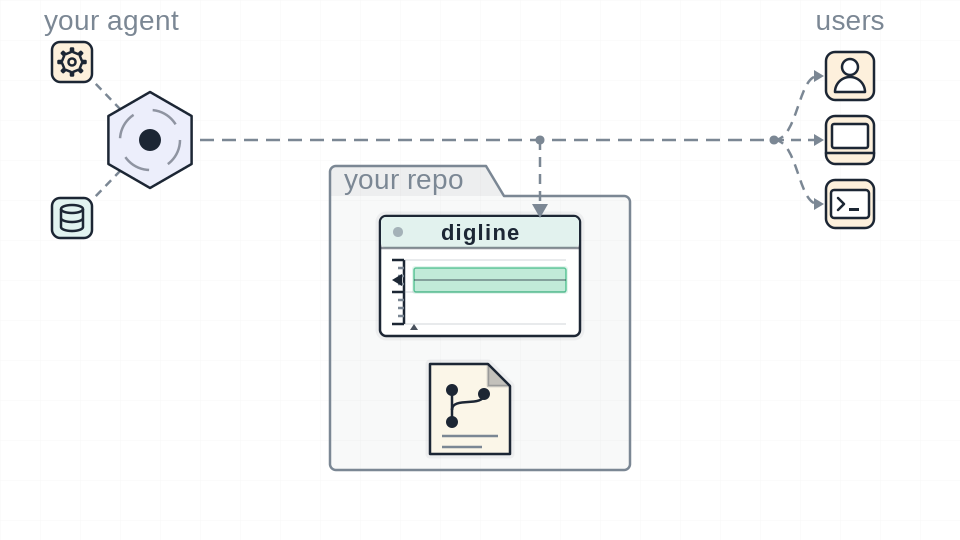
The agent above is the one editing your code, not one running in production. digline runs in your pipeline over the suite you committed: it reads no traces.
Your prompt worked on Tuesday. On Thursday it works a little less — not enough to break, enough for a user to notice in two weeks. No ordinary test catches it, because there is no correct output to compare against, only a better or a worse one.
digline gives you an approved reference — the baseline — and on every change
tells you whether you are below it: which case, which check, by how much. The
baseline is a JSON file in your repository, so it goes through code review and
it rolls back with git. No server, no account, no network call you have not
configured yourself.
When a check uses a model to grade, that grader does not always agree with
itself. Ask digline to sample and it records how much the score moved on its
own. Declare floor_standard_errors on that check and that measurement becomes
a floor: a drop outside it is reported with the interval on its line, and a drop
inside it is not a regression — the headline counts it, and explain prints the
interval. Declare nothing and the samples are still recorded, but the tolerance
decides alone.
$ digline compare --suite suite.py --run latest
2 checks got worse compared with the reference. Every case could be judged. No case is suspended. The suite is unchanged from the reference.

how-do-i-return · llm_rubric · Score fell from 1.000000 to 0.700000.
how-do-i-return · contains · Went from passing to failing (1.000000 → 0.000000).
Why digline
Most evaluation tools tell you whether an output is below a threshold. digline also tells you whether it is worse than it was — the drift from 0.91 to 0.78 that trips no threshold and is the first thing a user feels.
The suite is Python, not YAML: a judge is an object, a target is a function, and what may leave a perimeter is declared in code — none of which a configuration file expresses without reinventing a language. Where a suite is plain data it can be TOML instead, and the two forms build the same objects — what TOML cannot express, it refuses by name rather than half-supporting. Built for teams shipping LLM features for someone else, who have to show a customer what was tested, when, under which commit, and who approved it.
Wondering how digline differs from promptfoo, DeepEval, or observability platforms? See How digline compares.
Quickstart
With uv (recommended):
uv init && uv add digline
or with pip in an existing environment: pip install digline.
Requires Python 3.12+, which uv fetches for you if you do not have it. On
the pip path an older interpreter says ERROR: No matching distribution found
with from versions: none, which does not say why — that is what it means.
If you use Claude Code, digline also installs as a plugin with an MCP server — see Claude Code and MCP below.
suite.py — complete and runnable, no API key:
"""suite.py — complete and runnable: no API key, nothing else to install."""

from digline.core import Contains, CostBudget, JudgeReply, LlmRubric
from digline.run import Case, Response, Suite

ANSWERS = {
    "where-is-my-order": "Order 4821 ships Thursday. — Northwind Support",
    "how-do-i-return": "Any item, within 30 days, unused. — Northwind Support",
}

def judge(prompt: str) -> JudgeReply:
    """Your judge. digline composes `prompt` from the rubric, the question and
    the answer; it wants a score in [0, 1] and a reason back."""
    signed = "Northwind Support" in prompt
    concise = len(prompt.split()) <= 60
    return JudgeReply(
        score=0.4 + 0.3 * signed + 0.3 * concise,
        reason=f"signed={signed}, concise={concise}",
    )

def target(case: Case) -> Response:
    """Your application, called once per case. Canned here so this runs as is."""
    text = ANSWERS[case.id]
    return Response(output=text, cost_usd=0.004 + 0.001 * len(text) / 100)

suite = Suite(
    tenant="northwind",
    environment="staging",
    name="support",
    assertions=[
        Contains(needle="Northwind Support"),
        LlmRubric(
            rubric="Does the reply answer the question in at most three sentences?",
            judge=judge,
            threshold=0.7,
            tolerance=0.05,
        ),
        CostBudget(max_usd=0.02, tolerance=0.05),
    ],
    cases=[Case(id="where-is-my-order"), Case(id="how-do-i-return")],
)
tenant="northwind" is ours, like every tenant in this repository's examples,
and it has to become yours before the first run. A tenant is one customer: one
perimeter, and the directory your store is keyed on, .digline/<tenant>/.
Name it after the customer the suite is for. A suite copied to the next
customer with this line unchanged files that customer's runs in the first
one's directory, compares them against the first one's reference and promotes
over it, each with exit 0.
When your judge is a real model, add a provider plugin:
uv add digline-anthropic (or pip install digline-anthropic), likewise
digline-openai and digline-bedrock.
$ digline run --suite suite.py
2026-08-26T15-44-09-282929-00-00-e7421ec503ccefe8

$ digline promote --suite suite.py --run latest --replacing none
tenant 'northwind' · support baseline set to 2026-08-26T15-44-09-282929-00-00-e7421ec503ccefe8
Now make it worse — delete — Northwind Support from the second answer —
and ask again:
$ digline run --suite suite.py
2026-08-26T15-44-09-492722-00-00-e7421ec503ccefe8

$ digline compare --suite suite.py --run latest
2 checks got worse compared with the reference. Every case could be judged. No case is suspended. The suite is unchanged from the reference.

how-do-i-return · llm_rubric · Score fell from 1.000000 to 0.700000.
how-do-i-return · contains · Went from passing to failing (1.000000 → 0.000000).

$ echo $?
1
The exit code is the answer: 0 fine, 1 got worse, 2 the numbers are not
what they look like. A case that could not be judged is one cause of 2 among
several, and docs/api.md, The exit code, lists them all.
None of the three is a failure of digline: a wrapper that treats a non-zero
exit as a crash is reading a verdict as an error. Two more are not verdicts.
64 is the command refusing what it was asked: a missing baseline, a document
it cannot read, an --out it cannot write, a suite that exits while it loads.
70 is a failure nobody anticipated.
Everything lands in .digline/<tenant>/ — baselines/ committed, runs/
git-ignored through a .gitignore digline writes for you, and says so when one
you already had leaves runs/ out.
What it checks
Per case — pure functions (inputs) -> Verdict, no I/O, callable on their own:
| Assertion | Use it when |
|---|---|
Equals, Contains, NotContains, Affix, Regex |
the output must, or must not, contain something specific |
IsJson, JsonSchema |
the output is structured |
Length |
answers are growing, or must fit a channel |
Levenshtein |
"close enough" to Case.expected, graded rather than binary |
LlmRubric |
the criterion is a judgement — is it polite, does it stay on policy |
Faithfulness |
RAG: is the answer supported by the retrieved context |
FromAutoevals |
you already have an autoevals scorer and want it under a baseline |
PiiAbsent |
the output reaches a person — IBAN, codice fiscale, partita IVA, email, phone, checksum-verified where one exists |
ToolsCalled |
the target is an agent — a function, or an OpenAI, Anthropic or Bedrock target, whose plugins record every tool call — which tools it called, in order: an answer produced without the lookup that should have produced it |
ToolCalledWith |
the other half of a trajectory: the arguments a tool was called with — the right tool asked the wrong question |
CostBudget, LatencyBudget |
always. Graded, so a cost creeping up within budget is still visible |
Repeated |
the judge oscillates: grade the same output n times and fold the votes |
A suite pointed at an OpenAI-compatible endpoint, a gateway or a self-hosted
model declares what it actually charges — [target.pricing] in TOML,
override() in Python — so a CostBudget reads your prices rather than the
plugin's list.
Per run — one verdict on the whole suite, the kind that goes in a contract:
| Aggregate | Use it when |
|---|---|
Precision |
false positives are what your users see |
Recall |
what is missed is what your users miss |
Accuracy, F1 |
you need a single number for both |
Every assertion carries a threshold that can fail — there is no default that
passes vacuously, and Contains("") is a ValueError when the suite loads
rather than a green run — and a tolerance below which a difference from the
baseline is noise. Where a number is really "k out of n", write it as one:
min_agreement="2/3", and a float no k/n can produce is refused at
construction.
One card each — parameters, typical values, what to watch out for — in
docs/metrics.md. Custom assertion? Subclass
AssertionBase, or RunAssertionBase for an aggregate: docs/api.md.
How it thinks
- The judge is yours. The core never calls a model API: you inject a function or a provider plugin's judge, and in your tests a deterministic one.
- Three states, not two —
pass,fail,error. An error is neither green nor a regression: it means could not judge, and a run containing one cannot become the baseline. - Two kinds of noise, two answers.
Suite.samplesasks the target more than once — the same input answered differently.Repeatedgrades the same output more than once — the judge changing its mind.min_agreementbecomes mandatory as soon as you sample. - A tolerance is declared; a noise floor is declared too. Where a check
declares
floor_standard_errors, the baseline's judged samples set a floor either side of its score — that width times √2 times their standard deviation over the square root of their number, the √2 because what moves is a difference of two means — and a drop inside it is reported as unchanged rather than as a regression: a tool that cries wolf on its own measurement error teaches people to promote past it. A run aggregate keeps the range its samples spanned instead. It never rescues a flip and never invents an interval it does not have, so you see one once you have promoted a sampled baseline and declared a width. - An alias is a pointer, and pointers roll.
comparenames the model the provider said answered when it changes,digline logreads that down every stored run, and aCase(canary=True)watches behaviour where the provider says nothing: if it moves at all, the headline says the model under the alias likely changed and the run exits1. - Set the threshold where the system measurably is, not where you want it: the gate protects against getting worse, and raising the bar is a visible change in a pull request.
- Promote the median of several runs, not the first green one —
digline viewis the table you pick it from. Cases diagnose, aggregates gate.
Worked through with real numbers in docs/guide.md; the
reasoning behind every fixed decision is in docs/adr/.
Claude Code and MCP
digline also installs as a Claude Code plugin. What it ships first is the
judgement layer. The operating-digline
skill carries the same rules as AGENTS.md, and loads when the
agent is about to run a suite or read a comparison. Beside it is the MCP server,
which measures, reads and explains, and cannot promote a baseline. Two lines
plus one dependency: the server imports your suite, so it runs from your
project's .venv.
uv add --dev digline-mcp
claude plugin marketplace add digline/digline
claude plugin install digline@digline --scope project
The agent's own shell commands are not the server. A bare digline typed
there resolves through the PATH of the shell Claude Code started, which comes
from your login profile and from whatever environment was active when you
launched it, and it can be another project's install at another version.
uv run digline resolves through your project's environment.
What it installs, and what its hook does and does not guarantee:
plugins/digline/README.md.
In another agent, the skill alone installs through skills.sh:
npx skills add digline/digline --skill operating-digline. That is the skill
without the MCP server or the hook, taken from main rather than a release.
Commands
| Command | |
|---|---|
digline run |
execute the suite, write the run, print its key — refused before the first call if the baseline is at a schema this digline cannot read and --accepting-baseline-schema does not name it. A run killed part way through is finished with --resume, which re-pays for the cases nobody has an answer to and nothing else — docs/api.md |
digline compare |
headline plus the lines that got worse; --json, --json full for CI |
digline diff |
what differs between two runs, neither of them a baseline — for "should I switch?" rather than "did it get worse?". Always exits 0: it is a report, not a verdict — docs/diff.md |
digline promote |
make a run the baseline — refused if the tenant differs, the configuration changed, any check errored, the baseline moved since the comparison (--replacing names the one it replaces), or a pinned file drifted or lost its path and --accepting-pin does not name exactly those paths |
digline register |
record what a person decided about a comparison — --disposition accepted, rejected or unsure — as one line under .digline/<tenant>/register/, committed like a baseline. Counts and keys only: the reason goes in the message of the commit that adds the line. A person's act, never an agent's or a schedule's — docs/register.md |
digline report |
self-contained HTML for readers who do not read code; --locale mandatory, --redacted keeps the verdicts and drops the payload. With no baseline yet it renders the run on its own and says so, so the first run is readable before anything is promoted |
digline explain |
the same facts read back at length, in prose: what ran, what moved, against which measured interval, what differed underneath. Compares when there is a baseline and reads the run alone when there is not. --json emits the fact list the prose is rendered from. It states, and never advises — docs/explain.md |
digline log |
which model answered, read down the stored runs: what each side sent, what the provider said answered, the rolls between them, and every run that recorded nothing named for what it is. A roll is declared by the record, never deduced from scores. Never a gate: it exits 0 whatever it finds — docs/log.md |
digline rejudge |
judge a stored run's recorded answers again — a changed judge, rubric or threshold, over the same answers, at no cost to the target; refused before the first judge is paid, as run is, on a baseline this digline cannot read. The run it writes declares where the answers came from and cannot be promoted — docs/rejudge.md |
digline list |
stored runs, newest first, baseline marked |
digline view |
local browser UI — docs/view.md |
digline migrate |
bring stored runs forward across schema versions — docs/migrate.md |
digline delete |
remove a run, its journal legs and its replays across the tenant, by a key written out (latest is refused). Refused for the run under the current baseline: promote another first. It removes from .digline/<tenant>/runs/ and nowhere else — not the baseline, not the register, not git history, backups or reports — so it is not an erasure — docs/delete.md |
The same comparison reaches an agent through digline-mcp —
eight tools that read and measure, and no promote to call — and Claude Code
through the plugin, which ships that server with
the judgement layer beside it. It reaches a test run through
pytest-digline, one row per check, a pull request through
digline/digline-action, and CI
without a Python toolchain through ghcr.io/digline/digline.
From here: the examples below each run with no API key, the
reasoning behind every rule is in docs/adr/, and
CONTRIBUTING.md says how to set up the repository, run the
tests, and what a change has to show before it lands.
Examples
The projects in examples/ each answer a question somebody
actually arrives with. Every one runs with no API key, carries its committed
report.html, and is a standalone project: copy the directory anywhere and
uv sync works.
- I have a classifier: how do I keep it under control? — labelled cases, an agreement check,
PrecisionandAccuracyas the gate - I'm writing a prompt and have no application yet — a prompt in a file, and the report showing its diff next to what it moved
- [I have a RAG: how do I check it doesn't make things up?](https://github.com/digline/digline/blob/HEAD/examp