DownloadShortcut
A quick-download menu bar app for macOS.
Press a global shortcut anywhere on your Mac, confirm the link, and the file lands in
~/Downloads in seconds — no browser, no waiting for a page to load.
Contents
- Demo
- Features
- How it works
- Installation
- Settings
- Building from source
- Architecture
- Contributing
- License
Demo
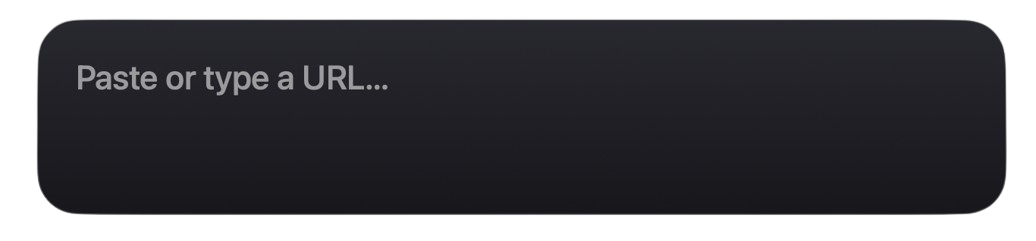
Press the shortcut, and the popup appears ready for a URL.
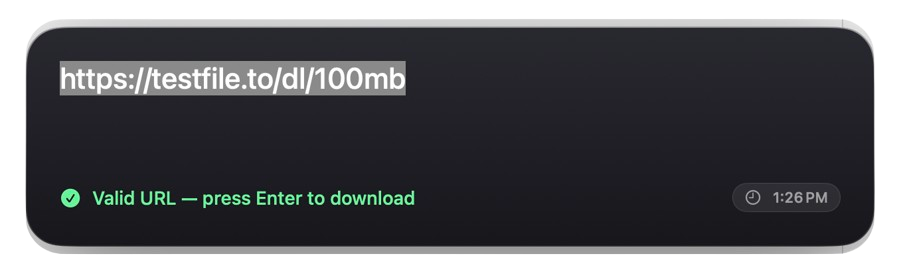
Paste or type a link — it's validated instantly.

The menu bar icon turns into a live progress ring while downloading.
Features
- Global shortcut, anywhere — configurable in Settings (default
⌥⌘V), works from any app. - Clipboard-aware popup — pops up centered on screen, pre-filled with a URL found and normalized from whatever you last copied (including protocol-relative links and URLs buried inside JSON). Paste or type one URL, or several on separate lines to queue them all at once.
- Skip the popup entirely — optionally download immediately when the clipboard already has a valid URL, only falling back to the popup when it doesn't.
- Concurrent download queue — several downloads run at once (default 3, configurable); extras wait their turn.
- Live tray progress — the menu bar icon becomes a circular progress ring with a percentage while downloading, plus a small badge showing how many are running concurrently.
- Cancel from the menu bar — cancel a single active download directly, or pick which one from a list when several are running.
- History, one click away — recent downloads with "Open" and "Show in Finder", right from the tray menu.
- Notifications — an optional notification (and sound) when a download finishes; click it to reveal the file in Finder.
- Launch at login — optional, via
ServiceManagement.
How it works
- Press your configured shortcut from anywhere on the system.
- A popup appears with a URL already filled in, pulled from your clipboard.
- Press Enter to start the download, or Esc to dismiss.
- Watch progress in the menu bar; open the finished file (or reveal it in Finder) from the tray menu once it's done.
Installation
DownloadShortcut isn't notarized or distributed as a signed release yet, so for now it's build-from-source only — see Building from source below.
Settings
Settings is a tabbed preferences window (opened via "Settings…" in the tray menu):
| Tab | Contains |
|---|---|
| General | Launch at login, skip-the-popup auto-download |
| Shortcut | The global shortcut recorder |
| Downloads | Max concurrent downloads, completion notification/sound, clear history |
| About | App version and a quick feature overview |
Building from source
Business logic (all TCA reducers, effects, and dependency clients) lives in a plain
Swift package under Sources/, fully unit-tested and buildable with the Swift
toolchain alone — no Xcode required:
swift build
swift test
Only have Xcode Command Line Tools, not full Xcode?
swift testneeds Swift Testing's runtime framework, which lives outside the default search path when Xcode itself isn't installed. If you hitno such module 'Testing'or adlopenfailure forTesting.framework, run:swift test \ -Xswiftc -F -Xswiftc /Library/Developer/CommandLineTools/Library/Developer/Frameworks \ -Xlinker -F -Xlinker /Library/Developer/CommandLineTools/Library/Developer/Frameworks \ -Xlinker -rpath -Xlinker /Library/Developer/CommandLineTools/Library/Developer/Frameworks \ -Xlinker -rpath -Xlinker /Library/Developer/CommandLineTools/Library/Developer/usr/libWith full Xcode installed, plain
swift testworks with no extra flags.
The App/ directory holds the thin AppKit "shell" — the status bar item, the popup
panel, window/entitlements/Info.plist glue — that needs a real macOS GUI session and
Xcode to build and run. It's generated into an .xcodeproj via
XcodeGen rather than hand- or Xcode-edited, so
the project file stays diffable and reproducible:
brew install xcodegen   # if you don't have it
xcodegen generate
open DownloadShortcut.xcodeproj
Then build & run the DownloadShortcut scheme in Xcode.
Dependencies
- swift-composable-architecture — app architecture.
- KeyboardShortcuts — global hotkey capture and recorder UI.
Pinned below
1.16.0inPackage.swift: newer releases use the#Previewmacro, which needs Xcode's PreviewsMacros plugin and won't build with only Command Line Tools. Safe to bump once you've confirmed a build against full Xcode.
Requirements
- macOS 14 Sonoma or later
- Swift 6 toolchain
- Xcode (for building/running the app shell; the
Sources/package builds without it)
Distribution notes
This app targets Mac App Store distribution and is sandboxed
(com.apple.security.app-sandbox), with com.apple.security.files.downloads.read-write
covering writes to ~/Downloads and com.apple.security.network.client covering the
downloads themselves — no security-scoped bookmarks needed, since the app only ever
touches files it created itself. A first-run onboarding screen walks through the one
real permission gate this leaves (notifications) plus the global shortcut and
launch-at-login.
Architecture
Built with The Composable Architecture
(TCA): unidirectional state, reducers, and effects, with every dependency (clipboard,
downloads, notifications, the global hotkey, persistence) injected via @Dependency
so the whole feature set is unit-testable without touching real AppKit state.
Sources/
├── SharedModels/         Domain types: DownloadRecord, DownloadStatus, AppSettings
├── ClipboardClient/       @Dependency wrapping NSPasteboard
├── HotkeyClient/          @Dependency wrapping the global hotkey library
├── DownloadClient/        @Dependency: URLSession downloads, streamed progress
├── HistoryClient/         @Dependency: persists download history to disk
├── FileActionsClient/     @Dependency: open / reveal-in-Finder
├── QuickAddFeature/        The popup: clipboard-seeded URL entry + validation
├── DownloadQueueFeature/   The download queue, concurrency cap, cancellation
├── StatusBarFeature/       Tray icon state machine (idle/downloading/finished)
├── HistoryFeature/         Recent-downloads list
├── SettingsFeature/        Preferences (shortcut, concurrency, notifications, …)
└── AppFeature/              Root reducer composing all of the above
App/ is the thin AppKit/SwiftUI shell (status item, popup window, settings window,
app delegate) that hosts AppFeature's views — deliberately kept small since it can't
be unit-tested the same way.
Contributing
Issues and pull requests are welcome. Before opening a PR:
swift build
swift test
should both pass. Please keep changes to App/ minimal and push logic down into the
Sources/ package where it can be tested.
License
MIT — see the LICENSE file for the full text.