
Try the live demo · Guide · Report an issue
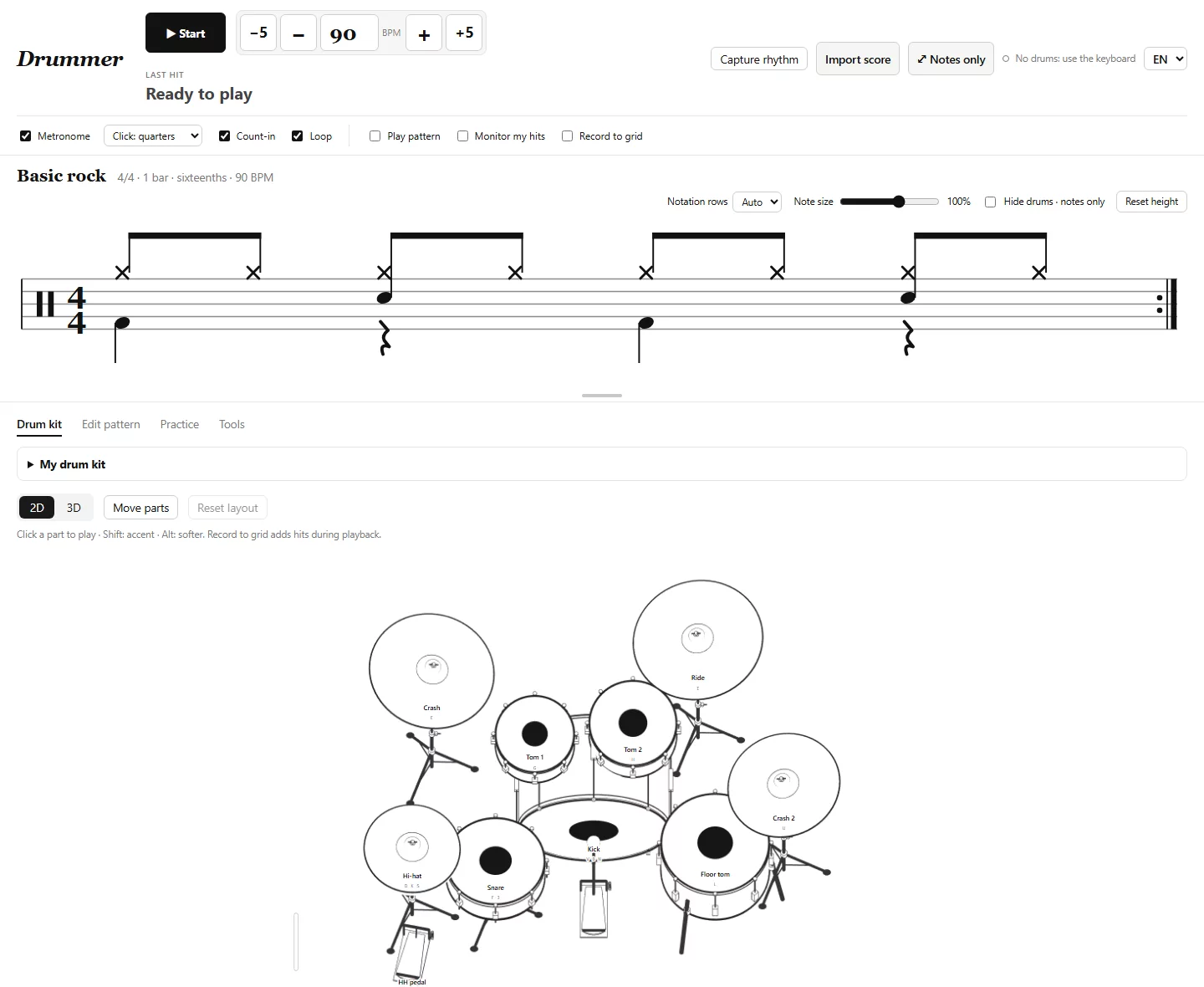
Practice drums in your browser with readable notation, MIDI input and honest timing feedback. Drummer works with electronic drum kits such as the Roland TD-17, or with your keyboard and mouse. No account or application server is required.

What you can do
- Browse 94 practice patterns, 20 per page, with previews of their actual notes.
- Edit with undo/redo, copy selected bars, and generate rudiments or fills.
- Connect multiple MIDI kits with device/channel/note rules and independent output maps, saved in profiles.
- Adjust tempo with large ±1/±5 controls and read hit feedback beside the tempo.
- Resize the notes, choose up to eight rows, or hide the drum kit for a dedicated reading view.
- Import original MusicXML scores with Import score. Pitched scores keep their original notation.
- Review each practice session with expected black notes and your actual red hits, including exact early/late offsets.
- Use A–B focus, a tempo trainer, backing audio, practice programs and performance replay.
- Sequence whole-song arrangements with section lengths, tempo and meter changes.
- Capture a played rhythm with count-in, quantize it, listen and save it.
- Export and restore a full backup with a change preview and conflict choices.
- Customize a 2D/3D kit, play its pads with the mouse and arrange its parts.
- Install the offline app, print practice sheets, and export patterns or performances.
The first visit opens in English. Choose SR at the top right for Serbian; your choice is remembered.
Quick start
Open the demo in Chrome, Edge or Brave, click Start, and play with the keyboard. Enable Play pattern to hear the reference rhythm. For an electronic kit, connect USB and grant the browser's MIDI permission.
| Control | Action |
|---|---|
| Space | Start / stop |
| F / J | Snare |
| V / B / N | Kick |
| D / K | Closed hi-hat |
| S / A | Open hi-hat / hi-hat pedal |
| G / H / L | Toms |
| E / U / I / O | Crashes / ride / bell |
| Shift / Alt + drum key | Accent / ghost note |
| ↑ / ↓; Shift + ↑ / ↓ | Tempo ±1 / ±5 BPM |
The full keyboard map adapts to the configured kit. My sound enables local monitoring; disable it when your drum module already makes sound.
Import a song as sheet music
Use Import score for .musicxml, .xml or compressed .mxl files. For a piece such as Mozart's Turkish March, export MusicXML from a notation program and select that file. The reading view shows the original pitches, parts, clefs and measures, with a zoom slider and scrolling.
| File | Purpose in Drummer |
|---|---|
.musicxml, .xml, .mxl |
Original score reading view, including pitched music |
.mid, .midi |
Patterns → MIDI import: choose and map a percussion section into the rhythm editor |
Pattern .json |
Import/export editable Drummer rhythms |
Audio, e.g. .mp3, .wav |
Practice → Backing track: local audio accompaniment |
MusicXML viewing does not turn piano music into a drum exercise or assess pitched playing. PDF/images need conversion in a notation/OCR program first; native MuseScore/Guitar Pro files should be exported as MusicXML. Imported scores remain local and are selected again after reload. See format notes.

AI audio: drums and drum notes
Open Song → Song analysis and choose an MP3 or another browser-decodable audio file, up to 100 MB / 10 minutes. Isolate drums runs Demucs locally, with drums-only listening, a mix without drums, and WAV export. Transcribe notes runs ADTOF on the original mix or extracted drums. Review the estimated tempo, five instrument groups and note suggestions, then export MIDI or apply a whole-song practice reference.
The first action explicitly downloads the selected model and a shared runtime: approximately 180.5 MB for Demucs or 17.0 MB for ADTOF; the 14.85 MB runtime is shared. Verified files are cached for reuse and can be deleted in the AI panel. Audio is never uploaded. Processing uses CPU/WASM workers, can take several minutes and substantial memory, and can be cancelled. Transcription is approximate: toms, hi-hat articulations and cymbal types are grouped, and MIDI velocity is a default rather than detected dynamics.
ADTOF's model is CC BY-NC-SA 4.0, non-commercial use only. This is separate from Drummer's MIT code license; see model notices.
Read your timing
After Stop, the journal opens your notation report. Black notes show the task; red notes below show when you actually played. A red note to the left is early, to the right is late. The report includes ±milliseconds, extra hits and missed notes, plus a pass/bar selector and exact original timestamps.

Run locally
git clone https://github.com/vladimirperovic/Drummer.git
cd Drummer
python -m http.server 8123 --bind 127.0.0.1
Open 127.0.0.1:8123. On macOS/Linux use python3 if needed; macOS also has pokreni.command. Opening index.html directly is not supported because the app uses ES modules and a service worker.
For Web MIDI, use a supported Chromium browser over HTTPS or localhost. Keyboard/mouse practice works without a MIDI device. 2D works without WebGL.
Local data and offline use
Patterns, sessions and settings belong to the browser and origin. The public demo and localhost have separate data. Settings → App and data → Backup and restore exports patterns, full sessions, programs, profiles, favorites, arrangements and settings. Review merge/replace choices and conflicts before applying a restore. Audio files and downloaded AI models are not included. The journal stores recordings in IndexedDB and loads details on demand; storage failures still show export/retry actions.
Open Settings → App and data and wait until it is ready before going offline. AI needs its optional downloads before offline use. See privacy.
Development and deployment
npm ci --prefix qa
npm --prefix qa test
python -m unittest discover -s qa -p test_analysis.py -v
Browser tests, implementation notes and contribution steps are in CONTRIBUTING.md and qa/README.md. node alati/build-pages.mjs prepares a static dist/; GitHub Actions publishes it to Pages on pushes to main.
Automated tests use simulated MIDI and isolated browsers. Physical drum hardware, audio-interface latency and all GPU/browser combinations have not been exhaustively tested. See release notes.
See the verification report and completed roadmap.
License and credits
Drummer's original code and generated kit artwork are available under the MIT license, copyright 2026 Vladimir Perovic. Third-party components and optional AI models retain their own licenses. See third-party notices.
No commercial sample pack or copyrighted song recording is included. Roland and EZdrummer are product references; this project is not affiliated with their manufacturers.