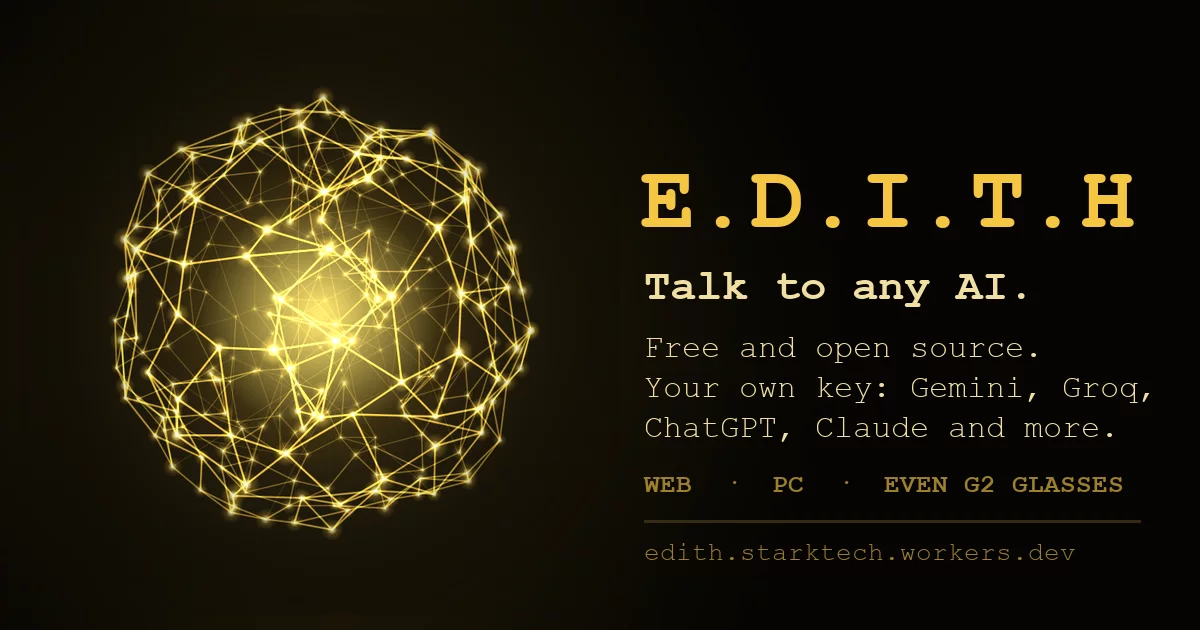
EDITH
Talk to any AI, with your own key: on Even Realities G2 glasses, in your browser, or on your PC.
▶ TRY EDITH IN YOUR BROWSER · free · no sign-up · bring a free Groq or Gemini key
New in EDITH 3 (beta): talk to your own Hermes Agent or OpenClaw from your G2. · 💬 Join the EDITH Discord
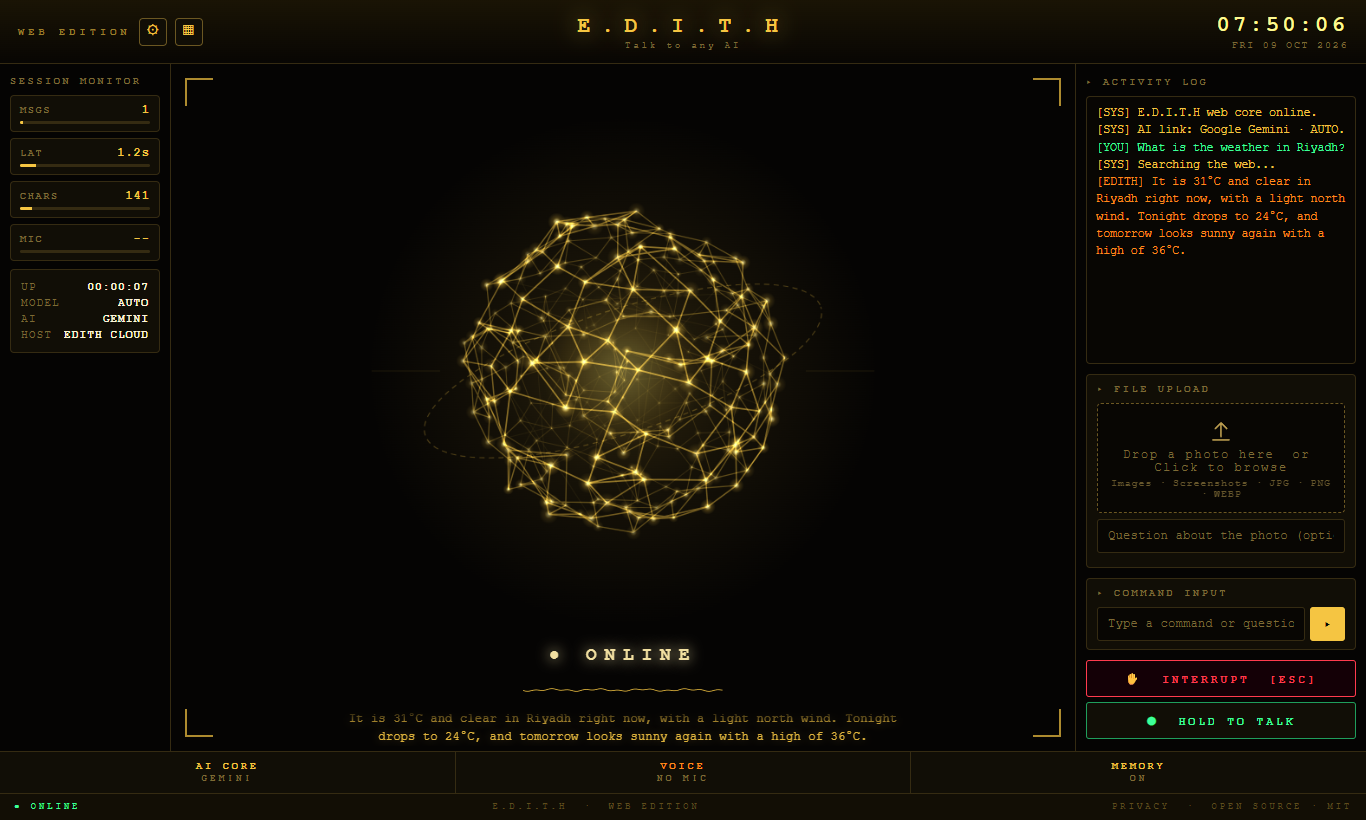
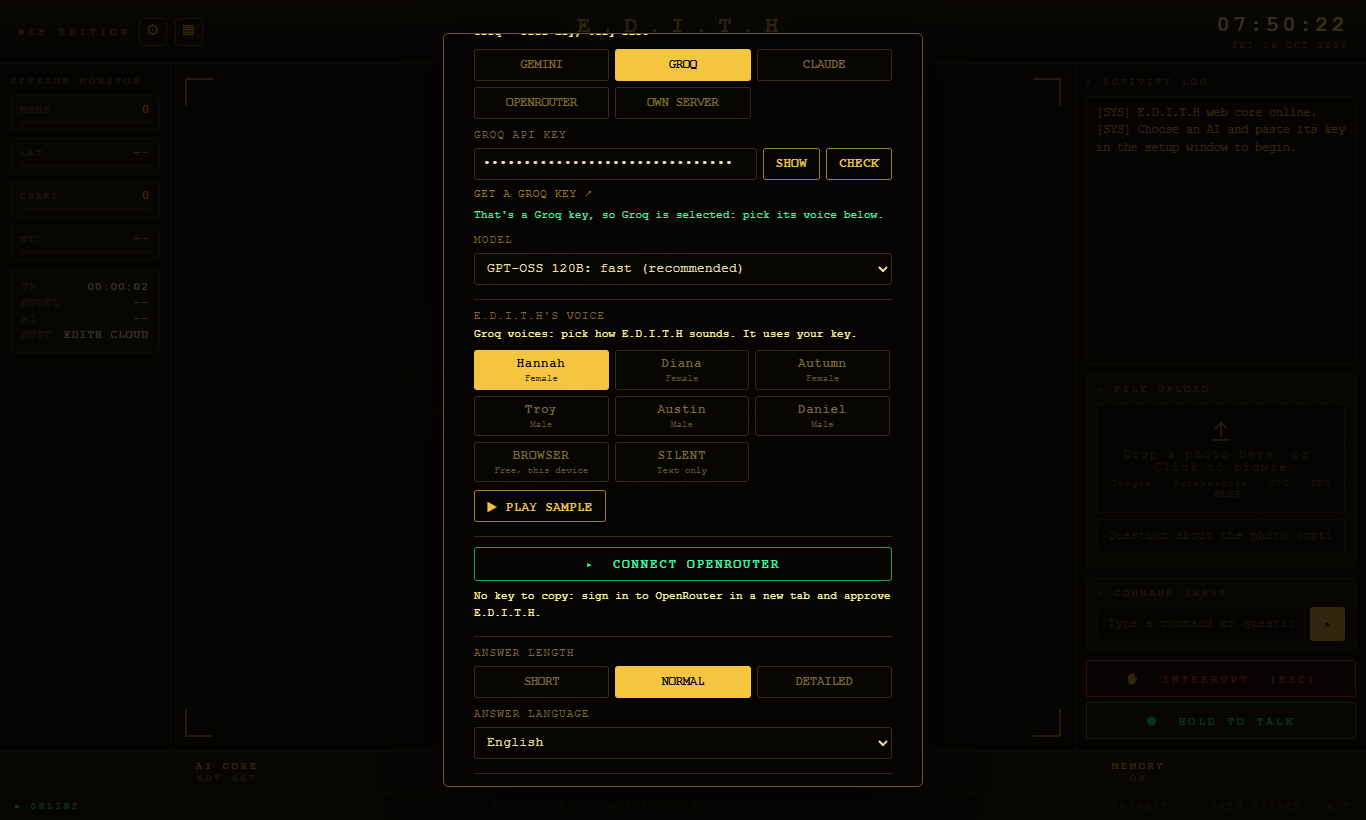
Open edith.starktech.workers.dev/web, pick an AI, paste its key (it stays in your browser) and pick how EDITH sounds. Then type, or hold the talk button (or Space) and speak. Drag the sphere to spin it; it bounces when EDITH talks.
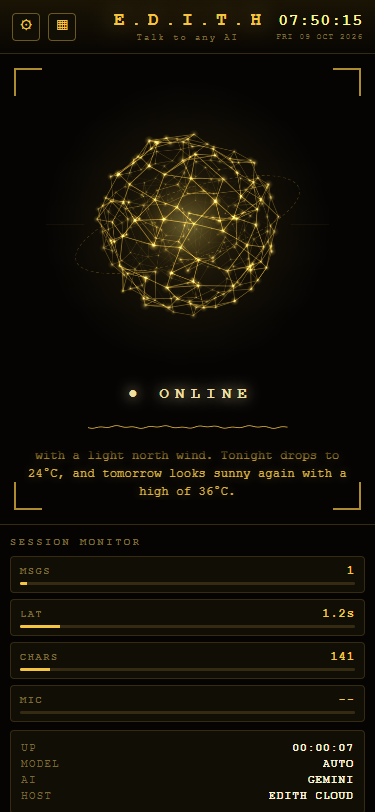
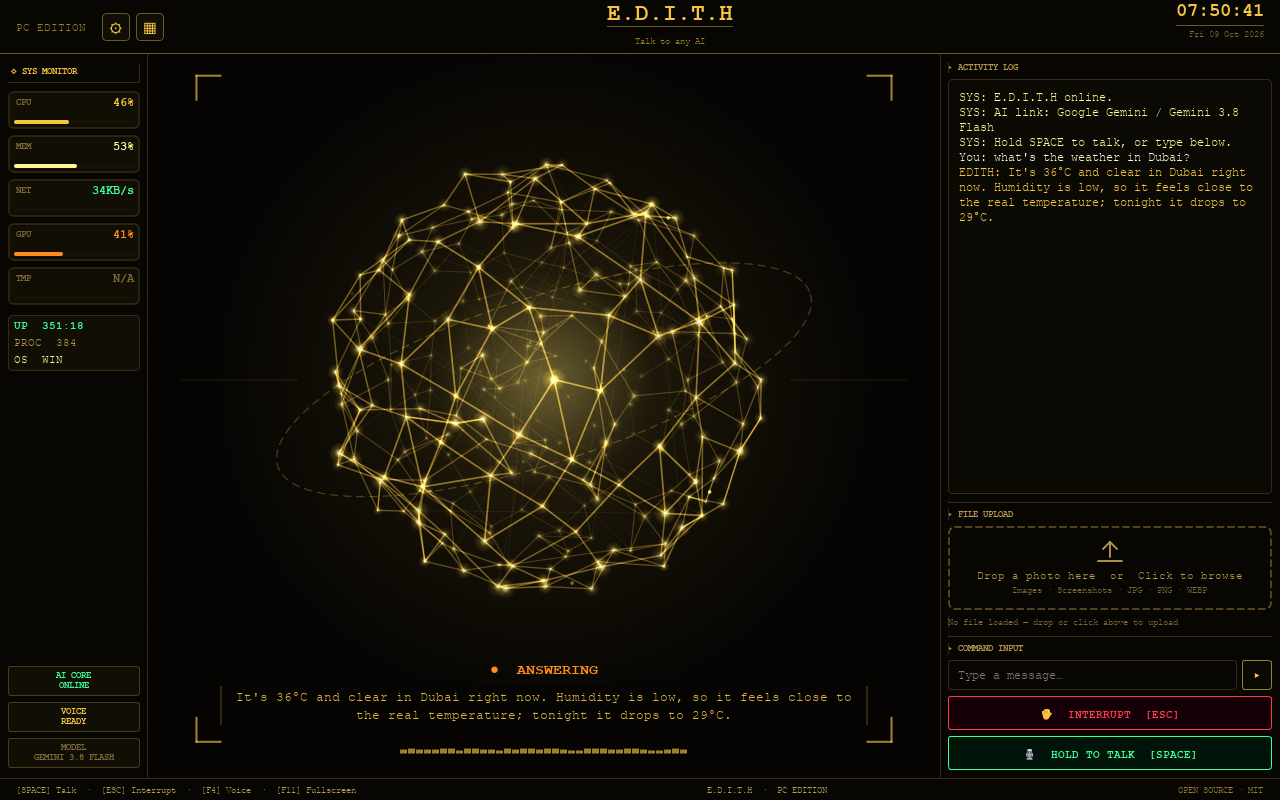
| Website on a phone | Pick a voice | The PC app |
|---|---|---|
 |
 |
 |
- Website: edith.starktech.workers.dev/web. Nothing to install.
- PC app:
desktop/edith.py, a desktop window with a live HUD that speaks its answers. Double-clickdesktop/Run EDITH.baton Windows, or runpython desktop/edith.py. - G2 glasses: EDITH on Even Hub. Hold the temple or ring, ask anything, and the answer appears in front of you as it is written.
Compatible AIs
Bring a key from any of these. Gemini and Groq give free keys. Each key stays on your device.
| AI | Get a key | Free key | Hears you | EDITH's voice |
|---|---|---|---|---|
| Google Gemini | aistudio.google.com/apikey | ✅ | ✅ | ✅ 30 voices |
| Groq | console.groq.com/keys | ✅ | ✅ | ✅ 12 voices |
| OpenAI (ChatGPT) | platform.openai.com/api-keys | ✅ | ✅ 13 voices | |
| Anthropic (Claude) | console.anthropic.com/settings/keys | with a second key | with a second key | |
| xAI (Grok) | console.x.ai | ✅ | free voices | |
| OpenRouter (hundreds of models) | openrouter.ai/keys, or Connect OpenRouter with no key to copy | free models | ✅ | free voices |
| DeepSeek | platform.deepseek.com/api_keys | with a second key | with a second key | |
| Mistral | console.mistral.ai/api-keys | ✅ | free voices | |
| Your own server (Ollama, LM Studio, vLLM…) | any OpenAI-compatible address | ✅ | with a second key | with a second key |
- "Hears you" means EDITH can understand speech with that key. For AIs that can't, add a free Groq or Gemini key just for voice.
- "EDITH's voice" is the voice that reads answers aloud on the website and PC app. Where it says "free voices", the PC app uses free Microsoft Edge voices and the website uses your browser's voice.
Your own agent (EDITH 3): EDITH can also act as the bridge to an agent on your PC.
- Hermes Agent (Nous Research), through its API server.
- OpenClaw, through its OpenAI-compatible gateway.
- Any agent with an OpenAI-style
/v1/chat/completionsAPI.
EDITH 3 (beta): your glasses, your agent
EDITH is a bridge between your G2 glasses and the AI agent you already run on your computer: Hermes Agent, OpenClaw, or anything with an OpenAI-style API. Talk on the glasses and your agent answers, with all of its own tools, memory and skills. When it wants to do something risky, you approve it with a tap on the glasses.
Set up in about a minute: no plugin, no relay, no cloud server.
- Turn on your agent's API:
- Hermes:
API_SERVER_ENABLED=trueandAPI_SERVER_KEY=…in~/.hermes/.env, thenhermes gateway. - OpenClaw:
gateway.http.endpoints.chatCompletions.enabled.
- Hermes:
- Open EDITH's PC app (
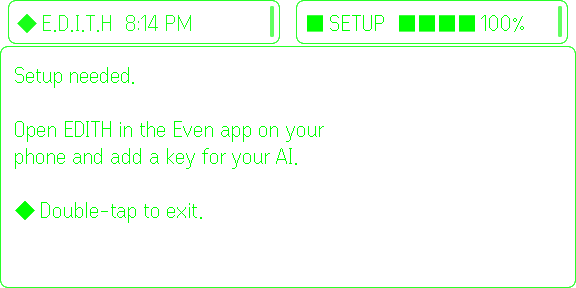
desktop/edith.py) → ⚙ → CONNECT YOUR AGENT. Pick it, paste its key, and press TEST. - Press LINK GLASSES. On the glasses, say "Link my PC, code 482 193".
- On the glasses, open the menu → Your agent (agent mode), and talk.
How it behaves:
- Agent mode: everything you say goes straight to your agent; EDITH only passes it along. Outside agent mode you can still say "ask my agent to…" and EDITH hands it over.
- Approvals on the glasses: when Hermes stops for approval (e.g. a terminal command), the glasses show what it wants to do. Tap to approve once, or double-tap to cancel.
- Long tasks: the glasses tell you when your agent is done, even many minutes later.
- Same conversation: your agent keeps one session for the glasses (Hermes
session_id, OpenClawuser). - Nothing exposed: your agent stays on
127.0.0.1. EDITH's PC app asks EDITH's server for work, so nothing on your PC is opened to the internet.
No agent? EDITH has its own PC tools too. Once linked, it can:
- Find and read your files.
- Build things in an EDITH Workspace folder and open them.
- Open links and drafted emails.
- Use the clipboard and put notes on your screen.
- Schedule daily reports (they run on your PC with your own key).
- Run commands, but only after you tap to approve.
It never touches keys, password stores or app data. Every action shows in the PC app's activity log, and PAUSE or UNLINK stops it at once.
Under the hood:
server/lib/agent.mjs: link codes, a job queue per PC, approvals, and long-task answers.server/lib/tools.mjs: theask_my_agentandpc_*tools.desktop/edith.py:AgentBridge(Hermes runs and events, OpenAI-style chat) andPcAgent.
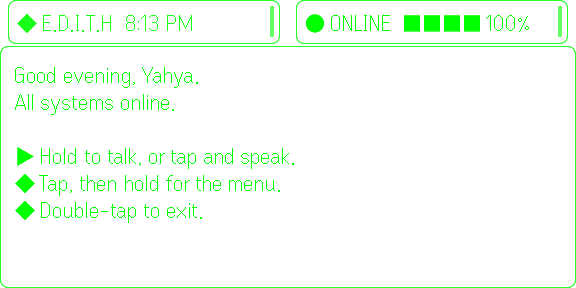
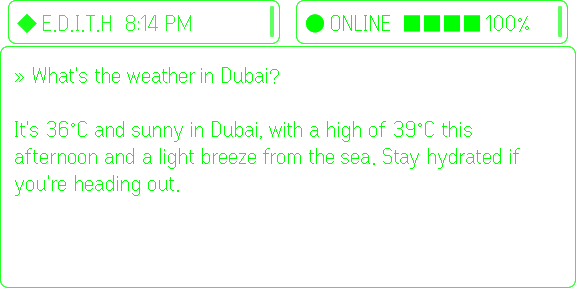
On the glasses
 |
 |
 |
 |
 |
 |
Features
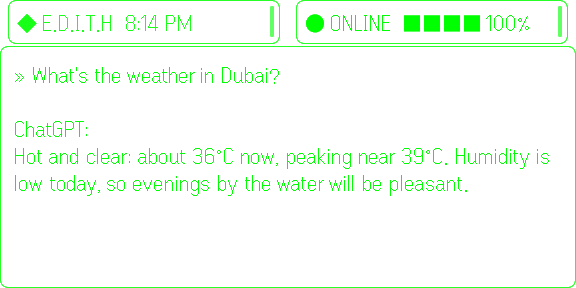
- Talk, read the answer. Hold to talk like a walkie-talkie, or tap and speak. Answers stream onto the display, and EDITH keeps listening for a moment afterwards so you can carry on without touching anything.
- Any AI, your key (see the list). Groq (free and fast), Google Gemini (free), OpenAI, Anthropic Claude, xAI Grok, OpenRouter, DeepSeek, Mistral, or your own OpenAI-compatible server. Pick the model you want. Connect OpenRouter works without copying a key at all.
- Voice for every AI. If your AI can't hear (Claude, DeepSeek), add a second key just for speech-to-text.
- Pick EDITH's voice (website and PC app). Paste a key and EDITH recognises the company and shows its voices: 13 from OpenAI, 30 from Google Gemini, 12 from Groq (English and Arabic). Press PLAY to hear one. They use your own key. For AIs without voices there are free ones.
- Useful out of the box. Web search, Wikipedia, weather, news headlines, a daily briefing, reading a link, and memories of what you tell it.
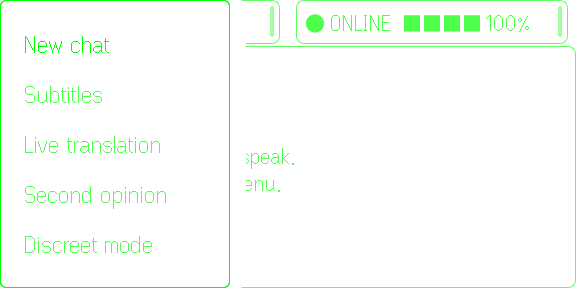
- Saved chats. Conversations are kept, named for you and searchable, and EDITH can recall what was said in earlier chats.
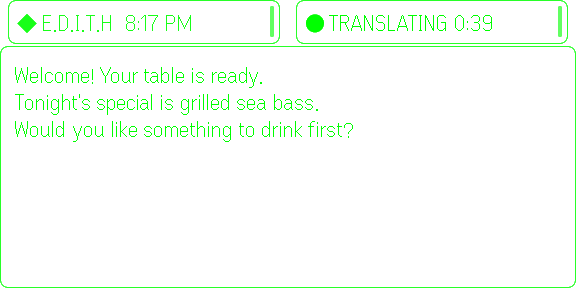
- Subtitles and live translation. Read what the person in front of you is saying, optionally in your own language.
- Second opinion. Ask another of your AIs the same question and compare.
- Discreet mode dims the display for meetings and dark rooms.
- Calendars. Add a private iCal link and EDITH knows what's next.
- Accounts (optional). Sign in with Google or email to keep your AIs, settings and chats on every phone.
- Nine languages: English, German, French, Spanish, Italian, Chinese, Japanese, Korean and Arabic.
Website and PC app
Both talk to the same server as the glasses and send surface: "web" or "desktop" with each
question, so EDITH words its answers for a screen instead of the glasses.
- Voices (
server/lib/voices.mjs,POST /api/speak): answers are read aloud by the voice of the AI company whose key you pasted (OpenAI, Gemini or Groq), a few sentences at a time, with your key.GET /api/providerslists each company's voices. Nothing is stored. - Website (
web.html,src/web/): built with the rest of the site and served at/web. Every visitor brings their own key, which is checked by the server and then kept only in that browser's local storage. Hold the talk button or Space to speak; answers stream into the activity log. Optional: read answers aloud with the browser's voice. - PC app (
desktop/edith.py, one file, Python 3.9+): PyQt6 window with a system monitor, an animated HUD and a typewriter activity log. Hold Space to talk, F4 turns voice replies on or off, F11 goes fullscreen. Missing packages (PyQt6, sounddevice, numpy, requests) are installed on first run; spoken replies use edge-tts, installed the first time voice is used. Settings and keys live in~/.edith/config.json. It useshttps://edith.starktech.workers.devunless you pass--server https://your-serveror setEDITH_URL.--selftestruns its checks without opening a window;--resetforgets this PC.
How it works
G2 mic ──BLE──▶ Even app (runs EDITH) ──HTTPS──▶ EDITH server /api/chat ──▶ your AI provider
G2 display ◀──BLE── words as they arrive ◀──── NDJSON stream ◀──────────── streamed reply
- The phone app (
src/) runs inside the Even app and uses the Even Hub SDK to read the glasses' microphone and gestures and to draw on the display. Your AI keys are saved on your phone. - A small server (
server/) runs on Cloudflare Workers. For each question it transcribes your voice, calls the AI you picked with the key your phone sent, runs tools such as web search, and streams the answer back. Memories, saved chats and accounts live in a Cloudflare D1 database.
Keys are sent with each request and used for that request only. They are never logged, and only stored (encrypted) if you sign in to an account.
Self-hosting
You need Node.js 22 or later, a free Cloudflare account, and G2 glasses with the Even app.
git clone https://github.com/edith-g2/edith-g2.git edith && cd edith
npm install
npx wrangler login
- Create the database. Run
npx wrangler d1 create edithand put thedatabase_idit prints intowrangler.jsonc. - Deploy.
npm run deploybuilds the app and deploys the Worker. Wrangler prints your server's address, e.g.https://edith.your-subdomain.workers.dev. - Point the app at it. Copy
.env.exampleto.env.localand setEDITH_URLto that address. - Open it on your glasses.
npm run qrshows a QR code to scan with the Even app, ornpm run packbuildsedith.ehpkto upload on Even Hub. To publish your own build, changepackage_idandauthorinapp.jsonfirst. - Your own address in search results.
web.html,public/about.html,public/robots.txt,public/sitemap.xmlandpublic/llms.txtname EDITH's official site. Replaceedith.starktech.workers.devwith your address so search engines and AI assistants credit your copy.
That's all EDITH needs. Everything below is optional.
Optional: accounts
Sign-in uses Firebase Authentication (free). npm run set-up-accounts walks you through it
and saves these Worker secrets for you:
| Secret | What it is |
|---|---|
FIREBASE_WEB_CONFIG |
The Firebase web app's public config (JSON) |
ACCOUNT_SECRET |
32+ random characters; the key that encrypts synced settings and AI keys. Never change it |
FIREBASE_SERVICE_ACCOUNT |
Lets "Delete account" remove the Firebase user too |
ACCOUNT_PROVIDERS |
Sign-in methods, default google,email |
Until they are set, the app simply hides the Account section.
Optional: moderation
EDITH can check questions for harmful use (weapons, malware, threats and the like) with a
separate key of yours, never the user's. It never flags anyone in distress. Turn it on with
npm run set-moderation-key, which sets MODERATION_PROVIDER, MODERATION_KEY and
MODERATION_MODEL (plus MODERATION_BASE for your own OpenAI-compatible server).
Serious rules ban a phone at once; lighter ones warn, and the third warning bans. Bans and
warnings are rows in the database; to lift every ban and forget the warnings behind them:
npx wrangler d1 execute edith --remote --command "DELETE FROM kv WHERE key LIKE 'blocked/%' OR key LIKE 'flags/%'"
Other settings
| Variable | Default | What it does |
|---|---|---|
CORS_ORIGIN |
* |
Which origins may call the API |
EDITH_SITE_URL |
none | Your server's address, sent to OpenRouter to name the app |
CHAT_MODELS, TRANSCRIBE_MODELS |
built in | The Gemini models "Auto" tries, in order |
Cloudflare's free Workers plan allows 10 ms of CPU per request. If requests start failing with "exceeded CPU", the Workers Paid plan lifts that limit.
The same server also runs as a Netlify Function (netlify/, npm run deploy:netlify) with
Netlify Blobs for storage. The setup scripts, and the sign-in helper accounts need, are
Cloudflare-only.
Development
npm run dev        # Vite dev server; /api is proxied to EDITH_URL
npm run simulate   # the Even Hub desktop simulator
npm run qr:dev     # open the dev server on your glasses (same Wi-Fi)
npm run build type-checks and builds the site. To add a language, copy
src/i18n/en.ts, translate it, and register it in src/i18n/index.ts and
server/lib/languages.mjs; TypeScript fails if a key is missing.
Project layout
| Path | What's there |
|---|---|
src/edith.ts |
The app's state machine: gestures, listening, asking, AIs and voice, chats, accounts |
src/phone.ts, src/phone.css |
The phone screen: setup, conversation, chats and settings |
src/hud.ts, src/text.ts |
Drawing on the glasses, and text the G2 font can show |
src/recorder.ts, src/room.ts |
Microphone audio for questions, and for subtitles |
src/api.ts |
The client for the server |
src/i18n/ |
Phone and glasses text in nine languages |
web.html, src/web/ |
EDITH's website (served at /web) |
desktop/ |
The PC app: edith.py, Run EDITH.bat and its README |
signin.html, connect.html |
Browser pages for signing in and connecting OpenRouter (served by your server, not packed) |
server/app.mjs |
Every /api route |
server/lib/providers/ |
The AI providers: Gemini, Claude and OpenAI-compatible adapters |
server/lib/tools.mjs |
Tools: memory, recall, web search, Wikipedia, weather, news, briefing |
server/lib/accounts.mjs, connect.mjs |
Accounts, and Connect OpenRouter |
server/lib/moderation.mjs |
Optional moderation |
worker/, wrangler.jsonc |
The Cloudflare Worker: D1 storage, static files, Firebase sign-in helper |
netlify/, netlify.toml |
The same server on Netlify |
public/privacy.html |
The privacy policy the app links to |
scripts/ |
Setup helpers, packaging, QR codes and the store icon |
app.json |
The Even Hub manifest |
Privacy
EDITH has no ads, analytics or tracking. AI keys stay on the phone and travel with each
request; voice recordings are transcribed and dropped; subtitles are never stored. The
server keeps memories, saved chats and, for signed-in users, their encrypted settings, all
deletable from the app. public/privacy.html is the policy the app shows: if you run your
own server, update it with your own details.
License
EDITH is released under the MIT License.