







Updates • What and Why • Philosophy • Installation • Usage • REST API • Examples • Just Use the Patterns • Custom Patterns • Helper Apps • Meta
What and why
Since the start of modern AI in late 2022 we've seen an extraordinary number of AI applications for accomplishing tasks. There are thousands of websites, chat-bots, mobile apps, and other interfaces for using all the different AI out there.
It's all really exciting and powerful, but it's not easy to integrate this functionality into our lives.
In other words, AI doesn't have a capabilities problem—it has an integration problem.
Fabric was created to address this by creating and organizing the fundamental units of AI—the prompts themselves!
Fabric organizes prompts by real-world task, allowing people to create, collect, and organize their most important AI solutions in a single place for use in their favorite tools. And if you're command-line focused, you can use Fabric itself as the interface!
Updates
For a deep dive into Fabric and its internals, read the documentation in the docs folder. There is also the extremely useful and regularly updated DeepWiki for Fabric.
Click to view recent updates
Dear Users,
We've been doing so many exciting things here at Fabric, I wanted to give a quick summary here to give you a sense of our development velocity!
Below are the new features and capabilities we've added (newest first):
Recent Major Features
- v1.4.447 (April 16, 2026) — Claude Opus 4.7: Updates the Anthropic SDK to v1.37.0 and adds the new Claude Opus 4.7 to the available models, including 1M-token context window support.
- v1.4.437 (March 16, 2026) — OpenAI Codex PLugin: Fabric now supports using OpenAI Codex (with your OpenAI subscription) as a backend!
- v1.4.417 (Feb 21, 2026) — Azure AI Gateway Plugin: Added Azure AI Gateway plugin supporting multiple backends (AWS Bedrock, Azure OpenAI, Google Vertex AI) through a unified Azure APIM Gateway with shared subscription key authentication.
- v1.4.416 (Feb 21, 2026) — Azure Entra ID Authentication: Added Azure Entra ID authentication plugin with shared Azure utilities, Entra ID/MSAL support, and extracted common Azure logic into a reusable
azurecommonpackage. - v1.4.380 (Jan 15, 2026) — Microsoft 365 Copilot Integration: Added support for corporate Microsoft 365 Copilot, enabling enterprise users to leverage AI grounded in their organization's Microsoft 365 data (emails, documents, meetings.
- v1.4.378 (Jan 14, 2026) — Digital Ocean GenAI Support: Added support for Digital Ocean GenAI, along with a guide for how to use it.
- v1.4.356 (Dec 22, 2025) — Complete Internationalization: Full i18n support for setup prompts across all 10 languages with intelligent environment variable handling—making Fabric truly accessible worldwide while maintaining configuration consistency.
- v1.4.350 (Dec 18, 2025) — Interactive API Documentation: Adds Swagger/OpenAPI UI at
/swagger/index.htmlwith comprehensive REST API documentation, enhanced developer guides, and improved endpoint discoverability for easier integration. - v1.4.338 (Dec 4, 2025) — Add Abacus vendor support for Chat-LLM models (see RouteLLM APIs).
- v1.4.337 (Dec 4, 2025) — Add "Z AI" vendor support. See the Z AI overview page for more details.
- v1.4.334 (Nov 26, 2025) — Claude Opus 4.5: Updates the Anthropic SDK to the latest and adds the new Claude Opus 4.5 to the available models.
- v1.4.331 (Nov 23, 2025) — Support for GitHub Models: Adds support for using GitHub Models.
- v1.4.322 (Nov 5, 2025) — Interactive HTML Concept Maps and Claude Sonnet 4.5: Adds
create_conceptmappattern for visual knowledge representation using Vis.js, introduces WELLNESS category with psychological analysis patterns, and upgrades to Claude Sonnet 4.5 - v1.4.317 (Sep 21, 2025) — Portuguese Language Variants: Adds BCP 47 locale normalization with support for Brazilian Portuguese (pt-BR) and European Portuguese (pt-PT) with intelligent fallback chains
- v1.4.314 (Sep 17, 2025) — Azure OpenAI Migration: Migrates to official
openai-go/azureSDK with improved authentication and default API version support - v1.4.311 (Sep 13, 2025) — More internationalization support: Adds de (German), fa (Persian / Farsi), fr (French), it (Italian), ja (Japanese), pt (Portuguese), zh (Chinese)
- v1.4.309 (Sep 9, 2025) — Comprehensive internationalization support: Includes English and Spanish locale files.
- v1.4.303 (Aug 29, 2025) — New Binary Releases: Linux ARM and Windows ARM targets. You can run Fabric on the Raspberry PI and on your Windows Surface!
- v1.4.294 (Aug 20, 2025) — Venice AI Support: Added the Venice AI provider. Venice is a Privacy-First, Open-Source AI provider. See their "About Venice" page for details.
- v1.4.291 (Aug 18, 2025) — Speech To Text: Add OpenAI speech-to-text support with
--transcribe-file,--transcribe-model, and--split-media-fileflags.
These features represent our commitment to making Fabric the most powerful and flexible AI augmentation framework available!
Intro videos
Keep in mind that many of these were recorded when Fabric was Python-based, so remember to use the current install instructions below.
Navigation
fabric- What and why
- Updates
- Intro videos
- Navigation
- Changelog
- Philosophy
- Installation
- Usage
- REST API Server
- Our approach to prompting
- Examples
- Just use the Patterns
- Custom Patterns
- Helper Apps
- pbpaste
- Web Interface (Fabric Web App)
- Meta
- 💜 Support This Project
Changelog
Fabric is evolving rapidly.
Stay current with the latest features by reviewing the CHANGELOG for all recent changes.
Philosophy
AI isn't a thing; it's a magnifier of a thing. And that thing is human creativity.
We believe the purpose of technology is to help humans flourish, so when we talk about AI we start with the human problems we want to solve.
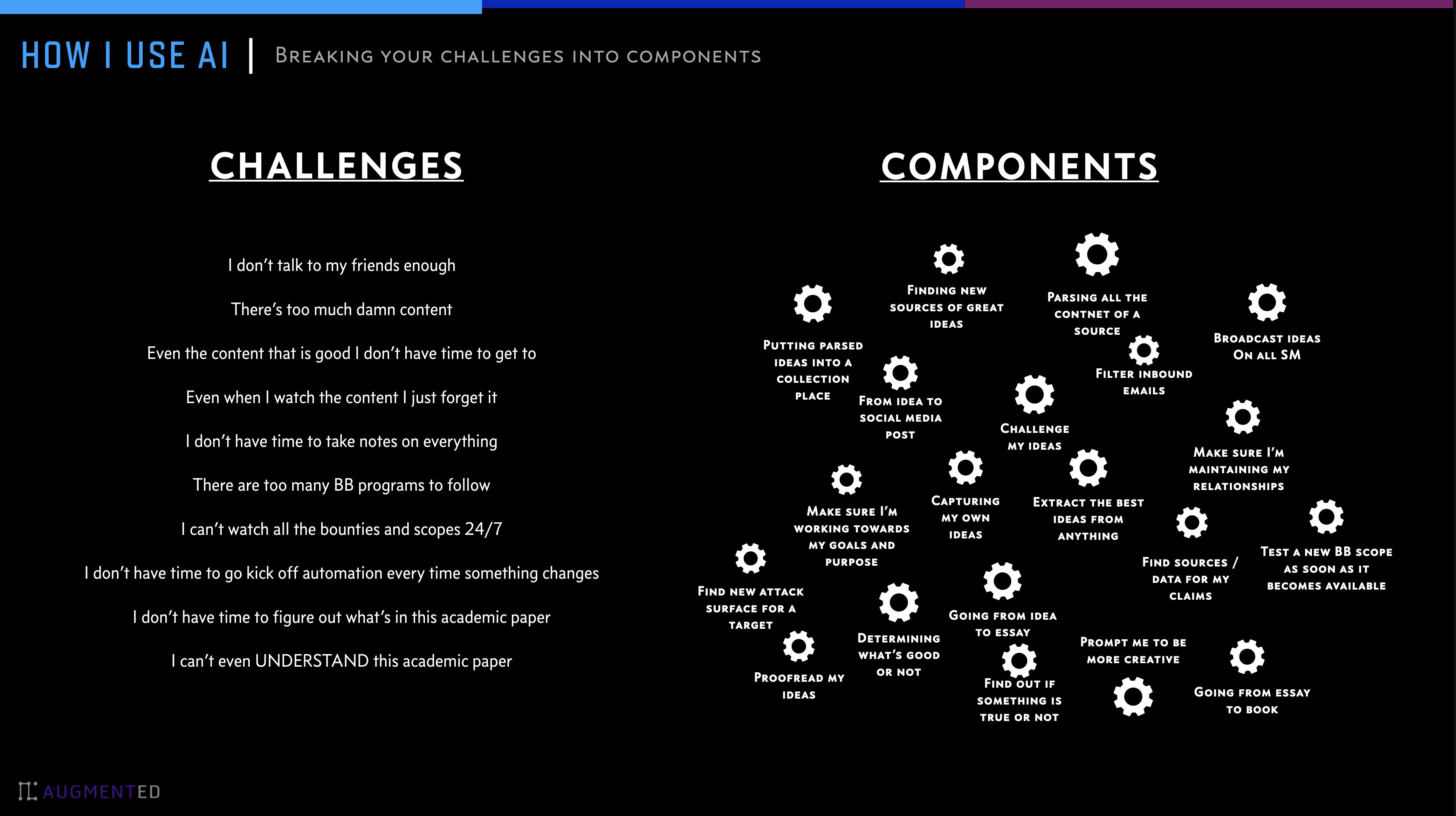
Breaking problems into components
Our approach is to break problems into individual pieces (see below) and then apply AI to them one at a time. See below for some examples.
Too many prompts
Prompts are good for this, but the biggest challenge I faced in 2023——which still exists today—is the sheer number of AI prompts out there. We all have prompts that are useful, but it's hard to discover new ones, know if they are good or not, and manage different versions of the ones we like.
One of fabric's primary features is helping people collect and integrate prompts, which we call Patterns, into various parts of their lives.
Fabric has Patterns for all sorts of life and work activities, including:
- Extracting the most interesting parts of YouTube videos and podcasts
- Writing an essay in your own voice with just an idea as an input
- Summarizing opaque academic papers
- Creating perfectly matched AI art prompts for a piece of writing
- Rating the quality of content to see if you want to read/watch the whole thing
- Getting summaries of long, boring content
- Explaining code to you
- Turning bad documentation into usable documentation
- Creating social media posts from any content input
- And a million more…
Installation
One-Line Install (Recommended)
Unix/Linux/macOS:
curl -fsSL https://raw.githubusercontent.com/danielmiessler/fabric/main/scripts/installer/install.sh | bash
Windows PowerShell:
iwr -useb https://raw.githubusercontent.com/danielmiessler/fabric/main/scripts/installer/install.ps1 | iex
See scripts/installer/README.md for custom installation options and troubleshooting.
Manual Binary Downloads
The latest release binary archives and their expected SHA256 hashes can be found at https://github.com/danielmiessler/fabric/releases/latest
Using package managers
NOTE: using Homebrew or the Arch Linux package managers makes fabric available as fabric-ai, so add
the following alias to your shell startup files to account for this:
alias fabric='fabric-ai'
macOS (Homebrew)
brew install fabric-ai
Arch Linux (AUR)
yay -S fabric-ai
Windows
Use the official Microsoft supported Winget tool:
winget install danielmiessler.Fabric
Windows (Scoop)
scoop install fabric-ai
From Source
To install Fabric, make sure Go is installed, and then run the following command.
# Install Fabric directly from the repo
go install github.com/danielmiessler/fabric/cmd/fabric@latest
Docker
Run Fabric using pre-built Docker images:
# Use latest image from Docker Hub
docker run --rm -it kayvan/fabric:latest --version

# Use specific version from GHCR
docker run --rm -it ghcr.io/ksylvan/fabric:v1.4.305 --version

# Run setup (first time)
mkdir -p $HOME/.fabric-config
docker run --rm -it -v $HOME/.fabric-config:/home/appuser/.config/fabric kayvan/fabric:latest --setup

# Use Fabric with your patterns
docker run --rm -it -v $HOME/.fabric-config:/home/appuser/.config/fabric kayvan/fabric:latest -p summarize

# Run the REST API server (see REST API Server section)
docker run --rm -it -p 8080:8080 -v $HOME/.fabric-config:/home/appuser/.config/fabric kayvan/fabric:latest --serve
Images available at:
- Docker Hub: kayvan/fabric
- GHCR: ksylvan/fabric
See scripts/docker/README.md for building custom images and advanced configuration.
Environment Variables
You may need to set some environment variables in your ~/.bashrc on linux or ~/.zshrc file on mac to be able to run the fabric command. Here is an example of what you can add:
For Intel based macs or linux
# Golang environment variables
export GOROOT=/usr/local/go
export GOPATH=$HOME/go

# Update PATH to include GOPATH and GOROOT binaries
export PATH=$GOPATH/bin:$GOROOT/bin:$HOME/.local/bin:$PATH
for Apple Silicon based macs
# Golang environment variables
export GOROOT=$(brew --prefix go)/libexec
export GOPATH=$HOME/go
export PATH=$GOPATH/bin:$GOROOT/bin:$HOME/.local/bin:$PATH
Setup
Now run the following command
# Run the setup to set up your directories and keys
fabric --setup
If everything works you are good to go.
Supported AI Providers
Fabric supports a wide range of AI providers:
Native Integrations:
- OpenAI
- OpenAI Codex (ChatGPT/Codex subscription OAuth via private backend)
- Anthropic (Claude)
- Claude Code (Claude subscription via the local
claudeCLI) - Google Gemini
- Ollama (local models)
- Azure OpenAI
- Amazon Bedrock
- Vertex AI
- LM Studio
- Perplexity
OpenAI-Compatible Providers:
- Abacus
- AIML
- AIStupidLevel
- API Route
- Apple Foundation Models (local, macOS 27 or later: run
sudo fm licenseonce, thenfm serve --port 1976; no API key; select it once infabric -Sto enable it) - Cerebras
- Cheaper Inference
- DeepSeek
- DemonRoute
- DigitalOcean
- Eden AI
- GrokAI
- Groq
- Hostinger Router
- Langdock
- LiteLLM
- MiniMax
- Mistral
- Novita AI
- OpenCode Go
- OpenCode Zen
- OpenRouter
- Opper
- OrcaRouter
- OVHcloud
- Pzero
- Requesty
- SiliconCloud
- Synthorai
- Together
- Venice AI
- Y-API
- Z AI
Run fabric --setup to configure your preferred provider(s), or use fabric --listvendors to see all available vendors.
Per-Pattern Model Mapping
You can configure specific models for individual patterns using environment variables
like FABRIC_MODEL_PATTERN_NAME=vendor|model
This makes it easy to maintain these per-pattern model mappings in your shell startup files.
Add aliases for all patterns
In order to add aliases for all your patterns and use them directly as commands, for example, summarize instead of fabric --pattern summarize
You can add the following to your .zshrc or .bashrc file. You
can also optionally set the FABRIC_ALIAS_PREFIX environment variable
before, if you'd prefer all the fabric aliases to start with the same prefix.
# Loop through all files in the ~/.config/fabric/patterns directory
for pattern_file in $HOME/.config/fabric/patterns/*; do
    # Get the base name of the file (i.e., remove the directory path)
    pattern_name="$(basename "$pattern_file")"
    alias_name="${FABRIC_ALIAS_PREFIX:-}${pattern_name}"

    # Create an alias in the form: alias pattern_name="fabric --pattern pattern_name"
    alias_command="alias $alias_name='fabric --pattern $pattern_name'"

    # Evaluate the alias command to add it to the current shell
    eval "$alias_command"
done

yt() {
    if [ "$#" -eq 0 ] || [ "$#" -gt 2 ]; then
        echo "Usage: yt [-t | --timestamps] youtube-link"
        echo "Use the '-t' flag to get the transcript with timestamps."
        echo "Pipe to a pattern: yt URL | fabric -p extract_wisdom"
        return 1
    fi

    transcript_flag="--transcript"
    if [ "$1" = "-t" ] || [ "$1" = "--timestamps" ]; then
        transcript_flag="--transcript-with-timestamps"
        shift
    fi
    local video_link="$1"
    # Outputs the raw transcript to stdout so it can be piped to a pattern:
    #   yt URL | fabric