Fast, real-time Amharic Keyboard, Fidel phonetic typing (ፊደል), and Ethiopic / Geez transliteration engine for Visual Studio Code, Cursor, and Web Browsers.
🌐 Official Website & Live Web Demo (fidelx.pro.et)


Official Website • Quick Start • Shortcuts • Feature Guide • Phonetic Reference • Configuration • Credits • License
Overview
Fidel Input is a native Visual Studio Code extension designed for inputting Amharic text using a standard QWERTY keyboard. Rather than performing static string conversions, Fidel operates as a live Input Method Editor (IME). It intercepts typing inside active editors, maintains an uncommitted composition buffer, and replaces characters dynamically as phonetic syllables are constructed.
VS Code-family Editors
Fidel supports Visual Studio Code, Cursor, VSCodium, Antigravity IDE (also known as Antigravity), and other Open VSX-based editors.
Installing in Antigravity IDE
Antigravity IDE installs extensions from Open VSX, so install Fidel from there:
- Open the Extensions sidebar (
Ctrl + Shift + X/Cmd + Shift + X). - Search for
Yihun.fidel-amharicand click Install. - Press
Ctrl + Alt + A(Cmd + Alt + A) in an editor to start typing Amharic.
If Antigravity cannot find Fidel, download Yihun.fidel-amharic-*.vsix from Open VSX or GitHub Releases and run Extensions: Install from VSIX... from the Command Palette.
Troubleshooting: "not compatible with the current version of Antigravity IDE"
This error comes from the legacy Yihun.fidel-input listing, which is deprecated and superseded. It was published with "engines": { "vscode": "^1.125.0" }, so any editor built on an older VS Code base — including Antigravity IDE — refuses to install it.
Fidel is published under one current identifier: Yihun.fidel-amharic. To clear the error:
- Open the Extensions sidebar and search for
Yihun.fidel-input. - Choose Uninstall (or remove
Yihun.fidel-inputfrom any imported extensions / recommendations list). - Reload the window, then install
Yihun.fidel-amharic.
Supported editor versions
Fidel declares "engines": { "vscode": ">=1.85.0" }. Because the range is open-ended, installs are never blocked by an editor's own version number — including forks that report a 2.x base — so Fidel installs and runs on current and future VS Code forks (Antigravity IDE, Cursor, VSCodium, Windsurf, and other Open VSX-based editors). Fidel only uses long-stable VS Code APIs.
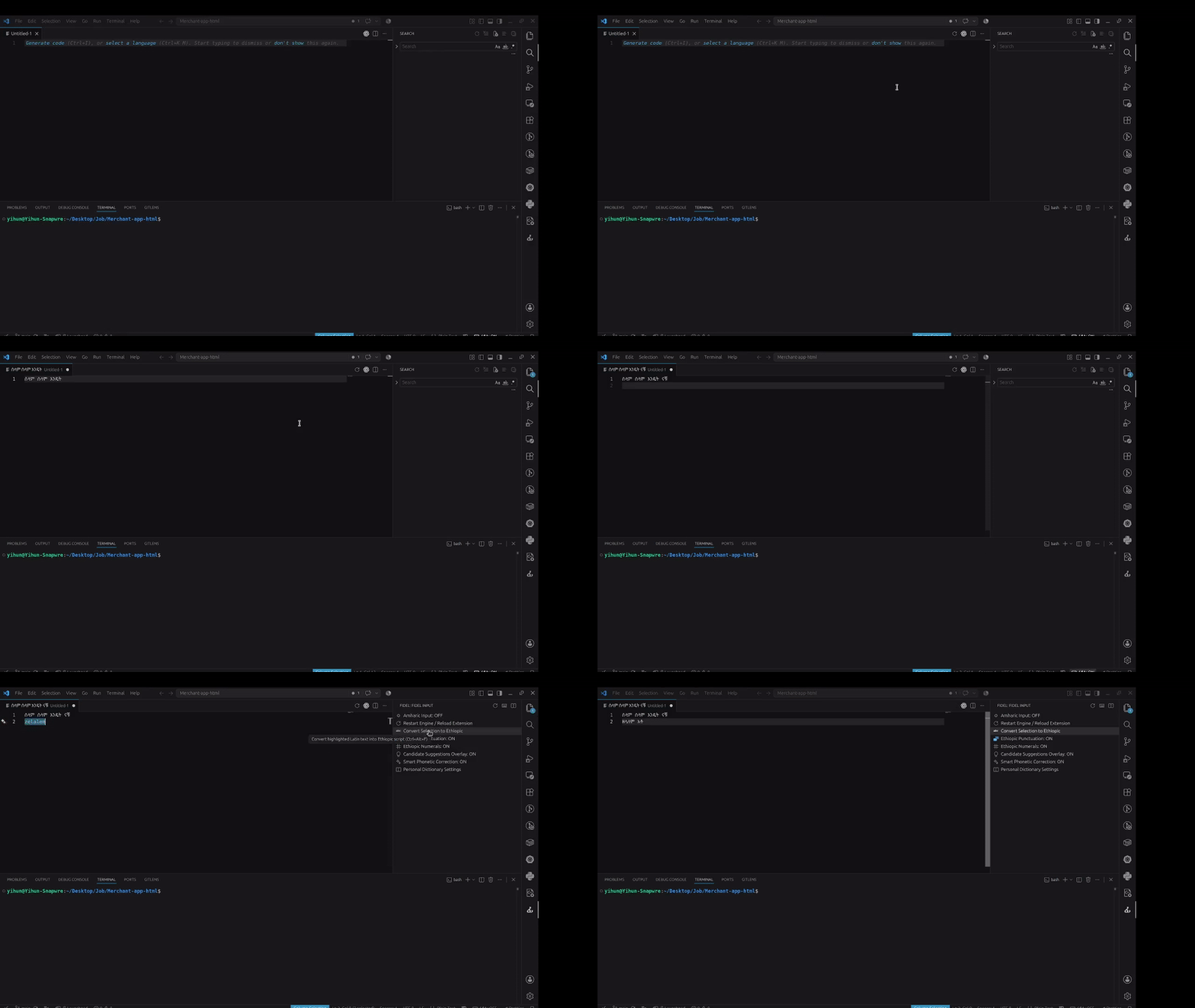
Visual Demonstration & Media
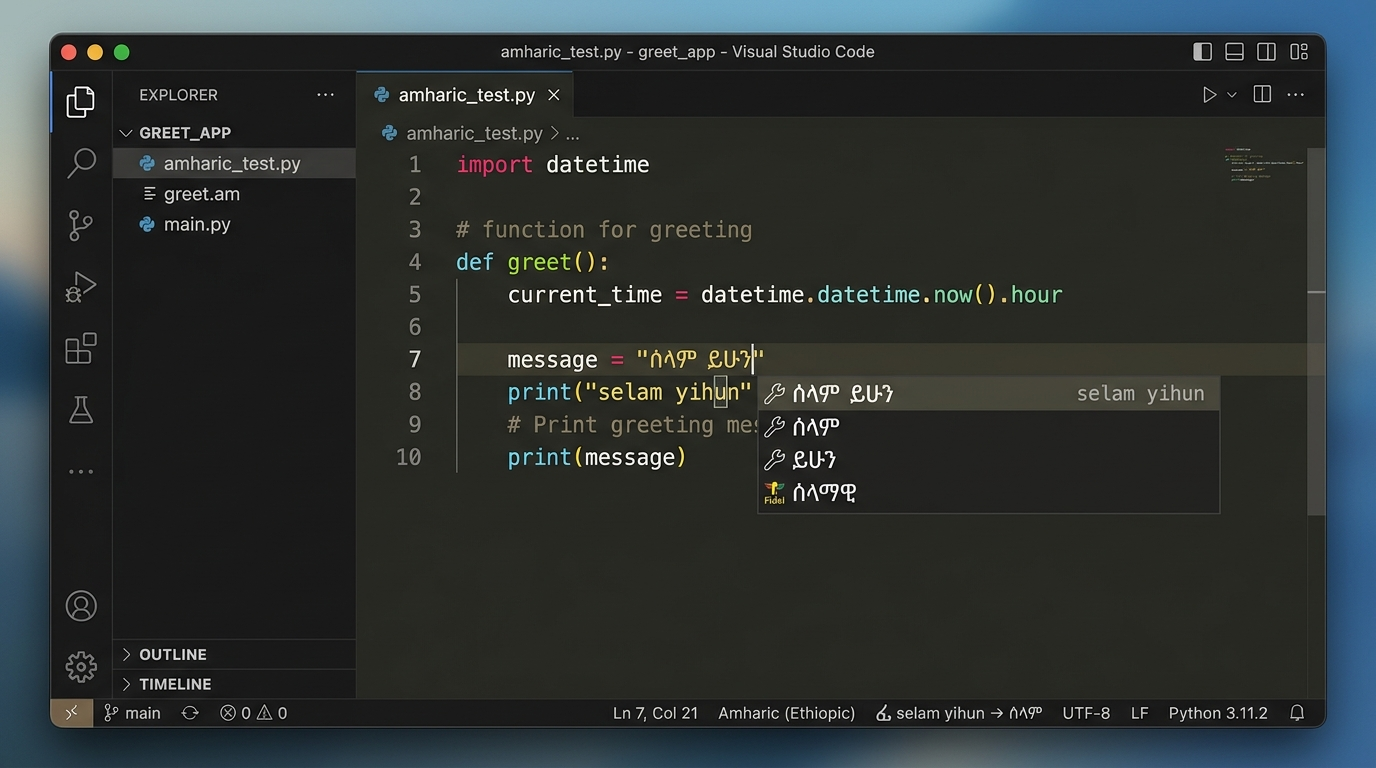
Quick Start
- Install the Fidel Input extension in Visual Studio Code.
- Press
Ctrl + Alt + A(orCmd + Alt + Aon macOS) to enable Amharic input mode. - Type phonetic Amharic:
selam yihun -> ሰላም ይሁን - Highlight any existing Latin text and press
Ctrl + Alt + F(orCmd + Alt + Fon macOS) to convert the selection directly into Ethiopic script.
Keyboard Shortcuts & Commands
| Command | Shortcut (Windows/Linux) | Shortcut (macOS) | Context | Description |
|---|---|---|---|---|
fidel.toggleInput |
Ctrl + Alt + A |
Cmd + Alt + A |
Editor Text Focus | Toggles Fidel Amharic input mode on or off |
fidel.toggleBypass |
Alt + X / Ctrl + Alt + B |
Cmd + Alt + X / Cmd + Alt + B |
Fidel Input Active | Temporarily skips Ethiopic transliteration to type raw Latin text |
fidel.convertSelection |
Ctrl + Alt + F |
Cmd + Alt + F |
Has Selection | Transliterates selected Latin text to Ethiopic script |
fidel.restartEngine |
Title Bar / Palette | Title Bar / Palette | Global | Re-initializes Fidel engine and clears composition buffer |
fidel.resetComposition |
Command Palette | Command Palette | Active Editor | Instantly resets uncommitted composition buffer |
fidel.disableInput |
Escape |
Escape |
Fidel Input Active | Disables Fidel input mode instantly |
fidel.enableInput |
Command Palette | Command Palette | Global | Enables Fidel Amharic input mode |
Feature Guide & How It Works
1. Live Composition Buffer Engine
Fidel intercepts keystrokes continuously, calculating phonetic syllable matches and modifying the document transactionally without forcing manual backspacing.
User types:   s   ->   e   ->   l   ->   a   ->   m   ->   SPACE
Buffer:      "s"      "se"     "sel"   "sela"   "selam"    ""
Rendered:    "ስ"      "ሰ"      "ሰል"    "ሰላ"     "ሰላም"     "ሰላም "
2. Automatic Word Boundary & Punctuation Commits
Composition buffers commit automatically upon hitting whitespace or punctuation delimiters (., ,, !, ?, ;, :). When fidel.convertPunctuation is enabled, Latin punctuation marks convert into Ethiopic punctuation equivalents:
selam,->ሰላም፤yihun.->ይሁን።bet?->ቤት፧
3. Ethiopic Numeral System (fidel.convertNumbers)
When "fidel.convertNumbers": true is enabled in settings, Arabic digits convert into traditional additive Ethiopic numerals:
- Single Digits:
1->፩,5->፭,9->፱ - Tens:
10->፲,12->፲፪,25->፳፭ - Hundreds & Thousands:
100->፻,200->፪፻,2026->፳፻፳፮
4. Glottal Stop & Ejective Apostrophe Parsing
Amharic ejectives and glottalized roots are typed using a trailing apostrophe (') or SERA uppercase triggers:
k'a-> ቃt'a-> ጣ (orTa-> ጣ)c'a-> ጫ (orCHa-> ጫ)p'e-> ጰ (orPe-> ጰ)p'a-> ጳ (orPa-> ጳ)
5. Smart Phonetic Correction (fidel.smartCorrection)
When "fidel.smartCorrection": true is enabled (default), Fidel automatically normalizes double-consonant typing variants and English digraph typos:
- Double trailing consonants:
selamm->ሰላም,yihunn->ይሁን - Double internal vowels/consonants:
beett->ቤት - Digraph substitutions:
amhariph->አማሪፍ
6. Homophone Candidate Suggestions (fidel.suggestions)
Fidel offers two UI models for inspecting and choosing homophone candidates (e.g. haile -> ሀይለ, ኃይለ, ሐይለ):
- IntelliSense Suggestion Box Below Text Cursor: When
"fidel.suggestions": trueis enabled in settings, VS Code displays an IntelliSense candidate list directly beneath your active typing cursor as you type. - Interactive QuickPick Command Palette: Select any word or place your cursor on a word and run command
Fidel: Show Homophone Candidate Suggestions(fidel.showSuggestions) to inspect and select homophone variants.
7. Syllable Disambiguation & Capital Vowel Split
When typing sequences like t followed by e, there are two valid phonetic intents:
- Merged into a single 1st-order syllable:
te$\rightarrow$ተ - Kept as two separate standalone letters (6th-order consonant + standalone vowel):
t+e$\rightarrow$ትእ
Fidel provides three complementary, non-breaking disambiguation mechanisms that work together seamlessly:
A. Capital Vowel Shorthand (Always Available, Mode-Independent)
Type capital E, I, U, or O to immediately force a 6th-order consonant + standalone vowel split without typing any boundary characters or changing any settings:
tE$\rightarrow$ትእ(e.g.tEgst$\rightarrow$ትእግስት)gEz$\rightarrow$ግእዝtI$\rightarrow$ትኢtU$\rightarrow$ትኡtO$\rightarrow$ትኦ
Note on Capital
A(Ayn ዐ collision):Ais explicitly reserved for the 4th-guttural Ayn (ዐ) consonant family (A$\rightarrow$ዕ,Aa$\rightarrow$ዐ,Aaa$\rightarrow$ዓ). To split with Alef (አ), use the boundary charactert-a$\rightarrow$ትአor standalone mode.
B. Explicit Boundary (-) and Merge (+) Keys
- Boundary Character (
"-"): Typing a hyphen between letters immediately commits the prior consonant as 6th-order without inserting the hyphen (e.g.t-e$\rightarrow$ትእ,t-a$\rightarrow$ትአ). - Merge Character (
"+"): When standalone mode is active, typing a plus forces the next vowel to merge (e.g.t+e$\rightarrow$ተ).
C. Configurable Default Mode (fidel.defaultSyllableMerging)
Choose your preferred global default in settings:
"merge"(default):teproducesተ; usetEort-eforትእ."standalone":teproducesትእ; uset+eforተ.
Combined Example:
Default "merge" mode:
  "teza"        -> ተዛ       (standard merge)
  "tEgst"       -> ትእግስት   (capital vowel shortcut)
  "t-azaz"      -> ትአዛዝ    (boundary character override for Alef)

"standalone" mode:
  "teza"        -> ትእዛ      (default standalone)
  "t+eza"       -> ተዛ       (plus merge override)
8. Post-Commit Hover Disambiguation & IntelliSense Alternative
- IntelliSense Live Suggestion: When typing an ambiguous syllable like
te, Fidel automatically adds a completion item showingትእalong with a shortcut tip ("Type capital E for ትእ instead of ተ"). - Hover Disambiguation: Hover your mouse over any recently typed ambiguous word in your editor to see a one-click action:
[Use "ትእ" instead].
9. On-Demand Selection Conversion (Ctrl + Alt + F)
Highlight any Latin block of text in your editor and press Ctrl + Alt + F (or Cmd + Alt + F on macOS) to instantly convert it to Ethiopic script without enabling full live input mode.
10. Temporary Transliteration Skip (Latin Bypass Mode)
Fidel provides two seamless ways to type raw English/Latin text without disabling Amharic input mode completely:
- Bypass Mode Shortcut (
Alt + X/Ctrl + Alt + B): PressAlt + X(orCtrl + Alt + B) to toggle Latin Bypass Mode. The status bar updates toፊደል: SKIPPED (Latin), allowing you to type code or English text. PressAlt + Xagain to immediately resume Amharic transliteration. - Escape Prefix (Backtick
`): Type a backtick`before a letter or word to skip transliteration for that word and output literal Latin text.
Phonetic Mapping Reference
1. Order Summary Matrix
| Order | Vowel Suffix (Standard Consonants) | Vowel Suffix (h / H / h' / A Families) |
Example Input | Output |
|---|---|---|---|---|
| 1st Order (ግዕዝ) | e |
a |
se / me / ha / Ha |
ሰ / መ / ሀ / ሐ |
| 2nd Order (ካዕብ) | u |
u |
su / hu |
ሱ / ሁ |
| 3rd Order (ሣልስ) | i |
i |
si / hi |
ሲ / ሂ |
| 4th Order (ራብዕ) | a / aa |
aa |
sa / ma / haa |
ሳ / ማ / ሃ |
| 5th Order (ኃምስ) | ee / ie |
e / ee / ie |
see / he / hee |
ሴ / ሄ |
| 6th Order (ሳድስ) | Bare consonant | Bare consonant | s / h |
ስ / ህ |
| 7th Order (ሣብዕ) | o |
o |
so / ho |
ሶ / ሆ |
| 8th Order (ዲቃላ) | wa / oa |
wa / oa |
swa / hwa |
ሷ / ኋ |
2. Complete Ethiopic Syllabary Table (33 Families & Compounds)
Below is the complete reference table of all 33 Ethiopic consonant families, standalone vowels, and labialized compound forms (ዲቃላ) with their English phonetic inputs and alternative trigger variants:
| Family | Phonetic Triggers / Variants | 1st Order | 2nd Order (u) |
3rd Order (i) |
4th Order | 5th Order | 6th Order (bare) | 7th Order (o) |
8th Order Labialized (wa/oa) |
|---|---|---|---|---|---|---|---|---|---|
| Ha (ሀ) | h |
ሀ (ha) |
ሁ (hu) |
ሂ (hi) |
ሃ (haa) |
ሄ (he/hee) |
ህ (h) |
ሆ (ho) |
ኋ (hwa) |
| La (ለ) | l |
ለ (le) |
ሉ (lu) |
ሊ (li) |
ላ (la/laa) |
ሌ (lee) |
ል (l) |
ሎ (lo) |
ሏ (lwa) |
| HHa (ሐ) | H, hh |
ሐ (Ha/hha) |
ሑ (Hu/hhu) |
ሒ (Hi/hhi) |
ሓ (Haa/hhaa) |
ሔ (He/hhe/Hee) |
ሕ (H/hh) |
ሖ (Ho/hho) |
ሗ (Hwa/hhwa) |
| Ma (መ) | m |
መ (me) |
ሙ (mu) |
ሚ (mi) |
ማ (ma/maa) |
ሜ (mee) |
ም (m) |
ሞ (mo) |
ሟ (mwa) |
| SSa (ሠ) | S, ss, s' |
ሠ (Se/sse) |
ሡ (Su/ssu) |
ሢ (Si/ssi) |
ሣ (Sa/ssa) |
ሤ (See/ssee) |
ሥ (S/ss) |
ሦ (So/sso) |
ሧ (Swa/sswa) |
| Ra (ረ) | r |
ረ (re) |
ሩ (ru) |
ሪ (ri) |
ራ (ra/raa) |
ሬ (ree) |
ር (r) |
ሮ (ro) |
ሯ (rwa) |
| Sa (ሰ) | s |
ሰ (se) |
ሱ (su) |
ሲ (si) |
ሳ (sa/saa) |
ሴ (see) |
ስ (s) |
ሶ (so) |
ሷ (swa) |
| Sha (ሸ) | sh, Sh |
ሸ (she) |
ሹ (shu) |
ሺ (shi) |
ሻ (sha/shaa) |
ሼ (shee) |
ሽ (sh) |
ሾ (sho) |
ሿ (shwa) |
| Qa (ቀ) | q, k', K, Q |
ቀ (qe/Ke) |
ቁ (qu/Ku) |
ቂ (qi/Ki) |
ቃ (qa/Ka) |
ቄ (qee/Kee) |
ቅ (q/K) |
ቆ (qo/Ko) |
ቋ (qwa/Kwa) |
| Ba (በ) | b |
በ (be) |
ቡ (bu) |
ቢ (bi) |
ባ (ba/baa) |
ቤ (bee) |
ብ (b) |
ቦ (bo) |
ቧ (bwa) |
| Va (ቨ) | v, V, B, b' |
ቨ (ve/Be) |
ቩ (vu/Bu) |
ቪ (vi/Bi) |
ቫ (va/Ba) |
ቬ (vee/Bee) |
ቭ (v/B) |
ቮ (vo/Bo) |
ቯ (vwa/Bwa) |
| Ta (ተ) | t |
ተ (te) |
ቱ (tu) |
ቲ (ti) |
ታ (ta/taa) |
ቴ (tee) |
ት (t) |
ቶ (to) |
ቷ (twa) |
| Cha (ቸ) | ch, c |
ቸ (che/ce) |
ቹ (chu/cu) |
ቺ (chi/ci) |
ቻ (cha/ca) |
ቼ (chee/cee) |
ች (ch/c) |
ቾ (cho/co) |
ቿ (chwa/cwa) |
| H'a (ኀ) | h', xh, hx |
ኀ (xha/h'a/hxa) |
ኁ (xhu/h'u) |
ኂ (xhi/h'i) |
ኃ (xhaa/h'aa) |
ኄ (xhe/h'e/xhee) |
ኅ (xh/h') |
ኆ (xho/h'o) |
ኋ (xhwa/h'wa) |
| Na (ነ) | n |
ነ (ne) |
ኑ (nu) |
ኒ (ni) |
ና (na/naa) |
ኔ (nee) |
ን (n) |
ኖ (no) |
ኗ (nwa) |
| Nya (ኘ) | ny, N, GN, n' |
ኘ (nye/Ne) |
ኙ (nyu/Nu) |
ኚ (nyi/Ni) |
ኛ (nya/Na) |
ጜ (nyee/Nee) |
ኝ (ny/N) |
ኞ (nyo/No) |
፝ (nywa/Nwa) |
| A (አ - Standalone) | a |
አ (a) |
ኡ (u) |
ኢ (i) |
ኣ (aa) |
ኤ (ee) |
እ (e) |
ኦ (o) |
ኧ (wa) |
| E (እ - Standalone) | e |
እ (e) |
ኡ (u) |
ኢ (i) |
አ (a) |
ኤ (ee) |
እ (e) |
ኦ (o) |
— |
| I (ኢ - Standalone) | i |
ኢ (i) |
ኡ (u) |
ኢ (i) |
ኢያ (ia) |
ኤ (ee) |
ኢ (i) |
ኦ (o) |
— |
| U (ኡ - Standalone) | u |
ኡ (u) |
ኡ (u) |
ኢ (i) |
ኡኣ (ua) |
ኤ (ee) |
ኡ (u) |
ኦ (o) |
— |
| O (ኦ - Standalone) | o |
ኦ (o) |
ኡ (u) |
ኢ (i) |
ኦኣ (oa) |
ኤ (ee) |
ኦ (o) |
ኦ (o) |
— |
| Ka (ከ) | k |
ከ (ke) |
ኩ (ku) |
ኪ (ki) |
ካ (ka/kaa) |
ኬ (kee) |
ክ (k) |
ኮ (ko) |
ኳ (kwa) |
| KHa (ኸ) | kh, x, X |
ኸ (khe/xe) |
ኹ (khu/xu) |
ኺ (khi/xi) |
ኻ (kha/xa) |
ኼ (khee/xee) |
ኽ (kh/x) |
ኾ (kho/xo) |
ዃ (khwa/xwa) |
| Wa (ወ) | w |
ወ (we) |
ዉ (wu) |
ዊ (wi) |
ዋ (wa/waa) |
ዌ (wee) |
ው (w) |
ዎ (wo) |
— |
| AHa (ዐ) | A, ah, a' |
ዐ (Aa/aha/a'a) |
ዑ (Au/ahu) |
ዒ (Ai/ahi) |
ዓ (Aaa/ahaa) |
ዔ (Ae/ahe/Aee) |
ዕ (A/ah) |
ዖ (Ao/aho) |
— |
| Za (ዘ) | z |
ዘ (ze) |
ዙ (zu) |
ዚ (zi) |
ዛ (za) |
ዜ (zee) |
ዝ (z) |
ዞ (zo) |
ዟ (zwa) |
| ZHa (ዠ) | zh, Z, z' |
ዠ (zhe/Ze) |
ዡ (zhu/Zu) |
ዢ (zhi/Zi) |
ዣ (zha/Za) |
ዤ (zhee/Zee) |
ዥ (zh/Z) |
ዦ (zho/Zo) |
ዧ (zhwa/Zwa) |
| Ya (የ) | y |
የ (ye) |
ዩ (yu) |
ይ (yi) |
ያ (ya) |
ዬ (yee) |
ይ (y) |
ዮ (yo) |
— |
| Da (ደ) | d |
ደ (de) |
ዱ (du) |
ዲ (di) |
ዳ (da) |
ዴ (dee) |
ድ (d) |
ዶ (do) |
ዷ (dwa) |
| Ja (ጀ) | j |
ጀ (je) |
ጁ (ju) |
ጂ (ji) |
ጃ (ja) |
ጄ (jee) |
ጅ (j) |
ጆ (jo) |
ጇ (jwa) |
| Ga (ገ) | g |
ገ (ge) |
ጉ (gu) |
ጊ (gi) |
ጋ (ga) |
ጌ (gee) |
ግ (g) |
ጎ (go) |
ጓ (gwa) |
| T'a (ጠ) | T, t' |
ጠ (Te/t'e) |
ጡ (Tu/t'u) |
ጢ (Ti/t'i) |
ጣ (Ta/t'a) |
ጤ (Tee/t'ee) |
ጥ (T/t') |
ጦ (To/t'o) |
ጧ (Twa/t'wa) |
| C'a (ጨ) | C, CH, c' |
ጨ (Ce/c'e) |
ጩ (Cu/c'u) |
ጪ (Ci/c'i) |
ጫ (Ca/c'a) |
ጬ (Cee/c'ee) |
ጭ (C/c') |
ጮ (Co/c'o) |
ጯ (Cwa/c'wa) |
| P'a (ጰ) | P, p' |
ጰ (Pe/p'e) |
ጱ (Pu/p'u) |
ጲ (Pi/p'i) |
ጳ (Pa/p'a) |
ጴ (Pee/p'ee) |
ጵ (P/p') |
ጶ (Po/p'o) |
ጷ (Pwa/p'wa) |
| TSa (ጸ) | ts, Ts, Tz, S' |
ጸ (tse) |
ጹ (tsu) |
ጺ (tsi) |
ጻ (tsa) |
ጼ (tsee) |
ጽ (ts) |
ጾ (tso) |
ጿ (tswa) |
| TZa (ፀ) | tz, TZ, ts' |
ፀ (tze/TZe) |
ፁ (tzu/TZu) |
ፂ (tzi/TZi) |
ፃ (tza/TZa) |
ፄ (tzee/TZee) |
ፅ (tz/TZ) |
ፆ (tzo/TZo) |
— |
| Fa (ፈ) | f |
ፈ (fe) |
ፉ (fu) |
**ፊ |