

Flint Agent
A lightweight AI agent for your terminal, built to work well with any
model, cheap and free ones included. It reads files, writes code, runs
commands, searches the web, uses MCP servers and remembers what you taught
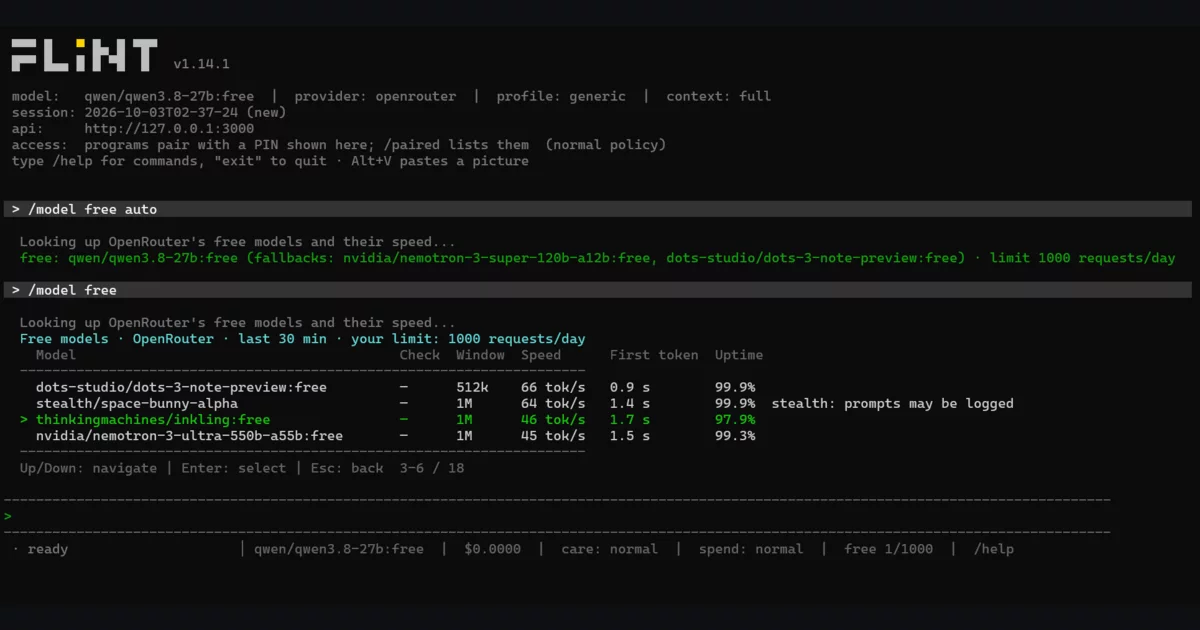
it. On OpenRouter's free tier, /model free picks the free models that can
call tools and falls back to another when one is busy.
It works with OpenRouter, OpenAI, Anthropic, Google, Groq, Together, NVIDIA, Cerebras, Mistral, DeepInfra, Fireworks, Hugging Face, SambaNova, Novita, Nebius or a local Ollama, and installs as a single npm package: no Python, no Docker, no background service.
Project page: https://klymentiev.com/projects/flint
What it does
Ask Flint the way you would ask a colleague:
> Read my project and tell me what it does
> Find all TODO comments and make a plan to fix them
> Write a Python script that converts CSV to JSON, then run it
> Take a screenshot of the desktop and click on Chrome
> Search the web for React best practices in 2026
> Remember that our deploy day is Wednesday
Flint picks the tools, asks before anything risky (by default: deleting a
file, destructive or one-way commands such as git push, child agents and
MCP tools), and shows each tool call as it happens.
Install
Needs Node.js 22.12 or newer.
npm install -g flint-agent
flint
Or from the repository:
git clone https://github.com/dklymentiev/flint-agent.git
cd flint-agent
npm install
npm link          # makes the `flint` command point at this folder
flint
On the first run a short setup picks a provider, takes your API key and asks
how careful Flint should be. flint --version checks the install.
flint not found on Windows? npm puts its commands in the folder that
npm prefix -g prints (usually %APPDATA%\npm), and that folder has to be on
your PATH. Add it under Settings, System, About, Advanced system settings,
Environment Variables, then open a new terminal. npm start in the Flint
folder works either way.
Updates. Flint says when a newer version is out, at most once a day, and
/update installs it and restarts in the same session. It never updates on
its own, and it refuses to overwrite local changes. See
docs/self-update.md.
Command line
flint                                    # start a new session
flint --last                             # continue the last session
flint --model google/gemini-2.5-flash    # pick a model
flint --provider anthropic               # use Anthropic directly
flint --profile desktop                  # desktop automation profile
flint --headless --task "Fix the bug" --cwd ./my-project
Free OpenRouter models: run Flint on the free tier
Flint runs on OpenRouter's free tier: free models from several vendors behind one API key, through OpenRouter's free LLM API.
- Create a free key at openrouter.ai.
- Run
flintand paste the key when it asks. - Type
/model free auto.
Most free models cannot call tools, and the ones that can are often
rate-limited. Flint keeps only the free models that can call tools (the
:free variants and the other zero-priced ones), ranks them by current speed
and uptime from OpenRouter's public stats, and hands OpenRouter the best one
with two fallbacks from other vendors, so a busy model passes the request to
the next. Flint counts today's free requests in the footer. /model free
shows the list; /model test scores any model on small agent tasks. More in
docs/free-mode.md.
Can I use Flint for free?
Yes. Create a free OpenRouter key, paste it when Flint asks, then run
/model free auto. Flint itself is free and open source (MIT).
Which free OpenRouter models work with Flint?
The free models that can call tools, because an agent works through tools. Flint reads that from OpenRouter's model list and ranks them live by speed and uptime, so the choice follows OpenRouter as its free list changes.
How does /model free auto pick a model?
It ranks the free tool-calling models by current throughput and uptime, takes the best, and sets two fallbacks from other vendors. When the first is rate-limited or down, OpenRouter passes the request to the next.
How it works
You type a message. Flint sends it to the model with a set of tools. The model decides which tools to call, Flint runs them (asking first when the action is risky) and loops until the task is done.
The conversation is ordinary terminal output: scroll and select it with your terminal. Only a few rows at the bottom are live: what Flint is doing, the background processes it started, the input line and one status line. Each tool call leaves one line, and each turn ends with a receipt: tools used, files changed, tokens in and out, time and cost.
Esc stops the running turn; pressed again, it stops background processes, newest first. Ctrl+C twice exits. Up/Down recalls earlier input.
Features
Any model, including free ones
| Provider | Default model |
|---|---|
| OpenRouter (default) | google/gemini-2.5-flash |
| OpenAI | gpt-4o |
| Anthropic | claude-sonnet-4-6 |
| Google Gemini (OpenAI-compatible endpoint) | gemini-3-flash-preview |
| Groq | llama-3.3-70b-versatile |
| Together | meta-llama/Llama-3.3-70B-Instruct-Turbo |
| NVIDIA | z-ai/glm-5.3 |
| Cerebras | gpt-oss-120b |
| Mistral | mistral-small-latest |
| DeepInfra | openai/gpt-oss-120b |
| Fireworks | accounts/fireworks/models/gpt-oss-120b |
| Hugging Face (router) | openai/gpt-oss-120b |
| SambaNova | gpt-oss-120b |
| Novita | zai-org/glm-5.3-flash |
| Nebius | openai/gpt-oss-120b |
| Ollama (local) | llama3.2 |
Switch with /provider and /model, also in the middle of a conversation.
Providers are defined in config/providers.json; your own copy in
~/.flint/providers.json adds or overrides them. API keys are stored
encrypted (DPAPI on Windows, AES-256-GCM elsewhere).
Free models. See Free OpenRouter models
above. /model test runs small agent tasks with checked answers on any model
and saves the score: docs/model-check.md.
Tools, and more through MCP
Built-in tools cover files (read, write, edit, search, with checkpoints and undo), shell commands and background processes, the web (fetch a page, search), persistent memory, task plans, child agents, and desktop control through an MCP desktop server.
Any MCP server adds its tools: mail,
chat, databases, your own APIs. Configure servers in MCP_SERVERS or in a
.mcp.json file in the working folder:
MCP_SERVERS=gmail|http|http://localhost:9090/mcp,my-db|stdio|~/my-db-server mcp
With many MCP tools, Flint lists them by name in a tool_search tool and
loads the ones the model asks for, so they do not fill every request.
Long sessions that stay affordable
Every call to the model sends the whole conversation again. Flint keeps that down in three ways:
- Tool search, above.
- Swap. Big and old tool results, and old turns of a long conversation,
move to the session's folder on disk. One line stays in their place
(
[swap #37 · page · <url> · 11 KB · "<title>" · turn 12 · swap_read 37]), and the agent reads them back withswap_readwhen it needs them. Nothing is lost. See docs/context-swap.md. - Compression. The last resort: old tool results are cut to a one-line summary. This one does lose text.
One switch decides how early they start:
| economy | normal (default) | generous | |
|---|---|---|---|
| For | paid models, long sessions | most work | capable models with big windows, quality first |
| MCP tools offered whole | up to 10 | up to 30 | up to 200 |
| Swap wakes up at | ~16k-32k tokens of context | ~48k-96k | near the window's edge |
| Compression starts at | a quarter of the window (max 64k) | half the window (max 128k) | 80% of the window |
| Old conversation goes to swap at | 40% of the window (max 150k) | 60% (max 300k) | 85% |
| Big result goes to swap when awake | over 2 KB | over 4 KB | over 16 KB |
| Token-saving advice to the model | yes | no | no |
Below those thresholds nothing is moved or shortened. /spend shows the
modes; /spend economy, /spend normal, /spend generous (or e, n, g)
switch and are remembered; FLINT_SPEND in the environment wins. Money
limits are separate: AGENT_MAX_COST per message (default $5, 0 = off) and
AGENT_SESSION_BUDGET per session (unlimited by default). See docs/spend-modes.md.
Sessions
Sessions are saved as you go. /resume picks a recent one to continue,
/new starts a fresh one, and restarts (/restart, /update) keep the
session you were in.
Autonomous mode
> /auto Refactor the auth module to use JWT, update all tests, write migration docs
Flint writes a plan, works through it task by task, keeps progress in SQLite
(/plan, /tasks), and stops when it is done or when it reaches your
budget. /continue resumes unfinished work.
Persistent memory
> Remember that our API rate limit is 5000 req/min
> What's our rate limit?
Memory survives across sessions and is protected by an HMAC integrity check: a memory file changed outside Flint is detected and not loaded.
Profiles
| Profile | For | Context |
|---|---|---|
generic (default) |
coding, files, general tasks | full history, compressed when it grows |
desktop |
GUI automation, browser | last 15 messages |
marketer |
content, research, analysis | last 15 messages |
ux-reviewer |
UI and UX reviews | full history |
/profile <name> switches. Add your own: a markdown file in profiles/ and
an entry in profiles/profiles.json.
Plugins
/install <git url or path>
/plugins
/uninstall <name>
A plugin can add tools, hooks and commands.
Safety
Flint runs commands and edits files on your machine, so it asks first. On the
first run you choose how often (/careful changes it later):
- safe: asks before every change to files and every command;
- normal (default): edits files and runs ordinary commands, but asks
before deleting a file, destructive commands (
rm -r,git reset --hard), one-way ones (pushing to git, publishing, uploads, mail), child agents and MCP tools; - permissive: asks only before deleting a file and reconnecting an MCP server.
Reading a secret file (.env, SSH keys, credentials) asks at every level,
and some commands are refused at every level. Around that sit further guards:
filesystem paths can be limited (AGENT_ALLOWED_PATHS), requests to internal
network addresses are refused, outside content is screened for prompt
injection, child agents inherit the blocked paths and cannot nest deeper than
five levels, and every tool call goes to an audit log.
/permissions, /allow <tool>, /deny <tool> and /confirm <tool> set
single tools; /allow-all skips confirmations for the session. For an MCP tool, [s]
at the prompt allows that whole server.
These guards reduce risk; they do not make running an AI agent with your permissions safe in every case. Read what it asks before you answer. See SECURITY.md to report a problem.
Running Flint from other programs
Headless
flint --headless --task "Fix the failing test in auth.test.js" --cwd ./project --budget 0.50
Runs one task and prints JSON on stdout:
{"response": "Fixed the test...", "cost": 0.034, "tokens": 12500}
A headless run never waits for a person. A command the guard would ask about
(for example rm -r) is refused at once and the agent is told why; the
first-run question is not shown; and with no API key configured the run stops
with a message instead of opening the key wizard. Pass the key in the
environment. The agent works in --cwd from its first step.
Stdio (stream-json subprocess)
A host that drives an agent CLI as a long-lived subprocess can drive Flint the same way, with the same flags and the same JSON lines:
flint --print --verbose --model stealth/space-bunny-alpha \
      --input-format stream-json --output-format stream-json \
      --session-id 0b7c4c8e-1f2a-4d3b-9c8d-1234567890ab
Write {"type":"user","message":{"role":"user","content":"..."}} lines to
stdin; read system, assistant, user (tool results) and result lines
from stdout. The working folder's FLINT.md files (or, without them, its
CLAUDE.md files) and .mcp.json are read; --tools and --disallowedTools
say which tools the agent has.
See docs/stdio-mode.md.
HTTP API
A running Flint listens on 127.0.0.1:3000. A program pairs once (you confirm
a PIN in the console) and then sends messages, reads status and history,
manages the queue and stops tasks:
curl -X POST 127.0.0.1:3000/pair/request -d '{"agentName":"my-script"}'
# Flint shows a PIN; the program sends it to /pair/confirm and gets a token,
# which stays valid across restarts for a day (FLINT_PAIRING_TTL_HOURS)
# or until /paired revoke my-script.
curl -X POST 127.0.0.1:3000/message \
  -H "Authorization: Bearer <token>" \
  -d '{"content":"What files changed today?"}'
Commands
| Command | What it does |
|---|---|
/help |
all commands and keys |
/model [id], /model free, /model test |
show or switch the model; free models; score a model |
/provider [name], /key |
switch provider; manage API keys |
/resume, /new, /sessions, /load <id> |
sessions |
/spend [level] |
economy, normal or generous |
/careful |
how often Flint asks: safe, normal, permissive |
/auto <task>, /continue, /plan, /tasks |
autonomous work and its plan |
/rewind [N or all] |
undo file changes made in this session |
/tools [n], /sys, /budget |
recent tool calls; model, cost and context; spending |
/ps, /logs <id>, /kill <id> |
background processes |
/mcp, /plugins |
MCP servers, plugins |
/memory |
memory stats (/memory clear empties it) |
/update, /restart |
install a newer version; restart, same session |
exit |
save and quit |
Keys
| Key | Action |
|---|---|
Esc |
clear the input; stop the turn; then stop background processes, newest first |
Ctrl+C |
stop the turn; twice within 2 s exits |
Up / Down |
input history |
Alt+V |
paste a picture (or text) from the clipboard as [Image #N] |
Ctrl+U, Ctrl+W |
clear the line, delete a word |
Ctrl+V is the terminal's own paste: text works, but with a picture in the
clipboard most terminals send nothing, so use Alt+V.
Configuration
Everything is set in a .env file or environment variables; see
.env.example for the full list with descriptions. The ones
most people touch:
| Variable | Default | What it does |
|---|---|---|
OPENROUTER_API_KEY |
none | key for OpenRouter (the setup can store it instead) |
OPENROUTER_MODEL |
provider's default | model to start with |
AGENT_MAX_ITERATIONS |
500 | tool-call steps per message |
AGENT_MAX_COST |
5 | cost limit per message, in dollars (0 = no limit) |
AGENT_ALLOWED_PATHS |
none | folders the file tools may touch |
MCP_SERVERS |
none | external tool servers |
INTENT_MODEL |
none | optional model that picks the tools for each message; unset offers them all |
FLINT_SPEND |
saved choice | economy, normal or generous |
FLINT_UPDATE_CHECK |
1 | 0 turns off the daily update check |
Documentation
- docs/guide.md: user guide
- docs/technical-reference.md: modules, tools and settings in detail
- docs/providers.md: providers and keys
- docs/console-spec.md: the console
- docs/stdio-mode.md, docs/context-swap.md, docs/spend-modes.md, docs/free-mode.md, docs/model-check.md, docs/self-update.md
- FEATURES.md: feature list
- CHANGELOG.md: what changed in each version
Development
git clone https://github.com/dklymentiev/flint-agent.git
cd flint-agent
npm install
npm test
Flint and its tests need Node.js 22.12 or newer. No .env and no API key
are needed: the tests stub the model.
Stack: Node.js (ESM), React 19 and Ink 6 for the terminal UI, Zustand for state, SQLite for the message queue, tasks and memory index.
See CONTRIBUTING.md before sending a change.
If Flint is useful to you, a star on GitHub helps other people find it.