
English · 日本語
genmodelfit tells you which image, video, music, sound-effect, speech (TTS) and 3D generation models run well on your PC.
It is inspired by llmfit, which does this for LLMs. Status: alpha (CHANGELOG.md).
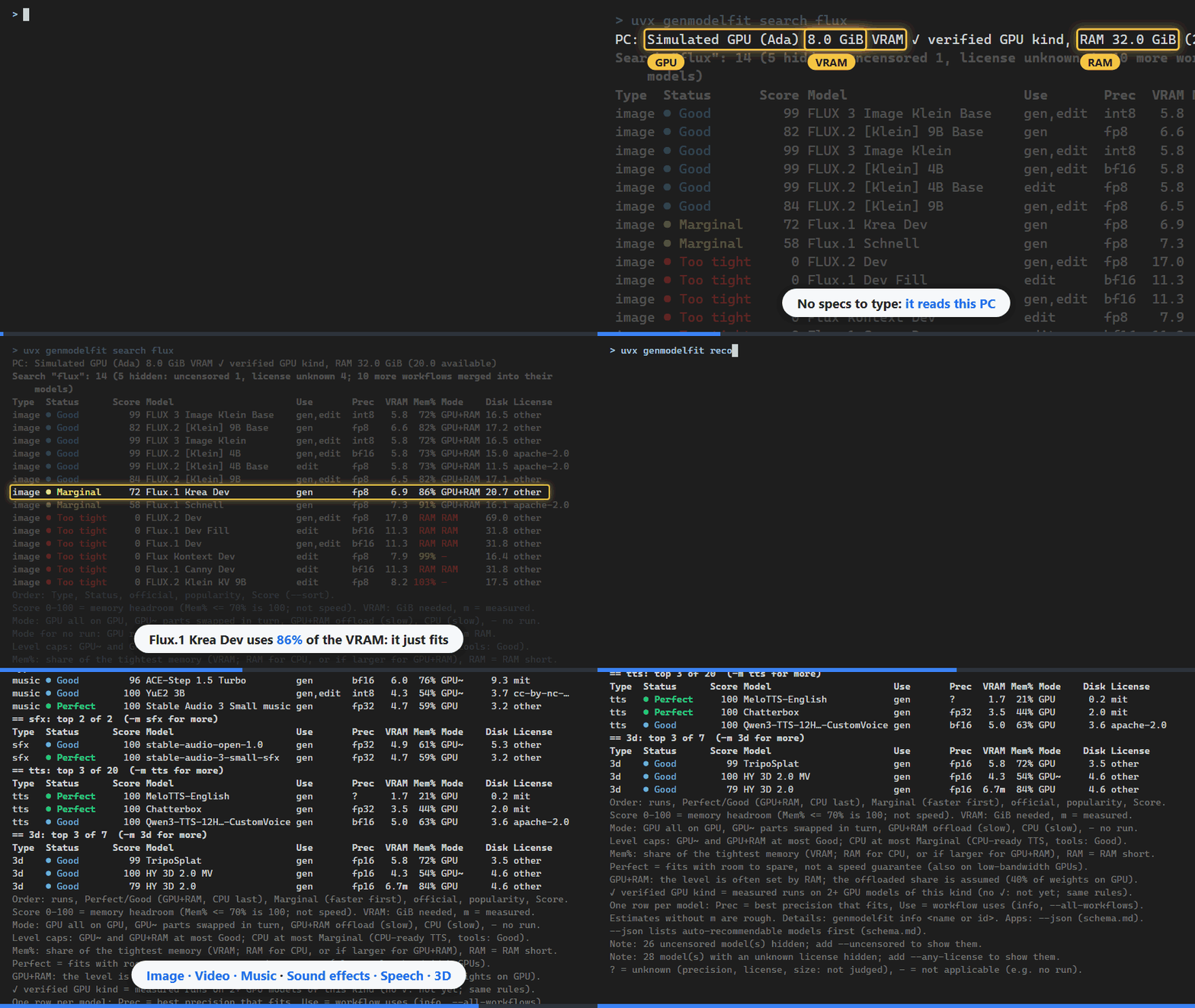
uvx genmodelfit search flux and uvx genmodelfit recommend with genmodelfit 0.12.0 (model list as of 2026-10-21). The list is updated weekly, so the models and counts change.
In the animation the GPU is a simulated Ada-generation one with 8 GiB VRAM (bf16 and fp8 usable), not the PC that recorded it.
--vram changes only the amount of VRAM, and the GPU generation stays that of the PC it runs on.
From the RTX 30 series on (30, 40, 50), the generation does not change the estimate, so this is also how to check a GPU before
you buy it (add --ram for its system RAM).
Quick start
Try it without installing. If you have uv, one command is enough. uv runs genmodelfit in its own temporary environment (and fetches Python if needed); nothing is added to your Python or PATH.
uvx genmodelfit recommend         # the best models for this PC, per type
uvx genmodelfit system            # what was detected on this PC
Every command in this README works this way: write uvx genmodelfit instead of genmodelfit.
uvx genmodelfit@latest … makes uv check for a newer version first.
Install it to use the genmodelfit command directly (details):
pipx install genmodelfit          # or: uv tool install genmodelfit / pip install genmodelfit
genmodelfit recommend             # the best models for this PC, per type
python -m genmodelfit recommend   # the same, if "genmodelfit" is not found
Help by measuring (optional, no git needed). With ComfyUI running, two commands and one button send a measurement of your GPU, which helps check and improve the estimates for everyone with the same GPU (how):
genmodelfit measure               # pick a model worth measuring and measure it (nothing is sent)
genmodelfit share                 # show what will be sent and open the GitHub form; then press "Create"
1. Prerequisites
What it does
- Judges whether each model in its list runs on this PC, and how comfortably (from VRAM, RAM, GPU generation).
- Recommends the best models per type: image, video, music, sfx (sound effects), tts (speech), 3d.
- Downloads the files of a model, after showing licenses and asking you.
- It does not generate anything. To run a model, use ComfyUI (or the runtime the model names). genmodelfit holds model information only, never weights.
- Why not llmfit: it covers LLMs only (llmfit#41); here memory changes several times over with precision, resolution, frames and offloading.
Requirements
- Windows, Linux or macOS, Python 3.10 or newer (with
uvx, uv provides Python if you have none). - GPU: NVIDIA (CUDA); the estimates are calibrated on NVIDIA runs. Without a usable NVIDIA GPU, AMD (ROCm: RDNA 2 or
newer, Windows 11 / Linux), Intel (XPU: Arc A / B, Core Ultra Arc Graphics, Windows 11 / Linux) and Apple silicon
(MPS, macOS 14 or newer) are judged with the vendors' support tables (same level rules as NVIDIA; the PC line shows "✓ verified GPU kind"
only for kinds of GPU with records of running on two or more GPU models, today NVIDIA with dedicated VRAM). Integrated GPUs and APUs (e.g. Radeon 780M / 680M, Steam Deck, Ryzen Z1) use shared memory. Other GPUs
(Intel UHD / Iris Xe, the 2-CU Radeon 610M / 820M, RDNA 1 and older) and PCs without a GPU are judged as CPU-only;
SD-family image models and Stable Audio count as running on CPU (slow). On Linux,
systemsuggestsupdate-pciidswhen lspci does not know the GPU's name (docs/hardware.md). Non-NVIDIA GPUs have no measurements yet, so they get no ✓.genmodelfit measureworks on these GPUs too; sending the result withgenmodelfit shareverifies them and tightens the estimates (Help by measuring).
Install
Not needed to try it: uvx genmodelfit … runs it without installing (Quick start).
To keep the genmodelfit command:
pipx install genmodelfit        # once: pipx ensurepath, then open a new terminal
uv tool install genmodelfit     # once: uv tool update-shell, then open a new terminal
pip install genmodelfit
pipx and uv put genmodelfit on PATH. python -m genmodelfit … always works, whatever PATH says
(on Windows also py -m genmodelfit …).
If pip printed "WARNING: The script genmodelfit.exe is installed in '…\Scripts' which is not on PATH" (common with python.org Python without "Add python.exe to PATH", Microsoft Store Python, user installs, or a venv not activated), add that folder to PATH or use one of the above. A terminal opened before PATH changed does not see it: open a new one.
What is sent over the network
Nothing, for judging: the hardware is read locally. Only update, download, measure and bench connect, and only to
public data or the ComfyUI you name (when you give no folder or URL, download and measure also ask a ComfyUI running on
this PC, at 127.0.0.1). share sends nothing: it opens a GitHub form in your browser. No telemetry. Details: Privacy.
2. Procedure
-
Check your PC. Shows the GPU, VRAM, RAM, page file, free disk, and whether the model list is still fresh.
genmodelfit system -
Get recommendations. The top models of each type that run here, best first. Narrow down with a type (
-m) or a use inside a type (--task;genmodelfit typeslists them).genmodelfit recommend genmodelfit recommend -m image --task edit -
See everything that runs. One table of all models that run here (Perfect / Good / Marginal).
--alladds tools, models that do not run and unjudged ones;--sort scoreranks across types;--fit goodkeeps one level.genmodelfit fit genmodelfit fit --sort score --fit good -
Look at one model. Files, licenses, memory in each mode, limits, and why it is or is not Verified.
genmodelfit info "Z-Image-Turbo" -
Download it.
--listshows the files, licenses, sizes and free disk without downloading. Then download into your ComfyUI folders; you are asked before anything starts, and every file is sha256-checked. Without--comfyui-dirit looks for your ComfyUI and shows where it found it (if it finds none or several, it asks).genmodelfit download "Z-Image-Turbo" --list genmodelfit download "Z-Image-Turbo" --comfyui-dir C:\ComfyUI # your ComfyUI folder -
Keep the list fresh. The list is rebuilt weekly. A model whose link check is older than 30 days stops being Verified. This fetches the latest signed list from this project.
genmodelfit update --from-release -
Measure and send (optional). Two commands and one button:
measurepicks a model worth measuring on your GPU and measures it on your running ComfyUI;shareshows exactly what will be sent and opens a GitHub form with it filled in, where you press "Create" (Help by measuring).genmodelfit measure genmodelfit share
For apps (Python / JSON)
The commands take --json (docs/schema.md).
The same in Python:
import genmodelfit as gmf

for f in gmf.recommend(modality="image", task="edit", limit=5):
    row = f.to_dict()  # the same dict as one item of `recommend --json`
    # memory_required_gb: what the chosen mode needs (the table's VRAM; RAM on CPU).
    # f.estimate.vram_gb is the all-on-GPU need, which can be larger than the GPU (GPU~ / GPU+RAM rows).
    print(f.model.id, f.model.precision, f.score, f.auto, f.estimate.fit, row["memory_required_gb"])

st = gmf.data_status()  # is the list fresh enough for Verified (auto) models?
if st.expired:
    print("run: genmodelfit update --from-release", st.expires_at)

# reading the list yourself: skip entries still waiting for review.
# on a malformed or wrongly typed list, load_db raises a RuntimeError (catch RuntimeError; the subclass
# genmodelfit.db.DatabaseError is not in gmf.__all__).
ok = [e for e in gmf.load_db().models if e.reviewed]

# one model, with the GPU your app detected (generation and precision are decided here)
fit = gmf.judge_model("image_sdxl_simple", gpu_name="NVIDIA GeForce RTX 3060", vram_gb=12, driver="560.94")
print(fit.to_dict()["fit_level"])  # only names in gmf.__all__ are stable API

# AMD / Intel GPUs go through the same support tables as detection; refusals say why (other_gpus[].reason)
pc = gmf.system_from(
    [{"name": "AMD Radeon RX 7800 XT", "vendor": "amd", "vram_gb": 16}],
    windows=True,
    windows_build=22631,
    cpu="AMD Ryzen 7 7700X",
)
gmf.gpu_family("Intel(R) Arc(TM) B580 Graphics", "intel")  # {"backend": "xpu", ...} from the name table
db = gmf.load_db(use_cache=False, user_measurements=False)  # bundled list + bundled measurements only

# fetch the signed list with your own session, e.g. the app's CA bundle (network: only this and gmf.download)
db = gmf.update_from_release(session=my_session, dest=data_dir / "db.json", state_dir=data_dir)
Only names in gmf.__all__ are stable API (docs/schema.md).
Judge another PC
--vram and --ram (GiB) replace the detected sizes, e.g. genmodelfit recommend --vram 12 --ram 32.
With a usable NVIDIA GPU, its generation is kept and only the VRAM changes. On a non-NVIDIA GPU (or without a usable
GPU), --vram judges a hypothetical NVIDIA GPU of unknown generation. Other users' measurements, and measurements
that set the level, apply only when --vram and the measured card's VRAM have a ratio (smaller ÷ larger) of 0.95 or more. --width, --height, --frames, --length and --precision judge a specific
setting.
Language
Output is in English by default. For Japanese, add --lang ja to any command (e.g. genmodelfit recommend --lang ja),
set the environment variable GENMODELFIT_LANG=ja, save it with genmodelfit config set lang ja (command line only),
or call gmf.set_language("ja") from Python (the flag wins, then the variable, then the saved setting for the command
line or set_language for Python; the OS language is not used). Only the texts change (reasons, notes, errors, table
headings and footers, --help); JSON keys, ids, codes and judgments are the same in both languages. English output
contains no Japanese, and Japanese output contains no English-only sentences (one language per line).
Kept in English in both languages: the table column names (Type, Status, Score, Model, Use, Prec, VRAM,
Mem%, Mode, Disk, License, Censored), the fit level names (Perfect, Good, Marginal, Too tight),
the run-mode marks (GPU, GPU~, GPU+RAM, CPU), units, and machine-readable values such as ids, license ids and
option names. This keeps the table widths stable and matches what you type for --fit, --sort and so on; the
Japanese output explains them in Japanese below the table. Type headings show the Japanese type name followed by
the name for -m (e.g. (image)).
Long lines are wrapped counting East Asian wide characters as two columns. File names, URLs, options and numbers with units are never split (a single one longer than the width stays whole on its own line), and the basic Japanese line-breaking rules apply (no line starts with a closing mark or comma, or ends with an opening bracket).
3. Results
Example
genmodelfit recommend on a PC with 8 GiB VRAM and 32 GiB RAM, top 2 per type (COLUMNS=100).
The examples use a simulated Ada-generation GPU; --vram changes only the amount of VRAM, and the GPU generation is
that of the PC it runs on. tools/screenshots.py --readme rebuilds these blocks:
$ genmodelfit recommend --vram 8 --ram 32 -n 2
PC: assumed 8.0 GiB VRAM (--vram), RAM 32.0 GiB (--ram)
Recommended: 12 of 83 (221 hidden: uncensored 26, tools 34, license unknown 28, too tight 133; 25
    more workflows merged into their models)
== image: top 2 of 32  (-m image for more)
Type  Status      Score Model                      Use       Prec  VRAM Mem% Mode    Disk License
image ● Good        100 Anima Base 1.0             gen,edit  bf16   5.7  71% GPU~     5.4 other
image ● Good         92 SDXL1.0 Base               gen       fp16   6.2  78% GPU~     6.5 openrail++
== video: top 2 of 12  (-m video for more)
Type  Status      Score Model                      Use       Prec  VRAM Mem% Mode    Disk License
video ● Good         96 Wan 2.2 5B TI2V            gen       fp16   6.1  76% GPU+RAM 16.9 apache-2.0
video ● Good        100 Wan 2.1 1.3B T2V           gen       fp16   4.3  54% GPU+RAM  9.2 apache-2.0
== music: top 2 of 10  (-m music for more)
Type  Status      Score Model                      Use       Prec  VRAM Mem% Mode    Disk License
music ● Good         96 ACE-Step 1.5 Turbo         gen       bf16   6.0  76% GPU~     9.3 mit
music ● Good        100 YuE2 3B                    gen,edit  int8   4.3  54% GPU~     3.7 cc-by-nc-…
== sfx: top 2 of 2  (-m sfx for more)
Type  Status      Score Model                      Use       Prec  VRAM Mem% Mode    Disk License
sfx   ● Good        100 stable-audio-open-1.0      gen       fp32   4.9  61% GPU~     5.3 other
sfx   ● Perfect     100 stable-audio-3-small-sfx   gen       fp32   4.7  59% GPU      3.2 other
== tts: top 2 of 20  (-m tts for more)
Type  Status      Score Model                      Use       Prec  VRAM Mem% Mode    Disk License
tts   ● Perfect     100 MeloTTS-English            gen       ?      1.7  21% GPU      0.2 mit
tts   ● Perfect     100 Chatterbox                 gen       fp32   3.5  44% GPU      2.0 mit
== 3d: top 2 of 7  (-m 3d for more)
Type  Status      Score Model                      Use       Prec  VRAM Mem% Mode    Disk License
3d    ● Good         99 TripoSplat                 gen       fp16   5.8  72% GPU      3.5 other
3d    ● Good        100 HY 3D 2.0 MV               gen       fp16   4.3  54% GPU~     4.6 other
Order: runs, Perfect/Good (GPU+RAM, CPU last), Marginal (faster first), official, popularity, Score.
Score 0-100 = memory headroom (Mem% <= 70% is 100; not speed). VRAM: GiB needed, m = measured.
Mode: GPU all on GPU, GPU~ parts swapped in turn, GPU+RAM offload (slow), CPU (slow), - no run.
Level caps: GPU~ and GPU+RAM at most Good; CPU at most Marginal (CPU-ready TTS, tools: Good).
Mem%: share of the tightest memory (VRAM; RAM for CPU, or if larger for GPU+RAM), RAM = RAM short.
Perfect = fits with room to spare, not a speed guarantee (also on low-bandwidth GPUs).
GPU+RAM: the level is often set by RAM; the offloaded share is assumed (40% of weights on GPU).
One row per model: Prec = best precision that fits, Use = workflow uses (info, --all-workflows).
Estimates without m are rough. Details: genmodelfit info <name or id>. Apps: --json (schema.md).
--json lists auto-recommendable models first (schema.md).
Note: 26 uncensored model(s) hidden; add --uncensored to show them.
Note: 28 model(s) with an unknown license hidden; add --any-license to show them.
? = unknown (precision, license, size: not judged), - = not applicable (e.g. no run).
The first lines show the PC and how many models were hidden and why. The last lines explain the marks.
fit prints one table (here 24 GiB VRAM, 128 GiB RAM, images only, first 6 rows):
$ genmodelfit fit --vram 24 --ram 128 -m image -n 6
PC: assumed 24.0 GiB VRAM (--vram), RAM 128.0 GiB (--ram)
All models: 6 of 60 (218 hidden: other types 166, uncensored 21, tools 19, license unknown 12; 51
    more workflows merged into their models)
Type  Status      Score Model                      Use       Prec  VRAM Mem% Mode    Disk License
image ● Perfect     100 Anima Base 1.0             gen,edit  bf16   7.0  29% GPU      5.4 other
image ● Perfect     100 SDXL1.0 Base               gen       fp16   8.0  33% GPU      6.5 openrail++
image ● Perfect     100 Anima Preview 3 Base       gen       bf16   7.0  29% GPU      5.2 other
image ● Perfect     100 NetaYume Lumina            gen       bf16  12.4  52% GPU      9.9 gemma
image ● Perfect     100 SDXL Turbo 1.0             gen       fp16   9.0  38% GPU      6.5 other
image ● Perfect     100 PixelDiT 1300M             gen       bf16   9.6  40% GPU      7.3 other
Order: Type, Status, official, popularity, Score (--sort).
Score 0-100 = memory headroom (Mem% <= 70% is 100; not speed). VRAM: GiB needed, m = measured.
…
Columns
| column | meaning |
|---|---|
| Type | image, video, music, sfx, tts, 3d |
| Status | fit level (below) |
| Score | 0–100: memory headroom. 100 while the tightest memory of the mode is at most 70% used (Mem%), lower above that; not speed, quality or popularity (rules) |
| Censored | Y censored / N uncensored; only with --uncensored (or `--content all |
| Model | one row per model (same weights); long names are cut in the middle with … |
| Use | gen, edit, i2v, … (genmodelfit types); the row's own use (the one matching --task) first, then the other uses of the model's workflows, without repeats (gen,edit; gen,… when they do not fit). The workflows: info; one row each: --all-workflows |
| Prec | the best precision that fits (fp16, bf16, fp8, int8, …) |
| VRAM | GiB needed in that mode; m = measured (by the maintainer, on this PC, or the median of other users' measurements of the same GPU; number of sources: info, JSON sample_count) |
| Mem% | share of the tightest memory used: VRAM on the GPU, RAM on CPU, the larger of the two for GPU+RAM; RAM = system RAM is short |
| Mode | GPU all on GPU, GPU~ parts swapped in turn, GPU+RAM offload (slow), CPU (slow), - does not run (GPU req: needs a GPU, none usable here; RAM: not enough system RAM) |
| Disk | download size (GiB); dropped first when the width is short (then see info or --json) |
| License | license of the files (other = read it yourself) |
Fit levels
The level comes from how much of the memory the mode uses (VRAM on the GPU, RAM on CPU), as in llmfit:
| level | use of memory | cap by mode |
|---|---|---|
| Perfect | ≤ 60% | only when all on the GPU (GPU); room to spare, not a speed guarantee |
| Good | ≤ 85% | highest level for GPU~ and GPU+RAM (offloading is chosen only when it raises the level), and on the CPU for speech whose authors state real-time CPU use (MeloTTS, Piper, VieNeu-TTS) and one-pass tools |
| Marginal | ≤ 98% | highest level for generation on the CPU or slightly short RAM (Mem% can be low) |
| Too tight | > 98% | does not run (a level set by measurements can be Good even above 98%) |
| ? | — | not judged: the download size is unknown |
There is no cap by GPU vendor; the PC line shows "✓ verified GPU kind" when that kind