

A native macOS menu bar app that turns your Mac into a video screensaver and live wallpaper engine. Play looping videos, GIFs, and built-in effects fullscreen — or run them behind your windows as a living desktop. Built with Swift, no Xcode project needed.
Features
| Feature | Description |
|---|---|
| Screensaver Mode | Fullscreen video, cursor hidden, dismiss with Escape/click/mouse |
| Live Wallpaper Mode | Ambient mode + reduced opacity = animated wallpaper behind all your windows |
| Ambient Mode | Play on any screen while you keep working — built-in, external, or all |
| Multi-Screen | Built-in, external, all screens — your choice |
| Video + GIF | Supports .mp4, .mov, .m4v, and .gif files |
| Volume Slider | Adjustable volume with mute toggle (defaults off; Sound Off/On while a video plays) |
| Opacity Slider | Fade the video in ambient mode to see your desktop through it |
| Loop | Toggle looping on/off — play forever or just once |
| Matrix Rain | Built-in Matrix digital rain effect — no video file needed |
| Matrix Settings | Color theme, speed, characters, density, font size, trail length |
| Starfield Warp | Built-in hyperspace warp effect with 4 cosmic backdrop layers, planets, moons, comets, and spacecraft Easter eggs |
| Photo Slideshow | Built-in Ken Burns cinematic photo slideshow with smooth crossfading from photos/ folder |
| GPU Hyperspace | Built-in Metal fragment/compute shader running at 60/120 FPS with <1% CPU overhead |
| Web Wallpapers | Interactive live HTML5 canvas & WebGL wallpapers from the web/ folder via WKWebView |
| Per-Monitor Setup | Displays menu assigns a different clip or effect per screen. Click = screensaver, Option-click = ambient |
| Ranger Menu | Now playing, Last Played, Play, Displays, Overlays, Settings. Last-used screen. Version and update check at the bottom |
| Sequential Playlist | Auto-advance through videos in sequence when playback ends, with seamless looping |
| Battery Saver Mode | Automatic 30fps throttling when macOS Low Power Mode is active on battery |
| Customizable Clock | 12-hour AM/PM vs 24-hour military time, seconds toggle, date toggle, 6 colors, 3 sizes |
| Shuffle | Pick a random video from your collection |
| Auto Play | Automatically start playing when the app launches |
| Launch at Login | Start the app every time you log in |
| Custom Icon | Drop a ranger.png next to the app for a custom menu bar icon |
| Organized Folders | videos/, gifs/, photos/, and web/ subfolders keep your media tidy |
| Portable | Move the whole folder anywhere — the app finds its videos |
| Auto Update | Checks GitHub for newer versions and offers one-click update with backup |
| Break Reminder | Countdown timer (60/45/30/15 min or custom) with fullscreen break screen overlay |
| Floating Countdown | On-screen countdown widget — choose screen, corner, color, and size |
| Pomodoro Mode | Auto-cycling work/break timer with configurable durations |
| Break Sound | Audible alert when break time arrives — 6 system sounds to choose from |
| Session Stats | Track breaks taken today and total — visible in the menu |
| Lock Screen | Password-protected screen lock — Cmd+Shift+L to lock, SHA-256 hashed password |
| Show in Dock | Toggle the app icon in the macOS Dock so you can see it alongside your other apps |
| Desktop Shortcut | Create a shortcut on your Desktop — never forget you have HollywoodSaver |
| Rain Effects | Two independent Matrix Rain modes — behind windows (wallpaper) and over windows (transparent overlay). Both fully click-through, with separate opacity sliders. Run one, the other, or both at once |
| Sleep Timer | Put your Mac to sleep now, after a timer (90/60/45/30/15 min), or after playback ends — resumes playback on wake |
| Floating Clock | Always-on-top clock overlay — 6 colors, 3 sizes, 4 corners, optional date, screen selection, auto-restore |
| Secure Auto-Update | Downloads pre-built releases from GitHub with SHA-256 checksum verification — no code compilation on your machine |
| Contribute | Buy Me a Coffee or Hodl H3LLCOIN — support the project from the menu |
v5.0.4 — Ranger menu, per-monitor playback, per-screen dismiss. Clean modular architecture (26 source files in
src/). Click plays last-used screen, Option-click is ambient. Every feature remains 100% free and open-source.
📖 More docs: Multi-Monitor Architecture Guide · Full feature list & version history · Complete changelog
Quick Start
Requirements
- macOS 15+ (Apple Silicon — M1/M2/M3/M4)
- Xcode Command Line Tools (
xcode-select --install)
Install
git clone https://github.com/davidtkeane/HollywoodSaver.git
cd HollywoodSaver
bash build.sh
bash build.sh compiles the app, generates the icon, quits a running copy, and launches the new binary. After launch it prints the version, git hash, and Unreleased changelog. No need to run run.sh separately.
Where is the icon?
HollywoodSaver lives in the menu bar (the top-right bar of your screen, next to Wi-Fi, battery, Spotlight, etc.).
macOS pins the Ranger extra to the Main display (System Settings → Displays). On a laptop-plus-ultrawide layout the extra can still show up in the overflow (>>) or on the external bar.
The menu is Now playing → Last Played → Play → Displays → Overlays → Settings, with version and Quit at the bottom. After you dismiss a clip, Last Played one-clicks the same thing on the same screen. Click a clip in Play to pick something new (last-used screen). Option-click is ambient. Settings checkboxes stay open until you move off the menu.
Add Videos From Github
Download the included hollywood.mp4 from the Releases page, or add your own videos:
Video From Mega Storage
Download hollywood.mp4 (113 MB) — Demo screensaver video hosted on MEGA
- Drop
.mp4,.mov,.m4vfiles into thevideos/folder - Drop
.giffiles into thegifs/folder - Click the menu bar icon — your media appears automatically
- That's it
Files in the root folder are also detected, so existing setups still work.
Free Screensaver Videos
Looking for cool videos to use? Here are some great free sources:
- Pexels — 2,800+ free screensaver loops
- Pixabay — 700+ free 4K clips
- Mixkit — Curated free loop videos
Live Wallpaper Mode

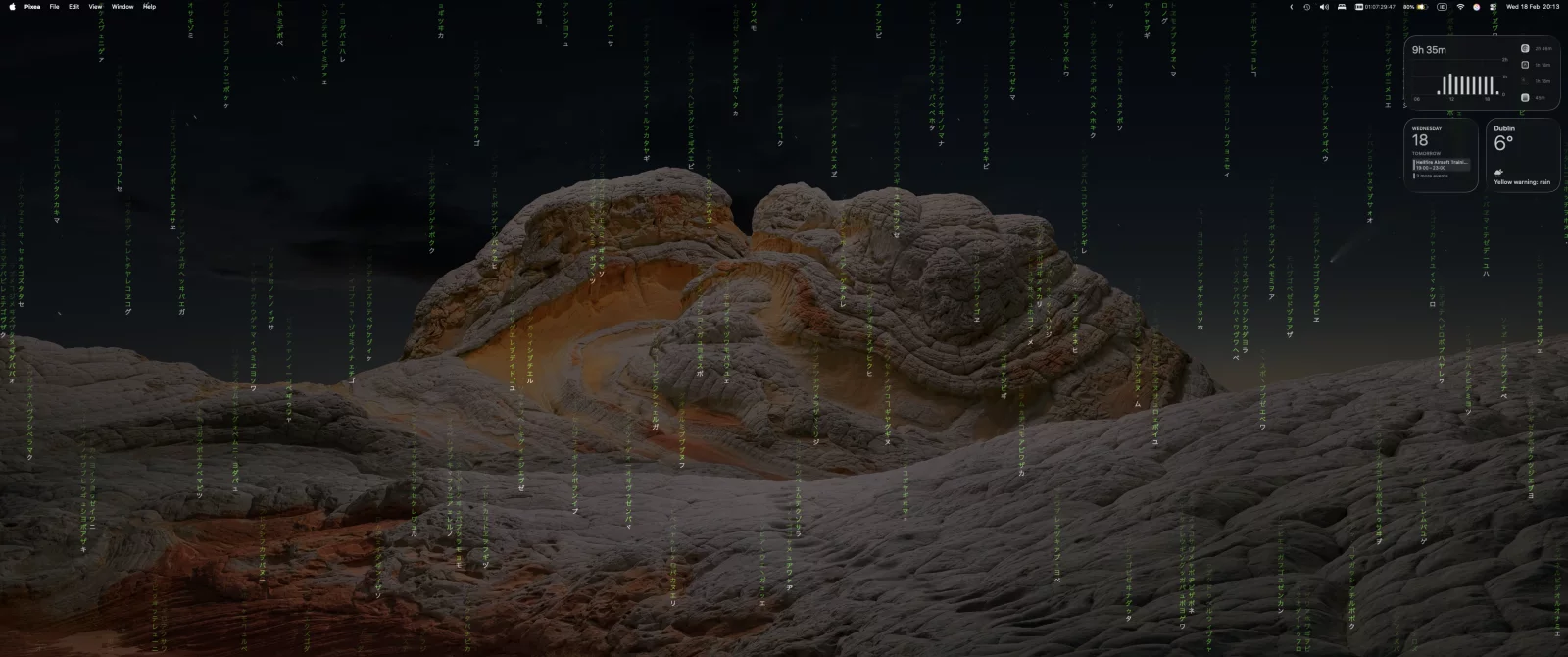
The real magic happens when you combine Ambient Mode with the Opacity slider. Lower the opacity and your video or effect plays behind all your windows — turning your desktop into a living, animated wallpaper.
Try this: Play → Effects → Matrix Rain (Option-click for ambient), then lower Opacity in Settings. Matrix code rains behind your Finder windows, your terminal, your browser — on every monitor. You keep working while your desktop looks like you're inside the Matrix.
This works with any media — videos, GIFs, and built-in effects all become live wallpapers. On a dual-monitor setup, both screens get the effect simultaneously.
Rain Effects
The Rain Effects submenu gives you two independent Matrix Rain modes:
| Mode | What It Does |
|---|---|
| Rain Behind Windows | Matrix Rain falls behind all your windows and icons — like an animated desktop wallpaper |
| Rain Over Windows | Transparent Matrix Rain falls in front of everything — fully click-through, you keep working while it rains code |
- Both modes can run simultaneously or independently
- Each has its own opacity slider (Behind: 0.1–1.0, Over: 0.05–0.5)
- Stop All Rain button to quickly turn everything off
- Both auto-restore when you relaunch the app
- Works across all screens and Spaces
Try this: Enable "Rain Over Windows" at low opacity (0.10–0.15) and keep coding. It's like working on a computer while looking through a rain-streaked window. Then add "Rain Behind Windows" too for the full immersion.
How It Works
Click the helmet icon (or play icon) in your menu bar to see all your videos listed. Each video gives you options:
Screensaver — goes fullscreen and blocks everything like a real screensaver. Escape, click, or move the mouse to dismiss.
Ambient (keep working) — plays behind your desktop on any screen (built-in, external, or all) while your Mac stays usable. Toggle it off from the menu bar whenever you want.
Settings
All settings are in the dropdown menu and persist between restarts:
- Sound — toggle audio on/off (menu stays open; default is muted)
- Open Media Folders — Videos / GIFs / Photos / Web / app folder in Finder
- Volume — drag the slider
- Opacity — transparency for ambient mode
- Rain Effects — rain behind windows, over windows, or both (with separate opacity sliders)
- Loop — repeat forever or play once
- Auto Play on Launch — resume the last video automatically
- Launch at Login — start with macOS
Sharing to Other Macs
Send the entire HollywoodSaver folder (app + videos) to another Mac. On the receiving Mac, remove the quarantine flag first:
xattr -cr ~/Desktop/HollywoodSaver
Then just open the app. Works on any Apple Silicon Mac (M1-M4) running macOS 15+.
Project Structure
HollywoodSaver/
  README.md               # You are here
  build.sh                # Build script — creates the .app bundle
  run.sh                  # Launcher with terminal info
  src/                    # Swift source (26 files, 6,557 lines total)
    main.swift              # App startup
    AppDelegate.swift       # Main controller + version constant (bump appVersion here only)
    Prefs.swift             # UserDefaults wrapper
    MatrixConfig.swift      # Matrix Rain config enums
    MatrixRainView.swift    # Matrix Rain rendering
    StarfieldWarpView.swift # Starfield hyperspace simulation & cosmic layers
    PhotoSlideshowView.swift# Ken Burns photo slideshow engine
    VideoPlayerView.swift   # AVPlayer-based video playback
    GifPlayerView.swift     # Frame-by-frame GIF animation
    LockScreen.swift        # Lock overlay + password screen
    BreakReminderView.swift # Break screen overlay
    ClockOverlayView.swift  # Floating clock display
    CountdownOverlayView.swift
    SliderMenuView.swift    # Volume/opacity slider menu items
    ToggleMenuItemView.swift# Stay-open checkbox menu item
    InputMonitor.swift      # Global/local event monitoring
    ScreensaverWindow.swift # Custom NSWindow + protocol
  images/                 # App logo and screenshots
    ranger.png              # App logo / menu bar icon source
    thematrix.png           # Matrix Rain screenshot
  docs/                   # Project documentation
    ABOUT.md                # Full feature list + version history
    CHANGELOG.md            # All release notes v1.0 → v5.0.4
  videos/                 # Drop .mp4, .mov, .m4v files here
  gifs/                   # Drop .gif files here
  photos/                 # Drop .jpg, .png, .heic files here (slideshow)
  release/                # 🎖️ Maintainer-only — you don't need to touch this
    release.sh              # Publishes GitHub Releases (maintainer workflow)
  HollywoodSaver.app/     # Built app (generated by build.sh)
🎖️ Note on
release/— This folder contains the release automation script used only by the project maintainer to publish new versions to GitHub. Regular users never need to run anything inrelease/— justbash build.shand you're set.
Pure Swift compiled with swiftc — no Xcode project, no dependencies, no frameworks beyond what ships with macOS.
Building
bash build.sh
This creates the .app bundle with Info.plist, compiles all Swift sources in src/, generates the app icon from images/ranger.png, and code-signs it ad-hoc.
☕ Support the Project
Love HollywoodSaver? Two ways to show it:
Buy Me a Coffee

🪙 Buy H3LLCOIN — Join the Community
H3LLCOIN is the Rangers community coin on Solana. Buying a coin makes you part of the community and helps fund free open source tools like HollywoodSaver.
| 🌐 Official site | h3llcoin.com |
| 🔄 Buy instantly | Jupiter Swap → H3LL |
| 📋 Contract address | BJP255e79kNzeBkDPJx8Dkgep32hwF56e1UCWKdBCvie |
How to buy in 3 steps:
- Get SOL on Coinbase, Binance, or Kraken
- Transfer SOL to your Phantom wallet
- Click the Jupiter Swap link above — H3LL is pre-loaded, just confirm the swap
Your support funds accessibility tools for 1.3 billion people worldwide. 🎖️
Rangers lead the way! 🎖️
License
MIT — do whatever you want with it.
Credits
Created by:
- David Keane (@davidtkeane) — IrishRanger 🎖️
- Cybersecurity Master's student (Year 1)
- Psychology BSc | TryHackMe Top 8%
- Building RangerOS for accessibility
- Creator of H3LLCOIN
Built with:
- Claude Code — AI pair programming
- AIRanger (Claude Opus 4.6) — Your AI Ops Commander 🎖️
Part of the Rangers ecosystem:
- 🪙 H3LLCOIN — Cryptocurrency for Rangers
- 🎖️ RangerOS — Accessibility-first security platform
- 🔗 RangerBlock — P2P blockchain network
Built with Swift and Rangers spirit 🎖️