

Imference Desktop
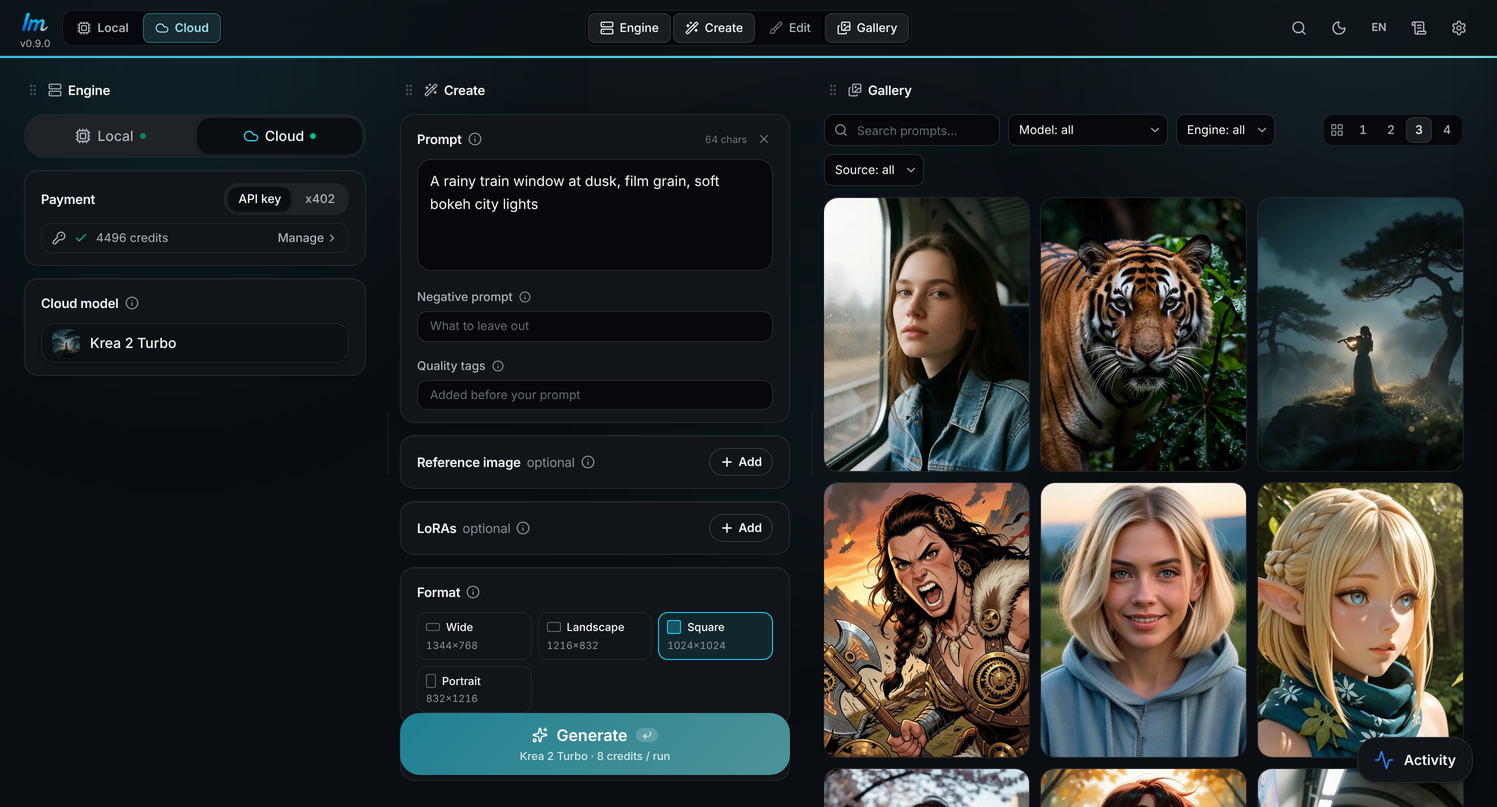
Generate AI images and videos — on your own GPU or in the cloud. One app.
Free · No subscription · Windows & macOS

English · 简体中文
Download · Quick start · Website · Contributing · Security
⬇️ Download
| Platform | Download |
|---|---|
| Windows 10/11 (x64) | Installer · Portable .exe |
| macOS 12+ (Intel & Apple Silicon) | .dmg |
| Linux | No prebuilt binary yet — build from source |
All versions and checksums.txt (SHA-256) are on the
Releases page.
🚀 Quick start
- Download the installer for your OS above and run it.
- Open the app — it installs its own inference engine and detects your GPU. Nothing touches your system Python.
- Pick a model, hit Generate — the weights download automatically and every model ships pre-tuned, so your first image already looks right.
No GPU? Switch the toggle to Cloud in step 3 and generate on imference.com instead.
⚠️ First launch
The app isn't code-signed yet, so your OS shows a one-time warning. This is expected — here's how to get past it:
- Windows — SmartScreen popup → click More info → Run anyway.
- macOS — right-click the app → Open → Open.
If macOS still refuses:
xattr -cr "/Applications/Imference Desktop.app"
You can verify your download against checksums.txt from the release.
The app checks for new versions at startup and shows a banner when one is
available; code signing and silent in-app auto-update are on the roadmap.
Why Imference Desktop
- ⚡ One-click setup — the app installs an isolated inference engine for you (nothing touches your system Python), detects your GPU, and starts and stops the engine on demand. No terminal, no CUDA wrestling.
- 🖥️ Local generation, $0 per image — run eight model families on your own GPU: SDXL, SD 1.5, Z-Image, FLUX, Chroma, Qwen-Image, Anima and Krea 2. Your prompts and images never leave your machine.
- 🧩 Preconfigured models, zero setup — pick a model from the curated catalog and hit Generate: the weights download automatically, and every model ships pre-tuned (steps, CFG, resolutions, quality tags, negative prompt) so your first image already looks right.
- 🎨 LoRAs — stack up to four styles, characters or detail boosters on
SDXL (Pony, Illustrious), Z-Image, Krea 2 and Anima models: pick them from
the curated catalog (one-click download, weights pre-tuned) or import your
own
.safetensors. Works locally and in the cloud. - 📦 Bring your own model — load any local
.safetensorscheckpoint (e.g. downloaded from Civitai) and pick its family. The file is used in place — nothing is copied or uploaded. - ☁️ Cloud when you want it — no GPU or a weak one? Generate images and video on imference.com from the same interface. Pay with an API key (credits) or x402 (USDC on Base) — the x402 route needs no account at all.
- 🎛️ Real controls, simple interface — format, steps, CFG, seed, quality tags, negative prompt, image-to-image. Stack generations in a queue, and even switch models mid-run — the app finishes the current image first.
- 🗂️ A gallery that remembers everything — every image and video is saved with its prompt, model and settings. Filter, search, and review in a fullscreen viewer.
- 🪄 Editing tools — edit with instructions ("replace the sky with a sunset"), upscale, vary, remove background, magic eraser with click-to-select, expand (outpaint), repaint, restore faces, describe, and quick utilities (resize, crop, convert, strip metadata, video trim/convert) right from the gallery — on your machine or in the cloud.
Editing tools
Right-click any image in the gallery (or open it and press Edit) to run a tool on it. Every tool shows where it will run before you start:
| Badge | Meaning |
|---|---|
| Local | Runs on this computer at full speed (GPU, or a light CPU tool). Nothing is uploaded. |
| Local (slow) | Runs on this computer on the CPU — no compatible GPU runtime was found. Still private, just slower. |
| Cloud | This computer can't run it (engine not installed, not enough memory, no generation model loaded…): it runs on imference.com at the price shown. |
-
Where it runs. Settings → Editing tools picks the default: Auto (local when the badge says so, otherwise the cloud), Always local or Always cloud; each run can override it. If a local run fails because the machine runs out of memory or lacks a runtime, the app proposes the cloud with its price — it never switches silently.
-
Privacy. Local tools never upload anything. Cloud runs show "Runs in the cloud: your image is uploaded" and the price before you start; uploads are deleted from the cloud within 24 hours.
-
How it works. Image and video tools run in a small separate tools engine (ONNX models of 2–500 MB, downloaded on first use and cached) that starts on demand and frees its memory after a few idle minutes. Vary, Repaint and Expand run on the generation model you have loaded (any model that does image-to-image). Results land in your gallery with a tool badge and the tool's settings in their metadata; you can chain another tool on a result.
-
Edit with instructions. Describe the change in plain words ("replace the sky with a sunset", "remove the man on the left", "make it a watercolor") and optionally add up to two reference images ("put the hat from image 2 on the cat"). It uses an instruction-edit model (Qwen-Image-Edit 2511), not your text-to-image model; the instruction is saved as the result's prompt.
- Local: load an edit model (Qwen-Image-Edit) as your local model. It needs a CUDA or ROCm GPU with about 12 GB of VRAM (the app streams the 20B transformer with group offload) and about 64 GB of RAM. An edit model can't generate from a prompt: while it is loaded, Generate points you to Edit with instructions, and Vary / Repaint / Expand run in the cloud.
- Otherwise it runs in the cloud on
qwen-image-edit-2511(or another edit model you pick in the dialog) at that model's price.
-
Local API for AI agents. While the app is open it serves a local API on
127.0.0.1(port 47823 when free) protected by a random token, so agents — e.g. the Imference MCP server withrun_on: local— can run tools on your machine for free. The port and token are in<config dir>/imference-desktop-go/local-api.json({"port","token","pid"}, readable only by you, removed when the app quits):curl -H "Authorization: Bearer $TOKEN" http://127.0.0.1:47823/v1/tools curl -H "Authorization: Bearer $TOKEN" -X POST http://127.0.0.1:47823/v1/tools/upscale \ -d '{"inputs": {"image": "/path/to/in.png"}, "params": {"scale": 2}}' # with an edit model loaded: references is a list (up to 2) curl -H "Authorization: Bearer $TOKEN" -X POST http://127.0.0.1:47823/v1/tools/instruct-edit \ -d '{"inputs": {"image": "/path/in.png", "references": ["/path/hat.png"]}, "params": {"instruction": "put the hat from image 2 on the cat"}}'Inputs may be absolute paths,
https://URLs ordata:URIs; outputs are saved to the gallery and returned as paths. Runs are local only (503 unsupported_runtimewhen this machine can't run the tool). Turn the API off in Settings → Editing tools.
Web version (prototype)
The same app, cloud-only, in a browser: task build:web (or
cd frontend && npm run build:web && go build -tags "web server" -o bin/imference-web .),
then IMFERENCE_WEB_ADDR=127.0.0.1:8090 bin/imference-web and sign in with an
imference.com API key.
How it works — one Go codebase, no business logic in TypeScript:
web_main.go/web_server.go(build tagweb): an HTTP server that runs one cloud-onlyAppper signed-in user (own settings, pending cloud jobs and gallery underIMFERENCE_WEB_DATA/users/<id>/), with the same methods the desktop binds.- The React frontend is built with
--mode web: Vite aliases@wailsio/runtimetosrc/lib/web-runtime.ts, so the generated bindings keep callingCall.ByID(Wails' FNV-32a ID ofmain.App.<Method>) andEvents.On— now overPOST /web/calland Server-Sent Events (GET /web/events).src/lib/target.tshides the local-only UI (engine, local mode, storage, x402 wallet). web_rpc.gois the policy: cloud methods are allowed, local status reads return empty values, local actions (engine, sidecar, file pickers, wallet, local models) answer 501. Settings writes only accept the cloud model; the API key is the session's; tools always run in the cloud and refuse file paths.- Sign-in:
POST /web/loginchecks the key againstGET /credits/balance, then sets anHttpOnly,SameSite=Strictsession cookie; every POST also needs theX-Imference-Web: 1header.
| Env | Default | |
|---|---|---|
IMFERENCE_WEB_ADDR |
127.0.0.1:8090 |
listen address |
IMFERENCE_WEB_DATA |
web-data |
per-user data root |
IMFERENCE_BASE_URL |
https://imference.com |
API base |
IMFERENCE_WEB_SECURE |
unset | 1 behind HTTPS (Secure cookie) |
IMFERENCE_WEB_BASE |
unset | path prefix, e.g. /app behind the imference API proxy |
IMFERENCE_WEB_GALLERY |
unset (client) |
server keeps generated images on the server instead of the user's disk |
Container: docker build -f Dockerfile.web -t imference-web . (Node 22 +
Go 1.25 build stages, distroless non-root runtime, ~28 MB), then
docker run -p 8090:8090 -v imference-web-data:/data imference-web. The
frontend uses relative URLs only, so the same image serves / or /app/
(IMFERENCE_WEB_BASE=/app). On imference.com it sits behind the API's /app
reverse proxy (WEB_APP_URL, see the imference repo README). Base images are
overridable (--build-arg NODE_IMAGE=... GO_IMAGE=...) when Docker Hub
rate-limits.
Gallery on the user's disk (default). The server never keeps images: a
result comes back to the browser (image + metadata) and
src/lib/web-gallery.ts saves it, in the desktop format
(<YYYYMMDD-HHMMSS>_<source>_<seed>.<ext> + .json sidecar), either in a
folder the user picks (File System Access API: Chrome / Edge / Brave / Opera
desktop; Settings > Gallery) or in the browser's private storage (OPFS, every
browser) — the desktop app can point at the same folder and share the gallery.
web-runtime.ts keeps the gallery calls (ListSavedImages, GalleryFacets,
GetSavedImage, DeleteSavedImage) in the browser, saves GenerateCloud /
RunTool results, and sends gallery images to tools as data URIs with their
metadata. Cloud jobs that finish while no tab is open wait in a per-user server
outbox (TakeClientGalleryOutbox) until the next visit. IMFERENCE_WEB_GALLERY=server
keeps the previous server-side gallery.
Prototype limits: sessions live in memory (a restart signs everyone out) and
the server is single-instance; the API key is stored in the user's
settings.json on the server; no rate limiting; credits only (no x402). go test -tags "web server" . covers the
binding-ID mapping, sign-in/CSRF, the method policy, per-user isolation, the
event stream and a cloud generation end to end against a mock API.
Requirements
| Mode | What you need |
|---|---|
| Local | Windows: an NVIDIA GPU (CUDA), or an AMD Radeon RX 7000/9000 (ROCm preview — needs Python 3.12 + a recent Adrenalin driver) · macOS: Apple Silicon. ~6–13 GB disk per model. |
| Cloud | Any machine — an imference.com API key, or a funded x402 wallet. |
Linux (NVIDIA CUDA / AMD ROCm) is supported by the engine and builds from source, but there's no prebuilt binary yet — see Build from source.
Learn more about the app on the imference.com/desktop page.
Feedback
This is an early public release — rough edges are expected.
- 🐛 Something broken? Open an issue — it directly shapes what gets built next.
- 💬 A question, or not sure it's a bug? Discussions → Q&A — GPU support, install trouble, how-to.
- 🖼️ Made something good? Show and tell.
Build from source
Built with Wails v3 (Go + React). This is also how to run it on Linux, which the release workflow doesn't package yet.
Requires Go 1.25+, Node 20+, and the Wails3 CLI:
go install github.com/wailsapp/wails/v3/cmd/wails3@v3.0.0-alpha2.116

wails3 dev      # run in dev mode (hot reload)
wails3 package  # production build + platform packaging (NSIS on Windows)
Releases are built automatically by GitHub Actions on a pushed v* tag
(see .github/workflows/release.yml).
See CONTRIBUTING.md for the repo layout, the checks to run before a PR, and how to add a language.
License
MIT © Publikey Sàrl
Model weights are not covered by this license — each model on the catalog carries its own terms (CreativeML, FLUX non-commercial, Apache-2.0…). Check the license of any model you use, especially commercially.
Found a security issue? See SECURITY.md — please don't open a public issue.