
inbox-jev
Not an engineer? Read How Inbox Jev sorts your email: what it does to your inbox, how to correct it and what to do when it gets something wrong, in plain words.
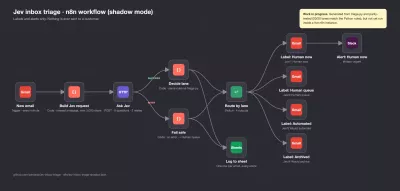
Triage your Gmail inbox with TypeSafe Jev. Every few minutes it reads new inbox emails, asks Jev which category they belong to (with a calibrated confidence), and:
- labels them (
Jev/Important,Jev/Action,Jev/Marketing, …), - archives receipts, tool notifications, newsletters, marketing and cold sales outreach,
- unsubscribes from verified marketing and cold-outreach sequences (RFC 8058 one-click or
mailto:) and moves scams/phishing to Spam, - keeps what needs you in the inbox: personal email (
Jev/Important) and automated email that needs an action (Jev/Action: approve a payment, update a card, verify a domain…), - leaves anything it is not sure about in the inbox with
Jev/Review, - learns from your corrections (change a label or move an email back → sender rule),
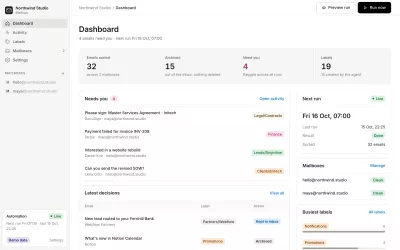
- sends a daily Slack digest of what it did.
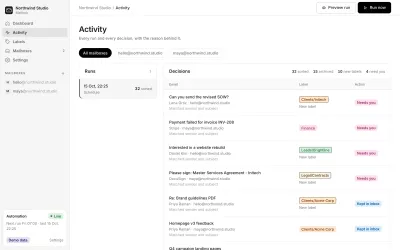
Everything is recorded in a database (SQLite by default) so it can be audited and undone.
Categories and labels
The categories below are a starting point, not a fixed taxonomy: they come from
categories.yaml and reflect one person's preferences (for example, a lead from
your website's form or a meeting someone booked with you is an action; newsletters are archived).
Tune the criteria, thresholds and actions, or add categories, in your own copy of the file, without
editing the repo (Your own categories). Brand names in the
criteria (HubSpot, Calendly…) are examples for Jev, not rules. The defaults:
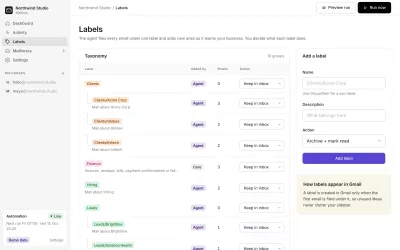
| Category | Label | Action | min_confidence |
|---|---|---|---|
important |
Jev/Important |
keep | — |
action_required |
Jev/Action |
keep | — |
transactional |
Jev/Transactional |
archive | 0.80 |
notification |
Jev/Notifications |
archive | 0.80 |
newsletter |
Jev/Newsletters |
archive | 0.80 |
marketing |
Jev/Marketing |
archive + unsubscribe | 0.90 |
cold_outreach |
Jev/Outreach |
archive + unsubscribe (never from known contacts) | 0.90 |
spam (scams, phishing) |
Jev/Spam |
move to Spam | 0.90 |
Extra labels: Jev/Needs Reply (Jev thinks the sender expects a reply or a personal action, not a
company survey, review request or promotion; only on emails that stay in the inbox), Jev/Invoices
(tag: an invoice to pay), Jev/Review (low confidence) and Jev/Processed (technical marker).
How it decides
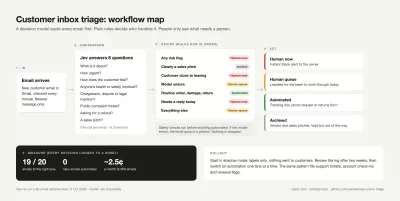
A plain-language overview is in docs/guide.md. The full functional spec, with flowcharts, decision tables, the exact checks and worked examples, is in docs/how-it-decides.md. The reasons behind each rule, and the alternatives that were rejected, are in docs/decisions/. In short, for each new inbox email:
- Allowlist (
allow_domains/allow_sendersinaccounts.yaml): always important, never archived. Jev is asked only for "needs a reply" and the tags. - Sender rules decide the category. They come from your corrections, from
inbox-jev rules set, or are created automatically after 3 consistent answers at ≥ 0.95 inlabel/act(never indry_run, never from a group archive, a known contact's pitch, or an answer with some keep probability, so senders that mix routine and action-needed mail keep going through Jev). Rules to archive or spam categories skip Jev; rules to keep categories still ask it for "needs a reply" and the tags, like the allowlist (if that call fails, the email is still labeled, just without those flags). A rule whose category was removed fromcategories.yamlis ignored (with a warning in the log): Jev decides, even when a@domainrule also matches. Senders in the account'sdecide_each_email(platforms that send both FYIs and mail that needs you, e.g. a CRM's notifications address that also relays your website's contact-form leads) never get a learned rule: Jev decides each of their emails, a correction fixes only that email, and only a manualrules setrule applies (ADR 0045). The same holds for an email sent as a mailing list's own address (itsFromis the address itsList-Postor Google Groups'Mailing-listnames, e.g. a group whose author can't be recovered): that address carries every member's mail (ADR 0051). - Jev gets the headers that matter, the start of the body (
BODY_CHARS; the HTML when thetext/plainpart is just a "view this in your browser" stub) andprevious_contact: whether you ever wrote to the sender or a person at their domain, from a search over your sent mail (emails sent only to machine addresses, likenoreply@or a notification's…@bounce.linkedin.comreply address, don't count). It also gets four phishing signals, each only when it says something: a reply or forward subject with noIn-Reply-To/References(reply_without_thread), a subject that starts like a calendar invitation or response with no calendar invite in the email (calendar_subject_without_invite), the registrable domains the body's links point to (link_domains, never a full URL) and Gmail's SPF, DKIM and DMARC verdicts (sender_auth; for a trusted group's author, Google's ARC record of the message the group received, unknown without a trusted one, never the group's own pass). The spam criteria treat a pass as proof of the sending domain only and look for mismatches (§4.7, ADR 0042). It answers with a category and its probabilities, "needs a reply" and the tags. - Policy turns the answer into actions, and the mode decides how much of that is applied:
- at or above a category's
min_confidence, its action applies; - below it, the email is still archived when Jev's top answer is an archive category and the archive categories, plus spam, together reach 0.90 (the archive group: never unsubscribes or spams; an email that "expects a reply" stays unless it's a stranger's pitch or a no-reply notification with no keep signal);
- otherwise nothing destructive happens:
Jev/Reviewplus the suggested label. Phishing that Jev calls spam below 0.90 lands here by design, already labeledJev/Spam: the user removingJev/Review(or changing another suggested label toJev/Spam) makes a sender rule (the guide, operations).
- at or above a category's
An unsubscribe is irreversible, so it only happens in act mode (and act_categories), for
marketing and cold_outreach at their own 0.90 confidence, when the sender passes DMARC (in
Gmail's own Authentication-Results, parsed strictly per RFC 8601: a header that doesn't parse
verifies nothing, §4.2) and sends a List-Unsubscribe header
(links in the body are never followed), never through a group or discussion list, never for cold
outreach from someone you have written to, never for a sender in decide_each_email unless a manual
rule decides, once per list and at most MAX_UNSUBSCRIBES_PER_RUN per run. It uses RFC 8058
one-click, else mailto:, else leaves a manual link in the digest. Sender rules and
inbox-jev unsubscribe-retry go through the same checks
(§3.3; in plain language:
What it unsubscribes you from).
Google Groups on a domain you list in the account's group_domains (opt-in: only domains whose
Google Workspace you control) are keyed on the author, so rules, corrections, the allowlist and
previous_contact apply to the person (allowlist a group itself by its exact address in
allow_senders); other groups stay keyed on the group address, which learns no rule from its mail
(step 2), and an entry that is a public suffix (co.uk, github.io) fails the accounts file
(§3.4).
Modes
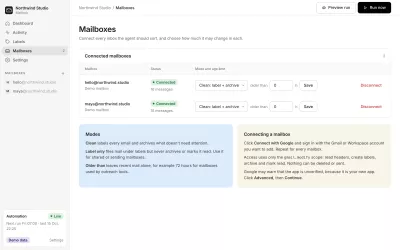
MODE |
DB + digest | Gmail labels | archive / spam / unsubscribe |
|---|---|---|---|
dry_run |
✅ (learns no sender rules) | ||
label |
✅ | ✅ | |
act |
✅ | ✅ | ✅ |
Start with dry_run or label for a week or two. Switch to act when the labels look right, all
at once or category by category with act_categories in accounts.yaml
(Rolling out act). Emails you restored or
starred are left alone, and so are other edits to their Jev/ labels (one of ours removed, one we
didn't set added). The three fixes the guide teaches (a category label swapped for another,
Jev/Review removed, an archived email moved back to the inbox) are learned as a correction, and
that correction then decides the email too (the guide).
Setup
uv tool install inbox-jev    # or: pipx install inbox-jev (Python 3.11+)
inbox-jev init               # guided setup, then an optional first dry run
An installed copy keeps its configuration and data in ~/.config/inbox-jev/ (.env,
accounts.yaml, secrets/, data/); set INBOX_JEV_HOME to use another folder. Run from a
checkout of this repo (uv sync --extra dev, then uv run inbox-jev init), it uses the checkout
instead, as a server deployment does
(ADR 0053).
inbox-jev init asks for what it needs, checks each value before saving it and keeps what is
already configured, so running it again adds an account or fixes one step
(ADR 0052):
- TypeSafe: the API key from the TypeSafe dashboard, checked with a request that classifies
nothing, saved as
TYPESAFE_API_KEYin.env(created from.env.example, owner-only). - Google: Gmail access goes through an OAuth client of your own, in a Google Cloud project you
control (inbox-jev ships none). The wizard opens the pages and walks through them: enable the
Gmail API, set up the consent screen, create a Desktop app client and download its JSON,
which it finds in
~/Downloads, checks and copies tosecrets/client_secret.json. - Slack (optional): a bot token (
chat:write, plususers:read.emailto find your member ID), checked and saved asSLACK_BOT_TOKEN. - Accounts: for each Gmail address, the browser authorization (token →
secrets/tokens/) and an entry inaccounts.yamlwith your digest's member ID and language and, for a company domain, that domain inallow_domains. The other options are inaccounts.example.yaml. - Schedule (optional): on the computer where it will run, a triage pass every 10 minutes and
the digest daily at 08:00, with launchd (macOS) or systemd user units (Linux):
inbox-jev schedule install. On Linux, systemd runs user timers only while you are logged in: on a headless machine, or to keep it running after you log out, enable lingering once (loginctl enable-linger $USER;installwarns when it is off). Skip this step when you deploy to a server (Running it in production): two copies must never triage the same account, andinstallrefuses on a server that runs the deployment's timer.
The categories are the defaults shipped with the package, updated with it. To
tune them, copy them to categories.yaml in the configuration folder (or point CATEGORIES_FILE at
your copy; Your own categories).
uv run pre-commit install adds gitleaks, ruff and mdformat before every commit if you develop.
The same, by hand
- TypeSafe: API key from the TypeSafe dashboard →
TYPESAFE_API_KEY.inbox-jev runfails each account's run without it (nothing is touched); the other commands don't need it. - Google:
- In Google Cloud Console, enable the Gmail API.
- Configure the OAuth consent screen (Google Auth Platform). Use Internal if all accounts are
in your Workspace. Otherwise use External and publish the app (Audience → Publish app) so
it is In production; it stays unverified, and Google shows a one-time warning when you
authorize (Advanced → Go to your app). Don't leave it in Testing: Google expires a Testing
app's tokens after 7 days, and every run then fails until you authorize again. When Google will
end an authorization (a Testing app, or access you limited in time when allowing it),
auth add,auth statusand the digest warn you, with the fix (Gmail authorization). - Create an OAuth client of type Desktop app and save its JSON as
secrets/client_secret.json.
- Slack (optional): a bot with the
chat:writescope →SLACK_BOT_TOKEN. Add each person's member ID asslack_user_idinaccounts.yaml.
cp .env.example .env                       # fill it in
cp accounts.example.yaml accounts.yaml     # your accounts + allowlists
uv sync --extra dev                        # exact versions from uv.lock
uv run pre-commit install                  # gitleaks, ruff, mdformat before every commit
uv run inbox-jev auth add you@example.com  # opens the browser; token → secrets/tokens/
Settings and both YAML files are checked when a command starts, so a typo stops it with a message instead of misbehaving later (Configuration checks).
Try it locally
uv run inbox-jev run --mode dry_run --limit 30
uv run inbox-jev stats
uv run inbox-jev digest --dry-print
Commands
| Command | What it does |
|---|---|
inbox-jev init |
Guided setup: TypeSafe key, Google OAuth client, Slack, accounts, first dry run |
inbox-jev schedule install / schedule status / schedule remove |
Run it on this computer: triage every 10 minutes, the digest daily at 08:00 (launchd or systemd user units) |
inbox-jev auth add EMAIL |
Authorize a Gmail account (opens the browser; token → secrets/tokens/) |
inbox-jev auth status [-a EMAIL] |
Which accounts are missing an authorization, or have one Google will end (a time-limited grant), with the fixes (Gmail authorization) |
inbox-jev run [-a EMAIL] [--mode M] [--limit N] [--lookback 30d] |
One triage pass (what the timer runs) |
inbox-jev digest [-a EMAIL] [--hours 24] [--dry-print [--blocks]] [--preview] |
Slack digest |
inbox-jev restore -a EMAIL --since 1d [--category marketing] |
Undo: back to inbox, remove labels (emails deleted in Gmail are skipped) |
inbox-jev reprocess -a EMAIL --category KEY [--low-confidence-only] |
Have the next act run redo that category's emails still in the inbox (pair with run --lookback) |
inbox-jev rules list [-a EMAIL] [--all] / rules set -a EMAIL @domain.com newsletter / rules delete -a EMAIL SENDER |
Sender rules (rules set and rules delete take an address or @domain, any case; rules delete also removes a rule stored as typed before rules set checked its input) |
inbox-jev retry-errors -a EMAIL |
Have the next run retry emails that failed, including those that stopped retrying after 8 failures (pair with run --lookback) |
inbox-jev unsubscribe-retry [-a EMAIL] |
Retry failed unsubscribes after re-checking them against the current rules, corrections and unsubscribe checks |
inbox-jev senders backfill [-a EMAIL] |
Store the author, not the group, for group emails saved before authors were recovered, and whether the sender is the list's own address |
inbox-jev stats [-a EMAIL] [--days 7] |
Counts per category |
inbox-jev labels rename OLD NEW [-a EMAIL] |
Rename a label in Gmail and the DB (see Renaming a label) |
inbox-jev --version |
The release and, inside the image, the commit it was built from |
Running it in production
On a server with Docker and systemd timers: a triage pass every 10 minutes, the daily digest, a
staleness watchdog, nightly off-site backups and Slack alerts on failures.
docs/operations.md has it all: deploy, updating a deployment and rolling
back, rolling out act, changing categories, alerts, backups and the database.
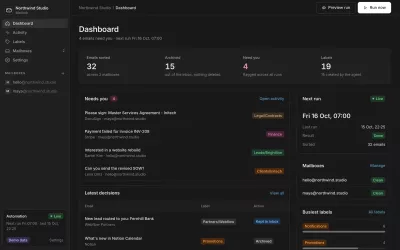
The daily digest is one Slack DM per account, laid out with Slack's Block Kit: first how many
emails need you and which (pending Jev/Action emails and replies, calendar invitations left out,
how many are still in Review), then a table of what Jev did, unsubscribes done or waiting for a
click, the corrections learned (sender and categories), and errors. What it shows, in plain words:
the guide; schedule, language and preview:
operations.
Privacy
Email headers and the first BODY_CHARS characters of each body are sent to the TypeSafe API, with
the domains (never the URLs) of the links anywhere in the body and Gmail's SPF/DKIM/DMARC verdicts.
Email bodies are not stored in the database or logged, only sender, subject and the classification.
previous_contact runs Gmail searches over your sent mail and reads the To/Cc/Bcc headers (never
the body) of matching sent emails: up to 10 for an address, up to 25 per run for a domain. Its
result is logged on each "message processed" line but not stored in the DB. That line also carries
timings_ms, the milliseconds each stage took (Gmail fetch, sender rule and sent-mail search, Jev,
applying the decision): numbers only, no email content. For a