Website: ironmesh.org • Contact: info@ironmesh.org • Security: info@ironmesh.org (see SECURITY.md)
v0.9.5 — security-hardening and onboarding release (protocol
ironmesh/0.9). CI green on Ubuntu, Windows and macOS across Python 3.10 – 3.13. 19 cross-version tests against real 0.9.4.2 on-disk state were skipping in every checkout and in CI because their fixture was never committed; they run on the 0.9.6 branch — see the 0.9.5 release notes. Theironmesh/0.9wire surfaces are covered by the test suite; a live multi-host run against 0.9.5 has not been recorded yet (it is part of the 0.9.6 evidence work). Field-tested in April 2026 on earlier releases: a 3-node mesh across three machines over Reticulum on the LAN (v0.9.1, 150/150 cross-host deliveries), and a Reticulum round trip over LoRa (SF8/BW125, 9/9 probes) to an Android phone running Sideband — seedocs/LORA_VALIDATION.md. Neither has been repeated on theironmesh/0.9protocol line. Wire-formatironmesh/0.8added opt-in feature flags (handshake-skip, group-broadcast) without disturbing any existing path; theironmesh/0.9protocol line adds domain-separated HELLO signatures, RNS link binding, and receive-side end-to-end source authentication, version-gated so older peers keep interoperating. The headline doc —docs/STABILITY_PROMISE.md— is the v1.0 contract for everything we commit to keeping stable. Full changelog:CHANGELOG.md.
IronMesh — Local-first, end-to-end encrypted mesh protocol for AI agents. Zero-config on LAN. Optional LoRa transport. Works when the cloud doesn’t.
pip install ironmesh
ironmesh demo          # spawn two local agents, exchange an encrypted ping
ironmesh setup         # interactive first-run wizard
That's the 60-second path: zero config files, no two machines required. The demo spawns two daemons in one process, runs the handshake, exchanges a hello, and tears down. When it prints its final line — [ok] Demo complete -- mesh handshake + encrypted ping verified. — your install is good.
Why IronMesh
Most agent frameworks assume the cloud is always available. Google's A2A needs HTTPS + internet. Anthropic's MCP is tool integration, not peer-to-peer. ACP is local-IPC-only. ANP wants a complex DID setup that still assumes internet.
None of them work when you pull the ethernet cable. None of them work in a basement. None of them work off-grid.
IronMesh is the transport layer that keeps working when the router dies, the ISP is down, or you're fully air-gapped. It is alpha software: its crypto is built on audited libsodium/PyNaCl primitives and it has passed a self-audit plus multiple rounds of adversarial review, but an independent, paid third-party security audit has not yet been done — see Distribution & caveats and SECURITY.md for exactly what's still rough.
- Zero-config LAN discovery via mDNS
- End-to-end encryption; forward-secret session keys (NaCl/libsodium)
- Offline message queuing in encrypted SQLite
- Optional LoRa transport via Reticulum for off-grid use
- Clean integration with Ollama, LangChain, AutoGen, CrewAI, and MCP
For preppers, homelab operators, privacy advocates, tinkerers, and anyone who thinks the answer to "what if the internet goes down?" shouldn't be "then nothing works."
Local-first. Offline-capable. Mesh-ready. Zero-config. No cloud required. Ever.
Features
Discovery and transport
- Zero-config discovery. mDNS/Zeroconf finds agents on your LAN. Identity keys are never broadcast; they're exchanged inside the authenticated handshake. Default-deny: auto-connect requires
--allowed-peersor--open-discovery. - Binary wire protocol. Compact binary frame format with Ed25519 signatures on every frame. No JSON on the wire after handshake.
- Multi-hop mesh routing. Distance-vector with split horizon, poisoned reverse, TTL loop prevention, and per-source-sharded dedup. See docs/MESH.md.
- Reticulum / LoRa transport. Optional second transport over Reticulum for off-grid use. WebSocket and Reticulum run concurrently. Enable with
--reticulumandpip install ironmesh[rns]. - TLS-first connections. Client tries
wss://beforews://. Plaintext fallback requires--allow-plaintext-ws.
Cryptography
- End-to-end encryption. NaCl / libsodium (XSalsa20-Poly1305 + X25519 ECDH). Plaintext messages are rejected after handshake.
- Forward secrecy (session layer). Per-session ephemeral keys, discarded once the handshake completes (wiping is best-effort: Python cannot guarantee it for immutable key bytes). Compromising a node's identity key later can't decrypt past session traffic; the end-to-end SealedBox layer is not forward-secret against destination-key compromise.
- Mutual authentication. Both client and server prove knowledge of the passphrase. No trusting a server that can't authenticate itself.
- Mandatory Ed25519 signatures. Every message is signed and verified. Unsigned messages are dropped.
- Channel binding. The authentication nonce is embedded in the ECDH handshake signature, cryptographically tying the two stages together.
- Replay protection. Monotonic sequence numbers (no seq=0 bypass) plus timestamp validation.
- End-to-end encryption over multi-hop. When the destination's identity key is known, the message body is sealed to the destination with a NaCl
SealedBox(X25519 keys derived from each node's identity), so only the destination can decrypt it — a relay never holds the key. Inner Ed25519 source signatures bind source/destination/msg_id/payload and are verified at the destination (v0.9.5+), so a relay cannot forge, redirect, replay-relabel, or re-attribute a message. By default the sealed copy rides alongside the per-hop layer so the frame stays wire-compatible with every node version — meaning a relay that decrypts its per-hop layer to route can still read the plaintext. To also hide the body from relays, run with--e2e-strict-confidentiality, which strips the plaintext so it travels only in the sealed field (a forwarding relay then cannot read message bodies); enable it only on a mesh where every node runs v0.9.5+. If the destination's key isn't yet known, IronMesh falls back to per-hop encryption only and logs a warning. See SECURITY.md.
Trust and storage
- Trust-On-First-Use. SSH-style key pinning. If a peer's identity key changes, the connection is terminated (not just logged). mDNS fingerprint pinning blocks address spoofing of known peers.
- Integrity-protected trust store. HMAC-SHA256 on the known-peers file catches tampering.
- Key encryption at rest. Identity keys are encrypted with Argon2id — whether generated by
ironmesh setup,ironmesh keys generate, or auto-generated by a bareironmesh run(which encrypts them with the mesh passphrase). An unencrypted key file requires the explicit--plaintext-keysopt-in. - Encrypted queue storage. SQLite payloads are SecretBox-encrypted. No plaintext at rest.
- Offline-capable. Messages queue when peers are offline and deliver automatically on reconnect.
- Tamper-evident audit log. Auth failures, TOFU mismatches, key rotations, and peer connections are chained with HMAC-SHA256. Any tampering breaks the chain. Logs rotate at 10 MB with chain anchors carried across files.
Operations
- Capability discovery. Agents advertise services like
llm:llama3ortool:filesystem; peers find them withfind_capability("llm:*"). See docs/CAPABILITIES.md. - Prometheus metrics.
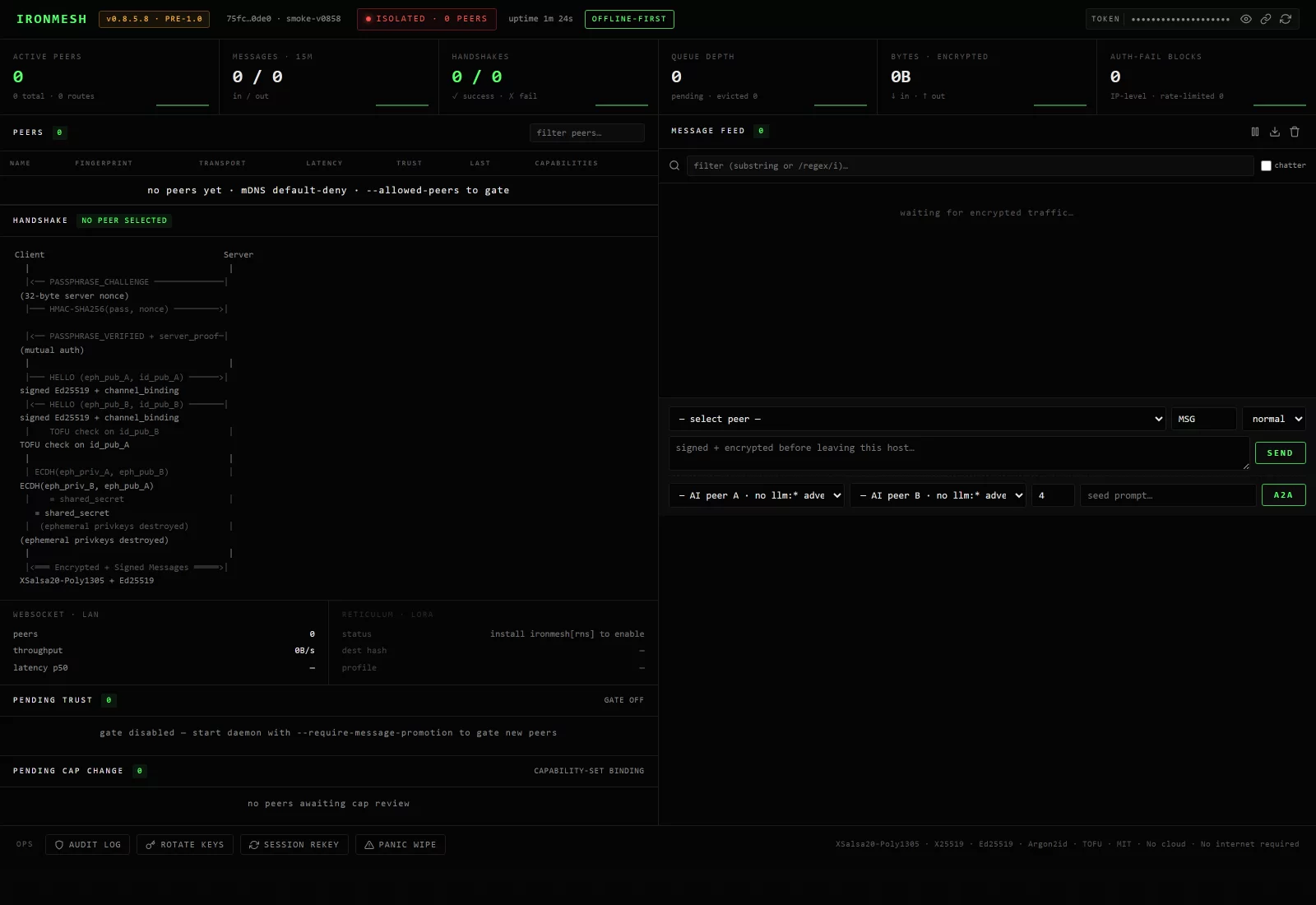
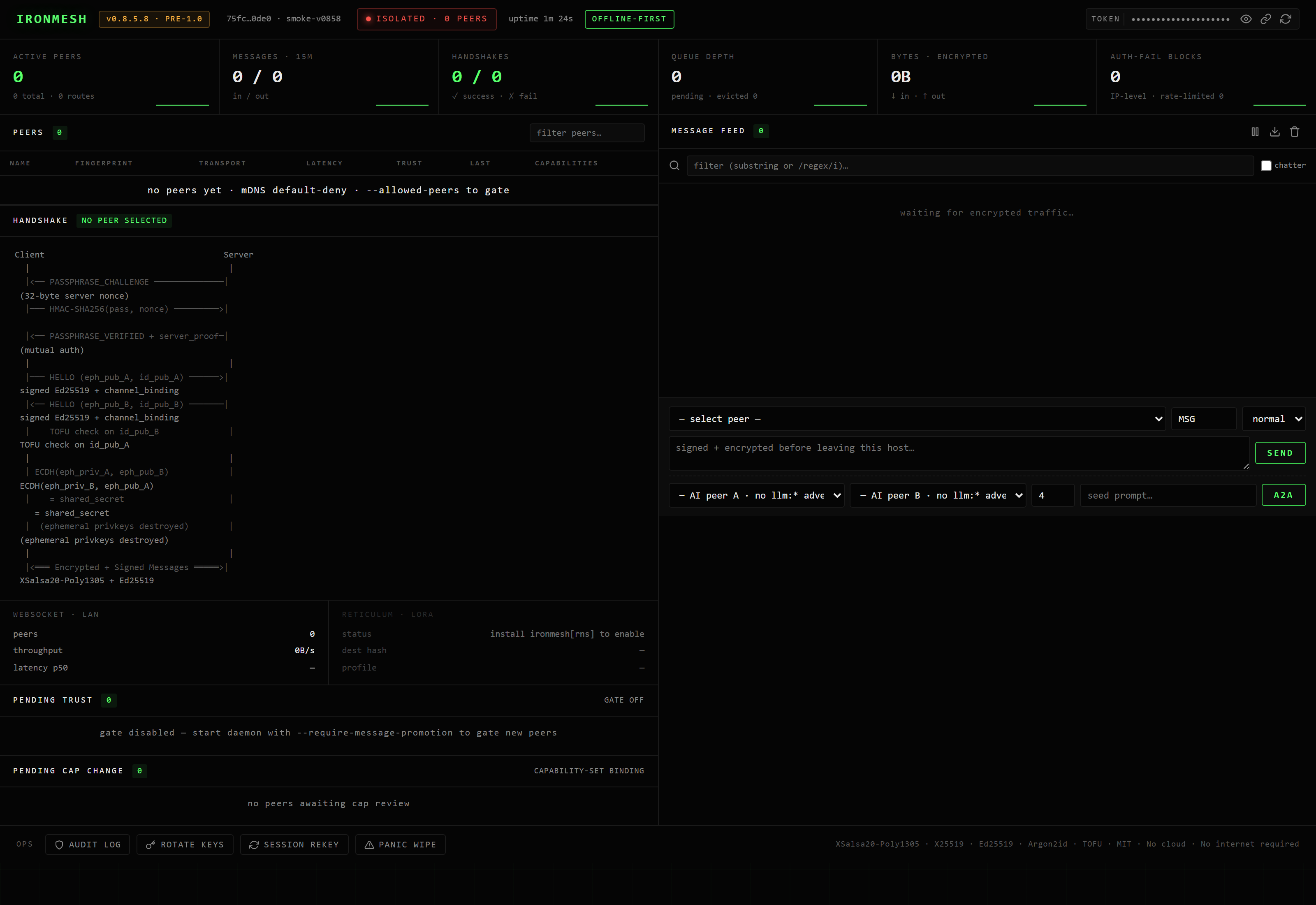
/metricsendpoint in Prometheus exposition format; JSON available via?format=json. - Token-authenticated GUI. Dashboard requires a per-session bearer token (printed at startup).
- Auth-failure blocking. 3 failed auth attempts from an IP in 5 minutes trigger a 5-minute block. Rate-limited mDNS discovery prevents flood attacks.
- Model agnostic. Ollama, llama.cpp, vLLM, a bash script — if it speaks WebSocket, it can use IronMesh.
- Cross-platform. Raspberry Pi, Windows, Linux, Mac. Tested daily on a Pi 5 and a Windows desktop.
ironmesh doctor+ deployment helpers. One-shot install diagnostic, plus--peer HOST:PORTfor a dry-run reachability check against another node. Two helper scripts intools/cover the SSH-detached daemon launch and verified wheel transfer patterns operators hit on multi-node deployments.
Where IronMesh fits
IronMesh is a networking layer for agents, not another orchestration framework. It sits under the tools you already use:
┌─────────────────────────────────────────────────────┐
│  Your application                                   │
├─────────────────────────────────────────────────────┤
│  Agent frameworks — LangChain, CrewAI, AutoGen      │  <- adapters ship with IronMesh
├─────────────────────────────────────────────────────┤
│  Tool / context protocols — MCP, A2A                │
├─────────────────────────────────────────────────────┤
│  IronMesh — identity, encryption, routing, queue    │  <- this project
├─────────────────────────────────────────────────────┤
│  Transport — WebSocket over LAN, Reticulum / LoRa   │
└─────────────────────────────────────────────────────┘
You can run MCP tool servers on top of an IronMesh session; you can
wire a LangChain AgentExecutor to IronMesh peers with a single
create_ironmesh_toolkit() call. The other layers assume connectivity;
IronMesh gives them connectivity that survives a router reboot, a dead
ISP, or no internet at all.
Five concrete deployment patterns — home AI mesh, offline LLM swarm,
robotics coordination, air-gapped lab, off-grid LoRa — in
docs/USE_CASES.md.
Why not just use X?
| Question | Answer |
|---|---|
| Can't I use HTTPS between agents? | Yes, until DNS goes down or your router reboots. IronMesh keeps working. Also: zero cert wrangling for a home-lab setup. |
| Doesn't MCP already solve this? | MCP connects agents to tools. IronMesh connects agents to each other. They compose. |
| What about LangGraph / CrewAI? | They orchestrate agent logic. IronMesh carries the messages between machines. They compose. |
| Isn't Tailscale / WireGuard enough? | Those give you an encrypted tunnel. IronMesh adds identity pinning, capability discovery, offline queueing, and a mesh-aware routing table on top — specific to how agents talk. |
| Why not Reticulum directly? | Reticulum is a great low-level mesh; IronMesh uses it as one of its transports. IronMesh adds agent-level features (per-agent identity, capability discovery, authenticated handshake, typed messages). |
How IronMesh relates to other agent protocols
Agent protocols sit at different layers, so a single feature grid that scores them against each other compares things that do different jobs. Compared by layer:
| Layer | Examples | What it is for | Relationship to IronMesh |
|---|---|---|---|
| Agent-to-agent application protocols | A2A, ACP | Task and message semantics between agents, usually carried over HTTP | Run on top of IronMesh: the ironmesh-a2a gateway (A2A 0.3.0 today; A2A 1.0.1 is a 0.9.6 deliverable) and the ironmesh-acp gateway expose mesh peers to them |
| Tool and context protocols | MCP | Connecting a model host to tools and data | ironmesh-mcp exposes mesh operations as 25 MCP tools (protocol revision 2024-11-05, stdio); a tested matrix across revisions 2024-11-05 and 2026-07-28 over stdio and networked transports is a 0.9.6 deliverable |
| Agent networking | IronMesh | Identity, authenticated handshake, encryption, multi-hop routing, offline queue, discovery between agents | This project |
| Encrypted network overlays | Tailscale, WireGuard | Encrypted IP connectivity between machines | IronMesh can run over them; they do not provide agent identity, capability discovery or queueing |
| Transports | WebSocket on a LAN, Reticulum / LoRa | Moving bytes between nodes | IronMesh uses both |
What IronMesh provides at its own layer:
- No internet dependency. Nodes discover each other on the LAN over mDNS
(default-deny: a discovered peer is auto-connected only if it is on the
--allowed-peerslist or--open-discoveryis switched on) and can also run over Reticulum, including LoRa radios. - Peer-to-peer. No broker, coordinator or cloud account; messages to offline peers wait in an encrypted local queue.
- Encryption. Each session uses ephemeral X25519 keys, so a later leak of
a node's identity key does not expose past session traffic. The additional
end-to-end layer (NaCl
SealedBox) protects message bodies from relays but is not forward-secret against compromise of the destination's key; seedocs/SECURITY.md. - Multi-hop routing and capability discovery across the mesh.
Quick Start
Requires Python 3.10 or newer. On Linux the firewall must allow UDP 5353 (mDNS) and TCP 8765 (WebSocket) between nodes. Full walkthrough: docs/GETTING_STARTED.md. For the legacy dashboard-focused 5-minute quickstart, see GETTING_STARTED.md in the repo root.
Install
pip install ironmesh            # PyPI
# or: docker pull wiztheagent/ironmesh:0.9.5
# or: ./scripts/install.sh       (Linux / macOS systemd)
# or: see docs/TERMUX.md         (Android)
10-second smoke test
ironmesh demo
Spawns two temporary agents on 127.0.0.1, does the full mutual-auth +
ECDH handshake between them, sends one encrypted ping, prints the
round-trip latency, and exits. No keys, ports, or state touched in
~/.ironmesh. Use this to confirm the install works before wiring up a
real deployment.
60-second demo — two agents on one machine
For a quick same-machine walkthrough, see Advanced / Testing — same-machine localhost demo below. That path uses two opt-in shortcut flags so you can run two agents without generating TLS certs or pre-pinning peer names.
For a real two-machine deployment, use Running two physical machines instead. That path is the recommended deployment shape: passphrase file (not env var), --allowed-peers allowlist, and TLS by default.
The "two Ollama agents talking" demo
For the full picture — two local LLM agents actually exchanging
prompts and responses over the encrypted mesh — see
examples/ollama_swarm.py. One node runs
Ollama, advertises a llm:<model> capability, and answers prompts; the
other sends a question and prints the reply. No cloud, no API keys, no
internet.
Using it from Python
The Agent SDK hides the asyncio / WebSocket plumbing:
from ironmesh import Agent

agent = Agent("my-bot", passphrase="shared-secret-12-plus")

@agent.on_message()
def handle(peer_id, payload):
    print(f"From {peer_id[:12]}: {payload.decode()}")
    agent.reply(peer_id, b"ack")

agent.run()                      # blocks; Ctrl-C to stop
# agent.run(foreground=False)    # returns the event loop for background use
Send from any thread once the agent is running:
agent.send_sync("peer-name", "hello")
Running two physical machines
For a real two-node deployment, use a passphrase file (not an env var
— env vars are visible via /proc/<pid>/environ) and lock down peer
discovery with --allowed-peers:
# On both machines
install -d -m 700 ~/.ironmesh
printf '%s' 'your-strong-secret-phrase-12-plus' > ~/.ironmesh/passphrase
chmod 600 ~/.ironmesh/passphrase
export IRONMESH_PASSPHRASE_FILE=~/.ironmesh/passphrase

# Machine A (e.g. Raspberry Pi)
ironmesh run --name alice --port 8765 --allowed-peers bob

# Machine B (e.g. desktop)
ironmesh run --name bob   --port 8765 --allowed-peers alice
The
--passphraseCLI flag was deliberately removed in v0.3 — it would leak the passphrase intops aux. Use--passphrase-file,IRONMESH_PASSPHRASE_FILE, or the interactivegetpassprompt.
Advanced / Testing — same-machine localhost demo
⚠ Localhost testing only. This path uses two opt-in shortcut flags (
--open-discoveryand--allow-plaintext-ws) that disable default-deny peer filtering and the TLS-first connection attempt. They exist to make a same-machine demo possible without generating TLS certs or pre-pinning peer names. Do not use them on a real deployment. For a real deployment, follow Running two physical machines above.
Open two terminals. Export the same passphrase in both, then run one agent per terminal:
# Both terminals
export IRONMESH_PASSPHRASE="any-12-plus-char-passphrase"

# Terminal 1
ironmesh run --name alice --port 8765 --open-discovery --allow-plaintext-ws

# Terminal 2
ironmesh run --name bob   --port 8766 --open-discovery --allow-plaintext-ws
Within a few seconds each terminal prints a line like:
Discovered agent: bob @ 127.0.0.1:8766
Peer bob (8f3c2a1b...) online -- ephemeral ECDH complete
That means the handshake succeeded and the two nodes have a live,
encrypted session. --open-discovery turns off the default-deny peer
filter so a same-machine demo just works without you having to know the
peer names in advance. --allow-plaintext-ws disables the wss-first
attempt so you don't need to generate a TLS cert for localhost. Both
flags emit a startup warning when set so they cannot accidentally make
it into a production config.
Docker
The image ships a secure default — default-deny discovery (auto-connect
needs --allowed-peers) and wss-first (no ws:// fallback). The two insecure
convenience flags (--open-discovery, --allow-plaintext-ws) are not in
the default; pass them explicitly if you want them.
# One-off .env with your passphrase (>= 12 chars)
printf 'IRONMESH_PASSPHRASE=your-strong-secret-phrase\n' > .env
docker compose up -d
# Dashboard at http://127.0.0.1:8766 (GUI token printed in logs)
Zero-config 2-node LAN demo (isolated network + demo passphrase; the insecure convenience flags are enabled explicitly in the compose file — demo only):
docker compose -f docker-compose.demo.yml up
Single contain