
One sentence in, a narrated product demo out. Tell it what to show and to whom. It explores your site, writes the voice-over a founder would give, drives a real browser through it, and hands you an MP4.
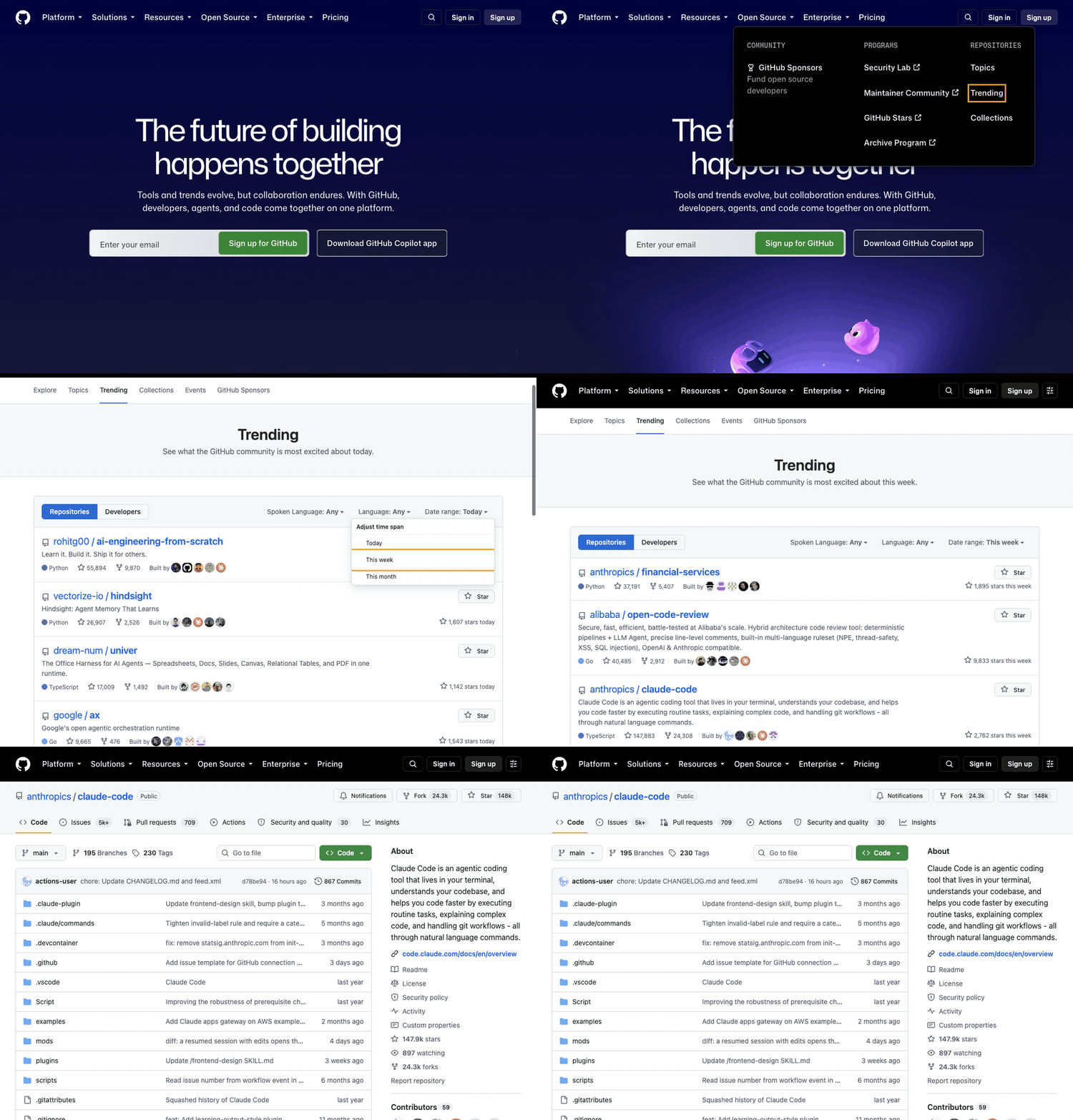
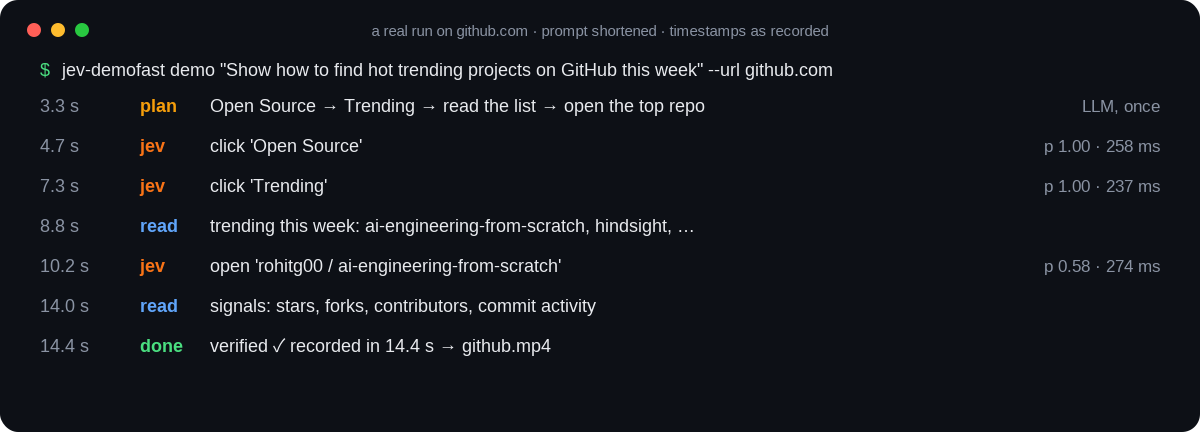
That GIF is the unedited output, about 20 seconds from sentence to video. Here is the run behind it: an LLM plans the route once, then Jev, a small decision model, picks each element in about a quarter of a second.
Two ways to try it:
- In your browser, nothing to install: app.onecentdemo.com. Sign in and get $3 of free credit, twelve demos.
- On your own machine: this repository. It's free and MIT-licensed; you bring your own keys and a demo costs cents.
Built on NVIDIA Nemotron and Nebius Token Factory
The script, the plans and the page reading run on NVIDIA Nemotron 3 Ultra through
Nebius Token Factory: on the hosted app always, and on your machine with
JDF_LLM_PROVIDER=nebius. Nemotron does the thinking a founder would. Jev (on Cloudflare Workers AI) makes the
quarter-second click decisions, a vision model checks the result, and ElevenLabs speaks the voice-over.
| Step | What Nemotron does | Thinking |
|---|---|---|
| The founder's script | Reads the brief and the site's map, writes the voice-over and picks the pages to show | on |
| Fitting the narration | Fits the script over what was actually recorded, correcting only what differs | on |
| Planning a route | Turns a goal into the steps to get there (Open Source → Trending → This week) | off |
| Reading pages | Picks filter values, form values and the items worth pointing out | off |
Why the split: with thinking off, the script came out as captions of the screen ("Select $126 to $150 range"); on, it
keeps a founder's voice and sticks to the facts on the page, and it runs only twice per video. Plans run on every
step, so speed wins there: of the four Nemotron models on Token Factory, Ultra with thinking off planned the GitHub
route best, in about 1 s; with thinking on, every model took 4–15 s. Measured with Nemotron doing this work, a
sentence becomes a narrated video in about 16 s. The models and their settings are in
src/jev_demofast/config.py.
Quickstart
You need Python 3.12+, uv, ffmpeg, Google Chrome, a Nebius Token Factory API key for Nemotron, and a Cloudflare account with Workers AI. Jev, the model that makes each click decision, is paid from AI Gateway credits: add a few dollars under AI → AI Gateway → Credits.
git clone https://github.com/q3learners/jev-demofast && cd jev-demofast
uv sync
export CLOUDFLARE_ACCOUNT_ID=...  CLOUDFLARE_API_TOKEN=...    # a token with Workers AI access
export JDF_LLM_PROVIDER=nebius  NEBIUS_API_KEY=...             # Nemotron on Token Factory (else Workers AI's GLM)

uv run jev-demofast chrome      # starts its own Chrome; your browser and logins are untouched
uv run jev-demofast demo "Show how to find hot trending projects on GitHub this week" \
    --url https://github.com/ --out github.mp4
The video, the founder's script (story.txt) and a log of every decision land next to github.mp4.
More to try
Add a voice. Set ELEVENLABS_API_KEY and add --voice chris (or eric, will, sarah, jessica). The
voice-over is spoken in one take and the video follows it.
uv run jev-demofast demo "Show my investors how easy it is to find men's running shoes under \$150 on our site" \
    --url https://www.allbirds.com/ --voice chris --out allbirds.mp4
Use your product's own words. --repo reads your public README so the script says what the product is, in your
words. Nothing is cloned or run.
uv run jev-demofast demo "Show founders how this turns one sentence into a narrated demo" \
    --url https://onecentdemo.com/ --repo https://github.com/q3learners/jev-demofast --voice eric --out ours.mp4
Demo your own app. For a Next.js app, build a map from the source first; Jev then drives without an LLM plan. Log
in once with jev-demofast chrome --open <your login page> and later demos start logged in.
uv run jev-demofast index ../my-nextjs-app --out app-index.json
uv run jev-demofast demo "Invite a teammate as a member" --url https://staging.example.com --index app-index.json
What you get
- A founder's script, written first. Who the demo is for and why, then a page-by-page tour of your site, then the payoff.
- A real browser on camera. Pages scroll smoothly, menus open, filters get ticked, and each element used is outlined.
- Honest results. If a step fails, the video ends on the error and the narration says so. It never fakes a success.
- Safe by default. It stays on your site, never signs up or deletes anything, and blurs what it types. Use
--dry-runto stop before anything that changes data, and point it at staging. - Every decision on record.
replay.jsonshows each choice Jev made, with its options and timing.
Learn more
- The guide: every option, logins, voices, models, configuration, measurements and limits.
- How it works: each stage and the experiments behind it.
- The story: Jev couldn't find the password reset form. Then we gave it a map.
Contributing
Contributions are welcome, especially map readers for more frameworks (React Router, Remix, Rails, Django). Start with the good first issues and CONTRIBUTING.md; the tests run offline.
Credits
Built on browser-use/jev-ultrafast and
laya-ultrafast (MIT, Browser Use; see NOTICE),
browser-harness (MIT), and Jev by TypeSafe,
used through Cloudflare Workers AI. Not affiliated with TypeSafe or Browser Use. MIT License.