
Website: https://kawaro.sbarah.com/
Kawaro
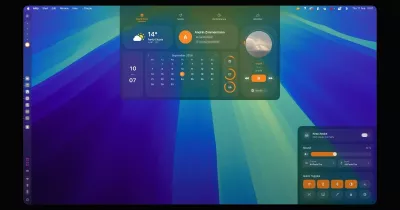
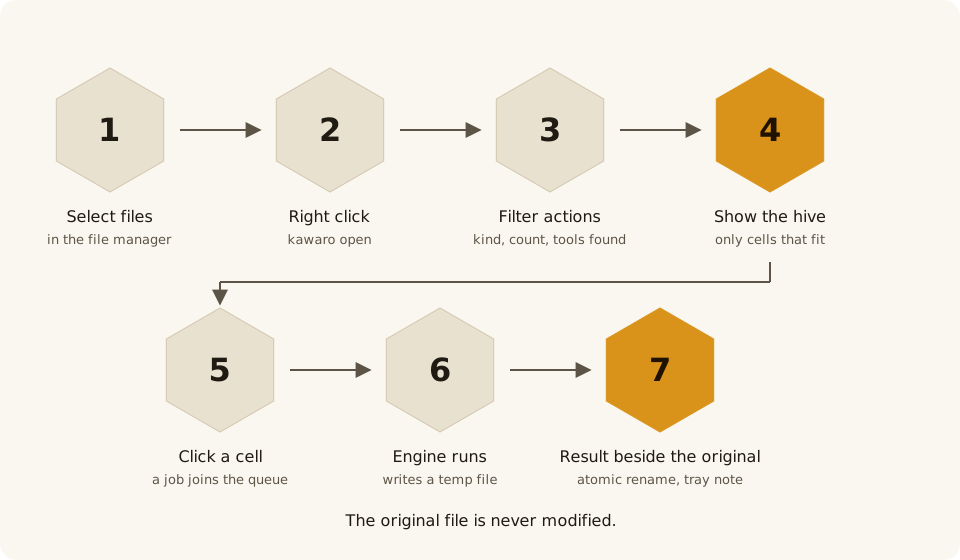
Select files in your file manager, open Kawaro from the right-click menu, and pick an action from the hive. The result is saved next to the original, which is never modified.
Everything runs on your machine: no uploads, no servers, no telemetry.
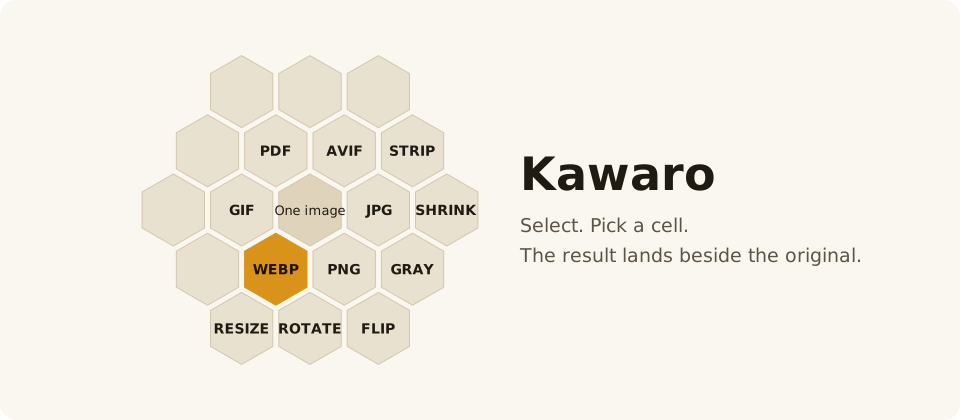
Illustration drawn from the app's own geometry and design tokens.
What it does
- Images: convert between PNG, JPEG, WebP, AVIF, GIF, BMP, TIFF and ICO; resize, rotate, flip, grayscale, compress, strip metadata, and combine several images into one PDF.
- Video and audio (v0.2, needs FFmpeg): convert to MP4, WebM and GIF, extract the audio track, convert audio between MP3, OGG, FLAC, WAV, M4A and Opus, compress video.
- Documents and PDF (v0.2, needs LibreOffice and Ghostscript): Office and ODF documents to PDF, DOCX and ODT both ways, compress, merge and rotate PDFs, turn pages into images.
The hive only offers what fits the selection: file kind, file count, and the tools installed on your system.
The name
Kawaro comes from «كوّارة» (kawwara), an old Arabic word for a beehive. The app is a hive of actions, so we took the word and shortened it to a name that reads the same in Arabic and Latin script: ka-wa-ro. The mark is a traditional domed beehive inside one honeycomb cell.
How it works
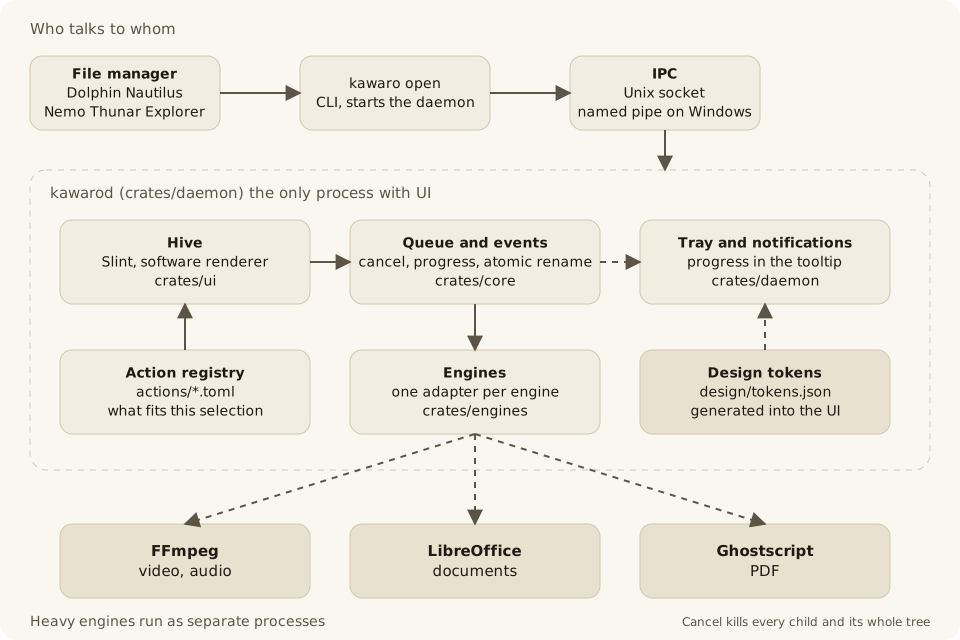
- One service shows UI.
kawarodholds the hive, the job queue, the tray and the engines;kawarois a thin client. - Heavy engines are separate processes (FFmpeg, LibreOffice, Ghostscript), killed with their whole tree on cancel.
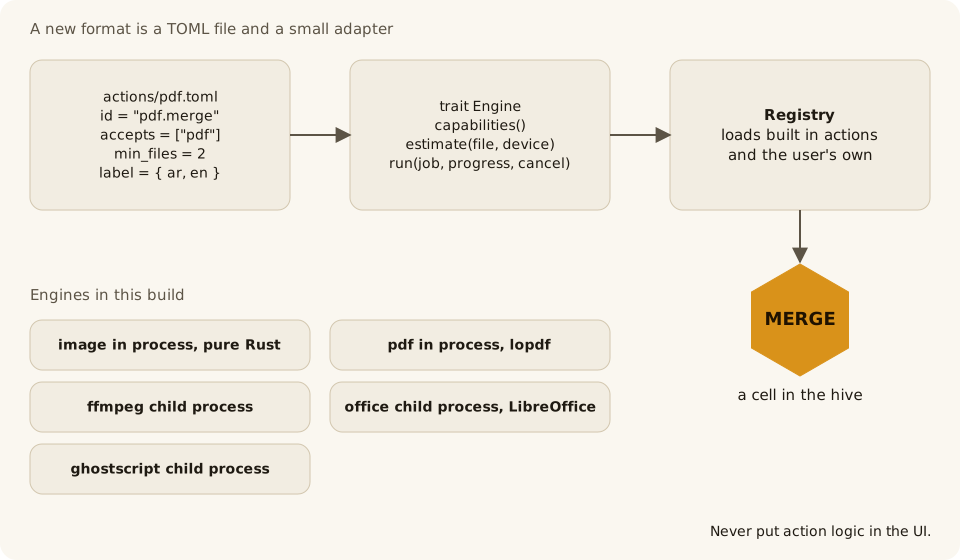
- A new format is one TOML file in
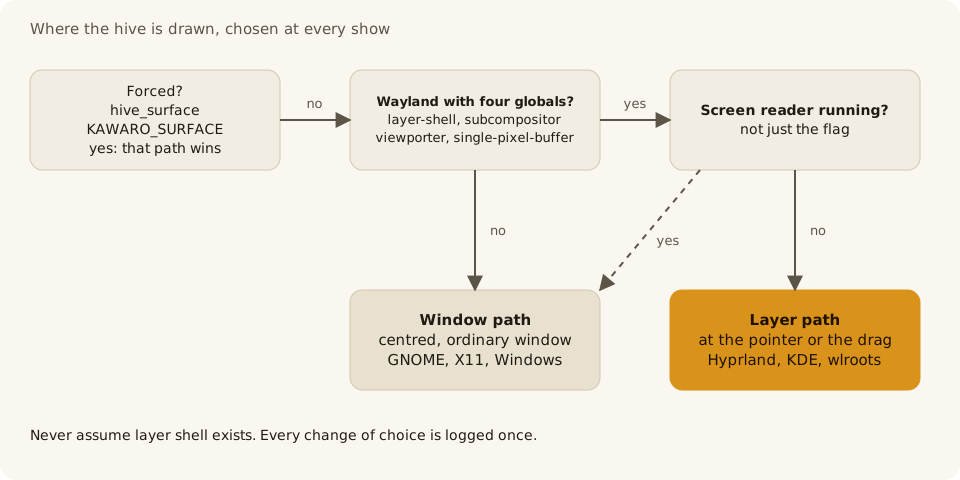
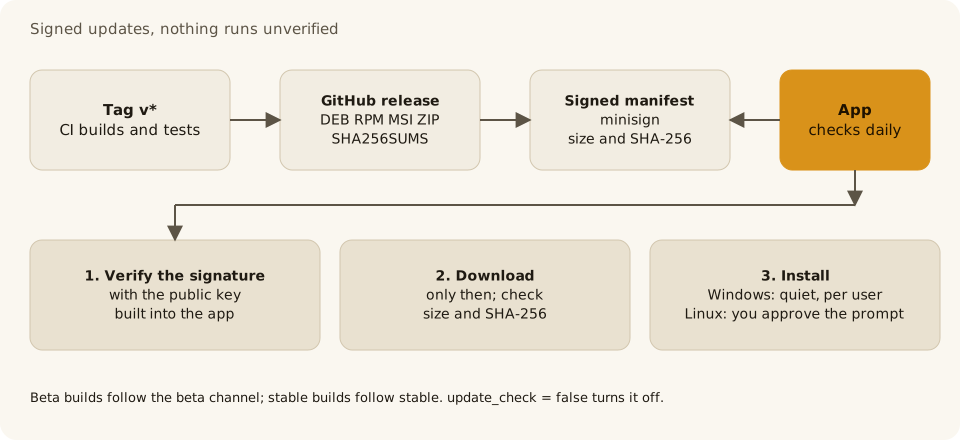
actions/plus a small adapter (diagram). - The hive picks its surface at every show (diagram) and updates are signed (diagram).
- The diagrams are generated by
python3 design/diagrams/build.pyfromdesign/tokens.json. The full contracts are indocs/architecture.md.
Platform support
| Platform | Tested | What works |
|---|---|---|
| Hyprland 0.56 | Tested | Works as a layer at the pointer, with drop and long press |
| KDE Plasma 6 (KWin 6.7) | Tested | Works as a layer, with focus, drop and the shortcut |
| GNOME 50 | Tested | Works as a centred window |
| Sway and wlroots | Not tested | Expected to work as a layer |
| X11 | Not supported yet | Planned |
| Fedora 41 and later (RPM), Ubuntu 22.04 and 24.04, Debian 12 (DEB) | Tested | The packages install and run |
| Windows 10 and 11 | Beta, not tested on a live machine yet | Zip and per-user MSI, right click menu, tray icon |
| macOS | Not supported yet | Planned |
Install
Linux (64 bit) for now.
Easiest: download the package for your system from the all releases and open it with your software installer, or:
sudo dnf install ./kawaro-*.x86_64.rpm     # Fedora
sudo apt install ./kawaro_*_amd64.deb      # Ubuntu, Debian
The package adds Kawaro to the right-click menu of Dolphin, Nautilus and Nemo and starts the service with every session; reopen your file manager after installing. For Thunar use the script below.
From source: requires Rust 1.85 or newer.
git clone https://github.com/M7MMAD-OMAR/kawaro
cd kawaro
./scripts/install.sh
The script installs for your user only, without root. It adds a Kawaro
entry to the right-click menu of the file managers it finds (Dolphin,
Nautilus, Nemo, Thunar) and starts the service with your session. To remove
it: ./scripts/uninstall.sh.
Either way, Nautilus needs nautilus-python (Fedora) or python3-nautilus
(Ubuntu), and opening from the clipboard needs wl-clipboard on Wayland or
xclip on X11.
Released: 0.4.0 is the first official release for Linux and Windows on the releases page, with a SHA256SUMS file to verify your download. The Windows files are TEST-SIGNED with a self-signed certificate, not a verified publisher: SmartScreen warns, and the click flow is "More info" then "Run anyway" after you have checked your download (see docs/windows-smartscreen.md). Read the release notes first, including the known gaps.
Windows beta
A Windows 10 (22H2) and Windows 11 beta is ready to try. It is for testers: the checklist is in docs/windows-beta-checklist.md.
What works: the right-click menu entry in Explorer, the hive window at the pointer, conversions with the engines below, the drop hive, and the service starting at logon. To convert while you drag: drag the file with the right mouse button and the hive opens during the drag, at the dragged file. No key is held while you drag, so Explorer keeps its own drag behavior: a drop outside the hive copies, moves or creates shortcuts as it always does, and the original file is never touched. The tray icon, the global shortcut and the end-of-job notification are built but not yet checked on a live Windows machine (S-079 owns that). Stop the service from the tray icon menu (Quit), or from Task Manager (end kawarod.exe); to uninstall Kawaro, run the uninstaller.
Install. Download kawaro-<version>-windows-x64.msi (per user, no administrator rights) or kawaro-<version>-windows-x64.zip (portable) from the release page. Both are unsigned, so Windows SmartScreen asks first: click "More info", then "Run anyway". On Windows 11 the Kawaro item is under "Show more options" in the right-click menu; on Windows 10 it is in the menu directly.
Engines are not bundled. LibreOffice, Ghostscript and FFmpeg are not bundled; install the ones you need (see Settings below for where Kawaro looks). A missing engine gives an error that names it.
Settings. The settings file is %APPDATA%\Kawaro\config.toml on Windows (~/.config/kawaro/config.toml on Linux).
Report back. Run scripts\windows\beta-smoke.cmd and scripts\windows\collect-logs.cmd; results go to %USERPROFILE%\kawaro-beta-test. Nothing is uploaded.
Command line
kawaro convert --to webp photo.png    # convert here, no service needed
kawaro actions *.jpg                  # what the hive offers for these files
kawaro open --from-clipboard          # open the hive for copied files
On Hyprland you can bind Super plus right-click to open the hive for the selected files directly; see the Hyprland guide.
To show the hive while you drag a file, bind kawaro drop to a shortcut,
Super+Z by default; GNOME, KDE and Hyprland steps are in
Drop shortcut.
Settings
Open Settings from the Kawaro tray icon, or edit
~/.config/kawaro/config.toml, which holds the language, theme, output
place (next to the original or in a subfolder) and quality preset. Your own
actions go in ~/.config/kawaro/actions/*.toml.
On Windows the settings file is %APPDATA%\Kawaro\config.toml, your own
actions go in %APPDATA%\Kawaro\actions\*.toml. The service log is
%LOCALAPPDATA%\Kawaro\logs\kawarod.log.
Windows signing: The 0.4.0 MSI and executables carry a self-signed test certificate, not a trusted publisher certificate. The portable ZIP contains the test-signed executables. Verify downloads against SHA256SUMS; Windows may show a SmartScreen warning. Neither package requires administrator rights.
On Windows kawaro open starts the service, kawarod.exe, from the
program folder when it is not running, and it is meant to keep running after
the terminal closes. This behaviour is not verified live yet (S-052).
Kawaro does not download the external engines on Windows. It looks for
them in PATH first, then in their usual install folders: LibreOffice in
%ProgramFiles%\LibreOffice\program, Ghostscript in the newest
%ProgramFiles%\gs\gs*\bin, FFmpeg in the ffmpeg\bin folder next to
kawaro.exe, then in the Windows registry for LibreOffice and
Ghostscript. When an engine is missing, the error names it and links to its
download page.
hold_ms is the long press, in milliseconds, before kawaro drop --hold
shows the hive: 400 by default, accepted from 100 to 2000; any other value
falls back to the default with a warning in the log. It is read at every
press, so a change applies without restarting the daemon. The settings
window does not show it; edit the file.
Contributing
Read CONTRIBUTING.md and docs/architecture.md first.
Security reports: see SECURITY.md. Release history: CHANGELOG.md. A new
format is one TOML file in actions/ plus a small adapter in
crates/engines/.
Website and docs
Guides, formats, releases and downloads: https://kawaro.sbarah.com/ (Arabic and English). The pages are built from docs/guide/, actions/ and CHANGELOG.md by scripts/build-site.sh.
Support
Kawaro is free and built in the open. If it helps you, you can support its development:
Distribution status
See distribution status for pending WinGet, SignPath and Microsoft Store steps.
Code signing policy
Kawaro has applied to the SignPath Foundation. Approval and trusted signing are pending; version 0.4.0 is test-signed. The full policy, team roles and privacy statement: CODE_SIGNING_POLICY.md.
License
GPL-3.0-or-later. See LICENSE.