Kerberos Agent




Docker Hub | Documentation | Website | View Demo
Before you continue, this repository discusses one of the components of the Kerberos.io stack, the Kerberos Agent, in depth. If you are looking for an end-to-end deployment guide have a look here.
Kerberos Agent is an isolated and scalable video (surveillance) management agent made available as Open Source under the MIT License. This means that all the source code is available for you or your company, and you can use, transform and distribute the source code; as long you keep a reference of the original license. Kerberos Agent can be used for commercial usage (which was not the case for v2). Read more about the license here.
:thinking: Prerequisites
- An IP camera which supports a RTSP H264 or H265 encoded stream,
- (or) a USB camera, Raspberry Pi camera or other camera, that you can transform to a valid RTSP H264 or H265 stream.
- Any hardware (ARMv6, ARMv7, ARM64, AMD64) that can run a binary or container, for example: a Raspberry Pi, NVidia Jetson, Intel NUC, a VM, Bare metal machine or a full blown Kubernetes cluster.
:video_camera: Is my camera working?
There are a myriad of cameras out there (USB, IP and other cameras), and it might be daunting to know if Kerberos Agent will work for your camera. Therefore we are listing all the camera models that are acknowlegded by the community. Feel free to add your camera to the list as well!
:books: Overview
Up and running in no time
Introduction
Running and automation
- How to run and deploy a Kerberos Agent
- Access the Kerberos Agent
- Configure and persist with volume mounts
- Configure with environment variables
Insights
Contributing
- Security vulnerability reporting
- Contribute with Codespaces
- Develop and build
- Building from source
- Building for Docker
Varia
Direct S3 recording layout
Direct S3 uploads store recordings as
<s3.username>/yyyy/mm/dd/<timestamp>-<deviceKey>.mp4. The timestamp is the
recording's Unix timestamp in milliseconds, and the date is its UTC date, not the upload
date. Timestamp and device key come from the recording's .metadata upload
checkpoint, which stores the timestamp in milliseconds. The uploader also
preserves checkpoint duration, FPS (when available), and encryption status as S3
object metadata. The device key must be non-empty and contain no path separators.
Retried uploads use the same object key, even after midnight. Millisecond
precision keeps recordings starting within the same second distinct.
This replaces the previous <s3.username>/<filename>.mp4 layout for new uploads.
Existing objects are not moved; consumers of direct S3 uploads must support both
layouts when reading historical recordings. Updated Kerberos Vault deployments
use the same filename and dated layout under the authenticated account directory
for both direct Vault uploads and Hub-proxied uploads.
Only historical recordings with missing, empty, or FPS-only queue markers fall back to the legacy filename format and configured Agent key. A structured checkpoint takes precedence over both the filename and current configured key; an invalid or unreadable checkpoint is reported as an upload error, not silently replaced with filename-derived values. For older structured checkpoints, missing camera name, region, and change count are recovered from a validated legacy filename. Populated checkpoint fields take precedence, and the checkpoint timestamp and device key remain authoritative.
The shorter filename cannot be decoded by legacy filename-only consumers.
Integrations must preserve structured recording metadata, including the device
key (productid) and recording timestamp (event-timestamp), as well as the full
object key.
Local recording layout
New local recordings are stored under
data/recordings/yyyy/mm/dd/<timestamp>-<deviceKey>.mp4, using the recording's UTC
start date and Unix-millisecond timestamp. For example:
data/recordings/2026/01/02/1767355200123-device-key.mp4.
The filename no longer embeds the camera name, region, change count, or duration,
and it does not change when the recording is finalized.
Those attributes, together with FPS and encryption status, are captured in the
.metadata upload checkpoint and sent as structured HTTP/tus metadata.
Existing flat recordings and dated recordings with older long filenames remain
supported without a migration. Recording lists, day filters, playback, uploaders,
and automatic cleanup handle both filename formats and layouts. Upload queue
checkpoints remain flat in data/cloud/. Successful-upload removal also resolves
both local layouts. Deploy the updated Vault alongside Agent for canonical
<account-directory>/yyyy/mm/dd/<timestamp>-<deviceKey>.mp4 storage keys and
metadata-driven Hub integration events.
Directory decryption also processes dated subdirectories and writes each output
to a sibling decrypted/ directory; those outputs are excluded from recording
lists and automatic cleanup.
Quickstart - Docker
The easiest way to get your Kerberos Agent up and running is to use our public image on Docker hub. Once you have selected a specific tag, run docker command below, which will open the web interface of your Kerberos agent on port 80, and off you go. For a more configurable and persistent deployment have a look at Running and automating a Kerberos Agent.
docker run -p 80:80 --name mycamera -d --restart=always kerberos/agent:latest
If you want to connect to a USB or Raspberry Pi camera, you'll need to run our side car container which proxies the camera to an RTSP stream. In that case you'll want to configure the Kerberos Agent container to run in the host network, so it can connect directly to the RTSP sidecar.
docker run --network=host --name mycamera -d --restart=always kerberos/agent:latest
Quickstart - Balena
Run Kerberos Agent with Balena Cloud super powers. Monitor your Kerberos Agent with seamless remote access, over the air updates, an encrypted public https endpoint and much more. Checkout our application video-surveillance on Balena Hub, and create your first or fleet of Kerberos Agent(s).

Quickstart - Snap
Run Kerberos Agent with our Snapcraft package.
snap install kerberosio
Once installed you can find your Kerberos Agent configration at /var/snap/kerberosio/common. Run the Kerberos Agent as following
sudo kerberosio.agent -action=run -port=80
A world of Kerberos Agents
The Kerberos Agent is an isolated and scalable video (surveillance) management agent with a strong focus on user experience, scalability, resilience, extension and integration. Next to the Kerberos Agent, Kerberos.io provides many other tools such as Kerberos Factory, Kerberos Vault, and Kerberos Hub to provide additional capabilities: bring your own cloud, bring your own storage, central overview, live streaming, machine learning, etc.

As mentioned above Kerberos.io applies the concept of agents. An agent is running next to (or on) your camera, and is processing a single camera feed. It applies motion based or continuous recording and makes those recordings available through a user friendly web interface. A Kerberos Agent allows you to connect to other cloud services or integrate with custom applications. Kerberos Agent is used for personal applications and scales to enterprise production level deployments. Learn more about the deployment strategies here.
This repository contains everything you'll need to know about our core product, Kerberos Agent. Below you'll find a brief list of features and functions.
- Low memory and CPU usage.
- Simplified and modern user interface.
- Multi architecture (ARMv6, ARMv7, ARM64, AMD64)
- Multi stream, for example recording in H265, live streaming and motion detection in H264.
- Multi camera support: IP Cameras (H264 and H265), USB cameras and Raspberry Pi Cameras through a RTSP proxy.
- Single camera per instance (e.g. one container per camera).
- Low resolution streaming through MQTT and high resolution streaming through WebRTC (only supports H264/PCM).
- Backchannel audio from Kerberos Hub to IP camera (requires PCM ULAW codec)
- Audio (AAC) and video (H264/H265) recording in MP4 container.
- End-to-end encryption through MQTT using RSA and AES (livestreaming, ONVIF, remote configuration, etc)
- Conditional recording: offline mode, motion region, time table, continuous recording, webhook condition etc.
- Post- and pre-recording for motion detection.
- Encryption at rest using AES-256-CBC.
- Ability to create fragmented recordings, and streaming through HLS fMP4.
- Deploy where you want with the tools you use:
docker,docker compose,ansible,terraform,kubernetes, etc. - Cloud storage/persistance: Kerberos Hub, Kerberos Vault and Dropbox. (WIP: Minio, Storj, Google Drive, FTP etc.)
- Outputs: trigger an integration (Webhooks, MQTT, Script, etc) when a specific event (motion detection or start recording ) occurs
- REST API access and documentation through Swagger (trigger recording, update configuration, etc).
- MIT License
How to run and deploy a Kerberos Agent
A Kerberos Agent, as previously mentioned, is a container. You can deploy it using various methods and automation tools, including docker, docker compose, kubernetes and more. To streamline your Kerberos.io experience, we provide concrete deployment examples to speed up your Kerberos.io journey”
We have documented the different deployment models in the deployments directory of this repository. There you'll learn and find how to deploy using:
- Static binary
- Docker
- Docker Compose
- Kubernetes
- Red Hat OpenShift with Ansible
- Terraform
- Salt
- Balena
- Snap
By default, your Kerberos Agents store all configuration and recordings within the container. To help you automate and have a more consistent data governance, you can attach volumes to configure and persist data of your Kerberos Agents and/or configure each Kerberos Agent through environment variables.
Access the Kerberos Agent
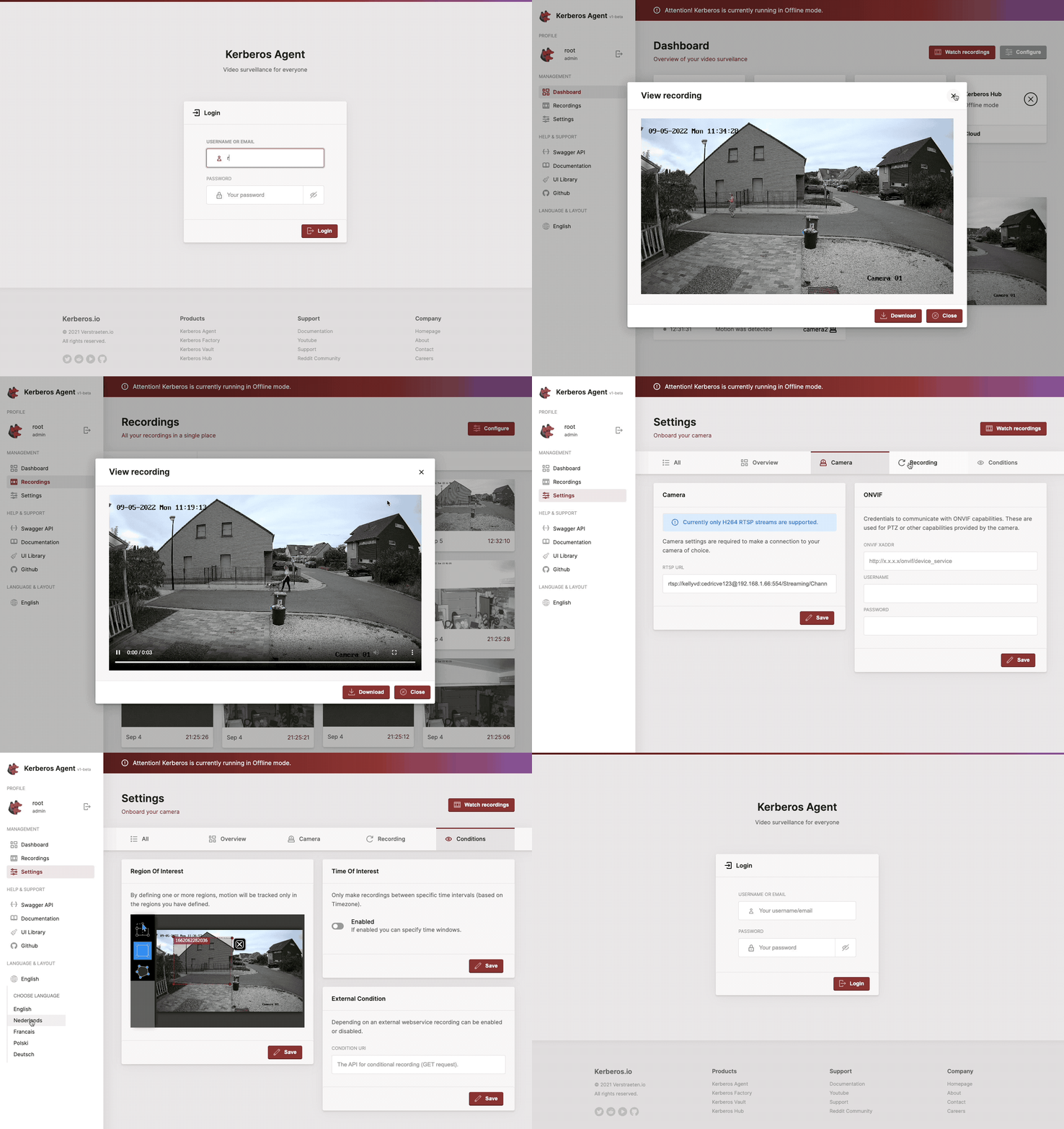
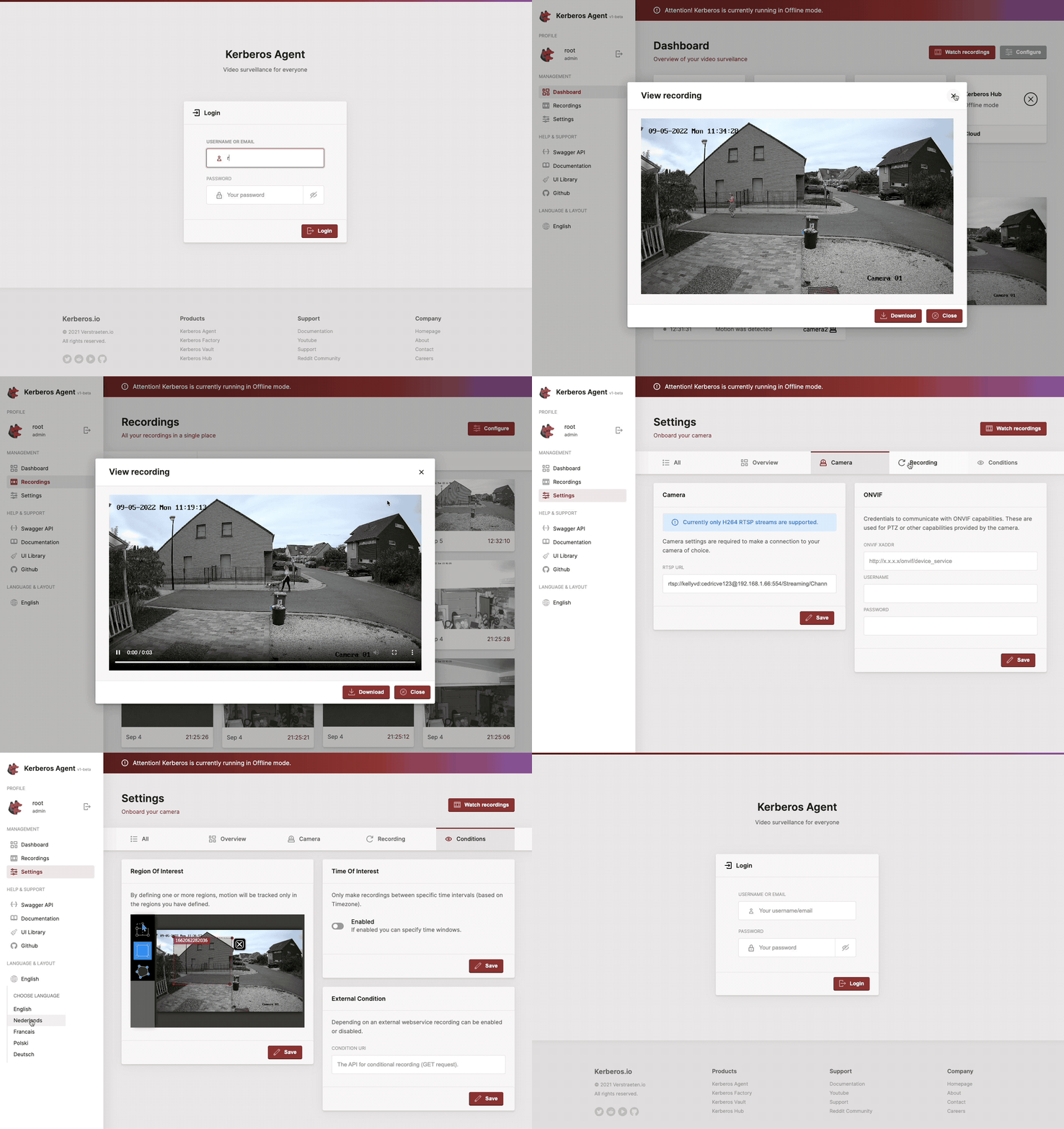
Once you have deployed the Kerberos Agent, using one of the deployment models described above, you will be able to access the Kerberos Agent user interface. A login page is presented asking for some credentials.
The default username and password for the Kerberos Agent is:
- Username:
root - Password:
root
Please note that you change the username and password for a final installation, see Configure with environment variables below.
Configure and persist with volume mounts
An example of how to mount a host directory is shown below using docker, but is applicable for all of the deployment models and tools described above.
You attach a volume to your container by leveraging the -v option. To mount your own configuration file and recordings folder, run the following commands:
docker run -p 80:80 --name mycamera \
-v $(pwd)/agent/config:/home/agent/data/config \
-v $(pwd)/agent/recordings:/home/agent/data/recordings \
-d --restart=always kerberos/agent:latest
More examples for each deployment and automation tool can be found in the deployment section. Be sure to verify the permissions of the directory/volume you are attaching. More information in this issue.
chmod -R 755 kerberos-agent/
chown 100:101 kerberos-agent/ -R
Configure with environment variables
Next to attaching the configuration file, it is also possible to override the configuration with environment variables. This makes deploying with docker compose or kubernetes much easier and more scalable. Using this approach, we simplify automation through ansible and terraform.
docker run -p 80:80 --name mycamera \
-e AGENT_NAME=mycamera \
-e AGENT_TIMEZONE=Europe/Brussels \
-e AGENT_CAPTURE_IPCAMERA_RTSP=rtsp://fake.kerberos.io/stream \
-e AGENT_CAPTURE_CONTINUOUS=true \
-d --restart=always kerberos/agent:latest
Set AGENT_PORT to change the Agent's internal HTTP port. The environment
variable takes precedence over -port. When using Docker, publish the same
container port:
docker run -p 8082:8082 \
  -e AGENT_PORT=8082 \
  --name mycamera \
  -d --restart=always kerberos/agent:latest
Health checks and API responses
GET /health is an unauthenticated liveness and diagnostics endpoint for
container orchestrators and external monitors. healthy means that the Agent
HTTP process can serve requests. Camera streams and Hub connectivity are
reported independently in the response, so an external camera or Hub outage
does not make Docker restart an otherwise functioning Agent process. Successful
probes return 200 OK and are logged at debug level to avoid periodic health
checks filling production logs.
curl http://localhost:8082/health
{
  "httpStatusCode": 200,
  "applicationStatusCode": "get_success",
  "entityStatusCode": "healthy",
  "message": "Healthy",
  "metadata": {
    "applicationName": "agent",
    "applicationVersion": "0.0.0",
    "timestamp": 1788710400,
    "path": "/health"
  },
  "data": {
    "health": {
      "description": "Agent HTTP service is healthy",
      "cameraConnected": true,
      "mainStream": {
        "configured": true,
        "connected": true,
        "packagesProcessed": 183421,
        "fps": 29.97,
        "resolution": {
          "width": 1920,
          "height": 1080
        },
        "lastPacketAt": 1788710399
      },
      "subStream": {
        "configured": true,
        "connected": true,
        "packagesProcessed": 91710,
        "fps": 15,
        "resolution": {
          "width": 640,
          "height": 360
        },
        "lastPacketAt": 1788710399
      },
      "hub": {
        "configured": true,
        "connected": true,
        "lastHeartbeatAttemptAt": 1788710398,
        "lastSuccessfulHeartbeatAt": 1788710398
      }
    }
  }
}
Stream packagesProcessed counts complete encoded video access units processed
since the Agent process started; it does not count individual fragmented RTP
packets. fps is the latest PTS-derived frame-rate estimate. Resolution is the
most recently observed encoded width and height. lastPacketAt, Hub heartbeat
timestamps, and response metadata timestamps are Unix seconds; 0 means that
no value has been observed yet. A stream can be configured but temporarily
disconnected.
Hub configured means heartbeat delivery is enabled and has the required URI
and key. Hub connected means the most recent heartbeat succeeded and the last
success is no more than three minutes old. A failed heartbeat marks it
disconnected immediately while retaining the last-success timestamp for
diagnosis.
New JSON endpoints should use this Hub-compatible response envelope rather than
adding unrelated top-level response shapes. HTTP status describes the transport
result, applicationStatusCode describes the operation, entityStatusCode and
message describe the domain outcome, metadata carries request/application
context, and endpoint-specific content belongs in a typed data object. Client
responses must contain safe messages only; detailed internal errors belong in
structured logs. Existing endpoints retain their legacy response shapes until
they are migrated deliberately.
Secure camera streams (RTSPS)
The Agent accepts rtsps:// camera URLs. Do not use srtsp://; RTSPS is RTSP over TLS. For a Bosch FLEXIDOME micro 3100i, enable Secure RTSP under Network > Network Services and use port 9554:
AGENT_CAPTURE_IPCAMERA_RTSP='rtsps://username:password@camera.example:9554/?inst=1'
AGENT_CAPTURE_IPCAMERA_SUB_RTSP='rtsps://username:password@camera.example:9554/?inst=2'
Certificate verification is enabled by default.