
🇸🇪 Svenska · 🇬🇧 English · 🇪🇸 Español · 🇩🇪 Deutsch · 🇫🇷 Français · 🇮🇹 Italiano · 🇵🇹 Português · 🇳🇱 Nederlands · 🇵🇱 Polski · 🇷🇺 Русский · 🇯🇵 日本語 · 🇨🇳 中文 · 🇮🇳 हिन्दी
Lagom Lens is a minimal browser extension which helps you to learn a new language. Hover a word in subtitles (YouTube, SVT Play or Netflix) to see a translation in your chosen language.
Tip
Hold Shift while hovering to translate the whole subtitle line instead of just one word.
It works by manipulating the DOM elements of the page and then querying https://mymemory.translated.net/ for translations.
Revise with Anki
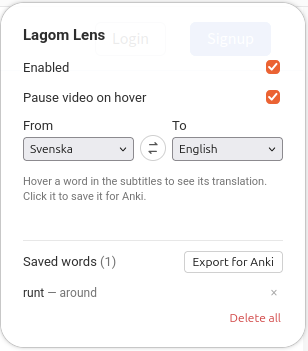
Click a word while its translation is showing to save it, together with the subtitle line you heard it in as an example sentence. Hold Shift while clicking to save the whole line instead. Saved words get a ★ in the tooltip, and are listed in the extension's popup.
To revise them with Anki:
- Click Export for Anki in the popup. This downloads
lagom-lens-anki.tsv. - In Anki, choose File → Import and pick the file.
- Check that the note type is Basic and If matches is Keep current, then click Import.
Each word becomes a card in a Lagom Lens deck. The front shows the word and its sentence, and the back shows their translations. You can export again whenever you've saved more words. Only the new ones are added: cards you already have are left as they are, including anything you changed in them. If you edit the front of a card, though, the next import adds the original as a second card.
Once your words are in Anki you can clear the list with Delete all in the popup, so that your next export only has the words you save after that.
Why?
I was tired of having to pause videos, type words into my translator, and then resume the video. Lagom Lens lets you hover over a word and see the translation instantly.
Screenshots
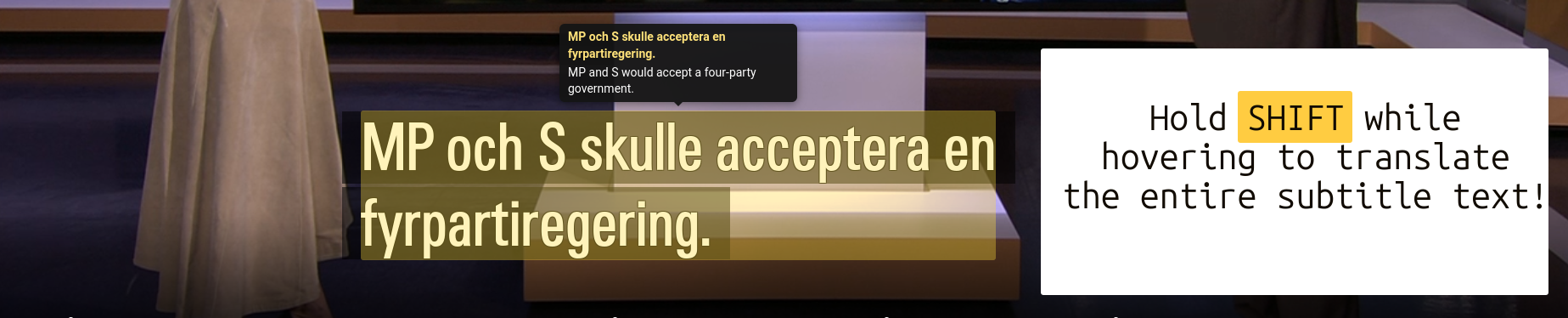
SVT Play

rösträkningen -> the vote count
YouTube

medborgarskapsprov -> citizenship test
Language Menu
Install from source (Chrome/Edge/Brave)
- Go to
chrome://extensions - Enable Developer mode (top right)
- Click Load unpacked
- Select this folder (
lagom-lens) - Open a Swedish YouTube video, an SVT Play video or a Netflix title, turn on subtitles
Install from source (Firefox)
- Go to
about:debugging#/runtime/this-firefox - Click Load Temporary Add-on…
- Select
manifest.jsoninside this folder (not the folder itself) - Open a Swedish YouTube video, an SVT Play video or a Netflix title, turn on subtitles
Note: a temporary add-on is removed when Firefox restarts — reload it from
about:debugging again next session.
FAQ
-
How do I translate a whole sentence instead of one word?
- Hold
Shiftwhile hovering over the subtitle.
- Hold
-
I was hovering and the video moved so the subtitles changed.
- I recommend pausing the video while you hover. I also assume that if you are learning Swedish, you probably don't watch the video at full speed anyway so you shouldn't have this problem too often.
-
Why Lagom Lens?
- "Lagom" is a Swedish word that roughly translates to "just right" or "moderate". Lens is inspired from Google Lens and isn't too complex like computer vision and not too simple like a dictionary lookup.