
Limn (limn-review)
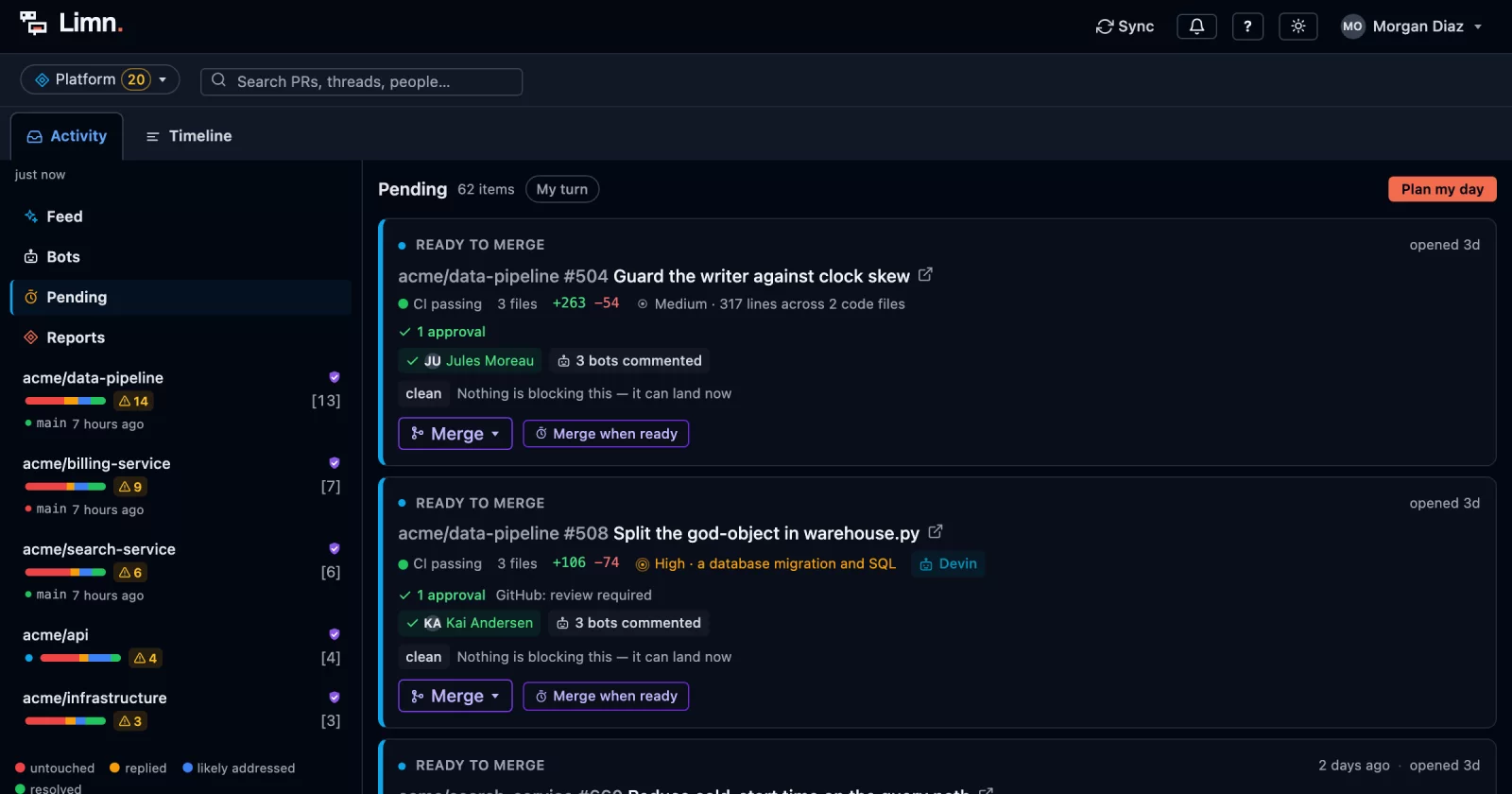
The calm layer above your review bot. Bring your own reviewer — CodeRabbit, Greptile, Copilot, whatever you run — and Limn becomes the cross-repo triage layer above it: what's stalled, whose turn it is, and which of the bot's comments a human still needs to read. A single-page dashboard for a whole team's GitHub activity across many repos: a horizontal timeline per repo, member sub-lanes, and drill-down into PRs and review threads (read them in-app).
Third-party review-bot output (CodeRabbit · Greptile · Copilot · Qodo · Sourcery) is a first-class, triaged signal, not generic noise: bot threads a later commit has likely addressed vs the ones still needing a human, a per-vendor signal-to-noise rate, and one-click bulk-resolve of the stale ones. Claude Review and AI Fix run on your own Claude Code login or Anthropic API key — see Review and fix with Claude.
Repos are organised into Workspaces — a named group of repos, and the one scope the whole app runs on. Every repo lives in exactly one workspace (new repos land in Default, which you can rename but not delete), so switching workspace re-scopes the feed, the timeline, the metrics and the review-bot settings together. Reports can compare workspaces side by side once you have more than one.
Limn runs only on your machine: SQLite, your gh CLI for GitHub, no accounts and
no hosted backend. npx limn-review opens straight to the app. Every feature is
free (see License). (The package was pierre-review; that name is
deprecated, and ~/.pierre-review moves to ~/.limn once, on first boot.)
Try the demo — limn-review.com/demo/ The real app in your browser, on sample data. Nothing is sent anywhere.
Screenshots
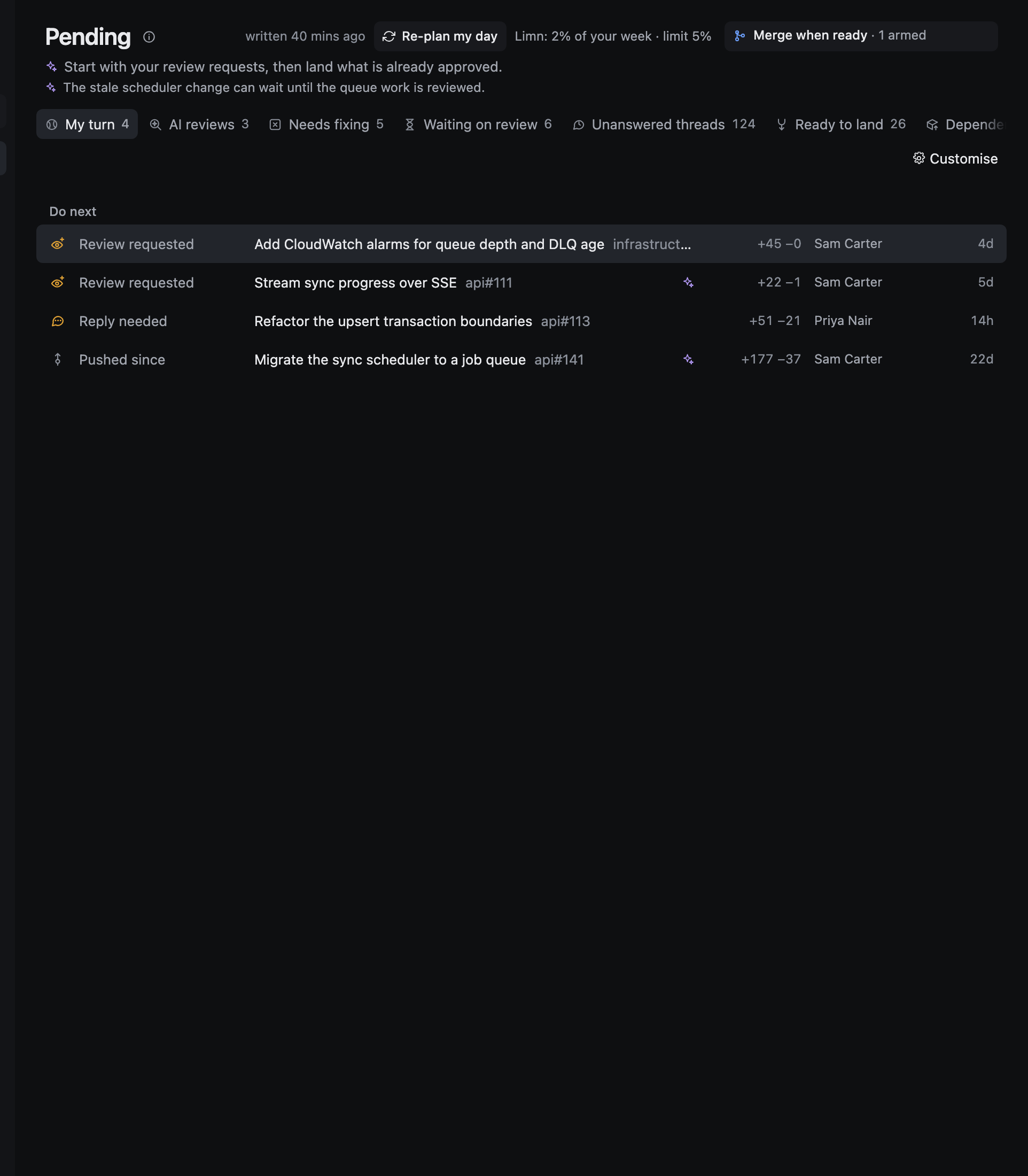
Pending — everything waiting on you or your workspace, across every repository, in seven ranked tabs:
Drill into any PR without leaving the dashboard — review threads grouped by file, each tagged with its derived state (resolved · replied · likely-addressed · untouched), alongside CI, approvers, and the full activity feed:
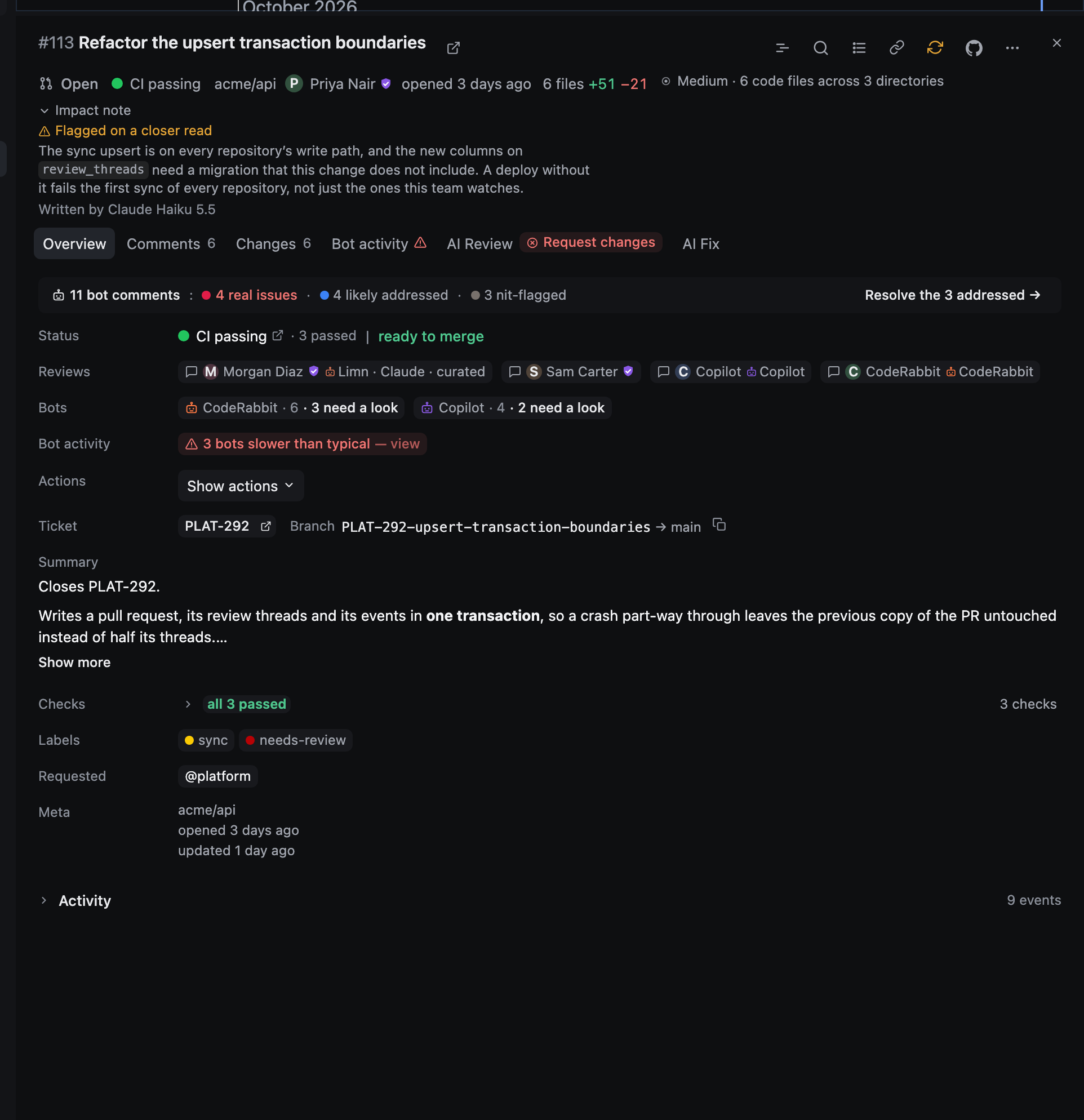
Every review thread already triaged, and every bot comment graded for severity:

Prerequisites
- Node ≥ 20 (developed on 24)
- pnpm ≥ 9 (from a checkout)
- GitHub CLI (
gh) authenticated:gh auth login. For org repos behind SSO you may needgh auth refresh -h github.com -s read:org.
Quick start
To use it: npx limn-review. To work on it, from a checkout:
pnpm install
cp .env.example .env        # optional; sensible defaults otherwise
pnpm db:migrate             # create the SQLite schema (also runs on startup)
pnpm dev                    # backend :4000 + frontend :5173
Open http://localhost:5173. Add repos from the UI (owner/name); the first sync backfills the last 90 days, then each repo is re-synced as often as its activity warrants.
By default bulky text (PR descriptions, diff hunks, commit messages) isn't stored —
it's fetched from GitHub when you open a PR and cached in the browser, keeping the DB
small and backfills fast. Set PERSIST_BODIES=true to store it locally (larger DB,
PR detail works fully offline).
One-off sync without the server
pnpm sync:once owner/repo
pnpm db:studio              # inspect the data
Review and fix with Claude
Every pull request gets a Claude tab. It is on by default — there is no flag to set. It runs on Claude or on Codex (see Codex instead of Claude).
- Claude Review — Claude reads the change and returns findings, each tied to a line. Tick the ones worth keeping and post them as one GitHub review. Paste in a story and it checks the change against it. Auto review reviews new pull requests as they arrive; it is off for every workspace until you switch it on.
- Ask Claude — a chat on the review, and on each finding.
- AI Fix — pick the review comments you want fixed. It edits a copy of the branch, shows you the diff, and pushes only when you click Push.
What the agents can do:
- The reviewer (and the chat) reads the code. It cannot edit files, run commands or reach the web.
- The fixer edits files. It has no shell, so it builds and tests nothing.
- Nothing is posted or pushed until you press the button.
With an issue tracker connected (Jira, GitHub Issues or Linear, in Settings), a review can fill its story from the linked ticket, auto review included. Without one, paste the story in.
Your Claude, not ours
It runs on your own Claude Code login or Anthropic API key. Limn stores no key and charges nothing for it. Every AI feature (reviews, fixes, chats, report write-ups) uses the same two sources, first one wins:
- Your Claude Code login — run
claudeonce to sign in (or setCLAUDE_CODE_OAUTH_TOKEN). A run on the login never seesANTHROPIC_API_KEY. ANTHROPIC_API_KEYin the environment.
Set LIMN_AI_USE_API_KEY=true to use the key even when you are signed in. With
neither, the Run button is replaced by one line: Sign in to Claude Code or set
ANTHROPIC_API_KEY. The ladder lives in apps/backend/src/ai/credentials.ts.
Codex instead of Claude
Every AI feature can run on Codex instead, on your own ChatGPT plan. One provider runs everything at a time.
npx limn-review ai install codex   # adds the Codex CLI to the AI download
npx limn-review ai login codex     # sign in with ChatGPT (add --device-auth on a headless machine)
Or press Set up AI and sign in from Settings → AI. Limn keeps its own Codex
sign-in in ~/.limn/codex; your ~/.codex is not read or changed. Codex with an
OpenAI API key is not available yet.
Pick the provider in Settings → AI, or set LIMN_AI_PROVIDER to claude, codex
or auto (the default: Claude when both are signed in, Codex when only Codex is).
Each run is labelled with the provider and model that ran it. On Codex the models are
gpt-6.1-sol (deep reviews), gpt-6.1-terra and gpt-6-luna. The rules are the same:
no shell, no web, and nothing posted or pushed until you press the button. The spend
budget counts Limn's share of your ChatGPT plan's 5-hour and weekly limits.
One-time setup
The npm package ships no AI SDKs, so npx limn-review stays small. The first time
you use an AI feature, press Set up AI (a one-time download of about 110 MB), or
run:
npx limn-review ai install # or `limn ai install` if installed globally
This installs exact, pinned versions of the Claude Agent SDK and its peers into
~/.limn/ai-runtime. From a checkout (pnpm dev) they resolve from node_modules
and there is nothing to install. To use the claude you already have installed
instead of the bundled one, set LIMN_CLAUDE_PATH=/path/to/claude.
To hide every AI surface, set LIMN_AI_DISABLED=true.
Bot-comment severity
Review-bot comments can be scored for severity (nit → critical) and category by a small ML model, with badges on each comment and a rollup on the Bots tab. It uses no LLM and costs nothing. The model runs inside Limn, at background priority. The first time, press Set up in the app (a one-time download of about 240 MB), or run:
npx limn-review ml install # or `limn ml install`
From a checkout, pnpm dev reads the model from the packages/ml submodule.
LIMN_ML_DISABLED=true turns scoring off. Full setup, tuning and caveats:
docs/ML-SEVERITY.md.
Demo and website
pnpm --filter @pierre-review/frontend build:demobuilds the static demo — the real app on recorded sample data — intoapps/frontend/dist-demo/, served at/demo/. See apps/frontend/src/demo/README.md.apps/siteis the small service behind limn-review.com: the landing pages, the demo and the contact form. See apps/site/README.md.
Layout
apps/backend— Fastify API, Drizzle + SQLite, the GitHub sync engine; reporting, Bots Monitoring and Slack live insrc/platform/apps/frontend— React + Vite + Tailwind + vis-timeline dashboard (served at/app), plus the static demo runtime insrc/demo/apps/landing— the marketing pages (prerendered; served byapps/site)apps/site— the website service (landing,/demo/, contact form)packages/shared— the contract shared by both sidespackages/ml— the bot-comment severity model (submodule)
See CLAUDE.md for the architecture and conventions.
License
Limn is source-available under the Limn License 1.0.
- Free for individuals, and for any team or organisation where 3 people or fewer use it. You may use, copy and change it.
- More than 3 people in one organisation (affiliates count together) need a commercial licence — ask through the contact form.
- You may not offer Limn, or a product built from it, as a competing commercial product or service.
- Copies you pass on must keep the licence and copyright notice.
The licence does not convert to MIT or any other licence over time.