

One local MCP server for Mail, Calendar, Reminders, Notes, Messages, Contacts, Photos, Safari, Music and Shortcuts on macOS. Searches and lists return pointers: an id, a one-line summary and a link that opens the item in its app. Bodies are a separate, capped fetch. Writes are tiered and audited; deletes, moves and sends preview first. macOS only. Python + FastMCP + uv. See DESIGN.md and CHANGELOG.md.
What you can ask
- "What is on my calendar this week? When am I free on Thursday afternoon?"
events,free_busy - "Which emails need a reply? Draft a reply to the first one."
mail_needs_response,mail_reply. The reply opens as a draft in Mail. It is not sent. - "Move the newsletters in my inbox to Archive. Show me first."
mail_search,move_mail,mail_undo. The move previews by default.mail_undoreverses it, within the known limits below.
Safety and privacy
- Local. No telemetry, and no network requests of its own: only a local unix socket (shim to daemon) and the
dashboard on 127.0.0.1. Three tools reach past the Mac through the apps, when called: the send tools (off by
default) send through Mail,
safari_openopens a page, andrun_shortcutruns a Shortcut that can call the web. - Three tiers. Read, write and outbound. Send tools are absent until you enable them per app:
macos-apps-mcp allow-send mail(daemon) orMACOS_APPS_ALLOW_SEND=mail(stdio).MACOS_APPS_READ_ONLY=1registers reads only and wins over both. - Dry run first.
dry_rundefaults to true fordelete_draft,move_mail,trash_mail,mail_undo,send_mail,reply_all,forward_mail,delete_reminder,delete_event,delete_noteandupdate_note. Other writes act when called.mail_replyopens a draft only. - Audit log. Every write goes to
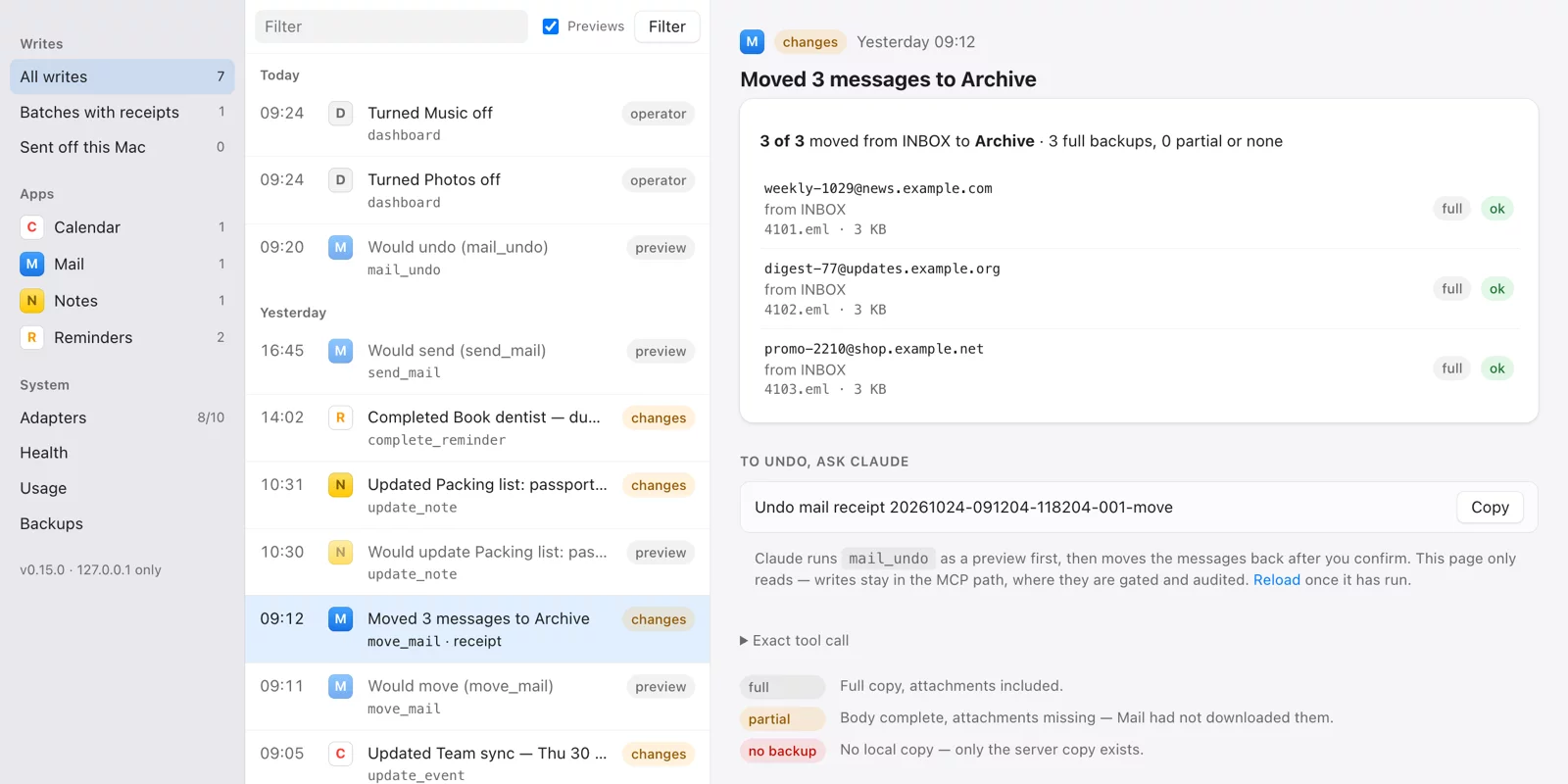
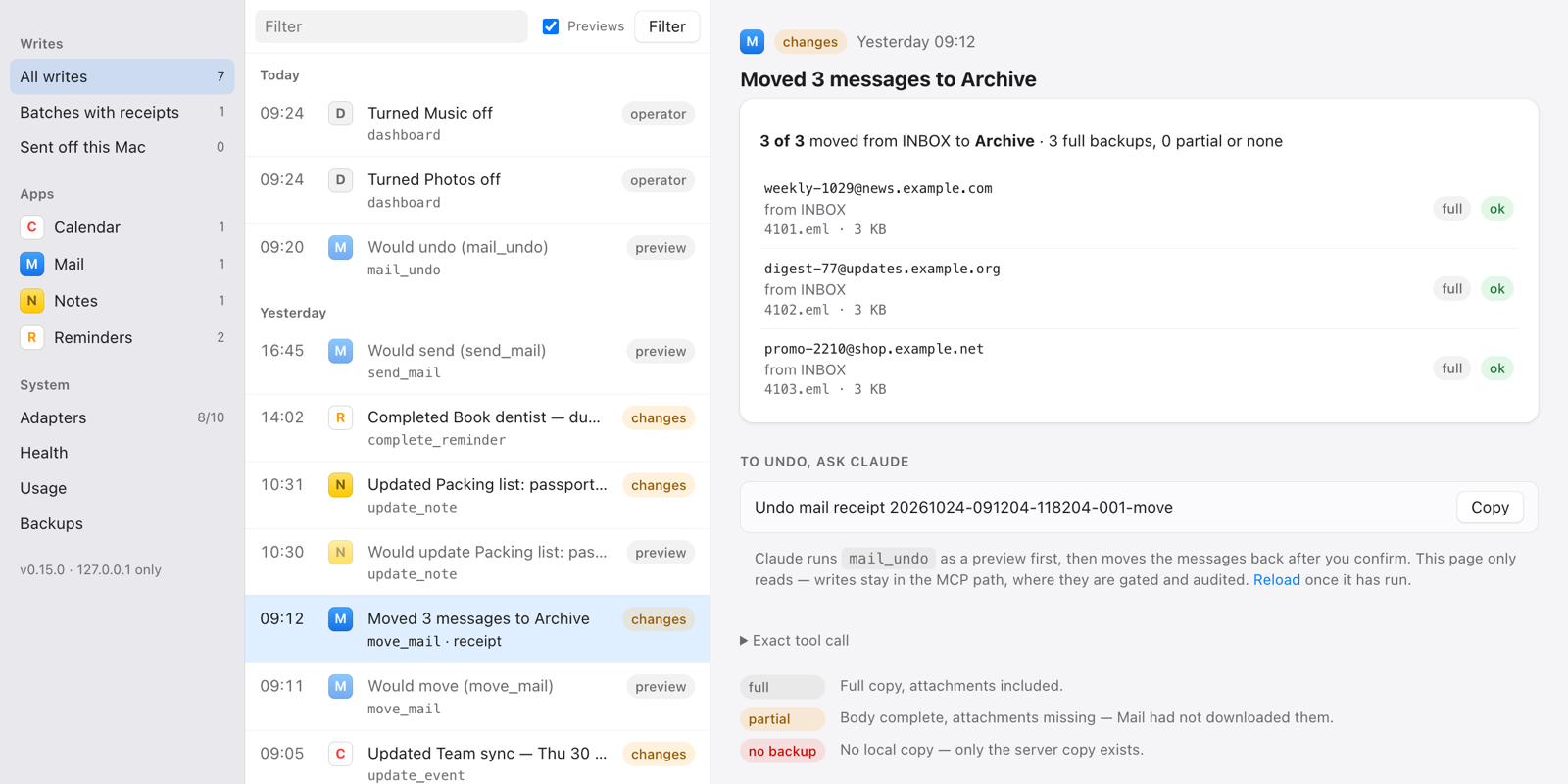
~/.local/state/macos-apps-mcp/audit.jsonl(under$XDG_STATE_HOMEwhen set). An update or delete by id also records the item as it was. Theaudittool reads the log back. - Mail recovery. Before a Mail move or delete, each message is copied as
.emlunder~/.local/state/macos-apps-mcp/backup/mail/.mail_undoreverses the batch. No tool empties the Trash. - Known limits. A message Mail downloaded only in part is backed up without its attachments. Moves and trashes
through a Gmail label folder are refused, because Gmail reverts them about 2 minutes later.
sent: truemeans Mail accepted the message, not that it was delivered. All Mail facts. - Dashboard. Under the signed
.appdaemon, a local page (127.0.0.1 only) shows every write, what it changed, and the backup behind each Mail batch. Invented data below:
First 5 minutes
Requires macOS, Python ≥ 3.12 and uv. uv provides uvx. The package is on PyPI. Point your MCP client at uvx. It fetches the package and runs it, so there is no clone and no venv path:
{
  "mcpServers": {
    "macos-apps": {
      "command": "uvx",
      "args": ["macos-apps-mcp"]
    }
  }
}
If Claude Desktop cannot find uvx, set "command" to its full path: run which uvx in Terminal (a default uv install prints /Users/you/.local/bin/uvx).
For Claude Code:
claude mcp add macos-apps --scope user -- uvx macos-apps-mcp
Or, instead of claude mcp add, install the Claude Code plugin. It starts the same server and adds a skill
that teaches the dry-run workflow. In Claude Code, run /plugin marketplace add elfensky/macos-apps-mcp, then
/plugin install macos-apps@macos-apps-mcp.
The CLI commands further down (allow-send, dedupe-mail) run the same way: uvx macos-apps-mcp allow-send.
Run doctor first. The doctor tool reports what is granted and opens no dialog (each Automation grant is read live; an app that is not running shows not_running). doctor(request=True), with you at the screen, opens the EventKit and Automation dialogs. The server needs:
- EventKit: Calendar and Reminders.
- Automation, one dialog per app: Mail, Notes, Contacts, Safari, Messages, Music.
- Accessibility (optional, no dialog: turn it on in System Settings → Privacy & Security → Device Control and Data Access, called Accessibility before macOS 27, for the app that starts the server):
mail_replyandreply_allput your text above Mail's own quote. Without it, those two refuse and create nothing.doctorand the Health page show whether it is on. - Full Disk Access (optional, no dialog: turn it on in System Settings → Privacy & Security → Full Disk Access, for the app that starts the server): Messages content, Photos, Mail's index reads, reminder tags and subtasks, and the fast Notes path. Without it, Notes and some Mail reads use a slower path. The rest return an error or a
coveragenote.
Under stdio, macOS gives each grant to the app that starts the server (Claude Desktop, Terminal, VS Code), so each client needs its own. The signed .app daemon holds one set for all: docs/DAEMON.md.
Load only the apps you use. MACOS_APPS_ADAPTERS_OFF=photos,music registers no tools for those apps, so your client holds fewer tools in its context. Under the daemon, see turn adapters off.
From source (development): use this path to work on the server itself.
git clone https://github.com/elfensky/macos-apps-mcp && cd macos-apps-mcp
uv sync
Then point your MCP client at the project's own venv python — deterministic, and it carries the locked PyObjC wheels:
{
  "mcpServers": {
    "macos-apps": {
      "command": "/absolute/path/to/macos-apps-mcp/.venv/bin/python",
      "args": ["-m", "macos_apps_mcp"]
    }
  }
}
Why not apple-mcp?
apple-mcp by Dhravya Shah pioneered one MCP server for all Apple apps. It is now archived. It returned full note and email bodies inline. This server returns pointers, fetches bodies only on request, and gates every write by tier. See CREDITS.md.
Something broke? Run doctor and paste its output into a GitHub issue. The report shows process paths, so check them before you post.
Tools
Reads return pointers; results are capped per adapter. Bodies/content are a separate bounded
fetch. Writes/actions are skipped entirely when MACOS_APPS_READ_ONLY is set (see below).
Calendar & Reminders — read/write (EventKit)
| Tool | Args | Notes |
|---|---|---|
events |
when = today | week | YYYY-MM-DD |
list events as pointers |
free_busy |
start, end (ISO), optional calendars ids |
merged busy intervals + free gaps in the window; no event details |
reminders |
due = today | overdue | this-week | a list name |
list reminders as {results, coverage?}; each result carries folder, tags and parent (read-only; needs EventKit and Full Disk Access) |
calendars / reminder_lists |
— | containers (id + name) to target writes |
create_event / update_event |
title, start, end (ISO), calendar, location, notes, all_day, recurrence, alarms (minutes before the start, at most 5; all-day: from local midnight, -540 = 09:00 on the day) |
update is a full replace by id, except alarms: omitted keeps the event's alarms, [] removes them |
delete_event |
id, span, dry_run |
dry_run previews without deleting; a real delete is verified gone (the occurrence, not the series) |
create_reminder / update_reminder |
title, due, list_name, notes, priority (0–9), start, recurrence |
update is a full replace by id |
create_reminder_list |
name | new list on the default account; an exact duplicate name is refused |
complete_reminder |
id | marks complete; completing a parent lists the subtasks it leaves open under subtasks; refused, changing nothing, when the Reminders store cannot be read (needs EventKit and Full Disk Access) |
delete_reminder |
id, dry_run (default true), with_subtasks |
deletes by id and proves it gone; a parent with subtasks is refused unless with_subtasks=true, since deleting it deletes them too (needs EventKit and Full Disk Access) |
Event and reminder pointers carry folder = the calendar or list id, which
free_busy(calendars=…) and the write tools (calendar=, list_name=) take.
Reminder tags and subtasks (tags, parent = the parent's id) are read from the
Reminders store, read-only, and need Full Disk Access. When that store cannot be read, the
reminders still come back and coverage says why. No public API writes a tag or nests a
reminder, so no tool here does.
A write targets its container by name or Pointer.id; an ambiguous name raises rather than
guessing. Recurrence is an RFC 5545 RRULE: FREQ, INTERVAL, COUNT, UNTIL, BYDAY (with
ordinals such as 2TU or -1FR for monthly and yearly rules), BYMONTHDAY, BYMONTH,
BYYEARDAY and BYSETPOS, e.g. FREQ=MONTHLY;BYDAY=2TU;COUNT=6. A recurring reminder needs a
due date. BYWEEKNO, BYHOUR, BYMINUTE, BYSECOND and WKST are refused by name (EventKit
saves BYWEEKNO but expands only the first date), and so is any value out of range or any
combination RFC 5545 forbids; each part is checked again after the write. A start date that
does not match its rule is accepted — RFC 5545 counts it as the first occurrence — and the
event result says that the first occurrence is an extra one.
Mail — id-first read + draft-and-open (Automation)
Sending is off by default: reads, create_draft, and mail_reply never send — they
open a compose window for you to review. Outbound (send_mail, reply_all,
forward_mail) exists but only runs when the operator opts in via
MACOS_APPS_ALLOW_SEND, and dry_run still defaults to True even then.
| Tool | Args | Notes |
|---|---|---|
mail |
subject-OR-sender substring | inbox matches; id = stable RFC822 message-id, message:// deeplink |
mail_body |
id, mailbox | one message's plaintext, bounded + truncation-marked; mailbox is the folder value from a mail_search result passed back verbatim (or a canonical name) — any mailbox, not just the inbox |
mail_search |
subject, from_, to, mailbox, account, since, until, unread, flagged, has_attachments, body, limit | indexed search via Envelope Index (at rest — no Mail launch unless account= is a display name, which is resolved through Mail; a UUID stays pure sqlite, an unknown name raises); one result per message (INBOX preferred); has_attachments excludes inline images; body best-effort (indexed only) |
mail_index_bodies |
rebuild | builds/refreshes opt-in FTS body index from .emlx at rest; resumable, size-capped; skips not-yet-downloaded (partial coverage by design) |
mail_thread |
id, limit (default 100) | whole conversation, oldest-first, includes your sent messages; deduped; over limit oldest dropped (thread read for reply) |
mail_overview |
— | every mailbox with total + unread, unread-first; includes Junk/Trash/All Mail; counts live (stored counters go stale) and per distinct message; account names come from Mail (launches it), UUIDs stand in when it's unreachable; On My Mac always named |
mail_attachments |
mailbox (a search result's folder, verbatim — or inbox/sent/drafts/trash/junk), optional query |
attachment name/size/downloaded per message; works on Drafts |
mail_needs_response |
— | inbox mail likely needing your reply, ranked with a reason (flagged / unread-direct / unanswered-direct); headers only, no bodies read |
mail_awaiting_reply |
days (1–365, default 3) |
mail you sent ≥ days ago with no reply (real In-Reply-To/References threading), oldest first, reason awaiting-reply |
create_draft |
to, subject, body | opens a draft for review — never sends; returns a locator |
mail_reply |
message_id, mailbox, reply_body, include_quote |
native threaded reply (sets In-Reply-To/References) that keeps Mail's own quote, your text on top through Accessibility; opens for review — never sends |
drafts |
— | list Mail drafts as pointers (id + subject — to recipient) |
delete_draft |
id, dry_run |
delete one draft by message-id; dry_run previews |
create_mailbox |
name (/ nests), account |
creates the folder; missing parents auto-created. No delete counterpart — delete <mailbox> is not scriptable, so removing one is a Mail.app action. In a Gmail account the new folder is a label, which move_mail refuses |
move_mail |
ids (≤25), from_mailbox, to_mailbox, dry_run |
file/archive/refile; every message backed up + logged before anything moves, so mail_undo puts it back. dry_run defaults to True. Cross-account moves leave exactly one copy. A Gmail label folder is refused at either end (a move out of a label leaves a copy), and so is a unified name as the source |
trash_mail |
ids (≤25), mailbox, dry_run |
soft delete, and the only delete there is — Mail's delete moves to the account's Trash and nothing in its scripting dictionary erases from there. Undoable via mail_undo; emptying Trash is yours to do in Mail.app. dry_run defaults to True |
mail_undo |
receipt, dry_run |
replay a move_mail/trash_mail receipt in reverse; the undo is itself backed up and undoable. A receipt into a Gmail label or a unified name is refused, with how to restore by hand |
update_mail_status |
ids (≤25), mailbox, read, flagged, flag_color |
mark read/unread, flag (+colour). Re-issuing with the opposite value is the undo, so dry_run defaults to False |
mail_duplicates |
limit |
report only — per-mailbox redundant-copy counts + worst offenders. Cleanup is the dedupe-mail CLI below; this tool cannot delete |
send_mail |
to, subject, body, cc, bcc, html, from_address, dry_run |
gated by MACOS_APPS_ALLOW_SEND; dry_run defaults to True |
reply_all |
message_id, mailbox, body, include_quote, dry_run |
gated; native reply-all that keeps Mail's own quote, your text on top through Accessibility; sends only after the text is confirmed, then sweeps its own Drafts copy (drafts_copy) |
forward_mail |
message_id, mailbox, to, dry_run |
gated; original + attachments forwarded intact — no covering-note param (writing the body destroys both, device-verified) |
Messages — content via chat.db (read-only; Full Disk Access)
| Tool | Args | Notes |
|---|---|---|
messages_chats |
— | conversation list (id + name); no content, no FDA needed |
messages_search |
query, limit |
search message text (decodes attributedBody), newest first |
messages_with |
contact (phone/email), country, limit |
recent messages with one person; country = calling code or 2-letter region (locale default, never +1) |
message_body |
id | full text of one message by guid |
Notes — NoteStore.sqlite reads + opt-in bodies
| Tool | Args | Notes |
|---|---|---|
notes |
title, snippet or body words | {results, truncated?, plane?, coverage?} — matching notes (id + snippet), title/snippet hits first, then body-only hits; bodies are searched in memory on the Full Disk Access plane (locked notes skipped); body words split at spaces and punctuation only, so a word inside unspaced Chinese or Japanese text is found by title or snippet only; diacritic- & smart-punctuation-insensitive |
notes_all |
— | every live note (id + "Account / Folder" + snippet), Recently Deleted excluded |
note_bodies |
ids (≤ 50) | opt-in plaintext hydration → [{id, body}] |
create_note |
title, body, optional folder name |
returns the stable x-coredata id; an unknown/ambiguous folder is refused, not guessed |
update_note |
id, title, body | full replace of title+body by id; the stable id is preserved and verified after write |
delete_note |
id, expect_title, dry_run |
moves to Recently Deleted; dry_run previews |
Other read-only context
| Tool | Args | Returns |
|---|---|---|
contacts |
name substring | cards (name, org, first phone + email) |
photos |
search string | {results, truncated?} pointers (title · filename · date), newest first, at most 25; matches filename, title, description, keywords, place, people and labels. The id is the Photos uuid; the old <UUID>/L0/001 id is still accepted |
photo_albums |
— | {results, truncated?} album pointers (id, title (n photos), folder path), at most 100 |
photo_info |
photo id | dates, location, place, people, EXIF subset, pixel size, kind; never image bytes or thumbnails |
safari_tabs |
— | every open tab (url + title) |
shortcuts |
name substring (empty = all) | the user's Shortcuts; id = stable UUID, shortcuts:// deeplink |
ping / now / doctor |
— (doctor takes optional request=True to trigger permission prompts) |
health check / time / permission diagnostics |
audit |
optional since (ISO datetime) |
recent write audit entries (newest first) — what macos-apps-mcp changed, with before/after pointers (enough to undo by hand) |
usage |
— | per-tool call counts + the never-used list, for pruning rarely-used tools |
Actions (writes)
| Tool | Args | Notes |
|---|---|---|
create_contact |
given_name, family_name, organization | |
run_shortcut |
name or id, optional input_text |
runs a Shortcut; returns a bounded output snippet |
safari_open |
url | opens in a new tab; bare host → https://; only http/https allowed |
export_photo |
photo id, dest_dir inside the allowed root |
writes the edited still (the original when there is no edit) as a new file, name <original stem>_<id prefix>.<ext>, never overwritten, capped at 250 MiB; a photo only in iCloud is absent (nothing is downloaded); videos refused, a Live Photo exports its still only; additive, audited |
Read-only mode
Set MACOS_APPS_READ_ONLY=1 (or true / yes) to register reads only — every write and action
tool is skipped, a safe-deploy guard. (Reads may still open apps / read local stores.)
Turning adapters off
Set MACOS_APPS_ADAPTERS_OFF=photos,music (a comma list of adapter names) to register no tools
for those apps. Under the daemon, the file ~/.local/state/macos-apps-mcp/adapters_off holds the
same list and takes effect after a restart. Details: docs/DAEMON.md.
Dashboard
Under the daemon, http://127.0.0.1:47632 shows the audit trail, Health, the adapter switches,
usage and the Mail backups. Run `macos-app