Markr
The cockpit for AI coding. See every session, hand off between tools, never lose context.
Markr Studio · Context Bridge handoffs · Smart Handoff (✨ AI refine) · Cross-session memory · AI Agent Map · Config Lab & Health — plus a best-in-class Markdown preview (Mermaid · KaTeX · live TOC · copy-as-PNG · themes · PDF export).


Install on VS Code · Install on Cursor / Open VSX · Report a Bug · Request a Feature
What is Markr?
Markr is the cockpit for AI coding — the one vendor-neutral place that sits above Claude Code, Cursor, Windsurf, Codex, Augment and the rest. As you work across more than one AI tool, Markr lets you see every session in one command center (Markr Studio), carry context between tools without losing it (Context Bridge + Smart Handoff), and keep your agent instructions healthy (Config Lab, Config Health, AI Agent Map). No tool builds this — they want lock-in; Markr is the layer that makes your agents portable.
It's also a free, open-source, best-in-class Markdown preview for VS Code and Cursor — GitHub-accurate typography, tables, Mermaid, KaTeX, a live Activity Bar panel and split-edit mode — which is how most people first meet Markr. Whether you're juggling AI agents, managing a CLAUDE.md / .cursorrules, or just want a dramatically better .md preview, Markr is built for you.
Click the Markr icon in the Activity Bar. Or open any .md file and press Cmd+Shift+M.
✨ New in 6.8 — the AI workbench, elevated
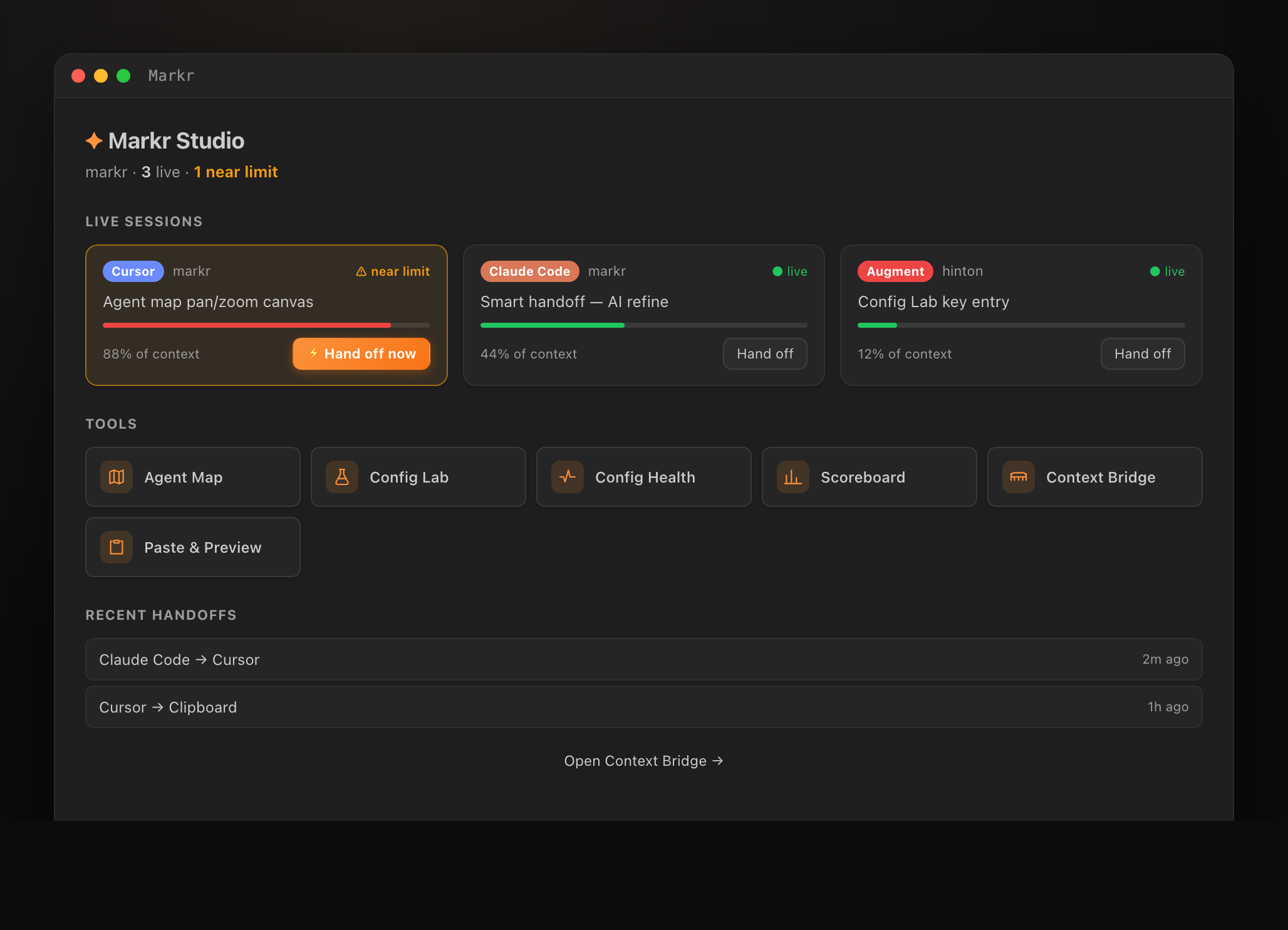
✦ Markr Studio — one command center for the AI workbench. See every live session and how close it is to its context limit, hand a near-limit one off in a single click, launch every tool, and review recent handoffs.

✦ Smart Handoff. Every handoff opens in a review & edit panel — trim it, or hit ✨ Refine to have your configured AI model rewrite it densely and accurately (secrets re-redacted before sending, one-click ↩ Revert). Your edits are what get copied.

✦ Context Bridge, and every Markr surface, redesigned on a new premium design system — soft-elevation cards, a segmented scope toggle, and full keyboard navigation.
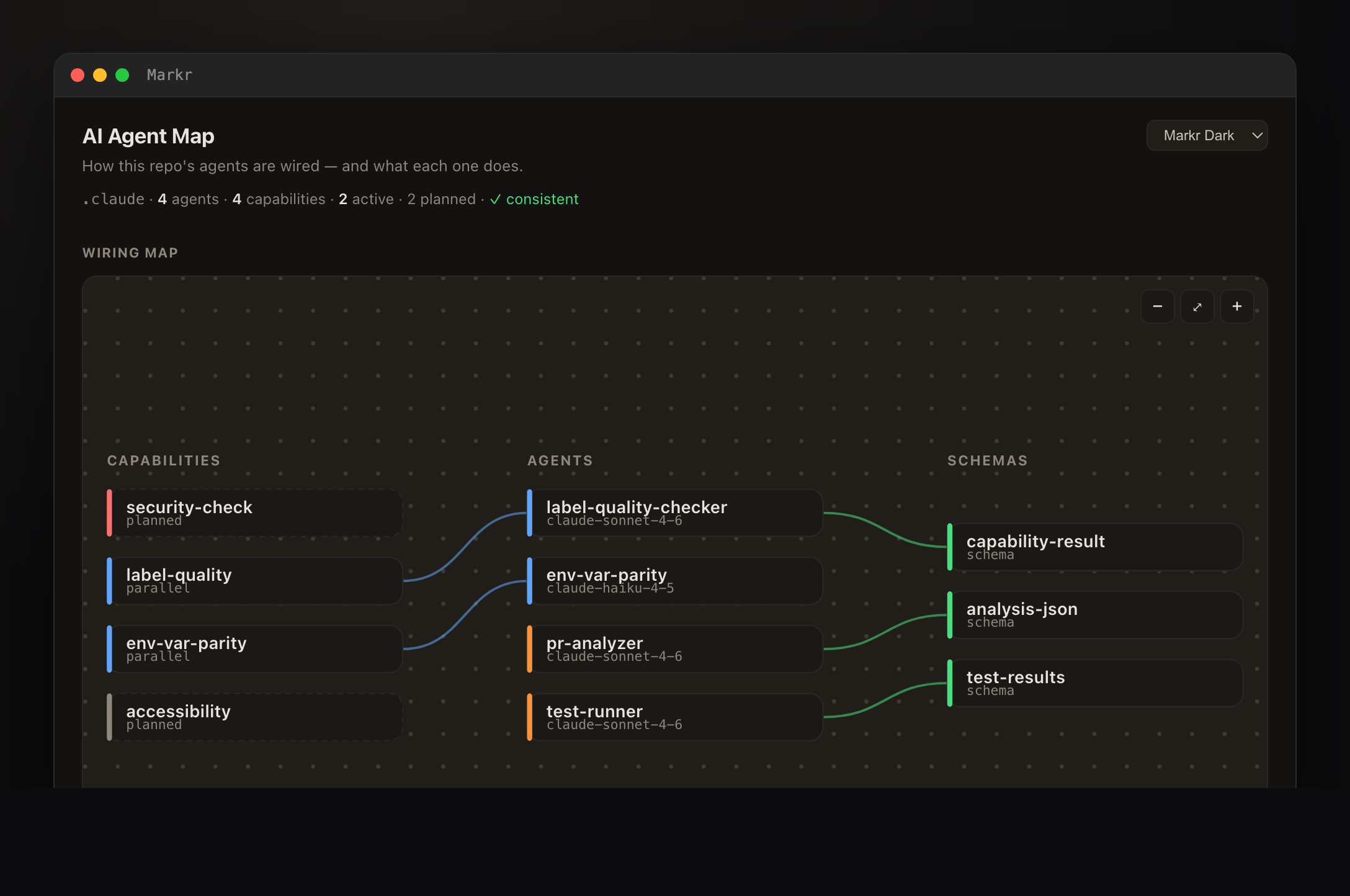
✦ AI Agent Map — an interactive pan/zoom map of how a .claude/ multi-agent repo is wired: capabilities → agents → schemas. Hover to trace connections, click any node to open the file.
See it in action

✦ NEW in 5.0 (beta) — Context Bridge. See every AI coding session across Claude Code, Cursor, Augment & Codex in one sidebar. Pick one, hand it off to another tool, and Markr writes a Conditional Residual Handoff — decisions, dead-ends, constraints & the uncommitted git diff, not a chat dump.

✦ AI Config Health. Score your AI config workspace out of 100 — findings flag missing testing guidance, secrets in config, absent verification commands, with concrete fixes ranked by severity.

✦ Copy AI Workspace Bundle. One click concatenates CLAUDE.md, .cursorrules, agent.md & more into a single readiness-scored doc — paste it into any AI to onboard it to your repo instantly.

✦ Click the token counter → see a breakdown by section with proportional bars. Supports Claude, GPT-4, GPT-4o, DeepSeek, Kimi, Llama 3, Gemini, Mistral & more. Click any row to jump there.

✦ Double-click CLAUDE.md, .cursorrules, or any AI config — Markr opens automatically, text editor closes. Markr is the editor.

✦ Agent Watch — Claude Code edits CLAUDE.md → preview updates instantly without saving → ⬤ Updated badge + token delta

✦ Click the Markr icon in the Activity Bar — AI configs pinned at top, workspace files in a nested folder tree, instant search

✦ Hover any table → "Copy table" → paste into Slack, Google Chat, or Docs as a real formatted table

✦ Hover any Mermaid diagram → 🖼 Copy image → paste as a 2× retina PNG anywhere — Figma, Notion, Confluence, Slack

✦ Copy markdown from Claude or ChatGPT → Preview Clipboard → edit in split pane → Mermaid renders live → save as .md

✦ Type in the Notebooks panel to filter all workspace .md files instantly
Screenshots

Dark theme · Live Table of Contents · Workspace file browser · Word count & reading time


✦ Notion White theme ✦ Split edit mode — editor + live preview side by side


✦ Mermaid diagrams — render, expand fullscreen, copy as PNG ✦ Syntax highlighting — 190+ languages


✦ GitHub alerts — NOTE, WARNING, TIP, CAUTION ✦ Collapsible TOC panel with scroll spy
Why Markr?
| Built-in VS Code Preview | Markr | |
|---|---|---|
| AI configs open in Markr | ✗ | ✅ CLAUDE.md, .cursorrules open only in Markr — no text editor |
| Agent Watch (real-time) | ✗ | ✅ Preview refreshes while agent edits — no save needed |
| Live + token delta badge | ✗ | ✅ See exactly what changed and how many tokens it cost |
| Activity Bar panel | ✗ | ✅ Browse AI configs + folder tree without opening a file |
| New AI config wizard | ✗ | ✅ CLAUDE.md, .cursorrules & more with starter templates |
| GitHub-accurate styling | Partial | ✅ Pixel-perfect |
| Live Table of Contents | ✗ | ✅ Collapsible, scroll spy |
| Multi-tab navigation | ✗ | ✅ Open multiple files |
| Workspace file browser | ✗ | ✅ Nested folder tree, grouped |
| Mermaid diagrams | ✗ | ✅ Flowcharts, Gantt, sequence & more |
| Copy diagram / table / code as PNG | ✗ | ✅ Hover → 📷 Image — paste into Figma, Slack, anywhere |
| Rich copy (Cmd+C) | ✗ | ✅ Pastes formatted content into Slack, Docs, Notion |
| Copy table as formatted HTML | ✗ | ✅ Hover → Copy table — Slack renders it as a real table |
| Paste & preview markdown | ✗ | ✅ Paste any markdown, edit live, save as file |
| File search | ✗ | ✅ Instant fuzzy search across all workspace files |
| Syntax highlighting | Basic | ✅ 190+ languages |
| Copy code buttons | ✗ | ✅ Hover to reveal |
| Word count + reading time | ✗ | ✅ Always visible |
| Token counter (model-aware) | ✗ | ✅ Claude, GPT-4, GPT-4o, DeepSeek, Kimi, Llama 3, Gemini, Mistral |
| Token section breakdown | ✗ | ✅ Click to see which section costs the most — jump to it |
| Export to HTML / PDF | ✗ | ✅ One click |
| Themes | VS Code only | ✅ Light, Dark, Notion, Linear |
| Focus / reading mode | ✗ | ✅ Distraction-free |
| Split edit mode | ✗ | ✅ Preview + editor side by side |
| AI config file support | ✗ | ✅ CLAUDE.md, .cursorrules, Copilot, Windsurf & more |
Features
🔀 Context Bridge — Switch AI tools without losing context (NEW in 5.0 · expanded in 6.0, beta)
The Context Bridge sidebar reads the session transcripts your AI coding tools already write to disk — Claude Code, Cursor, Augment, Codex, Aider, Cline, Roo Code, Windsurf, and Gemini CLI — and shows them all in one place: which project, which task, how many tokens, and which are live right now. A tool-health row confirms what Markr can read (✓ / — / ⚙). No setup, no daemon, nothing sent anywhere — it only reads what's already on your machine.
When you switch tools, pick a session and hand it off. Markr generates a Conditional Residual Handoff (CRH) — a handoff format built on two proven foundations (Slepian–Wolf conditional source coding + the I-PASS clinical handoff protocol). Instead of dumping the chat, it transmits only what the next tool can't re-derive by reading your repo:
- 🧠 Decision log — the decisions made and why (the reasoning behind the current code)
- 🛑 Dead-ends — approaches already tried and abandoned, so the next agent doesn't repeat them
- 📌 Constraints — the hard requirements you stated
- 🔀 In-flight diff — your uncommitted
gitchanges (what reading committed code can't show) - 📁 Pointers, not payload — file lists the next tool reads itself, so the handoff stays lean
- ✅ Receiver synthesis — the paste-ready prompt makes the next tool restate the task before it acts
Every handoff opens in a Review & edit panel first — trim anything the next agent can re-derive from the repo, then Copy or Deliver it straight into the target's native file (CLAUDE.local.md, a .cursor/rules/*.mdc, HANDOFF.md). Prefer a polished brief? Hit ✨ Refine to have your configured AI model rewrite it densely (opt-in; secrets re-redacted before sending; one-click ↩ Revert). Your edits are what get sent. Paste into Claude Code / Cursor / Augment / Codex / ChatGPT and keep going — no context lost, no browser tab-hopping.
Beta: decision/dead-end extraction is heuristic and improving — which is exactly why you review & edit before sending. Feedback welcome.
🧠 Cross-Session Memory (NEW in 6.0, beta)
The decisions, dead-ends, and constraints Markr mines don't vanish when a session ends — they're remembered per project. A Memory tab in the Context Bridge groups them by kind with occurrence counts, a dismiss button, and search across all your projects. New handoffs are seeded from this memory, so continuity survives across sessions, not just within one. Stored locally; secrets are redacted before anything is written to disk.
✍️ Configs That Write Themselves (NEW in 6.0, beta)
When you tell your agents the same thing across sessions ("always use pnpm", "never touch the public API"), Markr clusters those repeats into an evidence-backed config suggestion and offers to add it — one click appends the rule under a ## Learned rules (Markr) heading in your CLAUDE.md / AGENTS.md / .cursorrules (undoable; never edited without your Accept). It also flags stale config sections whose keywords haven't appeared in recent sessions (guardrail sections like Security are always protected). Optional: rewrite rules with your own LLM (markr.aiEnhance, off by default).
⚡ Ambient Continuity (NEW in 6.0, beta)
Markr watches active sessions and warns when one nears its context limit so you can hand off before you hit the wall. Handoffs can be delivered straight into the next tool's own convention — a delimited block in CLAUDE.local.md, a .cursor/rules/*.mdc rule, or HANDOFF.md — with a one-time per-workspace confirmation, and marked "consumed" once a new session picks them up. Every handoff is kept in a History tab (copy again / view).
📊 AI Scoreboard (NEW in 6.0, beta)
A dashboard no other tool can build, because nothing else reads all your AI tools at once. Sessions and tokens per tool per week, dead-end rate, median session length, and most-worked projects — all computed locally, themeable (Markr Dark / Light / Notion / Linear), with an Export that opens a redacted report in Markr.
❤️ AI Config Health — score your agent setup
Click the pulse icon in the Markr sidebar to score your AI config workspace out of 100. Markr scans your CLAUDE.md, .cursorrules, agent.md and friends and surfaces findings ranked by severity:
- Critical / High — secrets committed in config, missing verification commands
- Medium — no testing guidance, no "what to run before finishing" bar
- Score + token total — how heavy your AI context docs are, at a glance
- Prioritized fixes — what to address first, with concrete recommendations
📦 Copy AI Workspace Bundle
One click concatenates every AI config file in your workspace — CLAUDE.md, .cursorrules, agent.md, skill.md, and more — into a single, readiness-scored Markdown bundle on your clipboard. Paste it into any AI to onboard it to your repo's conventions instantly. (Capped at the first 20 files to stay usable.)
🧪 AI Config Lab — test your AI config like a notebook (NEW in 6.1, beta)
You write AGENTS.md, CLAUDE.md, .cursorrules, and Copilot instructions blind — there's no way to check whether the rules actually steer a model the way you intended. AI Config Lab lets you test them directly inside Markr.
Open the Lab on any AI config file (🧪 in the editor title bar, or Markr: Open AI Config Lab) and create lightweight test cases: a name, a user prompt, an expected-behavior note, and optional must-include / must-not-include checks. Click Run — Markr uses the config file as the model's instruction and your prompt as the user message, streams the response, and shows pass/fail from the deterministic include/exclude checks.
Example tests: "Uses project test command" (prompt: "I changed sessionReader.ts — what should I run?" → must include npm test), "Avoids unsafe actions", "Respects the package manager".
- Add a provider key right in the Lab — click 🔑 API key to add Anthropic / OpenAI / Google; it's stored in VS Code SecretStorage, never written to your repo. Nothing is sent until you click Run.
- Secrets are redacted from the config and prompt before anything leaves the machine; raw
.envvalues are never sent. - Tests are stored locally in
.markr/config-tests.json. Your config files are never modified.
🗺 AI Agent Map — see how your multi-agent repo is wired (NEW in 6.5)
Multi-agent repos (a .claude/ folder with agents/, capabilities.yml, schemas/) are a typed system spread across many files — easy to break in ways no single file shows. AI Agent Map (Markr: Open AI Agent Map, or the Workbench button) turns it into an interactive map.