English · Русский
megarohas deck
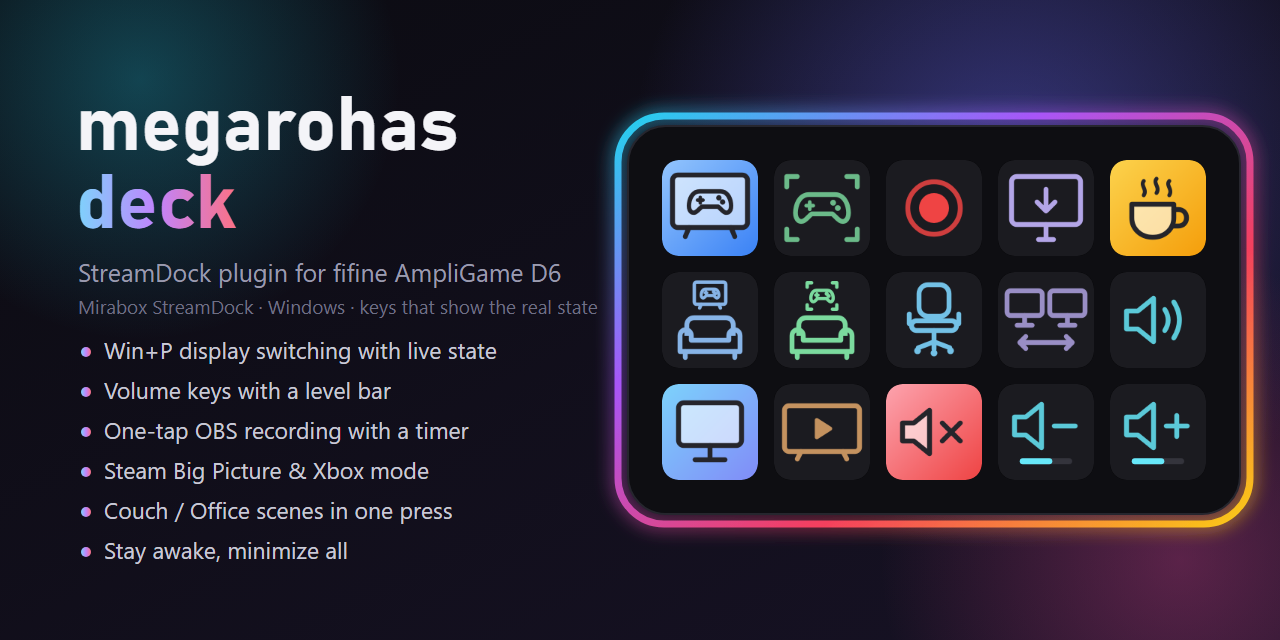
A plugin for the fifine AmpliGame D6 stream controller (and other decks running the Mirabox StreamDock software) that turns it into a couch-and-desk remote for a Windows gaming PC. Every key shows the real state: the active screen mode lights up, the volume keys draw a level bar, the record key turns red and counts time, Big Picture and Xbox mode glow while they are open — even when you changed something with the keyboard instead of the deck.
One small .exe, no runtime to install (it uses the .NET Framework that ships with Windows), no background services.
Keys
All keys live in the megarohas category of the deck software; drag them anywhere.
Screens — like Win+P, but one tap
| Key | What it does |
|---|---|
 Monitor only |
picture on the PC monitor only |
 TV only |
picture on the second screen (TV) only |
 Extend |
desktop across both screens |
 Duplicate |
the same picture on both |
The key of the current mode is lit and follows changes made with Win+P. If a switch fails (TV off), the key shows an alert.
Volume
| Key | What it does |
|---|---|
 Mute |
mute / unmute; turns red while muted |
 Volume down |
−2 %, hold to keep going; the bar shows the level |
 Volume up |
+2 %, hold to keep going |
Works with whatever output is the default right now (TV, headphones…).
Recording
 Record screen — one tap to start recording the
main screen with OBS without opening its window, even on top of Big Picture. OBS does not sit in the background:
the tap starts it minimized to the tray, straight on a
deck_record scene that only captures the main screen, and the
second tap stops the recording and closes OBS again. An OBS you opened yourself is just used — it records on
deck_record, goes back to your scene and stays open. The key turns red with a running timer.
Needs OBS 28+ with the built-in WebSocket server enabled (Tools → WebSocket Server Settings); the plugin reads the
password from OBS's own config, nothing to type.
Keep the webcam off: tick Deactivate when not showing in the properties of your camera sources in OBS. Then the camera only turns on in scenes that show it — never during a deck recording.
Gaming modes
| Key | What it does |
|---|---|
 Steam Big Picture |
open / close Big Picture; lit while it is open |
 Xbox mode |
toggle Windows 11 Xbox mode (formerly Xbox Full Screen Experience); lit while it is on |
 Couch: Big Picture |
TV only → Big Picture |
 Couch: Xbox mode |
TV only → Xbox mode |
 Office |
back to the desk: leave Xbox mode, close Big Picture (the apps keep running), monitor only, minimize everything |
Big Picture and Xbox mode never run together: turning one on first turns the other off. Xbox mode is detected with the
official IsGamingFullScreenExperienceActive() API.
Windows
| Key | What it does |
|---|---|
 Desktop |
minimize all windows for real (like Win+M — unlike Win+D they do not pop back on a stray click) |
 Stay awake |
the screen does not turn off and the PC does not sleep while it is lit |
Stay awake starts/closes the tiny NeSpat
window app if it is installed in %LOCALAPPDATA%\Programs\NeSpat, otherwise the plugin holds the wake lock itself.
Install
- Download
megarohas_deck-vX.Y.Z.zipfrom Releases and unpack it. - Right-click
install.ps1→ Run with PowerShell. It copies the plugin to%APPDATA%\HotSpot\StreamDock\pluginsand restarts the deck software. - Find the megarohas category in the actions list and drag keys onto the deck.
Manual install: copy the com.megarohas.deck.sdPlugin folder to %APPDATA%\HotSpot\StreamDock\plugins and restart
fifine Control Deck / StreamDock.
Tested on a fifine AmpliGame D6 with fifine Control Deck 3.10 on Windows 11. Other decks that use the Mirabox StreamDock software (293V3, N3, N4, Ajazz AKP153…) should work too — the keys use the standard StreamDock SDK.
Good to know (D6)
- The RGB ring is hardware-only. Neither the software's
lampControlcommand (including the store's RGB Control plugin) nor the Mirabox HID LED commands change it on the D6. Use the button on the back: short press — next of the 9 modes, long press — off/on. - Xbox button opens both Game Bar and the Big Picture menu? Turn off Settings → Gaming → Game Bar → Allow your
controller to open Game Bar (in Settings — writing
UseNexusForGameBarEnabledto the registry is ignored). - OBS 32 "did not shut down properly / safe mode" prompt. OBS 32 removed
--disable-shutdown-check, and an OBS that did not close cleanly (Windows shut down with it running, a crash) leavesrun_*marks in%APPDATA%\obs-studio\.sentinel— the next start then waits silently on a safe-mode dialog. The plugin deletes those leftovers (only while OBS is not running) before it starts OBS, so the start never gets stuck. - The deck software kills its plugins' children. fifine Control Deck runs itself and every plugin inside a Windows
job object, so anything a plugin starts directly dies (uncleanly) whenever the software restarts. The plugin starts OBS
through WMI (
Win32_Process.Create) instead, which puts it outside the job; starting it viaexplorer.exefrom inside the job does not work. - Boot logo: Settings → Device → Replace boot logo takes an 800×480 image shown through the 5×3 key windows
(160 px per key).
bootlogo/make_bootlogo.pydraws grid-aware logos and a preview through the keys.
Build from source
Nothing to install: the C# compiler of .NET Framework 4 ships with Windows.
.\build.ps1      # src\*.cs -> com.megarohas.deck.sdPlugin\MegarohasDeck.exe
.\install.ps1    # copy into the deck software and restart it
Key images are SVG drawn by make_icons.py (Python standard library only) and rendered to PNG with headless Edge;
docs/make_cover.py draws the cover. Debugging: an empty debug file next to the installed exe makes the plugin log
every incoming message to MegarohasDeck.log.
| Path | |
|---|---|
src/Program.cs |
StreamDock WebSocket protocol, dispatch to modules |
src/Displays.cs |
screen modes (SetDisplayConfig / QueryDisplayConfig) |
src/Audio.cs |
volume via Core Audio, live level bar |
src/Record.cs |
OBS via obs-websocket v5 |
src/Gaming.cs |
Big Picture, Xbox mode, Couch, Office |
src/Tools.cs |
Desktop, Stay awake |
License
MIT © megarohas. Not affiliated with fifine, Mirabox, Valve or Microsoft.
English · Русский
megarohas deck (по-русски)
Плагин для стрим-деки fifine AmpliGame D6 (и других дек на софте Mirabox StreamDock), который превращает её в пульт игрового ПК — и для дивана, и для стола. Каждая кнопка показывает настоящее состояние: горит текущий режим экранов, у громкости полоска уровня, кнопка записи краснеет и тикает временем, Big Picture и режим Xbox светятся, пока открыты — даже если ты переключил что-то с клавиатуры, а не с деки.
Один маленький .exe, ничего ставить не надо (используется .NET Framework, который уже есть в Windows), никаких служб.
Кнопки
Все кнопки — в категории megarohas списка действий софта деки, перетаскиваются на любую клавишу.
Экраны — как Win+P, но одним нажатием
| Кнопка | Что делает |
|---|---|
| Только монитор |
картинка только на мониторе компьютера |
| Только ТВ |
картинка только на втором экране (ТВ) |
| Расширить |
рабочий стол на оба экрана |
| Дублировать |
одна картинка на обоих |
Кнопка текущего режима горит и следит и за Win+P. Если переключиться не вышло (ТВ выключен) — значок ошибки.
Громкость
| Кнопка | Что делает |
|---|---|
| Без звука |
выключить / включить звук; красная, пока звук выключен |
| Тише |
−2 %, удержание — непрерывно; полоска показывает уровень |
| Громче |
+2 %, удержание — непрерывно |
Работают с устройством вывода по умолчанию (ТВ, наушники…).
Запись
Запись экрана — одно нажатие, и основной экран
пишется через OBS, не открывая его окно, даже поверх Big Picture. В фоне OBS не висит: нажатие запускает его
свёрнутым в трей сразу на сцене deck_record (только захват основного экрана), повторное — останавливает запись и
закрывает OBS. Открытый вручную OBS плагин просто использует: пишет на deck_record, возвращает твою сцену и не
закрывает. Кнопка красная, на ней тикает время.
Нужен OBS 28+ с включённым встроенным WebSocket-сервером (Инструменты → Настройки сервера WebSocket); пароль плагин
берёт из конфига самого OBS, вводить ничего не надо.
Чтобы вебкамера не включалась: в OBS в свойствах источников камеры поставь галку Отключать, когда не отображается. Тогда камера включается только на сценах, где она есть, и никогда — во время записи с деки.
Игровые режимы
| Кнопка | Что делает |
|---|---|
| Steam Big Picture |
открыть / закрыть Big Picture; горит, пока открыт |
| Режим Xbox |
включить / выключить режим Xbox в Windows 11 (бывший Xbox Full Screen Experience); горит, пока включён |
| Диван: Big Picture |
только ТВ → Big Picture |
| Диван: режим Xbox |
только ТВ → режим Xbox |
| Офис |
обратно за стол: выйти из режима Xbox, закрыть Big Picture (сами приложения остаются запущенными), только монитор, свернуть всё |
Big Picture и режим Xbox никогда не работают вместе: включение одного сначала выключает другой. Режим Xbox
определяется официальной функцией IsGamingFullScreenExperienceActive().
Windows
| Кнопка | Что делает |
|---|---|
| Рабочий стол |
сворачивает все окна по-настоящему (как Win+M — в отличие от Win+D окна не разворачиваются обратно от случайного клика) |
| Не спать |
пока горит, экран не гаснет и ПК не засыпает |
«Не спать» запускает/закрывает крошечное окно NeSpat,
если оно установлено в %LOCALAPPDATA%\Programs\NeSpat; иначе плагин сам держит запрет сна.
Установка
- Скачай
megarohas_deck-vX.Y.Z.zipсо страницы Releases и распакуй. - Правый клик по
install.ps1→ Выполнить с помощью PowerShell. Скрипт скопирует плагин в%APPDATA%\HotSpot\StreamDock\pluginsи перезапустит софт деки. - В списке действий найди категорию megarohas и перетащи кнопки на деку.
Вручную: скопируй папку com.megarohas.deck.sdPlugin в %APPDATA%\HotSpot\StreamDock\plugins и перезапусти
fifine Control Deck / StreamDock.
Проверено на fifine AmpliGame D6 с fifine Control Deck 3.10 под Windows 11. Другие деки на софте Mirabox StreamDock (293V3, N3, N4, Ajazz AKP153…) тоже должны работать — кнопки сделаны на стандартном StreamDock SDK.
Полезно знать (D6)
- RGB-кольцо управляется только кнопкой. На D6 его не меняет ни команда
lampControlсофта (в том числе плагин RGB Control из магазина), ни HID-команды подсветки Mirabox. Кнопка на задней стороне: короткое нажатие — следующий из 9 режимов, долгое — выключить/включить. - Кнопка Xbox открывает и Game Bar, и меню Big Picture? Выключи Настройки → Игры → Game Bar → Разрешить контроллеру
открывать Game Bar (именно в настройках — запись
UseNexusForGameBarEnabledв реестр не действует). - OBS 32 и окно «OBS неправильно завершил работу / безопасный режим». В OBS 32 убрали
--disable-shutdown-check, а OBS, закрытый не штатно (выключили Windows, пока он работал, или он упал), оставляет отметкиrun_*в%APPDATA%\obs-studio\.sentinel— следующий запуск молча висит на окне безопасного режима. Плагин удаляет эти остатки (только пока OBS не запущен) перед запуском OBS, поэтому старт не зависает. - Софт деки убивает потомков своих плагинов. fifine Control Deck держит себя и все плагины в Windows Job, поэтому
всё, что плагин запустил напрямую, умирает (аварийно) при каждом перезапуске софта. Плагин запускает OBS через WMI
(
Win32_Process.Create) — так он оказывается вне Job; черезexplorer.exeизнутри Job это не работает. - Загрузочная картинка: Настройки → Оборудование → Заменить логотип запуска — 800×480, видна сквозь окна
клавиш 5×3 (по 160 px на клавишу).
bootlogo/make_bootlogo.pyрисует логотипы под сетку и превью «сквозь клавиши».
Сборка из исходников
Ставить ничего не надо: компилятор C# из .NET Framework 4 есть в Windows.
.\build.ps1      # src\*.cs -> com.megarohas.deck.sdPlugin\MegarohasDeck.exe
.\install.ps1    # скопировать в софт деки и перезапустить его
Картинки кнопок — SVG из make_icons.py (только стандартная библиотека Python), в PNG через Edge в headless-режиме;
обложку рисует docs/make_cover.py. Отладка: пустой файл debug рядом с установленным exe — плагин пишет все входящие
сообщения в MegarohasDeck.log.
Лицензия
MIT © megarohas. Проект не связан с fifine, Mirabox, Valve или Microsoft.