
MCP Server
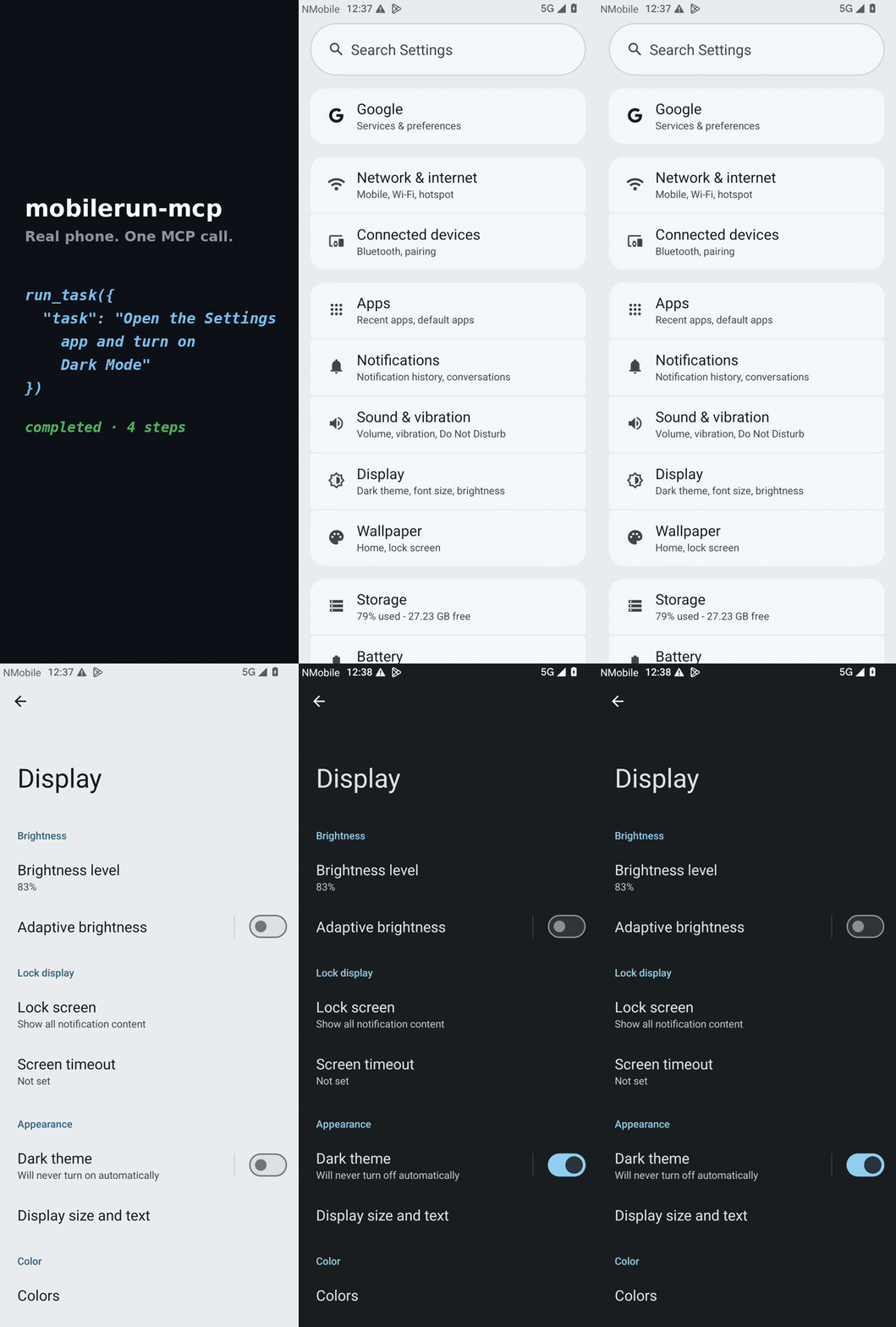
Give your AI agent control of Android devices with the Mobilerun MCP server.
Control devices, run agent tasks, manage apps, and build workflows on Mobilerun Cloud from any MCP client.
🔐 Hosted MCP endpoint — sign in with OAuth, no API key
https://cloud.mobilerun.ai/api/mcp






- 📱 List, create, and manage Android devices
- 📸 Inspect screenshots and UI state; tap, swipe, and type
- 🤖 Run agent tasks and chat with the Mobilerun Assistant
- 📦 Manage apps, device files, and settings
- 🔀 Build workflows with actions, triggers, and webhooks
- 🔑 Sign in with OAuth — no API key to copy, nothing to install for the hosted endpoint
- 🛠️ Open source and self-hostable
🚀 Quickstart
Connect to https://cloud.mobilerun.ai/api/mcp. Your first connection opens browser sign-in with your Mobilerun account (OAuth 2.1 + PKCE with dynamic client registration). No API key needed.
Claude Code
claude mcp add --transport http mobilerun https://cloud.mobilerun.ai/api/mcp
Run /mcp inside Claude Code to sign in.
Codex CLI
codex mcp add mobilerun --url https://cloud.mobilerun.ai/api/mcp
codex mcp login mobilerun
Cursor / VS Code
Click the install badge above and sign in when prompted. For manual Cursor setup, use the mcpServers JSON under Any other MCP client below.
VS Code JSON fallback (.vscode/mcp.json)
{
  "servers": {
    "mobilerun": {
      "type": "http",
      "url": "https://cloud.mobilerun.ai/api/mcp"
    }
  }
}
Claude Desktop / claude.ai
Add a custom connector with this URL, then sign in:
https://cloud.mobilerun.ai/api/mcp
Any other MCP client
Add a remote HTTP server using your client's settings. For clients using mcpServers (including Cursor):
{
  "mcpServers": {
    "mobilerun": {
      "url": "https://cloud.mobilerun.ai/api/mcp"
    }
  }
}
💬 Try it
- “List my Mobilerun devices.”
- “Open Settings on my device and turn on dark mode.”
- “Take a screenshot of my device and describe what's on screen.”
- “Ask the Mobilerun assistant which of my devices are ready.”
🧰 Tools
The available tools and operations depend on the server's policy and your account permissions.
| Family | Tools | What it does |
|---|---|---|
| Devices | list_devices, get_device, get_device_screenshot, get_device_ui_state, list_apps_on_device, create_device, terminate_device |
Inspect, create, and terminate devices |
| Device control | manage_device, device_action, manage_device_apps, manage_device_files, configure_device, manage_esim |
Control input, apps, files, settings, and eSIMs |
| Tasks | run_task, get_task, list_tasks, stop_task, send_task_message, get_task_media |
Run, monitor, message, and stop agent tasks |
| Workflows | list_workflow_resources, get_workflow_resource, create_action, create_trigger, create_flow, manage_flow, workflow_events |
Build and manage actions, triggers, flows, and events |
| Webhooks | webhooks |
Manage subscriptions and deliveries |
| Credentials | list_credentials, list_credential_packages, manage_credentials |
Access and manage stored credentials |
| Apps | apps |
Browse and manage applications |
| Proxies | proxies, connect |
Manage proxies and purchase connectivity |
| Numbers & messages | numbers, messages |
Manage numbers and SMS conversations |
| Mailboxes | mailboxes |
Manage mailboxes, inbox links, and email |
| Files | files |
Manage organization files and signed transfer URLs |
| Platform | platform_catalog |
Browse device models, timezones, and app event types |
| Assistant | assistant |
Chat with the Mobilerun Assistant |
Some tools create billed resources (for example create_device, proxy purchases, or work the assistant does for you). Charges apply to the signed-in account. Only approve an assistant permission after the user explicitly confirms it.
🔑 API key (CI and headless)
For clients that cannot use OAuth, connect to https://api.mobilerun.ai/v1/mcp with an Authorization: Bearer dr_sk_... header. Create a key in Mobilerun Cloud; see API keys.
{
  "mcpServers": {
    "mobilerun": {
      "url": "https://api.mobilerun.ai/v1/mcp",
      "headers": {
        "Authorization": "Bearer dr_sk_YOUR_KEY"
      }
    }
  }
}
claude mcp add --transport http mobilerun https://api.mobilerun.ai/v1/mcp --header "Authorization: Bearer dr_sk_YOUR_KEY"
🛠️ Self-hosting & development
packages/tools contains the auth-agnostic tool core; packages/server provides the API-key HTTP and stdio transports.
Run pnpm install && bun test to get started.
See the server reference for setup, configuration, policies, and operation details.
The roadmap describes the architecture; the tool contract covers compatibility and versioning.
🤝 Contributing
See CONTRIBUTING.md to get started.
🔒 Security
Report vulnerabilities using SECURITY.md.
📄 License
Licensed under Apache-2.0.