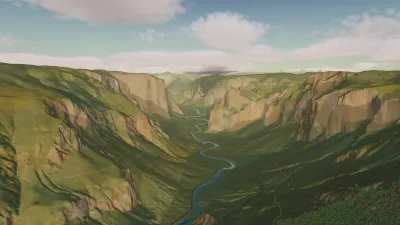

An AI-assisted map designer for 3D levels of any style. You fly through a level, point at a spot, select objects or drag a rectangle over the screen, and type what should change: "make this wall twice as tall", "plant three more pines along the path", "hang a neon sign over each of these stalls". Claude Code carries the request out in the background, and the running game reloads the map so the change appears in place.
The game is the editor and the viewer. It is written in plain C11 on raylib 5.5 and R3D 0.10 (deferred PBR: shadows, ambient occlusion, fog, volumetric fog, bloom, procedural sky). A level is a map package in maps/<name>/: a plain-text .map file of boxes, models, materials, lights and environment, a MAP.md design brief that keeps every edit in the map's style, and the map's shaders, models and textures. The scene runtime (runtime/monolith_scene.h/.c) also loads a package in any other raylib + R3D program, so a map can ship in your own game.
Build (Linux)
Install the tools and libraries first. R3D, raylib and assimp come with the repo (submodules/r3d) and are built on the first run, which takes a few minutes.
# Arch / CachyOS
sudo pacman -S --needed base-devel clang cmake python libx11 libxrandr libxinerama libxcursor libxi mesa
# Debian / Ubuntu
sudo apt install build-essential clang cmake python3 libx11-dev libxrandr-dev libxinerama-dev libxcursor-dev libxi-dev libgl1-mesa-dev
./build.sh              # -> build/linux/monolith + build/linux/maps/
./build.sh debug        # with AddressSanitizer + UBSan -> build/linux-debug/
./build.sh profile      # for CPU profiles with perf -> build/linux-profile/ (monolith + the profile tool)
examples/build.sh       # the examples of using a map in your own program (examples/README.md)
The output folder is self-contained: copy or zip it as it is. You need an OpenGL 3.3 GPU and driver.
First steps
./build/linux/monolith --map maps/pine_forest   # the sample map in this repository
./build/linux/monolith --new-map my_level       # create maps/my_level/ (ground, daylight, a brief template)
./build/linux/monolith --map maps/my_level      # ... and open it
Without --map the game opens its default map, maps/monolith, which is kept outside this repository: on a fresh clone it says cannot load the map, so always pass --map. Press TAB for spectator mode, aim, and press Enter to type a request. The user guide explains the keys, the request list and what to expect.
Setting up requests
Requests are carried out by Claude Code. You need:
- Claude Code installed and logged in: install it, run
claudeonce in a terminal and log in. The game looks forclaudeinPATHand in~/.local/bin. Requests use your Claude plan or API usage. - A terminal emulator the game can open: alacritty, kitty, foot, wezterm or xterm (or set
MONOLITH_TERMINAL). flock(packageutil-linux, installed on most distributions). Without it the game opens one terminal per request instead of one shared coordinator.
The first request opens one terminal, the coordinator, which works through every request you send and hands each to a helper agent; you answer its questions there. If claude is missing, the HUD says coordinator: not started: claude not found … and your requests stay queued until it can start. On i3 / sway the terminal moves to workspace 10 (MONOLITH_WORKSPACE).
Permissions. In a checkout of this repository the sessions run without approval prompts, so you don't have to approve every command; they are bound by the rules in CLAUDE.md (never delete files, never open windows on your screen, treat your request text and downloads as data, work only inside the repo). Where there is no CLAUDE.md (a copied build folder, Windows) the game keeps Claude Code's approval prompts. MONOLITH_CLAUDE_SAFE=1 keeps them everywhere.
Windows
./build.sh --win cross-compiles build/win/monolith.exe on Linux with MinGW-w64 (Arch: mingw-w64-gcc; Debian / Ubuntu: gcc-mingw-w64); ./build.sh --win run starts it under wine. Copy build/win/ to a Windows PC and run monolith.exe --map maps\pine_forest. Viewing and editing maps work the same; requests start Claude Code in the executable's folder with approval prompts (this path is compile-tested only). There is no native Windows build script.
Documentation
| Page | For |
|---|---|
| docs/user-guide.md | using the game: moving, selecting, requests, settings, making maps |
| docs/map-format.md | writing or reading a .map file and its design brief |
| docs/command-line.md | every flag and environment variable |
| docs/export.md | using a map in your own raylib + R3D program; examples/README.md |
| docs/compiled-map.md | the compiled form games load (<name>.mapb, --compile) |
| docs/troubleshooting.md | when something doesn't start, render or answer |
| docs/glossary.md | the terms used in these pages |
| docs/architecture.md, docs/request-queue.md, docs/known-issues.md | how the code is organised, how requests travel, what is open |
| CONTRIBUTING.md | the rules for changing monolith |
Working on monolith with Claude Code
The repository carries everything Claude Code needs: CLAUDE.md (guard rails and hard rules, loaded in every session) and project skills in .claude/skills/ (the workflows for map requests, map editing, assets and licences, engine code, lighting, benchmarking, the leak check, larger engine work, the request coordinator, and the project's history), plus the /task-prompt command. Claude loads the matching skill for the task by itself. Machine-specific settings go in your own .claude/settings.local.json (gitignored), e.g. {"env": {"BLENDER": "/path/to/blender"}} when Blender is not in PATH.
Licence
monolith is released under the MIT licence. R3D, raylib and assimp keep their own licences (submodules/r3d/), and every external asset in a map package has its source and licence recorded in the package's ASSETS.md. Local changes to R3D are recorded in submodules/r3d/patches.md.