
Muryokusho (無量空処).spoon
Hammerspoon Spoon to add cards to Anki easily via various methods.
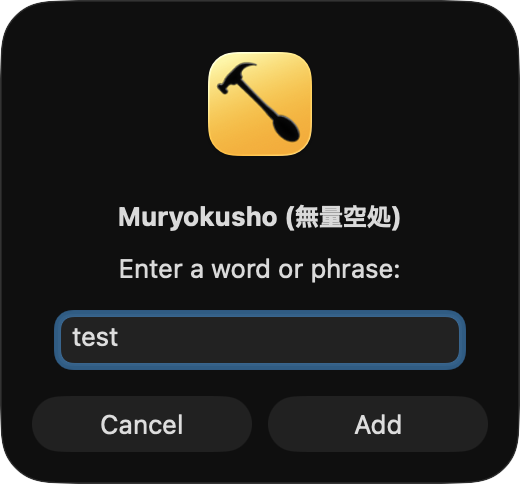
- Global hotkey — works from any app
- Translates via Google Translate (default, free, no API key) or OpenAI Chat Completions
- Shows translation alert on screen (dismissed by click, any key, or timeout)
- Adds a card to Anki via AnkiConnect
Prerequisites
- Hammerspoon
- Anki with the AnkiConnect add-on (default port 8765)
- OpenAI API key (only when using
translationMethod = "openai")
Installation
Install Hammerspoon first if you haven't:
brew install --cask hammerspoon
1. Install the Spoon
Download Muryokusho.spoon.zip, open it to install, and add to ~/.hammerspoon/init.lua:
hs.loadSpoon("Muryokusho")
spoon.Muryokusho:start()
spoon.Muryokusho:bindHotkeys({ addCard = { {"ctrl", "alt"}, "w" } })
2. (Optional) Use OpenAI instead of Google Translate
Store your OpenAI API key in Keychain:
security add-generic-password -a "muryokusho" -s "openai-api-key" -w "sk-..."
Then set in your Hammerspoon config:
spoon.Muryokusho.translationMethod = "openai"
🚀 Via SpoonInstall
Download SpoonInstall.spoon.zip and open it to install if you haven't.
Add to ~/.hammerspoon/init.lua:
hs.loadSpoon("SpoonInstall")
spoon.SpoonInstall.repos.muryokusho = {
    url    = "https://github.com/masaki39/muryokusho",
    desc   = "Muryokusho Spoon repository",
    branch = "main",
}
spoon.SpoonInstall:andUse("Muryokusho", {
    repo  = "muryokusho",
    start = true,
    config = {
        ankiDeck          = "Default",      -- Anki deck name
        ankiModelName     = "Basic",        -- Anki note type
        ankiFrontField    = "Front",        -- front field name
        ankiBackField     = "Back",         -- back field name
        translationMethod = "google",       -- "google" | "openai"
        language          = "ja",           -- locale code for translation target
        openaiModel       = "gpt-4.1-nano", -- OpenAI model (openai method only)
        allowDuplicate    = false,          -- allow duplicate Anki cards
        alertDuration     = 6,             -- seconds to show alert (click/key also dismisses)
        -- customPrompt = nil,             -- override built-in system prompt (openai only)
    },
    hotkeys = {
        addCard = { {"ctrl", "alt"}, "w" },
    },
})
Configuration
| Property | Default | Description |
|---|---|---|
ankiDeck |
"Default" |
Anki deck name |
ankiModelName |
"Basic" |
Anki note type |
ankiFrontField |
"Front" |
Front field name |
ankiBackField |
"Back" |
Back field name |
translationMethod |
"google" |
Translation backend: "google" (free, no key) or "openai" |
language |
"ja" |
Translation target as locale code ("ja", "en", "zh-CN", "ko", etc.) |
openaiModel |
"gpt-4.1-nano" |
OpenAI model (used when translationMethod = "openai") |
customPrompt |
nil |
Override built-in system prompt (OpenAI only) |
allowDuplicate |
false |
Allow duplicate Anki cards |
alertDuration |
6 |
Seconds to show translation alert (click or any key also dismisses) |
Usage
- Press the hotkey
- Type a word or phrase in the dialog, then click Add
- Translation appears on screen — click or press any key to dismiss
- Card is added to Anki automatically
Version Management (for developers)
chmod +x version.sh   # first time only
./version.sh patch    # patch bump (default)
./version.sh minor
./version.sh major
git push && git push --tags