Self-Hosted AI Chat Interface with Memory & RAG
A production-ready web application for deploying your own AI assistant. Works with any OpenAI-compatible API (TabbyAPI, Ollama, vLLM) and includes document search, long-term memory, and enterprise admin features.
🚀 Quick Start • 📚 Wiki • 🎯 Features • 🏗️ Architecture
✨ Features
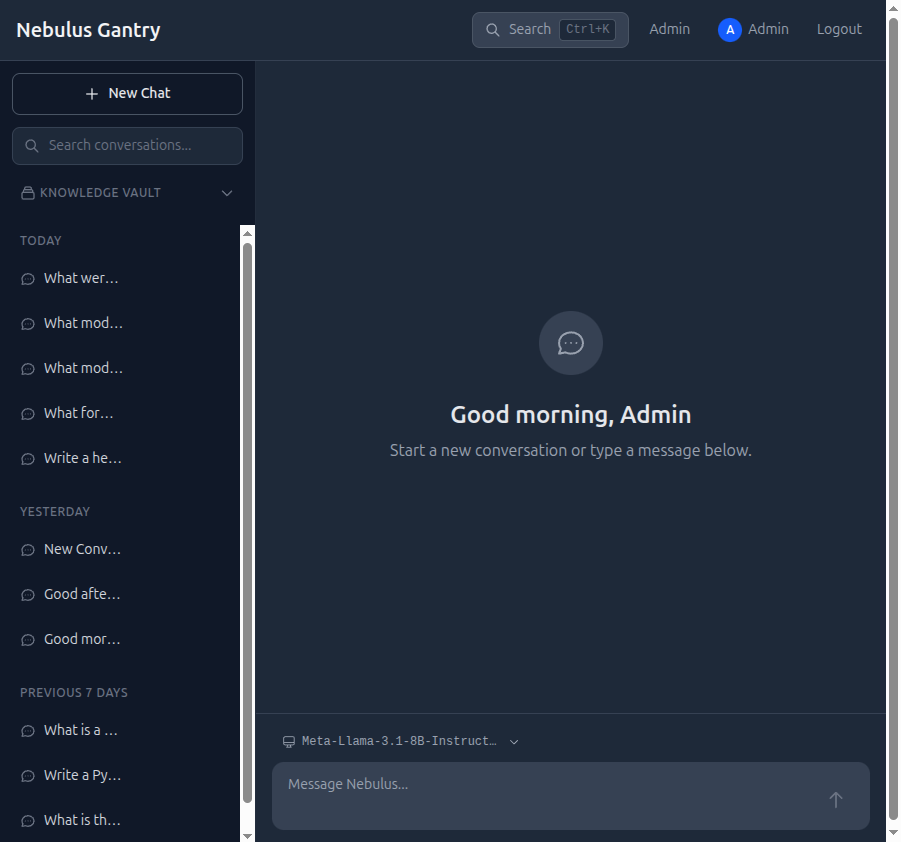
🎨 Beautiful Chat Interface
- Dark-themed UI inspired by Claude.AI - Professional, distraction-free design
- Real-time streaming - SSE-powered responses with typewriter effect
- Markdown rendering - Code blocks with syntax highlighting, tables, lists
- Mobile responsive - Collapsible sidebar, adaptive layout
- Conversation management - Search, pin, export, and organize chats
🧠 Long-Term Memory
- Vector Search - ChromaDB semantic search across all conversation history
- Knowledge Graphs - Automatic entity extraction and relationship mapping with NetworkX
- Contextual Awareness - Relevant history automatically injected into each response
- Cross-conversation memory - AI remembers context from past sessions
📚 Knowledge Vault (RAG)
- Document upload - Supports PDF, DOCX, TXT, CSV formats
- Automatic processing - Smart chunking (2000 chars) with overlap for context preservation
- Semantic search - Vector embeddings for accurate document retrieval
- Source citations - Responses include references to specific document chunks
- Collection management - Organize documents into searchable collections
- Persistence verified - All uploads survive container rebuilds
👥 Multi-User & Admin
- Role-based authentication - Admin and user roles with session-based auth
- User management - Create, update, delete users via admin dashboard
- Model switching - Hot-swap between LLMs without restart (TabbyAPI integration)
- Service monitoring - View and manage Docker container status
- Real-time logs - Stream logs from backend, frontend, or LLM services
- Audit trail - Track user actions and system events
🔌 Flexible Backend Support
- LLM: Works with any OpenAI-compatible API
- TabbyAPI (ExLlamaV2, llama.cpp)
- Ollama (Llama, Mistral, Qwen, etc.)
- vLLM (production inference server)
- LocalAI, LM Studio, text-generation-webui
- Memory: ChromaDB for vector embeddings and semantic search
- Database: SQLite by default (PostgreSQL, MySQL via SQLAlchemy)
- Deployment: Docker Compose with hot-reload for development
🚀 Quick Start
Prerequisites
- Docker & Docker Compose (recommended path)
- OpenAI-compatible LLM API (TabbyAPI, Ollama, vLLM, etc.)
- ChromaDB instance (optional but recommended for memory features)
1. Clone & Configure
git clone https://github.com/jlwestsr/nebulus-gantry.git
cd nebulus-gantry

# Create environment file
cat > .env << 'EOF'
DATABASE_URL=sqlite:///./data/gantry.db
CHROMA_HOST=http://chromadb:8000
TABBY_HOST=http://your-llm-api:5000
SECRET_KEY=change-this-to-a-random-secret
SESSION_EXPIRE_HOURS=24
VITE_API_URL=http://localhost:8000
EOF
2. Run with Docker
docker compose up -d
Access Points:
- 🌐 Frontend: http://localhost:3001
- 🔧 Backend API: http://localhost:8000
- 📖 API Docs: http://localhost:8000/docs (interactive Swagger UI)
3. Create Admin User
docker compose exec backend python -c "
from backend.services.auth_service import AuthService
from backend.database import get_engine, get_session_maker
engine = get_engine()
Session = get_session_maker(engine)
db = Session()
auth = AuthService(db)
user = auth.create_user(
    email='admin@example.com',
    password='your-secure-password',
    role='admin',
    display_name='Admin'
)
print(f'Created admin user: {user.email}')
db.close()
"
4. Start Chatting
Navigate to http://localhost:3001, log in with your admin credentials, and start your first conversation. The AI will remember context across sessions and you can upload documents for RAG-powered answers.
🏗️ Architecture
┌─────────────────────────────────────────────────────────────┐
│                    Browser (React SPA)                       │
│  ┌──────────┬──────────┬──────────┬──────────┬──────────┐  │
│  │ Chat UI  │ Knowledge│ Admin    │ Settings │ Search   │  │
│  │          │ Vault    │ Panel    │          │ (Ctrl+K) │  │
│  └──────────┴──────────┴──────────┴──────────┴──────────┘  │
└────────────────────┬────────────────────────────────────────┘
                     │ HTTP / SSE Streaming
┌────────────────────▼────────────────────────────────────────┐
│              FastAPI Backend (:8000)                         │
│  ┌──────────────────────────────────────────────────────┐  │
│  │ Routers:  /auth  /chat  /admin  /documents           │  │
│  ├──────────────────────────────────────────────────────┤  │
│  │ Services: Auth │ Chat │ LLM │ Memory │ Graph │ Docs  │  │
│  └──────────────────────────────────────────────────────┘  │
│                                                              │
│  ┌───────────┬────────────┬─────────────┬─────────────┐   │
│  │ SQLite    │ ChromaDB   │ NetworkX    │ LLM API     │   │
│  │ (users,   │ (vector    │ (knowledge  │ (streaming  │   │
│  │ messages, │ embeddings)│ graph JSON) │ responses)  │   │
│  │ docs)     │            │             │             │   │
│  └───────────┴────────────┴─────────────┴─────────────┘   │
└─────────────────────────────────────────────────────────────┘
Technology Stack:
| Layer | Technology | Purpose |
|---|---|---|
| Frontend | React 19, TypeScript, Vite 7 | Modern SPA with hot reload |
| Styling | Tailwind CSS v4 | Utility-first, dark theme |
| State | Zustand | Lightweight global state |
| Backend | FastAPI 0.109, Python 3.12 | Async API with auto docs |
| ORM | SQLAlchemy 2 | Type-safe database queries |
| Database | SQLite (default) | Zero-config, file-based DB |
| Vectors | ChromaDB | Semantic search & embeddings |
| Graphs | NetworkX | Entity relationship mapping |
| Auth | Session cookies, bcrypt | Secure, httponly sessions |
| Streaming | SSE (Server-Sent Events) | Real-time chat responses |
| LLM | OpenAI-compatible API | TabbyAPI, Ollama, vLLM, etc. |
| Containers | Docker Compose | Orchestrated deployment |
📖 Documentation
Comprehensive guides available in the GitHub Wiki:
| Guide | Description |
|---|---|
| Installation | Detailed setup for Docker and manual deployment |
| Configuration | Environment variables, LLM backends, ChromaDB |
| Knowledge Vault | Document upload, RAG setup, search optimization |
| Long-Term Memory | Vector search, knowledge graphs, context injection |
| Admin Dashboard | User management, model switching, logs |
| API Reference | REST endpoints, SSE streaming, authentication |
| Architecture | System design, data flow, service interaction |
| Deployment | Production checklist, HTTPS, reverse proxy, scaling |
| Developer Guide | Local setup, testing, contributing |
🎯 Use Cases
For Developers
- ✅ Self-hosted ChatGPT alternative - Complete control over your AI infrastructure
- ✅ Clean architecture - FastAPI + React with proper separation of concerns
- ✅ Full API access - Build integrations, bots, or custom frontends
- ✅ Docker-first - Reproducible environments, easy deployment
- ✅ Open to extend - Add custom models, tools, or integrations
For Enterprises
- 🔒 Private deployment - No data leaves your infrastructure
- 📋 Compliance-friendly - GDPR, HIPAA, SOC2 compatible when self-hosted
- 👥 Multi-user with RBAC - Admin and user roles, session management
- 📊 Audit controls - User actions, system logs, conversation exports
- 🔐 Security-first - Bcrypt passwords, httponly cookies, CORS controls
For AI Enthusiasts
- 🦙 Beautiful UI for local LLMs - Llama, Mistral, Qwen, Yi, DeepSeek, etc.
- 📚 Built-in RAG - Upload PDFs, query your documents with citations
- 🧠 Memory system - AI remembers context across sessions
- 🐳 One-command deploy -
docker compose upand you're running - 🎨 Claude.AI-inspired UX - Professional dark theme, smooth animations
🔧 Development
Local Setup (without Docker)
Backend:
cd backend
python3 -m venv venv
source venv/bin/activate  # On Windows: venv\Scripts\activate
pip install -r requirements.txt
uvicorn main:app --reload --port 8000
Frontend:
cd frontend
npm install
npm run dev
Frontend dev server: http://localhost:5173 Backend API: http://localhost:8000
Testing
cd backend
pytest tests/ -v

# Run with coverage
pytest tests/ --cov=backend --cov-report=html
Current test status: 276 tests passing
Contributing
See Contributing Guide for:
- Code style guidelines (Black, Flake8, ESLint)
- Commit conventions (Conventional Commits)
- Pull request process
- Development workflow
📦 Deployment
Docker Compose (Recommended)
# Production deployment
docker compose up -d

# View logs
docker compose logs -f

# Restart services
docker compose restart backend frontend
Production Checklist
Before deploying to production:
- Change
SECRET_KEYto a random 32+ character string - Configure HTTPS via reverse proxy (nginx, Caddy, Traefik)
- Set up backups for
./datadirectory (SQLite, knowledge graphs) - Review CORS settings in
backend/main.py - Create strong admin password (min 12 chars, mixed case, symbols)
- Configure ChromaDB persistence with external volume
- Set
SESSION_EXPIRE_HOURSto appropriate value (default: 24) - Enable firewall rules (allow 80/443, block 8000/3001 externally)
- Set up monitoring (uptime, logs, resource usage)
See Production Deployment Guide for detailed instructions.
🛠️ Configuration
Key environment variables:
| Variable | Default | Description |
|---|---|---|
DATABASE_URL |
sqlite:///./data/gantry.db |
SQLAlchemy database connection string |
SECRET_KEY |
dev-secret-change-in-production |
Session signing secret (change in prod!) |
CHROMA_HOST |
http://localhost:8000 |
ChromaDB HTTP endpoint for vectors |
TABBY_HOST |
http://localhost:5000 |
LLM API endpoint (OpenAI-compatible) |
SESSION_EXPIRE_HOURS |
24 |
Session cookie lifetime in hours |
VITE_API_URL |
http://localhost:8000 |
Backend URL for frontend (build-time) |
Full configuration guide: Wiki > Configuration
🤝 Contributing
Contributions are welcome! Please:
- Fork the repository
- Create a feature branch (
git checkout -b feat/amazing-feature) - Commit your changes (
git commit -m 'feat: add amazing feature') - Push to the branch (
git push origin feat/amazing-feature) - Open a Pull Request
See CONTRIBUTING.md for detailed guidelines.
📊 Project Status
- ✅ v2.0 - Complete rewrite (FastAPI + React)
- ✅ Streaming chat - SSE real-time responses
- ✅ Long-term memory - ChromaDB + NetworkX
- ✅ Knowledge Vault - RAG with document upload
- ✅ Admin panel - Users, models, services, logs
- ✅ Model switching - Hot-swap LLMs via TabbyAPI
- ✅ Conversation export - JSON and PDF formats
- ✅ Searchable history - Ctrl+K command palette
- 🚧 Personas - Custom system prompts (planned)
- 🚧 Multi-modal - Image upload support (planned)
📄 License
Proprietary - West AI Labs LLC
This software is proprietary and not open source. All rights reserved.
🌟 Acknowledgments
Built with excellent open-source tools:
- FastAPI - Modern Python web framework
- React - UI library
- ChromaDB - Vector database
- Tailwind CSS - Utility-first CSS
- Zustand - State management
- NetworkX - Graph algorithms
UI design inspired by Claude.AI and ChatGPT.
🔗 Related Projects
Part of the Nebulus AI Ecosystem:
- Nebulus Prime - Complete local AI infrastructure (Linux/NVIDIA)
- Nebulus Edge - macOS deployment with MLX (Apple Silicon)
- Nebulus Core - Shared Python library and CLI framework
Made with ❤️ for the self-hosted AI community