

NextRole 🚀
✨ GenAI-Accelerated Career Advancement ✨
Upload your CV + a job description. Get a tailored resume PDF, a researched interview-prep doc, and a day-of battlecard cheat sheet — built by a multi-agent system with long-term memory.
🌐 next-role.dev — the hosted version is coming soon. Until then, self-host it in minutes with the Quick Start below.








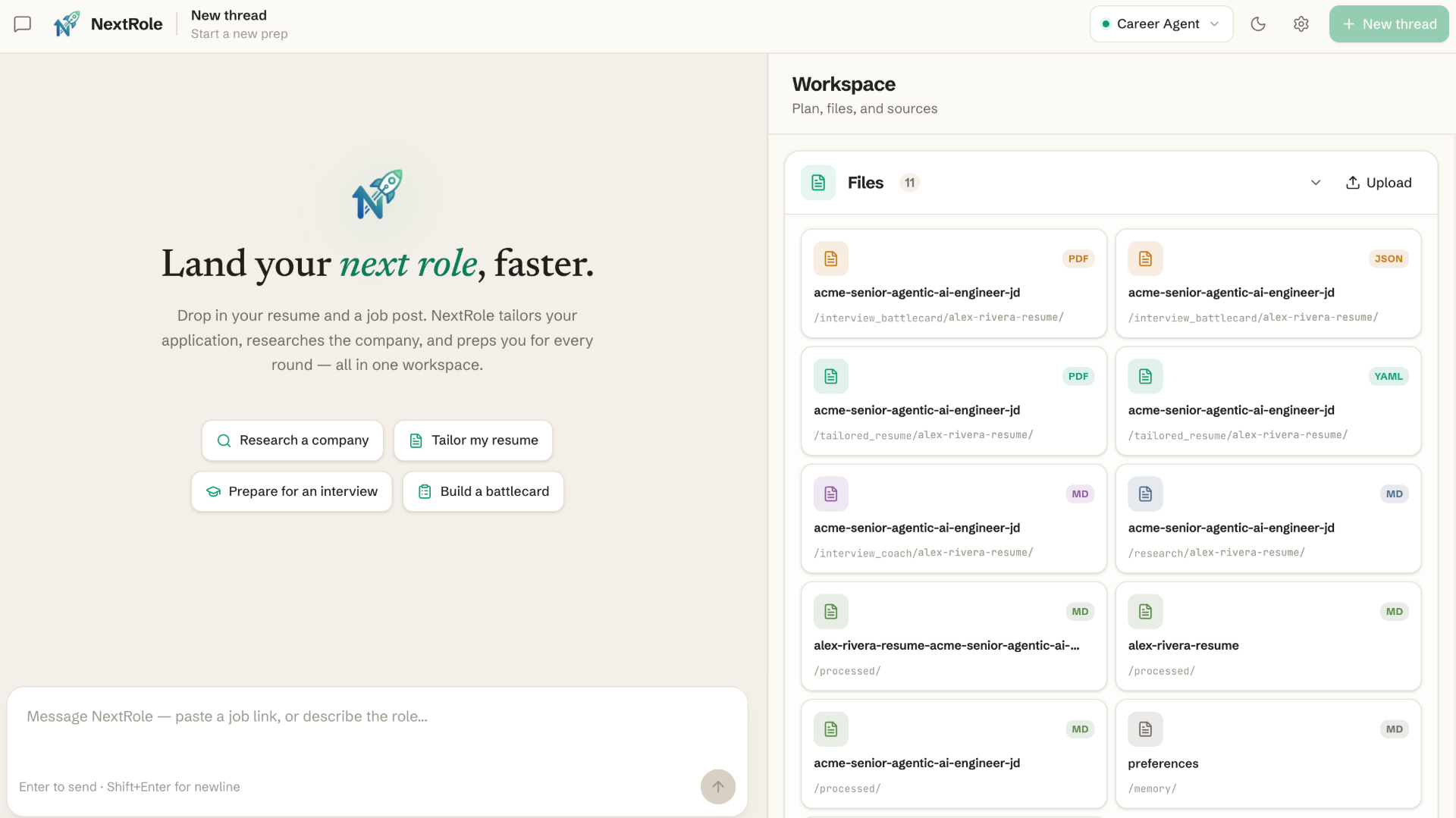
What is NextRole?
Preparing for an interview takes hours of tedious resume tailoring and company research. NextRole automates the heavy lifting. Hand it your current CV and a target Job Description (or just a JD URL) — whether you're applying externally or angling for an internal move — and a team of specialized AI agents researches the company, rewrites your resume to fit, coaches you round-by-round, and prints a cheat sheet for the day of.
- 📄 Tailored resume → PDF — your experience rewritten against the exact JD + company research, rendered with
rendercv(editable & re-renderable). - 🔍 Deep company & role recon — live web research distilled into a match analysis.
- 🎯 Structured interview prep — a self-introduction plus per-round STAR stories mapped to the role.
- ⚡ Day-of battlecard — a one-page-per-round PDF cheat sheet for the final high-pressure review.
- 🗓️ Time-boxed prep plans — a study plan that fits 1 month, 2 weeks, or just 3 hours.
- 🔗 Paste a JD URL — point it at a careers page; it extracts and processes the posting for you.
- 💬 Iterate by chatting — "add a 4th round", "add React to my skills" — streaming multi-turn edits, with the right agent owning each file.
- 🗂️ Built-in workspace — upload, preview (PDF / MD / YAML / JSON / code), print-to-PDF, and swap the LLM at runtime.
Demo
Meet the agents — NextRole in 72 seconds
Career agent — from CV and JD to interview-ready
▶️ Watch the full walkthrough in HD on YouTube »
Analytics agent — ask the product questions, get charts
▶️ Watch the analytics agent demo in HD on YouTube »
Quick Start
The whole stack — frontend, backend, Postgres, Redis, S3-compatible object storage, and an analytics stack (ClickHouse, Dagster, Cube, Superset) — runs in Docker.
# 1. Clone & configure
git clone https://github.com/tam159/next-role.git
cd next-role
cp .env.example .env          # then fill in your API keys (see table below)

# 2. Launch everything
docker compose up -d

# 3. Find your host ports (set in .env, vary per machine)
docker ps                     # read the 0.0.0.0:<host>->... mappings

# 4. Open the app
#    Frontend UI      →  http://localhost:<FRONTEND_LOCAL_PORT>/
#    Backend API docs →  http://localhost:<LANGGRAPH_LOCAL_PORT>/docs
💡 Pick your LLM in the app. Open the in-app Configuration dialog to set the main agent and subagent models — no rebuild needed. See LLM configuration below for recommended models and free / local options.
Environment variables — what to put in .env
| Variable | Required | Purpose |
|---|---|---|
OPENAI_API_KEY |
✅ | Default main + subagent models |
TAVILY_API_KEY or TINYFISH_API_KEY |
✅ | Web research (hiring-recon, JD-from-URL) — whichever provider WEB_SEARCH_PROVIDER selects |
WEB_SEARCH_PROVIDER |
preset | Web research provider: tavily (default) or tinyfish — see below |
LLAMA_CLOUD_API_KEY |
✅ | Document parsing (LlamaParse) |
POSTGRES_PASSWORD |
✅ | Local Postgres password |
ANTHROPIC_API_KEY / GOOGLE_API_KEY |
⬜ | Alternative providers (swap at runtime) |
OPENAI_API_BASE |
⬜ | Self-hosted / Azure / LM Studio endpoint |
AWS_ACCESS_KEY_ID / AWS_SECRET_ACCESS_KEY / AWS_DEFAULT_REGION |
⬜ | AWS Bedrock models |
LANGCHAIN_API_KEY + LANGCHAIN_TRACING_V2=true |
⬜ | LangSmith tracing (recommended) |
AUTH_ENABLED / BETTER_AUTH_SECRET / LANGGRAPH_AUTH |
⬜ | Multi-user auth (opt-in) — steps in Authentication & multi-user |
CAREER_AGENT_EXECUTE_APPROVAL |
preset | Human approval for the agent's shell tool — see below |
SANDBOX_PROVIDER (+ SANDBOX_E2B_*, SANDBOX_TEMPLATE) |
preset | Where the shell tool executes: host or isolated sandbox — see below |
FRONTEND_LOCAL_PORT / LANGGRAPH_LOCAL_PORT / POSTGRES_LOCAL_PORT / REDIS_LOCAL_PORT / OBJECT_STORE_LOCAL_PORT |
preset | Host port mappings |
OBJECT_STORE_* |
preset | Artifact object storage — see below |
CLICKHOUSE_* / DAGSTER_* / DBT_DOCS_LOCAL_PORT / CUBE_* / SUPERSET_* / ANALYTICS_RO_PASSWORD |
preset | Analytics stack (warehouse, orchestration, semantic layer, BI) — see below |
CLICKHOUSE_AGENT_PASSWORD / ANALYTICS_AGENT_ALLOWED_USERS |
generate / empty | The analytics agent's read-only warehouse login, and who may run it — see below |
Shell-command approval. Risky execute (bash) commands pause in the UI for approve / edit / reject; a conservative read-only allowlist auto-approves trivial pokes. The gate applies in both sandbox modes below — isolation contains blast radius, not exfiltration or API misuse. On by default — set CAREER_AGENT_EXECUTE_APPROVAL=false only for offline evals or emergency rollback (env changes need docker compose up -d backend to recreate, not restart). Full policy in backend/agents/career_agent/README.md.
Web research. WEB_SEARCH_PROVIDER picks the backend behind web_search / web_extract (used by hiring-recon) and extract_jd. tavily (default) returns longer per-result content; tinyfish (TinyFish Search + Fetch) returns short snippets, has no finance topic, and fetches at most 10 URLs per call. Results are normalized to one shape, so tools, skills and the Sources panel behave the same either way.
Sandbox. SANDBOX_PROVIDER picks where execute commands (and rendercv renders) run. local (default) executes on the backend host — right for local dev and a trusted team, zero extra moving parts. e2b runs every command in an isolated remote microVM over the E2B API: point SANDBOX_E2B_API_URL at a self-hosted CubeSandbox (open source, Apache-2.0 — your data never leaves your infra; provisioning + template guide in deploy/cubesandbox/), or leave it empty to use E2B Cloud with the same code path. CubeSandbox requires its own Linux host (custom PVM kernel or native KVM), so it is reached over HTTP rather than run inside docker compose.
Object storage. Binary artifacts (uploads + rendered PDFs) live in S3-compatible object storage. Locally that's the compose object-store service (SeaweedFS) and the presets work as-is: S3 API on OBJECT_STORE_LOCAL_PORT, a browsable bucket UI on OBJECT_STORE_UI_LOCAL_PORT, and placeholder credentials that the local emulator accepts but doesn't enforce. For the cloud, point OBJECT_STORE_ENDPOINT / OBJECT_STORE_BUCKET / credentials at a managed bucket — AWS S3, GCS, Azure, or any S3-compatible store — with no code changes. Note: the AWS_* variables are reserved for Bedrock models; the object store reads only OBJECT_STORE_*.
Analytics. A self-contained analytics stack (docs/ideas/analytics-platform-plan.html Phase 0) rides the same compose file: dlt extracts the operational Postgres into a ClickHouse warehouse (structure and metrics only — chat/CV text never lands there), dbt models it into star-schema marts, Cube serves the metric definitions, and Superset ships a seeded NextRole Overview dashboard (users, threads & runs, reliability, tokens + estimated cost), all orchestrated by Dagster on an hourly schedule. Fill the three generate: secrets in the analytics block of .env, then after first boot trigger the initial pipeline run once — docker compose exec dagster-daemon dagster asset materialize --select "*" -m nextrole_analytics.definitions (or "Materialize all" in the Dagster UI on DAGSTER_LOCAL_PORT) — and log into Superset on SUPERSET_LOCAL_PORT with SUPERSET_ADMIN_USERNAME/SUPERSET_ADMIN_PASSWORD. Cube's Playground is on CUBE_LOCAL_PORT, the generated dbt docs site (model/column catalog + lineage) on DBT_DOCS_LOCAL_PORT, ClickHouse's query UI on http://localhost:<CLICKHOUSE_HTTP_LOCAL_PORT>/play. Budget ~2–4 GB extra RAM; overview and screenshots in analytics/README.md, developer guide in analytics/AGENTS.md. Product analytics (PostHog) and LLM-trace storage (Langfuse) are deliberate follow-ups per the blueprint.
Analytics agent. A second agent, picked from the agent switcher in the top bar, answers questions about the product itself — activity, reliability, LLM cost, agent behaviour — by querying the warehouse above and drawing the answer. It reads the marts' own documentation (dbt descriptions, Cube metric definitions, ClickHouse schema) before writing SQL, and charts persist with the conversation, so reopening a thread months later still shows them. It connects as a dedicated ClickHouse user with SELECT on the marts and staging databases only, under a settings profile whose limits it cannot raise — generate CLICKHOUSE_AGENT_PASSWORD alongside the other analytics secrets. Because it reads every user's activity, access is an explicit allowlist: with auth on, list the user ids or emails allowed to run it in ANALYTICS_AGENT_ALLOWED_USERS (empty denies everyone; single-user deployments are unaffected). Details in backend/agents/analytics_agent/README.md.
Secrets live only in .env (gitignored); gitleaks runs on every commit.
LLM configuration — pick your models, run it for free or local
Models are swappable at runtime — no rebuild. Open the in-app Configuration dialog and set Main agent / Subagents to a <provider>:<model> string (e.g. anthropic:claude-sonnet-5); leave blank to use the defaults. Settings persist in your browser's local storage.
Recommended: Claude Sonnet 5, GPT-5.x, or Gemini 3.x — e.g. anthropic:claude-sonnet-5, openai:gpt-5.6-terra, google_genai:gemini-3.5-flash.
Run it for free or fully local:
- Tavily and LlamaCloud both include a generous monthly free tier, and TinyFish Search / Fetch are free within a daily allowance — plenty for local use.
- Google AI Studio offers a free tier for Gemini
flash/litemodels. - Fully local — point
OPENAI_API_BASEat LM Studio or Ollama (both expose an OpenAI-compatible API) and fill your local model in the UI.
Output quality tracks the model you pick — smaller local models trade some quality for zero cost.
Dev workflow — hot reload, restart, rebuild, stop
- Code edits hot-reload in both containers — just save the file.
- Add a frontend dep:
pnpm --dir frontend add <pkg>→docker compose restart frontend - Add a backend dep:
uv add <pkg>→docker compose up -d --build backend - Change
.env:docker compose up -d <service>(recreates the container with the new values) - Stop:
docker compose down(add-vto wipe the DB, Redis, object-storage, warehouse, Dagster & Superset volumes)
Architecture
NextRole runs two agents in its own self-hosted agent server on LangGraph + DeepAgents. The career agent handles intake, document processing, and the final battlecard; it delegates research, resume tailoring, and interview coaching to three declarative specialist subagents (defined in subagents.yaml, each with its own model, tools, and skills). The analytics agent answers product questions with read-only warehouse queries and persistent charts.
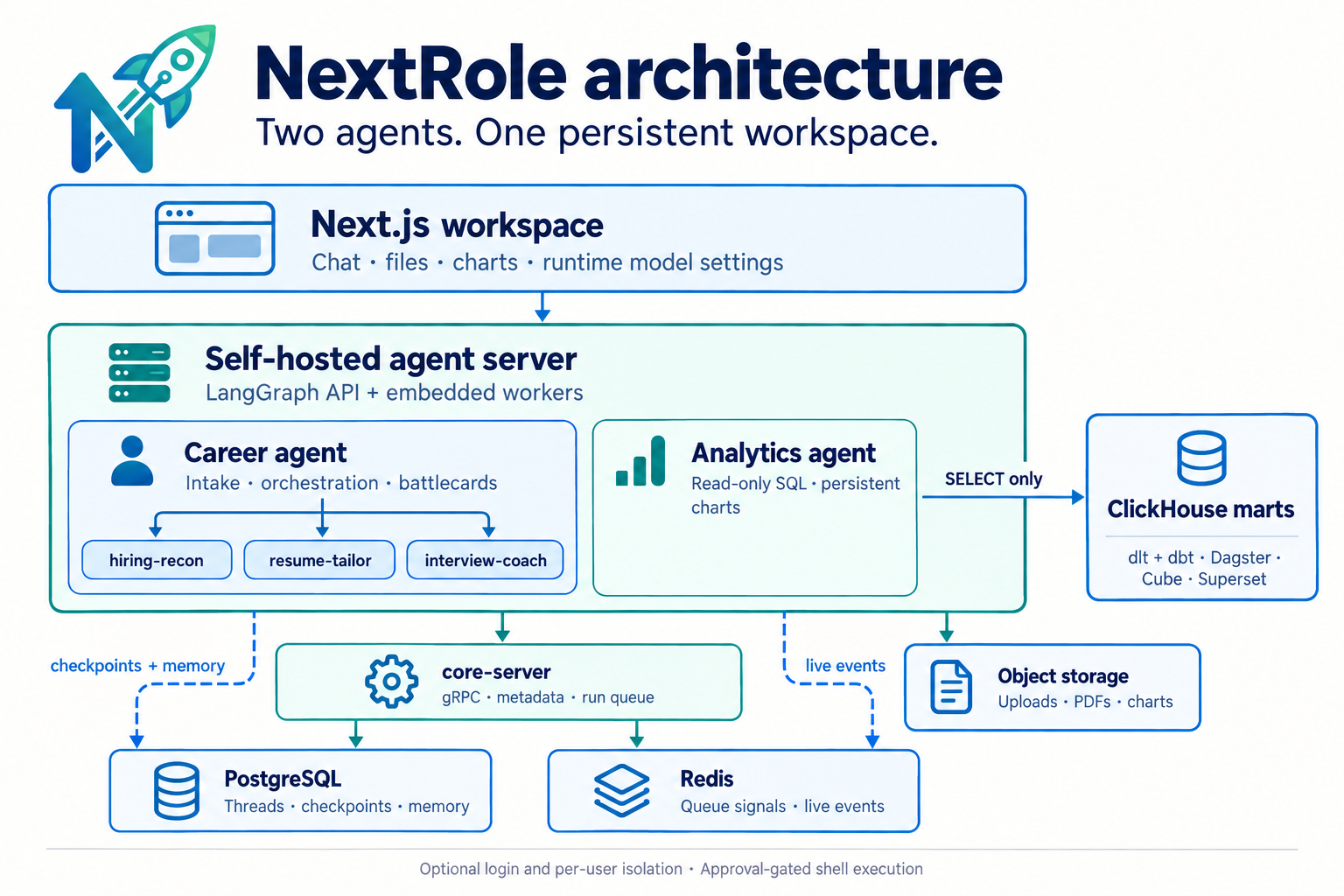
The backend executes the agents; core-server owns metadata and the durable run queue in PostgreSQL. Checkpoints and memory use direct PostgreSQL access, while Redis carries queue signals and live events. Uploads, PDFs, and charts persist in S3-compatible object storage. See the backend architecture and analytics guide for the detailed flows.
How It Works
A five-stage career preparation pipeline followed by ongoing edits. Stage 4 runs the resume tailor and interview coach in parallel; after generation, Stage 6 routes follow-up edits to whichever agent owns the target file.
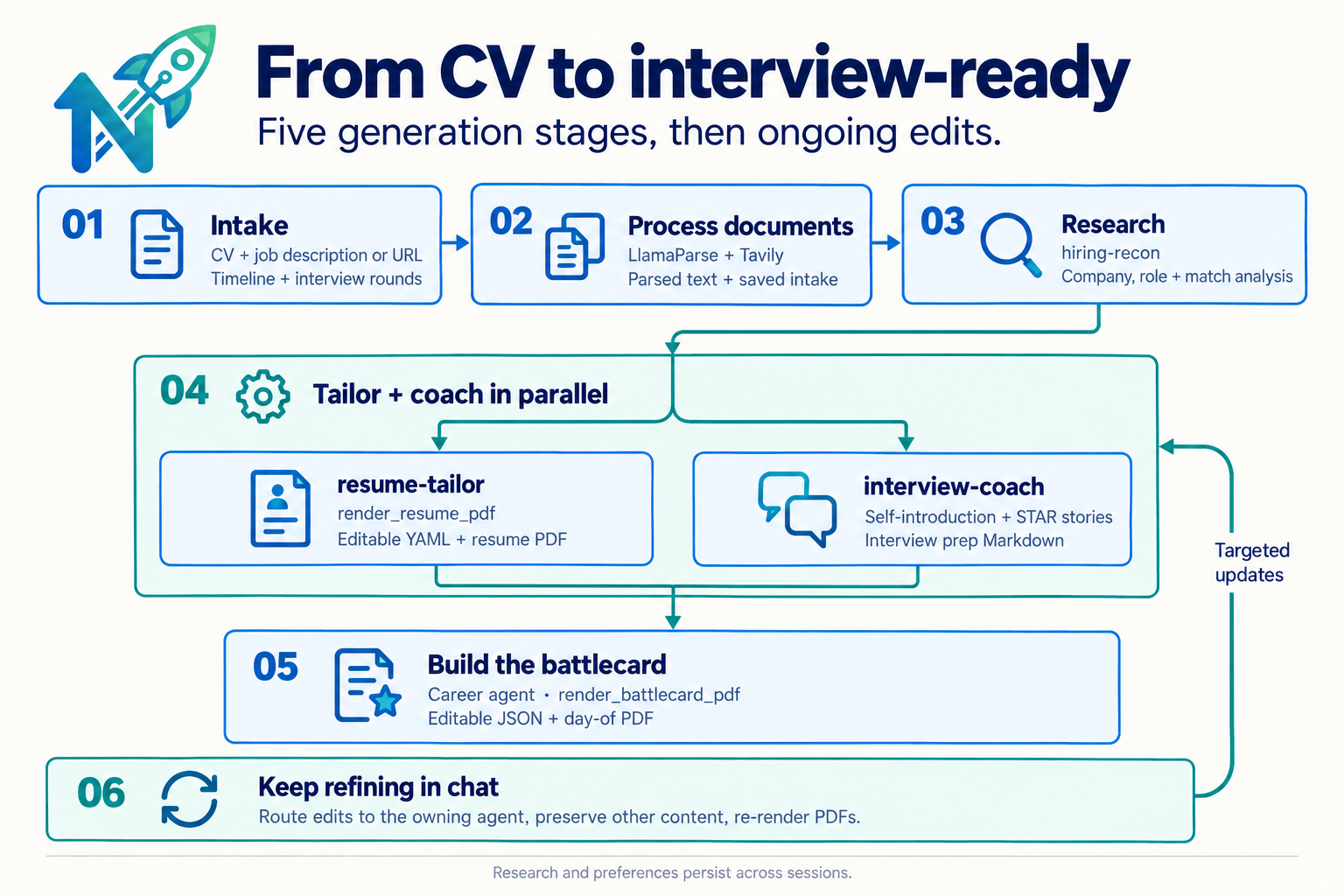
The return arrow illustrates a targeted tailoring or coaching update. Other edits go to the agent that owns the affected file; they do not automatically rerun the full pipeline.
Stage-by-stage detail
- Intake — the agent asks for your CV, the JD (file, URL, or pasted text), your prep timeline, and any extra context.
- Process documents — uploads are parsed to markdown via LlamaParse (
parse_document); JD URLs are pulled via Tavily or TinyFish (extract_jd). Results land in/processed/, alongside a persisted intake note. - Research — the
hiring-reconsubagent gathers company + role intel and a match analysis →/research/<resume>/<jd>.md. - Tailor & coach (parallel) —
resume-tailorrewrites the CV as arendercvYAML and renders a PDF;interview-coachwrites a structured prep doc (self-intro + per-round STAR stories). - Battlecard — the main agent assembles a one-page-per-round JSON and renders it to a day-of PDF via WeasyPrint.
- Multi-turn updates — ask for changes in chat; the owning agent reads the existing file, preserves everything you didn't name, and re-renders.
The full procedure (file layout, update routing, source-of-truth conventions) lives in backend/agents/career_agent/README.md. Per-feature design docs are in docs/prd/ — an OKF knowledge bundle you can render as an interactive graph; see docs/prd/README.md.
The DeepAgents stack — an agent defined by filesystem primitives
The agent's behavior is configured by files, not hardcoded — making it easy to read, diff, and extend:
| Primitive | Where | Role | When loaded |
|---|---|---|---|
| Memory | CAREER_AGENT.md |
Per-stage procedure manual (semantic memory) | Always (system prompt) |
| Skills | skills/<consumer>/<name>/SKILL.md |
Task workflows (procedural memory) | On demand, per consumer |
| Subagents | subagents.yaml |
Specialist delegates → the task tool |
Always |
| Tools | tools.py + DeepAgents built-ins |
parse_document, extract_jd, render_resume_pdf, render_battlecard_pdf, list_files, plus read/write/edit_file, ls/glob/grep, delete, execute |
— |
| Filesystem | CompositeBackend |
Routes virtual paths to the right store (see below) | — |
| Middleware | middleware.py |
ModelOverrideMiddleware (runtime LLM swap; opts Claude tool calls — direct API and Bedrock — into fine-grained arg streaming) + UtcDatetimeMiddleware |
— |
Subagents only receive the tools they opt into in YAML — tool whitelisting keeps interview-coach, for example, from inheriting the main agent's full toolset.
Memory & storage architecture
A single CompositeBackend gives the agent one virtual filesystem while routing each path prefix to the right physical store — Postgres for text artifacts, S3-compatible object storage for uploads and rendered PDFs (SeaweedFS locally; S3 / GCS / Azure in the cloud), and a shell route for execute whose scratch space holds only render working files: a host shell backend by default, or an isolated remote sandbox (CubeSandbox / E2B) with SANDBOX_PROVIDER=e2b.
flowchart LR
    Agent["Agent filesystem tools<br/>read_file · write_file · edit_file<br/>ls · glob · grep · execute"]
    CB{{"CompositeBackend<br/>routes virtual paths"}}
    Agent --> CB
    subgraph Shell["Shell default route · SANDBOX_PROVIDER"]
        SH["execute — local: host subprocess,<br/>/virtual/path → on-disk path ·<br/>e2b: remote E2B microVM<br/>(CubeSandbox self-hosted / E2B Cloud)<br/>renders run in a throwaway scratch dir"]
    end
    subgraph Store["StoreBackend · Postgres + pgvector"]
        ST["/memory/ · /p