

Noticons
39,819 icons, inside Notion's own page-icon menu.
Offline. No account. No tracking.
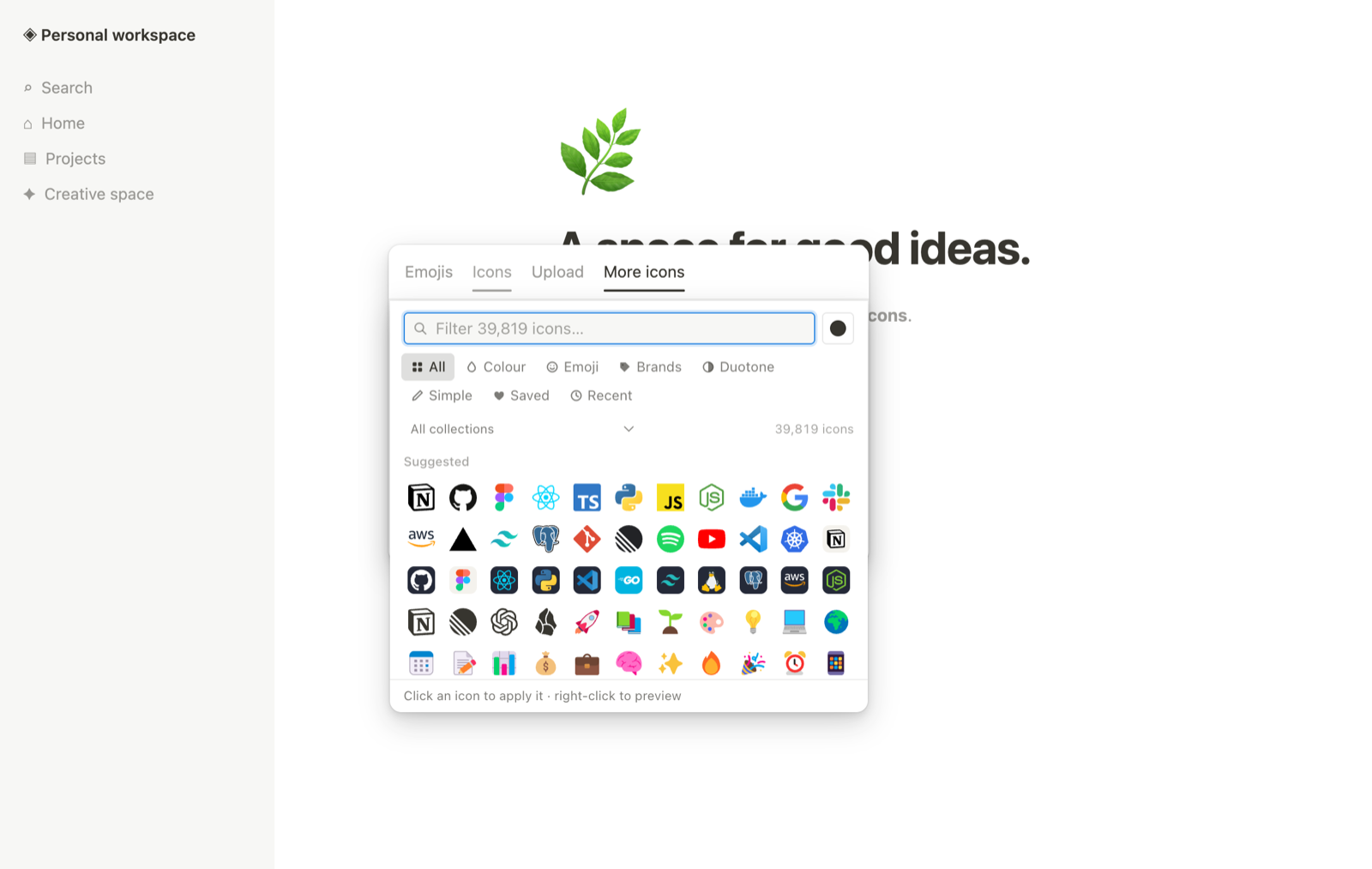
Noticons adds a More icons tab next to Notion’s Emojis / Icons / Upload tabs. Search 39,819 icons across 18 collections, tint the line and duotone ones with Notion's own colour palette, and click once to apply.
| Icons | 39,819 across 18 collections, filtered by Colour, Emoji, Brands, Duotone or Simple |
| Colour | 15,838 full-colour icons: Fluent Emoji Flat, Twemoji, Streamline Emojis, Flat Color Icons, Fluent UI System Color, Streamline Ultimate Color, Material Icon Theme, Catppuccin, Circle Flags, Logos, Devicon, Skill Icons |
| Duotone | 4,462 two-tone icons — Solar, Duoicons and Phosphor's duotone weight — all repainted by the colour picker |
| Line | Lucide, Tabler, Phosphor and Simple Icons, for when a page wants something quieter |
| Search | Offline fuzzy matching, plus synonyms for the way people actually name pages (roadmap, okr, hiring, security). Flags answer to country names, not just ISO codes |
| Tint | Notion's ten text colours for the line and duotone sets, or any hex you like |
| Applies | One click. The SVG is rasterised to a transparent 280 × 280 PNG and handed to Notion's own upload |
| Privacy | No network requests, no analytics, no accounts. One permission: storage |
Install
Chrome, Edge, Brave, Arc — Chrome Web Store (pending first submission) Firefox, Zen — Firefox Add-ons (pending first submission)
From source
npm ci
npm run build
- Chromium — open
chrome://extensions, enable Developer mode, Load unpacked, selectdist/. - Firefox — open
about:debugging#/runtime/this-firefox, Load Temporary Add-on, selectdist-firefox/manifest.json.
Refresh Notion afterwards. Temporary Firefox add-ons disappear on restart; a permanent install needs a signed build from the store.
Using it
- Click a page's icon in Notion.
- Choose More icons — or press Alt+Shift+I anywhere on a Notion page.
- Optionally set a colour with the dot beside the search field.
- Click an icon. It applies immediately and the panel closes.
| Action | How |
|---|---|
| Apply | Click an icon |
| Preview without applying | Right-click an icon |
| Save / unsave | The bookmark on an icon, or in the preview bar |
| Copy the SVG, or download a PNG | Preview an icon, then use the bar at the bottom |
| Navigate by keyboard | ↓ from the search field, arrows in the grid, Enter applies the first result |
Saved icons, recents, your colour and your last filter persist locally.
How it works
- A content script recognises the visible Emojis / Icons / Custom tab group by its labels, in every language Notion currently ships, and appends one tab styled from its own neighbours' computed styles.
- The panel lives in a Shadow DOM so nothing leaks either way, and reads Notion's live light/dark class so it follows the theme switch.
- A background service worker loads the bundled Iconify JSON and runs Fuse.js fuzzy search off the editing thread.
- The chosen SVG is rasterised to a 280 × 280 PNG and passed to Notion's own custom-image paste handler, or to a native file input. Save is clicked only if Notion actually asks for one. The clipboard is never read or replaced.
- Because Notion stores the image, applied icons survive uninstalling this extension and appear on your other devices.
No paid icon APIs, no network search, no tokens, no Notion private API calls.
Honest limitations
Live upload against a logged-in Notion session has not been verified by the author. The automated tests and the browser fixture exercise tab injection, fuzzy search, PNG conversion and both upload paths, but Notion can change its DOM at any time — this is a best-effort integration, not an official API.
- If the tab is missing, use Alt+Shift+I, or the toolbar button.
- If the upload fails, preview the icon and use ↓ PNG, then upload it from Notion's Upload tab.
- The extension never claims Notion saved anything. It distinguishes three outcomes — Notion asked for a Save and got one, Notion took the image and closed its menu, or Notion took the file and said nothing. The third leaves the panel open and tells you to check the page icon, because handing over a file is not evidence that Notion kept it.
- Desktop web only: it does not touch Notion's desktop app, mobile app, or public
notion.sitepages. - Roughly 52 MB of icon data is bundled uncompressed; the first open indexes it once.
Development
Node 20+ (CI runs 22).
npm ci
npm test            # 31 tests: detection, upload outcomes, search, sanitisation, manifest
npm run brand       # regenerate icons from scripts/brand.mjs — output is committed
npm run build       # dist/ (Chromium) and dist-firefox/
npm run dev         # build, then serve the integration fixture on :4173
npm run package     # releases/noticons-{chrome,firefox}-v<version>.zip
npm run verify      # brand + test + build, the same gate CI runs
npm run dev serves a deliberately-labelled fixture that is not live Notion.
It runs the real picker, detection and upload code against a mock messaging API,
and has a dark-mode toggle for checking theme handling.
| File | Responsibility |
|---|---|
| src/notion.js | DOM recognition, the native upload adapter, PNG conversion |
| src/picker.js | The panel, colour well, saved/recent, apply flow |
| src/catalog.js | Fuzzy search, synonyms, curated suggestions, SVG generation |
| src/collections.js | Which sets are bundled, the category each answers, and how two of them are narrowed |
| src/theme.js | Notion's surface tokens and colour palette |
| src/styles.js | The panel stylesheet |
| src/content.js | Tab injection and the keyboard shortcut |
| scripts/brand.mjs | Brand geometry → the committed PNG icons |
| scripts/build.mjs | Both browser builds, version injection, licence metadata |
Releasing
Tag it; CI does the rest.
npm version minor
git push --follow-tags
.github/workflows/release.yml verifies the tag against package.json, runs
the tests, rebuilds, packages, publishes to both stores and opens a GitHub
Release. Publishing steps skip themselves when their secrets are absent.
See store/DEPLOY.md for the credentials, and
store/listing.md for the listing copy.
Legal
MIT — see LICENSE. Bundled icon sets keep their own licences; see
THIRD_PARTY_NOTICES.md, and the per-set notices in
notices/, which ship inside the package.
Noticons is an independent project. It is not affiliated with, endorsed by, or sponsored by Notion Labs, Inc. "Notion" is their trademark, used here only to describe what this extension works with.