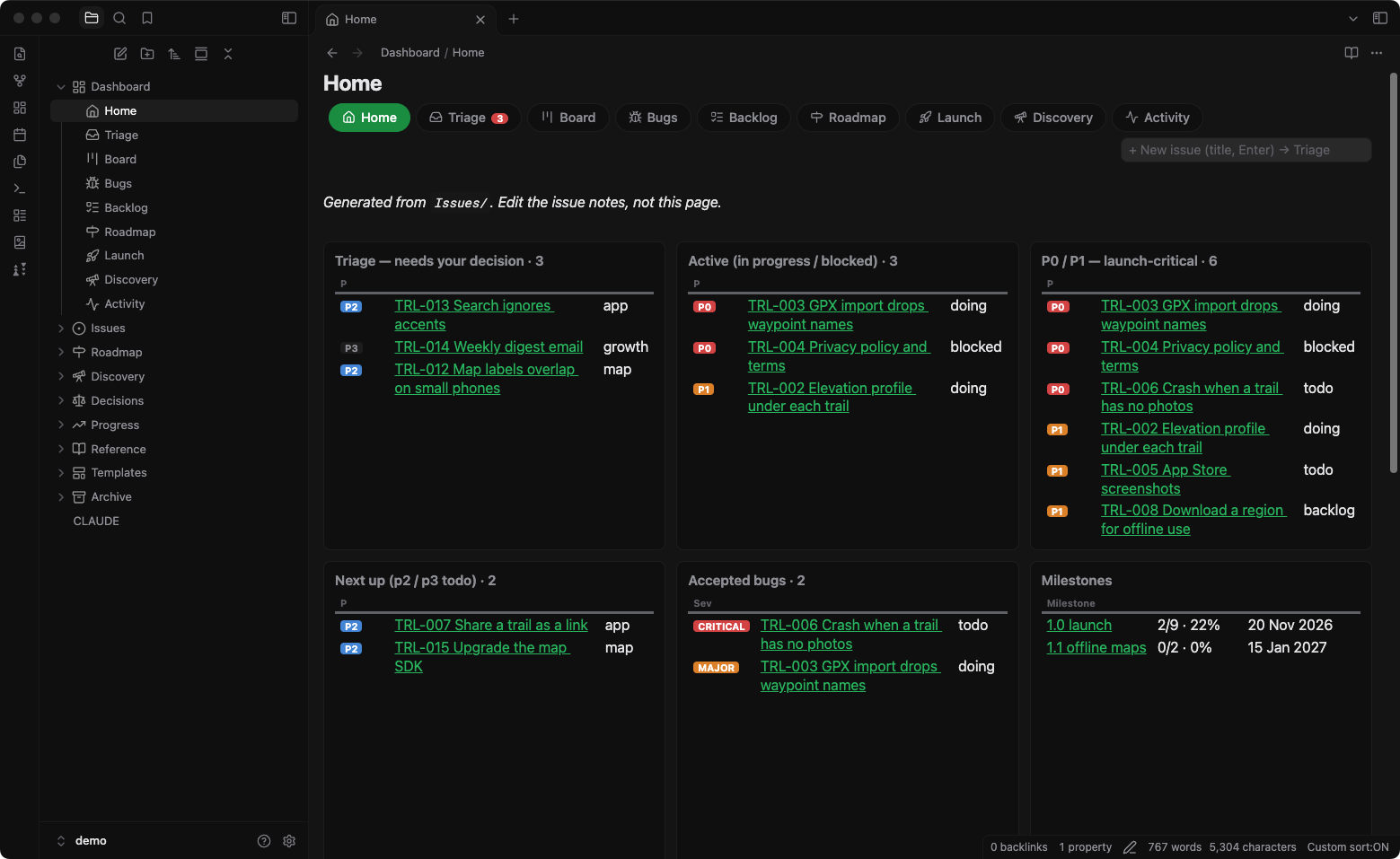
Linear-style issue tracking in plain Markdown, inside Obsidian. Issues, a triage inbox, a kanban board, bugs, backlog, milestones, discovery notes and decisions, all as notes you own. Optionally run by Claude Code, which files, updates and links the notes for you while it works on your code.
| Triage | Board |
|---|---|
 |
 |
Quick start: try the demo, or let your AI coding agent set it up for you with one copy-paste prompt.
Why
Small teams and solo builders often want Linear's discipline (one inbox, clear statuses, priorities, milestones) without another SaaS, seat prices or lock-in. Here every issue is a Markdown file with YAML frontmatter, and the dashboards are Dataview queries over that frontmatter. It's diffable, greppable and works offline. Put it in git and you have full history. An AI coding agent can read and write it as easily as you can.
What you get
- Issues (
Issues/ACME-001 Title.md):type(task, bug, feature, chore),status(triage, backlog, todo, doing, blocked, done, cancelled),priorityp0–p3,severityfor bugs,area,milestone,source, plus an## Activitylog at the bottom of each note. - Dashboards (
Dashboard/), with a tab bar and a quick "+ New issue" field that files straight into triage:- Home: what needs a decision, what's in progress, launch-critical work, next up, bugs, milestones, latest progress.
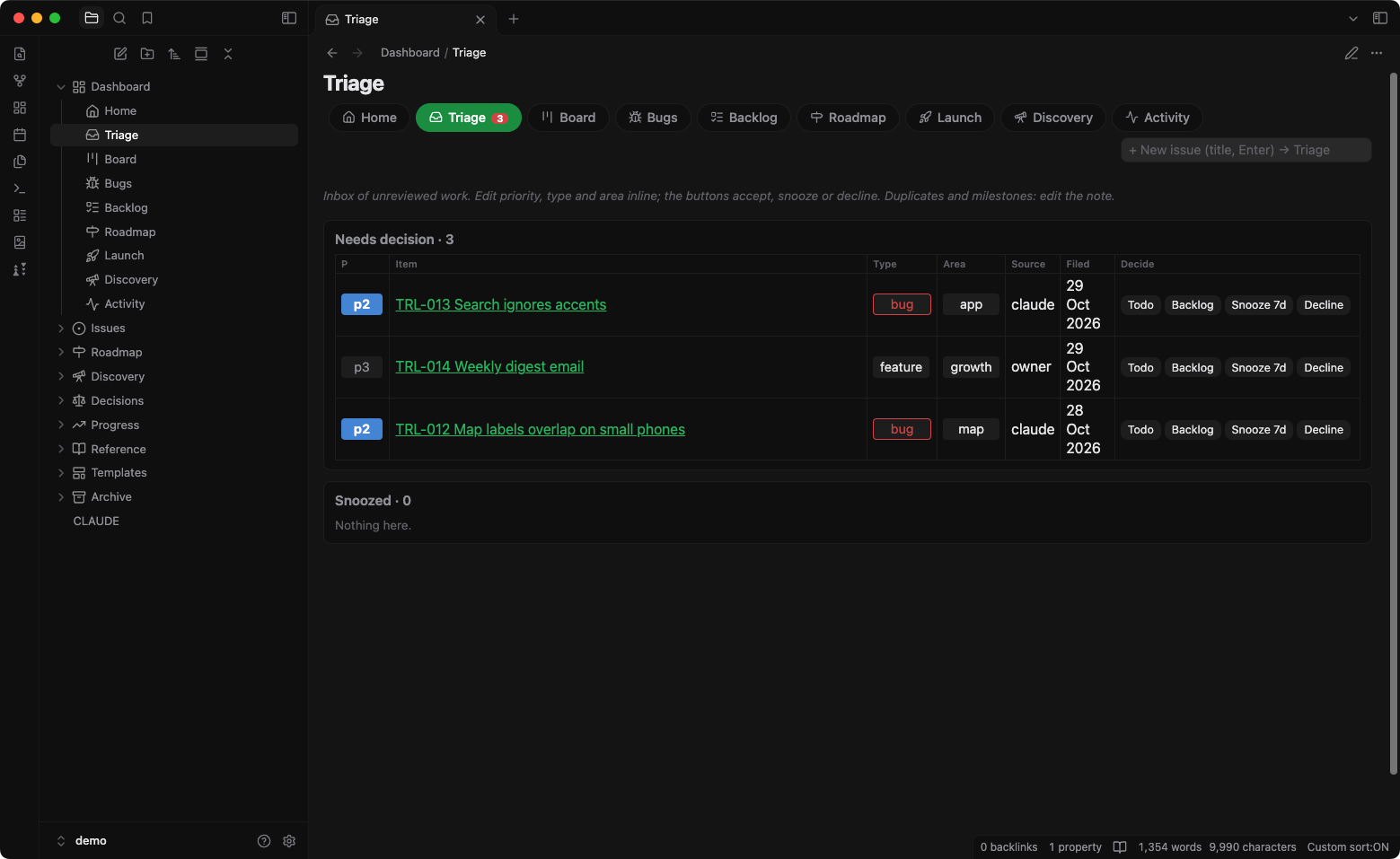
- Triage: the inbox. Accept to Todo or Backlog, snooze 7 days, or decline, right from the table. Each choice is written to the issue's frontmatter and Activity log, with Undo.
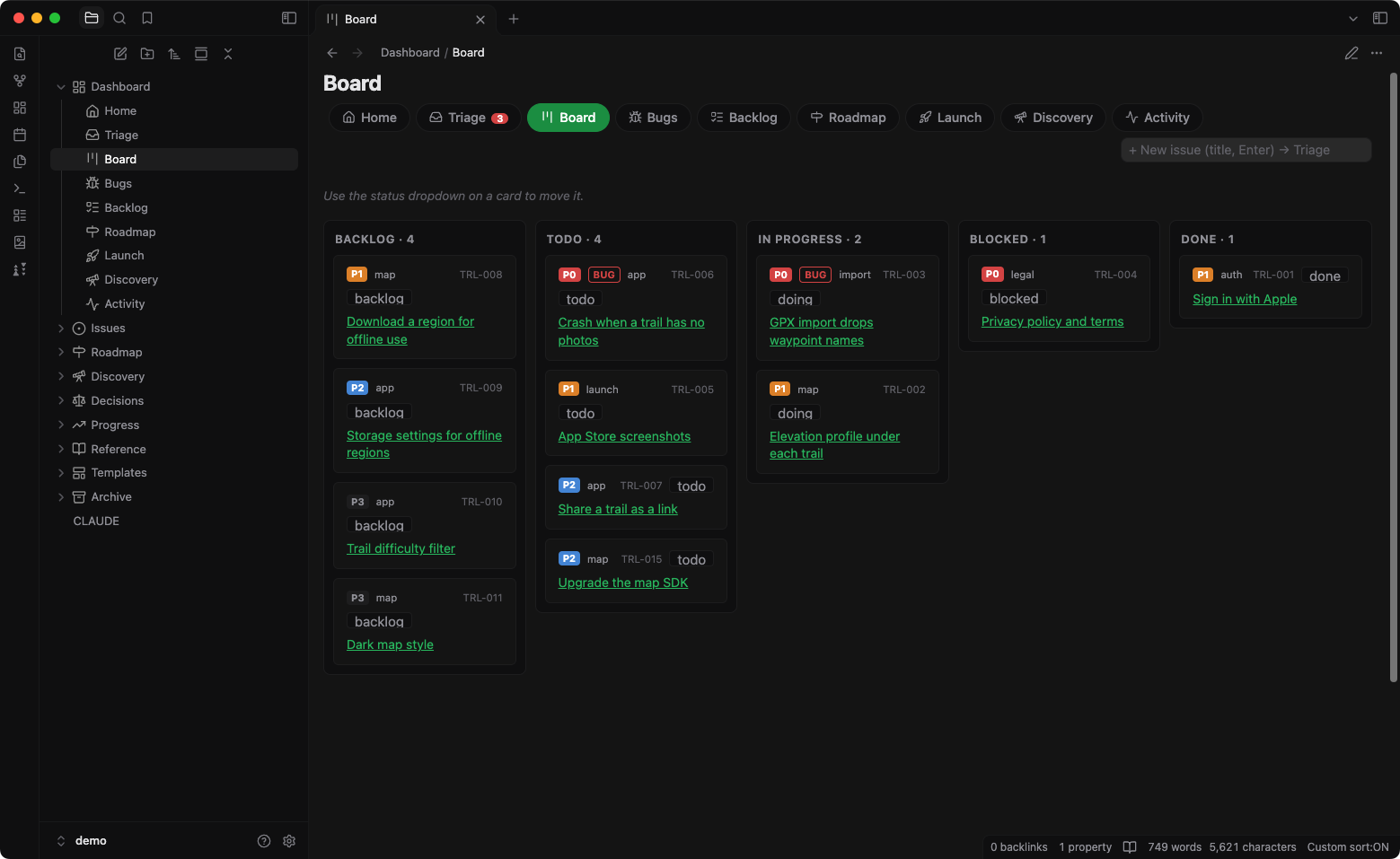
- Board: kanban by status. Move a card with the status dropdown on it.
- Bugs, Backlog (priority editable inline), Roadmap (milestones with progress bars, features by now / next / later), Launch (the active milestone's issues as a board), Discovery (ideas and decisions), Activity (every issue's Activity lines in one feed).
- Roadmap/ milestones (exactly one
active), Discovery/ ideas and research, Decisions/ lightweight ADRs, Progress/ weekly or release notes, Reference/ product brief. - Templates/ for every note type (Obsidian's core Templates plugin).
- Folder and dashboard icons (Iconic), a fixed folder order (Custom File Explorer sorting) and a dashboard stylesheet (CSS snippet), all preconfigured.
CLAUDE.mdin the vault: the schema and working rules for AI agents (how to file, triage, link and log).
Try the demo (2 minutes)
git clone https://github.com/agilek/obsidian-product-vault.git
In Obsidian: Open folder as vault → choose obsidian-product-vault/demo → Trust author and enable plugins → open Dashboard/Home.
The demo is a fictional hiking app, "Trailhead", with 16 issues, two milestones, ideas, a decision and a progress note. The plugins are included, so it works right away.
Install with an AI agent (copy and paste)
Paste this into Claude Code, Codex, Cursor or any coding agent that can run shell commands. Start it in your project's repo if you want the vault connected to that code; it works without a repo too.
Set up "Obsidian Product Vault" (https://github.com/agilek/obsidian-product-vault) for me:
a Linear-style issue tracker inside Obsidian. Guide me step by step and ask before
anything you can't undo.

1. Read the repo's README.md and skills/product-vault/SKILL.md first and follow them.
   Clone the repo to a tools folder (default ~/.local/share/obsidian-product-vault,
   or `git pull` if it is already there). Don't clone it into my project.
2. Check the prerequisites: git, curl, rsync and python3 (macOS or Linux; on Windows
   use WSL or Git Bash, otherwise follow the README's "Option B: by hand"). Tell me
   what is missing and how to install it; don't install system packages without asking.
3. Ask me, all at once, with sensible defaults I can accept:
   - product name (default: the current repo's folder name) and issue prefix
     (2–4 capitals, e.g. ACME),
   - where vaults live (default ~/Obsidian/product, passed as PRODUCT_VAULTS),
   - whether to connect it to the current code repo (symlink ./vault, git-ignored),
   - whether to move open items from TODO.md or similar task files into issues.
4. Run skills/product-vault/setup-vault.sh <slug> <PREFIX> [<repo-path>] ["Display Name"]
   with PRODUCT_VAULTS set. Show me the output; stop and explain if it fails.
5. Fill in the new vault's CLAUDE.md "Areas" (from my project's structure) and
   Reference/Product brief.md (from my README). Keep it short.
6. If I said yes to migrating: turn every open item into an issue note exactly as
   the "Migration brief" in SKILL.md describes, run its verification, show me the
   counts, then replace the old task file with a pointer to the vault (ask first).
7. If you are Claude Code: install the skill so it's there next time
   (`ln -s <clone>/skills/product-vault ~/.claude/skills/product-vault`) and add a
   short pointer to the vault in my project's CLAUDE.md. Other agents: add the same
   pointer to AGENTS.md or your rules file, and tell me the vault's CLAUDE.md holds
   the working rules.
8. Commit the vault (it is its own git repo). Don't create any remote repository
   unless I ask; if I do, make it private.
9. Finish with what I do in Obsidian: "Open folder as vault" → choose the vault
   folder → "Trust author and enable plugins" → open Dashboard/Home in Reading view
   (Cmd/Ctrl+E). Then a 5-line cheat sheet: file an issue, triage it, move it on
   the Board, refer to an issue by its code, where the rules live.
Create your own vault
Option A: with the script (macOS, Linux; needs git, curl, rsync, python3)
cd obsidian-product-vault
skills/product-vault/setup-vault.sh acme ACME            # → ~/Obsidian/product/acme, issues ACME-001…
PRODUCT_VAULTS=~/Notes skills/product-vault/setup-vault.sh acme ACME   # another parent folder
It copies skills/product-vault/template/, fills in the product name and issue prefix, downloads the three plugins at pinned versions and makes the first git commit. Then open the folder in Obsidian as above.
Option B: by hand
- Copy
skills/product-vault/template/to a new folder. - Replace
{{PROJECT}}with your product name and{{PREFIX}}with your issue prefix in all.mdand.jsfiles. These are outside.obsidian/; the{{date:…}}and{{title}}placeholders inTemplates/are Obsidian's and stay. - Create the empty folders
Issues,Roadmap,Discovery,Decisions,Progress,Archive. - Open it in Obsidian, trust the vault, then install Dataview, Iconic and Custom File Explorer sorting from Settings → Community plugins → Browse. Their settings are already in
.obsidian/plugins/*/data.json, so you only need to install and enable them. You can also runskills/product-vault/install-plugins.sh <vault>.
Tip: dashboards are meant to be read in Reading view (Cmd/Ctrl+E). In editing view, Obsidian may show a dashboard's query code instead of the dashboard. The tabs in the dashboard bar always open Reading view. The demo opens every note in Reading view (Settings → Editor → Default view for new tabs).
Requires Obsidian 1.7.2 or later (the Iconic plugin needs it). Dataview JavaScript queries must be on; the template already turns them on.
Use it with Claude Code (optional)
The repo is also a Claude Code plugin with one skill, product-vault. Claude then does the setup, migrates your repo's existing TODO.md into issues and keeps the vault current as it works.
/plugin marketplace add agilek/obsidian-product-vault
/plugin install product-vault@obsidian-product-vault
Or install just the skill: ln -s "$PWD/skills/product-vault" ~/.claude/skills/product-vault.
Then, in your code repo, ask: "Set up a product vault in Obsidian for this project and move TODO.md into it." The skill:
- creates the vault and fills in your project's areas and product brief;
- migrates open items from
TODO.mdor similar into linked issues, milestones, ideas and decisions; - adds a git-ignored
./vaultsymlink to your repo and a pointer in itsCLAUDE.md; - wires a small hook (
vault-changes.py, Python standard library only) into your repo's.claude/settings.local.json. When you move an issue in Obsidian, for example todoing, Claude sees the change on your next message and acts on it.
The rules Claude follows are in the vault's CLAUDE.md:
- Anything it discovers while working is filed in triage unasked.
- It never accepts or schedules triage items itself; that's your call.
- Saying
ACME-012makes it read that issue first. - A passing remark like "we should replace that icon" becomes an issue, an idea or a decision.
- Every note links to related notes both ways.
How it works
The issue note is the data:
---
id: ACME-012
title: "Search ignores accents"
type: bug
status: triage
source: claude
priority: p2
severity: minor
area: app
milestone:
created: 2026-10-29
updated: 2026-10-29
tags: [verify]
---
The dashboards are dataviewjs blocks that query Issues/ and render tables and cards. Buttons and menus write back with Obsidian's processFrontMatter and append a line to the note's ## Activity section. A triage issue embeds Dashboard/triage-actions.js, so you can also decide on it from the note itself.
Customise:
- Areas: list your own in the vault's
CLAUDE.md.areais free text. - Colours and layout:
.obsidian/snippets/dashboard.css. - A new dashboard: add it to the
pagesarray at the top of each dashboard and toDashboard/sortspec.md.
Repository layout
skills/product-vault/
  SKILL.md             Claude Code skill (setup + migration instructions)
  setup-vault.sh       create a vault from the template
  install-plugins.sh   download Dataview, Iconic, Custom File Explorer sorting
  vault-changes.py     Claude Code hook: report issue changes made in Obsidian
  template/            the vault template ({{PROJECT}}, {{PREFIX}})
demo/                  example vault "Trailhead", plugins included
.claude-plugin/        Claude Code plugin + marketplace manifests
Credits
The dashboards depend on these community plugins, each under its own license. The demo/ vault includes their release builds unchanged.
- Dataview by Michael Brenan (MIT)
- Iconic by gfxholo (MIT-0)
- Custom File Explorer sorting by SebastianMC (0BSD)
Not affiliated with Linear or Obsidian. Everything else here: MIT.