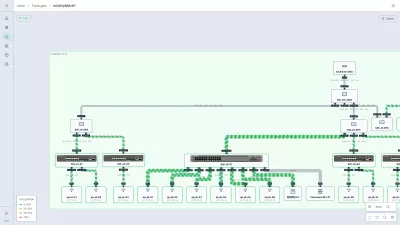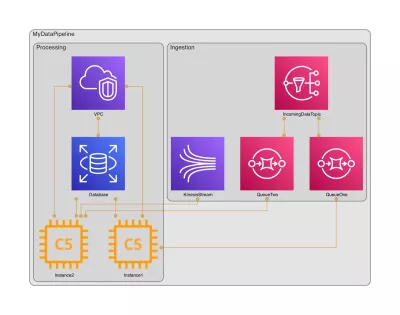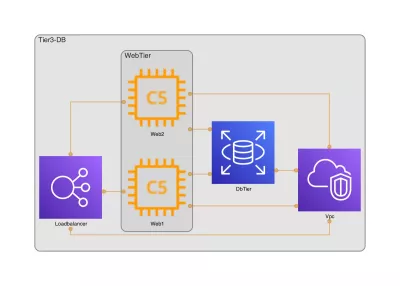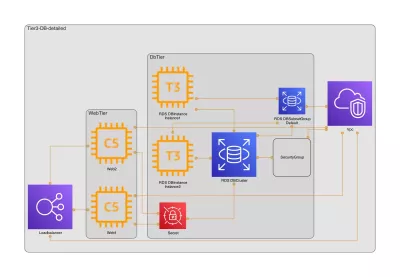

Point ork at an existing project, get an OrkStage environment template, then push, deploy and operate instances from your terminal or CI.


What it is
This repository holds two things that share one engine:
ork, a single binary for Linux, macOS and Windows. It scans a project, writes aplatform/v1template into.ork/, and talks to the OrkStage API to validate and push templates, deploy instances, follow deployments, and read status and logs.- The scan engine (
orkstage-scan), a Rust library that maps Terraform and OpenTofu, CloudFormation, SAM, CDK, Kubernetes, Helm, Docker Compose, Dockerfiles and package manifests to OrkStage resource types, with evidence for every finding. Compiled to WebAssembly, it is the npm package@orkstage/scanthat the OrkStage API uses for imports.
The scan runs on your machine. ork import sends only the resulting report, never your code.
flowchart LR
  files["Your project<br/>Terraform, CloudFormation, Kubernetes, Compose"] --> engine["orkstage-scan"]
  engine --> report["ScanReport<br/>resources, connections, evidence"]
  engine --> template[".ork/template.yaml<br/>platform/v1"]
  template -->|"ork template push"| api["OrkStage API"]
  report -->|"ork import"| api
  api -->|"ork deploy --wait"| cloud["Instances on AWS<br/>(or simulated providers)"]
Preview. Commands and flags can still change.
Quickstart
Install a release (checksums verified, no administrator rights needed):
curl -fsSL https://orkstage.io/install.sh | sh # Linux, macOS
irm https://orkstage.io/install.ps1 | iex # Windows
Or install from crates.io (Rust 1.88 or later):
cargo install orkstage-cli --locked
ork --version
Until the first stable release the install scripts take the newest prerelease, whose binaries are not code signed yet: Windows SmartScreen and macOS Gatekeeper may warn before the first run.
To build from source:
git clone https://github.com/orkstage/orkstage-cli.git
cd orkstage-cli
cargo install --path crates/ork-cli --locked
No Rust toolchain? Every build step also runs in Docker; see docs/building.md.
Scan a project without an OrkStage server:
cd my-project
ork scan                     # what was detected, with evidence
ork scan --format json       # the full ScanReport
Connect to an OrkStage API (for a local one, see the quickstart) with an API key created in the console:
ork login --api-url http://localhost:4000     # prompts for the API key (ork_live_...)
ork init                                      # scans and writes .ork/
# fill [placements] in .ork/config.toml: one cloud target and region per slot
ork up --publish --wait                       # push, publish, create the instance if needed, deploy
ork status && ork logs api
Repository layout
| Path | What it is |
|---|---|
crates/orkstage-scan |
The scan engine (library, no I/O in its core API, compiles to wasm32). |
crates/orkstage-scan-wasm |
Bindings generated with wasm-bindgen, published as @orkstage/scan from dist/scan-wasm/. |
crates/ork-cli |
The ork binary. |
docker/ |
Toolchain image for building and testing in containers. |
docs/ |
Reference documentation. |
Documentation
- Command reference: commands, flags, exit codes, JSON output,
credentials, the
.ork/directory, CI usage - Scan engine: how detection and merging work, the Node.js API, dependency choices
- Building and releasing: Docker builds, tests, cross compiling, code signing
- CLI guide on orkstage.io and importing existing IaC
Related repositories
| Repository | Role |
|---|---|
orkstage |
The control plane: the API this CLI talks to, and the consumer of @orkstage/scan |
orkstage-console |
Web console, where you create API keys and review imports |
orkstage-modules |
OpenTofu modules that provision what your templates describe |
orkstage-site |
orkstage.io and the documentation |
orkstage-dev |
Runs the whole stack locally |
Contributing
Read CONTRIBUTING.md for the checks that CI runs and how snapshot
tests work. New detectors need fixtures under crates/orkstage-scan/tests/fixtures/.
Security
Report vulnerabilities privately through GitHub Security Advisories or to security@orkstage.io. Do not open public issues for them.
License
GNU AGPL-3.0 (AGPL-3.0-only), part of the OrkStage open core.