
See what your AI agent did, not just what it wrote.
AI coding agents write code fast. Seeing what the change actually does in the running app is the slow part. Over the Shoulder lets your agent show you, in your own Chrome, one visible step at a time:
- a Chrome extension that shows where the agent's clicks and typing land (an outline and a ripple; hovers too, best effort), with step numbers, finding labels and optional spoken narration;
- a skill that tells the agent to walk you through its change in the real app, tie each visible
difference back to the code (
file:line), and finish with a QA report.
It does not drive the browser itself. It sits on top of whatever your agent already uses.
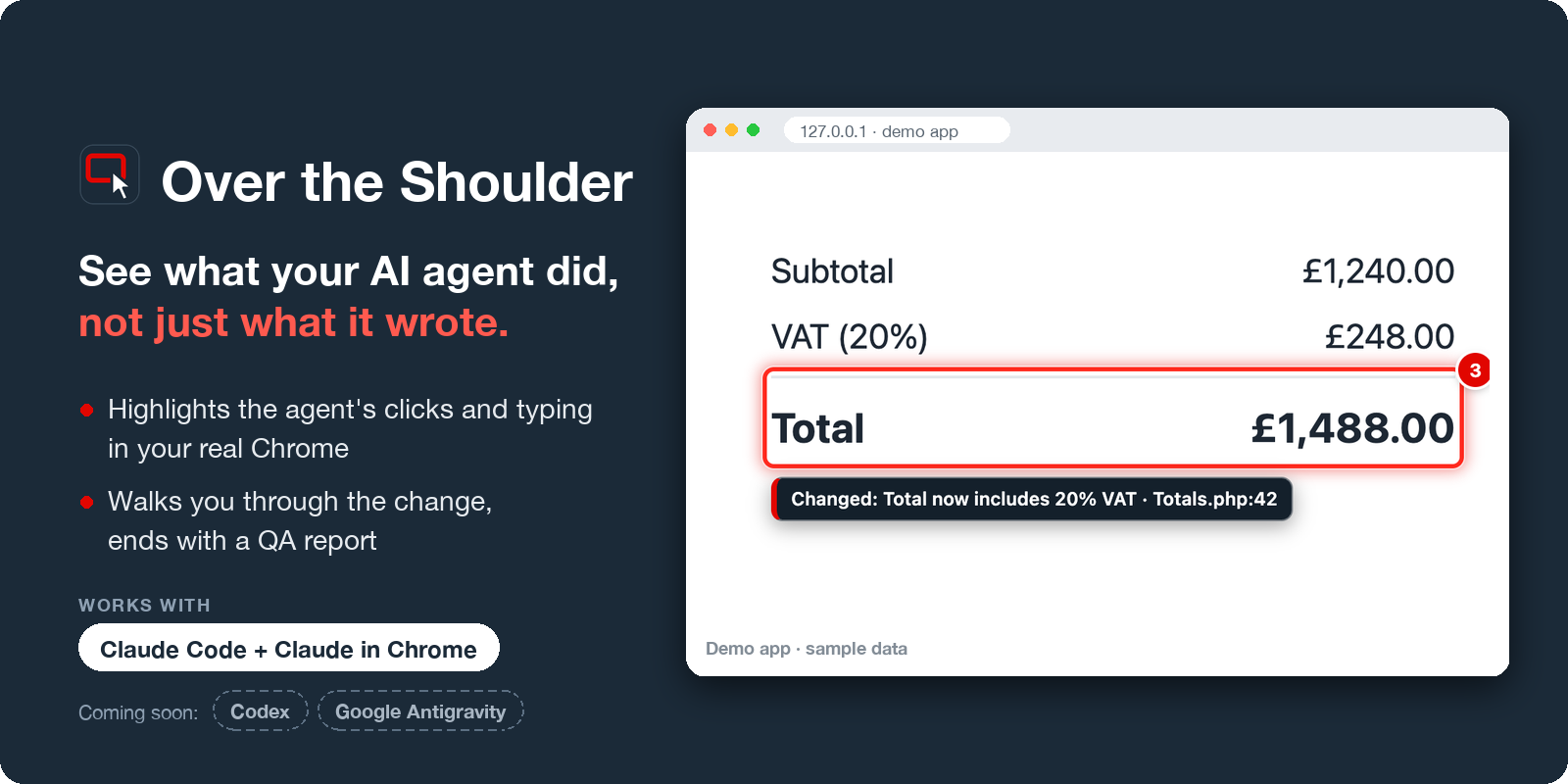
Screenshot from a demo invoice app, with sample data: the extension outlines the changed total, numbers the step and labels what changed and where in the code.
Status: 0.1.1, works with Claude Code + Claude in Chrome. Codex and Google Antigravity are coming soon.
Install
1. The extension
- Download
over-the-shoulder-<version>.zipfrom the latest release and unzip it (or clone this repository and use itsextensionfolder). - Open
chrome://extensions, turn on Developer mode, click Load unpacked and choose the unzipped folder. - Pin Over the Shoulder to the toolbar.
It runs on localhost, 127.0.0.1 and *.test out of the box. For any other site, open that site, click
the toolbar icon and press Enable on this site.
2. The skill (Claude Code)
/plugin marketplace add ahmadrazainbox/over-the-shoulder
/plugin install over-the-shoulder@over-the-shoulder
Then, after a change: "Show me the change in the browser."
What you see
| Agent action | On the page |
|---|---|
| Hover | The page dims for a moment and the target glows; a soft outline stays |
| Click | A ripple and an outline |
| Typing | An outline on the field |
| Step event | A numbered badge on the target (or a toast in the corner) |
| Finding | A label beside the target |
Your own mouse and typing are left alone: an agent's hover is a single jump, while a hand sends a stream of small moves, and typing is shown only after the agent's own hover or click. Turn on Also show my own clicks in the popup if you want yours too. Telling the two apart is a best guess, not a guarantee: a short agent hop can go unlit, and an unusual hand movement can occasionally light something.
Voice
Off by default. In the popup: Speak each step, pick a voice and speed, and whether a new step interrupts the last one. Alt+Shift+S (while Chrome is focused), or switching voice off, stops speaking and keeps it quiet for ten seconds. Only the tab in front can speak. Offline system voices keep everything on your computer; voices marked online send the spoken text to Google.
For agents: the step event
window.dispatchEvent(new CustomEvent('over-the-shoulder', {
  detail: JSON.stringify({ step: 4, label: 'Total shows 0.00', say: 'Now I save. Watch the total.' })
}))
detail must be a JSON string. All fields are optional: step (badge), label (finding, up to 200
characters), say (spoken if voice is on, up to 300 characters).
Any script on a page where the overlay runs can send this event, not only your agent, and could also draw look-alike marks of its own. So treat the overlay as a guide to follow the agent, not as proof of what it did; the agent's chat and its final report are the record. Enable the extension only on sites you trust.
Privacy
Draws only. It never reads field values or keys, stores nothing but your settings, and sends nothing anywhere. See PRIVACY.md.
Develop
npm install
npx playwright install chromium
npm test
The tests load the extension into Playwright's Chromium and check the overlay (hovers, clicks, typing, shadow DOM, iframes, single-page navigation, the step event, voice), the popup (site detection, enabling a site, voice settings) and site registration (enabled sites get the overlay, removed ones lose it).
Releases
Versions follow semantic versioning: 0.1 Claude, 0.2 adds Codex, 0.3 adds Google
Antigravity, 1.0 is the first Chrome Web Store release. Each release is a v<version> tag with the
extension zip attached; see CHANGELOG.md.
Author
Built by Ahmad Raza: armunir.com
Licence
MIT